Odoo
Integre o Odoo com Modelos de Linguagem de Grande Escala (LLMs) para automação aprimorada de processos de negócios.
Documentação
mcp-server-odoo
Um servidor extensível do Model Context Protocol que fornece integração entre Odoo e LLMs.
Atenção: o projeto está em estágio muito inicial de desenvolvimento. Espere imperfeições. Agradecemos qualquer feedback!
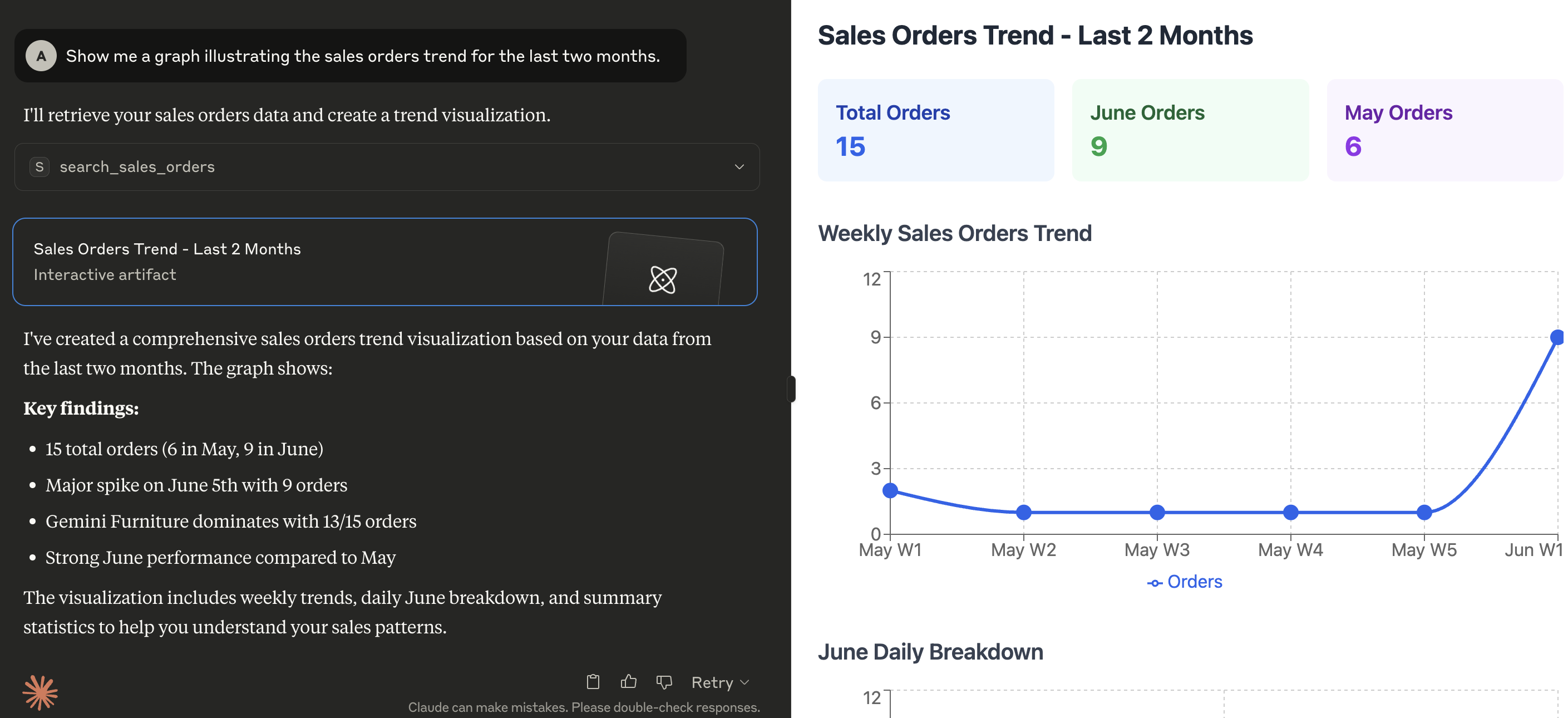
Servidor MCP em ação
Aqui está uma demonstração de que tipo de capacidades o MCP habilita no Claude for Desktop:
Pré-requisitos
Configuração
O servidor procura pelas seguintes variáveis no ambiente de execução:
| Variável | Obrigatório | Descrição | Exemplo |
|---|---|---|---|
ODOO_BASE_URL | Sim | A URL da instância Odoo | http://localhost:8069 |
ODOO_DATABASE | Sim | O nome do banco de dados para conectar | mydatabase |
ODOO_USERNAME | Sim | Nome de usuário para autenticação | admin |
ODOO_PASSWORD | Sim | Senha ou chave de API para autenticação | admin |
ODOO_VERSION | Sim | Versão principal do seu servidor Odoo | 18 |
LOG_LEVEL | Não | Nível de log desejado (veja níveis de log do Python), o padrão é INFO | INFO |
TRANSPORT_PROTOCOL | Sim | O protocolo de transporte MCP a usar. Valores válidos são stdio para comunicação apenas local ou sse / streamable-http para comunicação remota | stdio |
HOST | Não | O(s) endereço(s) IP no(s) qual(is) o servidor deve escutar conexões de clientes | 127.0.0.1 |
TOOLS_TO_REGISTER | Sim | Lista separada por vírgulas de ferramentas para expor ao cliente MCP. As ferramentas podem ser escolhidas entre as incluídas neste projeto (veja o diretório src/mcp_server_odoo/tools) ou personalizadas fornecidas por arquivos externos (veja EXT_DIRECTORIES) | search_partners,search_quotations,search_sales_orders,search_customer_invoices |
EXT_DIRECTORIES | Não | Lista separada por vírgulas de caminhos para procurar ferramentas adicionais que podem ser carregadas em tempo de execução | /your/custom/path |
Instalação
Instale a ferramenta com uv tool:
uv tool install --from git+https://github.com/alberto-re/mcp-server-odoo mcp-server-odoo
Execute o servidor
Execute-o diretamente com uvx:
uvx mcp-server-odoo
Execute dentro do Docker
Um Dockerfile está incluído se você deseja executar o servidor MCP dentro de um contêiner Docker.
Para construir o contêiner, execute este comando a partir do diretório raiz do repositório:
docker build -t mcp-server-odoo .
Agora você pode executar o contêiner a partir da imagem construída com:
docker run --rm --env-file /path/to/env/file -p 8000:8000 mcp-server-odoo
Ao executar dentro de um contêiner, lembre-se de usar um protocolo de transporte baseado em HTTP (ou seja, defina TRANSPORT_PROTOCOL para sse ou streamable-http) e faça o servidor escutar em todas as interfaces (ou seja, defina HOST para 0.0.0.0).
Integrações
Conectando ao Claude Desktop
- Edite o arquivo de configuração do Claude for Desktop.
- No MacOS, a configuração está localizada em
~/Library/Application Support/Claude/claude_desktop_config.json. - No Windows, a configuração está localizada em
%APPDATA%\Claude\claude_desktop_config.json
- Adicione a configuração do servidor na seção mcpServers.
{
  "mcpServers": {
    "mcp-server-odoo": {
      "command": "uvx",
      "args": [
        "mcp-server-odoo"
      ],
      "env": {
        "ODOO_BASE_URL": "http://localhost:8069",
        "ODOO_DATABASE": "mydatabase",
        "ODOO_USERNAME": "admin",
        "ODOO_PASSWORD": "admin",
        "ODOO_VERSION": "18",
        "TRANSPORT_PROTOCOL": "stdio",
        "TOOLS_TO_REGISTER": "search_partners,search_quotations,search_sales_orders,search_customer_invoices"
      }
    }
  }
}
- Reinicie o Claude for Desktop.
Conectando ao mcphost
-
Edite o arquivo de configuração do mcphost. Veja a documentação para saber onde ele procura arquivos de configuração.
-
Adicione a configuração do servidor na seção mcpServers.
{
  "mcpServers": {
    "mcp-server-odoo": {
      "command": "uvx",
      "args": [
        "mcp-server-odoo"
      ],
      "env": {
        "ODOO_BASE_URL": "http://localhost:8069",
        "ODOO_DATABASE": "mydatabase",
        "ODOO_USERNAME": "admin",
        "ODOO_PASSWORD": "admin",
        "ODOO_VERSION": "18",
        "TRANSPORT_PROTOCOL": "stdio",
        "TOOLS_TO_REGISTER": "search_partners,search_quotations,search_sales_orders,search_customer_invoices"
      }
    }
  }
}
- Execute o comando
mcphost.