agentic-store-mcp
Potencialize seus agentes de IA com 31 ferramentas prontas para produção. Oferece análise Python local-first, busca em tempo real com SearXNG e um proxy local seguro para sanitizar prompts. Construído para desenvolvedores que valorizam desempenho e privacidade. Instale uma vez, use em qualquer lugar.
Documentação
⚡ AgenticStore MCP Server: LLM Prompt Firewall, Token Optimization & AI Security Toolkit
Open-source Model Context Protocol (MCP) server for data privacy, prompt recording, audit logs, Relay project delivery, and 74 tools for Claude Code, Codex, Cursor, and Windsurf.




Documentation • Quick start • Prompt Firewall • Relay • Tool directory • Client setup • GUI webapp
🔒 Why You Need This: Enterprise-Grade AI Security Meets Autonomous Agents
Giving AI assistants like Claude, Cursor, and Windsurf access to your codebase and the web is a superpower. But passing sensitive enterprise data to remote LLMs is a massive security risk. Furthermore, hitting token limits quickly degrades LLM context windows and increases costs.
The Problem: You want the massive productivity boost of agentic workflows, but you cannot compromise on Data Loss Prevention (DLP), compliance, leak prevention, or token bloat.
The Solution: AgenticStore MCP Server solves the entire equation natively:
- 🛡️ The LLM Prompt Firewall: A secure local proxy that intercepts, scans, and sanitizes your prompts before they leave your machine. It flags leaked secrets, PII, and API keys, using local models (like Ollama) to sanitize data and generate strict audit traces for all AI usage.
- 🧰 The MCP Toolkit (74 Tools): A production-ready arsenal. Instantly arm your AI with code analyzers and CVE vulnerability scanners, project health checks, safe local data inspection, context pruners, token optimizers, persistent semantic memory, and self-hosted SearXNG web search.
- ✦ Relay: A local project delivery system for humans and AI agents. Plan a project, create Epics and tickets, route work through Codex or Claude, and keep decisions, Git evidence, validation, and handoffs on the board.
Zero subscriptions. Zero vendor lock-in. Configure your MCP tools manually or effortlessly through a beautiful local GUI.
🎥 Prompt Firewall Demo
Your browser does not support the video tag. Take a look at the Prompt Firewall Demo video here.(If the video above doesn't load, click here to watch the demo)
🎥 Watch the GUI Demo in Action (MCP Tools)
Your browser does not support the video tag. Take a look at the AgenticStore MCP GUI Demo video here.
(If the video above doesn't load, click here to watch the demo)
🏗️ How It Works
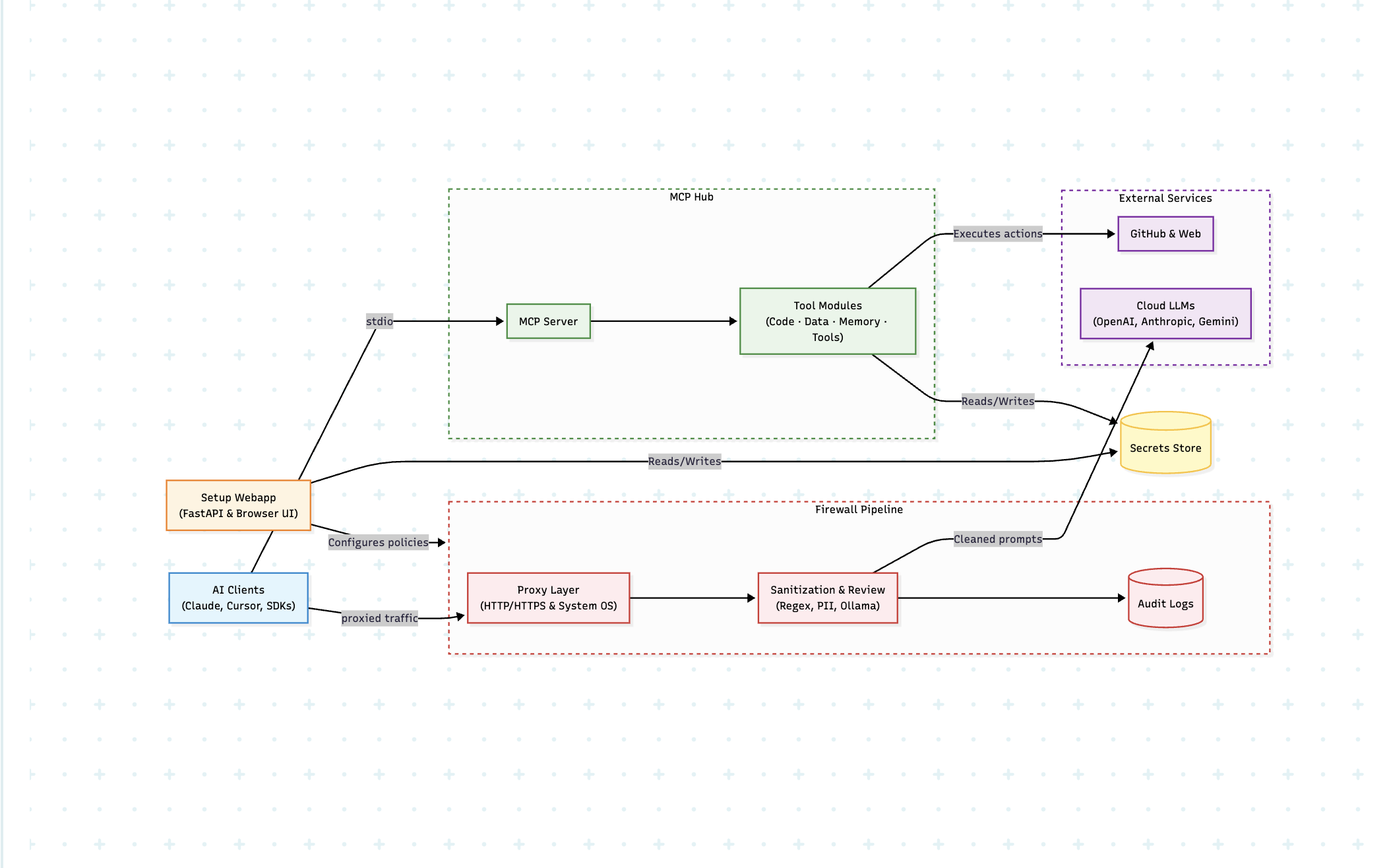
🔥 Why Choose AgenticStore MCP?
| Feature | AgenticStore MCP Server | Standard MCP Servers |
|---|---|---|
| AI Security & Prompt Firewall | 🛡️ Yes (Proxy & Rule-based DLP) | ❌ No |
| Audit Traces & Logs | 📝 Yes (Prompt recording & compliance) | ❌ No |
| Local LLM Prompt Sanitization | 🦙 Yes (Ollama integration) | ❌ No |
| Persistent Agent Memory | 🧠 Yes (survives restarts & sessions) | ❌ No |
| Token Optimization & Pruning | ✂️ Yes (LLM token compression) | ❌ No |
| Agentic Web Search | 🌐 Self-hosted SearXNG | ❌ Usually No |
| Capabilities | 🛠️ 74 specialized tools | ⛏️ 1 to 5 basic tools |
| Configuration | 🖥️ Web GUI Dashboard OR ⚙️ Manual | ⚙️ Manual JSON setup |
| Privacy | 🔒 100% Local Execution | 🔒 Varies |
- 🛡️ LLM Prompt Firewall: Intercept, sanitize, and perform prompt recording for all data leaving your system, ensuring robust AI security.
- 🔒 100% Privacy-First: Everything runs locally. Generate reliable audit traces for AI usage while your code and data never leave your machine unaudited.
- ✂️ LLM Token Optimization: Radically reduce your token burn with code structural compression (
token_optimizer) and relevance-based context trimming (context_pruner). - 💸 Truly Free: No accounts, no paywalls, no subscriptions.
- 🧠 Persistent Agent Memory: Let your AI remember facts and contexts across sessions seamlessly.
- ⚡ Plug & Play: Installs instantly via
uvxorpip. MCP configuration supports both manual JSON and GUI workflows.
📋 Table of Contents
- 🛡️ LLM Prompt Firewall & Sanitization
- 🧰 What's Inside the Toolkit
- 🚀 Quick Start Guide (Fastest Way to Install)
- ✦ Relay: JIRA for AI Agents
- 🔌 Connect to Your AI Client
- 🗂 Tool Directory — All 74 Tools
- 💻 Claude Code CLI Integration
- 🔎 Enabling Web Search
- 🎛 Overriding Configs & Advanced Usage
🛡️ LLM Prompt Firewall & Sanitization
The Prompt Firewall gives you complete control over what natural language data and code leaves your computer when using cloud-based AI coding assistants, delivering enterprise-grade AI security.
[!NOTE] The Firewall feature is currently tested and stable on macOS. Support for Linux and Windows is coming soon!
Key Features:
- Proxy Interception: Set up a local proxy to monitor all LLM traffic.
- Audit Traces for AI Usage: Automatically generate prompt recording logs. Get clear warnings at each prompt level showing exactly what was changed or redacted.
- 1-Click UI Setup: Install certificate -> start proxy. The magic starts immediately. (Note: Firewall setup is only made available on the UI to ensure smooth installation and operation).
- Local LLM Integration (Optional): Connect your local Ollama instance. Download open-source models to run completely local, pre-flight prompt sanitization, scanning your code to make it better and safer before sending it to a remote API.
- Rule-Based Sanitization: Easily define regex or grammar rules to block PII, AWS keys, database strings, or proprietary logic.
To enable the firewall and begin collecting audit traces for AI usage, start the GUI Webapp and navigate to the Firewall tab to install the certificate and start the proxy. For deeper technical architecture, read the officially provided AgenticStore Prompt Firewall Documentation or visit the main site at agenticstore.dev.
GPT / OpenAI clients and custom redaction
MCP Hub → Clients now includes GPT / OpenAI Codex, with automatic TOML configuration and selected-tool support. The Codex CLI must be installed to apply the configuration. The Firewall dashboard also supports OpenAI SDK applications alongside Claude Code. Connect GPT / OpenAI SDK to route Chat Completions and Responses requests through http://127.0.0.1:8766/openai/v1. Settings now include Redaction Replacement for your own literal placeholder; blank restores the typed defaults. Prompt recordings store the sanitized prompt that is forwarded upstream by default. In the Firewall → Recordings tab, you can explicitly choose to retain the original pre-sanitization prompt locally when an investigation requires it. See the OpenAI setup and coverage guide.
🧰 What's Inside the Toolkit (74 MCP Tools)
Equip your AI client with these modules containing 74 specific MCP tools, categorized strategically for maximum productivity:
- 🛡️ Local Only: 62 tools with
openWorldHint: false; they stay within local or configured closed environments. - ☁️ Open World: 12 tools that can reach public web or remote-provider systems.
- 📝 Stateful: 21 tools that can write local state, execute a bounded action, or change an external system; explicit confirmation is required where applicable.
- 👓 Read Only: 53 tools marked retry-safe through MCP annotations.
| Module | Purpose | Key Capabilities | Tools |
|---|---|---|---|
| 💻 Code (Codebase, GitHub, Security) | Codebase mastery & safety | Static analysis, symbol references, GitHub PRs, OSV CVE scans, CodeQL scanning | 18 |
| 🌐 Data (Search, Files & Databases) | Internet and local data access | Web search, file extraction, local file discovery, comparison, relevance search, local vector indexing, quality checks, and safe structured-data queries | 24 |
| 🧠 Memory (Productivity & Storage) | Context manipulation & persistence | Save/read facts, optimize LLM tokens, context pruning | 14 |
| 🛠️ Tools & System Config | Project, database, and OS inspection | Project health, SQLite schema inspection, process and log checks | 18 |
🚀 Quick Start Guide (Fastest Way to Install)
Pick the setup that best fits your workflow. MCP supports both manual configuration and GUI-based management setup. Don't know which to pick? Start with V0.
V0 — Python / uvx (Fastest start, no Docker needed)
1️⃣ Install via PyPI
pip install agentic-store-mcp --upgrade
(Or use uvx agentic-store-mcp if you have Astral's toolchain).
2️⃣ Run the MCP server
agentic-store-mcp
3️⃣ (Optional) Check your installation
agentic-store-mcp --version
4️⃣ Configure your AI Client
See the Connect to Your AI Client section to link it manually, or use the UI!
💡 Pro-Tip (Web Search): Want web search? Check out our Copy-Paste Config below. See Web Search Setup.
V1 — From GitHub Source (Latest Features)
1️⃣ Install directly from the repository
pip install git+https://github.com/agenticstore/agentic-store-mcp.git
(Or using uv: uvx --from git+https://github.com/agenticstore/agentic-store-mcp.git agentic-store-mcp)
2️⃣ Run the MCP server
agentic-store-mcp
3️⃣ Configure your AI Client
See the Connect to Your AI Client section to link it!
V2 — MCP Hub UI (Manage everything visually)
Forget manual JSON editing! Use our local web UI to:
- 🛡️ Firewall: Setup certificates and monitor all intercepted LLM prompts and audit logs for comprehensive prompt recording.
- 🔑 Connectors: Enter remote API keys securely (stored in OS keyring).
- 🛠️ Tools: Toggle which of the 74 tools to expose to the AI.
- 💻 Clients: Auto-generate configuration for Claude, Codex, Cursor, and Windsurf.
- 🧠 Memory: Manage persistent agent states, checkpoints, token optimization, and logs.
- ✦ Relay: Plan and triage work with an AI agent, create Epics and tickets, manage workspaces, and retain handoff, validation, and Git evidence.
Start the Hub via Python:
# Ensure it is installed via pip
pip install agentic-store-mcp --upgrade

# Launch the web UI  automatically bundled with the core package
agentic-store-webapp
Access it at: http://localhost:8765
✦ Relay: JIRA for AI Agents
Relay is AgenticStore's local delivery system for projects shared by people and AI agents. It lives in the webapp and stores its board on your machine, so project context stays available across agent sessions.
Use Relay to create multiple boards, group work into Epics, assign each ticket to an isolated workspace, and run Codex or Claude handoffs in parallel. Each ticket can retain progress comments, validation results, Git evidence, decision context, blockers, and the session that worked on it.
Triage with the AI Task Planner
Open Relay → AI task planner and describe the outcome, success criteria, constraints, product surfaces, and quality requirements. Relay opens a local Codex or Claude planning session with a reusable planning harness. The planner inspects the selected board, asks follow-up questions, proposes an Epic with bounded child tickets, and waits for your explicit approval before it creates work in bulk.
The harness makes automated tests and documentation part of the plan whenever code or user-facing behavior changes. It also prompts for security, accessibility, migration, rollout, and rollback work when relevant. Planning sessions are recorded in Relay so the rationale remains with the project.
A practical workflow
- Create a board for a product, release, or client initiative.
- Use AI task planner to turn a goal into an approved Epic and testable tickets.
- Assign tickets to local checkouts or fresh remote clones, then hand them to Codex or Claude.
- Review work through recorded comments, validations, and Git evidence; drag tickets through delivery states as work progresses.
Relay does not send project data to a hosted planning service. It launches the local agent client you select, which uses its own configured model and privacy settings.
🔌 Connect to Your AI Client
Because AgenticStore MCP supports both manual configuration and management via the GUI, you can manually add the configuration snippet to your respective client's config file if you prefer. Remember to restart the client after saving! For an in-depth guide on linking AI agents properly, visit the Client Connection Documentation on agenticstore.dev.
| Client | Config File Path |
|---|---|
| Claude Desktop (Mac) | ~/Library/Application Support/Claude/claude_desktop_config.json |
| Claude Desktop (Win) | %APPDATA%\Claude\claude_desktop_config.json |
| Cursor | ~/.cursor/mcp.json |
| Windsurf | ~/.codeium/windsurf/mcp_config.json |
| VS Code | Appends to your VS Code settings.json under MCP extension config |
Standard Copy-Paste Config
Basic Setup:
{
  "mcpServers": {
    "agentic-store-mcp": {
      "command": "agentic-store-mcp",
      "args": []
    }
  }
}
With Web Search (SearXNG) enabled:
{
  "mcpServers": {
    "agentic-store-mcp": {
      "command": "agentic-store-mcp",
      "args": [],
      "env": {
        "SEARXNG_URL": "http://localhost:8080"
      }
    }
  }
}
🗂 Tool Directory — All 74 Tools
📝 Code Module (18 tools)
Codebase Analysis
Analyze, search, and navigate your codebase flawlessly.
| Tool | Capability |
|---|---|
analyze_commits | Analyze git commit history context (authors, frequency, patterns). |
get_file | Fetch and read file syntax content straight from GitHub repositories. |
python_lint_checker | Runs static analysis on Python files (finds bugs, unused imports, structural style). |
search_code | Blazing-fast full-text code pattern search across local files and GitHub. |
code_symbols | Find local Python, JavaScript, and TypeScript symbols with source locations. |
code_references | Find local Python and TypeScript/JavaScript imports, definitions, and uses for a symbol. |
git_change_summary | Summarize staged and unstaged changes, changed symbols, generated files, and bounded diffs. |
test_runner | Run allowlisted local test, lint, build, or type-check commands after explicit confirmation. |
dependency_change_impact | Estimate local import impact for dependency manifest changes. |
release_readiness_check | Check local Git and release metadata before publishing. |
dependency_upgrade_plan | Build a read-only package upgrade plan from manifests and import references. |
Remote Integration
(Requires a GitHub Personal Access Token. Set via GITHUB_TOKEN or MCP Hub).
| Tool | Capability |
|---|---|
create_pr | Automatically open new internal Pull Requests on GitHub. |
get_repo_info | Fetch GitHub repo metadata (stars, forks, contributors). |
manage_issue | Create, update, comment on, and close GitHub issues. |
Security & Auditing
Agent-driven DevSecOps & Supply Chain Verification.
| Tool | Capability |
|---|---|
code_scanning_alerts | Retrieve CodeQL and Semgrep security findings from GitHub. |
dependabot_alerts | Fetch automated dependency vulnerability alerts via Dependabot integration. |
dependency_audit | Scan packages (requirements.txt, package.json, go.mod) dynamically against the OSV CVE database. |
repo_scanner | Scan for leaked secrets (API keys), PII leaks, and enforce .gitignore compliance. |
🌐 Data Module (24 tools)
| Tool | Capability |
|---|---|
agentic_web_crawl | Extract clean markdown text, headings, and SEO metadata signals from any URL. |
agentic_web_search | Conduct live semantic web searches safely via self-hosted SearXNG. |
file_inspect | Inspect a local file's metadata, text/binary state, encoding estimate, hash, size, line count, and bounded preview. |
file_read | Read a bounded line range from a local text file. |
file_scan | Inventory a local directory with file paths, extensions, and sizes. |
file_sample | Select a reproducible random sample of local file paths. |
file_search | Search local text files within a bounded directory while respecting common ignored directories and result limits. |
file_diff | Compare two local text files with a bounded unified diff. |
archive_inspect | List ZIP and TAR archive contents without extracting them. |
semantic_search | Rank local text files by query relevance using local TF-IDF token scoring; no embeddings or network calls. |
vector_index_search | Build and search an explicit local vector index through a localhost-only embedding endpoint. |
data_profile | Profile CSV, JSON, and JSONL data: schema, null counts, duplicates, samples, and detected email values. |
database_query | Run parameterized, read-only SQLite SELECT or EXPLAIN SELECT queries with strict row and time limits. |
data_transform | Perform explicit CSV/JSONL file-to-file transformations only after confirmation, without overwriting the source. |
schema_compare | Compare CSV, JSON, JSONL, or SQLite schemas to find missing, changed, or incompatible fields. |
data_quality_check | Check duplicate keys, null thresholds, type drift, invalid emails, and referential gaps in local data. |
file_extract | Extract bounded text and metadata locally from PDF, DOCX, XLSX, PPTX, HTML, and Markdown. |
structured_data_query | Filter, sort, group, and aggregate CSV, JSON, and JSONL without importing it into a database. |
data_contract_check | Validate local data against reusable JSON contracts. |
api_contract_inspect | Inspect local OpenAPI, GraphQL, and JSON Schema contracts. |
browser_evidence_capture | Capture bounded, reproducible public-web research evidence. |
data_lineage_map | Find local references to a data file across a workspace. |
citation_verify | Re-check public sources and required terms for research evidence. |
document_compare | Compare bounded text extracted from local documents. |
🧠 Memory Module (14 tools)
Persistent memory and token reduction guarantees LLM agents can hand off work across massive repos over massive chat sessions safely.
Productivity & Token Optimization
| Tool | Capability |
|---|---|
token_optimizer | NEW: Radically compress code/text before sending to the LLM. Supports three modes (compress, summarize, both) across languages (Python, JS/TS, Go, Rust, Java, C/C++, Shell) by stripping non-functional strings and surfacing structural outlines. Auto-returns saved token metrics. |
context_pruner | NEW: Recommends exactly which files/data to drop to reduce massive token windows by scoring each item by keyword overlap against your active task description. Never wastes network context overhead. |
restore_session | Load your entire historical workspace context back from a checkpoint. |
spinup_memory | Initialize a new project memory directory gracefully. |
update_change_log | Append structured semantic release notes into CHANGELOG.md. |
update_learnings | Log technical discoveries into a perpetual, searchable markdown repository. |
update_milestones | Track exact milestone progression seamlessly as development scales. |
update_plan | Edit, append, or overhaul your central architectural plan.md. |
Storage Primitives
| Tool | Capability |
|---|---|
memory_checkpoint | Save a total snapshot of conversational states, decisions, and immediate plans. |
memory_log | Append real-time timestamps logs of session activity. |
memory_read | Fetch structured facts efficiently. |
memory_restore | Read and restore state configurations from stored checkpoints. |
memory_search | Full-text contextual search indexing memory databases perfectly. |
memory_write | Commit persistent JSON facts directly outliving standard LLM chat windows. |
🛠️ Tools Module (18 tools)
| Tool | Capability |
|---|---|
configure | Dynamically override runtime configurations and API connectors entirely. |
project_health_check | Inspect a local project's Git state, manifests, runtimes, declared commands, and common setup gaps without running scripts. |
database_inspect | Read a local SQLite schema: tables, columns, indexes, foreign keys, file size, and optional row counts. Never executes supplied SQL or writes data. |
list_processes | NEW: Instantly query whether specific software systems are successfully running executing pgrep & lsof bounds across 11 integrated well-known endpoints (e.g Docker, Redis, Postgres, MongoDB, Node, Celery). Return PIDs correctly natively. |
tail_system_logs | NEW: Smart and efficient log file trailing algorithm (seek-from-end). Never crash context windows on gigabyte log files; reads the minimal context necessary by filtering directly by criteria like 'error' and 'exception' bounding memory footprints cleanly to 1000 lines. |
tool_search | Find the best MCP tool for a task with ranked natural-language matching, capability/connector filters, and optional input summaries. |
workspace_snapshot | Create or compare a bounded local workspace manifest with Git state and file hashes. |
task_checkpoint | Persist or restore a structured local agent task checkpoint. |
plan_validator | Check a plan for structured steps, success criteria, and approval markers. |
approval_gate | Create and resolve explicit local approvals for sensitive actions. |
environment_diff | Compare environment files without exposing secret values. |
tool_orchestrator | Recommend a focused, risk-aware tool profile for an agent goal. |
tool_profile_manage | Save and apply named MCP tool profiles after a client restart. |
tool_profile_audit | Explain profile capabilities, risk annotations, and connector needs. |
decision_log | Track key development decisions, rationale, alternatives, and risks. |
task_board (Relay) | JIRA for AI Agents: local boards, Epics, tickets, dependencies, workspaces, agent handoffs, Git evidence, validations, decisions, and planning-session records. |
risk_register | Track release and architectural risks with mitigation and status. |
handoff_bundle | Assemble a portable development handoff from lifecycle artifacts. |
💻 Claude Code CLI Integration
AgenticStore MCP is fully compatible with Claude Code explicitly for terminal workflows, allowing developers full access to the 74 command capacities directly interacting via the command line.
Safe CLI Execution Modes
Automatically install the application directly into your ~/.claude/settings.json seamlessly resolving connection bindings. The CLI handles both traditional operation and state-of-the-art intercepting proxy verification cleanly via a dynamic CLI command structure.
Default Mode: (For direct API calling — connects to normal Anthropic models purely without firewall tracking):
agentic-store-mcp --install-claude
- Explicitly registers to the user's
~/.claude/settings.jsonlocally. - Actively forces
launchctl unsetenvcleanup dropping any staleANTHROPIC_BASE_URLrouting bindings to assure 100% stable connection directly to Anthropic standard APIs. - Removes proxy-forcing traces dynamically from your target system environment
~/.zshrc/~/.bash_profile— new terminals always start completely clean.
Firewall Mode: (Pre-validates proxy stability mapping traffic efficiently directly into Prompt Recoding security boundaries protecting enterprise secrets):
agentic-store-mcp --install-claude --firewall-mode
- First natively verifies the AgenticStore firewall proxy is correctly listening across Port 8766 before touching configuration trees preventing deployment breakages completely.
- Formally injects
launchctl setenvrouting instructions properly writing nc-guarded shell profile blocks into Node.js TLSANTHROPIC_BASE_URLinterception directly into Claude.
(Note: --firewall-mode explicitly refuses to run unaccompanied. It requires --install-claude actively passed alongside it).
Manual Configuration
Run claude mcp add agentic-store-mcp "agentic-store-mcp".
🔎 Enabling Web Search
To give your agent internet access, agentic_web_search uses a private SearXNG instance.
If you'd like to use a remote API or host your own container, simply append its URL.
Pass the environment variable to your AI Client:
{
  "mcpServers": {
    "agentic-store-mcp": {
      "command": "agentic-store-mcp",
      "args": [],
      "env": {
        "SEARXNG_URL": "http://localhost:8080"
      }
    }
  }
}
🎛 Overriding Configs & Advanced Usage
Overriding configs is related to your MCP setup. MCP supports both manual and GUI setup, so you can filter exactly what tools get loaded via environment variables if integrating deeply without the web GUI.
# Debug: List what would be loaded and exit
agentic-store-mcp --list
Note: The LLM Prompt Firewall is exclusively configured via the UI. The firewall is only made available on the UI to ensure smooth setup, robust proxy interception, and seamless prompt recording out of the box.
Focused tool profiles
AgenticStore can run a focused subset of tools for a specific job. Use tool_orchestrator to recommend a profile, save it through tool_profile_manage, audit its safety boundaries with tool_profile_audit, then restart the MCP client with that profile:
agentic-store-mcp --profile private-code-review
Profiles always retain the three profile-control tools. A profile changes the tool list supplied at client connection time, so restarting the client is required after a profile is created or changed.
🛠️ Troubleshooting
Internet Disruption After Proxy Use When dealing with the LLM Prompt Firewall proxy, if the server is terminated abruptly, there could be an internet disruption on your machine due to residual system proxy settings.
If you lose internet connection after a crash, run this command in your terminal to restore your proxy to default:
networksetup -setsecurewebproxystate "Wi-Fi" off
🤝 Contributing & Community
Contributions are what make the open-source community such an amazing place to learn, inspire, and create. Any contributions you make are greatly appreciated.
If you'd like to contribute code or improvements, please fork the repository and create a Pull Request.
⭐ If this toolkit saved you 10 hours of configuration, please give us a star to help others find it!
📜 License & Support
This project is licensed under the MIT License — free to use, modify, and distribute. See LICENSE for details.
⭐ Manage Everything Easier via the Webapp: agentic-store-webapp
Built with ❤️ by AgenticStore.dev — Open-source AI tooling for everyone.
🏷️ Core Technologies & Ecosystem
AgenticStore is built for the Model Context Protocol (MCP Server) ecosystem to provide robust LLM Security, a Prompt Firewall, and proactive AI Data Privacy. It supports comprehensive Data Loss Prevention (DLP) through Prompt Sanitization, Prompt Recording, and Audit Traces for AI Usage. Designed for Autonomous Agents and AI Coding Assistants like Claude Code MCP Integration, Cursor IDE MCP, and Windsurf.
We tackle the hardest scaling problems for modern LLMs natively via LLM Token Compression, context window offloading natively via Context Pruning, structured code processing via Token Optimization, and deep Persistent Agent Memory. Combining deep systemic oversight spanning AI DevSecOps, OSV CVE Dependency Scans, Static Code Analysis, local OS Process Management (via list_processes), dynamic streaming Log File Tailing, and private Agentic Web Search via SearXNG. Scale locally executing reliably with Ollama Integration for unbreachable AI Auditing Requirements.
Codex with ChatGPT login can route model requests through the TLS firewall using the GPT / Codex connection control. HTTP and outgoing JSON WebSocket prompts are supported; restart Codex and verify a new recording. See Codex proxy setup.
Firewall Audit Log now filters Blocked / errors and Sanitized entries and includes a Reveal original matched values toggle. New audit findings store original matches locally; originals are hidden from the default response and display. Older category-only entries cannot recover original values. Clear removes the saved audit details.
When you stop the dashboard with Ctrl+C, AgenticStore restores the macOS HTTP/HTTPS proxy settings saved before installation and then stops its listener. A separate watchdog restores routing after an unexpected server or proxy failure. See network proxy recovery for limitations.