ScrAPI MCP Server
Um servidor para raspar páginas da web usando a API ScrAPI.
Documentação

Servidor MCP ScrAPI




O Servidor MCP ScrAPI permite que clientes compatíveis com MCP façam scraping de páginas da web por meio do ScrAPI.
O ScrAPI é útil quando uma página precisa de uma sessão real de navegador, resolução de CAPTCHA, acesso a proxy residencial, tratamento de banners de cookies, renderização de JavaScript, busca com geolocalização ou ações de navegador antes do scraping, como cliques e rolagem.
Conteúdo
- Recursos
- Ferramentas disponíveis
- Pré-requisitos
- Chave de API
- Início rápido
- Configuração do cliente MCP
- Transporte HTTP
- Servidor hospedado na nuvem
- Exemplos de uso
- Comandos do navegador
- Solução de problemas
- Desenvolvimento
- Licença
Recursos
- Faça scraping de qualquer URL válida
https://ouhttp://por meio do ScrAPI. - Retorne HTML bruto ou Markdown legível.
- Execute comandos de navegador antes do scraping.
- Use transporte stdio para clientes MCP de desktop.
- Use transporte HTTP Streamable para clientes MCP remotos e testes locais.
- Execute com
npx, Docker, Smithery ou a partir do código-fonte.
Ferramentas Disponíveis
scrape_url_html
Faz scraping de uma URL e retorna o resultado como HTML.
Use esta ferramenta quando precisar da estrutura da página, links, tabelas, metadados incorporados ou análise downstream personalizada.
Entradas:
| Nome | Tipo | Obrigatório | Descrição |
|---|---|---|---|
url | string | Sim | A URL absoluta para fazer scraping. Deve ser uma URL válida. |
browserCommands | string | Não | String de array JSON com comandos de navegador a serem executados antes do scraping. |
Retorna:
- Conteúdo
text/htmlda página solicitada. isError: truecom o corpo do erro do ScrAPI quando a solicitação upstream falha.
scrape_url_markdown
Faz scraping de uma URL e retorna o resultado como Markdown.
Use esta ferramenta quando o conteúdo de texto for mais importante que a estrutura HTML, por exemplo, extração de artigos, textos de produtos, resumos de resultados de busca ou análise de páginas amigável para LLMs.
Entradas:
| Nome | Tipo | Obrigatório | Descrição |
|---|---|---|---|
url | string | Sim | A URL absoluta para fazer scraping. Deve ser uma URL válida. |
browserCommands | string | Não | String de array JSON com comandos de navegador a serem executados antes do scraping. |
Retorna:
- Conteúdo
text/markdownda página solicitada. isError: truecom o corpo do erro do ScrAPI quando a solicitação upstream falha.
Pré-requisitos
Escolha uma das seguintes opções de execução:
- Node.js 18 ou mais recente para
npxou desenvolvimento local. - Docker para uso baseado em contêiner.
- Um cliente compatível com MCP, como Claude Desktop, MCP Inspector ou outro cliente que suporte servidores MCP stdio ou Streamable HTTP.
Chave de API
Defina SCRAPI_API_KEY para usar sua conta ScrAPI:
export SCRAPI_API_KEY="your-scrapi-api-key"
PowerShell:
$env:SCRAPI_API_KEY = "your-scrapi-api-key"
Uma chave de API é obrigatória. Sem ela, o ScrAPI atualmente permite uso gratuito limitado em determinados domínios, com menor concorrência e prioridade de fila.
Início Rápido
Executar com NPX
O transporte padrão é stdio, que é o transporte que a maioria dos clientes MCP de desktop usa ao iniciar um processo de servidor local.
npx -y @deventerprisesoftware/scrapi-mcp
Com uma chave de API:
SCRAPI_API_KEY="your-scrapi-api-key" npx -y @deventerprisesoftware/scrapi-mcp
PowerShell:
$env:SCRAPI_API_KEY = "your-scrapi-api-key"
npx -y @deventerprisesoftware/scrapi-mcp
Executar com Docker
A imagem Docker publicada inicia em modo HTTP por padrão e escuta na porta 5000.
docker run --rm -p 5000:5000 -e SCRAPI_API_KEY="your-scrapi-api-key" deventerprisesoftware/scrapi-mcp
Endpoint MCP:
http://localhost:5000/mcp
Para executar o contêiner como um servidor stdio para um cliente MCP local:
docker run -i --rm -e TRANSPORT=stdio -e SCRAPI_API_KEY="your-scrapi-api-key" deventerprisesoftware/scrapi-mcp
Configuração do Cliente MCP
A maioria dos assistentes de codificação locais usa uma destas duas formas de configuração:
- Stdio: o cliente inicia este pacote com
npxou Docker e se comunica via stdin/stdout. - Streamable HTTP: você inicia este servidor com
TRANSPORT=httpe aponta o cliente parahttp://localhost:5000/mcpou sua URL implantada.
Quando um cliente tem uma configuração de tempo limite de ferramenta, use um valor próximo a 300000 milissegundos ou 300 segundos. O ScrAPI pode levar vários minutos para páginas que exigem resolução de CAPTCHA, renderização de navegador ou vários comandos de navegador.
Claude Desktop com NPX
Adicione isto ao seu claude_desktop_config.json:
{
  "mcpServers": {
    "ScrAPI": {
      "command": "npx",
      "args": ["-y", "@deventerprisesoftware/scrapi-mcp"],
      "env": {
        "SCRAPI_API_KEY": "your-scrapi-api-key"
      }
    }
  }
}
Claude Desktop com Docker
{
  "mcpServers": {
    "ScrAPI": {
      "command": "docker",
      "args": [
        "run",
        "-i",
        "--rm",
        "-e",
        "SCRAPI_API_KEY",
        "deventerprisesoftware/scrapi-mcp"
      ],
      "env": {
        "SCRAPI_API_KEY": "your-scrapi-api-key"
      }
    }
  }
}
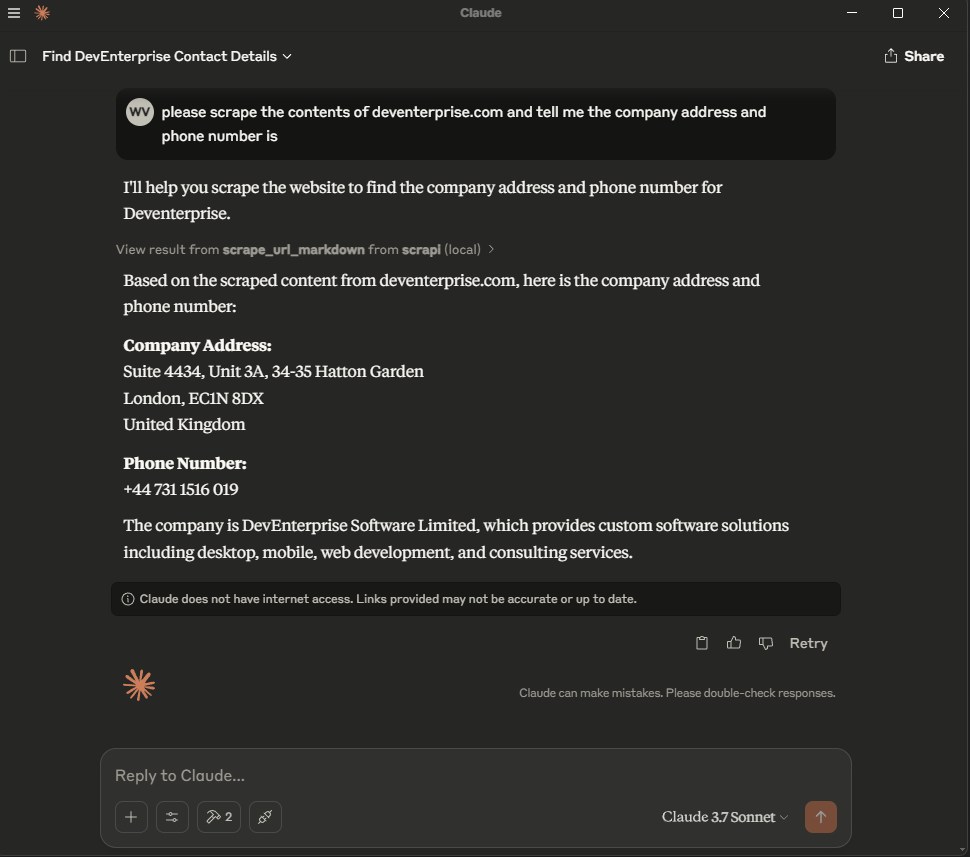
Após alterar a configuração, reinicie o Claude Desktop. Você deve ver as duas ferramentas ScrAPI disponíveis na lista de ferramentas MCP.
Cursor
O Cursor suporta configuração de projeto em .cursor/mcp.json e configuração global em ~/.cursor/mcp.json. Consulte a documentação MCP do Cursor.
Configuração stdio:
{
  "mcpServers": {
    "scrapi": {
      "command": "npx",
      "args": ["-y", "@deventerprisesoftware/scrapi-mcp"],
      "env": {
        "SCRAPI_API_KEY": "${env:SCRAPI_API_KEY}"
      }
    }
  }
}
Configuração HTTP:
{
  "mcpServers": {
    "scrapi": {
      "url": "http://localhost:5000/mcp"
    }
  }
}
Para HTTP, inicie o servidor primeiro:
TRANSPORT=http PORT=5000 SCRAPI_API_KEY="your-scrapi-api-key" npx -y @deventerprisesoftware/scrapi-mcp
Windsurf
O Windsurf Cascade armazena servidores MCP em ~/.codeium/windsurf/mcp_config.json. Você também pode adicionar servidores em Windsurf Settings > Cascade > MCP Servers. Consulte a documentação MCP do Windsurf.
Configuração stdio:
{
  "mcpServers": {
    "scrapi": {
      "command": "npx",
      "args": ["-y", "@deventerprisesoftware/scrapi-mcp"],
      "env": {
        "SCRAPI_API_KEY": "${env:SCRAPI_API_KEY}"
      }
    }
  }
}
Configuração HTTP:
{
  "mcpServers": {
    "scrapi": {
      "serverUrl": "http://localhost:5000/mcp"
    }
  }
}
O Windsurf suporta serverUrl ou url para servidores MCP HTTP remotos. Se sua equipe usa controles MCP empresariais, o ID do servidor na lista de permissões do administrador deve corresponder ao nome da chave, por exemplo, scrapi.
Kilo Code
O Kilo Code armazena a configuração MCP no arquivo de configuração principal do Kilo. Use ~/.config/kilo/kilo.jsonc para configuração global, kilo.jsonc na raiz do projeto ou .kilo/kilo.jsonc para configuração específica do projeto. Consulte a documentação MCP do Kilo Code.
Configuração stdio local:
{
  "mcp": {
    "scrapi": {
      "type": "local",
      "command": ["npx", "-y", "@deventerprisesoftware/scrapi-mcp"],
      "environment": {
        "SCRAPI_API_KEY": "your-scrapi-api-key"
      },
      "enabled": true,
      "timeout": 300000
    }
  }
}
Configuração HTTP remota:
{
  "mcp": {
    "scrapi": {
      "type": "remote",
      "url": "http://localhost:5000/mcp",
      "enabled": true,
      "timeout": 300000
    }
  }
}
No Windows, se npx não for encontrado na interface do Kilo Code, use cmd como comando e passe /c, npx, -y e @deventerprisesoftware/scrapi-mcp como argumentos.
Codex
O Codex suporta servidores MCP na CLI e na extensão do IDE. Ambos usam a mesma configuração MCP. Por padrão, o Codex armazena em ~/.codex/config.toml; projetos confiáveis também podem usar .codex/config.toml. Consulte a documentação MCP do Codex.
Adicione um servidor stdio com a CLI do Codex:
codex mcp add scrapi --env SCRAPI_API_KEY="your-scrapi-api-key" -- npx -y @deventerprisesoftware/scrapi-mcp
codex mcp list
Configuração stdio config.toml equivalente:
[mcp_servers.scrapi]
command = "npx"
args = ["-y", "@deventerprisesoftware/scrapi-mcp"]
startup_timeout_sec = 20
tool_timeout_sec = 300

[mcp_servers.scrapi.env]
SCRAPI_API_KEY = "your-scrapi-api-key"
Configuração HTTP:
[mcp_servers.scrapi]
url = "http://localhost:5000/mcp"
tool_timeout_sec = 300
Na interface de terminal do Codex, execute /mcp para confirmar que o servidor está conectado.
VS Code
O VS Code armazena a configuração MCP em .vscode/mcp.json para um workspace ou no perfil do usuário. A chave de nível superior é servers, não mcpServers. Consulte a referência de configuração MCP do VS Code.
Configuração stdio:
{
  "inputs": [
    {
      "type": "promptString",
      "id": "scrapi-api-key",
      "description": "ScrAPI API key",
      "password": true
    }
  ],
  "servers": {
    "scrapi": {
      "type": "stdio",
      "command": "npx",
      "args": ["-y", "@deventerprisesoftware/scrapi-mcp"],
      "env": {
        "SCRAPI_API_KEY": "${input:scrapi-api-key}"
      }
    }
  }
}
Configuração HTTP:
{
  "servers": {
    "scrapi": {
      "type": "http",
      "url": "http://localhost:5000/mcp"
    }
  }
}
Use os comandos da Paleta de Comandos MCP: Add Server, MCP: List Servers e MCP: Reset Cached Tools para adicionar, inspecionar e atualizar servidores MCP.
Claude Code
O Claude Code suporta servidores MCP por meio da CLI claude mcp e do comando /mcp dentro do Claude Code. Consulte a documentação MCP do Claude Code.
Adicione um servidor stdio:
claude mcp add --transport stdio --env SCRAPI_API_KEY="your-scrapi-api-key" scrapi -- npx -y @deventerprisesoftware/scrapi-mcp
claude mcp list
Adicione um servidor HTTP:
claude mcp add --transport http scrapi http://localhost:5000/mcp
claude mcp list
Para disponibilizar o servidor em todos os projetos do Claude Code, adicione --scope user antes do nome do servidor:
claude mcp add --transport stdio --scope user --env SCRAPI_API_KEY="your-scrapi-api-key" scrapi -- npx -y @deventerprisesoftware/scrapi-mcp
Dentro do Claude Code, execute /mcp para confirmar que o servidor está conectado.
Cliente MCP Stdio Genérico
Use esta forma para clientes que aceitam um comando, argumentos e variáveis de ambiente:
{
  "name": "ScrAPI",
  "command": "npx",
  "args": ["-y", "@deventerprisesoftware/scrapi-mcp"],
  "env": {
    "SCRAPI_API_KEY": "your-scrapi-api-key"
  }
}
Transporte HTTP
Defina TRANSPORT=http para executar o servidor via Streamable HTTP.
TRANSPORT=http PORT=5000 SCRAPI_API_KEY="your-scrapi-api-key" npx -y @deventerprisesoftware/scrapi-mcp
PowerShell:
$env:TRANSPORT = "http"
$env:PORT = "5000"
$env:SCRAPI_API_KEY = "your-scrapi-api-key"
npx -y @deventerprisesoftware/scrapi-mcp
O endpoint MCP é:
http://localhost:5000/mcp
Variáveis de ambiente:
| Nome | Padrão | Descrição |
|---|---|---|
SCRAPI_API_KEY | Chave padrão limitada | Chave de API ScrAPI usada ao chamar a API de scraping do ScrAPI. |
TRANSPORT | stdio | Use stdio ou http. |
PORT | 5000 | Porta usada quando TRANSPORT=http. |
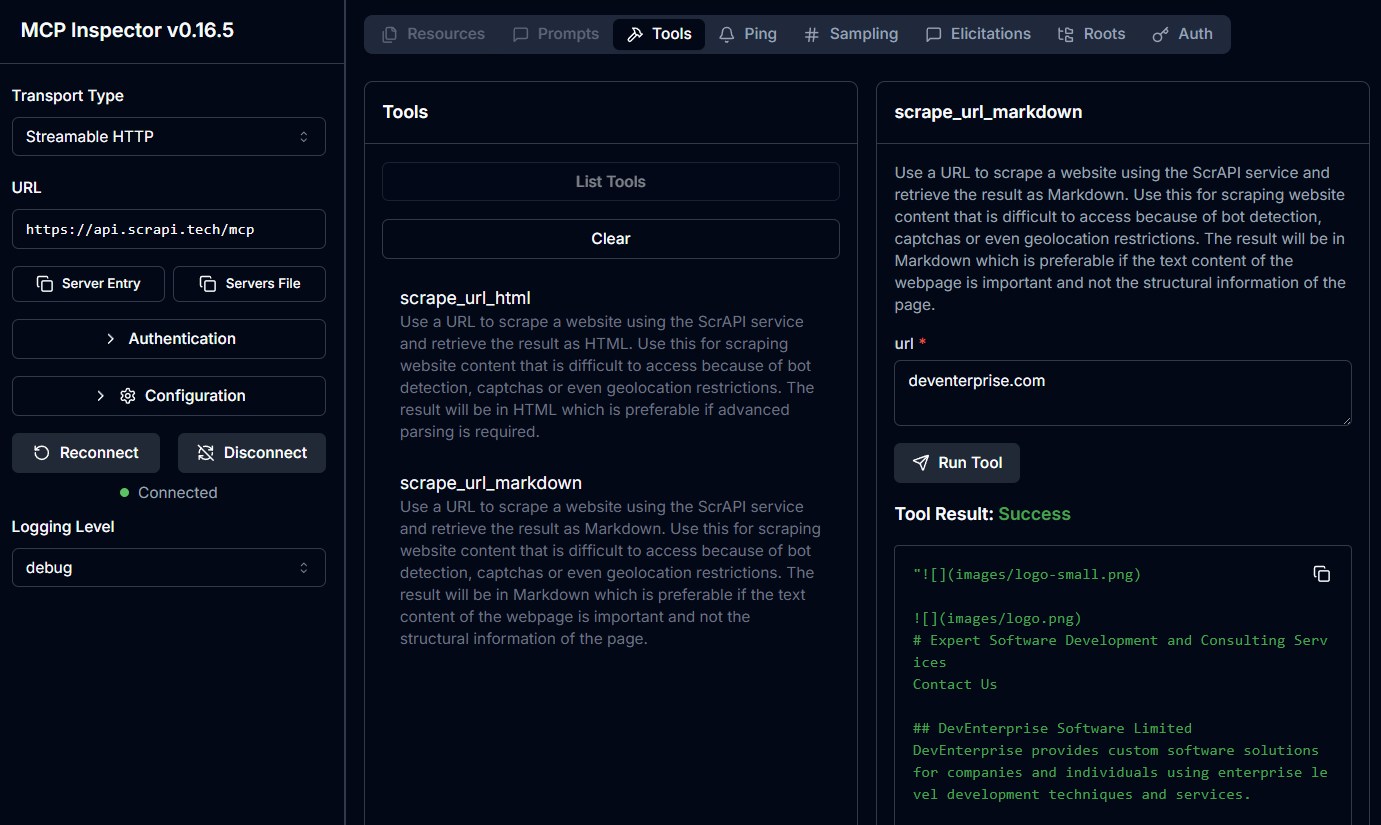
Testar com MCP Inspector
Modo stdio:
npx @modelcontextprotocol/inspector npx -y @deventerprisesoftware/scrapi-mcp
Modo HTTP:
TRANSPORT=http PORT=5000 npx -y @deventerprisesoftware/scrapi-mcp
Em seguida, abra o MCP Inspector e conecte-se a:
http://localhost:5000/mcp
Servidor Hospedado na Nuvem
O ScrAPI também fornece endpoints MCP hospedados:
Streamable HTTP: https://api.scrapi.tech/mcp
Servidores MCP na nuvem ainda não são suportados por todos os clientes MCP. Eles são mais úteis para clientes personalizados, MCP Inspector ou plataformas que suportam servidores MCP remotos.
Para autenticar com sua chave de API ScrAPI, passe-a como parâmetro de consulta ou cabeçalho de solicitação:
- Parâmetro de consulta:
https://api.scrapi.tech/mcp?apiKey=<YOUR_API_KEY> - Cabeçalho de solicitação:
X-API-KEY: <YOUR_API_KEY>
Exemplos de Uso
A interação exata depende do seu cliente MCP. Na maioria dos clientes, você pode pedir ao modelo para usar a ferramenta ScrAPI ou chamar a ferramenta diretamente de um inspetor de ferramentas.
Fazer Scraping de uma Página como Markdown
Ferramenta:
scrape_url_markdown
Argumentos:
{
  "url": "https://example.com"
}
Exemplo de prompt:
Use ScrAPI to scrape https://example.com as Markdown and summarize the page.
Fazer Scraping de uma Página como HTML
Ferramenta:
scrape_url_html
Argumentos:
{
  "url": "https://example.com"
}
Exemplo de prompt:
Use ScrAPI to scrape https://example.com as HTML and extract every link.
Aceitar Cookies Antes do Scraping
O valor browserCommands deve ser uma string contendo um array JSON.
{
  "url": "https://example.com",
  "browserCommands": "[{\"click\":\"#accept-cookies\"},{\"wait\":1000}]"
}
Pesquisar um Site Antes de Fazer Scraping dos Resultados
{
  "url": "https://example.com/search",
  "browserCommands": "[{\"input\":{\"input[name='q']\":\"web scraping\"}},{\"click\":\"button[type='submit']\"},{\"waitfor\":\"#results\"}]"
}
Carregar Mais Conteúdo
{
  "url": "https://example.com/products",
  "browserCommands": "[{\"scroll\":1200},{\"wait\":1000},{\"click\":\"button.load-more\"},{\"waitfor\":\".product-card:nth-child(25)\"}]"
}
Comandos do Navegador
Ambas as ferramentas suportam comandos opcionais de navegador que interagem com a página antes que o ScrAPI capture o resultado final.
Os comandos são fornecidos como uma string de array JSON. Eles são executados com comportamento semelhante ao humano, como movimento aleatório do mouse e velocidade de digitação variável.
| Comando | Formato | Descrição |
|---|---|---|
| Click | {"click": "#buttonId"} | Clicar em um elemento por seletor CSS. |
| Input | {"input": {"input[name='email']": "value"}} | Preencher um campo de entrada. |
| Select | {"select": {"select[name='country']": "USA"}} | Selecionar uma opção por valor ou texto visível. |
| Scroll | {"scroll": 1000} | Rolar para baixo por pixels. Use um valor negativo para rolar para cima. |
| Wait | {"wait": 5000} | Aguardar por milissegundos. Máximo: 15000. |
| WaitFor | {"waitfor": "#elementId"} | Aguardar um elemento aparecer no DOM. |
| JavaScript | {"javascript": "console.log('test')"} | Executar JavaScript personalizado. |
Array de comandos legível:
[
  { "click": "#accept-cookies" },
  { "wait": 2000 },
  { "input": { "input[name='search']": "web scraping" } },
  { "click": "button[type='submit']" },
  { "waitfor": "#results" },
  { "scroll": 500 }
]
Escapado como argumento de ferramenta MCP:
{
  "url": "https://example.com",
  "browserCommands": "[{\"click\":\"#accept-cookies\"},{\"wait\":2000},{\"input\":{\"input[name='search']\":\"web scraping\"}},{\"click\":\"button[type='submit']\"},{\"waitfor\":\"#results\"},{\"scroll\":500}]"
}
Precisa de ajuda para encontrar seletores CSS? Experimente a extensão de navegador Rayrun para selecionar elementos e gerar seletores.
Para mais detalhes, consulte a documentação de Comandos do Navegador.
Solução de Problemas
O cliente MCP não consegue encontrar o servidor
- Confirme que o Node.js 18 ou mais recente está instalado se estiver usando
npx. - Confirme que o Docker Desktop está em execução se estiver usando Docker.
- Reinicie o cliente MCP após editar o arquivo de configuração.
- Verifique se o comando configurado funciona em um terminal.
As ferramentas aparecem, mas o scraping falha
- Confirme que
SCRAPI_API_KEYestá definido corretamente. - Tente a mesma URL sem
browserCommands. - Certifique-se de que
browserCommandsseja uma string de array JSON, não um array JSON bruto. - Use
scrape_url_htmlse a extração de Markdown omitir a estrutura que você precisa. - Páginas de longa execução, fluxos de CAPTCHA e páginas com muito JavaScript podem levar vários minutos.
Comandos do navegador são ignorados
O servidor só envia comandos de navegador quando browserCommands é analisado como um array JSON. Isto é válido:
{
  "browserCommands": "[{\"click\":\"#accept-cookies\"}]"
}
Isto não é válido para este esquema de ferramenta MCP porque é um array de objetos, não uma string:
{
  "browserCommands": [{ "click": "#accept-cookies" }]
}
O endpoint HTTP não responde
- Confirme que o servidor foi iniciado com
TRANSPORT=http. - Confirme que o cliente se conecta a
/mcp, não a/. - Confirme que a porta corresponde a
PORT.
Desenvolvimento
Instalar dependências:
npm install
Executar testes:
npm test
Compilar:
npm run build
Executar a partir do código-fonte em modo stdio:
npm run build
node dist/index.js
Executar a partir do código-fonte em modo HTTP:
TRANSPORT=http PORT=5000 node dist/index.js
Compilar a imagem Docker:
docker build -t deventerprisesoftware/scrapi-mcp -f Dockerfile .
Ou use o script do pacote:
npm run docker:build
Licença
Este servidor MCP é licenciado sob a Licença MIT. Você é livre para usar, modificar e distribuir o software, sujeito aos termos da Licença MIT. Consulte LICENSE para obter detalhes.