3Dsellers MCP
Run eBay, Amazon, Walmart, Etsy, Shopify and TikTok Shop stores from your AI assistant. 150+ hosted ecommerce tools, no code.
호스팅형 MCP 서버
npx add-mcp 'https://api.3dsellers.com/mcp'Claude Code, Codex, Cursor 등에 설치됩니다
문서
Connect Your AI Tools with 3Dsellers MCP
The 3Dsellers MCP server is a hosted MCP server with 150+ tools. Connect Claude, ChatGPT, Cursor, Claude Code or any assistant that supports remote MCP servers, such as Perplexity, Grok or Mistral Le Chat, and ask it to create, edit and publish eBay listings, update inventory and prices on Amazon, Walmart, Etsy, Shopify and TikTok Shop, manage orders, run CSV imports and answer Helpdesk tickets. Nothing to install and no eBay developer account.
Server URL
API documentation: api.3dsellers.com/docs
See It in Action
What MCP is, how to connect Claude and ChatGPT, and what sellers ask it to do, in under eight minutes.
Everything Your AI Can Do: 150+ Tools
Once 3Dsellers MCP is connected, Claude, ChatGPT or any MCP-compatible assistant can use these tools in your 3Dsellers account. Read tools only look at your data. Write tools make changes, and the assistant asks for your approval before it runs them.
Find Products
Search your catalog by SKU, title, tag or segment.
Read
Get Product
Get every detail of one product, including variations and images.
Read
Create Product
Create a product with variations, images, prices and identifiers.
Write
Update Product
Replace a product's details in one step.
Write
Edit Product Fields
Change only the fields you name and leave the rest as is.
Write
Remove Products
Remove products from your catalog.
Write
Tag Products
Add or remove tags on products.
Write
Get Product Listings
See where each product is listed and the status on every channel.
Read
Get Custom Attributes
List the custom attributes used in your catalog.
Read
Delete Custom Attributes
Remove custom attributes you no longer use.
Write
Sync New SKUs
Pull new SKUs from your channels into the catalog.
Write
Link SKUs Across Accounts
Link the same SKU across selling accounts so stock stays in sync.
Write
Get SKU Templates
List your SKU templates.
Read
Get SKU Template
Get one SKU template and its pattern.
Read
Create SKU Template
Create a template that builds SKUs automatically.
Write
Delete SKU Template
Delete a SKU template.
Write
Get Segments
List your saved product segments.
Read
Create Segment
Save a filter as a segment, for example all Nike shoes under $50.
Write
Update Segment
Change the filter of a saved segment.
Write
Delete Segment
Delete a saved segment.
Write
Publish Products to a Channel
Publish products to eBay, Amazon, Walmart, Etsy, Shopify or TikTok Shop.
Write
Set Draft Details
Fill in title, price, category and other listing details before you publish.
Write
Set Item Specifics
Set brand, MPN, color, size and other item specifics on listings.
Write
Tag Listings
Add or remove tags on listings.
Write
Apply Business Policies
Apply shipping, return and payment policies to listings.
Write
Get Business Policies
List the business policies on your eBay account.
Read
Dismiss Listing Errors
Clear listing errors you have already handled.
Write
Get Store Categories
List the categories in your eBay store.
Read
Create Store Category
Add a category to your eBay store.
Write
Update Store Category
Rename or move an eBay store category.
Write
Delete Store Category
Delete an eBay store category.
Write
Set Listing Quantity
Set the available quantity on a listing.
Write
Set Variation Quantity
Set the quantity of one variation, such as a size or color.
Write
Turn Inventory Sync On or Off
Turn inventory sync on or off for a selling account.
Write
Find Orders
Search and filter orders by status, channel, date or SKU.
Read
Tag Orders
Add or remove tags on orders.
Write
Add Tracking
Send the carrier and tracking number to the marketplace.
Write
Create Invoice
Create an invoice for an order.
Write
Get Invoice
Get the invoice of an order.
Read
Get Bulk Action Catalog
See every bulk action you can run on products and listings.
Read
Get Bulk Action Fields
See which fields a bulk action needs before you run it.
Read
Run Bulk Action
Change prices, item specifics, policies or tags on hundreds of listings at once.
Write
Get Bulk Actions
List the bulk actions you ran and their status.
Read
Get Bulk Action
Track one bulk action until it finishes.
Read
Get Import Types
See which CSV imports are available and their columns.
Read
Run CSV Import
Import products or changes from a CSV file, with a dry run first.
Write
Get Imports
List your CSV imports and their status.
Read
Get Import
Get the result of one CSV import.
Read
Get Import Errors
See the errors of a CSV import, row by row.
Read
Retry Rejected Rows
Fix and retry the rows that failed in an import.
Write
Get Scheduled Imports
List imports that run on a schedule.
Read
Get Scheduled Import
Get one scheduled import and its settings.
Read
Schedule an Import
Import a supplier file from a link on a fixed schedule.
Write
Update Scheduled Import
Change the link, timing or mapping of a scheduled import.
Write
Delete Scheduled Import
Stop and delete a scheduled import.
Write
Run Scheduled Import Now
Run a scheduled import right away.
Write
Get Export Types
See which reports and exports are available.
Read
Create Export
Create a report of products, listings or orders.
Write
Get Exports
List your exports and their download links.
Read
Get Export
Get one export and its file.
Read
Delete Export
Delete an export.
Write
Get Scheduled Exports
List exports that run on a schedule.
Read
Get Scheduled Export
Get one scheduled export and its settings.
Read
Schedule an Export
Create a report that runs on a fixed schedule.
Write
Update Scheduled Export
Change the timing or content of a scheduled export.
Write
Delete Scheduled Export
Stop and delete a scheduled export.
Write
Run Scheduled Export Now
Run a scheduled export right away.
Write
Get Catalog Categories
List the categories in your product catalog.
Read
Create Catalog Category
Add a category to your product catalog.
Write
Get Category Mappings
See which channel category each catalog category maps to.
Read
Set Category Mappings
Map catalog categories to eBay, Amazon or other channel categories.
Write
Find Unmapped Categories
Find catalog categories that have no channel category yet.
Read
Get Category Item Specifics
See the item specifics a channel category requires.
Read
Get Channel Category Fields
See every field a channel category accepts.
Read
Get Product Templates
List your product templates.
Read
Get Product Template
Get one product template and its fields.
Read
Get Template Mappings
See how product fields map to each channel.
Read
Apply Template Mappings
Apply field mappings to products in bulk.
Write
Delete Template Mapping
Remove a field mapping.
Write
Track Mapping Job
Track a mapping job until it finishes.
Read
Get Auto-Map Fields
See which fields are mapped automatically.
Read
Set Auto-Map Fields
Choose which fields map automatically.
Write
Get Mapping Rules
List your mapping rules.
Read
Get Mapping Rule
Get one mapping rule.
Read
Create Mapping Rule
Create a rule, for example set Condition to New for every product in a segment.
Write
Update Mapping Rule
Change a mapping rule.
Write
Delete Mapping Rule
Delete a mapping rule.
Write
Preview Mapping Rule
Preview what a rule will change before you apply it.
Read
Create Mapping Template
Create a mapping template for a channel.
Write
Update Mapping Template
Change a mapping template.
Write
Delete Mapping Template
Delete a mapping template.
Write
Copy Mapping Template
Copy a mapping template to start a new one.
Write
Validate Mapping Template
Check a mapping template for missing or wrong fields.
Read
Find Tickets
Search Helpdesk tickets by status, channel or buyer.
Read
Get Ticket
Get one ticket and its details.
Read
Get Ticket Messages
Read the full conversation of a ticket.
Read
Count Tickets
See how many tickets are open, unread or waiting.
Read
Reply to Ticket
Send a reply to the buyer.
Write
Add Internal Note
Add a note your team can see and the buyer cannot.
Write
Change Ticket Status
Mark a ticket open, pending or closed.
Write
Mark Ticket Read
Mark a ticket read or unread.
Write
Get Auto Messages
List your automatic post-sale messages.
Read
Get Auto Message
Get one automatic message.
Read
Create Auto Message
Send buyers a message after a sale, a shipment or a delivery.
Write
Update Auto Message
Change the text or timing of an automatic message.
Write
Delete Auto Message
Delete an automatic message.
Write
Get Automation Catalog
See every trigger and action you can automate.
Read
Get Automations
List your automations and whether each one is on.
Read
Get Automation
Get one automation and its rules.
Read
Create Automation
Create an automation, for example tag every order over $100.
Write
Update Automation
Change or pause an automation.
Write
Delete Automation
Delete an automation.
Write
Get Offer Rules
List your rules for offers to watchers.
Read
Get Offer Rule
Get one offer rule.
Read
Create Offer Rule
Send automatic offers to buyers who watch your listings.
Write
Update Offer Rule
Change the discount or timing of an offer rule.
Write
Delete Offer Rule
Delete an offer rule.
Write
Get Listing Templates
List your listing description templates.
Read
Get Listing Template
Get one listing template and its HTML.
Read
Create Listing Template
Create a listing description template.
Write
Update Listing Template
Change a listing template.
Write
Get Default Template
See which template applies to new listings in each store.
Read
Set Default Template
Choose the template that applies to new listings in a store.
Write
Get Selling Accounts
List the marketplace accounts connected to 3Dsellers.
Read
Get Selling Account
Get the details of one connected account.
Read
Check Connection Status
Check that each marketplace connection is working.
Read
Hosted 3Dsellers MCP vs a Local Open-Source Server
Some eBay MCP servers on GitHub run on your own computer and talk to the eBay API directly. Here is how the hosted 3Dsellers server compares.
3Dsellers MCP
Open-Source eBay MCP
Setup
Install Node.js or Python and run it on your own computer
No eBay developer account needed


Works in ChatGPT and claude.ai on the web
Works in Claude Desktop, Cursor and VS Code
eBay
Amazon, Walmart, Etsy, Shopify, TikTok Shop and WooCommerce
One catalog for every channel
Bulk actions and CSV imports
Helpdesk and buyer messages
Automations and offer rules
Tools
150+
Depends on the project
Updates when the eBay API changes
Done by 3Dsellers
You update it yourself
Support
Included in your plan
Community only
Pricing
The MCP server is included in every 3Dsellers plan, including the free trial. Actions the AI runs use AI actions that you buy in advance: AI Lite, 2,000 actions for $9 a month; AI Pro, 5,000 actions for $20 a month; AI Elite, 10,000 actions for $29 a month. Reading your data, such as listing orders or searching products, is free.
Manage Tokens, Permissions and Requests
Every AI assistant and integration connects to 3Dsellers with a token. The API / MCP page in Settings shows every token, what it is allowed to do, every call it made, and how much of your rate limit is left.
Connect and create tokens
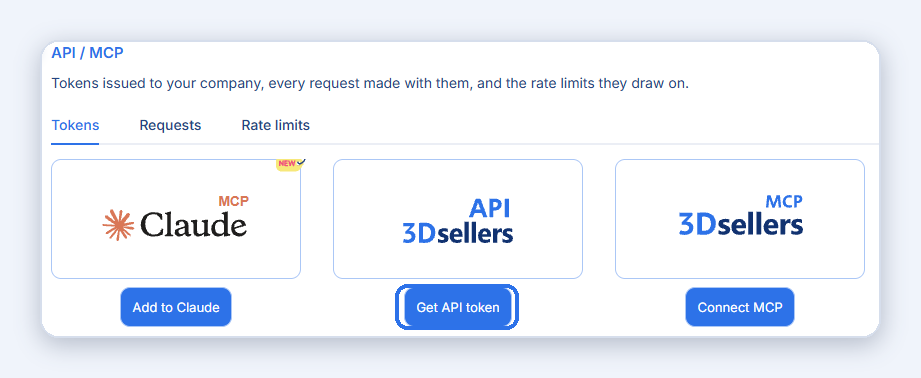
Open Settings > Profile > API / MCP, or go to app.3dsellers.com/api-mcp. Add to Claude connects Claude with a sign-in and no token to copy. Get API token creates a bearer token for your own script or integration. Connect MCP shows the server URL and a token for developer tools such as Cursor, VS Code and Claude Code.
A token is shown only once, when it is created. Copy it right away and keep it private.
See what each token is allowed to do
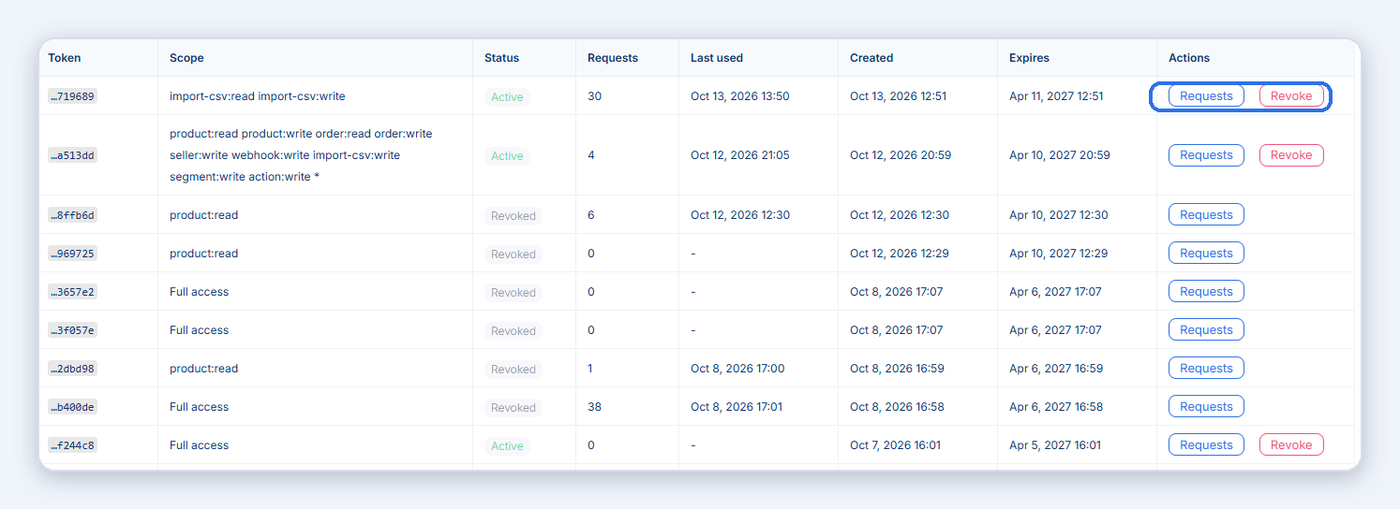
The Issued tokens list shows every token with its app, scope, status, request count, last use and expiry. The scope is the permission: product:read can only read products, product:write can change them, and Full access means every tool.
Revoke stops one token on its next request. Revoke all cuts off every app and AI agent at once; use it if a token leaked.
Review every call the AI made
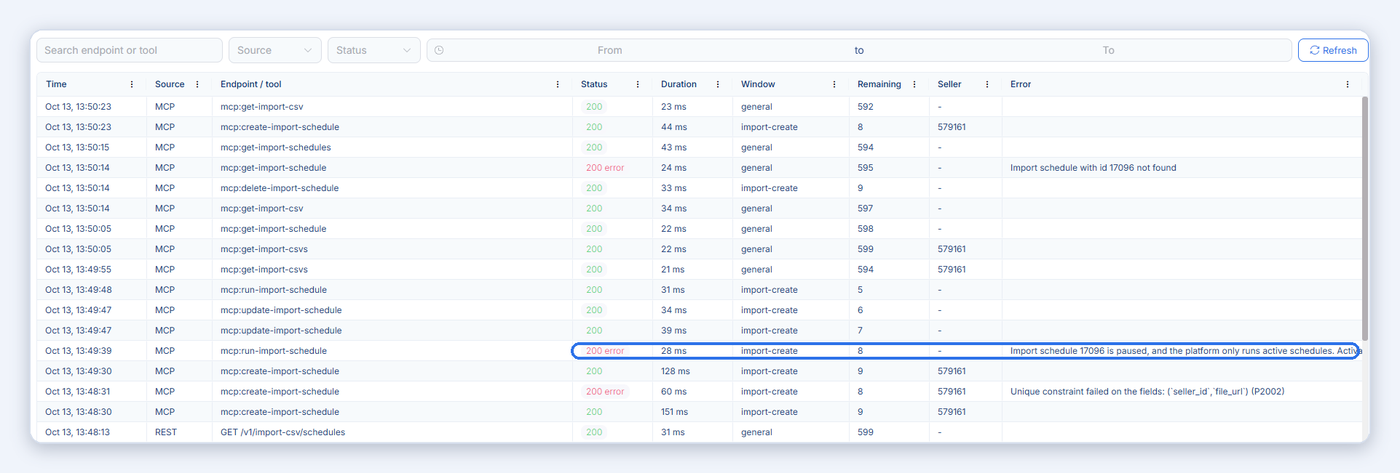
The Requests tab logs every REST API call and every MCP tool call: time, source, tool name, status, duration and the error message when a call failed. Filter by token, source, status or date, and click a row for the full details.
Values that look like secrets are shown as [redacted], and only people in your 3Dsellers company can see the log.
Watch your rate limits
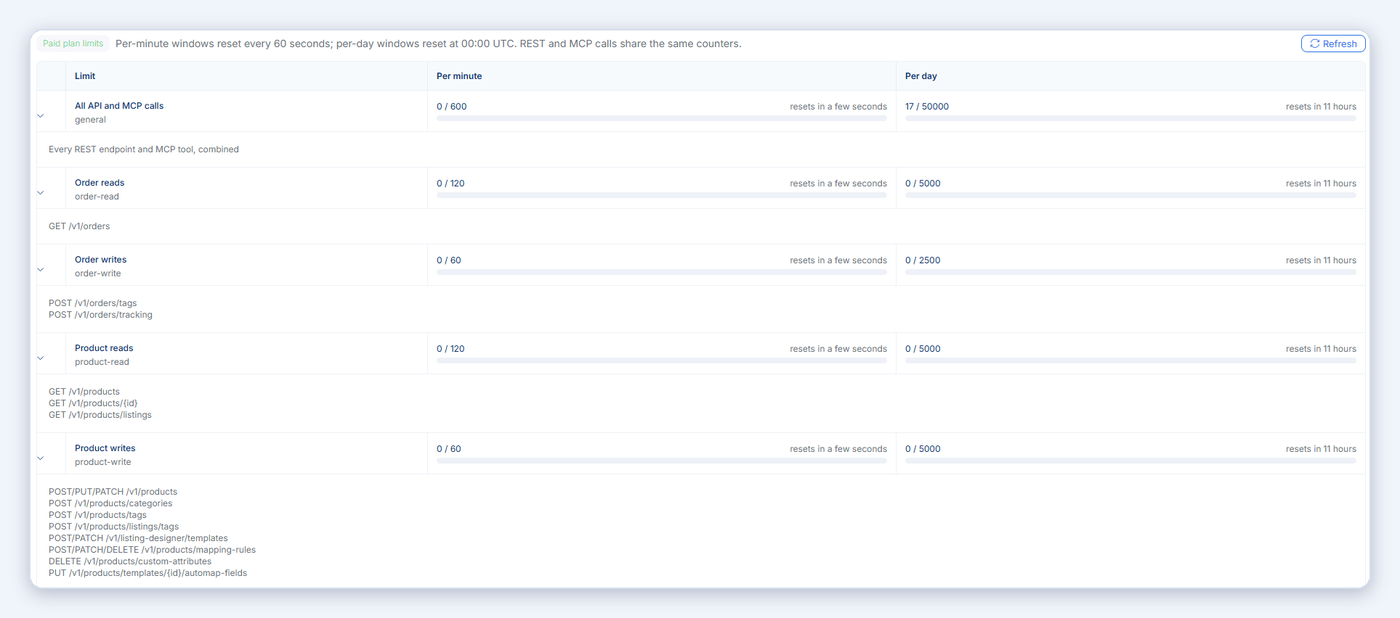
The Rate limits tab shows each limit, how much of it you used this minute and today, and when it resets. REST and MCP calls share the same counters: on a paid plan, 600 calls a minute and 50,000 a day for all tools combined, with separate limits for order and product reads and writes.
Per-minute counters reset every 60 seconds, per-day counters at 00:00 UTC.
Full guide: API / MCP page: tokens, request log and rate limits.
Features
3Dsellers Gives You the Tools You Need to Take Your eCommerce Business to the Next Level
The 3Dsellers MCP server is built for sellers who would rather ask than click. Connect it to Claude or ChatGPT in two minutes, then ask what sold today, which eBay listings have errors, or which products are low on stock, and let the assistant fix listings, update inventory, tag orders and publish products through your own 3Dsellers account. Every action runs with your approval and your data stays in 3Dsellers.
Integrations
Streamline Your Multichannel Commerce with 3Dsellers' Integrations
3Dsellers connects your eBay, Amazon, Walmart, Etsy, Shopify, TikTok Shop and WooCommerce stores in one place. With the MCP server, all of that is one chat away in Claude, ChatGPT or your developer tools: check orders, sync inventory, fix listings and publish products by asking, while 3Dsellers does the work on each marketplace.
Trusted by 5,000+ eCommerce Sellers
Integrations
Enjoy Better, More Streamlined Multichannel Commerce with 3Dsellers' Integrations
3Dsellers integrates with a wide selection of popular ecommerce platforms and channels, allowing you to easily sync product and order data, automate processes, and streamline operations across multiple channels. With 3Dsellers' powerful integrations, you'll enjoy improved efficiency and fewer errors, allowing you more time to focus on growing your business. Maximize your sales and effortlessly scale your business with 3Dsellers' multichannel integrations.
Frequently Asked Questions
FAQ
Short answers to the questions sellers ask before they connect an AI assistant to their store.
What is an MCP server for eBay sellers?

It is a hosted connection that lets an AI assistant such as Claude or ChatGPT work inside your 3Dsellers account: search and create products, publish listings to eBay and your other channels, update inventory and prices, manage orders and answer buyers. You connect it once with the server URL https://api.3dsellers.com/mcp and sign in. No code and no eBay developer account.
Can ChatGPT list items on eBay for me?
Yes, once ChatGPT is connected to 3Dsellers through the MCP server. Add 3Dsellers as an app in ChatGPT with the server URL, sign in, and ask it to create and publish a listing. ChatGPT drafts the listing, shows it to you, and publishes it to eBay through 3Dsellers after you approve.
Can Claude create and publish eBay listings?
Yes. 3Dsellers is listed in Claude's connector directory. Add it, sign in, and ask Claude to create a product and publish it to your eBay store. Claude shows the draft and asks for your approval before it publishes.
Do I need an eBay developer account to use 3Dsellers MCP?
No. 3Dsellers is already connected to your eBay account, so the AI works through 3Dsellers. There is nothing to install, no API keys to manage and no developer application to apply for.
How do I connect Claude to my eBay store?
Open Claude's connector directory, add 3Dsellers, sign in to your 3Dsellers account and approve access. Then turn the connector on in a chat from the + menu. It takes about two minutes. Full steps are on the Claude page.
How do I connect ChatGPT to my eBay store?
In ChatGPT, add a new app, paste https://api.3dsellers.com/mcp as the server URL, choose OAuth, sign in with your 3Dsellers account and click Accept. Then pick 3Dsellers from the + menu in any chat. Full steps are on the ChatGPT page.
Which AI assistants work with 3Dsellers MCP?
Any assistant that supports remote MCP servers: Claude, ChatGPT, Grok, Claude Code, Cursor, VS Code, Perplexity, Mistral Le Chat, Windsurf, Gemini CLI, Codex CLI and others. Step-by-step pages: Claude, ChatGPT, Grok and Cursor, VS Code and Claude Code, plus the setup guide.
Can an AI manage eBay, Amazon, Walmart and Shopify listings from one chat?
Yes. 3Dsellers keeps one catalog for every channel you sell on, so one connection covers eBay, Amazon, Walmart, Etsy, Shopify, TikTok Shop and WooCommerce, including publishing a product from one channel to another.
Is it safe to give an AI assistant access to my eBay account?
The assistant never sees your eBay password. It connects to 3Dsellers with OAuth or a token, can only use the tools listed on this page, and asks for your approval before it runs a tool that changes data. Every token, its scope and every call it made are listed under Settings > API / MCP, where you can revoke it at any time.
Which plan includes the MCP server, and what does it cost?
The MCP server is included in every 3Dsellers plan, including the free trial. Actions the AI runs use AI actions that you buy in advance: AI Lite, 2,000 actions for $9 a month; AI Pro, 5,000 for $20; AI Elite, 10,000 for $29. Reading your data is free.