Tomba MCP
공식Tomba는 고유한 B2B 이메일 파인더 및 검증기로, 손쉽고 효과적인 아웃리치 확장을 위한 독특한 리드 데이터베이스를 제공합니다.
Tomba MCP(으)로 무엇을 할 수 있나요?
- 도메인에 대한 이메일 주소 찾기 —
domain_search를 통해 회사의 모든 연락처를 요청하고, 부서나 국가와 같은 필터를 적용할 수 있습니다. - 개인의 이메일 생성 —
email_finder를 사용하여 이름과 도메인에서 가능성 있는 주소를 구성한 후 검증합니다. - 이메일 전달 가능성 확인 —
email_verifier를 사용하여 주소가 유효하고 발송해도 안전한지 확인합니다. - 연락처 프로필 보강 —
email_enrichment를 사용하여 이메일로 직함, 회사, 소셜 링크를 가져옵니다. - 회사 기술 스택 발견 —
technology_finder를 통해 웹사이트가 사용하는 도구와 플랫폼을 식별합니다. - 유사 회사 찾기 —
similar_finder를 사용하여 잠재 고객 발굴이나 분석을 위한 유사 도메인을 찾습니다.
문서
 Tomba.io MCP 서버
Tomba.io API와 통합하기 위한 Model Context Protocol (MCP) 서버입니다. 이 서버는 표준화된 MCP 인터페이스를 통해 포괄적인 이메일 발견, 검증, 및 강화 기능을 제공합니다.
기능
도구 (28개 사용 가능)
이메일 발견
- 도메인 검색: 도메인과 연결된 모든 이메일 주소 찾기
- 이메일 파인더: 이름과 도메인에서 가능성 있는 이메일 주소 생성
- 작성자 파인더: 기사 작성자의 이메일 주소 발견
- LinkedIn 파인더: LinkedIn 프로필 URL에서 이메일 찾기
- 이메일 개수: 도메인의 총 이메일 수 확인
- 이메일 소스: 이메일 주소가 웹에서 발견된 위치 찾기
- 이메일 형식: 도메인에서 사용하는 이메일 형식 패턴 확인
검증
- 이메일 검증기: 이메일 전달 가능성 검증 및 데이터베이스 존재 여부 확인
강화
- 이메일 강화: 추가 연락처 데이터로 이메일 강화
- 개인 강화: 이메일로 개인 데이터 찾기 (이름, 직책, 소셜 프로필)
- 회사 강화: 도메인으로 회사 데이터 찾기 (산업, 규모, 위치)
- 통합 강화: 이메일로 개인 + 회사 통합 강화
전화
도메인 인텔리전스
- 도메인 상태: 도메인이 웹메일 또는 일회용인지 확인
- 자동 완성: 로고 및 도메인 정보가 포함된 회사 이름 제안
- 유사 파인더: 대상 도메인을 기반으로 유사 도메인 찾기
- 기술 파인더: 웹사이트에서 사용하는 기술 스택 발견
- 위치: 국가별 직원 위치 수 확인
회사 검색
- 회사 검색: 고급 필터를 사용한 자연어 쿼리로 회사 검색
계정 및 관리
- 계정 정보: 현재 계정 정보, 요금제 및 크레딧 확인
- 사용량 정보: 모든 엔드포인트의 API 사용 통계 확인
- 플래그 목록: 상태 및 크레딧 환불이 포함된 제출된 데이터 플래그 목록
- 플래그 생성: 크레딧 복구를 위한 잘못된 데이터 보고 (하드 바운스, 유효하지 않은 이메일)
- 리드 목록: 선택적 도메인 필터로 리드 목록 표시
- 리드 생성: 목록에 새 리드 추가
- 키 목록: API 키 목록
- 로그 가져오기: 최근 API 요청 로그 확인
리소스 (7개 사용 가능)
tomba://api/status- API 상태 및 계정 정보tomba://domain/{domain}- 도메인 정보tomba://email/{email}- 이메일 정보tomba://similar/{domain}- 유사 도메인 분석tomba://technology/{domain}- 기술 스택 정보tomba://docs/api- API 문서tomba://docs/tools- 도구 문서
프롬프트 (16개 사전 구축 워크플로우)
- find_contact - 개인의 완전한 연락처 정보 찾기
- verify_email_list - 이메일 주소 일괄 검증
- research_company - 회사 연락처 및 구조 조사
- enrich_lead - 사용 가능한 모든 데이터로 리드 강화
- find_journalists - 기사에서 저널리스트 연락처 찾기
- phone_finder - 연락처의 전화번호 찾기
- validate_phone - 전화번호 검증
- competitor_analysis - 유사 도메인 및 기술을 사용한 경쟁사 분석
- technology_audit - 웹사이트의 포괄적인 기술 감사
- domain_insights - 이메일 수 및 기술을 포함한 도메인에 대한 포괄적인 인사이트
- bulk_domain_research - 여러 도메인의 이메일 수 및 기본 정보 조사
- find_target_companies - 고급 필터로 회사 찾기 (규모, 유형, 매출, 산업)
- market_research - 포괄적인 필터링으로 시장 부문의 회사 조사
- lead_generation - 회사 및 연락처를 찾아 리드 생성
- prospect_enrichment - 포괄적인 데이터로 회사 잠재 고객 강화
- industry_analysis - 세부 세분화로 산업 내 회사 분석
회사 검색 프롬프트의 필터 옵션
| 필터 | 사용 가능한 값 |
|---|---|
| 규모 | 1-10 (초소형), 11-50 (소형), 51-250 (중형), 251-1K (중대형), 1K-5K (대형), 5K-10K (초대형), 10K-50K (엔터프라이즈), 50K-100K (매머드), 100K+ (글로벌) |
| 유형 | education, government, nonprofit, private, public, personal |
| 매출 | $0-$1M, $1M-$10M, $10M-$50M, $50M-$100M, $100M-$250M, $250M-$500M, $500M-$1B, $1B-$10B, $10B+ |
| 산업 | LinkedIn 산업 코드 V2 기반 (컴퓨터 소프트웨어, 금융 서비스, 병원 및 의료 등 140개 이상의 산업) |
성능 및 안정성
타임아웃
모든 API 호출에는 120초 타임아웃이 있습니다. Tomba 검색은 실시간 인프라에서 실시간으로 실행됩니다 — 응답 시간은 대상 회사의 SMTP 서버 속도, 웹사이트 응답성 및 catch-all 감지 깊이에 따라 달라집니다.
지수 백오프를 통한 재시도
모든 API 호출은 다음 경우에 지수 백오프로 최대 3회 자동 재시도합니다:
429 Too Many Requests(요율 제한 초과)5xx서버 오류
재시도 지연: 1초 → 2초 → 4초.
요율 제한
요율 제한은 엔드포인트 및 요금제별로 적용됩니다:
| 요금제 | 초당 | 분당 | 일당 |
|---|---|---|---|
| 무료 | 1 | 2 | 5 |
| 기본 | 3 | 50 | 500 |
| 성장 | 5 | 80 | 1,000 |
| 프로 | 8 | 150 | 4,000 |
| 50,000+ 요금제 | 무제한 | 무제한 | 무제한 |
Tomba가 결과를 제공할 수 없는 경우 크레딧이 청구되지 않습니다. 30일 이내의 중복 요청은 다시 계산되지 않습니다.
전송 옵션
- stdio - 표준 입력/출력 (기본값, Claude Desktop용)
- http - REST 엔드포인트가 있는 HTTP 서버
설치
사전 요구 사항
- Node.js 18 이상
- npm 또는 yarn
- Tomba API 계정 (여기서 가입)
스크린샷
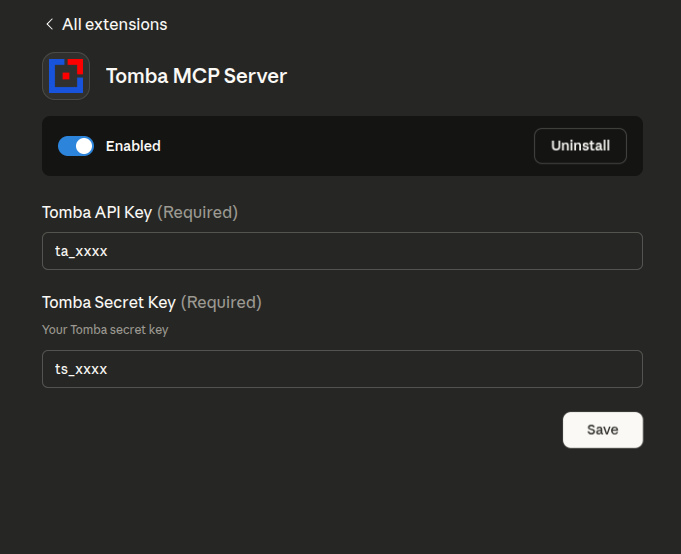
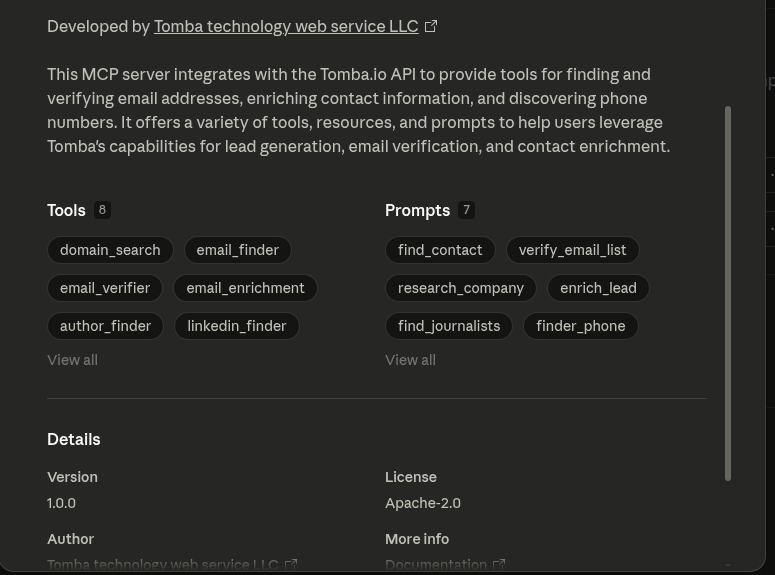
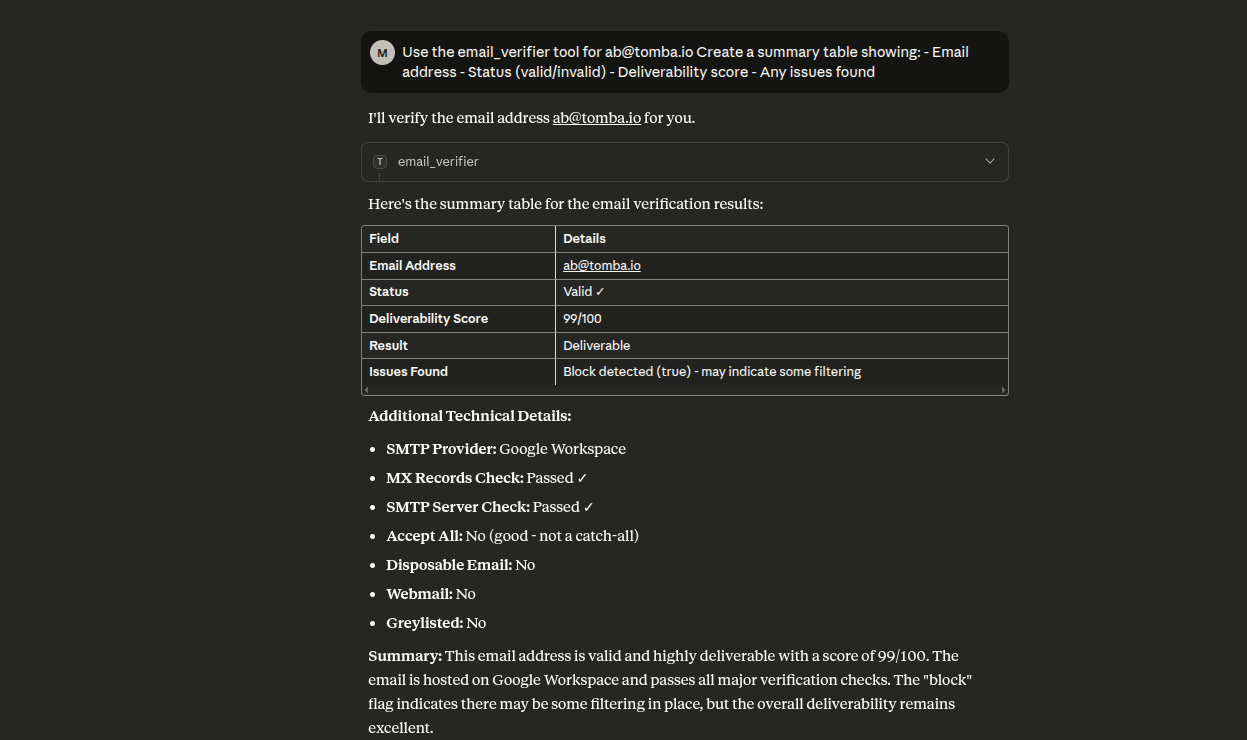
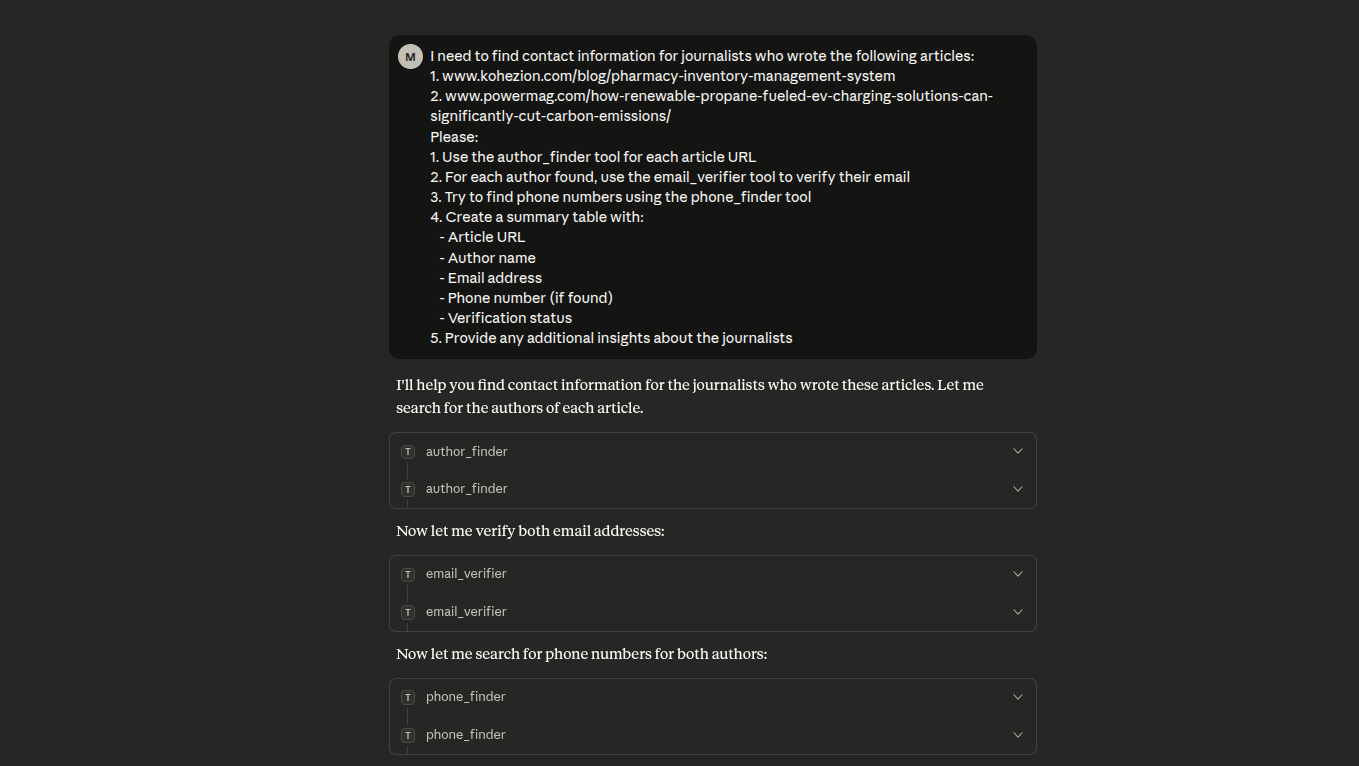
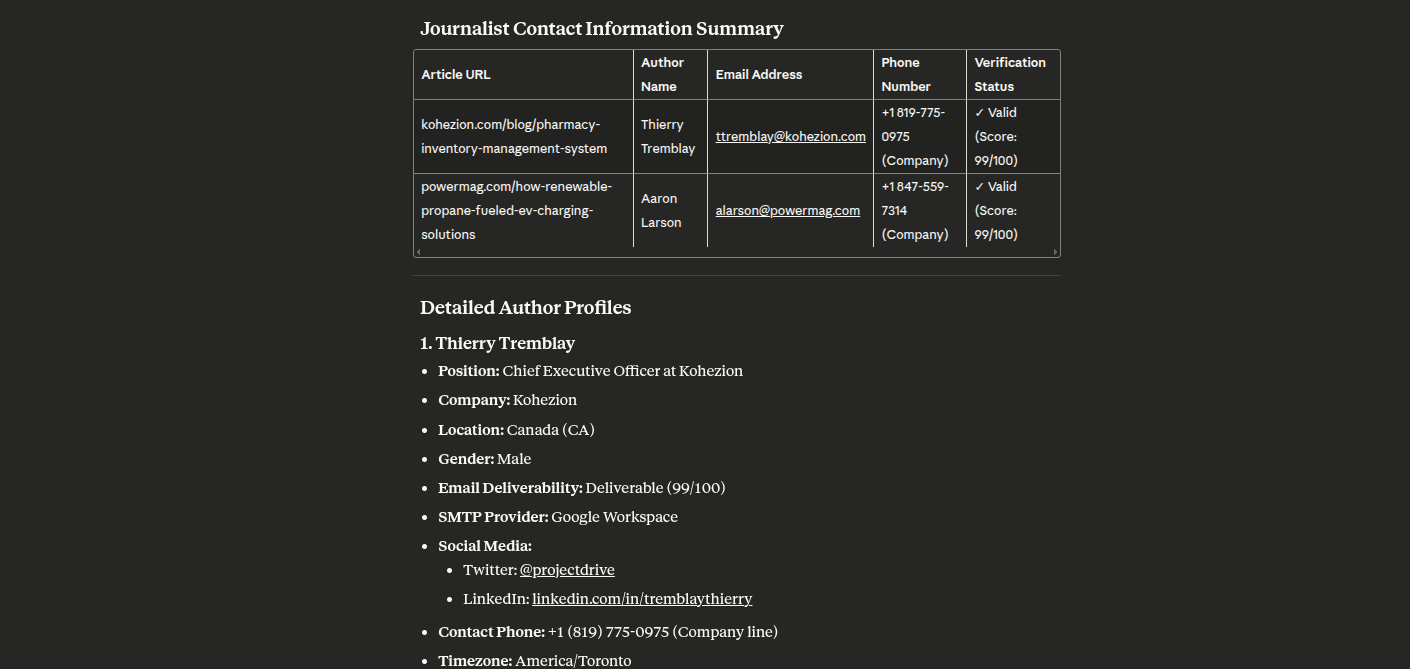
참고: npm 패키지가
tomba-mcp-server에서@tomba-io/tomba-mcp-server로 이름이 변경되었습니다. 구성 파일을 그에 따라 업데이트하세요.
옵션 1: NPX로 설치 (권장)
Tomba MCP 서버를 사용하는 가장 쉬운 방법은 저장소를 복제할 필요가 없는 npx를 통한 것입니다:
macOS/Linux
claude_desktop_config.json (~/Library/Application Support/Claude/claude_desktop_config.json)에 추가:
{
    "mcpServers": {
        "tomba": {
            "command": "npx",
            "args": ["-y", "@tomba-io/tomba-mcp-server"],
            "env": {
                "TOMBA_API_KEY": "your-api-key-here",
                "TOMBA_SECRET_KEY": "your-secret-key-here"
            }
        }
    }
}
Windows
claude_desktop_config.json (%APPDATA%\Claude\claude_desktop_config.json)에 추가:
{
    "mcpServers": {
        "tomba": {
            "command": "npx",
            "args": ["-y", "@tomba-io/tomba-mcp-server"],
            "env": {
                "TOMBA_API_KEY": "your-api-key-here",
                "TOMBA_SECRET_KEY": "your-secret-key-here"
            }
        }
    }
}
참고: -y 플래그는 설치 프롬프트를 자동으로 수락하며, npx는 항상 최신 버전을 가져옵니다.
옵션 2: 소스에서 설치
서버를 수정하거나 개발에 기여하려는 경우:
# Clone the repository
git clone https://github.com/tomba-io/tomba-mcp-server.git
cd tomba-mcp-server

# Install dependencies
yarn install

# Build the project
yarn build
구성
OpenClaw 스킬
이 저장소에는 이제 skills/tomba-contact-intelligence/SKILL.md에 워크스페이스 로컬 OpenClaw 스킬이 포함되어 있습니다.
이 스킬은 OpenClaw가 연락처 발견, 회사 조사, 이메일 검증, 전화 조회 및 잠재 고객 강화 워크플로우에 적합한 Tomba MCP 도구를 선택하도록 돕기 위해 설계되었습니다.
사용 방법:
- 이 저장소를 OpenClaw 워크스페이스로 열거나
skills/tomba-contact-intelligence디렉토리를 OpenClaw 스킬 디렉토리에 복사합니다. - Tomba MCP 서버가 구성되어 OpenClaw에서 사용 가능한지 확인합니다.
- 스킬이 로드되도록 새 OpenClaw 세션을 시작합니다.
예시 프롬프트:
- "stripe.com의 파트너십 담당자에게 가장 적합한 연락처를 찾고, 반환하기 전에 이메일을 검증하세요."
- "독일의 핀테크 회사를 조사한 다음, 상위 매치에 대한 가능성 있는 영업 연락처를 식별하세요."
- "이 잠재 고객을 이메일, 전화, 회사 기술 및 유사 경쟁사로 강화하세요: jane@acme.com"
Claude Desktop 설정
이 서버를 Claude Desktop과 함께 사용하려면 claude_desktop_config.json 파일에 구성을 추가하세요.
NPX 사용 (권장)
이 방법은 자동으로 최신 게시 버전을 사용합니다:
macOS/Linux (~/Library/Application Support/Claude/claude_desktop_config.json):
{
    "mcpServers": {
        "tomba": {
            "command": "npx",
            "args": ["-y", "@tomba-io/tomba-mcp-server"],
            "env": {
                "TOMBA_API_KEY": "your-api-key-here",
                "TOMBA_SECRET_KEY": "your-secret-key-here"
            }
        }
    }
}
Windows (%APPDATA%\Claude\claude_desktop_config.json):
{
    "mcpServers": {
        "tomba": {
            "command": "npx",
            "args": ["-y", "@tomba-io/tomba-mcp-server"],
            "env": {
                "TOMBA_API_KEY": "your-api-key-here",
                "TOMBA_SECRET_KEY": "your-secret-key-here"
            }
        }
    }
}
로컬 설치 사용
소스에서 빌드한 경우 설치 디렉토리의 절대 경로를 사용하세요:
macOS/Linux:
{
    "mcpServers": {
        "tomba": {
            "command": "node",
            "args": ["/ABSOLUTE/PATH/TO/tomba-mcp-server/server/index.js"],
            "env": {
                "TOMBA_API_KEY": "your-api-key-here",
                "TOMBA_SECRET_KEY": "your-secret-key-here"
            }
        }
    }
}
Windows:
{
    "mcpServers": {
        "tomba": {
            "command": "node",
            "args": [
                "C:\\ABSOLUTE\\PATH\\TO\\tomba-mcp-server\\server\\index.js"
            ],
            "env": {
                "TOMBA_API_KEY": "your-api-key-here",
                "TOMBA_SECRET_KEY": "your-secret-key-here"
            }
        }
    }
}
중요 참고 사항:
your-api-key-here및your-secret-key-here를 실제 Tomba API 자격 증명으로 교체하세요- 로컬 설치의 경우
/ABSOLUTE/PATH/TO/tomba-mcp-server를 설치 디렉토리의 전체 경로로 교체하세요 - 구성 업데이트 후 Claude Desktop을 다시 시작하세요
Tomba API 자격 증명 얻기
- https://tomba.io 방문
- 계정 가입 또는 로그인
- 대시보드로 이동
- API 설정으로 이동
- API 키 및 비밀 키 복사
대안: HTTP 전송 사용
npx로 HTTP 전송 사용:
{
    "mcpServers": {
        "tomba": {
            "command": "npx",
            "args": [
                "-y",
                "@tomba-io/tomba-mcp-server",
                "--transport",
                "http",
                "--port",
                "3000"
            ],
            "env": {
                "TOMBA_API_KEY": "your-api-key-here",
                "TOMBA_SECRET_KEY": "your-secret-key-here"
            }
        }
    }
}
로컬 설치로 HTTP 전송 사용:
{
    "mcpServers": {
        "tomba": {
            "command": "node",
            "args": [
                "/ABSOLUTE/PATH/TO/tomba-mcp-server/server/index.js",
                "--transport",
                "http",
                "--port",
                "3000"
            ],
            "env": {
                "TOMBA_API_KEY": "your-api-key-here",
                "TOMBA_SECRET_KEY": "your-secret-key-here"
            }
        }
    }
}
사용법
명령줄 옵션
Usage: tomba-mcp-server [options]

Options:
  --transport <type>    Transport type: 'stdio' or 'http' (default: stdio)
  --port <number>       Port number for HTTP transport (default: 3000)
  --help                Show help message

Environment Variables:
  TOMBA_API_KEY         Your Tomba API key (required)
  TOMBA_SECRET_KEY      Your Tomba secret key (required)

Examples:
  # Run with stdio transport (default)
  node server/index.js

  # Run with HTTP transport on default port (3000)
  node server/index.js --transport http

  # Run with HTTP transport on custom port
  node server/index.js --transport http --port 8080
독립형 HTTP 서버
서버를 독립형 HTTP 서비스로 실행할 수도 있습니다:
export TOMBA_API_KEY="your-api-key"
export TOMBA_SECRET_KEY="your-secret-key"
node server/index.js --transport http --port 3000
HTTP API 엔드포인트
- POST /mcp - JSON-RPC 요청 전송
- GET /mcp - 알림용 Server-Sent Events (X-Session-Id 헤더 필요)
- DELETE /mcp - 세션 종료 (X-Session-Id 헤더 필요)
- GET /health - 상태 확인 엔드포인트
- GET /sessions - 활성 세션 목록 (인증 필요)
예시 HTTP 요청
curl -X POST http://localhost:3000/mcp \
  -H "Content-Type: application/json" \
  -d '{
    "jsonrpc": "2.0",
    "method": "tools/call",
    "params": {
      "name": "email_finder",
      "arguments": {
        "domain": "stripe.com",
        "firstName": "Patrick",
        "lastName": "Collison"
      }
    },
    "id": 1
  }'
🔧 개발
개발 명령어
# Run in development mode
yarn dev

# Build the project
yarn build

# Run tests
yarn test

# Run tests in watch mode
yarn test:watch

# Run tests with coverage
yarn test:coverage

# Lint code
yarn lint

# Fix linting errors
yarn lint:fix
🔍 디버깅 및 테스트
MCP Inspector (권장)
MCP 서버를 테스트하고 디버깅하는 가장 쉬운 방법:
# Build and launch MCP Inspector
yarn debug
이렇게 하면 다음을 할 수 있는 웹 인터페이스가 열립니다:
- 📋 사용 가능한 모든 도구 보기
- 🧪 도구를 대화식으로 테스트
- 📊 요청/응답 검사
- 🐛 실시간 디버깅
대체 디버깅 방법
# Debug TypeScript directly
yarn debug:dev

# Run integration tests
yarn test:integration

# Manual testing
yarn build
echo '{"jsonrpc":"2.0","id":1,"method":"tools/list"}' | node server/index.js
VS Code 디버깅
VS Code를 사용하는 경우 포함된 디버그 구성을 사용하세요:
- Debug MCP Server: 컴파일된 JavaScript 디버그
- Debug TypeScript: TypeScript 소스를 직접 디버그
- Debug with Inspector: MCP Inspector로 디버그
- Run Tests: Jest 테스트 디버그
포괄적인 디버깅 지침은 DEBUG_GUIDE.md를 참조하세요.
🧪 개별 도구 테스트
1. 도메인 검색
도메인 이름과 연결된 이메일 주소를 검색합니다.
{
    "name": "domain_search",
    "arguments": {
        "domain": "tomba.io",
        "limit": 10,
        "page": 1
    }
}
응답:
{
  "data": {
    "organization": {
      "website_url": "tomba.io",
      "organization": "Tomba technology web service LLC",
      "location": {
        "country": "US",
        "city": "Claymont",
        "state": "Delaware",
        "street_address": "1228 claymont",
        "postal_code": "19703"
      },
      "social_links": {
        "twitter_url": "https://twitter.com/tombaplatforum",
        "facebook_url": "https://www.facebook.com/tombaplatforum",
        "linkedin_url": "https://www.linkedin.com/company/tomba-io"
      },
      "disposable": false,
      "webmail": false,
      "phone_number": "(850) 790-5575",
      "industries": "Information Technology and Services",
      "founded": "2021",
      "company_size": "1-10",
      "company_type": "privately held",
      "revenue": "$0-$1M",
      "accept_all": false,
      "description": "the most powerful email-finding tool which is able to list all the email addresses of people who are working in a particular company.",
      "pattern": "{l}.{first}",
      "total_similar": 35,
      "keywords": [
        "lead generation software"
      ],
      "ranking": 661495,
      "whois": {
        "registrar_name": "namecheap, inc.",
        "created_date": "2020-07-07T20:54:07+02:00",
        "referral_url": "https://www.namecheap.com/"
      },
      "last_updated": "2025-09-06T00:22:01+02:00"
    },
    "emails": [
      {
        "email": "b.mohamed@tomba.io",
        "first_name": "Mohamed",
        "last_name": "Ben rebia",
        "full_name": "Mohamed Ben rebia",
        "gender": "male",
        "phone_number": false,
        "type": "personal",
        "country": "DZ",
        "position": "CEO",
        "department": "executive",
        "seniority": "senior",
        "twitter": null,
        "linkedin": "https://www.linkedin.com/in/mohamed-ben-rebia",
        "score": 100,
        "verification": {
          "date": "2025-09-22T00:00:00+02:00",
          "status": "valid"
        },
        "sources": [
          {
            "uri": "https://github.com/tomba-io/generic-emails/blob/084fc1a63d3cdaf9a34f255bedc2baea49a8e8b9/src/lib/validation/hash.ts",
            "website_url": "github.com",
            "extracted_on": "2021-02-08T20:09:54+01:00",
            "last_seen_on": "2021-02-08T22:43:40+01:00",
            "still_on_page": true
          },
          ....
        ]
      },
      ...
      ...
      ...
      ...
      ...
    ]
  },
  "meta": {
    "total": 21,
    "pageSize": 10,
    "current": 1,
    "total_pages": 3,
    "params": {
      "domain": "tomba.io",
      "page": 1,
      "limit": 10,
      "department": null,
      "country": null,
      "type": "all",
      "live": false
    }
  }
}
2. 이메일 파인더
도메인, 이름 및 성에서 가능성 있는 이메일 주소를 생성합니다.
{
    "name": "email_finder",
    "arguments": {
        "domain": "example.com",
        "firstName": "John",
        "lastName": "Doe"
    }
}
응답:
{
    "data": {
        "email": "b.mohamed@tomba.io",
        "first_name": "Mohamed",
        "last_name": "Ben rebia",
        "full_name": "Mohamed Ben rebia",
        "website_url": "tomba.io",
        "company": "Tomba technology web service LLC",
        "position": "CEO",
        "country": "DZ",
        "gender": "male",
        "twitter": null,
        "linkedin": "https://www.linkedin.com/in/mohamed-ben-rebia",
        "score": 100,
        "accept_all": null,
        "phone_number": false,
        "verification": {
            "date": "2025-09-22T00:00:00+02:00",
            "status": "valid"
        },
        "sources": [
            {
                "uri": "https://github.com/tomba-io/generic-emails/blob/084fc1a63d3cdaf9a34f255bedc2baea49a8e8b9/src/lib/validation/hash.ts",
                "website_url": "github.com",
                "extracted_on": "2021-02-08T20:09:54+01:00",
                "last_seen_on": "2021-02-08T22:43:40+01:00",
                "still_on_page": true
            }
        ]
    }
}
3. 이메일 검증기
이메일 주소 전달 가능성을 검증하고 데이터베이스 존재 여부를 확인합니다.
{
    "name": "email_verifier",
    "arguments": {
        "email": "b.mohamed@tomba.io"
    }
}
응답:
{
    "data": {
        "email": {
            "email": "b.mohamed@tomba.io",
            "result": "deliverable",
            "status": "valid",
            "score": 99,
            "smtp_provider": "Google Workspace",
            "mx": {
                "records": [
                    "aspmx.l.google.com",
                    "alt2.aspmx.l.google.com",
                    "alt1.aspmx.l.google.com",
                    "alt4.aspmx.l.google.com",
                    "alt3.aspmx.l.google.com"
                ]
            },
            "mx_check": true,
            "smtp_server": true,
            "smtp_check": true,
            "accept_all": false,
            "greylisted": false,
            "block": true,
            "gibberish": false,
            "disposable": false,
            "webmail": false,
            "regex": true,
            "whois": {
                "registrar_name": "namecheap, inc.",
                "referral_url": "https://www.namecheap.com/",
                "created_date": "2020-07-07T20:54:07+02:00"
            }
        },
        "sources": [
            {
                "uri": "https://github.com/tomba-io/generic-emails/blob/084fc1a63d3cdaf9a34f255bedc2baea49a8e8b9/src/lib/validation/hash.ts",
                "website_url": "github.com",
                "extracted_on": "2021-02-08T20:09:54+01:00",
                "last_seen_on": "2021-02-08T22:43:40+01:00",
                "still_on_page": true
            }
        ]
    }
}
4. 이메일 강화
이메일 주소를 추가 연락처 정보로 강화합니다.
{
    "name": "email_enrichment",
    "arguments": {
        "email": "b.mohamed@tomba.io"
    }
}
응답:
{
    "data": {
        "email": "b.mohamed@tomba.io",
        "first_name": "Mohamed",
        "last_name": "Ben rebia",
        "full_name": "Mohamed Ben rebia",
        "website_url": "tomba.io",
        "company": "Tomba technology web service LLC",
        "position": "CEO",
        "country": "DZ",
        "gender": "male",
        "twitter": null,
        "linkedin": "https://www.linkedin.com/in/mohamed-ben-rebia",
        "score": 100,
        "accept_all": null,
        "phone_number": false,
        "verification": {
            "date": "2025-09-22T00:00:00+02:00",
            "status": "valid"
        },
        "sources": [
            {
                "uri": "https://github.com/tomba-io/generic-emails/blob/084fc1a63d3cdaf9a34f255bedc2baea49a8e8b9/src/lib/validation/hash.ts",
                "website_url": "github.com",
                "extracted_on": "2021-02-08T20:09:54+01:00",
                "last_seen_on": "2021-02-08T22:43:40+01:00",
                "still_on_page": true
            }
        ]
    }
}
5. 작성자 파인더
URL에서 기사 작성자의 이메일 주소를 찾습니다.
{
    "name": "author_finder",
    "arguments": {
        "url": "https://example.com/article"
    }
}
응답:
{
    "data": {
        "email": "b.mohamed@tomba.io",
        "first_name": "Mohamed",
        "last_name": "Ben rebia",
        "full_name": "Mohamed Ben rebia",
        "website_url": "tomba.io",
        "company": "Tomba technology web service LLC",
        "position": "CEO",
        "country": "DZ",
        "gender": "male",
        "twitter": null,
        "linkedin": "https://www.linkedin.com/in/mohamed-ben-rebia",
        "score": 100,
        "accept_all": null,
        "phone_number": false,
        "verification": {
            "date": "2025-09-22T00:00:00+02:00",
            "status": "valid"
        },
        "sources": [
            {
                "uri": "https://github.com/tomba-io/generic-emails/blob/084fc1a63d3cdaf9a34f255bedc2baea49a8e8b9/src/lib/validation/hash.ts",
                "website_url": "github.com",
                "extracted_on": "2021-02-08T20:09:54+01:00",
                "last_seen_on": "2021-02-08T22:43:40+01:00",
                "still_on_page": true
            }
        ]
    }
}
6. LinkedIn 파인더
LinkedIn 프로필 URL에서 이메일 주소를 찾습니다.
{
    "name": "linkedin_finder",
    "arguments": {
        "url": "https://linkedin.com/in/johndoe"
    }
}
응답:
{
    "data": {
        "email": "b.mohamed@tomba.io",
        "first_name": "Mohamed",
        "last_name": "Ben rebia",
        "full_name": "Mohamed Ben rebia",
        "website_url": "tomba.io",
        "company": "Tomba technology web service LLC",
        "position": "CEO",
        "country": "DZ",
        "gender": "male",
        "twitter": null,
        "linkedin": "https://www.linkedin.com/in/mohamed-ben-rebia",
        "score": 100,
        "accept_all": null,
        "phone_number": false,
        "verification": {
            "date": "2025-09-22T00:00:00+02:00",
            "status": "valid"
        },
        "sources": [
            {
                "uri": "https://github.com/tomba-io/generic-emails/blob/084fc1a63d3cdaf9a34f255bedc2baea49a8e8b9/src/lib/validation/hash.ts",
                "website_url": "github.com",
                "extracted_on": "2021-02-08T20:09:54+01:00",
                "last_seen_on": "2021-02-08T22:43:40+01:00",
                "still_on_page": true
            }
        ]
    }
}
7. 전화 파인더
이메일, 도메인 또는 LinkedIn 프로필을 기반으로 전화번호를 검색합니다.
{
    "name": "phone_finder",
    "arguments": {
        "domain": "tomba.io"
    }
}
응답:
{
    "data": {
        "domain": "tomba.io",
        "valid": true,
        "local_format": "(850) 790-5575",
        "intl_format": "+1 850-790-5575",
        "e164_format": "+18507905575",
        "rfc3966_format": "tel:+1-850-790-5575",
        "country_code": "US",
        "line_type": "FIXED_LINE_OR_MOBILE",
        "carrier": "",
        "timezones": ["America/New_York"]
    }
}
8. 전화 검증기
전화번호를 검증하고 통신사 정보를 확인합니다.
{
    "name": "phone_validator",
    "arguments": {
        "phone": "+213667945402"
    }
}
응답:
{
    "data": {
        "valid": true,
        "local_format": "0667 94 54 02",
        "intl_format": "+213 667 94 54 02",
        "e164_format": "+213667945402",
        "rfc3966_format": "tel:+213-667-94-54-02",
        "country_code": "DZ",
        "line_type": "MOBILE",
        "carrier": "Mobilis",
        "timezones": ["Europe/Paris"]
    }
}
9. 이메일 개수
도메인의 총 이메일 주소 수를 확인합니다.
{
    "name": "email_count",
    "arguments": {
        "domain": "tomba.io"
    }
}
응답:
{
    "domain": "tomba.io",
    "total": 245,
    "personalEmails": 198,
    "genericEmails": 47,
    "department": {
        "engineering": 45,
        "sales": 38,
        "marketing": 32,
        "hr": 15,
        "finance": 12,
        "legal": 8,
        "executive": 25,
        "support": 28,
        "other": 42
    },
    "seniority": {
        "junior": 89,
        "senior": 125,
        "executive": 31
    },
    "source": "tomba_email_count"
}
10. 유사 도메인 찾기
특정 도메인을 기반으로 유사한 도메인을 찾습니다.
{
    "name": "similar_finder",
    "arguments": {
        "domain": "tomba.io"
    }
}
응답:
{
    "data": [
        {
            "website_url": "summit.com",
            "name": "Summit",
            "industries": "Wholesale"
        },
        {
            "website_url": "hunter.io",
            "name": "Hunter",
            "industries": "Information Technology and Services"
        },
        {
            "website_url": "voilaNorbert.com",
            "name": "VoilaNorbert",
            "industries": "Information Technology and Services"
        }
    ]
}
11. 기술 스택 찾기
모든 웹사이트의 기술 스택을 즉시 확인합니다.
{
    "name": "technology_finder",
    "arguments": {
        "domain": "tomba.io"
    }
}
응답:
{
    "domain": "tomba.io",
    "data": [
        {
            "slug": "intercom",
            "name": "Intercom",
            "icon": "Intercom.png",
            "website": "https://www.intercom.com",
            "categories": {
                "id": 10,
                "slug": "analytics",
                "name": "Analytics"
            }
        }
    ]
}
12. 회사 검색
위치, 산업, 규모, 매출을 포함한 고급 필터를 사용하여 자연어 쿼리로 회사를 검색합니다.
{
    "name": "companies_search",
    "arguments": {
        "filters": {
            "location_city": {
                "include": ["san francisco"]
            },
            "industry": {
                "include": ["technology"]
            },
            "size": {
                "include": ["51-200", "201-500"]
            }
        },
        "page": 1,
        "limit": 10
    }
}
응답:
{
    "data": {
        "companies": [
            {
                "name": "Tech Company Inc",
                "domain": "techcompany.com",
                "industry": "Technology",
                "location": {
                    "city": "San Francisco",
                    "state": "California",
                    "country": "United States"
                },
                "size": "51-200",
                "revenue": "$10M-$50M"
            }
        ],
        "total": 150,
        "page": 1
    }
}
사용 가능한 필터:
location_city: 포함/제외 배열로 도시 필터링location_state: 포함/제외 배열로 주(州) 필터링location_country: 포함/제외 배열로 국가 필터링industry: 산업별 필터링 (LinkedIn 산업 코드 V2 기준 - 140개 이상의 산업)type: 회사 유형별 필터링:education,government,nonprofit,private,public,personalsize: 회사 규모별 필터링:1-10,11-50,51-250,251-1K,1K-5K,5K-10K,10K-50K,50K-100K,100K+revenue: 매출 범위별 필터링:$0-$1M,$1M-$10M,$10M-$50M,$50M-$100M,$100M-$250M,$250M-$500M,$500M-$1B,$1B-$10B,$10B+founded: 포함/제외 배열로 설립 연도 필터링keywords: 포함/제외 배열로 키워드 필터링sic: 포함/제외 배열로 SIC 코드 필터링naics: 포함/제외 배열로 NAICS 코드 필터링similar: 포함/제외 배열로 유사 도메인 필터링
요청 제한 및 사용량
API 요청 제한
Tomba.io는 구독 플랜에 따라 요청 제한을 적용합니다:
- 무료 플랜: 월 50회 요청
- 성장 플랜: 월 5,000회 요청 + 10,000회 검증 요청
- 프로 플랜: 월 10,000회 요청
- 엔터프라이즈 플랜: 월 50,000회 요청
- 맞춤 플랜: 맞춤형 제한
Tomba 요금제에 대해 자세히 알아보세요.
요청 제한 헤더
각 API 응답에는 요청 제한 정보가 포함됩니다:
X-RateLimit-Limit: 1000
X-RateLimit-Remaining: 999
X-RateLimit-Reset: 1609459200
Tomba API 요청 제한에 대해 자세히 알아보세요.
요청 제한 처리
요청 제한을 초과하면 API는 429 Too Many Requests 상태를 반환합니다:
{
    "error": {
        "type": "rate_limit",
        "message": "Rate limit exceeded. Please try again in 60 seconds",
        "code": 429
    }
}
모범 사례
- 사용량 모니터링: tomba.io/dashboard에서 대시보드를 확인하세요
- 백오프 구현: 429 응답에 대해 지수 백오프로 처리하세요
- 일괄 작업: 동일 도메인의 여러 이메일에는 도메인 검색을 사용하세요
- 결과 캐싱: 중복 요청을 방지하기 위해 결과를 로컬에 저장하세요
- 계획 수립: 사용 패턴에 따라 플랜을 업그레이드하세요
사용 팁
- 도메인 검색은 요청당 여러 이메일을 반환합니다 (개별 조회보다 효율적)
- 이메일 검증은 유효한 이메일 형식에 대해서만 크레딧을 사용합니다
- 전화번호 찾기는 요청당 여러 번호를 반환할 수 있습니다
- 인리치먼트는 단일 요청으로 포괄적인 데이터를 제공합니다
문제 해결
Claude Desktop에서 서버가 시작되지 않는 경우
-
Node.js 버전 확인: Node.js 18 이상이 설치되어 있는지 확인하세요
node --version -
NPX 사용 시:
- 첫 실행 시 안정적인 인터넷 연결이 필요합니다
-y플래그는 설치를 자동으로 수락해야 합니다- NPX는 첫 사용 후 패키지를 캐시합니다
-
로컬 설치 사용 시:
- 구성 파일의 절대 경로가 올바른지 확인하세요
server/index.js이 존재하는지 확인하세요:ls -la server/index.jsyarn build를 성공적으로 실행했는지 확인하세요
-
API 자격 증명 확인: Tomba API 키가 올바른지 확인하세요
-
Claude 로그 확인:
- macOS:
~/Library/Logs/Claude/mcp*.log - Windows:
%APPDATA%\Claude\logs\mcp*.log
- macOS:
NPX 관련 문제
"npx 명령을 찾을 수 없음":
- npm이 설치되어 있는지 확인하세요:
npm --version - NPX는 npm 5.2.0+와 함께 제공됩니다. 필요한 경우 업데이트하세요:
npm install -g npm
패키지를 찾을 수 없음:
- 패키지가 게시되었는지 확인하세요:
npm view @tomba-io/tomba-mcp-server - npm 캐시를 지워보세요:
npm cache clean --force
패키지를 계속 다운로드하는 경우:
-y플래그를 사용할 때 정상적인 동작입니다- NPX는 첫 다운로드 후 패키지를 캐시합니다
- 영구 설치를 원하면 로컬 설치 방법을 사용하세요
인증 오류
- https://app.tomba.io/dashboard에서 API 키를 확인하세요
- 구성 파일에 환경 변수가 올바르게 설정되어 있는지 확인하세요
- API 구독이 활성 상태인지 확인하세요
도구가 응답하지 않는 경우
- Tomba API 요청 제한을 확인하세요
- 네트워크 연결을 확인하세요
- 오류 메시지가 있는지 서버 로그를 검토하세요
Tomba 소개
2020년에 설립된 Tomba는 어디에서도 찾을 수 없는 가장 신뢰할 수 있고 정확하며 심층적인 이메일 주소 데이터 소스임을 자랑합니다. 우리는 이메일 찾기 API를 생성하기 위해 테라바이트 규모의 데이터를 처리합니다.

기여하기
- 포크하기 (https://github.com/tomba-io/tomba-mcp-server/fork)
- 기능 브랜치 생성하기 (
git checkout -b my-new-feature) - 변경 사항 커밋하기 (
git commit -am 'Add some feature') - 브랜치에 푸시하기 (
git push origin my-new-feature) - 새 풀 리퀘스트 생성하기
라이선스
자세한 내용은 라이선스 파일을 참조하세요.