Ticketdesk AI MCP
공식AI Agents for Customer Support
Ticketdesk AI MCP(으)로 무엇을 할 수 있나요?
- 티켓 목록 조회 및 필터링 — 어시스턴트에게
get_tickets를 사용하여 상태, 우선순위, 담당자 또는 태그별로 티켓을 찾도록 요청하세요. - 티켓 세부 정보 및 대화 내역 가져오기 —
get_ticket으로 티켓의 전체 세부 정보를,get_ticket_activities로 메시지 스레드를 검색하세요. - 새 지원 티켓 생성 — 어시스턴트가
create_ticket을 통해 제목, 요청자 이메일, 우선순위 및 태그로 티켓을 열도록 하세요. - 고객에게 공개 답변 보내기 —
send_reply를 사용하여 티켓에 대한 고객 대상 이메일 답변을 작성하고 보내세요. - 비공개 내부 메모 추가 —
add_note를 사용하여 에이전트만 볼 수 있는 메모를 티켓에 남기세요. - 티켓 상태 및 할당 관리 —
set_ticket_state,set_ticket_priority,assign_ticket,set_ticket_inbox를 사용하여 티켓을 닫거나, 다시 열거나, 우선순위를 변경하거나, 재할당하거나, 인박스 간에 이동하세요.
문서
Ticketdesk MCP는 Claude 데스크톱, Cursor, VS Code Copilot 등 여러분의 AI 도구를 Ticketdesk AI 헬프데스크 소프트웨어에 직접 연결합니다. AI 에이전트를 떠나지 않고도 티켓 관리, 고객 응대, 담당자 배정, 우선순위 설정 및 전체 대화 스레드 확인이 가능합니다.
이 MCP 서버는 AI를 고객 지원 운영에 도입하는 가장 빠른 방법으로, MCP 서버를 통해 연결된 고급 AI 지원 도구를 통해 이메일과 채팅 전반에 걸쳐 교육 자료 기반의 자동화된 상황 인식 응답으로 AI 고객 지원을 강화합니다.
고객 지원 AI 에이전트를 구축하거나, 헬프데스크 워크플로우를 자동화하거나, 단순히 AI 어시스턴트가 티켓을 분류하고 응답할 수 있기를 원하든, Ticketdesk MCP 서버는 필요한 모든 것을 제공합니다.
사전 준비 사항
연결하기 전에 다음이 필요합니다:
- Ticketdesk AI 계정
- Ticketdesk API 키 - 메인 메뉴의 설정 > API 키에서 생성하세요.
- 컴퓨터에 Node.js 18 이상 설치
AI 도구에 연결하기
Claude 데스크톱
Claude 데스크톱 설정 > 커넥터 > 커넥터 추가로 이동하세요.
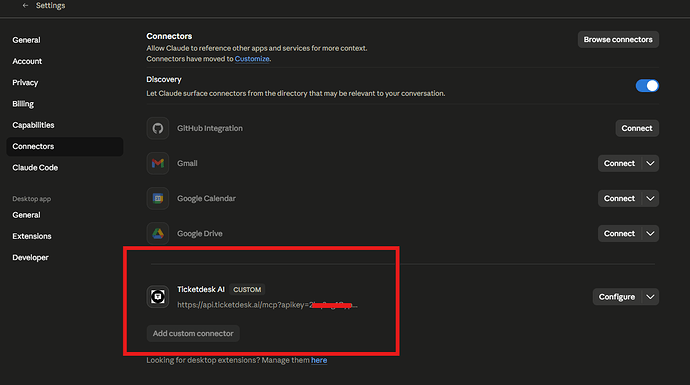
Cursor, VS Code 또는 기타 도구를 사용하는 경우 다음 단계에 따라 구성에 mcpServers을(를) 추가하세요.
-
Claude 데스크톱 구성 파일을 엽니다:
- macOS:
~/Library/Application Support/Claude/claude_desktop_config.json - Windows:
%APPDATA%\Claude\claude_desktop_config.json
- macOS:
-
Ticketdesk MCP 서버 항목을 추가합니다:
{
  "mcpServers": {
    "ticketdesk": {
       "url": "https://api.ticketdesk.ai/mcp?apikey=[YOUR_API_KEY]"
    }
  }
}
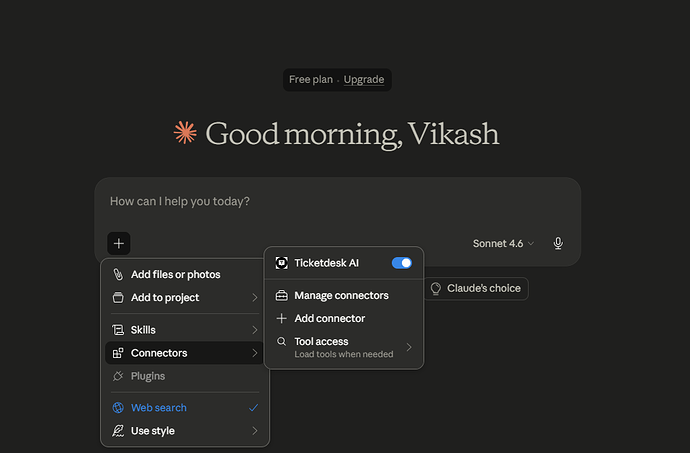
- Claude 데스크톱을 다시 시작합니다. 채팅 입력창에 도구 아이콘이 표시됩니다. 이 아이콘을 클릭하여 Ticketdesk 도구가 로드되었는지 확인하세요.
사용 가능한 도구
티켓 관리
| 도구 | 설명 |
|---|---|
create_ticket | 제목, 요청자 세부 정보, 우선순위, 태그 등으로 새 지원 티켓을 생성합니다. |
get_tickets | 티켓을 나열 및 검색하고, 상태, 우선순위, 담당자, 태그 및 기타 필드로 필터링합니다. |
get_ticket | ID로 단일 티켓을 가져와 모든 필드, 요청자 정보 및 현재 배정 상태를 확인합니다. |
set_ticket_state | 선택적 사유와 함께 티켓을 닫거나 다시 엽니다 (completed, not_planned, duplicate). |
set_ticket_priority | 티켓의 우선순위를 설정합니다: low, medium, high, 또는 urgent |
set_ticket_tags | 티켓의 태그를 교체하거나 삭제합니다. |
assign_ticket | 사용자 ID로 지원 담당자에게 티켓을 배정하거나 배정을 취소합니다. |
set_ticket_inbox | 티켓을 다른 받은 편지함으로 이동합니다 (이메일 답장이 발송되는 주소를 제어합니다). |
티켓 응답 및 활동
| 도구 | 설명 |
|---|---|
get_ticket_activities | 고객 메시지, 상담원 답변, 메모 및 시스템 이벤트 등 전체 대화 스레드를 가져옵니다. |
send_reply | 티켓의 받은 편지함을 통해 외부 이메일을 발송하는 고객 답장을 보냅니다. |
add_note | 티켓에 비공개 내부 메모를 추가합니다. 예: 상담원에게만 표시되고 고객에게는 절대 전송되지 않는 메모입니다. |
프롬프트 예시
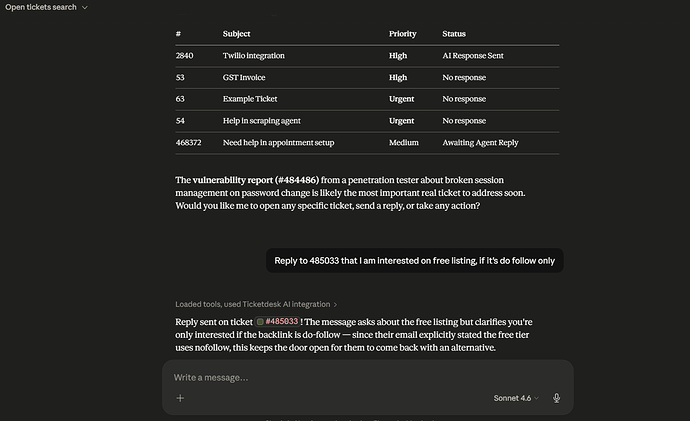
다음 한 줄 프롬프트로 AI 어시스턴트를 시작해 보세요:
티켓 찾기
- "나에게 배정된 모든 열린 티켓을 보여줘"
- "지난 24시간 동안 업데이트되지 않은 긴급 티켓을 나열해 줘"
- "'결제' 태그가 지정된 열린 티켓을 모두 찾아줘"
- "티켓 #1042를 가져와서 문제를 요약해 줘"
고객 응대
- "티켓 #1042의 대화를 읽고 문제를 해결하는 답장 초안을 작성해 줘"
- "티켓 #310에 답장하여 고객에게 환불이 처리되었음을 알려줘"
- "티켓 #77에 답장하여 추가 조사를 위해 주문 번호를 요청해 줘"
내부 메모 및 인계
- "티켓 #1042에 지금까지 시도한 내용을 요약하는 메모를 추가해 줘"
- "티켓 #200에 에스컬레이션 사유를 설명하는 내부 메모를 남겨줘"
- "티켓 #99에 다음 담당자를 위한 인계 메모를 추가해 줘"
티켓 생성
- "John(john@example.com)이 내보내기 기능이 고장 났다고 보고한 티켓을 생성해 줘"
- "support@example.com에서 결제 실패에 관한 새 긴급 티켓을 열어줘"