TechFabric
공식TechFabric가 게시한 Databricks 및 AI 콘텐츠(FAQ가 포함된 블로그 게시물, 서비스 페이지, 사례 연구)를 검색하고 읽습니다. 읽기는 익명으로 가능하며, TechFabric 직원은 Microsoft로 로그인하여 게시물 초안을 작성합니다.
TechFabric MCP(으)로 무엇을 할 수 있나요?
- Databricks 관련 질문에 작동하는 코드로 답변 — 에이전트에게 Databricks 질문을 하면 해당 질문에 답하는 Field Guide 섹션과 인용된 문서 페이지를 받습니다.
- techfabric.com 검색 및 읽기 — 에이전트가 TechFabric의 게시물과 사례 연구를 검색하고 읽도록 하세요. 읽기에는 로그인이 필요하지 않습니다.
- TechFabric 게시물 초안 작성 —
start_post로 게시물을 시작하고, 질문에 답한 뒤, 작성 전에check_outline으로 검토된 개요를 받으세요. - 초안 검증 및 게시 — 에이전트가
check_draft로 저장된 텍스트를 검증하도록 하고, 게시물 이름으로 확인한 후 게시하세요. - 모든 MCP 클라이언트에서 연결 — Claude Code, Codex, Cursor, VS Code, Gemini CLI 또는 다른 클라이언트를 두 원격 Streamable HTTP 서버 중 하나로 지정하세요.
호스팅형 MCP 서버
npx add-mcp 'https://www.techfabric.com/mcp'Claude Code, Codex, Cursor 등에 설치됩니다
문서
TechFabric's MCP servers
Coding agents write Databricks code from training data that's months old. Our Field Guide's MCP server gives Claude Code, Codex, Cursor, VS Code or any MCP client the section that answers the question, with code that runs. The second server, techfabric.com, is where our engineers write from the agent they already use. Both are free.
Connect your agent
Both are remote Streamable HTTP servers: nothing to install, and reading needs no sign-in.
1 · Pick a server

Databricks Field Guide
Databricks answers with working code from our Field Guide, and the docs.databricks.com pages each section cites.
https://databricks.techfabric.com/mcp
- Read-only
- No sign-in
- Free Tools and limits Source on GitHub
techfabric.com
For TechFabric's engineers to write posts and case studies from their agent. Anyone can search and read the site.
https://www.techfabric.com/mcp
2 · Add it to your agent
How to connect Claude Code
Run each command once, in any terminal. Add --scope user to have it in every project.
claude mcp add --transport http techfabric https://www.techfabric.com/mcp
claude mcp add --transport http databricks-field-guide https://databricks.techfabric.com/mcp
How to connect Claude Desktop and claude.ai
- Open Customize, then Connectors, choose Add and then Add custom connector.
- Give it a name and paste the server's URL. Keep the authentication settings Claude detects.
- Choose Add. Repeat for the second server.
On a Team or Enterprise plan, an owner may have to add a custom connector for the organisation first.
How to connect Codex
Codex writes them to ~/.codex/config.toml, which its IDE extension reads too.
codex mcp add techfabric --url https://www.techfabric.com/mcp
codex mcp add databricks-field-guide --url https://databricks.techfabric.com/mcp
techfabric.com offers a sign-in for its author tools, so Codex may start one for techfabric when you add it. Skip it: every read tool works without signing in. To edit the file by hand, add this.
[mcp_servers.techfabric]
url = "https://www.techfabric.com/mcp"

[mcp_servers.databricks-field-guide]
url = "https://databricks.techfabric.com/mcp"
How to connect Cursor
Add this to ~/.cursor/mcp.json for every project, or to .cursor/mcp.json in one project.
{
  "mcpServers": {
    "techfabric": { "url": "https://www.techfabric.com/mcp" },
    "databricks-field-guide": { "url": "https://databricks.techfabric.com/mcp" }
  }
}
How to connect VS Code
Add this to .vscode/mcp.json in the workspace, then start the servers from that file or from the MCP view. The tools are there in Copilot's agent mode.
{
  "servers": {
    "techfabric": { "type": "http", "url": "https://www.techfabric.com/mcp" },
    "databricks-field-guide": { "type": "http", "url": "https://databricks.techfabric.com/mcp" }
  }
}
How to connect Gemini CLI
Keep --transport http, because without it Gemini CLI treats the URL as a local command. --scope user writes to ~/.gemini/settings.json for every project; leave it off to write to the project's .gemini/settings.json.
gemini mcp add --transport http --scope user techfabric https://www.techfabric.com/mcp
gemini mcp add --transport http --scope user databricks-field-guide https://databricks.techfabric.com/mcp
If gemini mcp list shows them as disabled, trust the folder. By hand, the settings file takes this.
{
  "mcpServers": {
    "techfabric": { "type": "http", "url": "https://www.techfabric.com/mcp" },
    "databricks-field-guide": { "type": "http", "url": "https://databricks.techfabric.com/mcp" }
  }
}
How to connect GitHub Copilot CLI
Run each command once. Copilot CLI saves them to ~/.copilot/mcp-config.json, for every project.
copilot mcp add --transport http techfabric https://www.techfabric.com/mcp
copilot mcp add --transport http databricks-field-guide https://databricks.techfabric.com/mcp
How to connect OpenCode
Each command writes to the project's opencode.json, or to the global config with --global.
opencode mcp add techfabric --url https://www.techfabric.com/mcp
opencode mcp add databricks-field-guide --url https://databricks.techfabric.com/mcp
By hand, the config file takes this.
{
  "mcp": {
    "servers": {
      "techfabric": { "type": "remote", "url": "https://www.techfabric.com/mcp" },
      "databricks-field-guide": { "type": "remote", "url": "https://databricks.techfabric.com/mcp" }
    }
  }
}
How to connect other MCP clients
Point the client at the URL with the Streamable HTTP transport and no authentication. A client that only speaks stdio can reach either server through the mcp-remote bridge, with this as its command.
npx mcp-remote https://databricks.techfabric.com/mcp
To try one by hand, a JSON-RPC tools/list POSTed to the URL returns the tools with their full input and output schemas.
TechFabric author? Writing needs a sign-in: set up your AI harness to write for techfabric.com.
For TechFabric authors
Set up your AI harness to write for techfabric.com
Pick the agent you already use and follow its steps, from adding the server to publishing your first post. You need a techfabric.com Microsoft account that is on the blog's author list; reading needs neither.
The Field Guide's same-day news notes are reviewed at a separate endpoint, https://databricks.techfabric.com/mcp/owner, which only the Field Guide's owner can sign in to.
Set up Claude Code
Recommended
One install adds the server, the 13 commands and the techfabric-blog skill, and asks you before every publish.
-
Add the server with the plugin
Run this in any terminal. It adds TechFabric's plugin marketplace from GitHub (Fabric-Pro/techfabric-claude-plugin) and installs the plugin, which carries the server's address, so there is nothing else to add. Inside a Claude Code session,/plugin marketplace add Fabric-Pro/techfabric-claude-pluginand then/plugin install techfabric@techfabricdo the same, and/reload-pluginsturns the plugin on. Without access to GitHub, the second line installs the same plugin from techfabric.com.
Copyclaude plugin marketplace add Fabric-Pro/techfabric-claude-plugin && claude plugin install techfabric@techfabric
Copyclaude plugin marketplace add https://www.techfabric.com/mcp-servers/harness/claude-code/marketplace.json && claude plugin install techfabric@techfabric -
Find the commands
Type/techfabric:to see them: write-post, write-case-study, continue-draft, check, preview, publish, revise-post, status, blog-post-template, case-study-template, linkedin-post, reddit-post and performance. Whatever you type after a command is passed to it. -
Try a first prompt
From the repository you want to write about, run the command with your topic, or ask in your own words.
Copy/techfabric:write-post how we cut our Lakeflow job's cold start
CopyWrite a TechFabric blog post about how we <the problem you solved or the thing you built>. Start with start_post: ask me its questions with your suggested answers from this repo, then show me an outline checked with check_outline and wait for my yes before you write. Ask me for anything you don't know instead of inventing it, and give me the preview link when it's filed. -
Open the preview
Claude Code is a terminal, so it shows the link rather than the page. Every answer about a draft starts with a linePreview:and the link. Open it to read the post as techfabric.com will publish it, with its cover and diagrams. To edit in the browser instead, use the editor link in the email the site sends you. -
Publish once you've read it
Run/techfabric:publishwith the draft's id. Your agent verifies the saved text withcheck_draftfirst, which takes about a minute, and tells you anything still failing. You're then asked to confirm, by the post's name, before anything goes live. Once you say yes, the post is merged and deployed, and your agent can give you the live link. The plugin also asks you to allow everypublish_draftcall, even in auto mode. -
If something goes wrong
The tools are missing or failing: type/mcp, pick techfabric and reconnect. Signed out, or every write asks you to sign in again: your 30 days are up, or your account changed. In/mcp, pick techfabric and choose Re-authenticate, or Clear authentication and sign in again. A command is missing: runclaude plugin marketplace update techfabric, thenclaude plugin update techfabric@techfabric, and restart Claude Code. If the sign-in page refuses you, sign in with your own @techfabric.com account, not a guest account or another organisation's. If it says Microsoft didn't give a name that can go on a byline, ask Preetham Reddy.
Set up Claude Desktop and claude.ai
A custom connector, added once, is there in claude.ai and Claude Desktop alike.
-
Add the server as a custom connector
Open Customize, then Connectors, choose Add and then Add custom connector. Name it techfabric, paste the URL (www.techfabric.com/mcp and techfabric.com/mcp both work), keep the authentication settings Claude detects, and choose Add. On a Team or Enterprise plan, an owner adds it for everyone first, under Organization settings and Connectors, and you find it under Customize and Connectors, marked Custom.
Copyhttps://www.techfabric.com/mcp -
Turn it on in a chat
Nothing to install. In a chat, open the + menu, then Connectors, and make sure techfabric is turned on for that conversation. -
Try a first prompt
Paste this, with your own topic, and attach the notes or code it should draw on.
CopyWrite a TechFabric blog post about how we <the problem you solved or the thing you built>. Start with start_post: ask me its questions with your suggested answers from this repo, then show me an outline checked with check_outline and wait for my yes before you write. Ask me for anything you don't know instead of inventing it, and give me the preview link when it's filed. -
Open the preview
Claude renders MCP Apps, so a draft the server sends as an app opens in the conversation with its checks beside it. Every answer about a draft also starts with a linePreview:and the link, which opens the post as techfabric.com will publish it. -
Publish once you've read it
Ask Claude to publish the draft. Your agent verifies the saved text withcheck_draftfirst, which takes about a minute, and tells you anything still failing. You're then asked to confirm, by the post's name, before anything goes live. Once you say yes, the post is merged and deployed, and your agent can give you the live link. -
If something goes wrong
The tools are missing: check the connector is turned on in the chat's + menu, or open Customize, Connectors and connect it again. Signed out, or every write asks you to sign in again: your 30 days are up, or your account changed. Choose Connect on the connector again. Its sign-in settings can't be edited, so to change them, remove the connector and add it again. If the sign-in page refuses you, sign in with your own @techfabric.com account, not a guest account or another organisation's. If it says Microsoft didn't give a name that can go on a byline, ask Preetham Reddy.
Set up ChatGPT
A custom MCP server, added as a plugin on chatgpt.com.
-
Add the server as a plugin
Go to chatgpt.com/plugins, choose + and then Add custom MCP server. Name it techfabric, paste the URL under Connection, choose OAuth for authentication, then I understand and want to continue and Create as a plugin, and install it. If Add custom MCP server isn't there, ask your workspace's admin.
Copyhttps://www.techfabric.com/mcp -
Add it to a chat
Nothing to install, and ChatGPT has no slash commands for the server. In a new chat, type@and pick techfabric. -
Try a first prompt
Paste this, with your own topic and the notes it should draw on.
CopyWrite a TechFabric blog post about how we <the problem you solved or the thing you built>. Start with start_post: ask me its questions with your suggested answers from this repo, then show me an outline checked with check_outline and wait for my yes before you write. Ask me for anything you don't know instead of inventing it, and give me the preview link when it's filed. -
Open the preview
ChatGPT renders MCP Apps, so a draft the server sends as an app opens in the conversation with its checks beside it. Every answer about a draft also starts with a linePreview:and the link, which opens the post as techfabric.com will publish it. -
Publish once you've read it
Ask ChatGPT to publish the draft. Your agent verifies the saved text withcheck_draftfirst, which takes about a minute, and tells you anything still failing. You're then asked to confirm, by the post's name, before anything goes live. Once you say yes, the post is merged and deployed, and your agent can give you the live link. -
If something goes wrong
A tool the guide names isn't there: ChatGPT keeps the tool list it read when you added the server and doesn't hear when we add a tool. Choose Refresh on it at chatgpt.com/plugins (in developer mode, Refresh tools in the app's settings), then start a new chat and pick techfabric with@again. Signed out, or every write asks you to sign in again: your 30 days are up, or your account changed. Connect the plugin again at chatgpt.com/plugins. If the sign-in page refuses you, sign in with your own @techfabric.com account, not a guest account or another organisation's. If it says Microsoft didn't give a name that can go on a byline, ask Preetham Reddy.
Set up Codex
The CLI, and the IDE extension that reads the same config. The commands come as skills you call by name.
-
Add the server
Run this in any terminal. Codex writes it to~/.codex/config.toml, which the IDE extension reads too.
Copycodex mcp add techfabric --url https://www.techfabric.com/mcp -
Sign in with Microsoft
Runcodex mcp login techfabric. A browser opens on a techfabric.com page that names the app asking and where its access goes. Choose Continue with Microsoft and sign in with your @techfabric.com account. Any TechFabric employee can; you write under your own name. You stay signed in for up to 30 days.
Copycodex mcp login techfabric -
Install the commands
This adds one skill per command in~/.agents/skills. Codex runs one only when you name it: type$techfabric-write-post, or/skillsto see them all.
Copycurl -fsSL https://www.techfabric.com/mcp-servers/harness/install.sh | sh -s -- codex -
Try a first prompt
From the repository you want to write about, startcodexand run the skill with your topic, or ask in your own words.
Copy$techfabric-write-post how we cut our Lakeflow job's cold start
CopyWrite a TechFabric blog post about how we <the problem you solved or the thing you built>. Start with start_post: ask me its questions with your suggested answers from this repo, then show me an outline checked with check_outline and wait for my yes before you write. Ask me for anything you don't know instead of inventing it, and give me the preview link when it's filed. -
Open the preview
The Codex CLI doesn't show MCP Apps yet. Every answer about a draft starts with a linePreview:and the link. Open it to read the post as techfabric.com will publish it, with its cover and diagrams. To edit in the browser instead, use the editor link in the email the site sends you. -
Publish once you've read it
Type$techfabric-publishwith the draft's id. Your agent verifies the saved text withcheck_draftfirst, which takes about a minute, and tells you anything still failing. You're then asked to confirm, by the post's name, before anything goes live. Once you say yes, the post is merged and deployed, and your agent can give you the live link. -
If something goes wrong
The tools are missing: runcodex mcp listto see that techfabric is there and enabled, or/mcpinside Codex, then restart Codex. Signed out, or every write asks you to sign in again: your 30 days are up, or your account changed. Runcodex mcp login techfabricagain. A skill is missing: run the install line again and restart Codex. If the sign-in page refuses you, sign in with your own @techfabric.com account, not a guest account or another organisation's. If it says Microsoft didn't give a name that can go on a byline, ask Preetham Reddy.
Set up Cursor
The server in Cursor's MCP settings, and the commands as skills in the project you write from.
-
Add the server
Add this to~/.cursor/mcp.jsonfor every project, or to.cursor/mcp.jsonin one. Cursor lists the server with its other MCP servers, on its Customize page.
Copy{ "mcpServers": { "techfabric": { "url": "https://www.techfabric.com/mcp" } } } -
Install the commands
Run this in the project you write from. It adds the commands as skills in.cursor/skills, which run only when you type them, and a rule in.cursor/rulesthat points the agent at the server.
Copycurl -fsSL https://www.techfabric.com/mcp-servers/harness/install.sh | sh -s -- cursor -
Try a first prompt
In the agent, type the command with your topic, or ask in your own words.
Copy/techfabric-write-post how we cut our Lakeflow job's cold start
CopyWrite a TechFabric blog post about how we <the problem you solved or the thing you built>. Start with start_post: ask me its questions with your suggested answers from this repo, then show me an outline checked with check_outline and wait for my yes before you write. Ask me for anything you don't know instead of inventing it, and give me the preview link when it's filed. -
Open the preview
Cursor renders MCP Apps, so a draft the server sends as an app opens in the conversation with its checks beside it. Every answer about a draft also starts with a linePreview:and the link, which opens the post as techfabric.com will publish it. -
Publish once you've read it
Type/techfabric-publishwith the draft's id. Your agent verifies the saved text withcheck_draftfirst, which takes about a minute, and tells you anything still failing. You're then asked to confirm, by the post's name, before anything goes live. Once you say yes, the post is merged and deployed, and your agent can give you the live link. -
If something goes wrong
The tools are missing: where Cursor lists its MCP servers, check techfabric is turned on, and turn it off and on again to reconnect. Signed out, or every write asks you to sign in again: your 30 days are up, or your account changed. Sign in to techfabric again where Cursor lists it. A command is missing: run the install line again in the project and reload Cursor. If the sign-in page refuses you, sign in with your own @techfabric.com account, not a guest account or another organisation's. If it says Microsoft didn't give a name that can go on a byline, ask Preetham Reddy.
Set up VS Code with GitHub Copilot
The server in Copilot's agent mode. Its commands are the server's own prompts, so there's nothing else to install.
-
Add the server
Run MCP: Add Server from the Command Palette, choose HTTP (HTTP or Server-Sent Events), paste the URL, name it techfabric and pick where to save it. Or add this to.vscode/mcp.jsonin your workspace.
Copy{ "servers": { "techfabric": { "type": "http", "url": "https://www.techfabric.com/mcp" } } } -
Find the commands
Nothing to install. In Copilot Chat, in agent mode, type/techfabric.to see the commands. VS Code asks for each argument. -
Try a first prompt
Run the command and give it your topic, or ask in your own words.
Copy/techfabric.write-post
CopyWrite a TechFabric blog post about how we <the problem you solved or the thing you built>. Start with start_post: ask me its questions with your suggested answers from this repo, then show me an outline checked with check_outline and wait for my yes before you write. Ask me for anything you don't know instead of inventing it, and give me the preview link when it's filed. -
Open the preview
VS Code renders MCP Apps in chat when the experimentalchat.mcp.apps.enabledsetting is on, so a draft the server sends as an app opens in the conversation with its checks beside it. Every answer about a draft also starts with a linePreview:and the link, which opens the post as techfabric.com will publish it. -
Publish once you've read it
Run/techfabric.publishwith the draft's id. Your agent verifies the saved text withcheck_draftfirst, which takes about a minute, and tells you anything still failing. You're then asked to confirm, by the post's name, before anything goes live. Once you say yes, the post is merged and deployed, and your agent can give you the live link. -
If something goes wrong
The tools are missing: run MCP: List Servers, pick techfabric and restart it. Signed out, or every write asks you to sign in again: your 30 days are up, or your account changed. Restart the server and allow the sign-in again. Manage Trusted MCP Servers, in the Accounts menu, shows which servers may use your sign-in. If the sign-in page refuses you, sign in with your own @techfabric.com account, not a guest account or another organisation's. If it says Microsoft didn't give a name that can go on a byline, ask Preetham Reddy.
Set up Gemini CLI
The server for every project. Its commands are the server's own prompts, as slash commands.
-
Add the server
Run this in any terminal. Keep--transport http: without it Gemini CLI treats the URL as a local command.
Copygemini mcp add --transport http --scope user techfabric https://www.techfabric.com/mcp -
Sign in with Microsoft
Startgeminiand type/mcp auth techfabric. A browser opens on a techfabric.com page that names the app asking and where its access goes. Choose Continue with Microsoft and sign in with your @techfabric.com account. Any TechFabric employee can; you write under your own name. You stay signed in for up to 30 days.
Copy/mcp auth techfabric -
Find the commands
Nothing to install. Type/write-post,/publishand the rest, with arguments by name, such as--topicand--id. -
Try a first prompt
From the repository you want to write about, run the command with your topic, or ask in your own words.
Copy/write-post --topic="how we cut our Lakeflow job's cold start"
CopyWrite a TechFabric blog post about how we <the problem you solved or the thing you built>. Start with start_post: ask me its questions with your suggested answers from this repo, then show me an outline checked with check_outline and wait for my yes before you write. Ask me for anything you don't know instead of inventing it, and give me the preview link when it's filed. -
Open the preview
Gemini CLI is a terminal, so it shows the link rather than the page. Every answer about a draft starts with a linePreview:and the link. Open it to read the post as techfabric.com will publish it, with its cover and diagrams. To edit in the browser instead, use the editor link in the email the site sends you. -
Publish once you've read it
Run/publish --id=<the draft's id>. Your agent verifies the saved text withcheck_draftfirst, which takes about a minute, and tells you anything still failing. You're then asked to confirm, by the post's name, before anything goes live. Once you say yes, the post is merged and deployed, and your agent can give you the live link. -
If something goes wrong
The tools are missing: type/mcp list. If techfabric shows as disabled, run/mcp enable techfabric. If Gemini CLI says the folder isn't trusted, trust the folder you started it in, because it runs no MCP server in an untrusted one. Signed out, or every write asks you to sign in again: your 30 days are up, or your account changed. Type/mcp auth techfabricagain. If the sign-in page refuses you, sign in with your own @techfabric.com account, not a guest account or another organisation's. If it says Microsoft didn't give a name that can go on a byline, ask Preetham Reddy.
Set up Fabric Agents
You paste a line for each step and your Fabric agent sets it up with fabric-cli.
-
Add the server as a source
Paste this into a Fabric Agents session. The agent adds techfabric.com's MCP server as a source named TechFabric, with OAuth sign-in. For a draft every weekday as well, paste the Fabric Agents line under daily drafts on this page instead.
CopyAdd techfabric.com's MCP server to this workspace as a source: follow step 1 only of https://www.techfabric.com/mcp-servers/daily-drafts/fabric-agents.md -
Install the commands
Paste this too. The agent adds a skill per command, each needing the TechFabric source.
CopyAdd the TechFabric commands to this workspace: follow https://www.techfabric.com/mcp-servers/harness/fabric/README.md -
Try a first prompt
Type the command with your topic, or ask in your own words.
Copy@techfabric-write-post how we cut our Lakeflow job's cold start
CopyWrite a TechFabric blog post about how we <the problem you solved or the thing you built>. Start with start_post: ask me its questions with your suggested answers from this repo, then show me an outline checked with check_outline and wait for my yes before you write. Ask me for anything you don't know instead of inventing it, and give me the preview link when it's filed. -
Open the preview
Fabric Agents renders MCP Apps in version 0.15.7 or later, so a draft the server sends as an app opens in the conversation with its checks beside it. Every answer about a draft also starts with a linePreview:and the link, which opens the post as techfabric.com will publish it. -
Publish once you've read it
Type@techfabric-publishwith the draft's id. Your agent verifies the saved text withcheck_draftfirst, which takes about a minute, and tells you anything still failing. You're then asked to confirm, by the post's name, before anything goes live. Once you say yes, the post is merged and deployed, and your agent can give you the live link. None of the commands publishes from an automation. -
If something goes wrong
The tools are missing: ask the agent to runfabric-cli source validate techfabricand authenticate the source again if it fails. Signed out, or every write asks you to sign in again: your 30 days are up, or your account changed. Authenticate the TechFabric source again. A command is missing: paste the commands line from step 3 again. If the sign-in page refuses you, sign in with your own @techfabric.com account, not a guest account or another organisation's. If it says Microsoft didn't give a name that can go on a byline, ask Preetham Reddy.
Client support
Which AI clients work with both servers?
Every night a suite runs the official SDKs, MCP Inspector and stand-ins that send each app's requests, against both servers. Claude Code, Codex and Gemini CLI were also run for real, on the date shown. Apps checked by hand carry the date of that check and say Works only for what was checked; an app nobody has opened yet says Not checked yet. Last nightly run: 26 October 2026.
Client Sign-in (techfabric.com) Tools (both servers) MCP App views
Claude (claude.ai)
Checked by hand. 22 October 2026
Not checked yet
Works
Renders the views
- Checked in a browser: the Field Guide's search, code, chapter, review and cost views rendered, and the techfabric.com draft view showed a draft's status and checks.
- Sign-in from a write was not checked: the connector was already signed in.
- From the Worker's logs, not checked by hand: in Claude Desktop's Cowork mode the tools answered, but across about 40 calls to tools that open the draft view between 21 and 23 Oct 2026, Cowork never read ui://techfabric/draft or any of techfabric.com's other views.
- From the Worker's logs, not checked by hand: Claude Desktop in Chat mode read the draft view on its first call (lint_draft, 22:54 UTC, 23 Oct 2026).
ChatGPT
Checked by hand. 22 October 2026
Not checked yet
Works on the Field Guide; techfabric.com not checked yet
Renders the views on the Field Guide; techfabric.com not checked yet
- Checked with the Field Guide only: its views rendered, one view per turn, and the tool list only updated after clicking Refresh tools.
- techfabric.com was added as a connector, but its tools, draft view and sign-in from a write were not checked.
Cursor
Not checked in the app yet; its stand-in runs nightly. 26 October 2026
Not checked yet
Not checked yet
Not checked yet
- Cursor's documentation says it shows MCP App views.
- The nightly stand-in passes on both servers.
VS Code (GitHub Copilot)
Not checked in the app yet; its stand-in runs nightly. 26 October 2026
Not checked yet
Not checked yet
Not checked yet
- VS Code's documentation says it shows MCP App views.
- The nightly stand-in passes on both servers.
Fabric Agents
Checked by the Fabric Agents team. 22 October 2026
Works
Works
Renders the views
- 16 of 16 checks passed on the dev and desktop paths.
- Views need 0.15.7 or later. Signing in needs 0.15.12 or later, which offers Sign in before the first write and shows the server's own icon and description.
Claude Code
Real CLI 2.1.307 connects and reads; sign-in by stand-in. 22 October 2026
Reaches Microsoft sign-in
Works
Text and the preview link
Codex CLI
Real CLI 0.163.0 connects and reads; sign-in by stand-in. 22 October 2026
Reaches Microsoft sign-in
Works
Text and the preview link
- codex mcp add starts the Microsoft sign-in for techfabric.com straight away. Press Ctrl-C to skip it; reads work without signing in.
Gemini CLI
Real CLI 0.63.0 connects; reads and sign-in by stand-in. 22 October 2026
Reaches Microsoft sign-in
Works
Text and the preview link
- Our test account can no longer run Gemini CLI prompts (Google moved it to Antigravity), so only the connection is checked.
Goose
Stand-in, run nightly. 26 October 2026
Stand-in reaches Microsoft sign-in
Stand-in passes; not checked in the app yet
Should render, not seen yet
TypeScript SDK 1.x
Run nightly. 26 October 2026
Works
Text and the preview link
TypeScript SDK 2.x
Run nightly. 26 October 2026
Works
Text and the preview link
Python SDK 1.x
Run nightly. 26 October 2026
Asks, then needs a reconnect
Works
Text and the preview link
- Python SDK 1.x shows the sign-in request but drops the session. Reconnect after signing in.
Python SDK 2.x
Run nightly. 26 October 2026
Works
Text and the preview link
MCP Inspector (CLI mode)
Run nightly. 26 October 2026
Not checked
Works
Text and the preview link
mcp-remote (stdio bridge)
Run nightly. 26 October 2026
Not checked
Works
Text and the preview link
The Field Guide needs no sign-in in any client. A client that shows tool results as text gets the same answers, with the preview link and the next step first.
Still to check by hand
- Claude: sign in from a write, now that the 22 October 2026 release changed the sign-in and error messages, and check Claude Desktop on its own.
- ChatGPT: the techfabric.com tools, its draft view and sign-in from a write.
- Cursor and VS Code: add both servers, make a read call, sign in from a write and open a view.
- Goose: add both servers, read, sign in and open a draft view. Only its stand-in runs today.
- The Codex desktop app: open a draft view (the CLI is checked; the app renders views by its release notes).
- Microsoft 365 Copilot, Postman and MCPJam: their release notes say they show MCP App views; not checked yet.
- Windsurf, Zed, GitHub Copilot CLI and OpenCode: add both servers and make one read call.
The servers
What does each of TechFabric's MCP servers do?
The Field Guide answers Databricks questions with code, reviews Databricks code and prices a workload; it has 15 read-only tools. techfabric.com has 33: 24 for our authors and nine for anyone. Authors start each post from an interview and an approved outline, then write, check, publish and revise it from their own agent. They can also draft a LinkedIn post about each one and see how it does in search.
Databricks Field Guide MCP server
The Databricks Field Guide is what our engineers know about building, running and paying for Databricks. Ask how to add a Unity Catalog row filter, and the agent gets the section that explains it, the SQL function from that section, and the docs.databricks.com pages the section cites. Databricks' documentation stays the authority on syntax and limits.
15 tools · 12 prompts · six resources
search_guideSearch the guideget_chapterRead a chapterget_code_examplesFind code exampleswhats_newWhat's new in Databrickslist_chaptersList chaptersreview_databricks_codeReview Databricks codeestimate_costEstimate Databricks costexplore_conceptExplore a Databricks conceptquiz_meQuiz me on the guidelearn_pathFollow a Databricks learning pathexam_prepPrepare for a Databricks certificationflashcardsFlashcards from the guidedecideDecide with the guideexplore_diagramPlay a chapter's diagramsvisualizeDraw an answer
Sign-in
None. The server is public and read-only.
Rate limits
60 calls a minute and 300 an hour per IP address.
Freshness
Rebuilt on every deploy of the guide. Every answer carries the commit that built it, each page's last-changed date and how long it may be cached, which is 10 minutes for what's new, 15 for search and an hour for chapters and code.
Protocol
MCP revision 2026-07-28 over Streamable HTTP. Clients still on 2025-11-25 are served on the same URL.
MCP Apps
Interactive views for search results, a chapter, code examples, recent changes, code reviews and cost estimates, served as ui://databricks-field-guide/view. Concept walkthroughs, quizzes, flashcards, exam prep, learning paths, decisions and diagrams open ui://databricks-field-guide/concepts, and a drawn answer opens ui://databricks-field-guide/visualize. A host without MCP Apps gets the same answers as text.
Registry
com.techfabric.databricks/field-guide, version 1.9.1. MCP Registry entry · Glama listing
Source
github.com/Fabric-Pro/databricks-field-guide-mcp
Parameters, return values and resources
search_guideReadSearch the guide
The guide sections that answer a Databricks question. Returns and parameters Returns The chapter sections, margin notes and events that answer a Databricks question, best first, each with a snippet, its URL with the section anchor, and when the page last changed. Parameters query (required); kind: chapter, note, feature or event; limit 1 to 25, default 10get_chapterReadRead a chapter
A chapter or one section as Markdown, code intact. Returns and parameters Returns A chapter or margin note as clean Markdown with its code intact, or one section of it, plus the outline, the code blocks listed separately, the FAQs, the dates and the docs.databricks.com links it cites. Parameters slug (required): a slug such as lakebase, a path or any guide URL; section: an anchor or a headingget_code_examplesReadFind code examples
SQL, Python, CLI and config blocks for a topic. Returns and parameters Returns SQL, Python, CLI and config blocks that match a topic, each with the explanation around it, the section it came from and the docs links that section cites. Parameters topic (required); lang such as sql, python, bash, yaml, json or hcl; chapter: limit the results to one chapter; limit 1 to 25, default 8whats_newReadWhat's new in Databricks
Recent Databricks changes the guide tracks, newest first. Returns and parameters Returns Recent Databricks changes the guide tracks, newest first: margin notes, release-stage changes with links to Databricks' documentation and release notes, and chapters updated. Parameters since (YYYY-MM-DD, default the last 30 days); limit 1 to 200, default 30list_chaptersReadList chapters
The table of contents, with each chapter's main sections. Returns and parameters Returns Every chapter in the guide's order, with its part, summary, dates, URL, Markdown URL and main sections, and the margin notes. Parameters Nonereview_databricks_codeReadReview Databricks code
One SQL, Python or bundle file checked against the guide's rules. Returns and parameters Returns Findings for one SQL, Python or YAML file (a bundle, job, cluster or warehouse config), checked against the rules the guide's chapters state. Each finding gives the line, the reason, the fix, the guide's sentence with its section URL and the docs it cites, and the result lists the sections worth reading. No model is called, so the same file always gets the same findings; your agent decides which ones matter. Parameters code (required, up to 48,000 characters); lang: sql, python or yaml (detected when left out); filenameestimate_costReadEstimate Databricks cost
A monthly range from the prices the guide states, each one sourced. Returns and parameters Returns A workload's monthly cost as a range with its assumptions, from the figures the guide states: list prices per DBU by compute type, Apps and Genie rates, Lakebase's always-on minimum and storage. Every number carries its source sentence, date and pricing page. Where the guide has no figure, such as DBUs an hour for a warehouse size or model serving rates, it says so instead of guessing. Parameters workload (required): jobs, all_purpose, sql_warehouse, apps, genie, lakebase, model_serving or storage; compute, size, dbus_per_hour or dbus_per_month, hours, users, storage_gbexplore_conceptReadExplore a Databricks concept
One concept explained from the guide, with a model to step through. Returns and parameters Returns One Databricks concept (the Delta log, liquid clustering against Z-order, Spark shuffles, Unity Catalog grants, Photon cost, warehouse autoscaling, watermarks, medallion layers, Lakebase branching, serverless against classic, the MLflow lifecycle) explained with the guide's own sentences and their section links, a worked example, and an interactive model, with what the model assumes kept apart from what the guide states. Parameters concept (optional): its id or a plain name; without it, the listquiz_meReadQuiz me on the guide
Five to eight questions from the guide's own text, with answers. Returns and parameters Returns Five to eight multiple-choice questions on a chapter, a section or the whole guide, built from the guide's own tables, FAQs and glossary, each with its answer, the guide's explanation and the section link. Parameters chapter, section (both optional); or exam and domain for practice questions; answers to score a roundlearn_pathReadFollow a Databricks learning path
A route by role, one step at a time, with the reader's own progress. Returns and parameters Returns A curated path: data engineer fundamentals, analytics engineer, ML engineer, platform admin, Snowflake to Databricks, or cost control. Each step is a section to read, a concept to explore or a quiz, with the call that opens it. done is the reader's progress and is not stored. Parameters path (optional): an id or a plain name; done: step numbers or ids already finished. Without a path, the list.exam_prepReadPrepare for a Databricks certification
An exam's domains, the guide's coverage, and practice from the guide's own text. Returns and parameters Returns Every current Databricks Associate and Professional exam: Data Engineer Associate and Professional, Data Analyst Associate, Machine Learning Associate and Professional, Generative AI Engineer Associate, Context Engineer Associate, and Associate Developer for Apache Spark. Each domain has the weight Databricks publishes and how many guide sections bear on it. A domain the guide does not teach is named as a gap. With a domain, practice questions from those sections. Not affiliated with Databricks, and no exam question is reproduced. Parameters exam (optional); domain (optional). Without an exam, the list.flashcardsReadFlashcards from the guide
One card at a time. The back is a sentence the guide states. Returns and parameters Returns A deck for an exam domain or a chapter, from the guide's glossary, FAQs and section leads. Every back is the guide's sentence with its section URL. A domain the guide does not cover says so. Parameters exam and domain, or chapterdecideReadDecide with the guide
A decision walked one question at a time, each answer from the guide. Returns and parameters Returns One of five decisions: which compute, serverless or classic, Lakebase or Delta, Genie or a dashboard, streaming or batch. The questions are ours. Every answer rests on the guide's sentences, with the section to read. Parameters question (optional); choices: the option numbers so far. Without a question, the list.explore_diagramReadPlay a chapter's diagrams
A chapter's diagram, one edge at a time. Returns and parameters Returns A chapter's own Mermaid diagram played edge by edge, each node linked to the section it is about. The text lists the nodes, the edges in order and the source. Parameters chapter (required): a slug, path or URL; section (optional)visualizeReadDraw an answer
The assistant's answer as a card: a comparison, a plan, a chart or a diagram. Returns and parameters Returns An A2UI document checked for structure and drawn as a card. The card says the assistant composed it. sources lists only Field Guide pages the document names. The text renders the whole document. The tool checks structure, not facts. Parameters document (required, A2UI v0.9.1); title (optional); sources: Field Guide URLsfieldguide://llms.txtEvery chapter, note and feature page, one line each.fieldguide://whats-newThe last 30 days of Databricks changes the guide tracks, as JSON. A client on protocol 2026-07-28 can subscribe to it, or to any page, and be notified when a deploy changes it.fieldguide://page/{+path}Any published page as Markdown, for examplefieldguide://page/guide/lakebase.ui://databricks-field-guide/viewSearch results, chapters, code examples, recent changes, code reviews and cost estimates as an interactive page, in a host that renders MCP Apps.ui://databricks-field-guide/conceptsConcept walkthroughs, quizzes with review, flashcards, exam prep, learning paths, decisions and playable diagrams, in a host that renders MCP Apps.ui://databricks-field-guide/visualizevisualize's drawn answer, in a host that renders MCP Apps.
techfabric.com MCP server
Its main use is writing: an engineer's agent drafts a post from the repository and context it already has, runs the site's checks and files it, and once the engineer has read the preview and confirmed, publishes it. The workflow is under writing a post with your own agent.
Its read tools answer only from published, indexable pages, so drafts, previews and anything marked noindex never appear in a result.
33 tools · 18 prompts · 15 resources
searchSearch techfabric.comget_pageRead a pagelist_postsList blog postsget_servicesWhat TechFabric offersexplore_postExplore a postcompare_case_studiesCompare case studiesassess_databricks_readinessDatabricks readiness checkquiz_meQuiz me on a postvisualizeDraw an answerget_briefToday's briefAuthorlint_draftLint a draftAuthorcheck_draftCheck a draftAuthorsubmit_draftSubmit a draftAuthorupdate_draftSave an edit to your draftAuthorlist_draftsYour draftsAuthorget_statusWhere a draft standsAuthorreview_before_publishingReview before publishingAuthorpublish_draftPublish your draftAuthorpreview_draftPreview your draftAuthorrevise_postChange a published postAuthorstart_postStart a post with an interviewAuthorcheck_outlineCheck an outlineAuthorpropose_editsPropose a redlineAuthorapply_editsApply the accepted changesAuthorask_authorAsk you a questionAuthorsocial_post_kitLinkedIn kit for a postAuthorlint_socialLint a LinkedIn postAuthorreddit_post_kitReddit kit for a postAuthorpost_performanceHow a post is doingAuthorsuggest_links_and_topicsSuggest links and topicsAuthorpreview_diagramPreview diagramsAuthorget_brief_poolBrief poolAuthorpropose_briefPropose a briefAuthor
Sign-in
None to read. Any TechFabric employee can use the write tools, signing in with their Microsoft (Office 365) account in the techfabric.com tenant. No other tenant is accepted.
Rate limits
300 anonymous calls per IP address per hour. Signed-in calls are counted per author, at 600 an hour, with at most 20 new check runs, 6 submissions and 30 saves.
Freshness
The index is rebuilt from the site on every deploy. Resources may be cached for an hour, and search results for 15 minutes.
Protocol
MCP revision 2026-07-28 over Streamable HTTP. Clients still on 2025-11-25 are served on the same URL.
MCP Apps
The draft app, ui://techfabric/draft: in a host that renders MCP Apps, seven draft tools show the post as techfabric.com will publish it, with its checks and a Publish button the author presses. Four more views show a post's search numbers (post_performance), its LinkedIn kit and findings (social_post_kit, lint_social), the pages to link (suggest_links_and_topics) and each diagram drawn (preview_diagram). No sign-in: ui://techfabric/explore: explore_post steps through a post's or case study's diagram, each step tied to its section; compare_case_studies sets case studies side by side; assess_databricks_readiness and quiz_me are scored in the view. Without MCP Apps, a client that supports forms asks the quiz_me and assess_databricks_readiness questions as one form each, and every result is complete as text. The five reader prompts (explain-post, compare-case-studies, readiness, quiz, visualize) start the same tools as slash commands: explain-post runs explore_post, readiness runs assess_databricks_readiness and quiz runs quiz_me, and visualize draws an answer from the site's pages.
Registry
com.techfabric/techfabric, version 1.5.0. MCP Registry entry · Glama listing
Source
github.com/Fabric-Pro/techfabric-mcp
Parameters, return values and resources
searchReadSearch techfabric.com
Matching pages, best first. Returns and parameters Returns Blog posts, service and solution pages, case studies, city pages and events that match, best first, each with its title, URL, summary, date, author and type. Parameters query (required); type: post, service, solution, case_study, city, event or page; limit 1 to 25, default 10get_pageReadRead a page
One published page as clean Markdown, with its FAQs. Returns and parameters Returns One published page as clean Markdown, with its title, search title, description, dates, author, tags, its FAQs as question and answer pairs, and its canonical URL. Parameters url_or_slug (required): a full URL, a path such as /services/databricks, or a post's sluglist_postsReadList blog posts
Blog posts, newest first, by tag, author or date. Returns and parameters Returns Blog posts, newest first. Parameters tag, author (a name or a slug), since (YYYY-MM-DD); limit 1 to 100, default 20get_servicesReadWhat TechFabric offers
Every service and product page, with its own summary. Returns and parameters Returns Every service, solution, Databricks, AI, cloud, software, accelerator and product page, with its name, URL, kind and summary exactly as the live page states them. Parameters Noneexplore_postReadExplore a post
A post's or case study's diagram, step by step, each step tied to its section. Returns and parameters Returns A published post or case study as steps: its diagram's nodes in the order the diagram flows, each tied to the section it's about, with that section's opening in the page's own words and a link to it; a page with no diagram steps through its sections. In a host that renders MCP Apps it opens as a view to click through. Parameters post (required): a URL, a slug (case studies as case-studies/<slug>) or a topic; diagram, when the page has more than onecompare_case_studiesReadCompare case studies
Two or three case studies' challenge, strategy, solution and results, side by side. Returns and parameters Returns Two or three published case studies side by side: each one's challenge, strategy, solution and results in its own words, with its client, sector and stack where it states them, and a link to each section. With no arguments, the case studies to choose from. Parameters case_studies (two or three slugs or URLs) or topicassess_databricks_readinessReadDatabricks readiness check
Eight questions, scored at once, with where to start and who to talk to. Returns and parameters Returns Eight questions about a data platform, scored into five areas, with where to start and links to our service pages, posts and Databricks Field Guide chapters, then the contact page on the matching topic. Asked as a form or in its view where the client can; the answers are never stored. Parameters answers (question id to option value; leave out for the questions); contact; formquiz_meReadQuiz me on a post
A post's own FAQs as a multiple-choice quiz, scored. Returns and parameters Returns A multiple-choice quiz from a published post's own FAQs, each question with the post's answer, its explanation and a link, scored in a form or the view where the client can, or from the reader's answers. Parameters post (required): a URL, a slug or a topic; answers (letters, in order) to score; formvisualizeReadDraw an answer
Your assistant's answer drawn as an interactive card, with the techfabric.com pages it used listed as sources. Returns and parameters Returns The assistant's own answer as an interactive card: a comparison, a plan in steps, a calculator whose chart follows its sliders, a quiz, a table or a diagram. The assistant writes it as an A2UI document; the tool checks that it will draw, writes it all out as text, and lists as sources only pages this site publishes. Every card says it was composed by the assistant. Parameters document (required): A2UI v0.9.1 messages, JSONL or a JSON array; title; sources (techfabric.com URLs the answer used)get_briefAuthorToday's brief
Today's topic for a daily draft, held for you for a day. Returns and parameters Returns Today's topic for a daily draft, held for the signed-in author for 24 hours: the angle, the search to answer, sources, pages to link and the brief's id. If today's post has gone to a colleague, the site's pace is used up or nothing fits your work, it says why instead. Parameters Nonelint_draftAuthorLint a draft
The site's rule-based checks, in about a second. Returns and parameters Returns Runs the site's rule-based checks on a post, with no model, and returns each item's status and findings, with the passage each finding is about and what to do. Also returns judge_rubric: the reader, the questions and the thresholds the judged checks use. Files nothing itself. Once it passes, its next_action is submit: file it with submit_draft. Parameters markdown (required, with frontmatter); images (names); kind; sources; slugcheck_draftAuthorCheck a draft
The full checks, our judge included, once per final text. Returns and parameters Returns Runs the editor's full Run checks, judged checks included, and returns each item's status and findings. With a draft's id it checks the saved text, which publish_draft needs. A full run takes about a minute. With first_hand it first asks you to confirm the first-hand claims only you can source, in your client or through your agent; with first_hand_all, every claim the last check listed at once, each still recorded on its own. Your agent can't confirm them for you. Parameters id (a saved draft) or markdown (with frontmatter); images; first_hand or first_hand_all, with first_hand_confirmation; wait_seconds up to 50, default 25submit_draftAuthorSubmit a draft
A draft filed under your byline, with its preview. Returns and parameters Returns Files the post under the signed-in author's byline exactly as written, builds a preview and emails the author the editor link. Returns the draft's id. Parameters title and markdown (required); images; first_hand (asks you to confirm, through check_draft)update_draftAuthorSave an edit to your draft
A new saved version of your draft; the preview rebuilds. Returns and parameters Returns Saves a new version of your own draft in a second or two and returns its text_hash, your next base_hash. The commit and the preview follow in the background. It runs no checks, so lint the text first; check_draft with the id can run on the saved text straight away. A second save within a minute may be asked to retry while the first is committed. The site owner can also edit any draft, keeping its author's byline. Parameters id, markdown and base_hash (base_hash comes from get_status, or from your last save; base_sha also works); first_hand (asks you to confirm, through check_draft)list_draftsAuthorYour drafts
Your drafts, newest first, each with its state and next step. Returns and parameters Returns Your own drafts, posts, case studies and revisions, newest first: each one's title, kind, state (drafted, checks failing, ready to publish, published and the rest), created and updated dates, preview link and the next step. Filters by state, kind and the day it was created, so yesterday's drafts take one call. Reads only. Parameters state; kind; created_after and created_before (a date or a time); limit up to 50; cursor; all (the blog's editor only); stale (the site owner's queue of drafts stuck over two days)get_statusAuthorWhere a draft stands
A draft's state, failing checks, base_sha and links. Returns and parameters Returns One of your own drafts: its state, what's failing, the last check run, its current Markdown, the preview link and, once it's published, the live link. The editor link is only in your email. Parameters id (required)review_before_publishingAuthorReview before publishing
Whether your draft may publish, and the question to ask you. Returns and parameters Returns Checks everything publish_draft needs for one of your own drafts and changes nothing. If it may be published, it returns the question to ask you and a one-time confirmation for this exact saved text and its checks. If not, it says why. The draft app's Publish button uses it. Parameters id (required); override (the failing wording checks to publish past)publish_draftAuthorPublish your draft
Your draft live on techfabric.com, once you confirm. Returns and parameters Returns Publishes your own draft through the editor's own Publish, once check_draft with its id has passed on the saved text. The first call publishes nothing: you're asked to confirm, in your client or by your agent with a one-time confirmation. Then the site merges and deploys it. The site owner can also publish any draft, keeping its author's byline. Parameters id (required); confirmation (only on the second call); override (the failing wording checks to publish past); confirm_viapreview_draftAuthorPreview your draft
Your draft as the site renders it, with its checks. Returns and parameters Returns One of your own drafts as techfabric.com renders it, with its last check run, each check marked as one you may publish past or one that must pass, and whether Publish may run. In a host that renders MCP Apps it opens the draft app; in any host its text starts with the preview link. It changes no text. Parameters id (required)revise_postAuthorChange a published post
A revision of a live post, as a draft with its preview. Returns and parameters Returns Opens a revision of a post that's already live, for its author or the blog's editor: a draft that starts as the live text, with its own preview. The same tools edit, check and publish it, and publishing replaces the live post at the same URL under the same byline. Parameters post (required: the post's URL or slug)start_postAuthorStart a post with an interview
Seven questions about your work, before anything is written. Returns and parameters Returns The interview for a post, a case study or an explainer, tailored to your topic or today's brief: seven questions about your work and its reader. Your agent's suggested answers come pre-filled, in one form if your harness can show one. When you send your answers, it returns them as the draft's sources, word for word. Reads only. Parameters kind (post, case-study or explainer); topic or brief; suggested (your agent's answers); answers (yours)check_outlineAuthorCheck an outline
The title, opening, headings and FAQ checked before any prose. Returns and parameters Returns Checks an outline against the site's title, opening, heading and FAQ rules, and returns it as Markdown for you to approve. An outline is the title options, the opening's two sentences, four to six sections with a line each, the diagram and the FAQ questions, or a case study's four sections. Reads only. Parameters titles and sections (required); opening; diagram; faqs; kind; meta_title; readerpropose_editsAuthorPropose a redline
Suggested changes to your draft, each with a reason, for you to accept or reject. Returns and parameters Returns Your agent's suggested changes to a draft you've submitted, each shown as before and after with a one-line reason and how much of your wording it changes. Nothing is saved until you accept a change, in chat or in a form your app shows. Parameters id, base_hash and changes (required): each change's find, replace and reason; ask (a form for each change)apply_editsAuthorApply the accepted changes
Saves the changes you accepted and checks the draft again. Returns and parameters Returns Saves only the changes you accepted, re-runs the quick checks at once and starts the full check in the background. Parameters id, proposal_id and accept (required); rejectask_authorAuthorAsk you a question
One question only you can answer, kept with the draft as its source. Returns and parameters Returns Asks you one question about your own work (what you measured, who it was for, what happened), in a form if your app can show one. Your answer is kept with the draft as its source, in your words. Parameters id and question (required); passage; answer (your words, when your agent asked in chat)social_post_kitAuthorLinkedIn kit for a post
What your agent needs to draft a LinkedIn post about a published post. Returns and parameters Returns For any published post: its key points and first-hand sentences, its link with the LinkedIn campaign, your role and bio with the house voice notes, the social rules and LinkedIn's lengths. Reads only, calls no model and posts nothing. Parameters post (required: the post's URL or slug)lint_socialAuthorLint a LinkedIn post
The site's writing rules and the social rules on a LinkedIn post. Returns and parameters Returns Each finding in a LinkedIn post's text with what to do instead: the AI tells and slop, claims, an announcement opener, engagement bait, hashtags, its length, what shows before "see more" and whether it links the post. Reads only and posts nothing. Parameters text (required); post (the post it shares, to check its link)reddit_post_kitAuthorReddit kit for a post
What your agent needs to draft a Reddit post or answer in your own voice. Returns and parameters Returns For a subreddit and a published post or your own notes: the material, the subreddit's rules, the frame of a Reddit-native draft, the disclosure line, the optional link with the Reddit campaign, a checklist and the steps to post it yourself. With a draft, the site's writing rules and Reddit's on it. Reads only, calls no model and posts, votes or comments nothing. Parameters subreddit (required); post (URL or slug) or notes; thread (when answering one); draft ({ title, body }, to check it)post_performanceAuthorHow a post is doing
Search Console's numbers for your post, and what to improve. Returns and parameters Returns For one of your own published posts (any post, for the blog's editor): clicks, impressions, CTR and average position over the last 28 days against the 28 before, the searches it shows for, whether Google has indexed it, and what to improve, each with its numbers. Without a post, all of yours. Changes nothing. Parameters post (optional: the post's URL or slug)suggest_links_and_topicsAuthorSuggest links and topics
Pages of ours to link, and unanswered searches that fit your work. Returns and parameters Returns The posts, services, solutions and case studies a draft or post should link, each with the words it shares and the paragraph and phrase to link from, never one it already links. Also the searches that match your own work and that no post of ours answers yet. Reads only. Parameters markdown, id (one of your drafts) or post (one of your published posts); none of them for topics onlypreview_diagramAuthorPreview diagrams
Every mermaid diagram parsed as the site parses it. Returns and parameters Returns For each mermaid block in a post: its lines, its caption, whether the site's mermaid parses it (the error and its line in the post when it doesn't), and what the diagram rules flag. A host that renders MCP Apps draws each one in the site's theme. Reads only. Parameters markdown (required): the whole post, or one mermaid sourceget_brief_poolAuthorBrief pool
Open briefs and unanswered searches, for the site owner's brief automation. Returns and parameters Returns The briefs proposed and not yet taken, the searches competitors rank for or we target that no post or idea covers, the recent posts and the ideas in flight. Site owner only. Reads only. Parameters Nonepropose_briefAuthorPropose a brief
One topic into the pool get_brief offers engineers. Site owner only. Returns and parameters Returns Adds a brief (topic, the evidence for it, angle, sources, the search it answers, optionally the engineer it is for) that get_brief offers first to engineers whose work fits it, or says why not: a post or idea covers it, it is already open, or today's three are used. Drafts nothing. Parameters topic, why, angle (required); sources, target_query, for_authorsite://llms.txtThe site's map for language models.site://page/{+path}Any published page as Markdown, for examplesite://page/services/databricks.site://search?query=The search tool's results as a resource a client can cache, with an optional type.ui://techfabric/exploreThe interactive view explore_post, compare_case_studies, assess_databricks_readiness and quiz_me open in a host that renders MCP Apps: a diagram to step through, case studies side by side, the readiness check and the quiz, scored in the view.ui://techfabric/visualizeThe card visualize draws in a host that renders MCP Apps: the assistant's answer as an interactive card, listing the techfabric.com pages it drew on.techfabric://editorial/rulesThe house writing rules an author's agent reads before it drafts.ui://techfabric/draftThe draft app the draft tools open in, in a host that renders MCP Apps.techfabric://templates/blog-postThe shape of a techfabric.com blog post, the guidance for each part, and a skeleton to fill in.techfabric://templates/case-studyA case study's four sections, its frontmatter, the rules on naming clients and quoting numbers, and a skeleton to fill in.ui://techfabric/socialA post's LinkedIn kit and the findings on a LinkedIn draft, shown by social_post_kit and lint_social in a host that renders MCP Apps.ui://techfabric/linksThe pages to link and the open topics, shown by suggest_links_and_topics in a host that renders MCP Apps.ui://techfabric/diagramsEach diagram drawn in the site's theme, with what the rules flag, shown by preview_diagram in a host that renders MCP Apps.ui://techfabric/performanceA post's clicks, impressions, position and searches in Google, with what to improve, shown by post_performance in a host that renders MCP Apps.techfabric://drafts/{id}Each of the author's own drafts, to read or subscribe to. Signed-in authors only.techfabric://brief/todayThe brief the author holds today, read without claiming one. Signed-in authors only.
Interactive views
What do the cards look like?
In Claude Desktop, use Chat mode. The same cards open on claude.ai, in ChatGPT, in VS Code and in Fabric. A client that shows only text gets the same answer, with the next step written out. The line under each card is what to ask.
Databricks Field Guide
Connect https://databricks.techfabric.com/mcp. No sign-in. The Field Guide is not affiliated with Databricks.
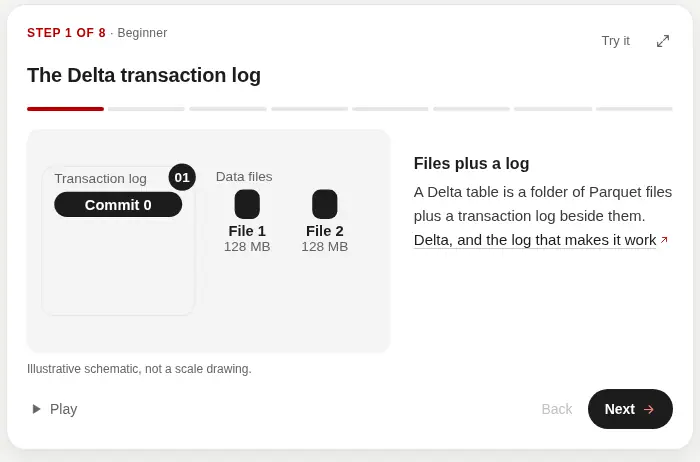
The first step of the Delta transaction log walkthrough: a solid panel for the log, and tiles for the data files.
Concept walkthroughs
One Databricks concept from the Field Guide, a step at a time. Each step carries the guide's sentence and the section it comes from.
"Show me how the Delta transaction log works, step by step."
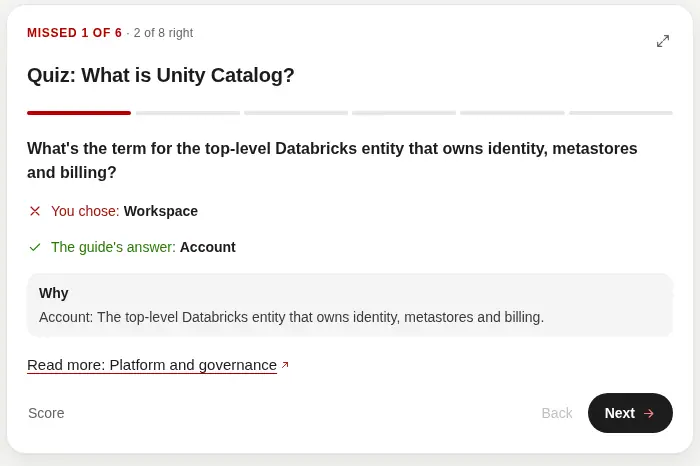
A missed Unity Catalog question: Workspace marked wrong, and Account as the guide's answer.
Quiz with review
Five to eight questions built from the guide's own text. After the score, Explain the ones I missed walks through each one: the pick, the guide's answer, and why.
"Quiz me on Unity Catalog."
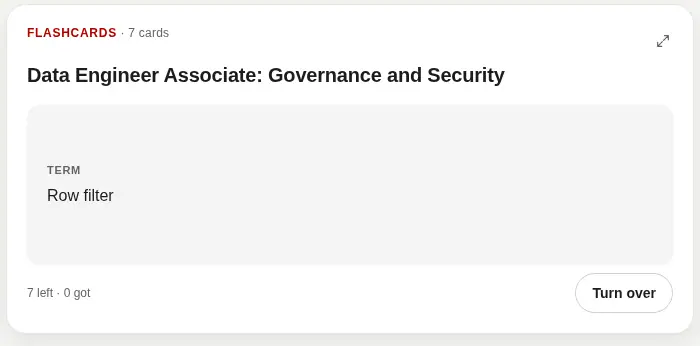
The front of a flashcard for the Data Engineer Associate, asking the term row filter.
Flashcards
One card at a time. The back is a sentence the guide states, with its section. Got it takes the card out. Review again puts it back in the deck.
"Flashcards for the Data Engineer Associate."
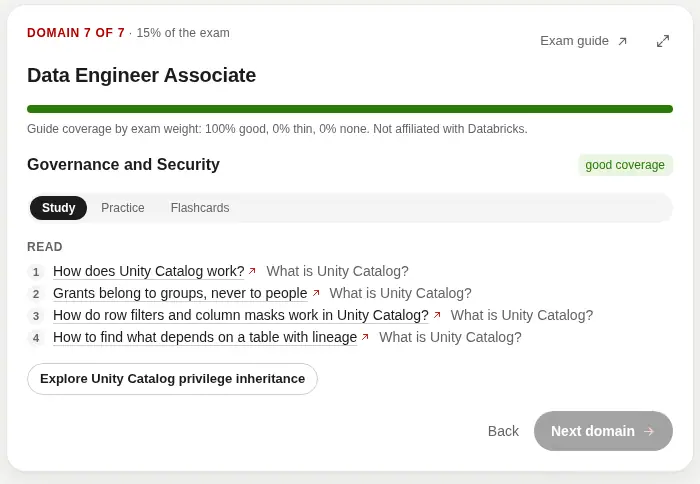
Exam prep for the Data Engineer Associate, on Governance and Security, with the sections to read.
Exam prep
Every current Databricks Associate and Professional exam: Data Engineer Associate and Professional, Data Analyst Associate, Machine Learning Associate and Professional, Generative AI Engineer Associate, Context Engineer Associate, and Associate Developer for Apache Spark. Each domain shows the weight Databricks publishes and how many guide sections bear on it. A domain the guide does not teach is named as a gap. Practice comes from the guide's text. The Field Guide is not affiliated with Databricks, and no exam question is reproduced.
"Help me prepare for the Databricks Data Engineer Associate."
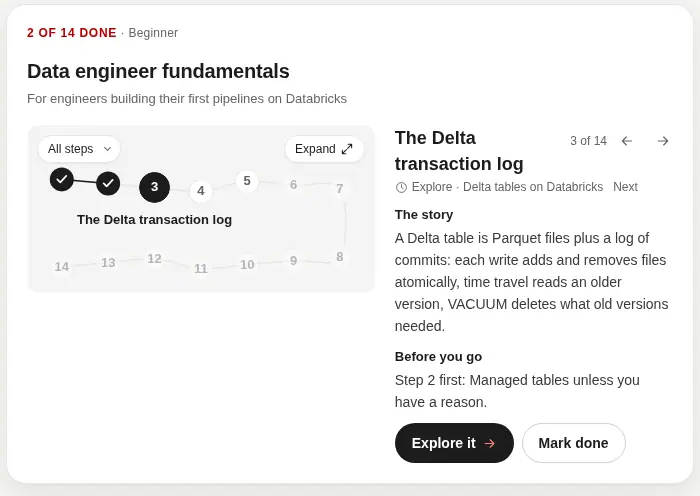
A Databricks data engineer learning path, drawn as a route with the early stops marked done.
Learning paths
A route by role: sections to read, concepts to walk through, and a quiz. The progress is the reader's. Nothing is stored on the server.
"Give me a learning path to become a Databricks data engineer."
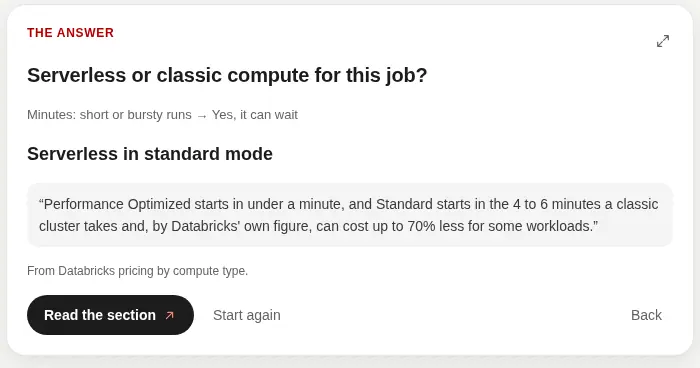
The guide's answer for a job that can wait: serverless in standard mode, quoted from the pricing section.
Decision trees
One question at a time. Every answer is a sentence the guide states, with the section to read.
"Help me decide between serverless and classic compute."
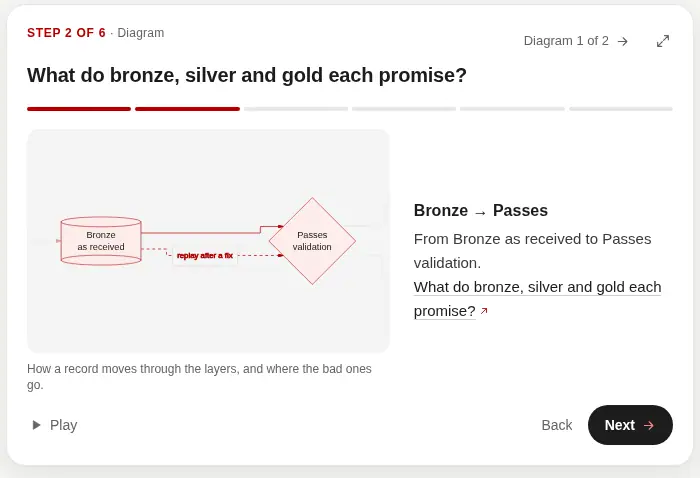
The medallion diagram on the step from bronze as received to passes validation.
Playable diagrams
A chapter's own diagram, one edge at a time. Each node links the section it is about.
"Play the medallion architecture diagram."
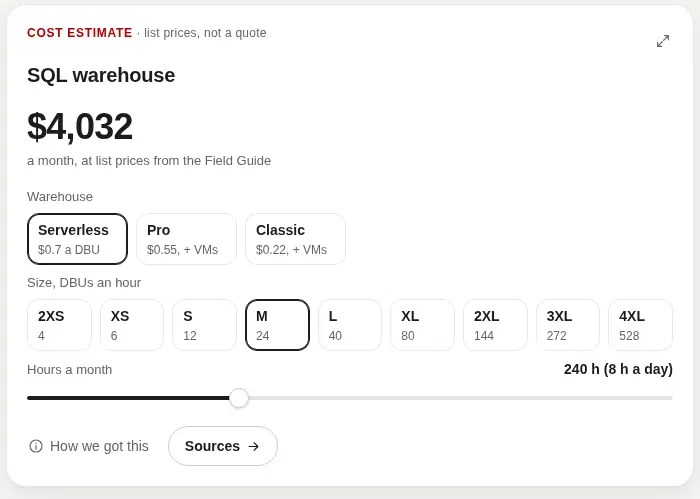
A SQL warehouse estimate at Field Guide list prices, with Medium and eight hours a day selected.
Cost estimate
A monthly figure from the prices the guide states. Every number carries its source sentence and date. Where the guide has no figure, the card says so.
"Estimate what a Medium SQL warehouse costs if it runs eight hours a day."
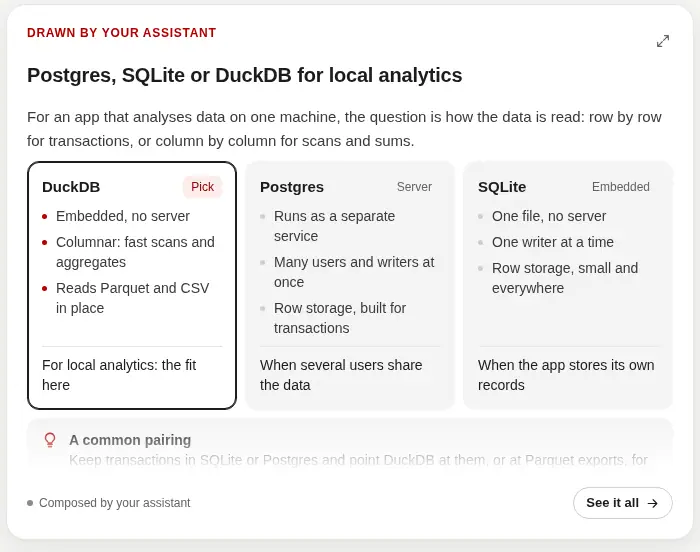
A comparison of Postgres, SQLite and DuckDB, with DuckDB marked as the fit and the card labelled drawn by the assistant.
Visualize
The assistant draws its own answer as a card: a comparison, a plan, a chart that follows a slider, or a diagram. The card says the assistant composed it. Sources are Field Guide pages the document names.
"Compare Postgres, SQLite and DuckDB for a local analytics app."
techfabric.com
Connect https://www.techfabric.com/mcp. Reading these needs no sign-in. Writing a post still needs a TechFabric Microsoft account.
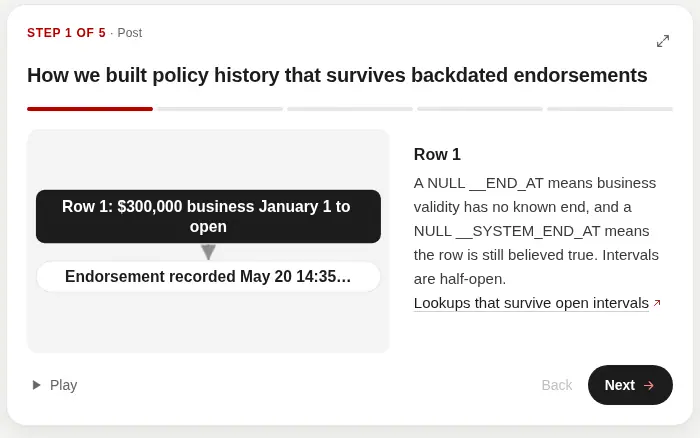
The first step of the bitemporal policy history post, with one row of the diagram and the section it comes from.
Post explainer
A published post or case study, stepped through in the order its diagram flows. Each step is tied to the section it is about, in the page's own words.
"Walk me through the bitemporal policy history post."
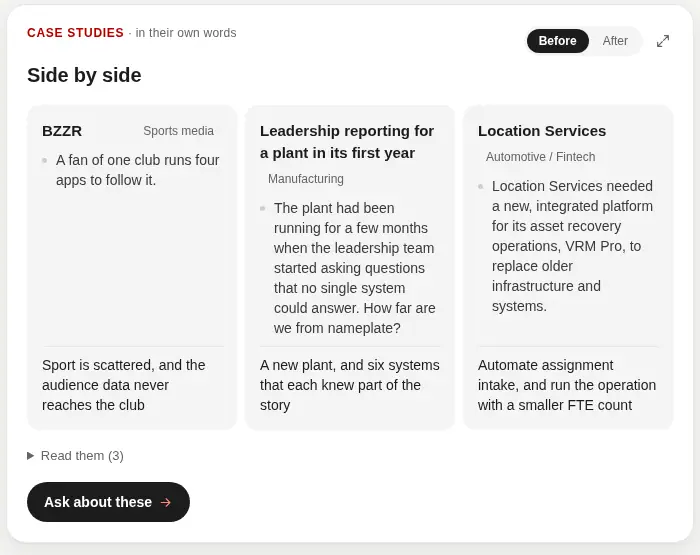
Three published case studies side by side on Before: BZZR, leadership reporting for a plant in its first year, and Location Services.
Case-study compare
Two or three published case studies side by side: challenge, strategy, solution and results, in the words the pages already use.
"Compare your Databricks case studies."
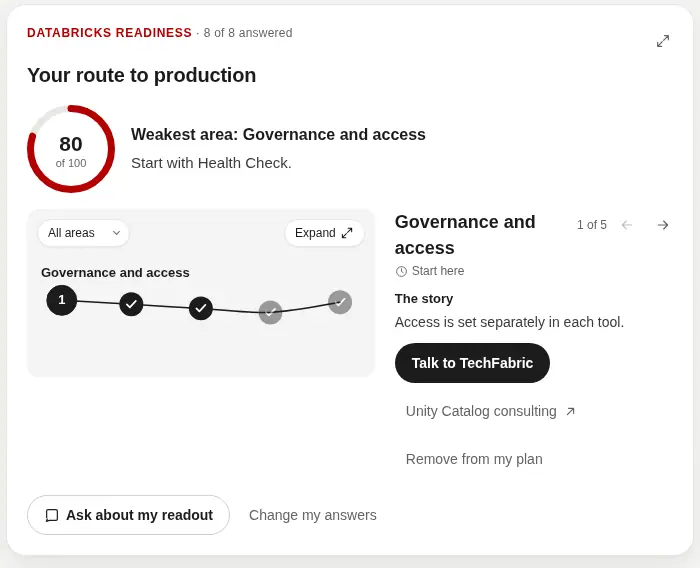
The readiness readout, with governance and access marked as the place to start.
Readiness check
Eight questions about the data platform, scored into a readout: where to start, what to work on first, and links to the pages that match. The answers are not stored.
"How ready are we for Databricks?"
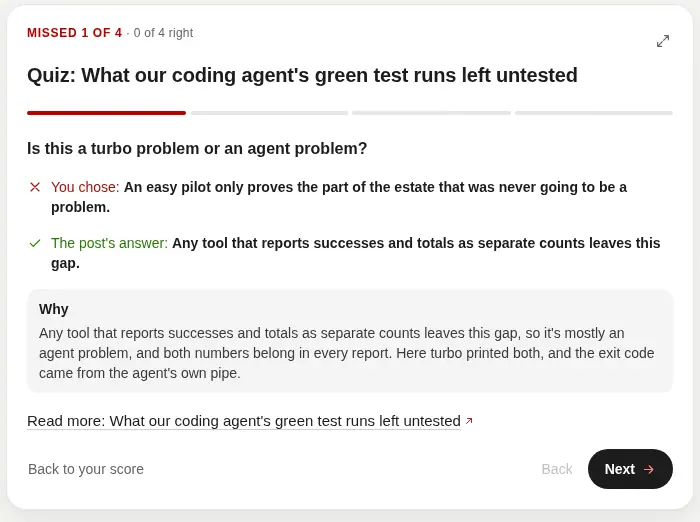
A missed question from the coding-agent test-run post, with the post's answer next to the wrong pick.
Quiz on a post
Questions from a published post's own FAQs. The right option is the post's answer. Explain the ones I missed reviews each miss.
"Quiz me on the post about what a coding agent's green test run left untested."
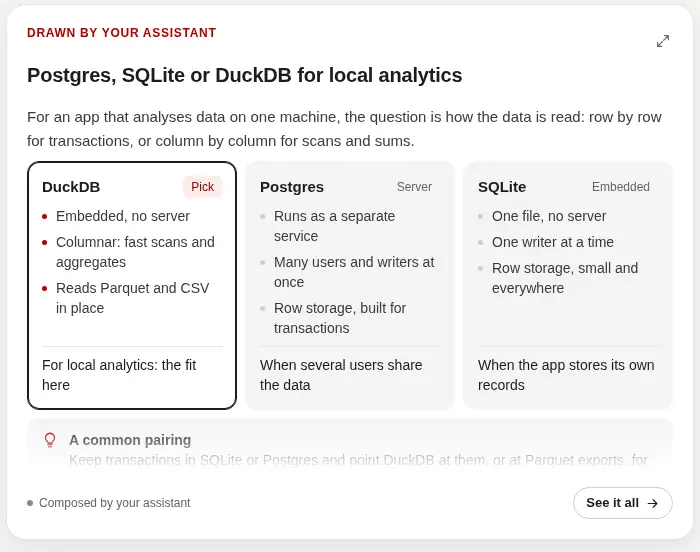
Postgres, SQLite and DuckDB compared on a card labelled drawn by the assistant, with DuckDB marked as the fit.
Visualize
The assistant draws an answer as a card after it has read the site. The card says the assistant composed it. Only pages this site publishes are listed as sources.
"Compare Postgres, SQLite and DuckDB for a local analytics app."
Try it
What can you ask TechFabric's MCP servers?
For techfabric.com, mostly writing; for the Field Guide, anything it covers. Name the server the first time, so the agent knows which tools to reach for; after that it usually picks them on its own.
Prompts for the techfabric.com server
- "Using the techfabric server, get today's brief and draft the post from what we built in this repo, leaving out anything that belongs to a client." Copy
- "Turn what we built in this repo into a case study draft for techfabric.com. Read the techfabric editorial_rules resource first, tell me whether its client register lets us name the client, and ask me for the outcome numbers. Run lint_draft with kind "case-study" and fix what it finds until it passes, then submit it with submit_draft and give me the preview link." Copy
- "Submit this draft to techfabric.com with submit_draft and give me the preview link." Copy
- "Verify my techfabric.com draft with check_draft and its id, and if it passes, publish it with publish_draft once I say yes." Copy
- "Search techfabric.com for what we've already written about Lakebase, so the new post doesn't repeat it." Copy
- "Walk me through the bitemporal policy history post." Copy
- "Compare your Databricks case studies." Copy
- "How ready are we for Databricks?" Copy
- "Quiz me on the post about what a coding agent's green test run left untested." Copy
Prompts for the Databricks Field Guide server
- "Show me how the Delta transaction log works, step by step." Copy
- "Quiz me on Unity Catalog. Then explain the ones I missed." Copy
- "Flashcards for the Data Engineer Associate." Copy
- "Help me prepare for the Databricks Data Engineer Associate." Copy
- "Give me a learning path to become a Databricks data engineer." Copy
- "Help me decide between serverless and classic compute." Copy
- "Play the medallion architecture diagram." Copy
- "Estimate what a Medium SQL warehouse costs if it runs eight hours a day, using the Field Guide's figures." Copy
- "Compare Postgres, SQLite and DuckDB for a local analytics app." Copy
- "Ask the Databricks Field Guide how to give each pull request its own Lakebase branch, and show me the CLI command it uses." Copy
- "What has Databricks changed in the last two weeks, according to the Field Guide?" Copy
- "Find SQL examples of Unity Catalog row filters in the Field Guide, then check the docs.databricks.com links they cite for the current syntax." Copy
- "Review this repo's Databricks bundle and SQL against the Field Guide, file by file, and summarise what it flags with links." Copy
How it works
How does an AI agent use an MCP server?
The Model Context Protocol (MCP) is the open standard AI assistants use to call tools on other systems. An agent connected to an MCP server can look something up halfway through a task and get a structured answer back, with a URL to cite, where it would otherwise guess from its training data or scrape a web page.
Your AI agent
Claude Code, Claude Desktop,
Cursor, VS Code
www.techfabric.com/mcp
search, get_page,
list_posts, get_services
databricks.techfabric.com/mcp
search_guide, get_chapter,
get_code_examples, whats_new,
list_chapters, review_databricks_code,
estimate_cost
Write tools,
TechFabric authors only
Microsoft sign-in,
techfabric.com tenant
A draft under
the author's byline,
published by the author
from the editor
Links to
docs.databricks.com
for exact syntax
and limits
One agent, two servers. Reading either one needs no sign-in; only the techfabric.com write tools ask a TechFabric author to sign in with Microsoft, and nothing on either server publishes.
For TechFabric authors
How to write a TechFabric blog post with your own agent
Your agent writes the post from what you actually did, checks it as it goes, and publishes it once you've read the preview and said yes. Any TechFabric employee can write: sign in with your techfabric.com Microsoft account, and your posts go out under your own name.
1 · Set up the server
Use any MCP client that supports sign-in, such as Claude Code, claude.ai, Codex or your own agent; client support says which we have checked. In Claude Code, add the server once, for all your projects.
claude mcp add --transport http --scope user techfabric https://www.techfabric.com/mcp
Then run /mcp, pick techfabric and choose Authenticate. If you skip that, Claude Code asks you to sign in the first time your agent calls a write tool. In Claude Desktop or claude.ai, add a custom connector named techfabric with the URL above, as in how to connect, and choose Connect. Every other harness, step by step, is in set up your AI harness.
2 · Sign in with Microsoft
Either way a browser opens on a techfabric.com page that names the client asking and where its access goes. Choose Continue with Microsoft and sign in with your @techfabric.com account. Access lasts an hour and renews itself for 30 days.
A prompt to start from
Replace the placeholder with something you built or fixed. The prompt asks the agent to read the rules first.
Read techfabric.com's editorial rules (the techfabric editorial_rules resource), then write a TechFabric blog post about how we <solved this problem or built this thing>. Draft only from what I actually did and what's in this project; never name a client the rules don't approve, and ask me for any fact you don't have instead of inventing it. Run lint_draft and fix every finding until it passes, review the draft against the judge_rubric it returns, then submit it with submit_draft and give me the preview link.
A case study instead of a post
- Send kind "case-study" to
lint_draft,check_draft,submit_draftandupdate_draft. The preview is the case study's page at /case-studies/<slug>, and it's verified and published as a post is:check_draftwith its id, thenpublish_draftonce you confirm, or from the editor link. - Its frontmatter is title, description, sector, stack (a list) and track (ai, migration or other). Add client when the client register approves naming that client in a case study, or when the client agreed to be named (below). Logo, website and metrics are never yours to set.
- Its body opens with four sections, in order: Challenge, Strategy, Solution, Results. Each starts with a bold one-line statement of its argument, then prose. Anything else goes after Results.
- Without an approved client, anonymise it by industry and size ("a regional credit union with about 40 branches") and name no client anywhere. To name a client the register doesn't approve, you need the client's confirmation: say you have it with client_confirmed: true, or with "I have the client's confirmation to name..." on the check's finding in the editor. It's recorded under your name.
- Every number is a client fact. Your agent asks you for the outcome numbers and never invents or estimates one, and the check holds each number to the sources sent with the case study: your notes and the project's own records. A source isn't an approval: a client's metric is published only with an approval recorded in the client register, or when lib/work.ts already carries it, and the check can't confirm that, so you do before you publish.
Turn what we built in this repo into a case study draft for techfabric.com. Read the techfabric editorial_rules resource first, tell me whether its client register lets us name the client, and ask me for the outcome numbers. Run lint_draft with kind "case-study" and fix what it finds until it passes, then submit it with submit_draft and give me the preview link.
Your first post with the write-post command
In Claude Code and Codex, one command takes a post from your topic to the live site. It interviews you first and agrees an outline with you before it writes a word, so the draft starts from what you know. Your own part is installing, answering its questions, saying yes to the outline and reading the preview. The checks run on their own, about a minute a run, and nothing is published until you say yes.
- 1 · a minute or two
Install and sign in
In Claude Code, the plugin line below installs the server and the commands together, in place of the claude mcp add line above. For any other harness, follow set up your AI harness. Sign in with your @techfabric.com Microsoft account when it asks. - 2 · seconds
Run one command
From the repository you want to write about, run `/techfabric:write-post` with your topic (`$techfabric-write-post` in Codex). Add `quick` if you already have the post written, and give your agent the text. In a harness without commands, paste the prompt to start from in step 2 above. - 3 · a few minutes
Answer its questions
start_postgives your agent seven questions about your work and its reader. Your agent fills in what it found in the repository, so you confirm or correct, in one form or a few at a time in chat. Your answers go with the post as sources, so the fact-check can back your first-hand sentences. - 4 · a minute
Say yes to the outline
Your agent proposes title options, the opening, four to six sections, the diagram and the FAQ questions, andcheck_outlineholds them to the site's title, opening and heading rules. It writes nothing until you say yes, so the shape is settled before any prose is written. - 5 · a few minutes, on its own
It drafts and files the post
Your agent writes the post section by section from your answers and the outline, runslint_draftand rewrites each flagged passage until every rule-based check passes, and reviews it against the judge's rubric. Thensubmit_draftfiles it under your byline, and you get the preview link and the preview by email. - 6 · about a minute a run, on its own
It verifies the draft
check_draftruns the judge, the slop classifier and the fact-check on the saved text. If something fails, your agent rewrites, saves and checks again, and asks you for any fact it needs rather than guessing. After six rounds it stops and shows you what's left. - 7 · a few minutes
Read the preview and say yes
Your agent shows you the preview link, then asks you "Publish '<title>' to techfabric.com now?" Only your yes publishes it. Once the deploy finishes, your agent gives you the live link.
claude plugin marketplace add Fabric-Pro/techfabric-claude-plugin && claude plugin install techfabric@techfabric
/techfabric:write-post <what you built or fixed>
The workflow, step by step
- Step 1
Read the editorial rules
Your agent reads theeditorial_rulesresource (techfabric://editorial/rules). It starts with client confidentiality, which decides what the post may say, then gives the frontmatter, this workflow and the house writing rules. - Step 2
Answer a short interview
Before anything is written, your agent callsstart_post: seven questions about your work and its reader, tailored to your topic or today's brief. It fills in what it found in the repository, so you confirm or correct. If your harness can show a form, you answer in one; otherwise your agent asks in chat. Your answers, word for word, become the draft's sources, so the fact-check has less to ask you later. - Step 3
Agree the outline
Your agent proposes title options, the opening's first two sentences, four to six sections with a line each, the diagram and the FAQ questions.check_outlineholds them to the title, opening, heading and FAQ rules, and your agent writes no prose until you say yes. Already written? Say "quick" and give your agent the text: it becomes the material and the sources. - Step 4
Draft from your own work
Your agent drafts the post section by section, frontmatter and all, from your answers, the outline you approved and the repository you're in. The frontmatter needs a title and a description at least, orlint_draft,check_draft,submit_draftandupdate_draftrefuse it. - Step 5
Lint it until it passes
Your agent runslint_drafton the whole post. It runs the site's rule-based checks on the text itself: the slop rules, claims, known errors, the title and description, the opening, the ending, the FAQ, the diagram and the images. No model reads it, so it answers in about a second. Its rewrite_plan lists each passage with what to write instead, and its next_action says the one next step, so the agent rewrites and lints again until it passes. - Step 6
Review it against the judge's rubric
lint_draftalso returnsjudge_rubric: the reader the post is judged as, with what they already know and what they're trying to fix, each question our judge will ask with its threshold, the first screen the buyer test reads, and the sentences the fact-check will want a source for most: our own claims that carry a number. Your agent reads the draft as that reader, answers each question as that reader would, and revises until every answer clears. - Step 7
Submit it under your byline
Oncelint_draftpasses, your agent files it withsubmit_draft, under your own byline exactly as written: the site sets the author, today's date and draft: true, renders the diagrams, builds the branded preview and emails it to you. It stays private until you publish. Your agent shows you the preview link after every submit and every update. From here every answer carries next_action, the one next step, andget_statusgives it for any draft at any time. - Step 8
Revise with update_draft
For revisions your agent lints the new text with the draft's id, then callsupdate_draftwith the id, the whole new post and base_hash: the hash of the version it edited, whichget_statusandupdate_draftreturn. A save returns in seconds and runs no checks; the preview rebuilds in the background.update_draftis refused if the draft has changed since that base_hash, or while it's open in the browser editor. - Step 9
Verify the saved text once
Your agent callscheck_draftwith the draft's id: the editor's full Run checks on exactly the saved text, with the judge, the slop classifier and the blog writer's fact-check, in about a minute. When something fails, its rewrite_plan and next_action say what to rewrite. Your agent rewrites, lints the edit with the id, saves withupdate_draftand verifies again, for up to six rounds. Then it stops and shows you what's left. - Step 10
Publish once you confirm
Your agent callspublish_draftwith the id, and the first call publishes nothing. Your client asks you, naming the post, or your agent gets a one-time confirmation and sends it back only after you say yes. If your client shows the draft card, you answer its question once, then your client asks you to allow the publish. The post then goes through the editor's own Publish and deploy; a failure brings the draft back.
What our side does and doesn't do
Your text is the draft. Our blog writer doesn't redraft it, but its fact-checker reads it: check_draft checks every claim against the pages your post links, what you told your agent, your own posts and the approved client facts. Each flagged sentence comes back with what to write instead. An unsourced client result, metric or quote holds the post for everyone.
Your agent can't publish past any fact-check finding. A claim resting on a page the checker couldn't read (a fetch error, a blocked or JavaScript-only page, a timeout) isn't one: it's listed as not verified, with the page, rather than called wrong.
A first-hand claim only you can source (what you measured, how our product works, what a client told you, what our customers ask) stops holding the post once you confirm it yourself. You confirm it in your client when it asks you, by answering yes to the question your agent relays, or with the editor's "I confirm this first-hand". Your agent can't confirm one for you.
Both kinds are listed when you publish. A client's results still need the client's confirmation, and the claims and known-errors checks always have to pass.
If only wording and style checks fail, you can publish anyway from the editor, and the choice is recorded. publish_draft can name some of those checks too, but never the fact-check, the slop and machine-writing checks or the opening: your agent fixes those until they pass. Checks that keep the page working (build, images, diagrams, links, placeholders) and the rules on claims, our own spend and secrets always have to pass.
Keep your edits in your agent and update_draft unless you want the writer involved. Replying to the preview email is different, because the reply goes to our blog writer. If the writer then needs a fact only you have, get_status asks you for it, or, in a client that supports MCP tasks, the open task does.
Rules to know
- No client names, data, metrics, schemas, incidents or code unless the client is approved for publication, and then only as far as the approval goes. The editorial rules list who's approved. A client's name, and only the name, may also go in when the client agreed and you say so (client_confirmed). When in doubt, generalise it or leave it out.
- First-hand claims must be true. Write "we" only for what we did, and never let the agent invent a number, a result, a client or a quote.
See it in your harness
- In a host that renders MCP Apps, the draft tools,
check_draftamong them, open the post or case study in the conversation as techfabric.com will show it, with its cover, diagrams and FAQ. To see it again, ask your agent to show the preview here: that runs preview_draft. lint_draftopens the post there too, before it's filed, with its findings and a **File draft** button that files it under your byline once your client asks you. Publish appears only after that.- Beside it are the checks. Each shows its finding, the passage it's about, and whether you may publish past it or it has to pass.
- You can run the checks again from there. **Ask the agent to fix this** hands a finding back to your agent, which edits and saves the draft.
- You can make small changes yourself in the **Edit** tab, without spending your agent's time: click a paragraph, heading, list or FAQ answer and change its Markdown, or change the title and description. **Save** saves the draft and lints it, with each finding beside its passage. If the draft changed since you opened it, your edits are carried onto the newer version, or kept aside where you both changed the same passage, and the newer version is never overwritten. In a client that can't save from the app, **Send my edits to the agent** passes your changes to your agent to save.
- **Publish** works once the checks pass on the saved text, and asks you to confirm first. When only wording checks fail, **Publish anyway** lists them before you confirm. The editor link in your email works too, and the app never shows it.
- In Claude Desktop, use a Chat conversation: our logs show Chat loading the draft app, and Cowork never loading it (21 to 23 October 2026). In Cowork you get the tools' answers and the preview link.
Hosts that support MCP Apps, per the official MCP client matrix and each host's release notes in October 2026: Claude (claude.ai and Claude Desktop), ChatGPT, VS Code with GitHub Copilot, Microsoft 365 Copilot, Cursor, Goose, the Codex desktop app, Fabric Agents 0.15.7 or later, Postman and MCPJam. In Claude Code and the Codex CLI, the answers come back as text, starting with the preview link.
Diagrams and links while drafting
preview_diagramchecks every mermaid diagram in the draft the way the site will. For each one it gives the lines it sits on, its caption, whether the site's mermaid parses it and, if not, the error and the line in your post it points to. It also flags a caption that doesn't say what the diagram shows, any label stating a fact the section's text doesn't, and a block the site won't draw because it isn't fenced as ```mermaid... ```. In a host that renders MCP Apps it draws each diagram in the site's theme and font.suggest_links_and_topicslists the pages of ours a draft should link: posts, services, solutions and case studies that share its subject, with the words they share and the paragraph and phrase to link from. It leaves out the post itself and anything already linked. It also lists searches that share words with your own posts and expertise and that no post of ours answers yet: ones competitors rank for, and ones we target. Send the draft's text, its id, or one of your published posts.- Both only read and change nothing; each allows 120 calls an hour. Your agent fixes what they report, for a few rounds at most, links what helps the reader, then runs
lint_draft.
Change a published post
- Your agent calls
revise_postwith the post's URL. Only the post's author (the engineer its byline names) or the blog's editor can open one. It opens a revision whose first draft is the live text, on its own branch with its own preview, and emails you the preview and the editor link. Asking again for the same post returns the revision that's already open. - From there it's a draft like any other.
get_statuswith the revision's id gives the markdown and base_hash, your agent edits and runslint_draftwith the id and the edit, thenupdate_draft, thencheck_draftwith the id verifies the saved text, andpublish_draftpublishes once you confirm. The editor link from the email works the same way. - Publishing replaces the live post at the same URL. The byline stays, and a save or publish that changes it is refused. A title change keeps the URL; changing a live URL needs a redirect, so ask the blog's editor. The original publish date stays, and the page shows "Updated" with the day. The sitemap's last-modified time moves and the deploy submits the URL to IndexNow, so search engines can see the post changed.
- A one-word fix still has to pass the checks that keep the page working and the rules on claims, our own spend and secrets. If only wording and style checks fail, you can publish anyway, as for a new post.
- If someone changes the live post while your revision is open, publishing stops instead of overwriting it. The live post's changes come into your draft along with yours, and wherever you both changed the same passage, the live wording stays and yours is listed on the draft. Read it, save, check again, then publish. Discarding a revision, from the link in its email, leaves the live post as it is.
- Without an agent, ask for a link at https://www.techfabric.com/api/ideas/revise. If your address may edit the post, it gets an "Edit this post" link that opens the same revision.
Change my published post at <its URL on techfabric.com>: <what to change>. Open it with the techfabric revise_post tool, edit the markdown get_status returns, run lint_draft with the id and my edit until it passes, save it with update_draft, verify it with check_draft and the id, then ask me before publish_draft.
Start from a template
- Start from a template when you'd rather fill in a shape than start from a blank page. The blog post template and the case study template give the frontmatter, what goes in each part and a skeleton, each part held to the same rules the checks read.
- Your agent reads them as the resources
techfabric://templates/blog-postandtechfabric://templates/case-study, or you start one with the blog-post-template or case-study-template command. The write-post and write-case-study commands use them too. - Every gap in the skeleton reads {{fill:...}}.
lint_draftfails a draft with one left in, so nothing goes out half filled. Your agent fills each one from your own work and asks you for what it doesn't know.
Post or answer on Reddit
- For now, only the TechFabric admin posts on Reddit, while they learn each subreddit's rules. You can still run the reddit-post command and send the draft to the TechFabric admin as notes; the points below are how it works once posting opens up.
- Reddit is where Databricks and data engineers ask each other what broke. Answer there as yourself: run the reddit-post command with the subreddit (r/databricks, r/dataengineering, r/MicrosoftFabric or r/AZURE) and a published post of ours, your own notes, or the thread you're answering.
- Your agent asks you for the problem you had, what you tried, what worked and your numbers. Only you know those, and the post is built on them. It drafts in the first person singular, with a title that is a plain question or a plain finding.
reddit_post_kitlints the draft until it passes: the site's writing rules, plus Reddit's. It also returns a summary of the subreddit's rules. Rules change, so read the subreddit's own rules page on the day you post.- Every post and every comment carries one line: "I work at TechFabric, a Databricks partner." r/databricks wants the Brand Affiliate flair on any post that links us.
- Give about nine answers with no link of ours for every one with a link. Put the whole answer in the post, so someone who never clicks still has it. Add our article's link only as the last line, and only when it holds detail the post can't, such as the full config or the diagram.
- In r/dataengineering, never link us. Its once-a-month self-promotion limit covers every TechFabric account together, and nobody tracks that slot yet. It also bans AI-generated and heavily AI-assisted text, with a permanent ban: treat the agent's draft as notes and write the post yourself.
- In r/MicrosoftFabric, post only once you already answer other people's questions there. It treats self-promotion without that as spam and bans promotional content, so a link of ours is further reading at most.
- You post it yourself, by hand, from your own Reddit account, and you answer the replies. No agent or script posts, votes or comments on Reddit, and nobody asks colleagues to upvote.
After it's live
- Ask your agent how a post is doing, or run the performance command.
post_performancereads Google Search Console for one of your own posts: clicks, impressions, CTR and average position over the last 28 days against the 28 before, the searches it shows for, and whether Google has indexed it. It counts searches from the US only, so its totals are lower than Search Console's default view, and it's cached for six hours. Preetham Reddy, the blog's editor, can read any post; nobody else can read yours. - It also says what to improve, each item with the numbers behind it. A post shown at least 100 times near the top but clicked under half as often as a result there usually is needs a title and description that name what people search for. A search it ranks 4th to 20th for needs a section that answers it outright. A post that isn't indexed needs links from your related posts, and one that's indexed but shown for no searches needs those links and a title that names what people search for. A post whose clicks fell by 40% or more gets the searches it lost. Your agent proposes the change and makes it only once you agree, as a revision (
revise_post) that goes through the same checks. - Subscribe to a draft's resource (
techfabric://drafts/{id}) and your client hears when its checks or its fact-check finish, a reviewer comments on its email thread, it's published, and Google indexes it. In a host that renders MCP Apps, the draft card shows the reviewer's comments and whether Google has indexed the live post. You still get the emails: the preview, the live post, and one more when Google has indexed a new post.
Troubleshooting
Sign-in refused
The sign-in page says why. If it says Microsoft didn't give a name that can go on a byline, ask Preetham Reddy to set yours. If it says only TechFabric's Microsoft accounts or only @techfabric.com accounts can sign in, or that guest accounts can't, you signed in with another Microsoft account; sign in again with your own @techfabric.com one. If it says the app can't connect, the client asked to send its sign-in somewhere MCP doesn't allow (plain http to another computer); update the client.
A check keeps failing
Have your agent run lint_draft on the text: each finding names its passage and what to do. A judged check (the reader test, helpful content) that fails in check_draft comes with its scores; have the agent revise against judge_rubric, call update_draft, and verify again. The editor link from your email shows the same checklist.
Too many calls
Signed in, the limits per hour are 600 calls, 240 lints, 20 new check runs, 6 submissions, 6 revisions opened, 30 saves and 10 publishes. Checking text that was already checked doesn't count as a new run.
Anything else
Ask Preetham Reddy, who runs the blog.
For TechFabric authors
Commands for writing and publishing from your agent
You don't have to remember the tool order. The server comes with 13 commands, and each one gives your agent the exact steps and points it at the house rules. Most agents show them as slash commands; for the ones that don't, we ship the same commands in their own format.
write-postWrite and publish a techfabric.com blog post under your byline, from today's brief or a topic of your own. Your agent interviews you first (about seven questions, its suggested answers filled in), agrees an outline with you, then drafts, lints, files and verifies it until every check passes, and publishes it only once you say yes.write-case-studyWrite and publish a techfabric.com case study about a project you worked on. Your agent interviews you first (the outcome numbers and their sources, and whether the client may be named), agrees the four sections with you, then drafts and verifies it, and publishes only once you say yes.continue-draftPick up one of your drafts where it stands: your agent reads where the draft stands and takes each next step through the checks, and publishes only once you say yes.checkRun techfabric.com's checks on a draft and explain each finding in plain words, with the fix your agent proposes. Nothing changes until you agree.previewShow a draft as techfabric.com will publish it: the preview link, or the draft app in a host that renders MCP Apps.publishPublish one of your drafts to techfabric.com. Your agent checks it, tells you what still fails, and publishes only after you say yes.revise-postChange one of your published posts, or one of your drafts: apply a reviewer's feedback or your own change, to one section or the whole text, check it again and save it, keeping your first-hand facts as they are. A live post changes only when you publish the revision.statusList your drafts and where each one stands, or one draft in detail: what's failing, its preview, and what to do next.blog-post-templateStart a techfabric.com blog post from the ready-made template: the shape the checks hold it to, what goes in each part, and a skeleton your agent fills in from your own work.case-study-templateStart a techfabric.com case study from the ready-made template: the four sections, the card's frontmatter, the client and number rules, and a skeleton your agent fills in from the project.linkedin-postDraft a LinkedIn post about a published techfabric.com post, in your voice, checked against the site's writing rules. You post it yourself: nothing is posted for you.reddit-postDraft a Reddit post, or an answer to a thread, in your own voice, from a published techfabric.com post or your own notes: the real problem, what you tried, what worked, your numbers, the one-line disclosure, and the link only if it adds depth. Checked against the subreddit's rules and the site's writing rules. You post it yourself: nothing is posted, voted or commented for you.performanceHow one of your published posts is doing in Google: clicks, impressions, CTR and position against the month before, the searches it shows for, whether it's indexed, and what to improve. Leave the post out for all of yours.
New to the server? Set up your AI harness first, from adding the server to signing in. publish always asks you first, and none of them publishes in a scheduled run. You can also attach today's brief (techfabric://brief/today) or one of your drafts (techfabric://drafts/<id>) to a message, in an agent that lets you attach resources.
The commands in your agent
Claude Code
A plugin: the server, the commands and the techfabric-blog skill in one install.
claude plugin marketplace add Fabric-Pro/techfabric-claude-plugin && claude plugin install techfabric@techfabric
Then run /mcp, pick techfabric, choose Authenticate and sign in. Type /techfabric: to see the commands. Everything after a command is passed to it, so /techfabric:write-post how we cut Lakeflow cold starts works as written. Before every publish_draft, the plugin asks you to allow it, even in auto mode. Without the plugin, the server's own prompts show up as /techfabric:write-post (MCP) and so on, but Claude Code splits their arguments at each space.
The plugin is published on GitHub, at Fabric-Pro/techfabric-claude-plugin. If git isn't installed, add it from techfabric.com instead:
claude plugin marketplace add https://www.techfabric.com/mcp-servers/harness/claude-code/marketplace.json && claude plugin install techfabric@techfabric
For example
/techfabric:write-post today's brief
Codex
Type $techfabric-write-post and the rest: one skill per command, run only when you name it.
curl -fsSL https://www.techfabric.com/mcp-servers/harness/install.sh | sh -s -- codex
They go in ~/.agents/skills, one skill per command, and Codex runs them only when you name one: type $techfabric-write-post, or /skills to see them all. The server itself is added as in how to connect.
For example
$techfabric-write-post today's brief
Cursor
Skills you run as slash commands, and one rule, in the project you write from.
curl -fsSL https://www.techfabric.com/mcp-servers/harness/install.sh | sh -s -- cursor
Run it in the project you write from. It adds the commands as skills in .cursor/skills, which run only when you type them, and a rule in .cursor/rules that points the agent at the server.
For example
/techfabric-write-post today's brief
VS Code
The server's prompts, in Copilot Chat. Nothing to install beyond the server.
Type /techfabric.write-post in Copilot Chat. VS Code asks for each argument and suggests values, such as your own draft ids once you're signed in.
For example
/techfabric.write-post
Gemini CLI
The server's prompts, as slash commands with named arguments.
Type /write-post --topic="today's brief". The arguments are --topic, --project, --client, --mode, --id and --feedback, as each command takes them.
For example
/write-post --topic="today's brief"
Fabric Agents
Type @techfabric-write-post and the rest, in a workspace with techfabric.com's MCP server added as a source.
Add the TechFabric commands to this workspace: follow https://www.techfabric.com/mcp-servers/harness/fabric/README.md
The agent adds a skill per command. Then type @techfabric-write-post. None of them belongs in an automation: the daily run uses the techfabric-blog skill, which never publishes.
For example
@techfabric-write-post today's brief
For TechFabric authors
Daily drafts from your coding agent
Your agent can start a post for you every weekday at 9am. The server picks one topic a day from the news and the searches we want to answer, matches it to what you write about and holds it for you for a day. Your agent drafts it from your repositories and leaves you questions for the first-hand part. You add that, read it and decide whether it goes out.
- Step 1
Take today's brief
At 9am on weekdays your scheduler starts your agent with the techfabric-blog skill. The agent callsget_brief, which picks today's topic and holds it for you for 24 hours: a news story from the last two days, or a search we don't answer yet that matches your work. If today's post has gone to a colleague, the pace of one automated post a day and three a week is used up, or nothing fits, it says why and stops. - Step 2
Draft from your own work
The agent reads theeditorial_rulesresource, then callsstart_postfor the brief's questions and fills in what it finds in the repository the run starts in. In a session with you, it asks you to confirm or correct each answer, checks an outline withcheck_outlineand shows it to you before drafting. On an unattended run it writes in TechFabric's "we'd" voice and lists its questions for you beside the links. - Step 3
Lint, fix and submit
The agent runslint_draftand fixes what it reports until it passes, reviews the draft against thejudge_rubricit returns, then callssubmit_draftwith the brief's id. The post is filed under your byline and the site builds the preview. A scheduled run stops there: the skill tells it never to publish, and the Claude Code and Codex schedules below leavepublish_draftout. - Step 4
Review and publish
The run ends with the preview link and the agent's questions, in its session or, for a run from cron, in its log. You read the preview and answer what the agent asked. Then, in a session with you, the agent verifies it withcheck_draftand callspublish_draft, which asks you to confirm. Or use the editor link from the preview email. Nothing is published until you say yes.
Schedule it in your agent
Fabric Agents
Each weekday the run opens its own session, waits for you to allow its tools, and ends in Needs Review with the preview link.
Paste this into a Fabric Agents session:
Set up TechFabric daily drafts in this workspace: follow https://www.techfabric.com/mcp-servers/daily-drafts/fabric-agents.md
The agent adds techfabric.com's MCP server as a source, the techfabric-blog skill and an automation that runs at 9am on weekdays in your time zone, with the model connection you already use. Then authenticate the TechFabric source and sign in with your @techfabric.com account. The automation runs in Ask mode, so each run waits for you to allow its tools. Switch it to Execute if you want it to run without asking.
Claude Code
A Desktop scheduled task, or a cron line for the CLI.
curl -fsSL https://www.techfabric.com/mcp-servers/daily-drafts/install.sh | sh -s -- claude-code
Then run /mcp, pick techfabric, choose Authenticate and sign in. In Claude Desktop's Code tab, open Scheduled and add a local task on Weekdays at 9:00, in one of your repositories, with this as its instructions. Choose Run now once and always allow the techfabric tools.
Draft today's TechFabric post with the techfabric-blog skill.
Without Desktop, a crontab line does the same and leaves the preview link and its questions in the log:
0 9 * * 1-5 cd ~/your-repo && claude -p "Draft today's TechFabric post with the techfabric-blog skill." --allowedTools "mcp__techfabric__get_brief mcp__techfabric__start_post mcp__techfabric__check_outline mcp__techfabric__lint_draft mcp__techfabric__submit_draft mcp__techfabric__get_status mcp__techfabric__search mcp__techfabric__get_page mcp__techfabric__list_posts Read Grep Glob" >> ~/techfabric-daily-draft.log 2>&1
Codex
A crontab line runs codex exec, read-only on your computer.
curl -fsSL https://www.techfabric.com/mcp-servers/daily-drafts/install.sh | sh -s -- codex
The skill goes in ~/.agents/skills, where Codex reads personal skills (a Codex older than 0.95 gets ~/.codex/skills instead). Then run codex mcp login techfabric and sign in. Add this line to your crontab, with your own repository's path. The run is read-only on your computer, writes only through the MCP server, and leaves the preview link and its questions in the log.
0 9 * * 1-5 cd ~/your-repo && codex exec --sandbox read-only -c 'mcp_servers.techfabric.disabled_tools=["publish_draft","revise_post"]' "Draft today's TechFabric post with the techfabric-blog skill." >> ~/techfabric-daily-draft.log 2>&1
Each one installs the same techfabric-blog skill and runs on the cron schedule 0 9 * * 1-5, 9am on weekdays in your own time zone. Sign in first, as in set up your AI harness, so the scheduled run doesn't stop at a sign-in.
Privacy
What do TechFabric's MCP servers keep about you?
Reading keeps nothing about what you ask. It needs no account and sets no cookie, and the only thing stored is a per-IP call count for the rate limit. Authors who sign in to write leave their drafts and address.
- Neither server keeps what you searched for or read. The log line for a call names the tool and the protocol revision, never its arguments.
- The only thing stored about an anonymous caller is a count of calls per IP address for the rate limit, which expires after about an hour.
- No read call reaches a language model on our side. Both servers answer from an index built when the site was deployed, and the Field Guide's server makes no outbound request at all.
- When a TechFabric author signs in to write, the server keeps the text they check, file or save, with their address against it, as the browser editor does.
- The privacy policy covers the rest of the site.
FAQ
MCP servers: common questions
What is an MCP server?
MCP, the Model Context Protocol, is an open standard for connecting AI assistants to other systems. An MCP server publishes a list of tools with their parameters, and an assistant such as Claude, Codex, Cursor or VS Code's agent mode calls them partway through a task and gets structured answers back.
A remote server like ours is a single URL, so connecting one is a line of configuration and nothing to install.
What is the techfabric.com MCP server for?
Writing. TechFabric's engineers use it to draft blog posts and case studies from the coding agent they already use, such as Fabric Agents, Claude Code or Codex, with the repository and context that agent already has.
The agent runs the site's checks, files the draft under the engineer's byline and, once the engineer reads the preview and confirms, publishes it. Anyone can also search and read the site's published pages without signing in.
Do I need an account to use TechFabric's MCP servers?
No. Every read tool on both servers works without signing in, and neither server sets a cookie. The only sign-in is on techfabric.com's write tools, which are for any TechFabric employee and ask for a Microsoft account in the techfabric.com tenant.
Can an agent publish to techfabric.com through the MCP server?
Yes, an author's own agent can, for that author's own draft, once the author confirms.
publish_draft needs the site's full checks to have passed on exactly the saved text, and its first call publishes nothing: a client that can ask the author does, naming the post; otherwise the agent gets a one-time confirmation and is told to ask them before sending it back.
The post then goes through the editor's own Publish, and the approval records how the author confirmed. Anyone who isn't a TechFabric employee can't reach the write tools at all.
Can I change a post that's already published?
Yes, if it's yours. Your agent calls revise_post with the post's URL, which opens a revision whose first draft is the live text, with its own preview.
It edits, checks and publishes that revision with the same tools as a new draft, and publishing replaces the live post at the same URL, under the same byline, with its original date and an Updated line. Only the post's author or the blog's editor can open one. Without an agent, ask for an Edit this post link at techfabric.com/api/ideas/revise.
Is the Field Guide server Databricks' own MCP server?
No. Databricks runs its own managed MCP servers inside a workspace, which act on your data and are documented on docs.databricks.com. The Field Guide server is built and run by TechFabric, a Databricks partner. It answers Databricks questions from our guide, with code and the documentation links each section cites, and it never connects to a workspace.
How current is the Databricks Field Guide server?
Its index is rebuilt on every deploy of the guide, so a new margin note or a rewritten chapter is in the server's answers as soon as that deploy is live.
Each answer carries the commit that built it, when each page last changed, and how long a client may cache it. For exact syntax and limits, follow the docs.databricks.com links it returns, because Databricks' own documentation is the authority and the guide links to it instead of copying it.
What happens if my agent goes over the rate limit?
The server answers HTTP 429 with a Retry-After header, and the agent can try again after that. techfabric.com allows 300 anonymous calls per IP address per hour. The Field Guide allows 60 a minute and 300 an hour per IP address.
Are TechFabric's MCP servers in the official MCP Registry?
Both are. techfabric.com is listed as com.techfabric/techfabric and the Field Guide as com.techfabric.databricks/field-guide, and Glama lists both as connectors. A client that browses the registry finds them under those names, and the domains behind each name are proved by a key served from that domain.