Clippy Vision
Fully local AI assistant that watches your screen (OCR, accessibility text, window titles) and exposes that context via an MCP server, with local RAG via Ollama. No cloud, no data leakage.
문서
Clippy Vision
Clippy Vision watches your work on this computer, stores a searchable activity history locally, and lets you ask about it through a connected MCP client such as Cursor, Claude Desktop, or VS Code. The desktop app captures, summarizes, and shows the timeline.
-blue)





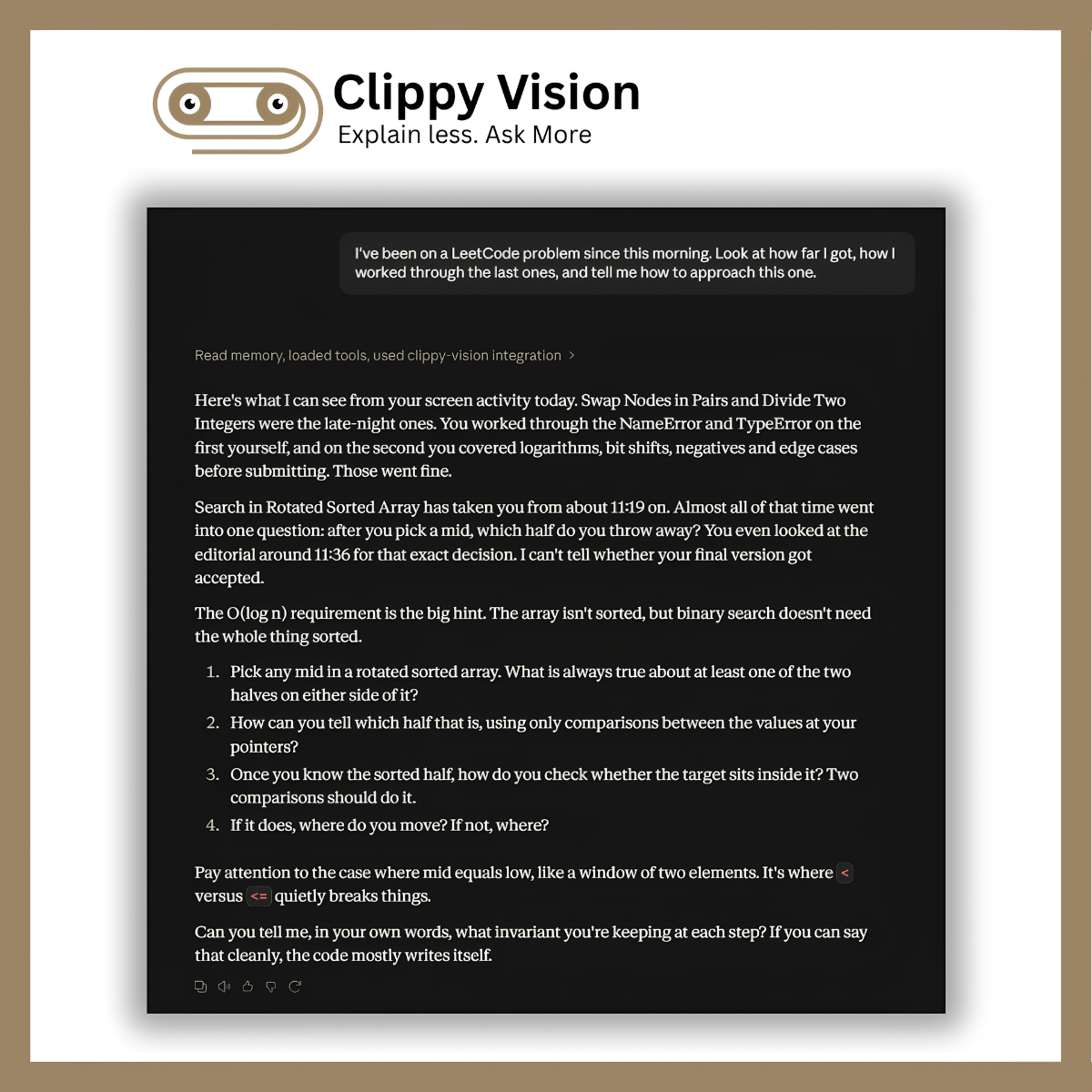
Ask in a connected MCP client, for example:
- "What was I working on before lunch?"
- "Which hotels did I look at yesterday?"
- "What was the error I encountered in my terminal?"
Download
Windows is tested for 2.0. macOS validation is pending, so macOS 2.0 installers are not included yet. macOS downloads below are the previous release (v1.3.1). Linux is experimental and X11 only; an unsigned x86_64 AppImage is built in CI (see docs/linux.md). The README describes current main; some installer features differ from 1.3.1.

-555555?style=for-the-badge&logo=apple&logoColor=white)
-555555?style=for-the-badge&logo=apple&logoColor=white)
All releases & older versions
·


The installers are unsigned: on Windows choose More info → Run anyway, and on macOS right-click → Open the first time. First run needs internet for dependencies and for the chat model you pick in setup (for example qwen3:8b is ~4.7 GB).
Trying Clippy? Share feedback (5 min).
Requirements
| Minimum | Recommended | |
|---|---|---|
| OS | Windows 10 / 11 (64-bit), macOS 12+, or Linux (Ubuntu 22.04+, experimental, X11 only) | Windows 11 or a current macOS |
| System RAM | 8 GB | 16 GB |
| Graphics memory | Not required. Integrated graphics or Apple unified memory is enough | 4 GB+ dedicated on Windows, or 16 GB unified memory on Apple silicon |
| Free disk | 8 GB | 10 GB+ |
| Python runtime | System Python 3.11+ on PATH (not bundled). Windows auto-install uses 3.11; CI uses 3.12 | Python 3.12 |
Python is not bundled in the Windows installer or Linux AppImage. requirements.txt does not pin a Python version. The packaged app runs CLIPPY_PYTHON if set, otherwise python3 (Linux/macOS) or python (Windows) from PATH (electron-ui/electron/lib/paths.js). CI unit tests and the release dry-run install Python 3.12. The setup wizard parses python --version and requires Python 3.11+.
When Python is missing, the setup wizard (electron-ui/electron/lib/setup.js) does this:
- It parses
--versionon that interpreter and requires Python 3.11+. Preflight text says "Clippy needs Python 3.11+ on PATH." It then re-resolves known install locations before declaring failure. - Windows: tries
winget install Python.Python.3.11 --silent. If winget is missing or the install cannot be found on PATH, it shows python.org/downloads and probes%LOCALAPPDATA%\Programs\Python\Python311\python.exe. - macOS: tries Homebrew
brew install pythonwhen Homebrew is present. If Homebrew is missing, it shows a manual-install message with the python.org link. - Linux: stays a manual install. The wizard does not try Homebrew or apt; it shows a python.org link.
Advanced: point Clippy at a specific interpreter before launch:
$env:CLIPPY_PYTHON = "C:\path\to\python.exe"
export CLIPPY_PYTHON=/path/to/venv/bin/python3
Linux support is experimental and X11 only. Wayland is not supported. On X11, screenshots use mss (optional crop via xdotool). Window titles use xdotool, clipboard uses wl-paste/xclip/xsel. AT-SPI accessibility text is implemented; it is covered by CI unit tests, not a real desktop. An unsigned Linux AppImage is built in CI. Install and run steps: docs/linux.md.
The setup wizard checks these numbers before installing. Below minimum → setup is blocked. Between minimum and recommended → you can continue with a warning that summaries may feel slower. Homebrew, dependency, and permission troubleshooting: docs/usage.md. Lower-spec machines: CONTRIBUTING.md.
Quick Start
- Download and install Clippy.
- Complete the setup wizard and grant required permissions.
- Leave Clippy running to build your activity history.
- Open Settings → Connect apps, connect your agent, and ask about your activity.
More detail: docs/usage.md · docs/mcp.md · client guides: Claude Desktop · LM Studio
Build from source: CONTRIBUTING.md
Features
- Searchable activity history across apps
- Local summaries and long-term memory
- Access through MCP-compatible agents
- A timeline for reviewing and deleting activity
- Capture and privacy controls
Privacy
- Clippy captures foreground windows, clipboard, typing metrics, and screenshots.
- Capture, summarization, and storage run locally on this computer.
- Connected cloud agents can receive retrieved memory through MCP tool replies.
- Connected clients have access to all exposed Clippy tools.
- Redaction is best effort. Private-browsing detection is on by default: Chrome, Edge, and Brave on Windows and macOS; Firefox and Opera on Windows (and attempted but untested on macOS); Vivaldi on Windows. Vivaldi, Safari, and Linux are not covered. See the coverage table.
- You can pause capture and delete stored activity from the tray or timeline.
Full guide (retention defaults and detailed behavior): docs/usage.md.
Documentation & Roadmap
| Guide | Contents |
|---|---|
| docs/usage.md | Capture controls, privacy, accessibility, install troubleshooting |
| docs/linux.md | Experimental Linux install and run (X11 only; AppImage, Python, capture tools) |
| docs/mcp.md | Supported clients, Copy JSON, tool reference, access permissions |
| docs/mcp-clients/claude-desktop.md | Step-by-step Claude Desktop setup: config location, restart, verification |
| docs/mcp-clients/lm-studio.md | Step-by-step LM Studio setup: MCP configuration, local model, test query, privacy |
| docs/architecture.md | Tech stack, capture pipeline, summarization, distillation, schema |
| CONTRIBUTING.md | Build from source and contribution guide |
| PROJECT_VISION.md | Roadmap, principles, and known limitations |
Contributing
See CONTRIBUTING.md for setup steps, building from source, and good first issues.
Contributors
Thanks to everyone who has shipped code, docs, design, or ideas.

| Contributor | What they built | |
|---|---|---|
 | @protocorn 💻 📖 🎨 🤔 🚧 | Designed the core app: agent, vision pipeline, memory system, and the Electron desktop shell. |
 | @rusetiq 💻 📦 | Brought Clippy Vision to macOS: native screen capture, permissions, and Apple Silicon + Intel packaging. |
 | @cursoragent 💻 | See their commits → |
 | @ABarpanda 💻 | See their commits → |
 | @Afrin-banu-A 💻 | See their commits → |
 | @vitorparras 💻 | See their commits → |
 | @Furox-Art 💻 | See their commits → |
 | @vaishn4vi 💻 | See their commits → |
 | @adity982 💻 | See their commits → |
 | @Draoui-Haroun 💻 | See their commits → |
 | @KeuqS 💻 | See their commits → |
 | @shaurya703 💻 | See their commits → |
 | @cyforkk 💻 | Made errors readable: replaced bare HTTP status codes with real API error messages in chat. |
 | @tadaokatzuki 💻 | See their commits → |
 | @icn5381 💻 | See their commits → |
How to get on this wall: CONTRIBUTING.md.
License
AGPL-3.0. See LICENSE. Releases already published through v1.3.1 stay under MIT. A commercial license for companies that cannot use AGPL is not written yet.