Process Street MCP Server
공식Process Street MCP 서버. 호스팅된 OAuth 엔드포인트를 통해 AI 에이전트를 워크플로우, 작업, 실행, 데이터셋 및 양식 필드에 연결합니다. 규정 준수 체크리스트를 트리거하고, 승인을 완료하며, 감사 수준의 운영 데이터를 가져옵니다. Claude, Cursor, ChatGPT, Windsurf, Cline 및 모든 MCP 호환 클라이언트와 함께 작동합니다. SOC 2, HIPAA, GDPR.
Process Street MCP(으)로 무엇을 할 수 있나요?
- Create and assign workflow runs — Ask your assistant to start a new run of a workflow and assign it to a specific person.
- Analyze workflow bottlenecks — Find recent workflow runs and identify where incomplete tasks are causing delays.
- Search and update data set records — Query records like active vendors and mark them for review based on criteria.
- Generate reports and summaries — Pull Process Street data and have your assistant produce concise summaries or reports.
- Manage tasks and runs — Create, update, and assign tasks and workflow runs directly from your AI chat.
호스팅형 MCP 서버
npx add-mcp 'https://mcp.process.st'Claude Code, Codex, Cursor 등에 설치됩니다
문서
Process Street MCP 서버 사용하기
확인: 기타 클라이언트 섹션
Process Street은 앱 통합을 통해 접근할 수 있는 Model Context Protocol(MCP) 서버를 제공합니다. 이 서버를 통해 AI 어시스턴트 및 기타 애플리케이션이 Process Street 플랫폼 외부에서 워크플로우, 워크플로우 실행, 작업, 사용자 및 데이터 세트에 접근할 수 있습니다.
이 서버는 MCP를 지원하는 다양한 AI 플랫폼과 도구를 통해 Process Street 조직과 상호작용할 수 있는 방법을 제공합니다.
대부분의 MCP 클라이언트는 동적 클라이언트 등록(DCR) 을 사용하여 자동으로 연결할 수 있으므로 클라이언트 ID나 비밀번호가 필요하지 않습니다. DCR을 지원하지 않는 클라이언트는 Process Street API 키를 사용하여 연결할 수 있습니다.
이 서버를 통해 Process Street 고객은 다음을 수행할 수 있습니다:
- 호환되는 AI 애플리케이션에서 Process Street 데이터에 접근
- 워크플로우 실행 생성 및 관리, 작업 할당
- Process Street 데이터 기반 보고서 및 요약 생성
- Process Street 데이터 분석 및 AI 기반 제안 받기
MCP를 사용하여 Process Street 외부에서 사용자가 할 수 있는 요청 예시:
- "분기별 액세스 검토 워크플로우의 새 실행을 생성하고 아직 할당된 사람이 없다면 규정 준수 관리자 [[[email protected]]](https://www.process.st/cdn-cgi/l/email-protection)에게 할당해 줘"
- "가장 최근의 고객 온보딩 워크플로우 실행을 찾아서 미완료 작업으로 인한 병목 현상이 있는 곳을 보여줘"
- "데이터 세트 레코드에서 활성 공급업체를 검색하고, 지난 6개월 동안 검토되지 않았다면 '검토'로 표시해 줘"
MCP 서버는 대부분의 Process Street API 엔드포인트를 도구로 지원합니다.
MCP 서버는 Process Street 로그인 자격 증명을 사용하여 접근하며, SAML SSO가 활성화된 조직도 포함합니다.
관리자, 빌더 및 사용자는 MCP 서버를 사용할 수 있으며 권한이 있는 리소스에만 상호작용할 수 있습니다.
요구 사항
호환되는 MCP 클라이언트, 포함:
- Claude (claude.ai)
- ChatGPT (Business, Enterprise 및 Edu 요금제는 전체 접근 가능, Pro 요금제는 읽기 전용 작업으로 제한)
- Microsoft Copilot Studio
- VS Code
- Cursor
- Claude Code
- Gemini CLI
- 또는 MCP 클라이언트를 구현한 기타 애플리케이션
MCP 설정 방법
Claude
- Process Street에 로그인 (여러 조직에 속해 있는 경우 MCP를 연결하려는 조직으로 전환해야 합니다)
- Claude에 로그인
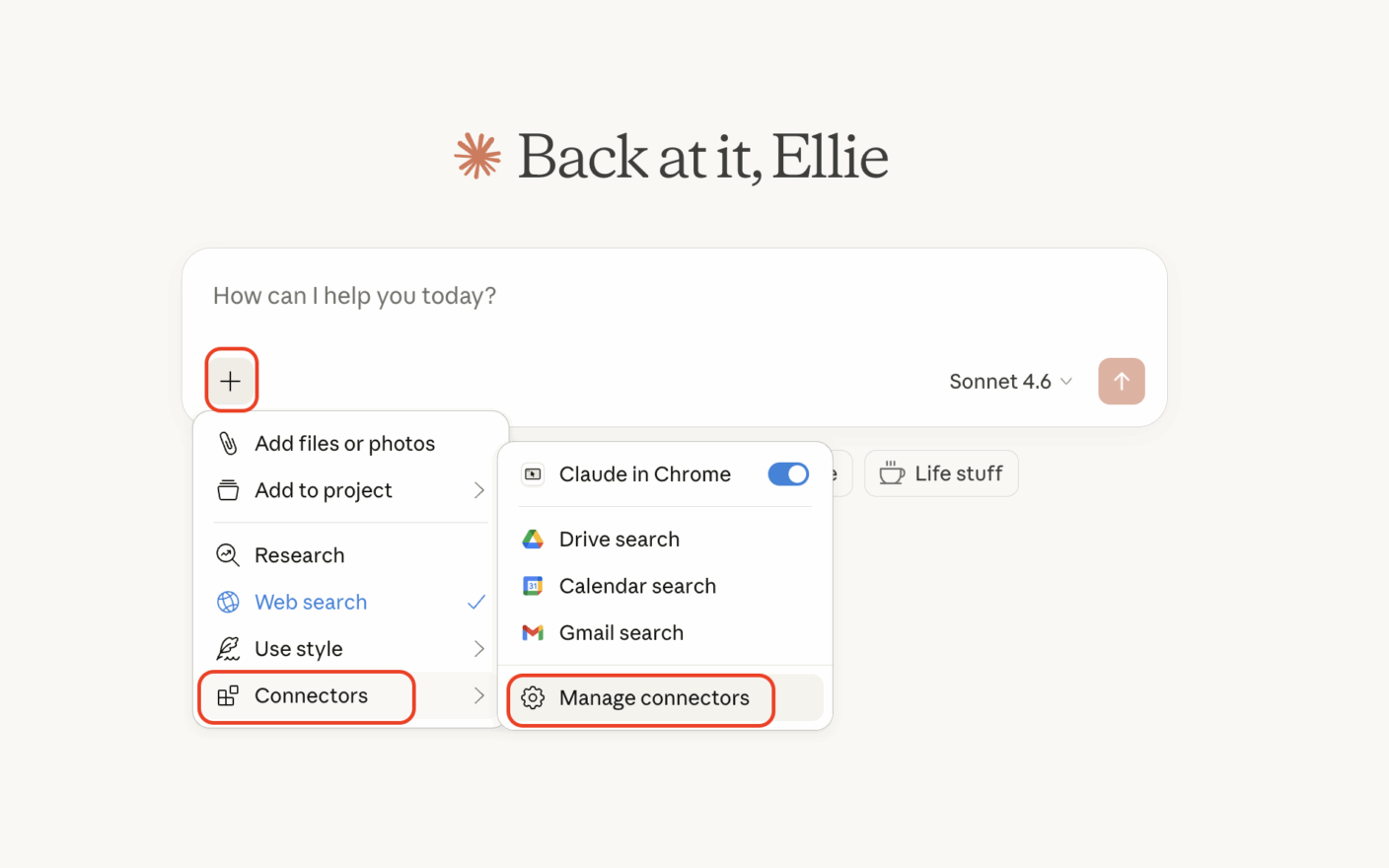
- 채팅에서 + 버튼 클릭
- 커넥터 선택 후 커넥터 관리 선택
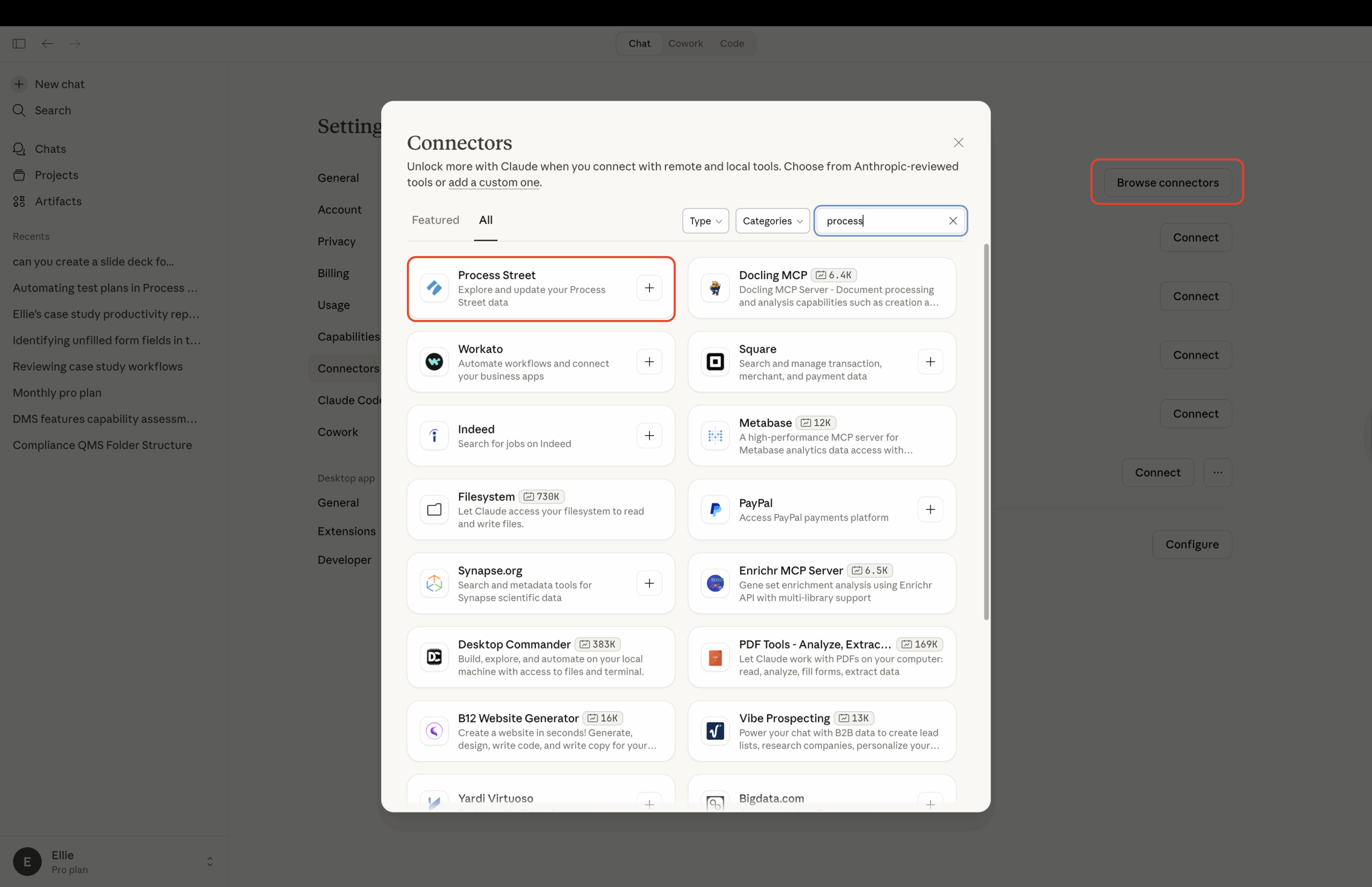
- 커넥터 찾아보기 선택 후 검색창에 Process Street 입력
- + 버튼을 클릭하여 Process Street 자격 증명으로 로그인
- 앱을 승인하고 Claude를 열어 완료
ChatGPT
참고: ChatGPT Business, Enterprise 및 Edu 요금제는 실행 생성 및 작업 업데이트를 포함한 전체 MCP 접근을 지원합니다. Pro 요금제는 읽기 전용 접근으로 연결할 수 있습니다. Business 요금제에서는 워크스페이스 관리자와 소유자만 사용자 지정 앱을 추가할 수 있습니다. ChatGPT Enterprise 및 Edu에서는 ChatGPT 관리자가 먼저 개발자 모드 접근 권한을 부여해야 할 수 있습니다.
- Process Street에 로그인 (여러 조직에 속해 있는 경우 MCP를 연결하려는 조직으로 전환)
- ChatGPT에서 설정 → 앱 → 고급 설정으로 이동하여 개발자 모드 켜기
- 설정 → 앱 → 만들기로 이동하여 Process Street MCP 서버 URL 입력:
https://mcp.process.st/ - 인증을 OAuth로 설정하고 등록 방법은 동적 클라이언트 등록으로 유지합니다. 클라이언트 ID나 비밀번호는 필요하지 않습니다.
- 도구 스캔 클릭 후 Process Street 자격 증명으로 로그인하고 접근 승인
- 만들기 클릭. Process Street이 활성화된 앱 아래에 표시되며 해당 도구를 ChatGPT 대화에서 사용할 수 있습니다.
팁: ChatGPT는 일반적으로 Process Street에서 데이터를 수정하는 작업(예: 실행 생성 또는 작업 업데이트)을 실행하기 전에 확인을 요청합니다. 워크플로우 보기 또는 보고서 가져오기와 같은 읽기 전용 작업은 일반적으로 확인 프롬프트 없이 실행됩니다. 정확한 동작은 ChatGPT 앱 권한에 따라 다릅니다.
Microsoft Copilot Studio
- Process Street에 로그인 (여러 조직에 속해 있는 경우 MCP를 연결하려는 조직으로 전환해야 합니다)
- Copilot Studio에 로그인
- 에이전트 생성
- 도구 추가, Model Context Protocol 선택 후 Process Street MCP Server 검색
- 새 연결 생성
- 인증 완료
- 에이전트 게시
- MCP를 연결하려는 채널 연결
접근 권한 부여
MCP 클라이언트(Claude, ChatGPT 또는 Copilot Studio를 통해)를 연결할 때마다 Process Street은 권한 부여 화면을 표시합니다. 이 화면에는 접근을 요청하는 애플리케이션의 이름, 필요한 권한(범위) 및 리디렉션 URI가 표시되므로 권한을 부여하기 전에 애플리케이션을 인식할 수 있습니다.
승인을 클릭하여 애플리케이션에 Process Street 데이터 접근 권한을 부여하거나 취소를 클릭하여 요청을 거부합니다. 취소하면 권한을 부여하지 않고 연결 중인 애플리케이션으로 돌아갑니다.
연결된 애플리케이션 검토 및 연결 해제
애플리케이션을 승인한 후 개인 설정에서 모든 연결된 애플리케이션을 검토하고 관리할 수 있습니다.
- 오른쪽 상단 모서리에서 아바타 또는 프로필 사진을 클릭한 다음 내 프로필 선택
- 앱 탭 클릭
앱 탭에는 소속된 모든 조직의 OAuth 연결 애플리케이션이 나열됩니다. 각 행에는 애플리케이션 이름, 리디렉션 대상, 보유한 권한(범위), 연결 및 마지막 활동 시간이 표시됩니다.
리디렉션 대상은 애플리케이션 이름 바로 아래에 표시되며 인증 후 애플리케이션이 사용자를 보내는 위치를 알려줍니다. 웹 기반 애플리케이션은 등록된 도메인(예: "claude.ai")을 표시하고, 로컬 애플리케이션은 "컴퓨터의 앱"을 표시합니다. 애플리케이션에 여러 대상이 있는 경우 쉼표로 구분하여 한 줄에 표시됩니다. 이는 동일한 표시 이름을 공유하는 애플리케이션을 구분하는 데 도움이 됩니다 — 합법적인 클라이언트는 인식할 수 있는 도메인을 표시하지만, 인식할 수 없는 도메인은 연결을 해제해야 한다는 신호입니다.
애플리케이션을 연결 해제하려면 옆에 있는 연결 해제를 클릭한 다음 대화 상자에서 확인합니다. 연결이 해제되면 애플리케이션은 더 이상 새 접근 토큰을 얻을 수 없습니다. 이전에 발급된 토큰을 통해 이미 보유한 접근 권한은 최대 1시간 동안 유효할 수 있습니다.
아직 승인된 애플리케이션이 없는 경우 탭에 빈 상태가 표시됩니다.
90일 동안 활동하지 않은 연결된 애플리케이션은 자동으로 비활성화됩니다. 이 경우 애플리케이션 등록이 제거되고 앱 탭에서 사라집니다 — 수동 연결 해제가 필요하지 않습니다. 해당 애플리케이션을 다시 사용하려면 일반 설정 흐름을 통해 다시 연결하세요(DCR 지원 클라이언트는 자동으로 재등록됩니다). 이렇게 하면 오래된 연결을 직접 정리할 필요 없이 앱 목록을 최신 상태로 유지할 수 있습니다.
기타 클라이언트
Process Street의 MCP 서버는 Model Context Protocol을 지원하는 모든 애플리케이션에서 작동합니다.
동적 클라이언트 등록으로 연결 (권장)
클라이언트가 동적 클라이언트 등록과 함께 OAuth를 지원하는 경우 MCP 서버 URL을 지정하면 클라이언트가 등록을 자동으로 처리합니다:
- 클라이언트에서
https://mcp.process.st/을(를) 원격 MCP 서버로 추가 - 등록 방법을 묻는 메시지가 표시되면 동적 클라이언트 등록 선택 (일반적으로 기본값)
- 클라이언트 ID와 클라이언트 비밀번호는 비워 둠
- Process Street 자격 증명으로 로그인하고 접근 승인
이 방법은 VS Code, Cursor, Claude Code, Gemini CLI 및 대부분의 최신 MCP 클라이언트에서 작동합니다.
참고: Gemini Enterprise와 같은 일부 클라이언트는 DCR을 지원하지 않으며 아래의 API 키 방법이 필요합니다.
API 키로 연결
OAuth 또는 DCR을 지원하지 않는 클라이언트의 경우 Process Street을 원격 MCP 서버로 추가하고 Process Street API 키를 토큰으로 사용하여 베어러 토큰으로 인증합니다.
두 가지가 필요합니다:
- MCP 서버 URL:
https://mcp.process.st/ - Process Street API 키. 관리자는 조직 관리자의 통합 페이지에서 생성할 수 있습니다. 자세한 내용은 Process Street API를 참조하고, 키의 기능을 제한하려면 제한된 API 키를 참조하세요.
그런 다음 클라이언트의 MCP 구성에 Authorization: Bearer YOUR_API_KEY 헤더를 추가합니다. 두 가지 일반적인 예는 다음과 같습니다. API 키를 비밀번호처럼 취급하세요.
VS Code
팁: VS Code는 동적 클라이언트 등록을 지원합니다. 아래의 API 키 구성 대신 Process Street을 원격 MCP 서버로 추가하고, 메시지가 표시되면 동적 클라이언트 등록을 선택하고 클라이언트 ID와 비밀번호는 비워 두세요. VS Code가 OAuth 흐름을 자동으로 처리합니다.
API 키로 연결하려면 워크스페이스의 .vscode/mcp.json에 서버를 추가하거나 MCP: 사용자 구성 열기 명령으로 사용자 구성을 엽니다. 입력을 사용하면 키가 파일에 저장되지 않습니다: VS Code가 한 번만 요청하고 안전하게 저장합니다.
{
  "servers": {
    "process-street": {
      "type": "http",
      "url": "https://mcp.process.st/",
      "headers": {
        "Authorization": "Bearer ${input:ps-api-key}"
      }
    }
  },
  "inputs": [
    {
      "id": "ps-api-key",
      "type": "promptString",
      "description": "Process Street API key",
      "password": true
    }
  ]
}
Cursor
팁: Cursor는 동적 클라이언트 등록을 지원합니다. 아래의 API 키 구성 대신 Process Street을 원격 MCP 서버로 추가하고, 메시지가 표시되면 동적 클라이언트 등록을 선택하고 클라이언트 ID와 비밀번호는 비워 두세요.
API 키로 연결하려면 ~/.cursor/mcp.json(모든 프로젝트에서 사용 가능) 또는 .cursor/mcp.json(단일 프로젝트용)에 서버를 추가한 다음 YOUR_API_KEY을(를) Process Street API 키로 교체하세요.
{
  "mcpServers": {
    "process-street": {
      "url": "https://mcp.process.st/",
      "headers": {
        "Authorization": "Bearer YOUR_API_KEY"
      }
    }
  }
}
동일한 패턴, 즉 Authorization: Bearer 헤더가 있는 원격 MCP 서버는 원격 서버를 지원하지만 동적 클라이언트 등록을 지원하지 않는 다른 모든 MCP 클라이언트에서 작동합니다.
아직 지원하지 않는 MCP 클라이언트를 사용 중이고 도움이 필요하면 지원 팀에 문의하세요.
- 시작 가이드에서 프로세스 구축의 5단계 알아보기
- YouTube 채널에서 유용한 비디오 및 웨비나 시청
- Process AI 알아보기
- 양식으로 정보 수집
- 데이터 세트로 데이터 구성
- 페이지로 정보 및 정책 문서화
- 블로그에서 영감 얻기
섹션으로 이동
Process Street 알아보기
Process Street을 사용하여 팀 프로세스를 재미있고, 빠르고, 완벽하게 만드세요. 팀의 정적 체크리스트를 강력한 대화형 워크플로우로 전환하는 데 도움을 드립니다!
Process Street에 대해 자세히 알아보기
[
YouTube 비디오
Process Street에 대한 심층 분석을 YouTube 비디오 시리즈로 확인하세요.
](https://www.youtube.com/channel/UCzQ7wReQLxZV-NndyXByfwQ "Process Street YouTube 채널")[
웨비나 참여
워크플로우를 효과적으로 기록, 복제 및 대체하세요!
](https://us02web.zoom.us/webinar/register/WN_NcqMImSlRCy5B4dv8Vig6Q "웨비나 참여")[
최신 릴리스 보기
최신 릴리스 및 개선 사항을 확인하세요.
](https://www.process.st/help/blog/ "최신 릴리스 보기")[
커뮤니티 참여
앱을 매일 어떻게 사용하고 있는지 다른 사람들과 공유하세요.
](https://community.process.st/ "커뮤니티 참여")