Threadminder
모든 채팅과 세션에서 AI에 지속적인 컨텍스트를 제공하여 프로젝트 진행 상황과 다음 단계를 항상 파악할 수 있게 합니다.
문서
Threadminder MCP
So your AI always knows what's going on.
Threadminder is a persistent context layer for Claude. Connect it once and Claude always knows where your projects stand, what's in progress, and what's next — across every chat, every session, every day.
No re-explaining. No digging through 47 old chats. Just open Claude and keep going.
"It changed my life within a day." — Amy, founder @ PluralityWorks
What it does
Once connected, Claude can:
- Remember your projects across sessions automatically
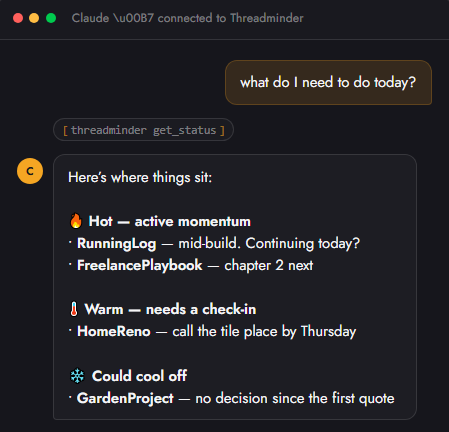
- Give you a full status update across everything at once — no drilling into each project one by one
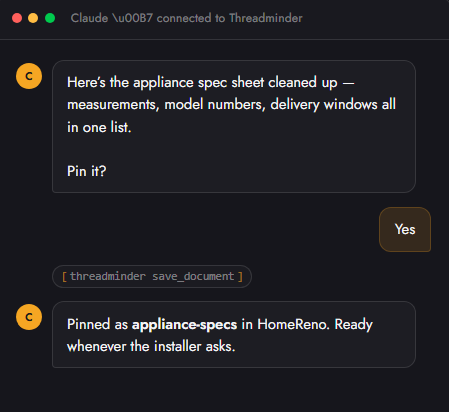
- Save decisions mid-conversation — just say "pin that"
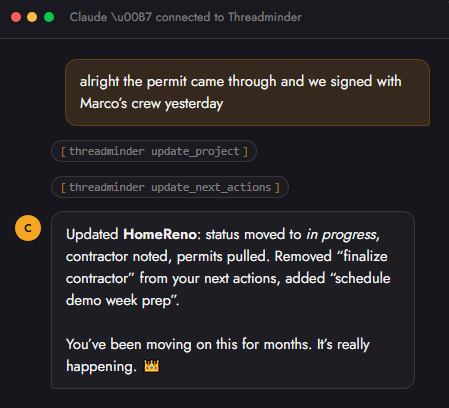
- Update project status as you work, without you filling out a single form
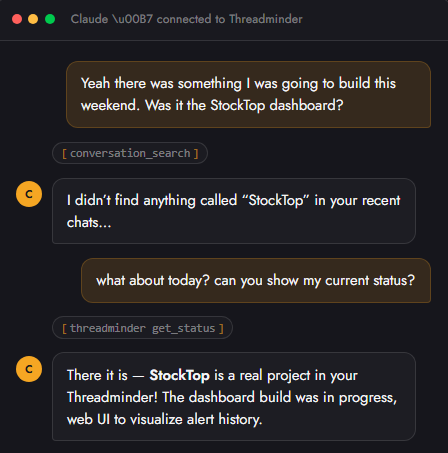
- Surface things you forgot — "wasn't there something I was going to do this week?"
It lives inside your Claude conversations. Not another app. Not another tab. Just Claude, but it finally remembers.
Screenshots
Getting your full project status at a glance:
Updating next actions mid-conversation:
Saving a document with a single command:
Handling a failed search gracefully:
Getting Started
- Sign up at threadminder.ai — free trial, no card required
- Get your personal MCP URL from the dashboard
- In Claude, go to Settings → Integrations → Add connector
- Paste your URL and authenticate
- Open any existing Claude chat and say: "Can you take what you know about this and make a project/status?"
That's it. Claude will build your first project from the conversation context and keep it updated automatically from that point on.
Compatibility
| Platform | Status |
|---|---|
| Claude (claude.ai) | ✅ Supported |
| ChatGPT | 🔜 Coming soon |
Pricing
| Plan | Price | Projects | Platforms |
|---|---|---|---|
| Personal | $6/mo | 5 | 1 |
| Pro | $15/mo | Unlimited | All |
Free trial available. No credit card required.
Links
Built by PluralityWorks