PIL
공식Instagram 저장 게시물을 검색 가능한 개인 지식 라이브러리로 전환하세요 — 로컬 SQLite, 읽기 전용 MCP 서버
PIL MCP(으)로 무엇을 할 수 있나요?
- 저장된 게시물 검색 — 어시스턴트에게 캡션과 AI 추출 지식 전반에서 텍스트로 게시물을 찾도록 요청하고,
search_posts를 통해 선택적 폴더 또는 태그 필터를 적용할 수 있습니다. - 전체 게시물 세부 정보 검색 —
get_post를 사용하여 저장된 모든 게시물에 대한 요약, 핵심 포인트, 방법 단계, 링크, 폴더 및 태그를 포함한 전체 기록을 가져옵니다. - 컬렉션 및 태그 탐색 —
list_folders와list_tags를 통해 인덱스된 개수로 저장된 Instagram 컬렉션을 나열하거나 사용 빈도별로 태그를 확인합니다. - 라이브러리 범위 확인 —
library_stats로 저장된 전체 게시물 라이브러리의 총계와 심층 읽기 완료 통계를 확인합니다.
문서

Your Instagram saved posts — deep-read by AI, searchable forever, on your machine.





Get started · How it works · Other AI tools · What's inside
mcp-name: io.github.pjpoulose/pil
Get PIL in 3 steps
1. Copy-paste this into Muse:
    Clone https://github.com/pjpoulose/PIL into your workspace and follow its
    SKILL.md to set up my Personal Instagram Library. Work through it step by
    step — install, build the library from my saved posts, and hand me the
    installable app.
2. When it asks, link your Instagram (one tap in your browser).
3. Download the app file it sends you → unzip → double-click Start PIL → click Install.
That's the whole thing. Your Muse does the setup, the reading, and the building. Want it on your phone too? Just ask your Muse — it handles that as well.
Prefer to do it yourself? One command sets everything up.
- Mac / Linux:
curl -fsSL https://raw.githubusercontent.com/pjpoulose/PIL/master/bootstrap.sh | bash- Windows (PowerShell):
irm https://raw.githubusercontent.com/pjpoulose/PIL/master/bootstrap.ps1 | iexThen build your library with the commands in Manual setup.
Every day you save posts you'll never find again. PIL (Personal Instagram Library) turns your Instagram saved collection into a private knowledge base on your own machine: every post deep-read by vision AI — narrative summaries, key points, how-to steps, links it discusses, automatic tags — searchable in seconds and queryable live from your AI coding tools.
Code is shared, data stays home. This repo contains only code, the database schema, config examples, and docs. Your saved posts, captions, and account details never leave your computer — ingestion, extraction, search, and the MCP server all run locally. A
.gitignoreblocks databases, configs, and exports from ever being committed.
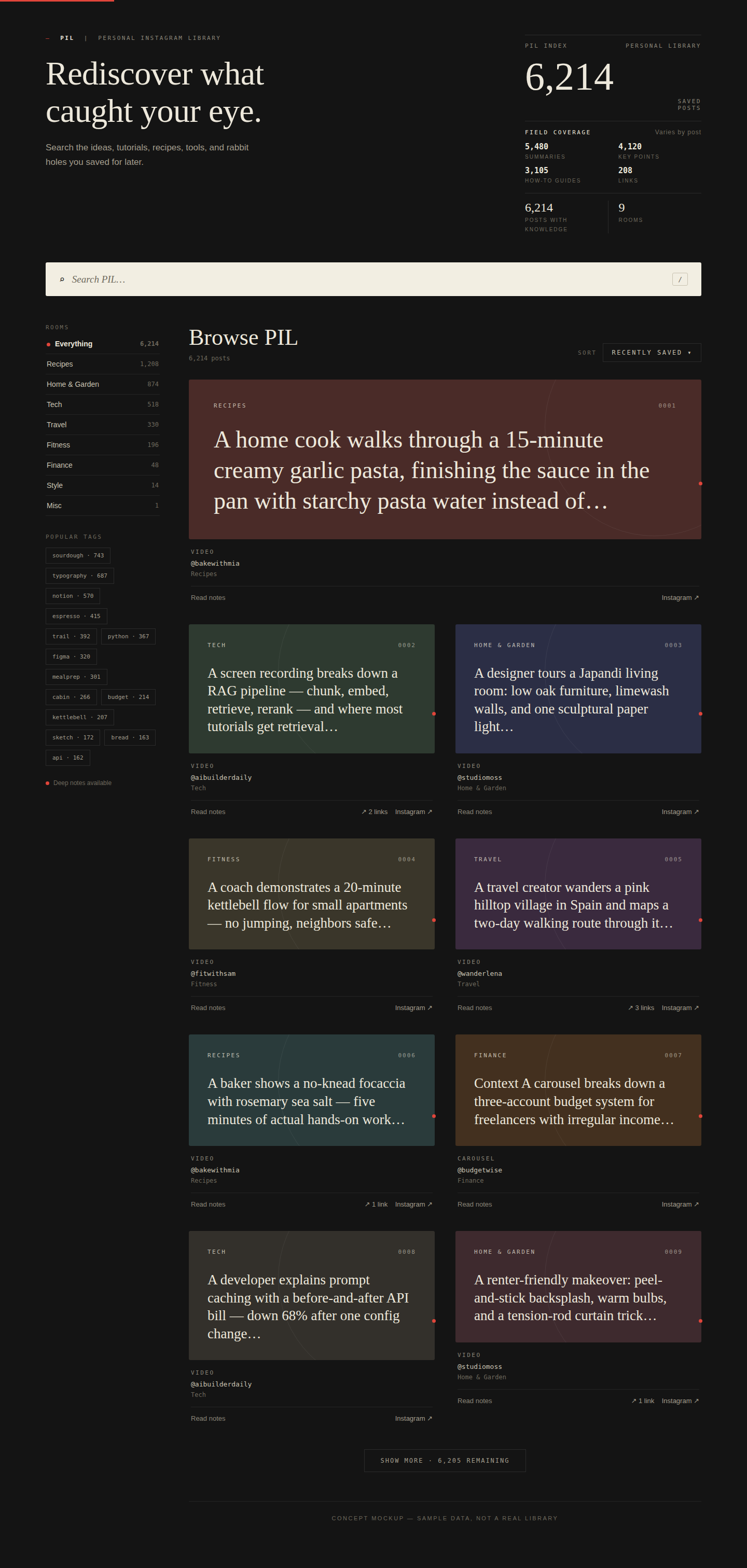
Concept mockup with sample data — your library looks like this, with your posts.

 Want your Claude, Codex, or Cursor to access this?
Connect the read-only MCP server and your other AI tools can query your library live — always current, nothing to re-upload. Your Muse can wire it up for you. How to connect →

 How it works
flowchart LR
    A["Instagram saved posts"] -->|"ingest"| B["Local SQLite on your machine"]
    B -->|"vision AI<br/>deep read"| C["Summaries, key points, how-tos, links, tags"]
    C --> D["Query two ways"]
    D --> E["MCP server — Cursor, Claude Code, Desktop"]
    D --> F["Static JSON export — any AI tool"]

 Manual setup (do it yourself)
Expand — only needed if you're skipping the 3-step Muse flow at the top.
Prerequisites: python3 (3.11+) and instagram-cli with your Instagram
account linked (run instagram-cli accounts — it must list your account).
The one-line installer at the top of this page handles all of this for you.
# 1a. Install from PyPI (recommended — no clone needed)
pip install personal-instagram-library
# gives you: pil-mcp pil-ingest pil-extract pil-tag
#            pil-export-web pil-export-html pil-export-pwa pil-publish-pwa

# 1b. Or get the code
git clone https://github.com/pjpoulose/PIL.git pil && cd pil

# 2. Configure (your data lives in data_dir, default ~/.local/share/pil)
cp pil.config.example.json ~/.config/pil/pil.config.json
# edit it: set account_id to your user_fbid from `instagram-cli accounts`

# 3. MCP server dependency
pip install "mcp<2"
Build your library (each step is resume-safe — re-run any time):
cd bin
python3 ingest_saved.py      # collections + saved posts
python3 extract_content.py   # vision-AI deep read (batches of 25)
python3 tag_all.py           # programmatic tags for untagged posts
python3 export_web.py        # static JSON export -> <data_dir>/web_data.json
python3 export_html.py       # searchable HTML dashboard -> <data_dir>/pil_library.html
python3 export_pwa.py        # installable PWA bundle -> <data_dir>/pwa/
Ask it anything — via the live MCP server or the static export:
python3 bin/mcp_server.py # read-only, stdio — Ctrl-C to stop
That's it. Re-run ingest_saved.py whenever you save new posts; extract_content.py
only processes posts it hasn't seen yet.
The app: ask your Muse to build and send it — see Your library as an app.

 Why not just scroll your saved tab?
| Instagram saved tab | PIL | |
|---|---|---|
| Find a post from 2 years ago | Scroll endlessly | Full-text search in seconds |
| Remember what a post actually said | Rewatch / reread it | AI summary, key points, how-to |
| Links a post mentioned | Gone unless you saved them | Extracted and clickable |
| Use it inside your AI tools | Screenshots and retyping | MCP server or JSON export |
| Where your data lives | Meta's servers | Your machine, SQLite |
Ask your library from other AI tools
Live (recommended): MCP. Point any MCP-compatible assistant at the read-only server and every question reads your current database — always up to date, no exports, no re-uploads:
python3 /path/to/pil/bin/mcp_server.py # stdio; Ctrl-C to stop
Wiring for Claude Code, Claude Desktop, and Cursor: references/mcp_clients.md. Any MCP-compatible client works — and your Muse can connect it for you if you'd rather not touch configs. Available tools:
| Tool | What it does |
|---|---|
search_posts | Text search over captions + deep-read knowledge, with optional folder/tag filters |
get_post | Full record for one post: summary, key points, how-to, links, folders, tags |
list_folders | Your saved collections with indexed counts |
list_tags | Tags by usage |
library_stats | Totals + deep-read coverage per field |
The server opens the database with SQLite mode=ro and exposes SELECT-only
tools — it cannot modify your library. (Attack-tested: SQL injection, write
attempts, and limit abuse all verified blocked.)
Snapshot: file upload. Ask your Muse to send you the web_data.json file
(built with export_web.py): every post with its deep-read knowledge in one
file. Attach it to any AI chat (Claude, ChatGPT, …) and ask questions like any
document. It's frozen at export time — a snapshot, not a live connection — so
ask your Muse for a fresh copy after you save new posts.
Directly (advanced). The database is plain SQLite at <data_dir>/pil.sqlite
(schema in schema.sql). Open it read-only with any SQLite tool.
These files hold your personal Instagram data — keep them on your own machine and only share them with tools you trust.

 Your library as an app
Your Muse builds the app for you and sends it to you — for your computer and your phone. Just ask:
- "Send me my PIL app" — download the file it sends you, unzip, double-click Start PIL, click Install. It lives on your computer like any other app and works fully offline.
- "Put PIL on my phone" — it handles the publishing and gives you a QR code to scan. Tap Install (Android) or Share → Add to Home Screen (iPhone).
No commands, no hosting setup, no terminal — your Muse takes care of all of it.
Signal Deck — the visual dashboard (v1.2.0)
Prefer exploring over querying? The Signal Deck (dashboard/) builds a
self-contained HTML dashboard from your local PIL database: a topic-ring hero
over everything you saved, search → synthesis (The Brief), a sources rail, a
sticky index, and a full archive grid. One file, works offline, your data
never leaves your machine.
cd dashboard
PIL_DB=~/.local/share/pil/pil.sqlite python3 build-signal.py
# open pil-signal-deck.html in Chrome/Safari
See dashboard/README.md for details, PWA notes, and the QA suite.

 What's inside
pil/
├── assets/logo.svg          # the seal above
├── SKILL.md                 # skill definition (for Muse)
├── README.md                # this file
├── LICENSE                  # MIT
├── schema.sql               # the five tables: folders, posts, post_folders, knowledge, tags
├── pil.config.example.json  # copy to pil.config.json and set your account_id
├── bootstrap.sh             # one-line installer for Mac/Linux
├── bootstrap.ps1            # one-line installer for Windows
├── bin/
│   ├── pil_common.py        # config resolution + DB helpers
│   ├── ingest_saved.py      # step 1: ingest (resume-safe)
│   ├── extract_content.py   # step 2: vision-AI extraction (resume-safe)
│   ├── tag_all.py           # step 3: tagging
│   ├── export_web.py        # step 4: static export
│   ├── export_html.py       # step 5: self-contained HTML dashboard
│   ├── export_pwa.py        # step 6: installable PWA bundle (manifest + SW + icons)
│   ├── publish_pwa.py       # step 7: publish PWA to your own host for phone install
│   └── mcp_server.py        # read-only MCP server (stdio)
└── references/
    └── mcp_clients.md       # Cursor / Claude Code / Claude Desktop wiring

 FAQ
FAQ
Do I need to know how to code? No. Copy-paste the prompt at the top of this page into Muse — it does everything with you. The only things you'll do yourself are linking Instagram (one tap in your browser) and downloading the app file it sends you.
Where does my Instagram data go? Nowhere. Code is shared, data stays home: your saved posts, captions, and account details never leave your computer. Nothing is uploaded to us — there is no "us"; there's no server, no account, no cloud.
Does it cost anything? PIL is free and open-source (MIT). There is no subscription and no account to create. The AI deep-read step runs through your own Instagram/AI setup.
Does the app work offline? Yes. Once installed, the desktop and phone apps run fully offline — search, rooms, tags, and answers all work without internet.
Which phones and computers? Windows, Mac, and Linux for the desktop app; iPhone and Android for the phone app. On Android, tap Install app in Chrome; on iPhone, use Safari's Share → Add to Home Screen.
I saved new posts — how do I add them? Just tell your Muse "I saved new posts." It fetches and deep-reads only the new ones, then refreshes your app and files.
Can I share my library with someone? Your library is files on your machine — you can copy them to someone else's computer, but they contain your personal Instagram data. Treat them like anything private: don't publish or upload them anywhere public.
Something failed — what now?
Tell your Muse what you saw — it can diagnose and fix it directly. (Running
the manual setup below? Re-run the installer — it's safe to run any number of
times — and check python3 --version is 3.11+.)

 Troubleshooting
Something wrong? Tell your Muse what happened — it can diagnose and fix most issues itself.
Running the manual setup yourself?
PIL account_id is not configured→ copy the example config and setaccount_idto youruser_fbidfrominstagram-cli accounts.- Extraction is slow on huge libraries — it's resume-safe; just re-run it.
429rate limits are handled with backoff inside the scripts.- The MCP server needs
mcp<2in the Python that runs it (2.x renamed the API).

 Contributing
PRs and issues welcome — better extraction prompts, new query clients, new export formats. Fork it, ship it, make it yours. If it saved you from the endless scroll, a star helps others find it.

 License
MIT. Built by Paul Poulose.