Claude Prompts MCP Server
외부 JSON 설정 파일에서 프롬프트를 로드하는 범용 MCP 서버입니다.
문서

Claude Prompts
The portable workflow layer beside your AI coding harness.
Your client executes with its own tools, agents, and context.
Claude Prompts adds reusable prompt resources, composable chains, validation gates, and client-native skill export.


Quick Start · What You Get · Compose Workflows · Run Anywhere · Docs
What your AI client gives you — and what this server adds
| Your client already does | This server adds |
|---|---|
| Run a prompt | Compose prompts with validation, reasoning guidance, and formatting in one expression |
| Single-shot skills | Multi-step workflows that thread context between steps |
| Execute subagents | Hand off mid-chain steps to agents with full workflow context |
| Client-native skill format | Author once as YAML, export to any client with skills:export |
| Manual prompt writing | Versioned templates with hot-reload, rollback, and history |
| Trust the output | Validate output between steps: self-evaluation and shell commands |
Is this for me?
- Use this if you write the same prompts repeatedly, run multi-step workflows, or want to share reusable prompts with a team.
- Skip if your client's built-in
/commandsalready handle what you need, or you're looking for a no-code prompt library. - Works with Claude Code, Claude Desktop, Cursor, OpenCode, Gemini CLI, Codex, Windsurf, and Zed. Plugin installers add hooks (chain tracking, gate enforcement, state preservation) for Claude Code, OpenCode, Gemini CLI, and Codex (experimental); other clients run MCP-only.
Quick Start
Claude Code (Recommended)
# Add marketplace (first time only)
/plugin marketplace add minipuft/minipuft-plugins

# Install
/plugin install claude-prompts@minipuft

# Try it
>>tech_evaluation_chain library:'zod' context:'API validation'
Development setup
Load plugin from local source for development:
git clone https://github.com/minipuft/claude-prompts-mcp ~/Applications/claude-prompts-mcp
cd ~/Applications/claude-prompts-mcp/server && npm install && npm run build
claude --plugin-dir ~/Applications/claude-prompts-mcp
Edit hooks/prompts → restart Claude Code. Edit TypeScript → rebuild first.
Codex (Experimental)
Codex hooks require Codex CLI 0.117 or later and are unavailable on Windows. See the codex-prompts requirements for Python and Node.js prerequisites.
Enable hooks in ~/.codex/config.toml:
[features]
hooks = true
Then install the plugin:
codex plugin marketplace add https://github.com/minipuft/minipuft-plugins.git
codex plugin add codex-prompts@minipuft
Restart Codex, run /hooks to review the plugin hooks, then try >>tech_evaluation_chain library:'zod' context:'API validation'.
More Client Setups
Claude Desktop
Option A: GitHub Release (recommended)
- Download
claude-prompts-{version}.mcpbfrom Releases - Drag into Claude Desktop Settings → MCP Servers
- Done
The .mcpb bundle is self-contained (~5MB); no npm required.
Option B: NPX (auto-updates)
Add to your config file:
- macOS:
~/Library/Application Support/Claude/claude_desktop_config.json - Windows:
%APPDATA%\Claude\claude_desktop_config.json
{
  "mcpServers": {
    "claude-prompts": {
      "command": "npx",
      "args": ["-y", "claude-prompts@latest", "--client", "claude-code"]
    }
  }
}
Restart Claude Desktop and test: >>research_chain topic:'remote team policies'
Other clients: VS Code · Cursor · OpenCode · Gemini CLI · Windsurf · Zed · From Source
Client setup: VS Code, Cursor, and other MCP-only clients use the manual configuration guide below.
Plugin installers (recommended where available; adds hooks):
# OpenCode (full hooks)
npm install -g opencode-prompts && opencode-prompts install

# Gemini CLI (partial hooks)
gemini extensions install https://github.com/minipuft/gemini-prompts
Manual config for VS Code, Cursor, OpenCode (no hooks), Gemini CLI (no hooks), Codex (no plugin hooks), Windsurf, and Zed: see Client Integration Guide for per-client config locations, JSON examples, and --client preset matrix. Client Capabilities Reference covers profile mapping and limits.
From source (developers):
git clone https://github.com/minipuft/claude-prompts-mcp.git
cd claude-prompts-mcp/server && npm install && npm run build && npm test
Point your MCP config to server/dist/index.js. Transport: --transport=stdio (default) or --transport=streamable-http.
Custom resources: --init=~/my-prompts scaffolds a starter workspace: three example prompts plus config.jsonc. Edit them (YAML schema), or have your AI author new prompts, gates, and frameworks via resource_manager. Point MCP_RESOURCES_PATH at an existing workspace if you already have one in the right shape. See Custom Resources Guide.
What You Get
Four primitives you author, version, and compose. The bundled set ships 51 prompts across 9 categories — a starting library, not the ceiling: your AI writes new prompts and chains through resource_manager as it works, so the set grows around what you actually do. All hot-reloadable, all versioned with rollback.
| Primitive | Symbol | What it is | Example |
|---|---|---|---|
| Prompt template | >> | Versioned YAML with named arguments; hot-reload on save | >>review target:'src/auth/' |
| Gate | :: | Validation criterion the AI checks its own output against; blocking or advisory; can shell-verify | :: 'cite sources' · :: verify:"npm test" |
| Framework | @ | Reasoning framework that shapes how the AI works through the problem; plug in your own or use built-ins like @ReACT, @5W1H, or the project's own @CAGEERF scaffold (Frameworks Guide) | @ReACT · @your_framework |
| Style | # | Output formatting and tone | #analytical · #procedural |
Prompts, gates, and frameworks are managed through the resource_manager tool. Your AI creates, edits, versions, and rolls them back through MCP, no file editing required. Styles are managed with the bundled cpm CLI. Failed gate checks can retry automatically or pause for your decision (Gates Guide). Build your first primitive: Prompt Authoring Tutorial.
The Three Tools
Everything above reaches your client through three MCP tools:
| Tool | Purpose |
|---|---|
prompt_engine | Execute prompts with frameworks and validation |
resource_manager | Create, update, version, and roll back resources |
system_control | Status, analytics, framework switching |
Most users invoke these via >> syntax in conversation; hooks construct the actual calls. For programmatic MCP clients calling tools directly, see MCP Tools Reference.
Compose Workflows
How to write a chain
>>review target:'src/auth/' @ReACT :: 'cite sources'
  --> security_scan :: verify:"npm test"
  ==> implementation
Read top-to-bottom:
>>review target:'src/auth/'runs thereviewprompt against your auth folder.@ReACToverlays the ReACT reasoning framework on this step.:: 'cite sources'adds a gate the AI must satisfy (cite sources, or retry).--> security_scan :: verify:"npm test"chains to step 2, which must passnpm testbefore producing output.==> implementationhands the final step off to a client-native agent (a subagent in Claude Code).
review ships with the server; security_scan and implementation stand in for prompts you write.
Validation runs between steps, not only at the end. For the full operator grammar and examples, see MCP Tools Reference.
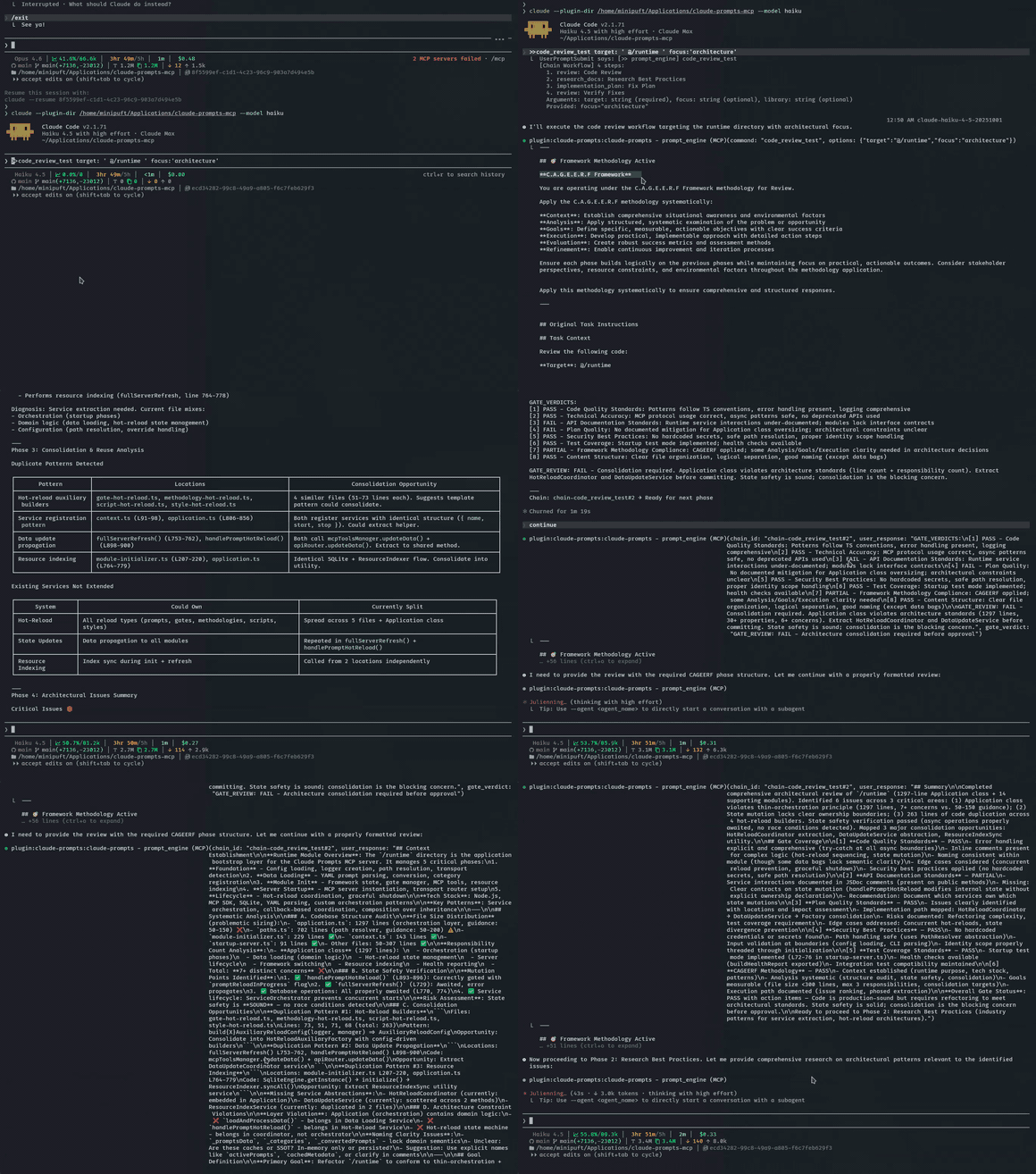
A gate catches a missing field, the model corrects itself, and the chain passes. Recorded on haiku, the cheapest model.
Two patterns extend the basic syntax. Chains also support context threading between steps and agent handoffs. See Chains Lifecycle and MCP Tools Reference.
See the output: tech evaluation chain with context7 research
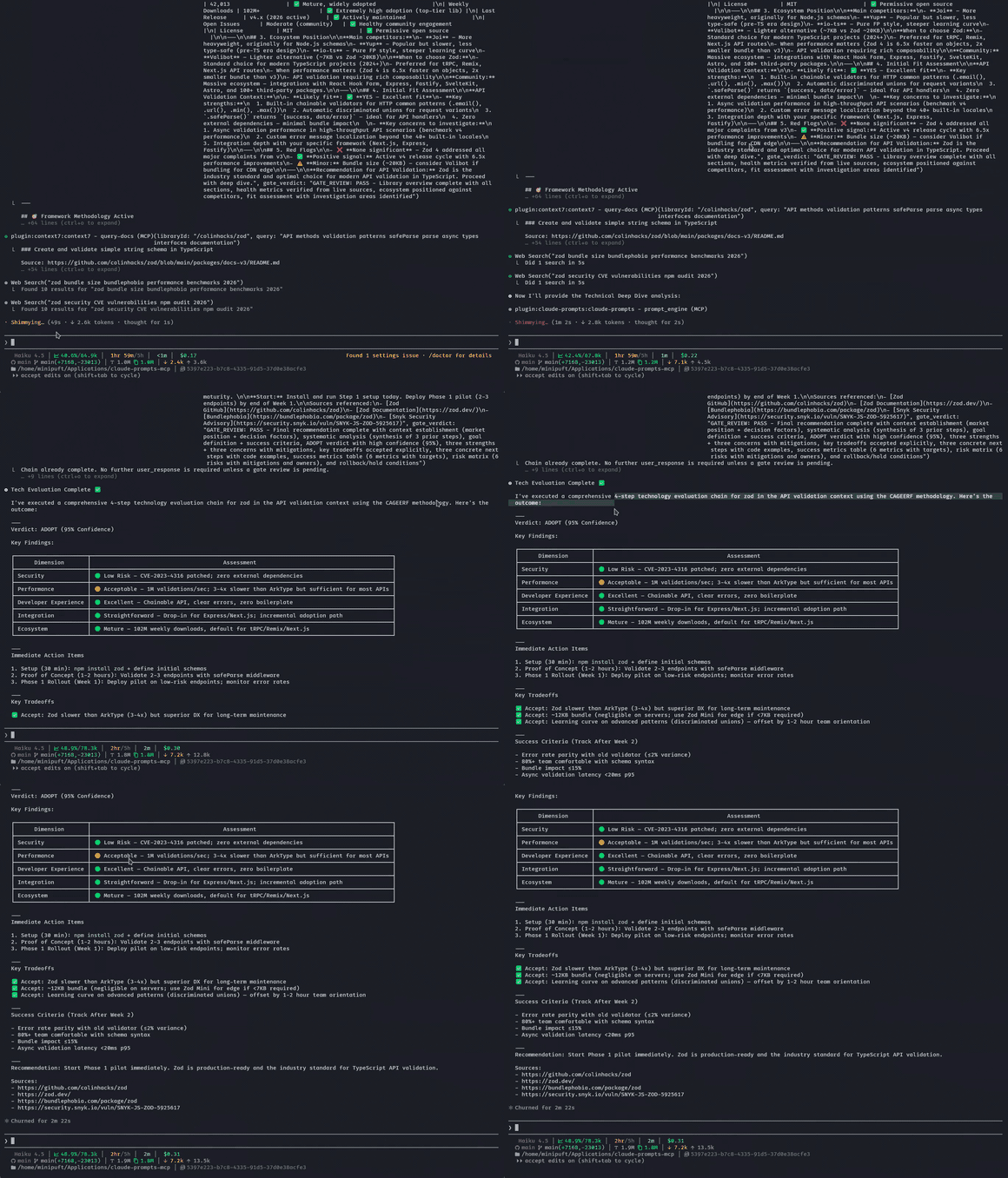
Context7 fetches live library docs mid-chain. The final output is a structured assessment with sources.
Verification Loops
Ground-truth validation via shell commands. The AI keeps iterating until tests pass:
>>implement-feature :: verify:"npm test" loop:true
Implements, runs the test, reads failures, fixes, retries. Spawns a fresh context after repeated failures to avoid context rot.
implement-feature stands for your own prompt: :: verify attaches to any of them.
| Preset | Tries | Timeout | Use Case |
|---|---|---|---|
:fast | 1 | 30s | Quick check |
:full | 5 | 5 min | CI validation |
:extended | 10 | 10 min | Large test suites |
For autonomous test-fix cycles with context-rot prevention: Ralph Loops Guide.
Judge Mode
Let the AI pick the right resources for the task:
%judge Help me refactor this authentication module
Analyzes available templates, reasoning frameworks, validation rules, and styles, then recommends the best combination. You confirm before it runs. For scoring and overrides see Judge Mode Guide.
Run Anywhere
Author workflows as YAML templates. Export as native skills to your client.
[!IMPORTANT] There are two source-of-truth scopes. MCP prompt YAML under
server/resources/is canonical for skills compiled by this repository. Shared user-authored operational skills, rules, and global instructions are canonical in~/.claude; Codex and OpenCode installations are one-way downstream consumers and must not be edited independently. Codex uses per-skill symlinks; Codex and OpenCode share a generated globalAGENTS.mdcontaining the globalCLAUDE.mdplus compact rule dispatch. OpenCode natively discovers~/.claude/skillsand loads that generated file through itsinstructionsconfiguration.~/.codex/rules/remains reserved for Codex command-execution policy.
Repository guidance follows the same ownership rule. CLAUDE.md plus .claude/rules/*.md are
canonical; the tracked AGENTS.md is a generated compact projection for clients that prefer that
filename. It carries selected project-wide handbook sections plus conditional dispatch entries for
every Claude rule rather than copying all rule bodies into always-loaded context. The renderer
enforces Codex's documented default 32 KiB project-guidance budget. A pre-commit hook regenerates
it from staged source bytes, and CI rejects drift:
npm run guidance:sync   # regenerate AGENTS.md
npm run guidance:check  # verify the committed projection
# skills-sync.yaml — choose what to export
registrations:
  claude-code:
    user:
      - prompt:development/review
      - prompt:development/validate_work
npm run skills:export
The review prompt becomes a /review Claude Code skill. validate_work becomes /validate_work. Same source, native experience; no MCP call required at runtime.
Compiles to Claude Code skills, Cursor rules, OpenCode commands, and more. npm run skills:diff flags when exports drift from source. Configuration, supported clients, and drift detection: Skills Sync Guide.
With Hooks
Without hooks, you're calling the three MCP tools explicitly (the LLM constructs each call). With hooks, the operators work in conversation: >>, -->, ==>, :: feel native rather than mediated, and workflow state survives across LLM turns and context compaction.
What hooks unlock:
| Hook | Unlocks |
|---|---|
| Auto-routing | >>research_chain topic:'X' in chat fires the right MCP tool call without you naming it |
| Chain continuity across compaction | Multi-step chains preserve state when context compacts mid-execution; the chain doesn't restart from scratch |
| Cross-step verdict tracking | Gate pass/fail verdicts thread across all chain steps without the LLM re-deriving them |
| Native agent handoffs | ==> routes to your client's subagent system automatically; no manual subagent invocation |
| Session persistence | Workflow state preserved when context compacts mid-chain |
Hooks ship with the plugin install. Full support on Claude Code (this repo) and OpenCode; partial on Gemini CLI; experimental on Codex, where Codex hooks are off by default and each install requires a one-time /hooks trust review. Other clients get the three MCP tools but no hook-driven behaviors. Detail: hooks/README.md.
How It Works
Command with operators → server parses and injects resources (framework, gates, style) → client executes the rendered prompt and self-evaluates against the gates → router decides: next step on pass, retry on fail, return on done.
Full request lifecycle, pipeline stages, and subsystem diagrams: Architecture Overview.
Documentation
Choose a guide based on what you want to do: learn by building, complete a task, look up syntax, or understand the design.
Quick jumps: Build your first prompt · Chains lifecycle · MCP Tools reference · Architecture overview · Troubleshooting
Contributing
cd server
npm install
npm run build        # esbuild bundles to dist/index.js
npm test             # Run test suite
npm run validate:all # Full CI validation
The build produces a self-contained bundle. server/dist/ is gitignored, and CI builds fresh from source.
See CONTRIBUTING.md for workflow details.