FlowchartAI MCP
원격 OAuth MCP 서버를 통해 AI로 네이티브 플로차트를 생성, 편집, 저장 및 내보낼 수 있습니다.
호스팅형 MCP 서버
npx add-mcp 'https://flowchartai.org/api/mcp'Claude Code, Codex, Cursor 등에 설치됩니다
문서
Your assistant, connected to your diagrams
A flowchart MCP server for creating and revising real files.
Ask your assistant to draw a process, change a branch and save the result in FlowchartAI. Open the same editable diagram when the conversation turns into a review.
Remote MCP endpoint
https://flowchartai.org/api/mcp
Streamable HTTP · OAuth with permission review
A useful first request
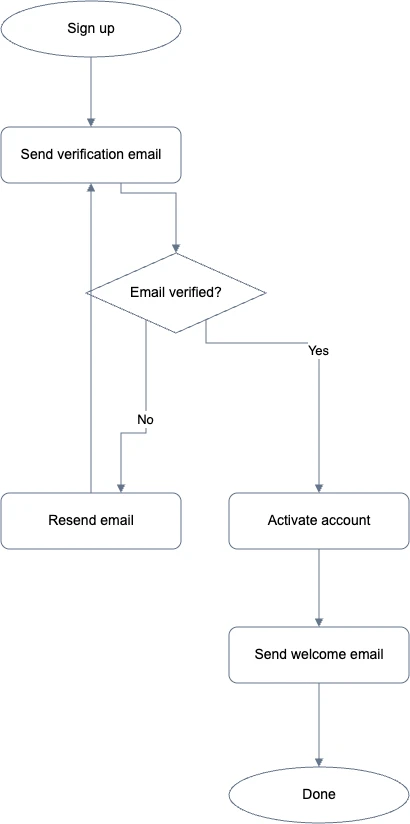
“Create an onboarding flow with signup, email verification and activation. Include a path to resend the verification email, use at most 100 credits, and give me the saved diagram link.”
Continue the conversation
Make the next change to the same diagram
After creating the onboarding flow, ask: “Add a welcome email after activation.” The assistant reads the current file and sends a natural-language edit against that version. It can return the updated diagram link and editable file.
You can move from an assistant to the website without redrawing the process. Manual adjustments stay in the document, and a version check prevents a tool from overwriting a newer website save.
Give the assistant a specific job
A product review can start from a written user journey. An operations discussion can turn an escalation checklist into a decision flow. A developer can map the process described in a ticket, then attach the saved file to the handoff.
Include the steps, decision labels and exception paths that matter. Ask the assistant to read the latest diagram before making an edit, and review the result before treating it as an approved procedure.
Tools for the whole document workflow
Discover    get_capabilities · get_account
Create      create_flowchart
Revise      get_flowchart · edit_flowchart
Organize    list_flowcharts · save_flowchart
Review      list_flowchart_versions
Deliver     export_flowchart
Recover     get_task · list_tasks
Tool names describe the action. Each request checks the connection’s permissions and file ownership on the server.
Keep control of access and spending
A connection uses your existing FlowchartAI allowance. Creating or revising with AI can spend Credits or an eligible legacy request; manual saves, reads and native exports do not incur AI charges. Set a per-task maximum, then use account and credential daily budgets to bound recurring work.
The dashboard shows recent operations and lets you revoke access. OAuth approval is separate from website sign-in: the client receives scoped tokens for the MCP resource. It cannot turn that token into a FlowchartAI login session.
If a connection drops during generation, check the task receipt before asking for another run. Reusing the same operation key recovers the existing task. Failed delivery and platform corrections do not create an extra user charge.
Flowchart MCP questions
Which assistants can connect?+
Use a client that supports a remote Streamable HTTP MCP server. OAuth clients can connect with the server URL and your consent. Clients that accept custom request headers can authenticate with an API key. Check that your client supports one of these authentication methods before adding the endpoint.
Do I need to install a local server?+
No local FlowchartAI server is required for the hosted endpoint. Your MCP client sends tool requests to FlowchartAI over HTTPS. Diagrams are stored in your FlowchartAI account and model generation runs through the hosted service. Hosted generation sends diagram context to FlowchartAI and its model service.
Can the assistant read every file in my account?+
Only grant permissions that fit the task. Diagram read permission allows the connection to list and read your saved files; generation and write permissions allow creating or changing them. A read-only key can leave generation and write permissions off. Each connection is limited to its owning account.
Will reconnecting restore a revoked token?+
No. Revoking a connection blocks its old access and refresh tokens. Connecting again creates a separate grant. Refresh tokens rotate when used, and reusing a consumed refresh token revokes that connection. You can review active and revoked connections in the developer dashboard.
What can I download through a tool?+
The export tool returns editable draw.io XML or the original JSON document. It does not require another AI generation. Open the saved file in the website editor when you need a rendered PNG or SVG for sharing. Legacy website documents remain readable as their original JSON.
Bring a process into the conversation
Connect your client, describe the flow and inspect the saved result.