Chargebee
공식AI 에이전트를 Chargebee 플랫폼에 연결하는 MCP 서버입니다.
Chargebee MCP(으)로 무엇을 할 수 있나요?
- Chargebee 문서 검색 — API, 기능 또는 청구 개념에 대한 질문을 하고
chargebee_documentation_search를 통해 공식 문서에서 답변을 얻으세요. - 통합 코드 개요 생성 —
chargebee_code_planner를 사용하여 Chargebee 통합을 위한 구조화된 코드 계획 및 샘플 스니펫을 요청하세요. - 릴리스 노트 및 FAQ 조회 — 최신 제품 업데이트, 자주 묻는 질문 및 기타 지식 베이스 콘텐츠를 검색하세요.
문서
Chargebee 모델 컨텍스트 프로토콜(MCP) 서버


⚠️ 지원 중단 안내
이 패키지는 지원이 중단되었으며 더 이상 업데이트나 지원이 제공되지 않습니다. 향상된 기능과 개선된 정확도를 제공하는 새로운 KnowledgeBase MCP 서버로 마이그레이션하시기 바랍니다. 자세히 알아보고 업그레이드하려면 여기를 참조하세요: Chargebee MCP 서버 문서
모델 컨텍스트 프로토콜(MCP)은 대규모 언어 모델(LLM)과 외부 시스템 간의 컨텍스트를 관리하기 위해 설계된 표준화된 프로토콜입니다.
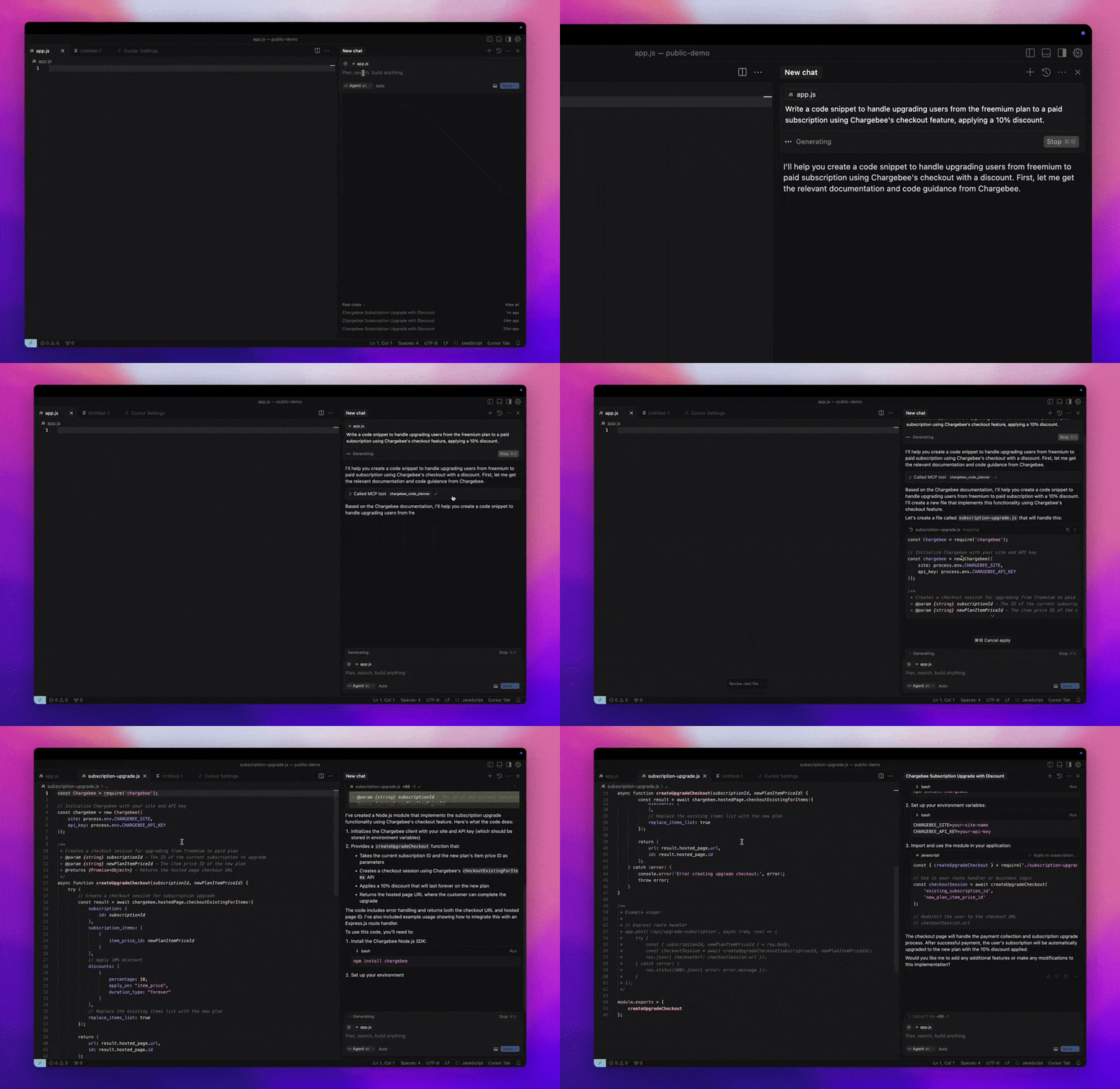
Chargebee MCP 서버는 개발자 효율성을 향상시키기 위한 강력한 도구 세트를 제공합니다. Cursor, Windsurf, Cline과 같은 AI 기반 코드 편집기 및 Claude Desktop과 같은 범용 도구와 통합됩니다. 모든 MCP 클라이언트와 호환됩니다.
이 MCP 서버를 통해 다음을 수행할 수 있습니다:
-
Chargebee 제품 및 API 서비스에 대한 즉각적인 답변을 얻을 수 있습니다.
-
통합 요구 사항에 맞춘 컨텍스트 인식 코드 스니펫을 받을 수 있습니다.
-
다음을 포함한 Chargebee의 지식 베이스에 액세스할 수 있습니다:
- 문서
- FAQ
- 릴리스 노트
- 그 외 다양한 정보
사전 요구 사항
- Node.js LTS - Chargebee MCP 서버가 올바르게 작동하려면 Node.js LTS 버전이 필요합니다.
설정
Node.js npx를 사용하여 Chargebee MCP 서버를 실행하려면 다음 명령을 실행하세요:
npx -y @chargebee/mcp@latest
사용 가능한 도구
| 도구 | 설명 |
|---|---|
chargebee_documentation_search | Chargebee 문서를 검색하여 자세한 정보와 사용 가이드를 검색합니다. |
chargebee_code_planner | Chargebee API 및 기능 통합을 위한 구조화된 코드 개요와 샘플 코드를 생성합니다. |
설치
Cursor
이 서버를 Cursor IDE에 추가하려면:
Cursor Settings>MCP으로 이동합니다.+ Add new Global MCP Server을 클릭합니다.- 글로벌
.cursor/mcp.json파일에 다음 구성을 추가합니다:
{
  "mcpServers": {
    "chargebee": {
      "command": "npx",
      "args": [
          "-y",
          "@chargebee/mcp"
      ]
    }
  }
}
자세한 내용은 Cursor 문서를 참조하세요. 참고: 프로젝트별 Cursor 구성(Cursor 0.46+에서 지원)에도 추가할 수 있습니다.
Windsurf
Cascade로 MCP를 설정하려면:
- Windsurf를 열고
Settings>Advanced Settings으로 이동하거나 명령 팔레트 >Open Windsurf Settings Page을 사용합니다. - Cascade 섹션으로 스크롤하여 새 서버를 추가하거나, 기존 서버를 보거나,
mcp_config.json에서 원시 JSON 구성 파일에 액세스합니다. - “사용자 정의 서버 추가 +”를 클릭하여
mcp_config.json에 Chargebee MCP 서버를 직접 포함시킵니다:
{
  "mcpServers": {
    "chargebee": {
      "command": "npx",
      "args": [
          "-y",
          "@chargebee/mcp"
      ]
    }
  }
}
자세한 내용은 Windsurf 문서를 참조하세요.
VS Code
다음 버튼 중 하나를 사용하여 VS Code에 Chargebee MCP 서버를 설치하세요:

또는 VS Code CLI를 사용하여 Chargebee MCP 서버를 설치할 수 있습니다:
# For VS Code
code --add-mcp '{"name":"chargebee","command":"npx","args":["-y","@chargebee/mcp"]}'
# For VS Code Insiders
code-insiders --add-mcp '{"name":"chargebee","command":"npx","args":["-y","@chargebee/mcp"]}'
설치 후 VS Code에서 GitHub Copilot 에이전트와 함께 Chargebee MCP 서버를 사용할 수 있습니다.
Claude
claude_desktop_config.json 파일에 다음 구성을 추가하세요. 자세한 내용은 Claude Desktop 문서를 참조하세요:
{
  "mcpServers": {
    "chargebee": {
      "command": "npx",
      "args": [
          "-y",
          "@chargebee/mcp"
      ]
    }
  }
}
Cline
Cline MCP 서버 설정을 통해 cline_mcp_settings.json 파일에 다음 JSON을 수동으로 추가하세요:
{
  "mcpServers": {
    "chargebee": {
      "command": "npx",
      "args": [
          "-y",
          "@chargebee/mcp"
      ]
    }
  }
}
Roo Code
Roo Code 설정에서 Edit MCP Settings을 선택하거나 VS Code 명령 팔레트에서 Roo Code: Open MCP Config 명령을 사용하여 MCP 설정에 액세스하세요:
{
  "mcpServers": {
    "chargebee": {
      "command": "npx",
      "args": [
          "-y",
          "@chargebee/mcp"
      ]
    }
  }
}
기여
이 프로젝트에 기여하려면 기여 가이드를 참조하세요.