Kai
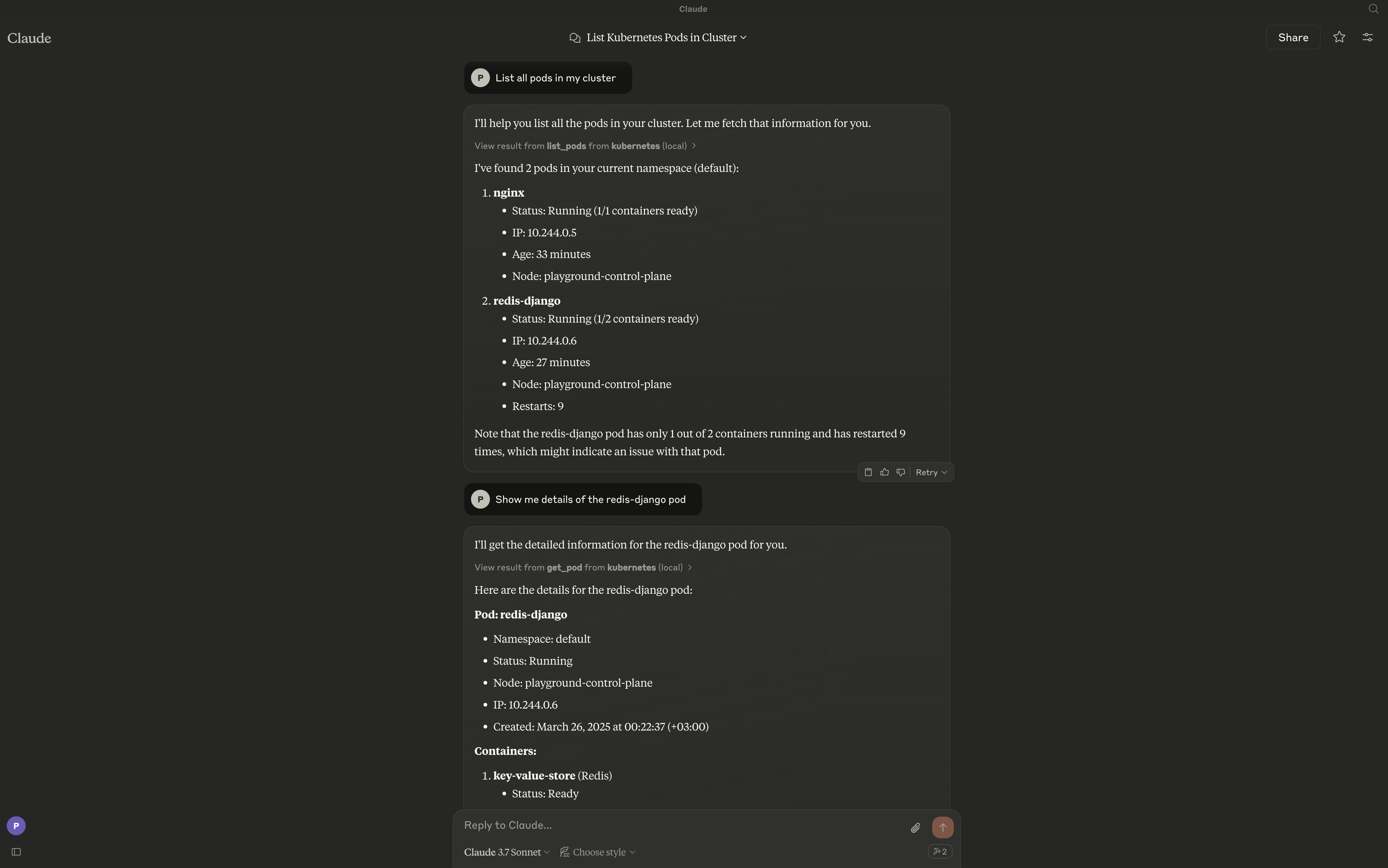
Kai는 대규모 언어 모델(LLM)과 Kubernetes 클러스터 간의 브리지를 제공하여 Kubernetes 리소스와 자연어로 상호작용할 수 있게 합니다. 이 서버는 클러스터, 네임스페이스, 파드, 디플로이먼트, 서비스 및 기타 Kubernetes 리소스를 관리하기 위한 포괄적인 도구 세트를 제공합니다.
문서
Kai - Kubernetes MCP Server
A Model Context Protocol (MCP) server for managing Kubernetes clusters from MCP-compatible clients like Claude Desktop, Cursor, and Continue.
Overview
Kai exposes Kubernetes operations as MCP tools, letting an LLM client manage your cluster through natural language — workloads, networking, config, storage, RBAC, custom resources, and raw manifests.
Features
Core Workloads
- Pods - Create, list, get, delete, and stream logs
- Deployments - Create, list, describe, and update
- Jobs - Batch workload management (create, get, list, delete)
- CronJobs - Scheduled batch workloads (create, get, list, delete)
Networking
- Services - Create, get, list, and delete
- Ingress - HTTP/HTTPS routing, TLS configuration (create, get, list, update, delete)
Configuration
- ConfigMaps - Configuration management (create, get, list, update, delete)
- Secrets - Secret management (create, get, list, update, delete)
- Namespaces - Namespace management (create, get, list, delete)
Cluster Operations
- Context Management - Switch contexts, list contexts, rename, delete
- Nodes - Node monitoring, cordoning, and draining (list, get, cordon, uncordon, drain)
- Cluster Health - Cluster status and resource metrics (cluster health, node/pod metrics)
Storage
- Persistent Volumes - PV management (list, get, delete) and PVC management (create, list, get, delete)
- Storage Classes - Storage class operations (list, get)
Security
- RBAC - Roles, RoleBindings, ClusterRoles, ClusterRoleBindings, and ServiceAccounts (list, get)
Utilities
- Port Forwarding - Forward ports to pods and services (start, stop, list sessions)
Advanced
- Apply/Delete Manifests - Apply or delete raw YAML/JSON, multi-document and any kind including CRDs (apply_yaml, delete_yaml)
- Custom Resources - CRD and custom resource operations (list/get CRDs, list/get/delete custom resources)
- Events - Event listing and filtering (by namespace, type, involved object)
- API Discovery - API resource exploration (list_api_resources)
Requirements
The server connects to your current kubectl context by default. Ensure you have access to a Kubernetes cluster configured for kubectl (e.g., minikube, Rancher Desktop, kind, EKS, GKE, AKS).
Installation
go install github.com/basebandit/kai/cmd/kai@latest
Container image
A multi-arch image (linux/amd64, linux/arm64) is published on Docker Hub:
docker pull cyclon/kai:v1.0.0
docker run --rm cyclon/kai:v1.0.0 -version
CLI Options
kai [options]

Options:
  -kubeconfig string        Path to kubeconfig file (default "~/.kube/config")
  -context string           Name for the loaded context (default "local")
  -in-cluster               Use in-cluster config (when running inside a pod)
  -transport string         stdio (default), streamable-http, or sse-legacy
  -sse-addr string          HTTP listen address for streamable-http/sse-legacy (default ":8080")
  -tls-cert string          Path to TLS certificate (enables HTTPS)
  -tls-key string           Path to TLS private key (enables HTTPS)
  -request-timeout duration Timeout for Kubernetes API requests (default 30s)
  -metrics                  Expose Prometheus metrics at /metrics (default true)
  -log-format string        json (default) or text
  -log-level string         debug, info, warn, error (default "info")
  -version                  Show version information
Logs are written to stderr in structured JSON format by default, making them easy to parse:
{"time":"2024-01-15T10:30:00Z","level":"INFO","msg":"kubeconfig loaded","path":"/home/user/.kube/config","context":"local"}
{"time":"2024-01-15T10:30:00Z","level":"INFO","msg":"starting server","transport":"stdio"}
Configuration
Claude Desktop
Edit your Claude Desktop configuration:
# macOS
code ~/Library/Application\ Support/Claude/claude_desktop_config.json

# Linux
code ~/.config/Claude/claude_desktop_config.json
Add the server configuration:
{
  "mcpServers": {
    "kubernetes": {
      "command": "/path/to/kai"
    }
  }
}
With custom kubeconfig:
{
  "mcpServers": {
    "kubernetes": {
      "command": "/path/to/kai",
      "args": ["-kubeconfig", "/path/to/custom/kubeconfig"]
    }
  }
}
Cursor
Add to your Cursor MCP settings:
{
  "mcpServers": {
    "kubernetes": {
      "command": "/path/to/kai"
    }
  }
}
Continue
Add to your Continue configuration (~/.continue/config.json):
{
  "experimental": {
    "modelContextProtocolServers": [
      {
        "transport": {
          "type": "stdio",
          "command": "/path/to/kai"
        }
      }
    ]
  }
}
HTTP Mode (web clients, remote use)
For non-stdio clients, run the streamable HTTP transport:
kai -transport=streamable-http -sse-addr=:8080
The MCP endpoint is http://localhost:8080/mcp. Health probes are at /healthz
and /readyz, and Prometheus metrics at /metrics. The legacy SSE transport
(-transport=sse-legacy, endpoint /sse) still works but is deprecated.
Custom Kubeconfig
By default, Kai uses ~/.kube/config. You can specify a different kubeconfig:
kai -kubeconfig=/path/to/custom/kubeconfig -context=my-cluster
Running Inside a Kubernetes Cluster
When deploying Kai inside a Kubernetes cluster, use the -in-cluster flag to automatically use the pod's service account credentials:
kai -in-cluster -transport=streamable-http -sse-addr=:8080
The recommended way to run Kai in-cluster is with kmcp (from kagent), which manages MCP servers as MCPServer resources:
apiVersion: kagent.dev/v1alpha1
kind: MCPServer
metadata:
  name: kai
spec:
  transportType: http
  httpTransport:
    targetPort: 8080
    path: /mcp
  deployment:
    image: cyclon/kai:v1.0.0
    port: 8080
    cmd: /kai
    args: ["-in-cluster", "-transport=streamable-http", "-sse-addr=:8080"]
    serviceAccountName: kai
kmcp creates the Deployment and Service for you. The service account needs RBAC for the resources Kai manages — broad get/list/watch, plus create/update/delete where you use mutating tools. See the kmcp deploy guide.
Runnable example: deploy/kagent/kai.example.yaml (test-only — grants cluster-admin; scope down for real use).
Usage Examples
Once configured, you can interact with your cluster using natural language:
- "List all pods in the default namespace"
- "Create a deployment named nginx with 3 replicas using the nginx:latest image"
- "Show me the logs for pod my-app"
- "Delete the service named backend"
- "Create a cronjob that runs every 5 minutes"
- "Create an ingress for my-app with TLS enabled"
- "Port forward service nginx on port 8080:80"
- "Apply this manifest: "
Contributing
Contributions are welcome! Please see our contributing guidelines for more information.
License
This project is licensed under the MIT License.