Armor Crypto MCP
공식여러 블록체인, 스테이킹, DeFi, 스왑, 브리징, 지갑 관리, DCA, 지정가 주문, 코인 조회, 추적 등과 인터페이스하는 MCP입니다.
Armor Crypto MCP(으)로 무엇을 할 수 있나요?
- Solana 지갑 생성 및 관리 — 지갑 관리 도구를 통해 새 지갑을 생성하고, 그룹으로 정리하며, 사용하지 않는 지갑을 보관 처리합니다.
- 토큰 스왑 실행 — 스왑 도구를 사용하여 Solana에서 일반 스왑을 수행합니다.
- 자동 거래 전략 설정 — DCA 주문, 지정가 주문, 예약 거래를 체결, 조회, 취소합니다.
- 토큰 스테이킹 및 언스테이킹 — 스테이킹 도구를 사용하여 자산을 스테이킹하거나 스테이킹된 포지션을 인출합니다.
- 인기 토큰 탐색 — 토큰을 검색하고 Solana의 인기 토큰 데이터를 조회합니다.
- 통계 분석 실행 — 정확한 온체인 데이터 분석을 위해 통계 계산기 도구를 적용합니다.
문서
Armor Crypto MCP
알파 테스트 버전 0.1.24
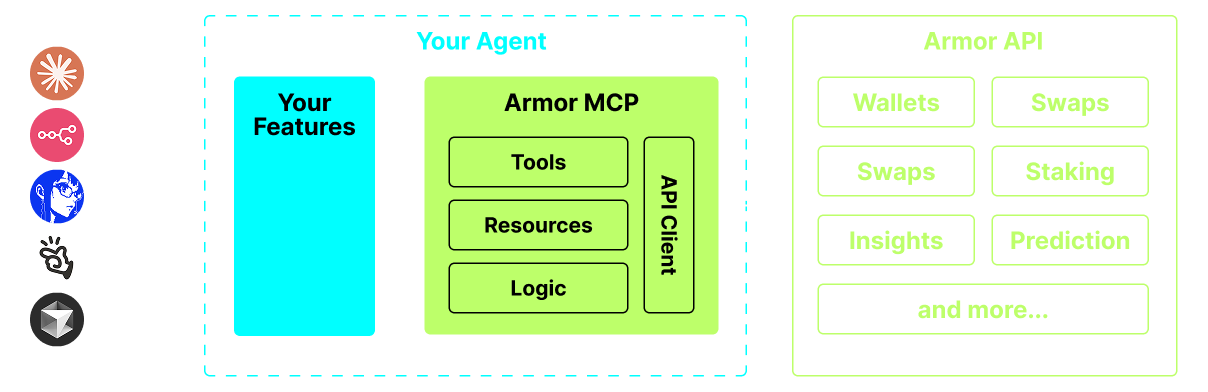
AI 에이전트를 암호화폐 생태계와 통합하기 위한 단일 소스입니다. 여기에는 지갑 생성 및 관리, 스왑, 전송, DCA, 손절 및 이익 실현과 같은 이벤트 기반 거래 등이 포함됩니다. Armor MCP는 알파 단계에서 Solana를 지원하며, 베타 단계에서는 이더리움, Base, Avalanche, 비트코인, Sui, Berachain, megaETH, Optimism, Ton, BNB, Arbitrum 등 12개 이상의 블록체인을 지원할 예정입니다. Armor의 MCP를 사용하면 통합된 로직과 완전한 도구 세트로 모든 암호화폐를 AI 에이전트에 도입할 수 있습니다.
기능
🧠 AI 네이티브
📙 지갑 관리
🔃 스왑
🌈 특화 거래 (DCA, 손절 등)
⛓️ 멀티체인
↔️ 크로스체인 거래
🥩 스테이킹
🤖 에이전트 프레임워크와의 빠른 통합
👫 소셜 감성
🔮 예측
요구 사항
1. Python이 설치되어 있는지 확인하세요
2. uv 설치
Linux / Windows
pip install uv
Mac
brew install uv
3. Claude Desktop 또는 AI 에이전트가 MCP를 실행합니다
자세한 내용은 사용법 및 구성을 참조하세요.
알파 테스트
현재 프리 알파 단계이며, Claude Desktop, Cline, Cursor, n8n 등 다양한 에이전트 및 에이전트 프레임워크의 기능을 테스트하고 있습니다.
현재 기능 및 도구
- 지갑 관리
- 그룹화 및 조직화
- 보관
- 스왑 및 거래
- 일반 스왑
- DCA (등록 / 목록 / 취소)
- 예약 주문
- 지정가 주문 (등록 / 목록 / 취소)
- 스테이킹 및 언스테이킹
- 토큰 검색 및 인기 토큰
- 정확한 분석을 위한 통계 계산기
- Solana 블록체인 지원
출시 예정
- 더 많은 블록체인 지원
- 민팅
- 도구로서의 Armor 에이전트 (또는 A2A)
MCP 설정
현재 API 키를 받으려면 Armor NFT가 필요합니다. 여기에서 받으세요.
사용법 및 구성
에이전트와 함께 Armor MCP를 사용하려면 다음 구성이 필요하며, <PUT-YOUR-KEY-HERE>를 API 키로 교체하세요:
{
  "mcpServers": {
    "armor-crypto-mcp": {
      "command": "uvx",
      "args": ["armor-crypto-mcp@latest", "--version"],
      "env": {
        "ARMOR_API_KEY": "<PUT-YOUR-KEY-HERE>"
      }
    }
  }
}
Claude Desktop에서 사용
- 개발자 모드가 활성화되어 있어야 합니다
- Claude Desktop 창의 왼쪽 상단 파일 메뉴를 엽니다.
- 파일 > 설정으로 이동합니다.
- 개발자 아래에서 구성 편집을 클릭합니다.
- 구성 파일에 위의
armor-wallet-mcp섹션을 삽입합니다. - 플레이스홀더를 API 키로 교체했는지 확인합니다.
- 파일을 저장하고 Claude Desktop에서 새 채팅을 시작합니다.
Cline에서 사용
- VSCode 왼쪽 패널의 Cline 탭에서
MCP Servers버튼을 클릭합니다. - 왼쪽 패널 하단으로 스크롤하여
Configure MCP Servers을 클릭합니다. - 구성 파일에 위의
armor-wallet-mcp섹션을 삽입합니다. - 플레이스홀더를 API 키로 교체했는지 확인합니다.
- 파일을 저장하고
MCP Servers탭 아래의Done을 클릭한 후 Cline과 채팅을 시작합니다.
n8n에서 사용
- n8n 앱을 엽니다.
- 화면 왼쪽 하단에서 사용자 이름 옆의
...을 클릭하고Settings을 클릭합니다. - 왼쪽 패널에서
Community nodes을 클릭한 다음Install a Community Node버튼을 클릭합니다. npm Package Name검색 필드에 mcp를 입력합니다.MCP Nodes을 설치합니다.- MCP 노드를 추가합니다(예:
List Tools). - MCP 클라이언트
Parameters탭에서Select Credential을 클릭하고Create new credential을 클릭합니다. Command아래에uvx을 입력합니다.Arguments아래에armor-crypto-mcp을 입력합니다.Environments아래에ARMOR_API_KEY=eyJhbGciOiJIUzI1NiIsIn...을 입력하고=뒤에 전체 API 키 값을 붙여넣습니다.Parameters탭으로 돌아가서 해당 노드의 MCPOperation을 선택할 수 있습니다.
Armor MCP 사용하기
Armor MCP를 설정한 후 시작하는 데 사용할 수 있는 몇 가지 프롬프트가 여기 있습니다