UML-MCP
다이어그램 생성 서버로, 여러 UML 및 기타 다이어그램 유형을 지원하며 다양한 출력 형식을 제공합니다. Kroki 및 PlantUML과 같은 렌더링 서비스와 통합됩니다.
문서
UML-MCP









UML-MCP gives an AI assistant a real diagram tool instead of asking it to fake diagrams in Markdown. Connect it once over MCP, then ask for a class diagram, sequence diagram, architecture view, Mermaid flowchart, D2 graph, BPMN process, or another Kroki-backed format. The server validates the source, renders it, and returns a URL, playground link, or inline image.
It also works as a building block for agent-facing products. Use MCP when an agent needs diagram tools, AG-UI when a frontend needs a standard event stream, and OpenUI when the product should turn model output into interactive, application-owned UI components. These layers complement each other; UML-MCP stays focused on diagram generation.
| Live MCP | https://uml-mcp.vercel.app/mcp |
| Docs | antoinebou12.github.io/uml-mcp |
| Catalog | ~37 Kroki-backed types · 5 MCP tools · URL + playground + chat PNG |
| Agent UI | MCP /mcp · canonical AG-UI /ag-ui · OpenUI integration guide |
| Install | python scripts/install.py · uv tool install uml-mcp && uml-mcp setup · Installation |
| Console | uml-mcp admin: setup form, settings, live logs, charts, Kroki playground (install · user guide · tour) |
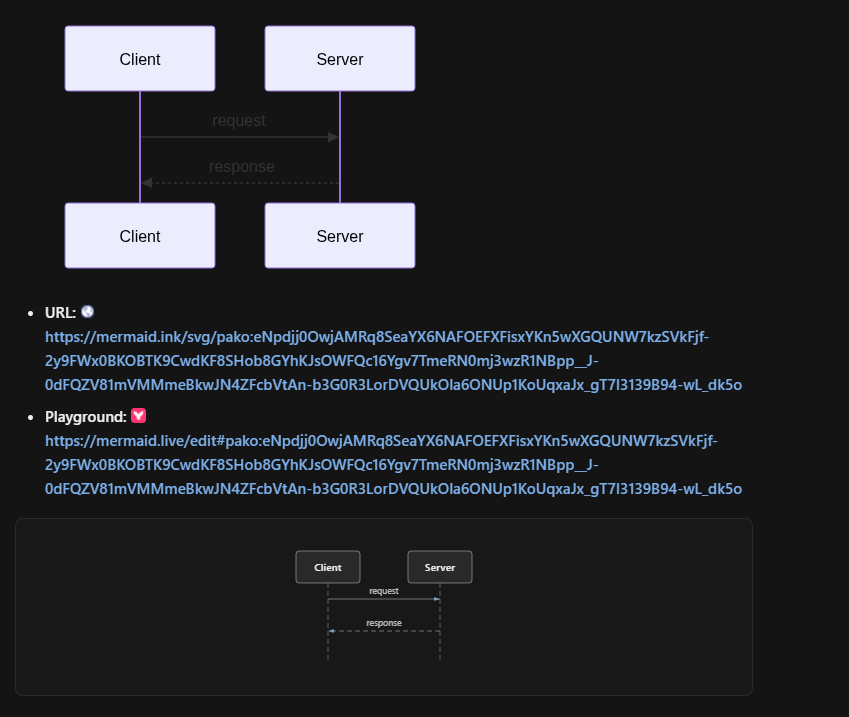
Chat reply shape: diagram preview · URL · Playground (mermaid.live)
Quick start
Remote (recommended) — add to your MCP client:
"uml-mcp": {
  "transport": "http",
  "url": "https://uml-mcp.vercel.app/mcp"
}
Use /mcp, not the site root. Then ask: “Draw a sequence diagram of a user logging in through an API gateway.” or paste PlantUML / Mermaid / Kroki source.
Repo defaults: .cursor/mcp.json · .vscode/mcp.json · .codex/config.toml.
| Client | Config | Guide |
|---|---|---|
| Cursor | .cursor/mcp.json | docs/integrations/cursor.md |
| VS Code / Copilot | .vscode/mcp.json | docs/integrations/vscode_copilot.md |
| OpenAI Codex | .codex/config.toml | docs/integrations/openai_codex.md |
| Ollama / Open WebUI | config/openwebui_mcp.json | docs/integrations/ollama.md |
| Claude Desktop | config/claude_desktop_*.json | docs/integrations/claude_desktop.md |
All snippets: config/README.md
Install locally (guided):
| Path | Command |
|---|---|
| Installer (needs only Python + typer + tqdm) | python scripts/install.py |
| Setup wizard | uv tool install uml-mcp && uml-mcp setup (profile, features, clients, health check) |
| Web setup form | uml-mcp setup --web → setup page in the console |
| Manual | uml-mcp config init --profile local · uml-mcp client install --client vscode|cursor|claude-desktop|claude-code |
Guide: docs/installation.md
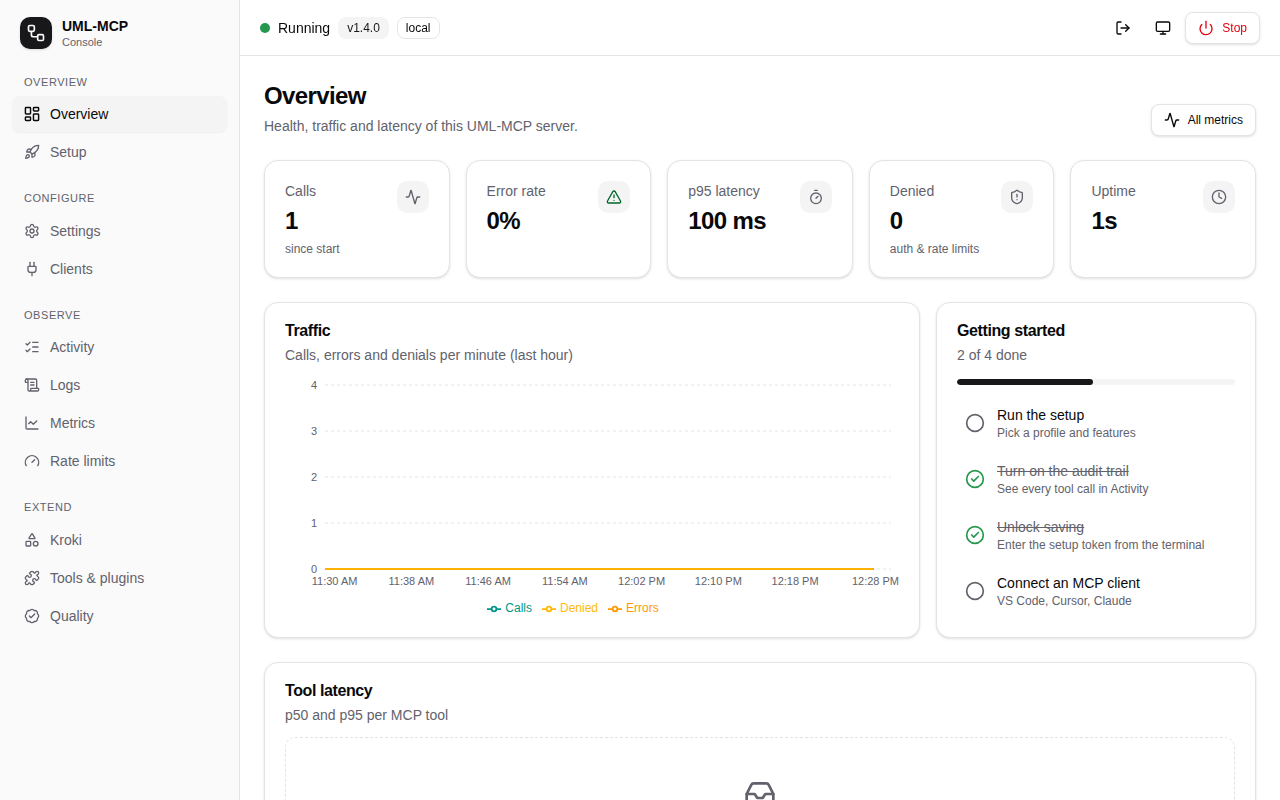
Admin console (uml-mcp admin): overview · setup · settings · activity · logs · metrics · plugins, light and dark, desktop and mobile
Clone from origin (local stdio)
git clone https://github.com/antoinebou12/uml-mcp.git
cd uml-mcp
uv sync
uv run python server.py
If you already have the repo and need to set origin:
git remote add origin https://github.com/antoinebou12/uml-mcp.git
Configs: config/README.md (Cursor, VS Code, Codex, Claude, Open WebUI, Continue)
Claude Code plugin
/plugin marketplace add https://github.com/antoinebou12/uml-mcp
/plugin install uml-mcp@uml-mcp-plugins
docs/integrations/claude_code.md · Cursor skill: .skill/skills/uml-mcp-diagrams/SKILL.md
At a glance
| Topic | What you get |
|---|---|
| Diagrams | ~37 types via Kroki (UML, Mermaid, D2, TikZ, BPMN, C4, GoAT, UMLet, …) |
| Tools | generate_uml · generate_uml_image · validate_uml · list_diagram_types · generate_uml_batch |
| Chat | Inline PNG + markdown  + Playground link |
| Deploy | Local · Docker · Kubernetes (Helm) · Vercel · Smithery |
| Enterprise | Optional SSO: Microsoft Entra ID / OAuth 2.1 bearer tokens, RFC 9728 metadata, clear 401/403 (docs/enterprise · guide) |
| Config file | One uml-mcp.yaml (defaults < file < env) · uml-mcp config init|show|validate · profiles local / docker / enterprise |
| Audit & observability | MXCP-style audit of every tool/resource/prompt call (JSONL rotation, stdout → SIEM) · JSON logs · metrics + Prometheus /metrics · rate limits per IP/user/route/tool (operations) |
| Quality | uml-mcp lint --strict --min-grade A: mcpx-style grade, token budget, MXCP-style config checks (rules) |
| Admin console | Setup form, schema-driven settings (save, reset, live apply), activity, live logs, charts, Kroki playground and Docker stack, Stop; local token or MCP.Admin (tour) |
| Local Kroki | uml-mcp kroki up --use: Kroki + mermaid, blockdiag, bpmn, excalidraw in Docker on 127.0.0.1 (guide) |
| Plugins | Extra MCP tools and diagram renderers from Python packages, allow-listed in plugins.enabled (guide · author) |
| Tracing | Optional OpenTelemetry spans per request and MCP call (uml-mcp[otel]) |
| Frontend | Canonical AG-UI SSE for agent UIs; OpenUI can consume AG-UI and render generated components in your app |
MCP tools
| Tool | Purpose |
|---|---|
generate_uml | Render one diagram; tool text includes image markdown, URL, Playground. Use png for ImageContent. |
generate_uml_image | Inline chat image (default PNG); fetches bytes even under hosted MCP_URL_ONLY |
validate_uml | Local checks; strict for Mermaid/D2 (rejects semicolon-packed sequenceDiagram) |
list_diagram_types | Catalog (like uml://types) |
generate_uml_batch | Many diagrams (MCP_BATCH_MAX_ITEMS, MCP_BATCH_CONCURRENCY) |
Smoke prompts: tests/prompts/chatgpt_mcp_smoke_test.md
Resources (uml://)
| Resource | Description |
|---|---|
uml://types | Types, backends, formats |
uml://templates / uml://examples | Starters and samples |
uml://formats / uml://capabilities | Formats and validation matrix |
uml://server-info / uml://workflow | Version/tools and plan-then-generate |
Diagram types
| Category | Examples |
|---|---|
| UML | Class, Sequence, Activity, Use Case, State, Component, Deployment, Object |
| General | Mermaid, D2, Graphviz, ERD, BlockDiag, BPMN, C4 |
| Specialized | TikZ, Excalidraw, GoAT, UMLet, Nomnoml, Pikchr, Structurizr, SVGBob, WaveDrom, WireViz, … |
Remote vs local
| Remote (Vercel) | Local | |
|---|---|---|
| Transport | HTTP MCP | stdio or HTTP |
| File writes | No | Optional |
| Chat images | PNG tools fetch bytes under URL-only | Same + optional disk |
| Env | Server-side | Your .env |
Deployment
Vercel — connect the repo; clients use https://<project>.vercel.app/mcp.
Smithery — paste that /mcp URL at smithery.ai/new. Guide: docs/integrations/vercel_smithery.md.
Docker
docker compose up -d
docker build -t uml-mcp . && docker run -p 8000:8000 uml-mcp
docker run -i uml-mcp python server.py --transport stdio
Kubernetes + SSO: helm upgrade --install uml-mcp deploy/helm/uml-mcp --set auth.mode=jwt … (Entra ID or any OIDC provider). Guide: docs/enterprise.
Configuration (local)
| Variable | Default |
|---|---|
KROKI_SERVER | https://kroki.io |
PLANTUML_SERVER | http://plantuml-server:8080 |
MCP_OUTPUT_DIR | ./output |
MCP_READ_ONLY | false |
MCP_URL_ONLY | see docs/configuration.md |
MCP_BATCH_MAX_ITEMS | 20 |
MCP_BATCH_CONCURRENCY | 4 |
MCP_RATE_LIMIT_PER_MINUTE | 0 |
UML_MCP_CONFIG | discovered uml-mcp.yaml (none disables) |
Full list: docs/configuration.md · single file: docs/configuration/uml-mcp-yaml.md
Architecture & layout
Assistant → generate_uml / generate_uml_image → Kroki (+ fallbacks) → url, playground, optional image bytes.
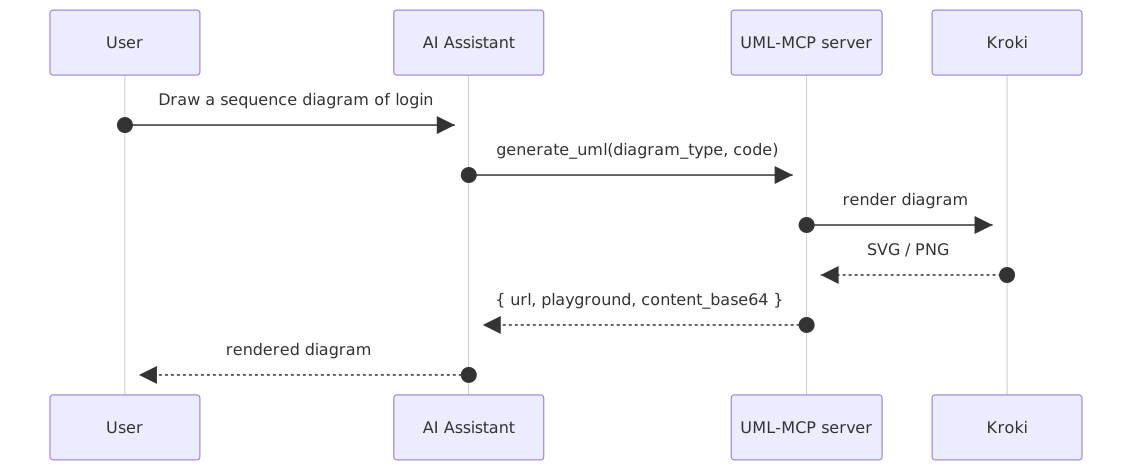
server.py / app.py     -- MCP + FastAPI (/mcp)
mcp_core/tools/        -- generate_uml, generate_uml_image, validate, batch
tools/kroki/           -- Kroki, PlantUML, Mermaid, D2
Agent UI: canonical POST /ag-ui for AG-UI clients; legacy direct render at POST /ag-ui/generate. See frontend integration and OpenUI + UML-MCP.
Development
uv sync --all-groups
uv run pytest tests/ -v
uv run ruff check . && uv run ruff format --check .
make ci
Docs locally: uv run mkdocs serve → http://127.0.0.1:8000
Enterprise SSO: OAuth 2.1 · OpenID Connect · Microsoft Entra ID
Optional and off by default (MCP_AUTH_MODE=none; the public Vercel endpoint stays open).
| Topic | Summary |
|---|---|
| Modes | jwt: validate Entra / OIDC access tokens (resource server) · entra-proxy: adds RFC 8414 + RFC 7591 facade with S256-only PKCE for DCR clients |
| OAuth 2.1 | Authorization Code + PKCE S256; header-only bearer tokens; 401 → WWW-Authenticate: Bearer resource_metadata, scope; 403 insufficient_scope step-up |
| OpenID Connect | Discovery + JWKS for signing keys; ID tokens are rejected, access tokens only |
| Entra ID | v2 tokens (requestedAccessTokenVersion: 2), mcp.read / mcp.write / .default, app roles, VS Code + Visual Studio pre-authorized (setup) |
| MSAL | Client side only (VS Code, Visual Studio, Azure CLI, daemons); examples in OAuth/OIDC/MSAL |
| Try it | tests/http/entra-auth.http · python -m mcp_core.auth generate az-script · checklist |
Community
If this survives a real production repo, it beats a lot of polished launch demos.
— @AIDailyGems on antoinebou12/uml-mcp
Daily and monthly activity (stars, forks, merged PRs, issues): trendshift.io/repositories/42725
Links
| Docs | Site · Cursor · Claude Code · Frontend · Enterprise SSO · OpenUI |
| Contribute | CONTRIBUTING.md · CODE_OF_CONDUCT.md · SECURITY.md |
| License | MIT |
Maintained by Antoine Boucher. Built on PlantUML, Kroki, Mermaid, and D2.