FermatMCP
궁극의 수학 엔진 - SymPy, NumPy, Matplotlib을 하나의 강력한 서버로 통합합니다! 개발자와 연구자에게 완벽합니다.
문서
Fermat MCP

This project provides a FastMCP server for mathematical computations, including numerical and symbolic calculations, as well as plotting.
Modules
1. mpl_mcp - Matplotlib Integration
| Feature | Description |
|---|---|
plot_barchart | Plots bar charts of given data values |
plot_scatter | Creates scatter plots from data points |
plot_chart | Plots line, scatter, or bar charts |
plot_stem | Creates stem plots for discrete data |
plot_stack | Generates stacked area/bar charts |
eqn_chart | Plots mathematical equations |
2. numpy_mcp - NumPy Integration
| Category | Operations |
|---|---|
| Basic Math | add, sub, mul, div, power, abs, exp, log, sqrt |
| Trigonometric | sin, cos, tan |
| Statistics | mean, median, std, var, min, max, argmin, argmax, percentile |
| Linear Algebra | dot, matmul, inv, det, eig, solve, svd |
| Matrix Operations | create, zeros, ones, full, arange, linspace |
| Array Manipulation | reshape, flatten, concatenate, transpose, stack |
3. sympy_mcp - SymPy Integration
| Category | Operations |
|---|---|
| Algebra | simplify, expand, factor, collect |
| Calculus | diff, integrate, limit, series |
| Equations | solve, solveset, linsolve, nonlinsolve |
| Matrix Operations | create, det, inv, rref, eigenvals |
Setup
Requirements
-
Python 3.12 or higher (To install Python3.12 follow Python Download)
-
uv (To install uv follow uv Installation)
Clone the repository
git clone https://github.com/abhiphile/fermat-mcp
Visual Studio Code, Windsurf
You can find the mcp.json file in the
MCP: Open User Configuration or MCP: Open Workspace Configuration
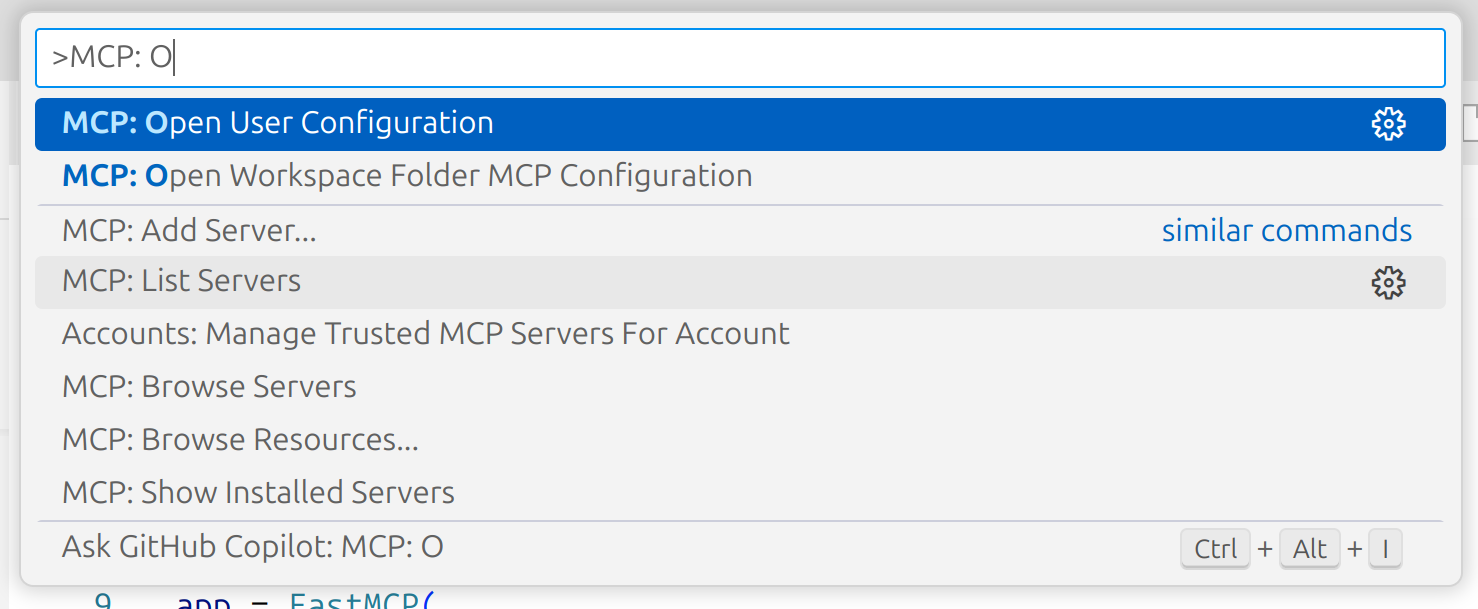
Add the following to your mcp.json:
{
  "mcpServers": {
    "fmcp": {
      "command": "bash",
      "args": ["MCP_SERVER_ABSOLUTE_PATH/setup.sh"],
      "description": "fmcp server is for mathematical computations, including numerical and symbolic calculations, as well as plotting."
    }
  }
}
Claude (Anthropic)
If you're using Claude or the Anthropic MCP client, add this working MCP configuration to your mcp.json (update the directory path to your local clone):
{
  "mcpServers": {
    "fmcp": {
      "command": "uv",
      "args": [
        "--directory",
        "/home/ty/Repositories/fermat-mcp",
        "run",
        "server.py"
      ]
    }
  }
}
Gemini CLI
-
Open your Gemini settings JSON located in ~/.gemini/settings.json where ~ is your home directory.
-
Add the following to your settings.json:
{
  "mcpServers": {
    "fmcp": {
      "command": "bash",
      "args": ["MCP_SERVER_ABSOLUTE_PATH/setup.sh"],
      "description": "fmcp server is for mathematical computations, including numerical and symbolic calculations, as well as plotting."
    }
  }
}
Installing via Smithery
To install Fermat MCP for local usage automatically via Smithery:
npx -y @smithery/cli install @abhiphile/fermat-mcp --client gemini
Example Usage
- Using Gemini CLI
╭──────────────────────────────────────────────────────────────────────────────────────────────────────────────╮
│  > Can you use fmcp server and using numpy method find the eigen values of this 8*8 matrix,                  |
│    2 1 3 1 1 8 4 2                                                                                           |
│    6 6 0 7 1 4 6 1                                                                                           │
│    9 2 1 8 7 9 9 0                                                                                           │
│    2 5 6 6 9 8 0 1                                                                                           │
│    1 3 6 2 3 8 8 1                                                                                           │
│    9 4 2 2 1 2 2 9                                                                                           │
│    8 6 4 4 2 0 2 8                                                                                           │
│    0 0 0 6 6 7 5 6                                                                                           │
╰──────────────────────────────────────────────────────────────────────────────────────────────────────────────╯

 ╭─────────────────────────────────────────────────────────────────────────────────────────────────────────────────────────────────────────╮
 │ ✔  numpy_mcp_numerical_operation (fmcp MCP Server) {"a":[[2,1,3,1,1,8,4,2],[6,6,0,7,1,4,6,1],[9,2,1,8,7,9,9,0],[2,5,6,6,9,8,0,1],[1,3,… │
 │                                                                                                                                         │
 │    {"eigenvalues":["32.077244457548815+0j","-11.531090644775198+0j","-6.6653982146786195+0j","0.6715984762411508+3.37024850             │
 │    10270413j","0.6715984762411508-3.3702485010270413j","4.541270555490195+2.776364664923869j","4.541270555490195-2.77636466             │
 │    4923869j","3.6935063384423428+0j"],"eigenvectors":[["-0.23263835483680192+0j","-0.2264723575289234+0j","-0.4308391916391             │
 │    0195+0j","-0.012346573390129022+0.17748655663058255j","-0.012346573390129022-0.17748655663058255j","-0.21221572277027187             │
 │    +0.3524396218277479j","-0.21221572277027187-0.3524396218277479j","0.3451499664861578+0j"],["-0.31955742545335186+0j","-0             │
 │    .2569860493445581+0j","0.05691886770041556+0j","-0.35591013681869693-0.2242364092694275j","-0.35591013681869693+0.224236             │
 │    4092694275j","0.1932161673963751-0.39527849111641133j","0.1932161673963751+0.39527849111641133j","-0.7979681696063214+0j             │
 │    "],["-0.46626263247473404+0j","-0.4684914620112376+0j","0.5469400556350749+0j","0.34325164099973565+0.06607019711949293j             │
 │    ","0.34325164099973565-0.06607019711949293j","0.21312270185159682+0.28822307710358636j","0.21312270185159682-0.288223077             │
 │    10358636j","0.42707422750984786+0j"],["-0.41589316441674523+0j","0.2291771012892302+0j","0.09410792992600435+0j","0.6375             │
 │    92441360358+0j","0.637592441360358+-0j","0.46446646137729414+0j","0.46446646137729414+-0j","0.08171661775583623+0j"],["-             │
 │    0.35812884189789035+0j","-0.26551071423139044+0j","-0.649979374400915+0j","-0.2999153430497845+0.20110182336747695j","-0             │
 │    .2999153430497845-0.20110182336747695j","0.04424367733961273-0.020400357434930304j","0.04424367733961273+0.0204003574349             │
 │    30304j","-0.037276545325188024+0j"],["-0.3042416233100104+0j","0.4027405071320744+0j","0.2343447346668298+0j","-0.119224             │
 │    87219398595+0.10317726668781271j","-0.11922487219398595-0.10317726668781271j","-0.3387759141362585+0.15790241128043445j"             │
 │    ,"-0.3387759141362585-0.15790241128043445j","0.11473144194899779+0j"],["-0.35389732755448017+0j","0.5359362131480812+0j"             │
 │    ,"0.13989902586074168+0j","-0.16008513226461316-0.26111873108374495j","-0.16008513226461316+0.26111873108374495j","0.055             │
 │    729749650881726-0.22748184206919145j","0.055729749650881726+0.22748184206919145j","-0.19838514696566653+0j"],["-0.327615             │
 │    5213691367+0j","-0.30122843153433887+0j","0.07858579556736099+0j","0.00042251379361638556-0.11670182367986544j","0.00042             │
 │    251379361638556+0.11670182367986544j","-0.18590228871569267-0.2479130526139182j","-0.18590228871569267+0.247913052613918             │
 │    2j","-0.03374593856285834+0j"]]}                                                                                                     │
 ╰─────────────────────────────────────────────────────────────────────────────────────────────────────────────────────────────────────────╯
✦ Of course, I can do that. Here are the eigenvalues for the given matrix:

  32.077244457548815
  -11.531090644775198
  -6.6653982146786195
  0.6715984762411508 + 3.3702485010270413j
  0.6715984762411508 - 3.3702485010270413j
  4.541270555490195 + 2.776364664923869j
  4.541270555490195 - 2.776364664923869j
  3.6935063384423428
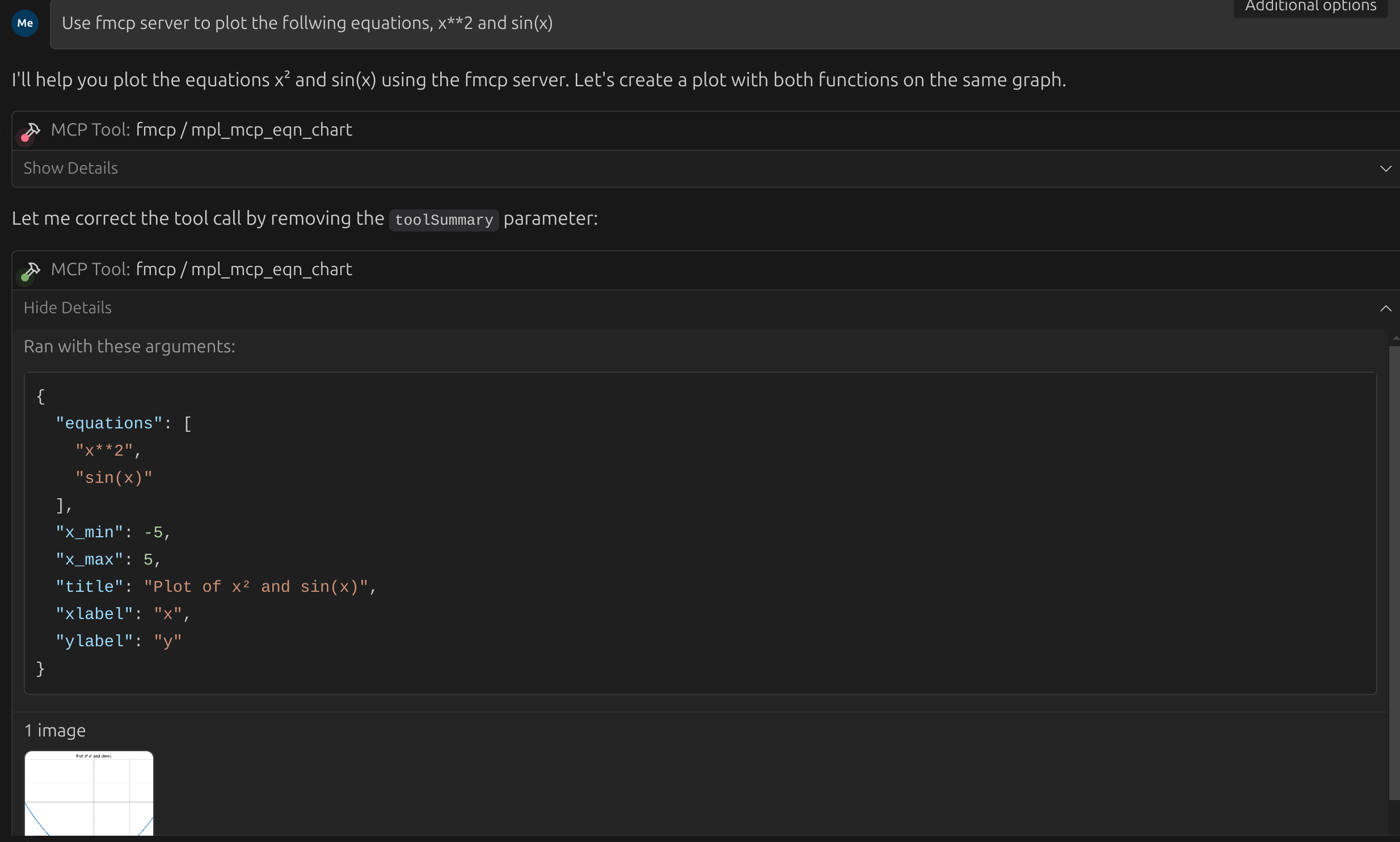
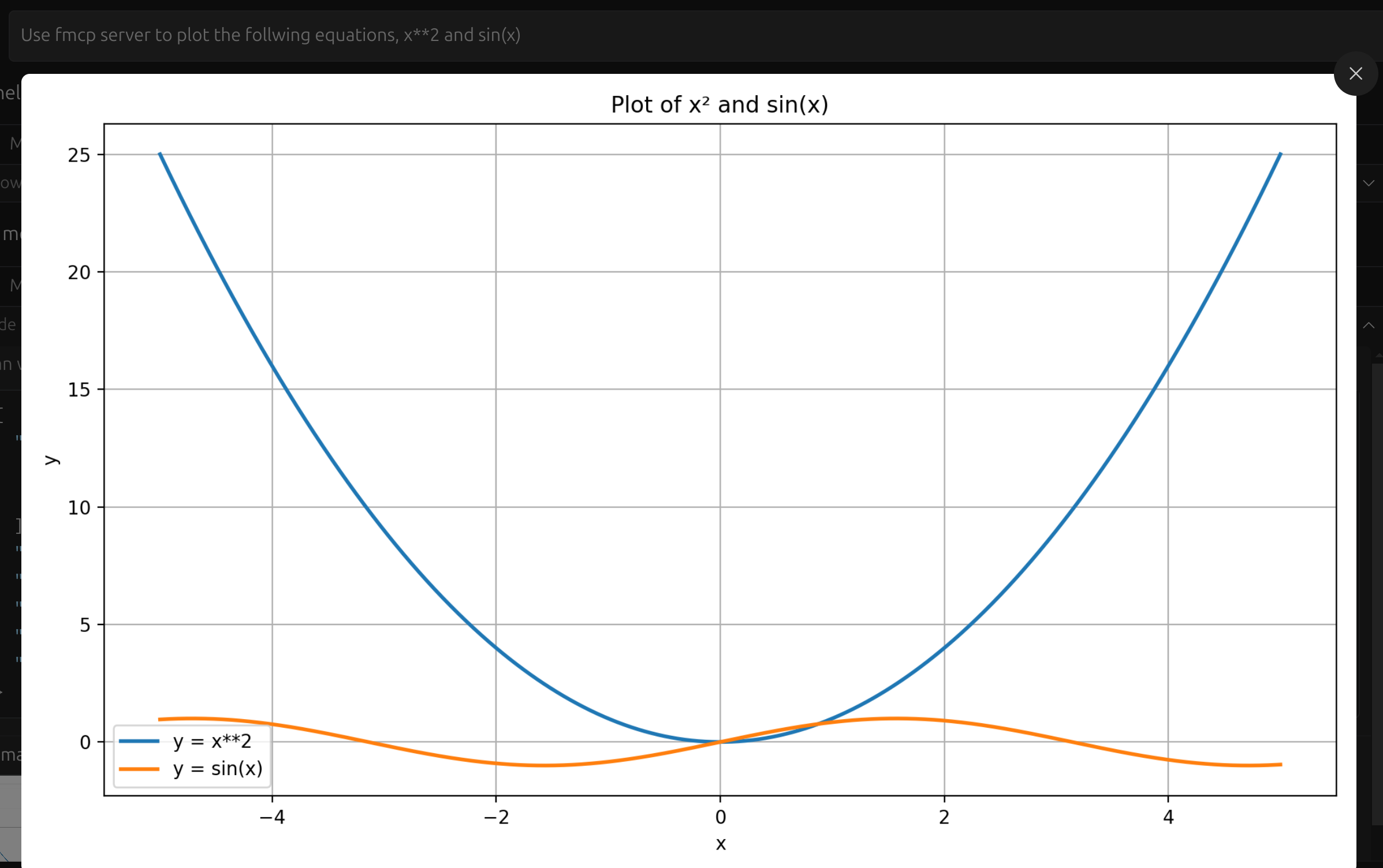
- Using Visual Studio Code, Windsurf
Here the task was to plot both x**2 and sin(x) in the same plot.