Flama
予測AIと生成AIのためのプロダクションフレームワーク。任意のモデルを1行でAPIとして提供し、OpenAI/Anthropic/Ollama互換のエンドポイント、組み込みチャットUI、ネイティブMCPを備えています。
ドキュメント

Light up your models 🔥






Flama
The production framework for Predictive and Generative AI.
Turn any model into a production API in a single line of code. Serve predictive and generative models on a Rust-powered core, and expose your tools to AI agents over the Model Context Protocol (MCP).
Flama is the Framework for Lightweight Applications, artificial intelligence
Models, and Automation. It packages a model from any of the mainstream frameworks
into a single portable format (the .flm file), so every model looks the same to your API
no matter where it came from, and serves it over HTTP in seconds.
- 📦 Any framework, one format. Package scikit-learn, TensorFlow, PyTorch, or an LLM into a single portable
.flmartifact. - ⬇️ Models on demand. Download and package any model from the HuggingFace Hub with one command.
- 🤖 Generative AI serving. Serve LLMs with OpenAI-, Anthropic-, and Ollama-compatible endpoints, side by side.
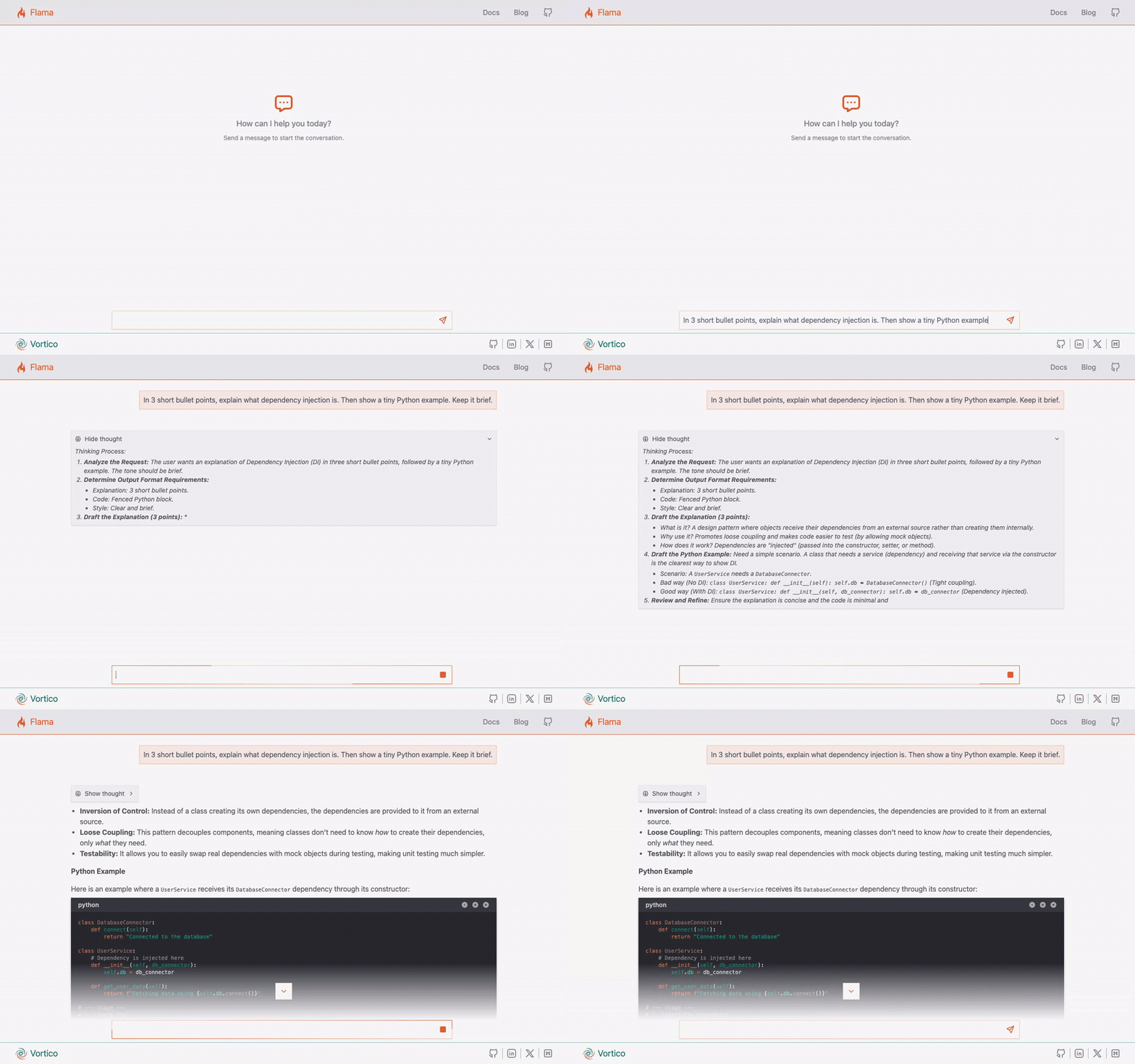
- 💬 Chatbot out of the box. Every served model ships a polished streaming chat UI at
/chat/, with Markdown, LaTeX, and Mermaid. - 🔌 Native MCP. Expose tools, resources, and prompts to AI agents with a single decorator, schemas derived from your type hints.
- ⚡ Rust-powered core. Routing, JSON encoding, request parsing, and compression compiled to native code, shipped as plain wheels.
- 🚀 Production-ready first. Go from a packaged model to a running service over the CLI, in Python, with a spec file, or inside a container.
Installation
Flama is published on PyPI and ships native wheels for every supported Python version (3.10 to 3.14) on Linux, macOS, and Windows. No Rust toolchain required.
pip install flama
Schema, database, and LLM support are optional extras, so you install only what you need:
pip install "flama[pydantic]"      # schema validation (also: typesystem, marshmallow)
pip install "flama[database]"      # SQLAlchemy-backed resources
pip install "flama[llm]"           # generative AI serving (vLLM on Linux, MLX on Apple Silicon)
pip install "flama[full]"          # everything
See the installation docs for details.
Quickstart
The same two commands serve both families of model: package it into a .flm, then point
flama serve at the file. No application code either way.
Serve a predictive model
Package a model trained in any mainstream framework:
import flama
from sklearn.neural_network import MLPClassifier

model = MLPClassifier(activation="tanh", hidden_layer_sizes=(10,))
# ... training ...
flama.dump(model, family="ml", path="model.flm", metrics={"accuracy": 0.947})
Or fetch one straight from the Hub, then serve it:
flama get --family ml --source huggingface scikit-learn/Fish-Weight
flama serve --model file=scikit-learn_Fish-Weight.flm,url=/model,name=fish
You get two endpoints, an OpenAPI schema at /schema/, and Swagger UI at /docs/.
GET /model/ returns the artifact's metadata; POST /model/predict/ runs inference:
curl -X POST http://127.0.0.1:8000/model/predict/ \
  -H "Content-Type: application/json" \
  -d '{"input": [[23.2, 25.4, 30.0, 11.52, 4.02]]}'
{"output": [242.0]}
Learn more in the Predictive AI docs.
Serve a generative model
From zero to a production API with a built-in chat UI in three commands:
pip install "flama[llm,pydantic]"

# 1. Download and package a model from HuggingFace into a portable .flm
flama get --family llm --source huggingface mlx-community/gemma-4-E2B-it-qat-4bit

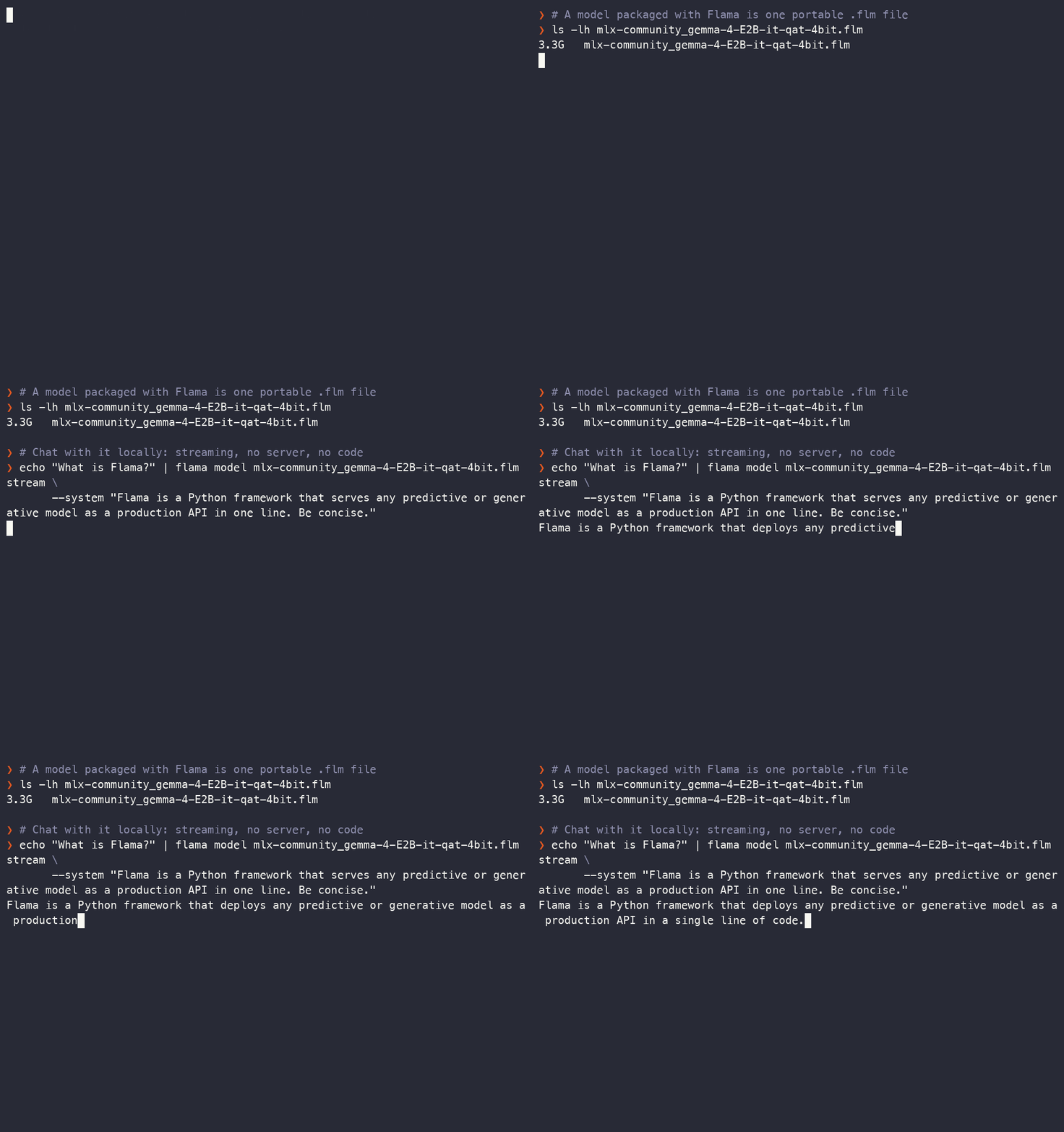
# 2. Try it straight from your terminal, no server needed
echo "What is Flama?" | flama model mlx-community_gemma-4-E2B-it-qat-4bit.flm stream --system "Be concise."

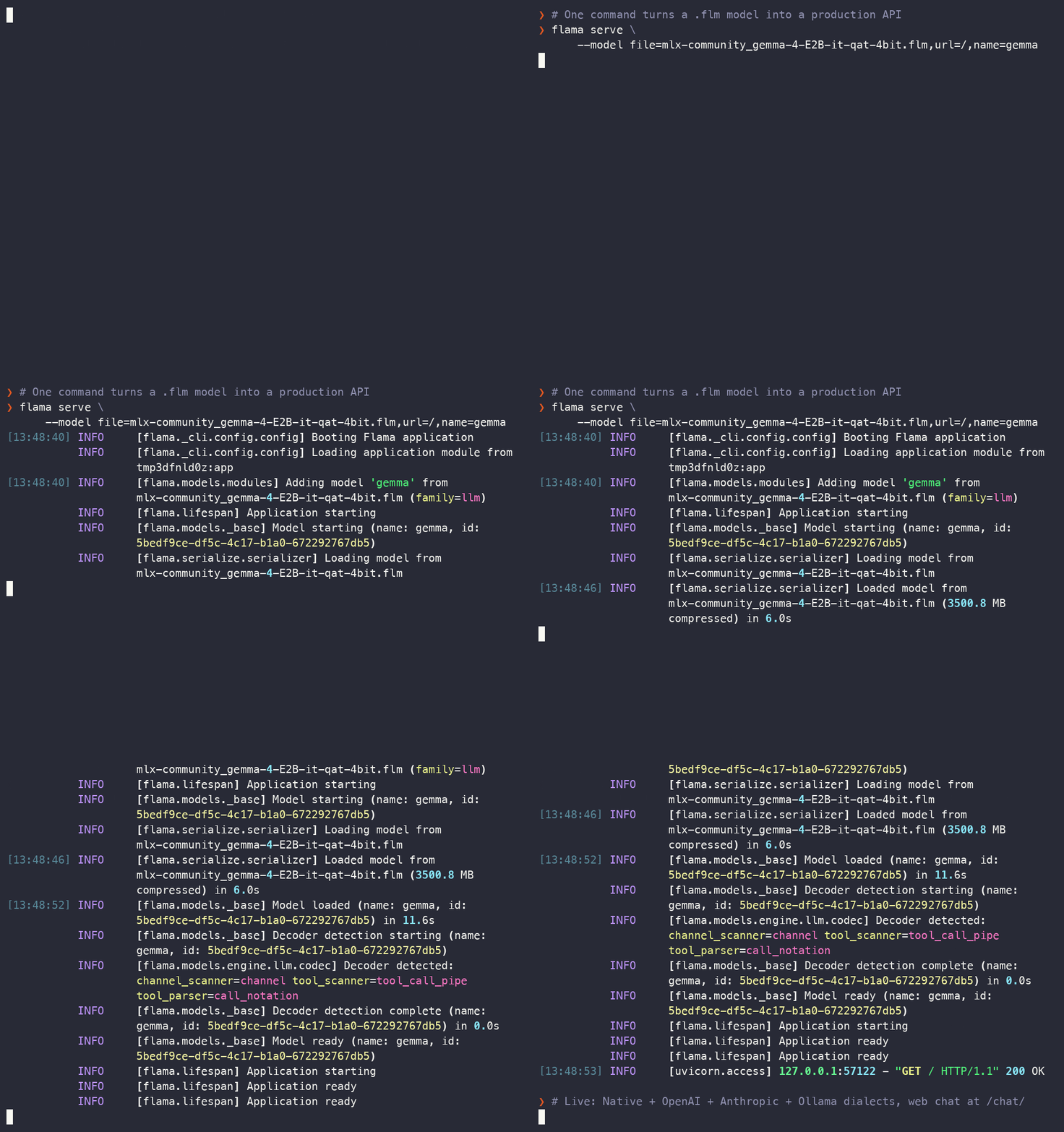
# 3. Serve it over HTTP
flama serve --model file=mlx-community_gemma-4-E2B-it-qat-4bit.flm,url=/,name=gemma
That is it: a full HTTP API, a streaming chat interface at
http://127.0.0.1:8000/chat/, and multi-dialect endpoints.
The same .flm file runs on vLLM (Linux with CUDA) or MLX (Apple Silicon), with
Flama selecting the backend at load time.
Step 2 above needs no server at all. Pipe a prompt into flama model ... stream and the
response streams straight into your shell:
Learn more in the Generative AI docs.
Speak the protocols your clients already use
A single model can serve multiple wire protocols simultaneously, so existing OpenAI, Anthropic, and Ollama clients work without code changes, just point them at your server.
| Dialect | Prefix | Representative routes |
|---|---|---|
| Native | (none) | /query/, /stream/, /chat/ |
| OpenAI | /openai | /v1/chat/completions, /v1/completions, /v1/responses, /v1/models |
| Anthropic | /anthropic | /v1/messages, /v1/models |
| Ollama | /ollama | /api/chat, /api/generate, /api/tags |
Inspect, test, and deploy
Every .flm file is self-describing. Alongside the weights it carries the framework and
version, the model class, its hyperparameters, the training metrics, and any auxiliary
files needed at inference time. The metadata sits ahead of the weights, so reading it is a
header parse rather than a full decompression, even on a multi-gigabyte artifact.
flama model model.flm inspect --pretty
{
  "meta": {
    "id": "42342016-bade-48d4-a185-0a3352fb7561",
    "timestamp": "2026-09-15T10:30:00",
    "framework": {"family": "ml", "lib": "sklearn", "version": "1.9.1", "config": null},
    "model": {
      "obj": "RandomForestClassifier",
      "params": {"n_estimators": 100, "max_depth": 8},
      "metrics": {"accuracy": 0.947, "f1": 0.932}
    },
    "extra": {"dataset": "prod-2024-q3", "author": "team-ml"},
    "capabilities": {"kind": "ml"}
  },
  "manifest": []
}
Because the metrics travel inside the file, a CI job can gate promotion on them without standing up a server. The same command group runs inference offline, so a reference set is scored on exactly the code path the server would use:
flama model model.flm run -i reference.json -o predictions.json
Deploy several models from one file
flama start reads a flama.json describing the application and the models it serves,
which makes a deployment reviewable in a pull request:
{
  "app": {
    "title": "ML Platform",
    "models": [
      {"url": "/sentiment", "path": "models/sentiment.flm", "name": "sentiment"},
      {"url": "/assistant", "path": "models/assistant.flm", "name": "assistant",
       "serving": ["native", "openai"]}
    ]
  },
  "server": {"host": "0.0.0.0", "port": 8000, "workers": 4}
}
flama start --create-config full   # write a template to start from
flama start                        # run it
Every option also binds to a FLAMA_* environment variable, so one image serves every
environment. Official images ship per Python version and schema library, which leaves the
Dockerfile as a FROM and two COPYs:
FROM vortico/flama:latest-python3.12-pydantic
COPY models/ models/
COPY flama.json .
CMD ["start"]
Learn more in the CLI docs.
Expose tools to AI agents with MCP
Flama ships native, first-class support for the Model Context Protocol. Declare a capability with a single decorator, mount the server, and Flama derives the JSON Schema from your type hints and serves it over a stateless protocol:
from flama import Flama

app = Flama()
app.mcp.add_server("/mcp/tools/", "tools")


@app.mcp.tool("add", description="Add two integers", mcp="tools")
def add(a: int, b: int) -> int:
    return a + b
Any MCP-capable client (Claude, Cursor, VS Code Copilot, or a custom agent) can discover and invoke it. Tasks, Elicitation, and MCP Apps are included. Learn more in the MCP docs.
And a full-featured API framework
Flama is also a complete toolkit for building production APIs:
- Resources with standard CRUD methods over SQLAlchemy tables.
- Dependency injection via
Components, the base of the plugin ecosystem. - Adaptable schemas with Pydantic, Typesystem, or Marshmallow, all optional extras.
- Auto-generated OpenAPI schema plus Swagger UI and ReDoc.
- Pagination, background tasks, lifespan events, and JWT authentication.
- Streaming-first HTTP with Server-Sent Events and NDJSON responses.
- Domain-Driven Design patterns: repositories, workers, and domain models.
flama upgradecodemods that rewrite imports and renamed symbols across major versions.
Examples
A curated, documentation-aligned set of runnable examples lives in vortico/flama-examples, covering fundamentals, the CLI, advanced topics, predictive AI, generative AI, and domain-driven design.
Documentation
Visit https://flama.dev/docs/ for the full documentation, including the quickstart and the CLI guide.
Use Flama with your AI assistant
Drop skill.md into your AI coding assistant and let it
build Flama apps with full framework knowledge.
Authors
- José Antonio Perdiguero López (@perdy)
- Miguel Durán-Olivencia (@migduroli)
Contributing
This project is absolutely open to contributions, so if you have a nice idea, please read our contributing docs before submitting a pull request. Questions and ideas are welcome in GitHub Discussions.
Support
If you find Flama useful for building robust Machine Learning and Generative AI APIs, the best way to support our work is to give us a ⭐ on GitHub, it is the best fuel for our development efforts. You can also follow Vortico for updates.
Star History
License
Flama is released under the Apache 2.0 license.