Ticketdesk AI MCP
公式カスタマーサポート向けAIエージェント
Ticketdesk AI MCPで何ができますか?
- チケットの一覧表示とフィルタリング — アシスタントに依頼して、
get_ticketsを使用し、ステータス、優先度、担当者、タグでチケットを検索できます。 - チケットの詳細と会話履歴の取得 —
get_ticketでチケットの全詳細を、get_ticket_activitiesでメッセージスレッドを取得します。 - 新しいサポートチケットの作成 — アシスタントに依頼して、
create_ticketを使用し、件名、リクエスターのメールアドレス、優先度、タグを指定してチケットを開きます。 - 顧客への公開返信の送信 —
send_replyを使用して、チケットに対する顧客向けのメール返信を作成・送信します。 - プライベートな内部メモの追加 —
add_noteを使用して、エージェントのみが閲覧可能なメモをチケットに残します。 - チケットのステータスと割り当ての管理 —
set_ticket_state、set_ticket_priority、assign_ticket、set_ticket_inboxを使用して、チケットのクローズ、再オープン、優先度変更、再割り当て、または受信箱間の移動を行います。
ドキュメント
Ticketdesk MCPは、Claude desktop、Cursor、VS Code CopilotなどのAIツールを、Ticketdesk AIヘルプデスクソフトウェアに直接接続します。AIエージェントを離れることなく、チケットの管理、顧客への応答、エージェントの割り当て、優先度の設定、会話スレッド全体の閲覧が可能です。
このMCPサーバーは、AIをカスタマーサポート業務に導入する最速の方法であり、MCPサーバー経由で接続された高度なAIサポートツールを通じて、トレーニング資料に基づいた自動的で文脈を理解した応答をメールやチャットで提供し、AIカスタマーサポートを実現します。
カスタマーサポートAIエージェントの構築、ヘルプデスクワークフローの自動化、あるいは単にAIアシスタントにチケットのトリアージと応答をさせたい場合でも、Ticketdesk MCPサーバーが必要なすべてを提供します。
前提条件
接続する前に、以下が必要です:
- Ticketdesk AIアカウント
- Ticketdesk APIキー - メインメニューの設定 > APIキーから生成
- マシンにインストールされたNode.js 18以降
AIツールへの接続
Claude Desktop
Claude desktopの設定 > コネクター > コネクターを追加 に移動します
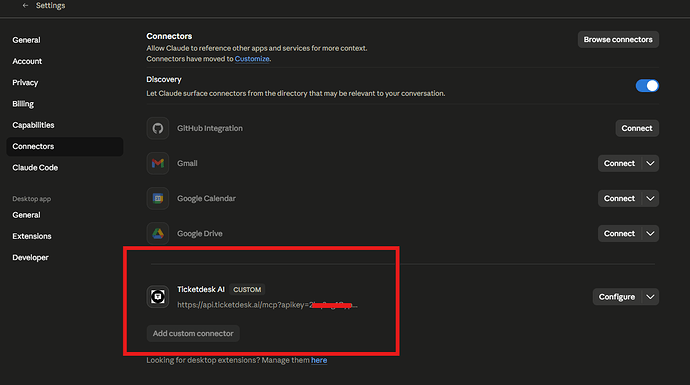
Cursor、VS Code、またはその他のツールを使用している場合は、以下の手順に従って設定にmcpServersを追加してください -
-
Claude Desktop設定ファイルを開きます:
- macOS:
~/Library/Application Support/Claude/claude_desktop_config.json - Windows:
%APPDATA%\Claude\claude_desktop_config.json
- macOS:
-
Ticketdesk MCPサーバーエントリを追加します:
{
  "mcpServers": {
    "ticketdesk": {
       "url": "https://api.ticketdesk.ai/mcp?apikey=[YOUR_API_KEY]"
    }
  }
}
- Claude Desktopを再起動します。チャット入力にツールアイコンが表示されます。それをクリックして、Ticketdeskツールが読み込まれていることを確認します。
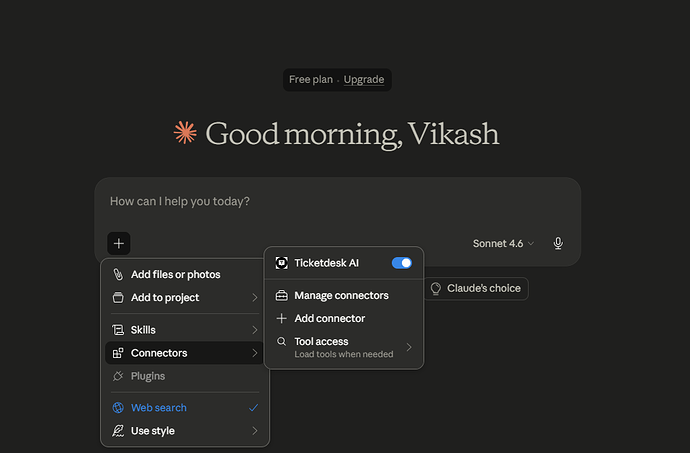
利用可能なツール
チケット管理
| ツール | 説明 |
|---|---|
create_ticket | 件名、依頼者詳細、優先度、タグなどで新しいサポートチケットを作成します |
get_tickets | チケットの一覧表示と検索、状態、優先度、担当エージェント、タグなどのフィールドでフィルタリングします |
get_ticket | IDで単一のチケットを取得し、すべてのフィールド、依頼者情報、現在の割り当てを表示します |
set_ticket_state | オプションの理由を付けてチケットをクローズまたは再オープンします (completed, not_planned, duplicate) |
set_ticket_priority | チケットの優先度を設定します: low, medium, high, urgent |
set_ticket_tags | チケットのタグを置換またはクリアします |
assign_ticket | ユーザーIDでサポートエージェントにチケットを割り当てるか、割り当てを解除します |
set_ticket_inbox | チケットを別の受信箱に移動します(返信メールの送信元が制御されます) |
チケット応答とアクティビティ
| ツール | 説明 |
|---|---|
get_ticket_activities | 顧客メッセージ、エージェント返信、メモ、システムイベントなどの完全な会話スレッドを取得します |
send_reply | チケットの受信箱経由で送信メールをトリガーする顧客への返信を送信します |
add_note | チケットに非公開の内部メモを追加します(例:エージェントのみが閲覧可能で、顧客には送信されません) |
プロンプト例
これらのワンライナーを使ってAIアシスタントを使い始めましょう:
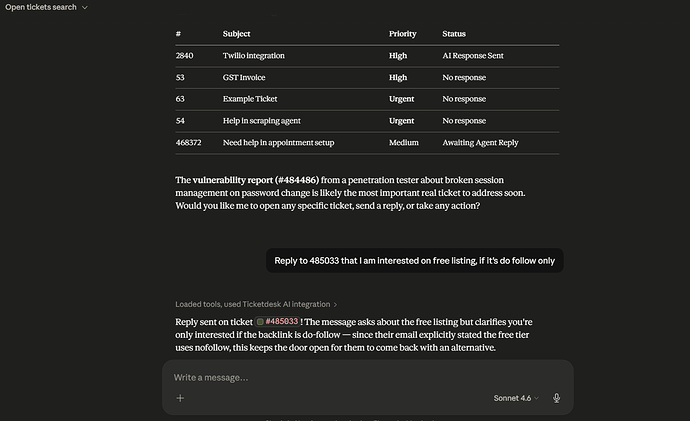
チケットの検索
- "自分に割り当てられているすべてのオープンチケットを表示して"
- "過去24時間以内に更新されていない緊急チケットを一覧表示して"
- "タグが「請求」でまだオープンなチケットをすべて検索して"
- "チケット#1042を取得して問題を要約して"
顧客への応答
- "チケット#1042の会話を読んで、問題を解決する返信の下書きを作成して"
- "チケット#310に返信して、返金が処理されたことを顧客に伝えて"
- "チケット#77に返信して、調査のために注文番号を尋ねて"
内部メモと引き継ぎ
- "チケット#1042に、これまでに試したことを要約したメモを追加して"
- "チケット#200に、エスカレーション理由を説明する内部メモを残して"
- "チケット#99に、次のエージェントのための引き継ぎメモを追加して"
チケットの作成
- "John(john@example.com)から、エクスポート機能が壊れているという報告のチケットを作成して"
- "support@example.comからの支払い失敗に関する新しい緊急チケットを開いて"