android-mcp-toolkit
Android開発向けのMCPツールのコレクションで、現在は決定論的なFigma-SVG-to-Android-XMLコンバーターを備えており、Gradle分析、リソース管理、ADB統合ツールを計画中です。
ドキュメント
Android MCP Toolkit for AI Agents
Small MCP server with three tools:
- Fast SVG → Android VectorDrawable conversion (cached, file or inline).
- adb logcat reader with package/pid/tag filters for quick crash triage.
- Translation length difference estimator to flag risky length deltas before layout breaks.
Why this exists
The Mission: Bringing Native Android to the AI Agent Era
While the AI ecosystem flourishes with web-first tools, Android development often feels left behind. This MCP server is my answer to that gap—a dedicated bridge connecting AI Agents directly to the Android toolchain.
⚡ Zero-Friction Asset Conversion: Convert SVGs to VectorDrawables instantly without the overhead of launching Android Studio.
🔍 Direct Diagnostic Access: Empower agents to pull, filter, and analyze adb logcat streams (by package, PID, or tag) in real-time.
🤖 Agent-Native Architecture: Deliver structured, scriptable outputs that LLMs can parse and act upon efficiently.
🚀 Built for Extensibility: A solid foundation designed to grow, paving the way for future utilities like bitmap helpers and asset validation.
Pairing ideas
- Figma MCP: grab SVGs from designs, feed to
convert-svg-to-android-drawableto get XML for Android resources. - Debugging: while running the app, call
read-adb-logcatwith package name or tag to capture crashes and filtered logs without leaving the MCP client.
Previews
SVG to VectorDrawable
- Figma request → SVG extraction
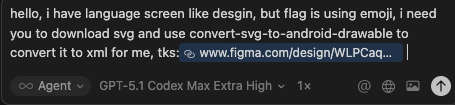
- Flag conversion preview (single)
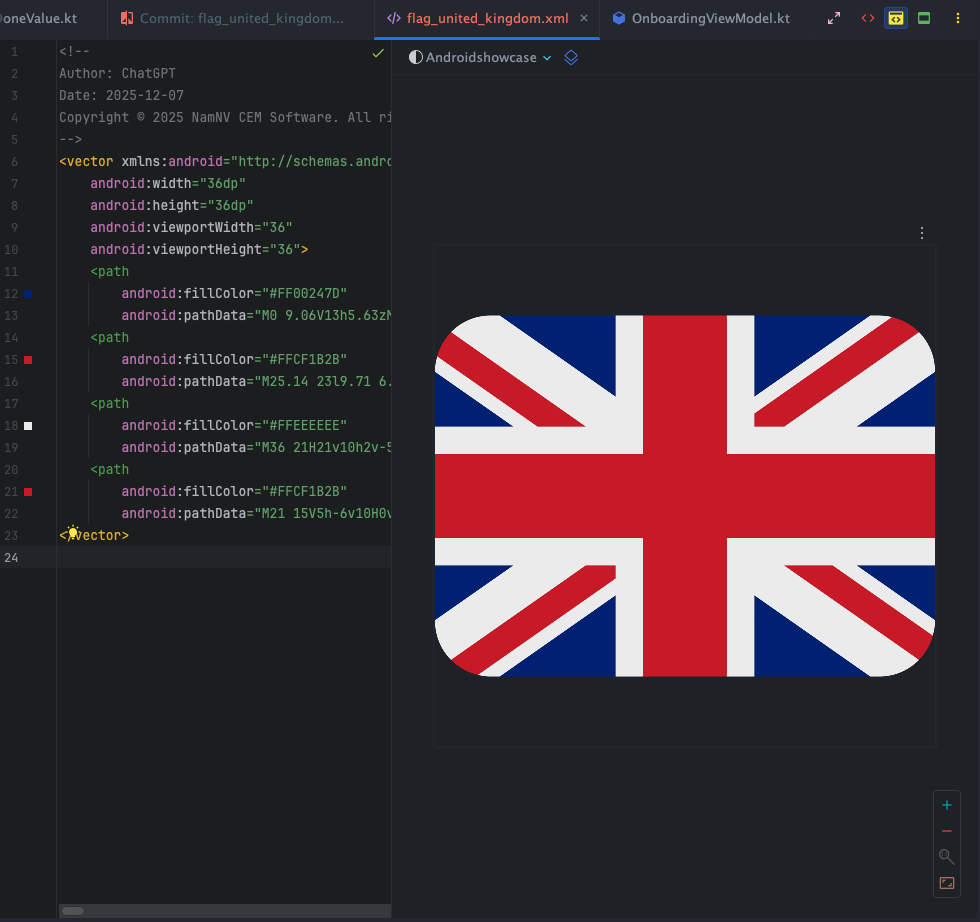
- Batch flag review (side-by-side)
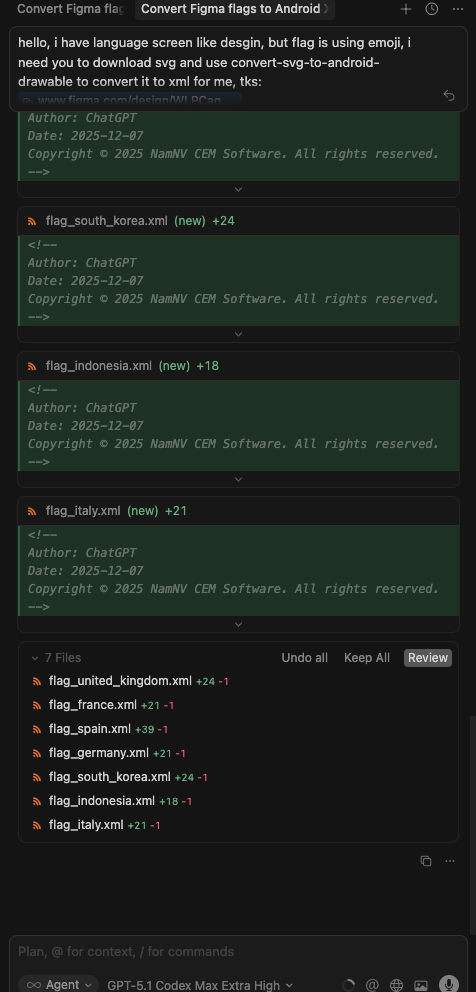
- Batch run via MCP (console)
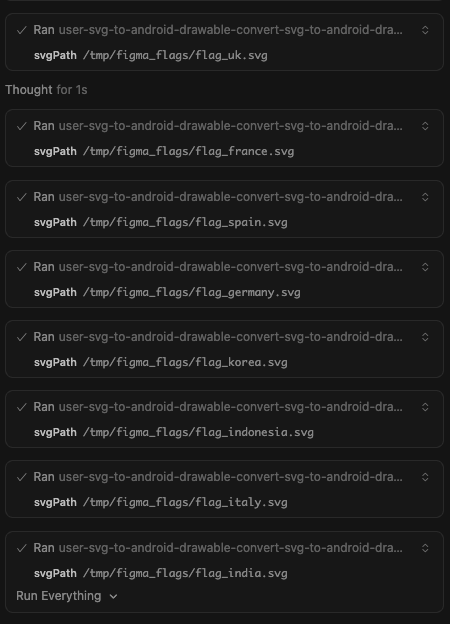
ADB logcat tool
- Crash capture prompt (inputs + filters)
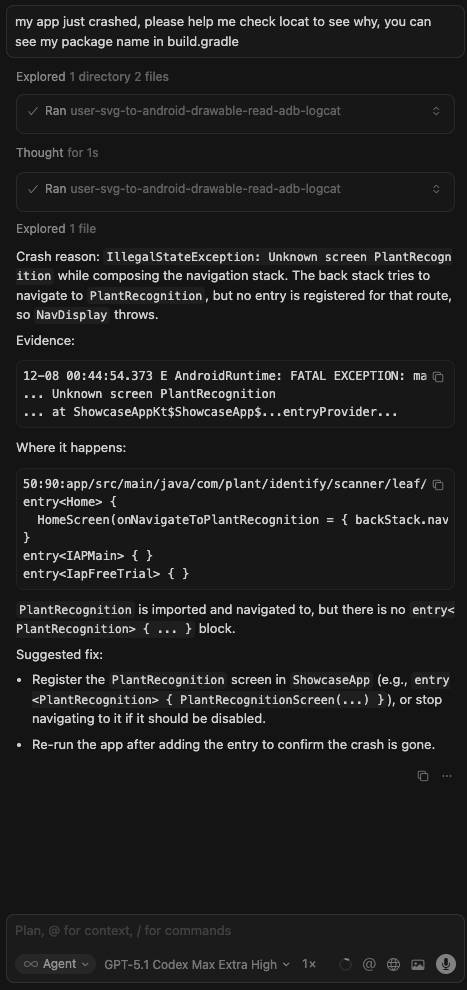
- Response preview (summarized logcat)

Current tools
-
convert-svg-to-android-drawable- Inputs:
svg(inline) orsvgPath(file path). Optional:outputPath,floatPrecision(default 2),fillBlack(default false),xmlTag(default false),tint,cache(default true). - Output: VectorDrawable XML text; also writes to disk when
outputPathis provided. - Performance: LRU cache (32 entries) keyed by SVG + options plus fast reuse in-session.
- Converter: vendored fork in
vendor/svg2vectordrawablewith fixes forrgb()/rgba(),hsl()/hsla(), and named colors. Upstream license:vendor/svg2vectordrawable/LICENSE(MIT).
- Inputs:
-
manage-logcat- Inputs:
action:read(default),crash,anr, orclear.packageName: Optional. Resolves PID viaadb shell pidof.pid: Optional. Explicit PID.tag: Optional. Filter by tag (e.g.MyApp).priority:V,D,I,W,E,F,S(defaultV).maxLines: Tail count (default 200, max 2000).timeoutMs: Default 5000.
- Behavior:
read: Fetches logcat tail.crash: Fetcheslogcat -b crash.anr: Fetches recent ActivityManager ANR logs + tail of/data/anr/traces.txt.clear: clears logcat buffers.
- Inputs:
-
get-current-activity- Inputs:
timeoutMs(default5000, max15000). - Behavior: Inspects
dumpsys windowto find the currently focused app/window. Useful to verify state.
- Inputs:
-
dump-ui-hierarchy- Inputs:
timeoutMs(default 10000). - Behavior: Captures current UI hierarchy as XML via
uiautomator.
- Inputs:
-
take-screenshot- Inputs:
outputPath(required),timeoutMs. - Behavior: Saves device screenshot to local file.
- Inputs:
-
inject-input- Inputs:
command(tap,text,swipe,keyevent,back,home),args(array),timeoutMs. - Optional:
elementIdorelementText(finds element center and taps it). - Behavior: Simulates user interaction suitable for testing flows.
- Inputs:
-
estimate-text-length-difference- Inputs:
sourceText(original),translatedText(to compare),tolerancePercent(default30, max500). - Behavior: Measures grapheme length of both strings, computes percent change, and reports whether it exceeds the tolerance (useful to catch translation length blowups that could break layouts).
- Inputs:
Roadmap (planned)
- Additional MCP tools for Android assets (e.g., batch conversions, validations, optimizers).
- Optional resource prompts for common Android drawables/templates.
Quick start
npm installnpm run buildnode dist/index.js(stdio MCP server)
Run via npx
- Global:
npx android-mcp-toolkit
Use in Cursor (MCP config)
Add to your Cursor settings JSON:
{
  "mcpServers": {
    "android-mcp-toolkit": {
      "command": "npx",
      "args": [
        "-y",
        "android-mcp-toolkit"
      ]
    }
  }
}
The npx call downloads the published package; no local path required.
Quick install via Cursor deep link:
cursor://anysphere.cursor-deeplink/mcp/install?name=android-mcp-toolkit&config=eyJjb21tYW5kIjoibnB4IC15IGFuZHJvaWQtbWNwLXRvb2xraXQifQ%3D%3D
Examples
- Input SVG:
sample_svg.svg - Output VectorDrawable:
examples/sample_svg.xml
Notes
- Transport: stdio via
@modelcontextprotocol/sdk. - Base deps kept minimal; everything needed to convert SVGs is vendored/included.