MCP YouTube Transcript Server
YouTube動画から文字起こしを取得し、コンテンツの分析や処理を行います。
ドキュメント
MCP YouTube Transcript Server
A Model Context Protocol server that enables retrieval of transcripts from YouTube videos. This server provides direct access to video transcripts through a simple interface, making it ideal for content analysis and processing.
Table of Contents
Features
✨ Key capabilities:
- Extract transcripts from YouTube videos
- Support for multiple languages
- Format text with continuous or paragraph mode
- Retrieve video titles and metadata
- Automatic paragraph segmentation
- Text normalization and HTML entity decoding
- Robust error handling
- Timestamp and overlap detection
Getting Started
Prerequisites
- Node.js 18 or higher
Installation
We provide two installation methods:
Option 1: Manual Configuration (Recommended for Production)
-
Create or edit the Claude Desktop configuration file:
- macOS:
~/Library/Application Support/Claude/claude_desktop_config.json - Windows:
%APPDATA%\Claude\claude_desktop_config.json
- macOS:
-
Add the following configuration:
{
  "mcpServers": {
    "youtube-transcript": {
      "command": "npx",
      "args": [
        "-y",
        "@sinco-lab/mcp-youtube-transcript"
      ]
    }
  }
}
Quick setup script for macOS:
# Create directory if it doesn't exist
mkdir -p ~/Library/Application\ Support/Claude

# Create or update config file
cat > ~/Library/Application\ Support/Claude/claude_desktop_config.json << 'EOL'
{
  "mcpServers": {
    "youtube-transcript": {
      "command": "npx",
      "args": [
        "-y",
        "@sinco-lab/mcp-youtube-transcript"
      ]
    }
  }
}
EOL
Option 2: Via Smithery (Development Only)
npx -y @smithery/cli install @sinco-lab/mcp-youtube-transcript --client claude
⚠️ Note: This method is not recommended for production use as it relies on Smithery's proxy services.
Usage
Basic Configuration
To use with Claude Desktop / Cursor / cline, ensure your configuration matches:
{
  "mcpServers": {
    "youtube-transcript": {
      "command": "npx",
      "args": ["-y", "@sinco-lab/mcp-youtube-transcript"]
    }
  }
}
Testing
With Claude App
- Restart the Claude app after installation
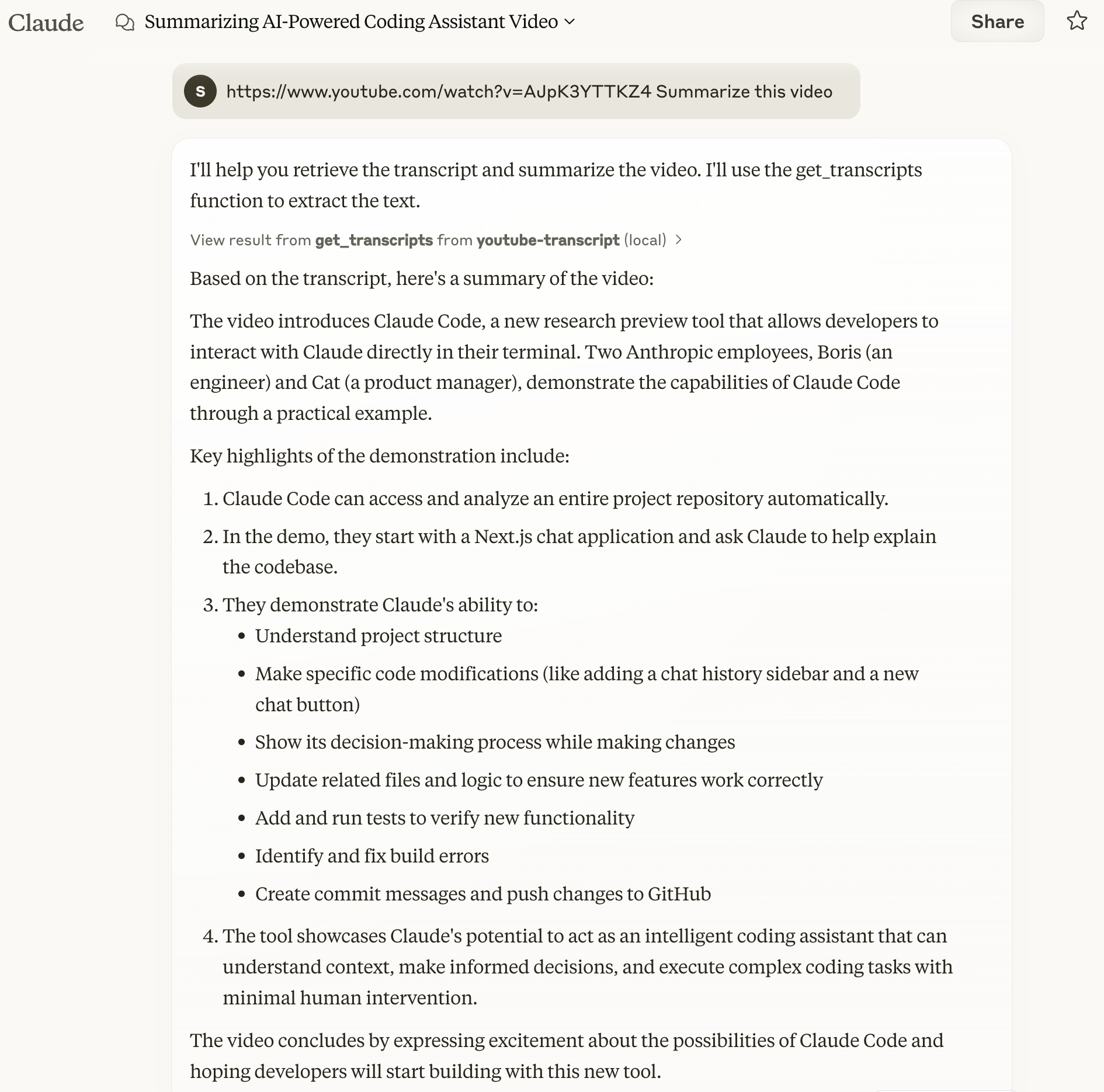
- Test with a simple command:
https://www.youtube.com/watch?v=AJpK3YTTKZ4 Summarize this video
Example output:
With MCP Inspector
# Clone and setup
git clone https://github.com/sinco-lab/mcp-youtube-transcript.git
cd mcp-youtube-transcript
npm install
npm run build

# Launch inspector
npx @modelcontextprotocol/inspector node "dist/index.js"

# Access http://localhost:6274 and try these commands:
# 1. List Tools: clink `List Tools`
# 2. Test get_transcripts with:
#    url: "https://www.youtube.com/watch?v=AJpK3YTTKZ4"
#    lang: "en" (optional)
#    enableParagraphs: false (optional)
Troubleshooting and Maintenance
Checking Claude Logs
To monitor Claude's logs, you can use the following command:
tail -n 20 -f ~/Library/Logs/Claude/mcp*.log
This will display the last 20 lines of the log file and continue to show new entries as they are added.
Note: Claude app automatically prefixes MCP server log files with
mcp-server-. For example, our server's logs will be written tomcp-server-youtube-transcript.log.
Cleaning the npx Cache
If you encounter issues related to the npx cache, you can manually clean it using:
rm -rf ~/.npm/_npx
This will remove the cached packages and allow you to start fresh.
API Reference
get_transcripts
Fetches transcripts from YouTube videos.
Parameters:
url(string, required): YouTube video URL or IDlang(string, optional): Language code (default: "en")enableParagraphs(boolean, optional): Enable paragraph mode (default: false)
Response Format:
{
  "content": [{
    "type": "text",
    "text": "Video title and transcript content",
    "metadata": {
      "videoId": "video_id",
      "title": "video_title",
      "language": "transcript_language",
      "timestamp": "processing_time",
      "charCount": "character_count",
      "transcriptCount": "number_of_transcripts",
      "totalDuration": "total_duration",
      "paragraphsEnabled": "paragraph_mode_status"
    }
  }]
}
Development
Project Structure
├── src/
│ ├── index.ts            # Server entry point
│ ├── youtube.ts          # YouTube transcript fetching logic
├── dist/                 # Compiled output
└── package.json
Key Components
YouTubeTranscriptFetcher: Core transcript fetching functionalityYouTubeUtils: Text processing and utilities
Features and Capabilities
-
Error Handling:
- Invalid URLs/IDs
- Unavailable transcripts
- Language availability
- Network errors
- Rate limiting
-
Text Processing:
- HTML entity decoding
- Punctuation normalization
- Space normalization
- Smart paragraph detection
Contributing
We welcome contributions! Please feel free to submit issues and pull requests.
License
This project is licensed under the MIT License - see the LICENSE file for details.