wigolo
あなたのAIコーディングエージェントのための頼りになるウェブ — ローカルファーストの検索、フェッチ、クロール、そしてMCP経由のリサーチ。
ドキュメント

Local-first web intelligence over MCP — no keys, no cloud, no metered bill.
works with Claude Code · Cursor · Codex · Gemini CLI · VS Code · Windsurf · Zed · Antigravity
Quickstart · Tools · Why wigolo · Benchmark · Architecture · Configuration · Feedback · FAQ · Available on · Contribute
wigolo runs on your machine as an MCP server and gives an AI coding agent one durable surface for everything web-related — search, fetch, crawl, extract, cache, find-similar, research, and autonomous gather loops. The core tools need no API keys, nothing it touches leaves ~/.wigolo/, and there's no bill that grows with how much your agent thinks.
Momentum
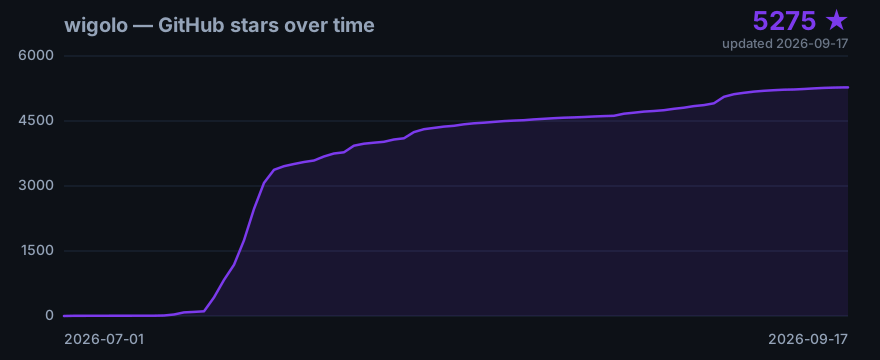
wigolo went public in early July 2026. It found its audience fast — most of the stars below landed in a single 48-hour window.
Chart generated from the public GitHub star timeline. If it's still climbing when you read this, that's the point — add a ⭐.
Quickstart
Requires Node ≥ 20 and ~1.5 GB of free disk. macOS, Linux, and Windows.
One command wires the local engine into your agent and sets up the MCP connection. init is unattended by default — no prompts, safe in scripts and CI — and does the complete setup: it downloads the browser engine and on-device models, runs a health check, and prints a clear per-component summary, so any setup problem surfaces right here, not silently on your agent's first call:
npx wigolo init --agents=<your-agent>
<your-agent>— one or more ofclaude-code·cursor·codex·gemini-cli·vscode·windsurf·zed·antigravity(comma-separated). wigolo writes the MCP config and instructions for you — nothing else to set up.- Any other MCP-capable agent? Omit
--agents— init still sets up the engine, and you point your agent at wigolo's MCP server (npx wigolo mcp) yourself. - Prefer a guided setup?
--interactivegives a plain-text prompt flow (pick your agents step by step);--wizardgives the richer terminal TUI. Both need a real terminal. - Skipping
init? You can wire the MCP server directly (below) without ever runninginit— the browser engine and models then download automatically on first use. - Fast / offline / CI setup? Add
--no-warmupto skip the downloads (components lazy-load on first use instead). (--non-interactivestill works — it's just the default now.) - A component download failing (offline, disk, network block) never fails the setup:
initreports what's not ready with the exact fix and still wires your agent — the component retries on first use.
That's the whole setup — search, fetch, crawl, extract, cache, and find-similar work with no API key. Check it's healthy:
npx wigolo doctor
Not for you? npx wigolo config --uninstall --yes removes everything, cleanly.
Manual MCP setup (any other agent)
The --agents flag has a built-in installer for each agent listed above — but it can't cover every agent in the world. For anything else — your own custom or in-house agent, or any MCP-capable client we don't wire automatically yet — set wigolo up by hand: it's just another MCP server. Install the engine once, then register it:
npx wigolo init # unattended full setup, no agent wiring (add --no-warmup to defer downloads)
Most clients use an mcpServers block in a JSON config file:
{
"mcpServers": {
"wigolo": {
"command": "npx",
"args": ["-y", "wigolo"]
}
}
}
wigolo with no subcommand starts the MCP stdio server (that is the default). If you installed it globally, use "command": "wigolo", "args": [] instead.
The file location — and the exact key — vary by client:
| Agent | Config file | Servers key |
|---|---|---|
| Cursor | ~/.cursor/mcp.json | mcpServers |
| Windsurf | ~/.codeium/windsurf/mcp_config.json | mcpServers |
| Gemini CLI | ~/.gemini/settings.json | mcpServers |
| Antigravity | ~/.antigravity/mcp.json | mcpServers |
| VS Code | user mcp.json (Command Palette → MCP: Open User Configuration) | servers |
| Zed | ~/.config/zed/settings.json | context_servers |
| Claude Code | (no file) run claude mcp add wigolo --scope user -- npx -y wigolo (--scope user = global; drop it for project-only) | — |
| Codex | ~/.codex/config.toml (TOML, not JSON) | [mcp_servers.wigolo] |
| Any other | wherever it registers MCP servers | its MCP-servers key |
Codex uses TOML instead of JSON:
[mcp_servers.wigolo]
command = "npx"
args = ["-y", "wigolo"]
To enable answer synthesis (below) for a hand-wired agent, add the provider and key to the server's env:
{
"mcpServers": {
"wigolo": {
"command": "npx",
"args": ["-y", "wigolo"],
"env": { "WIGOLO_LLM_PROVIDER": "gemini", "GEMINI_API_KEY": "<your-free-key>" }
}
}
}
Let an AI set it up for you
Setup is simple enough to hand off to an AI. Ask your coding agent (Claude Code, Cursor, …) — or any chat assistant (ChatGPT, Claude, Gemini) — to do it, and it can follow the steps above. Paste a prompt like:
Set up the wigolo MCP server for my agent. wigolo is a local-first MCP server installed with
npx wigolo init(engine only — no API keys). Then register it in my agent's MCP config as anmcpServersentry{ "command": "npx", "args": ["-y", "wigolo"] }. Note the per-client differences: VS Code uses theserverskey with"type": "stdio"; Zed usescontext_servers; Codex uses TOML[mcp_servers.wigolo]; Claude Code uses the CLIclaude mcp add wigolo --scope user -- npx -y wigolo. My agent is and its MCP config is at <path, or "wherever it registers MCP servers">.
That prompt is self-contained, so even an assistant with no web access can act on it. If the assistant can browse, point it at this README (the Manual MCP setup section above has every client's exact config path) or the project's machine-readable llms.txt — both carry the full procedure, including the optional LLM-synthesis env below.
Optional — enable answer synthesis
research, agent, and search format=answer use an LLM to write the final answer. Turn them on by setting a provider and its key (in your shell, or in your agent's MCP env block). WIGOLO_LLM_PROVIDER names the LLM — set it alongside the key:
export WIGOLO_LLM_PROVIDER=gemini
export GEMINI_API_KEY=<your-key> # free from https://aistudio.google.com/apikey — the free tier is plenty
Any provider works — use anthropic + ANTHROPIC_API_KEY, openai + OPENAI_API_KEY, or groq + GROQ_API_KEY. To stay fully local and keyless, set WIGOLO_LLM_PROVIDER=ollama (or a local server URL) instead. Gemini is suggested because its free tier is more than enough for wigolo.
Run with Docker
A prebuilt image runs the MCP server without installing Node yourself. The default command is the stdio MCP server. Two variants are published:
latest(default) — a slim image. The OS libraries for the browser engine are baked in, but the browser engine binary and the on-device models download on first use into the data volume. Smallest download; ideal for long-lived MCP setups.latest-full— the browser engine binary is preinstalled at build time. Larger image; ideal for JS-render-heavy work or ephemeral--rmruns with no persistent volume.
The data volume is mandatory in every run line — it holds the local cache, the on-device models, the browser engine binary, and your encrypted keys, and persists them across runs. Without it, every run re-downloads those components:
docker run -i --rm -v wigolo-data:/data ghcr.io/knockoutez/wigolo
The -i flag keeps stdin open for the MCP protocol. On first use the slim image downloads the browser engine binary and the models into the volume (a one-time few-hundred-MB download); later runs reuse them. To skip the first-use browser-engine download, use the full variant:
docker run -i --rm -v wigolo-data:/data ghcr.io/knockoutez/wigolo:full
Wire either variant into Claude Code:
claude mcp add wigolo -- docker run -i --rm -v wigolo-data:/data ghcr.io/knockoutez/wigolo
Any MCP client works the same way: set command to docker and args to the run flags above. The image is also on Docker Hub as towhid69420/wigolo.
HTTP serve mode. For a remote or multi-client setup, run the HTTP daemon instead with the packaging/compose.serve.yml snippet, which publishes port 3333 and adds a health check:
docker compose -f packaging/compose.serve.yml up
Bind-mount caveat. The container runs as an unprivileged user (uid/gid 1000). A named volume (as above) just works. If you bind-mount a host directory instead (-v "$PWD/wigolo-data:/data"), that directory must be writable by uid 1000 or the container hits EACCES — either chown 1000:1000 the host path first, or prefer the named volume.
REST API & self-host
wigolo serve exposes a plain-JSON REST API alongside the MCP transport. Same process, same tools, two surfaces:
- REST at
POST /v1/{tool}— curl-able, no MCP client needed. Request body is the tool's input; the response is the tool's output as plain JSON. - MCP at
/mcp(StreamableHTTP) and/sse— unchanged, for MCP clients. - OpenAPI 3.1 at
GET /openapi.json— the machine-readable contract. - Discovery at
GET /v1/tools—[{name, description, endpoint}]. - Health at
GET /health— always open, no auth.
Start it on the default loopback address:
wigolo serve # 127.0.0.1:3333
curl quickstart
All ten tools, against a local instance. Request bodies match each tool's input schema (the same schema MCP serves and OpenAPI publishes):
BASE=http://127.0.0.1:3333/v1
# search — multi-engine web search with ranked evidence
curl -sX POST $BASE/search -H 'Content-Type: application/json' \
-d '{"query":"local-first software","max_results":5}'
# fetch — one URL to clean markdown + metadata
curl -sX POST $BASE/fetch -H 'Content-Type: application/json' \
-d '{"url":"https://example.com"}'
# crawl — multi-page crawl (bfs / dfs / sitemap / map)
curl -sX POST $BASE/crawl -H 'Content-Type: application/json' \
-d '{"url":"https://example.com","strategy":"map","max_pages":20}'
# cache — query everything already seen (or stats / clear)
curl -sX POST $BASE/cache -H 'Content-Type: application/json' \
-d '{"query":"local first"}'
# extract — structured data (tables, metadata, JSON-LD, schema, brand)
curl -sX POST $BASE/extract -H 'Content-Type: application/json' \
-d '{"url":"https://example.com","mode":"structured"}'
# find_similar — related pages by URL or concept
curl -sX POST $BASE/find_similar -H 'Content-Type: application/json' \
-d '{"concept":"local-first search engines","include_web":true}'
# research — multi-step research brief
curl -sX POST $BASE/research -H 'Content-Type: application/json' \
-d '{"question":"what is local-first software","depth":"quick"}'
# agent — autonomous data gathering
curl -sX POST $BASE/agent -H 'Content-Type: application/json' \
-d '{"prompt":"summarize this page","urls":["https://example.com"],"max_pages":1}'
# diff — compare two content snapshots
curl -sX POST $BASE/diff -H 'Content-Type: application/json' \
-d '{"old":{"markdown":"a\nb"},"new":{"markdown":"a\nc"},"output":"summary"}'
# watch — register / list / check change-detection jobs
curl -sX POST $BASE/watch -H 'Content-Type: application/json' \
-d '{"action":"list"}'
The OpenAPI document lists every request field and the documented top-level response fields:
curl -s http://127.0.0.1:3333/openapi.json
Authentication
Auth is optional on loopback, fail-closed off it:
- Loopback bind, no token (default): the API is open to local callers — a browser-
Originrequest is still refused, and only loopbackHostheaders are accepted. - Non-loopback bind: the server refuses to start unless you set an API token or explicitly opt into open access. This is the guard that keeps a
--host 0.0.0.0deployment from being wide open by accident. - Token set: send
Authorization: Bearer <token>on/v1/*,/openapi.json, the shim, and the MCP transport routes (/mcp,/sse)./healthstays open.
Set the token by env var, or via a file (the standard Docker/systemd secret pattern — keeps it out of the process environment):
export WIGOLO_API_TOKEN="a-long-random-secret"
# or, file-based:
export WIGOLO_API_TOKEN_FILE=/run/secrets/wigolo_token
wigolo serve --host 0.0.0.0 # now requires the bearer token
curl -sX POST http://your-host:3333/v1/fetch \
-H "Authorization: Bearer $WIGOLO_API_TOKEN" \
-H 'Content-Type: application/json' \
-d '{"url":"https://example.com"}'
To bind to a public interface without a token (e.g. behind your own auth proxy), opt in explicitly with --allow-unauthenticated (or WIGOLO_SERVE_ALLOW_UNAUTHENTICATED=1).
Resource limits
Serve mode adds transport-level bounds on top of each tool's own defaults (MCP behaviour is unchanged). Override via env var:
| Env var | Default | What it bounds |
|---|---|---|
WIGOLO_SERVE_MAX_BODY_BYTES | 1 MiB (5 MiB for diff / extract) | Request body size → 413 on overflow |
WIGOLO_SERVE_TIMEOUT_SCALE | 1 | Multiplier on per-route deadlines (60s search/cache/diff/find_similar, 120s fetch/extract/watch, 300s crawl/research/agent) → 504 when exceeded |
WIGOLO_SERVE_MAX_CONCURRENCY | 16 | In-flight /v1 + shim requests → 429 when saturated |
WIGOLO_SERVE_REQUEST_TIMEOUT_MS | 120000 | Whole-request slow-loris guard (Node requestTimeout). 0 disables |
WIGOLO_SERVE_HEADERS_TIMEOUT_MS | 60000 | Header-receipt slow-loris guard (Node headersTimeout). 0 disables |
WIGOLO_SERVE_ALLOW_LOCAL_TARGETS | unset | Set to 1 to allow loopback/localhost target URLs under a non-loopback bind (blocked by default so a remote caller can't probe the box's own services) |
Server-side parameter clamps (also published in OpenAPI so a generated SDK can't emit a rejected request): crawl.max_pages ≤ 200, crawl.max_depth ≤ 5, agent.max_time_ms ≤ 240000, search query array ≤ 10. An explicit over-cap value returns 400 with the cap in the hint.
Self-host in one command
Docker (the API token makes a public bind safe; the volume persists cache, models, browser engine, and keys):
docker run -p 3333:3333 -v wigolo-data:/data \
-e WIGOLO_API_TOKEN="a-long-random-secret" \
ghcr.io/knockoutez/wigolo serve --host 0.0.0.0
Or use the packaging/compose.serve.yml snippet (uncomment the token line before binding beyond loopback). Native:
WIGOLO_API_TOKEN="a-long-random-secret" wigolo serve --host 0.0.0.0
Token exposure note. An env-var token is visible via
docker inspectand/proc/<pid>/environon the host. For hardened deployments useWIGOLO_API_TOKEN_FILEand mount the secret as a file (Docker/Kubernetes secrets, systemdLoadCredential) so it never enters the process environment.
Firecrawl-compat shim (experimental)
An experimental, flag-gated shim mounts a lite subset of the Firecrawl v1 surface so a Firecrawl SDK can point its base URL at wigolo. Off by default; enable with WIGOLO_FIRECRAWL_COMPAT=1. It mounts at /compat/firecrawl/v1 and covers scrape, search, map, and crawl only — batch, alternate formats (screenshot / changeTracking / rawHtml), the v2 surface, and webhooks are deliberately not implemented. Auth, limits, and target guarding apply identically to the shim.
WIGOLO_FIRECRAWL_COMPAT=1 wigolo serve
curl -sX POST http://127.0.0.1:3333/compat/firecrawl/v1/scrape \
-H 'Content-Type: application/json' \
-d '{"url":"https://example.com"}'
Install channels
wigolo ships on five channels. npm is the primary channel and works today (npx wigolo … — the Quickstart above). The other four are packaging for release: their published artifacts (the install.sh URL, the Homebrew tap, and the container registries) go live at first release — see packaging/RELEASE-RUNBOOK.md.
Pick the channel that matches how you run things, then wire the MCP command from the last column. Wire wigolo with the absolute command shown — never rely on a PATH export. MCP clients launch the server as a child process and do not read your shell profile, so a bare wigolo on PATH is invisible to them; use npx, or the channel's absolute binary path.
| Channel | Install | Upgrade | Uninstall | Recommended MCP command | Status |
|---|---|---|---|---|---|
| npm (primary) | npm i -g wigolo — or no install at all, just npx wigolo | npm i -g wigolo@latest (or nothing — npx always fetches latest) | npx wigolo config --uninstall --yes | command: "npx", args: ["-y", "wigolo"] | Verified — macOS arm64; Windows covered by npm (CI matrix) |
| curl | sh | curl -fsSL https://wigolo.dev/install.sh | sh | re-run the same curl … | sh (idempotent; reuses the bundled runtime) | sh install.sh --uninstall (keeps your cache/config) | command: "$HOME/.wigolo/bin/wigolo", args: [] | Verified — macOS arm64; URL live at first release |
| Homebrew | brew install <org>/wigolo/wigolo | brew upgrade wigolo | brew uninstall wigolo | command: "$(brew --prefix)/bin/wigolo", args: [] | Verified — macOS arm64; tap live at first release |
| Docker | docker pull ghcr.io/knockoutez/wigolo (see Run with Docker) | docker pull ghcr.io/knockoutez/wigolo (re-pull latest) | docker rmi ghcr.io/knockoutez/wigolo (+ docker volume rm wigolo-data to drop data) | command: "docker", args: ["run", "-i", "--rm", "-v", "wigolo-data:/data", "ghcr.io/knockoutez/wigolo"] | Verified — linux-docker (arm64 native, amd64 emulated); registry live at first release |
| Single-file binary | download the release asset, chmod +x wigolo | download the new release asset (versionless latest URL) | rm <path>/wigolo (+ rm -rf ~/.wigolo to drop data) | command: "/absolute/path/to/wigolo", args: [] | macOS arm64 verified; linux-x64 / linux-arm64 / win-x64 documented — unverified until CI; no Windows-native installer (documented gap — use npm on Windows) |
One channel at a time. All channels share one data directory (~/.wigolo by default, /data in Docker). Running two different wigolo versions against the same data dir is undefined — pick one channel per machine and let it own the data dir.
Component downloads (every channel). A fresh package install pulls nothing extra on its own. Running wigolo init downloads the browser engine binary and the on-device models up front (a one-time few-hundred-MB download) and verifies them; if you skip init — or pass init --no-warmup — they download lazily on first use into the data dir instead. wigolo warmup --all pre-caches them anytime.
Channel caveats
- curl | sh and binary are headless-first. They run every tool and the flag-driven
wigolo init, but the interactive setup wizard is not available in the standalone binary — for a guided setup, use npm (npx wigolo init --wizard). - macOS binary signing. Prebuilt macOS binaries are code-signed + notarized at release time and are safe to
curl-download. If Gatekeeper still blocks a locally-copied binary (the quarantine attribute), clear it withxattr -d com.apple.quarantine <binary>.curldownloads set no quarantine attribute, so the curl channel is unaffected. - Versionless URLs. The
install.shURL and the binary release-asset URLs are unversioned — they always resolve to the latest release. Upgrading is re-running the same command. - Docker data volume is mandatory. The
-v wigolo-data:/datamount holds the cache, models, browser engine binary, and encrypted keys. Without it, every run re-downloads them.
SDKs (pre-release)
Thin, typed clients for the REST API live in this repo — TypeScript (sdks/typescript/: zero runtime dependencies, plain fetch, runs on Node ≥18 / Bun / Deno / edge runtimes) and Python (sdks/python/: standard library only, sync Client + AsyncClient, Python ≥3.10). One method per tool across all ten tools, env-driven configuration (WIGOLO_BASE_URL, WIGOLO_API_TOKEN), and an embedded local mode that finds or starts a local wigolo serve for you (WIGOLO_LOCAL=1 in Python; createLocalClient() from the TypeScript local entry).
Published as wigolo-sdk on npm and wigolo on PyPI — each SDK's README (sdks/typescript/README.md, sdks/python/README.md) has the install line and a runnable quickstart. Both SDKs are contract-locked to the server's live /openapi.json by drift tests (npm run test:sdk:ts, npm run test:sdk:py).
Framework integrations
Drop wigolo's tools into the agent framework you already use — opt-in wrappers live in packages/, each thin over the MCP server or the SDKs, so the full ten-tool surface (including cache, find_similar, research, and agent — the four most frameworks' web tools don't have) comes along.
| Framework | Package | What you get |
|---|---|---|
| LangChain | packages/wigolo-langchain | Each tool as a LangChain BaseTool, plus a BaseRetriever backed by search/find_similar for RAG chains. |
| CrewAI | packages/wigolo-crewai | wigolo tools as CrewAI BaseTools via wigolo_tools(), ready to hand to any crew. |
| LlamaIndex | packages/wigolo-llamaindex | A BaseReader that loads fetched / crawled / searched pages as LlamaIndex documents. |
| Vercel AI SDK | packages/wigolo-vercel-ai-sdk | Tool factories for generateText / streamText tools, edge-friendly. |
Published as wigolo-langchain, wigolo-crewai, and wigolo-llamaindex on PyPI and wigolo-vercel-ai-sdk on npm; see each package's README for the import-and-call quickstart. They're opt-in extras — the core MCP server never depends on any framework.
Tools
| Tool | What it does |
|---|---|
🔎 search | Multi-engine web search (18 direct adapters) with rank fusion, ML cross-encoder reranking, and an explainable per-result score. Pass a query array for parallel breadth. |
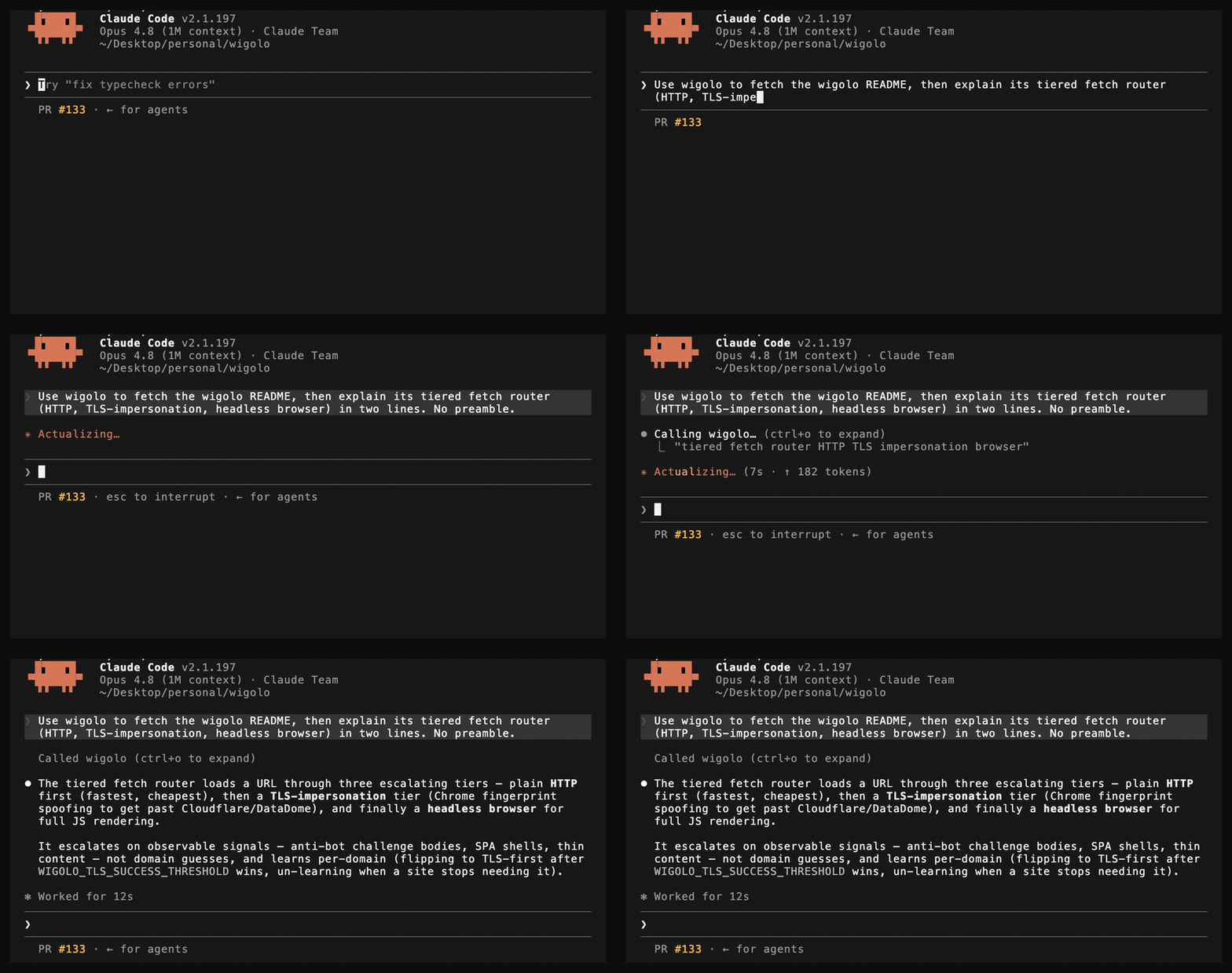
📄 fetch | Load one URL through a tiered router (HTTP → TLS-impersonation → headless browser) that auto-escalates on anti-bot challenges or SPA shells. Clean markdown + metadata + links. |
🕸️ crawl | Multi-page crawl — BFS, DFS, sitemap, or map-only. Per-domain rate limits, robots.txt respect, boilerplate dedup. |
🧩 extract | Structured data from a page: tables, metadata, JSON-LD, brand identity, named schemas (Article / Recipe / Product / …), or any custom JSON Schema. |
💾 cache | Query everything already seen — keyword (BM25) or hybrid (BM25 + on-device vectors). Plus stats, clear, and change detection. |
🧲 find_similar | Pages similar to a URL or a concept, via 3-way fusion of keyword + semantic + live web. |
🧠 research | Decompose a question → fan out sub-queries → fetch sources → synthesize a cited report (or a structured brief the host LLM writes from). |
🤖 agent | Autonomous gather loop: plan → search → fetch → extract → synthesize, with a step log, time budget, and optional output schema. |
🔁 diff + ⏱️ watch | See exactly what changed on a page since last visit; re-check on a schedule and deliver changes to a webhook. |
Agent skills
wigolo ships an 11-pack skill catalog — one focused how-to per tool (search, fetch, crawl, extract, cache, find-similar, research, agent, diff, watch, plus an overview pack) — so your coding agent knows how to drive each tool well without you spelling it out. wigolo init installs them into every agent it wires up; you can also manage them directly:
wigolo skills add # install into agents in the current project
wigolo skills add --global # install into your per-user agent config instead
wigolo skills list # show what's installed and whether it's current
wigolo skills remove # remove the packs wigolo installed
- Project vs. global. Default is the project you're in;
--globaltargets your home-level agent config. - Idempotent. Re-running
addonly rewrites what changed; already-current packs are left alone. - Receipts, not guesswork. Every install is recorded, so
remove(andwigolo uninstall) never removes files it can't verify it installed — hand-edited skills are detected and never clobbered. - Dry-run first. Preview every create / update / skip before anything touches disk with
--dry-run.
Why it's different
wigolo isn't the free stand-in you settle for until the budget clears — it's built to hold the same line as the paid services in this lane, and it brings receipts. What actually separates it:
- Built for agents, not humans. One MCP call fans out many queries across many engines in parallel — something a serial host tool-loop can't replicate — with transparent per-result scoring and budget-aware output.
- Honest output. Stale cache, failed fetches, degraded backends, and truncation are surfaced in the result, never disguised as empty-but-successful data.
- $0 per query, free to re-query. Default search talks to public engines through direct adapters; the reranker and embeddings run on-device. Every response is cached, so asking again is instant and costs nothing.
- Private by default. Cache, embeddings, models, and config live under
~/.wigolo/. Nothing reaches a third party unless you explicitly opt into an LLM for synthesis.
wigolo is a focused web layer for one agent on one machine — not a hosted SaaS, a vector database other apps query, or a browser-automation framework. Within that lane it goes toe-to-toe with the paid services on result quality — and the meter, the key, and the data-egress simply aren't there.
Here's what one real result looks like, dissected — including the failed engine and the weak result, because those are part of the answer too:
Benchmark
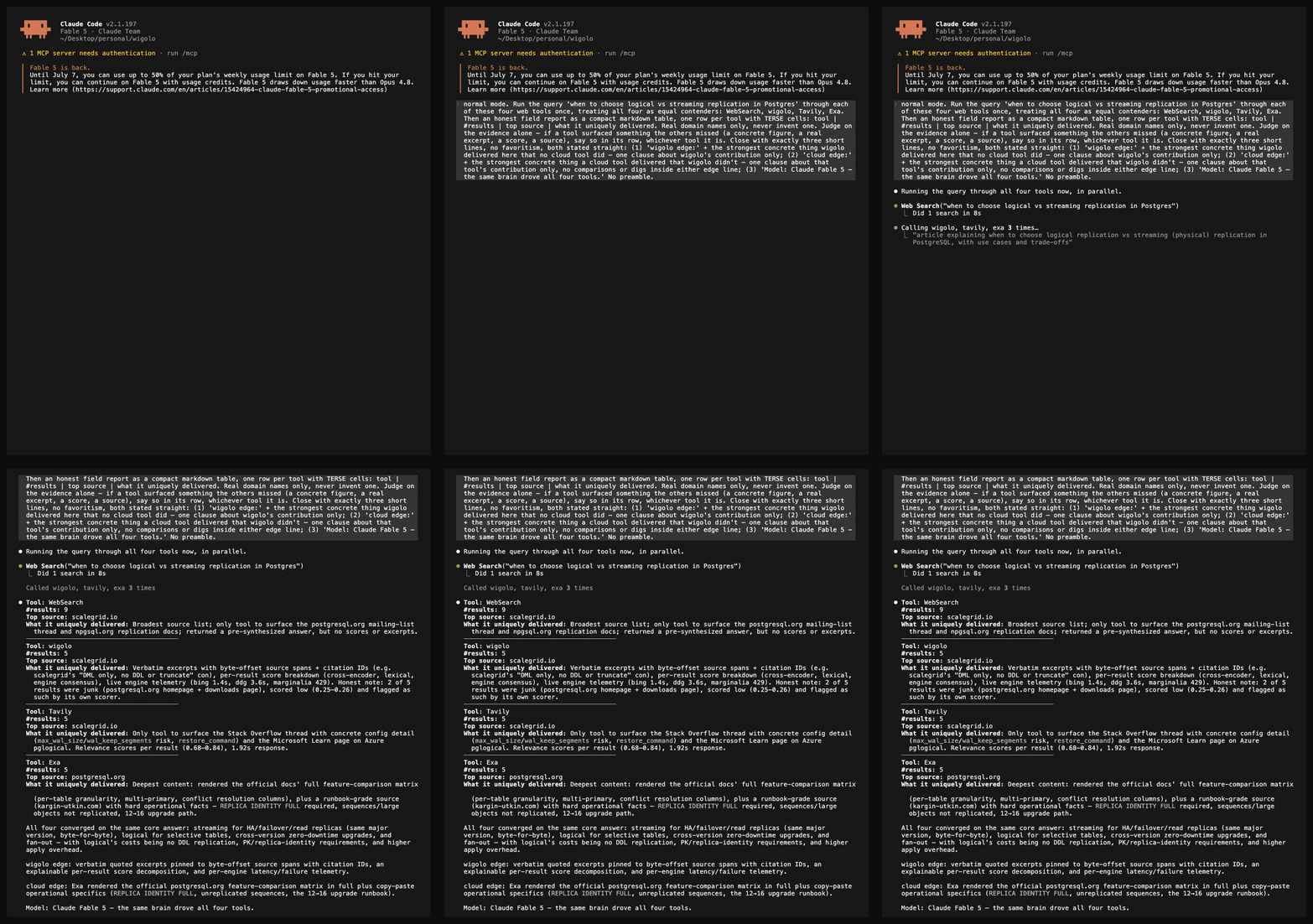
All four tools converged on the same core answer — and only one of them handed back verbatim, byte-pinned evidence while doing it.
One cold query, run live inside a single Claude Fable 5 session and fanned out to four web tools on equal footing — built-in WebSearch, wigolo, Tavily, and Exa — then reported by the agent itself under one rule: judge on the evidence alone, no favoritism. The query: when to choose logical vs streaming replication in Postgres.
The headline is in the report itself: all four tools converged on the same core answer. Same top source as the paid tools, same conclusions — parity demonstrated, not asserted. On top of that, wigolo was the only tool of the four to return verbatim quoted excerpts pinned to byte-offset source spans with citation IDs, an explainable per-result score decomposition (cross-encoder, lexical, engine consensus), and live per-engine telemetry — and when two of its results were weak, its own scorer flagged them as junk on-screen. The cloud tools earn their line too: Exa rendered the official docs' comparison matrix in full. Both edges, stated straight, by the same model that drove all four tools.
One honest query, not a leaderboard — run your own and you'll see the same shape: the keyless local tool standing shoulder to shoulder with the paid services, handing your agent evidence the others don't, at $0 with nothing leaving your machine. Here's the full run:
Same fight, different physics
The paid tools are genuinely good — that's what makes the parity interesting. The differences that remain aren't quality, they're physics:
| wigolo | Firecrawl | Exa | Tavily | |
|---|---|---|---|---|
| Multi-engine web search | ✅ | ✅ | ✅ | ✅ |
| Fetch & structured extraction | ✅ | ✅ | ✅ | ✅ |
| Whole-site crawl & map | ✅ | ✅ | — | ✅ |
| Verbatim excerpts pinned to byte-offset source spans | ✅ | — | — | — |
| Explainable per-result score decomposition | ✅ | — | — | — |
| Persistent local memory — re-query instantly, offline | ✅ | — | — | — |
| Query data stays on your machine | ✅ | — | — | — |
| API key / account | none | required | required | required |
| Cost per query | $0 | metered | metered | metered |
Feature standing as of July 2026 — check each vendor's docs for current state.
That last row is the one that compounds — agents don't ask once, they ask in bursts:
Architecture
A single Node process speaking MCP (JSON-RPC over stdio). Everything heavy is local and lazy-loaded, so a zero-key install pays nothing for the parts it isn't using.
flowchart TD
A["🤖 AI coding agent<br/>any MCP client"]
A -->|MCP over stdio| B["<b>wigolo</b><br/>10 tools · dynamic instructions<br/>in-process browser pool + cache + models"]
B --> C{"Tool layer"}
C --> T1["search · fetch · crawl · extract"]
C --> T2["cache · find_similar · research · agent"]
T1 --> F["⚙️ Fetch router<br/>HTTP → TLS-impersonation → headless browser<br/><i>per-domain learning</i>"]
T1 --> S["⚙️ Search<br/>18 engines → RRF fusion → cross-encoder rerank<br/><i>explainable evidence score</i>"]
T2 --> DB[("🗄️ SQLite<br/>url cache · FTS5 keyword · sqlite-vec")]
T2 --> ML["🧠 On-device ML<br/>BGE-small embeddings (384d)<br/>MiniLM cross-encoder reranker"]
F -.->|optional| LLM["☁️ Cloud LLM<br/>synthesis only · opt-in"]
S -.->|optional| SX["🔀 Aggregator backend<br/>opt-in legacy / hybrid"]
F --> WEB["🌍 Public web"]
S --> WEB
style B fill:#7c3aed,stroke:#5b21b6,color:#fff
style WEB fill:#0ea5e9,stroke:#0369a1,color:#fff
style DB fill:#1e293b,stroke:#334155,color:#fff
style LLM stroke-dasharray: 5 5
style SX stroke-dasharray: 5 5
- Code beats model. Deterministic work — canonicalization, rank fusion, dedup, schema matching, hashing — never touches an LLM. The model is reserved for judgment, opt-in, and capped per request. LLM-filled fields are checked against the source and nulled if absent, so hallucinations don't reach your output.
- Routing on observable signals. The fetch ladder escalates to a real browser on what it sees — SPA markers, challenge bodies, thin content — not domain guesses. It learns per-domain and unlearns when a site stops needing it.
- Gets past most bot walls, keyless — and says so when it can't. The ladder runs UA rotation on a bare
403, TLS-fingerprint impersonation, a hardened headless browser, and it waits out interstitial challenges to capture the clearance cookie and reuse it per-domain. That clears the common JS-challenge sites with no keys and no third party. The honest ceiling: managed-challenge networks with IP reputation scoring (think the strictest job-board and review sites) still won't hand a datacenter or fresh residential IP a clearance — for those you opt into a proxy, a challenge-solver sidecar, or a hosted reader (all off by default). When a page stays blocked, wigolo returns a labeledblocked_by_challengefailure — never a challenge shell dressed up as content. - Transparent, honest results. Every result carries a score breakdown and a query-understanding block; degraded state is always surfaced, never hidden. wigolo self-tunes which fetch tier to try first per domain;
wigolo tune listshows what it learned andwigolo tune resetclears it.
Configuration
A clean install works out of the box. A few settings meaningfully raise output quality — set them as environment variables or in your agent's MCP env block.
# 1. Synthesis — the biggest lever. research / agent / search-answer need an LLM
# to write the final text. Set the provider AND its key (a key alone is ignored).
export WIGOLO_LLM_PROVIDER=gemini # names the LLM; free tier is plenty (or anthropic/openai/groq)
export GEMINI_API_KEY=<your-key> # that provider's key (ANTHROPIC_API_KEY / OPENAI_API_KEY / …)
# ...or fully local & keyless: export WIGOLO_LLM_PROVIDER=ollama (or a local http URL)
# 2. Wider retrieval funnel
export WIGOLO_SEARCH=hybrid # core engines + aggregator fallback
export WIGOLO_GITHUB_TOKEN=... # GitHub code search 10 → 30 req/min + org-private
# 3. Land more fetches, stay warm
export WIGOLO_TLS_TIER=auto # per-domain TLS-impersonation past Cloudflare/DataDome
export WIGOLO_EAGER_WARMUP=1 # pay the ~1s model load up front, not on first search
For repeated interactive use, run wigolo serve so the browser pool, embeddings, and reranker stay resident across calls. To stay 100% on-device, a local LLM endpoint + WIGOLO_TLS_TIER=auto is the honest minimal set.
Per-call habits that pay off: query arrays (["a","b","c"]) for parallel breadth · search_depth: "deep" for queries that matter · include_domains as a hard filter for docs lookups.
CLI commands
| Command | What it does |
|---|---|
wigolo / wigolo mcp | Start the MCP stdio server (the default command). |
wigolo <tool> <args> | Run any tool once, headlessly — search, fetch, crawl, extract, cache, find-similar, research, agent, diff, watch. Add --json for machine-readable output (results on stdout, logs on stderr, exit code 0/1); --help on each tool lists its flags. Example: wigolo search "rust async runtimes" --limit 5 --json. |
wigolo init | Full headless setup: wire into detected agents, persist settings, download the browser engine + models, run a health check, and print a per-component summary (so failures surface at setup, not on first agent call). --agents=<csv> --provider=<name> --search=<backend> (unattended by default — safe in CI); --interactive for plain-text prompts; --no-warmup to skip the downloads (lazy first-use instead); --wizard for the interactive TUI; --json for a machine-readable summary (components + doctor). |
wigolo setup mcp | Re-write just the MCP server entries, without the full wizard (--json). |
wigolo doctor | Cold-start health check — no network fetches. --fix auto-repairs known failures (re-download missing models, install the browser engine, clear stale sidecar state, reset engine breakers — including on a running daemon); --json for a machine-readable report. |
wigolo verify | End-to-end smoke test (fetch, crawl, extract, search, rerank, embed) (--json). |
wigolo serve | HTTP daemon — keeps subsystems warm across multiple clients. A taken port fails with an actionable message naming --port. |
wigolo shell | Interactive REPL with tab completion for every command and flag. Pipe a command script to wigolo shell --json and each command returns one line of JSON (NDJSON); a non-zero exit means at least one command failed — fully scriptable. |
wigolo tune | Inspect and reset what wigolo learned per domain — which fetch tier it prefers, challenge-clearance state, and backoff windows. tune list / tune show <domain> / tune reset <domain> / tune reset --all, all with --json. |
wigolo config | Settings TUI; or headless --set K=V, --export, --import, --cleanup, --uninstall --yes (--json with --plain). |
wigolo status | Plain-text status summary (--json). |
wigolo health | Ping a running daemon's /health (--json; exit code = status). |
wigolo warmup | Optional pre-cache of components for CI/offline: --all (browser + models), --browser, --embeddings, --reranker, --searxng (opt-in search sidecar). Nothing requires warmup — everything downloads on first use. --json for a machine-readable result. |
wigolo backfill | Embed cached pages that have no vector yet (--batch-size, --dry-run, --json). |
wigolo plugin add|list|remove | Manage custom extractor / search-engine plugins (--json). |
wigolo auth | Show configured browser-auth sources — CDP endpoint, Chrome profile, storage state (--json; never prints secret values). |
wigolo uninstall | Remove wigolo from agent configs (keeps your cache). --yes to skip confirmation, --json for a machine-readable plan+result. |
Every command speaks --json for scripting and AI drivers (the exceptions are the serve daemon and the mcp protocol stream). Output on stdout is always a single machine-readable document; logs go to stderr; the exit code reflects success.
Environment variables — search & engines
| Var | Default | Effect |
|---|---|---|
WIGOLO_SEARCH | core | core (direct engines) / searxng (legacy) / hybrid (core + fallback). |
BRAVE_API_KEY | — | When set, Brave joins the engine pool (env-only, never persisted). |
WIGOLO_GITHUB_TOKEN | — | Lifts GitHub code search 10 → 30 req/min; enables org-private search (env-only). |
SEARXNG_URL | — | External aggregator URL; when set, skips local bootstrap. |
SEARXNG_MODE | native | native (Python venv) or docker. |
SEARXNG_PORT | 8888 | Port for the native aggregator. |
SEARXNG_QUERY_TIMEOUT_MS | 8000 | Per-query timeout to the aggregator. |
WIGOLO_MULTI_QUERY_CONCURRENCY | 5 | Max parallel (query × engine) tasks. |
WIGOLO_MULTI_QUERY_MAX | 10 | Max unique queries after normalization. |
WIGOLO_QUERY_EXPAND_VARIANTS | 5 | Heuristic query-expansion variants. |
SEARCH_NARROW_RENDER_MAX_CANDIDATES | 3 | Max candidates for which a domain-scoped (include_domains) search renders result pages in the browser engine during enrichment — recovers real content from JS-heavy documentation sites. Bounded to a few URLs; broad searches never escalate. 0 disables. |
Environment variables — fetch, network & TLS
| Var | Default | Effect |
|---|---|---|
USER_AGENT | rotating Chrome UAs | Override the User-Agent header. |
FETCH_TIMEOUT_MS | 10000 | HTTP request timeout. |
FETCH_MAX_RETRIES | 2 | Retry budget for 429 / 502 / 503 / network errors. |
MAX_REDIRECTS | 5 | Manual-mode redirect cap. |
PLAYWRIGHT_LOAD_TIMEOUT_MS | 15000 | Browser page.load wait. |
PLAYWRIGHT_NAV_TIMEOUT_MS | 30000 | Browser navigation timeout. |
SEARCH_FETCH_TIMEOUT_MS | 15000 | Per-result hydration fetch in search. |
SEARCH_TOTAL_TIMEOUT_MS | 30000 | Aggregate search budget. |
USE_PROXY / PROXY_URL | false / — | Route fetch through a proxy. |
WIGOLO_TLS_TIER | off | off / auto (per-domain learned) / on (always try TLS first). |
WIGOLO_TLS_BROWSER | chrome_142 | TLS fingerprint profile (<browser>_<version>). |
WIGOLO_TLS_SUCCESS_THRESHOLD | 3 | Successes before a domain flips to TLS-first. |
Environment variables — browser pool & auth
| Var | Default | Effect |
|---|---|---|
MAX_BROWSERS | 3 | Max concurrent contexts per browser type. |
BROWSER_IDLE_TIMEOUT | 60000 | Idle context eviction (ms). |
BROWSER_FALLBACK_THRESHOLD | 3 | HTTP failures on a domain before forcing the browser. |
WIGOLO_BROWSER_TYPES | auto (all 3) | CSV of browsers to use (chromium, firefox, webkit). |
WIGOLO_CDP_URL | — | Chrome DevTools endpoint for a remote / logged-in browser. |
WIGOLO_AUTH_STATE_PATH | — | Playwright storageState.json (cookies / localStorage). |
WIGOLO_CHROME_PROFILE_PATH | — | Full Chrome User Data dir (copied to temp per use). |
Environment variables — cache & crawl
| Var | Default | Effect |
|---|---|---|
CACHE_TTL_SEARCH | 86400 | Search result cache TTL (s). |
CACHE_TTL_CONTENT | 604800 | Page content cache TTL (7 days). |
WIGOLO_FAST_STALE_MAX_HOURS | 24 | In cache mode, accept entries up to this age. |
WIGOLO_FAST_TIMEOUT_MS | 800 | Tight timeout for cache-mode fallback fetches. |
CRAWL_CONCURRENCY | 2 | Per-public-domain concurrent fetches. |
CRAWL_DELAY_MS | 500 | Per-public-domain inter-request delay. |
CRAWL_PRIVATE_CONCURRENCY | 10 | Per-private-domain concurrency (localhost / RFC1918). |
CRAWL_PRIVATE_DELAY_MS | 0 | Per-private-domain delay. |
RESPECT_ROBOTS_TXT | true | When false, robots.txt is not fetched. |
VALIDATE_LINKS | true | When false, broken-link probe is skipped. |
WIGOLO_CRAWL_INDEX | — | 1 → crawled pages enqueued for embedding. |
WIGOLO_WAIT_FOR_INDEX | — | 1 → embedding queue runs synchronously per page. |
Environment variables — reranker, embedding & relevance
| Var | Default | Effect |
|---|---|---|
WIGOLO_RERANKER | onnx | onnx (cross-encoder) / none (consensus + authority + recency boosts only). |
WIGOLO_RERANKER_MODEL | Xenova/ms-marco-MiniLM-L-6-v2 | Cross-encoder model ID. |
WIGOLO_RERANKER_IDLE_TIMEOUT_MS | 300000 | Hold the model warm 5 min after last use. |
WIGOLO_EMBEDDING_MODEL | BAAI/bge-small-en-v1.5 | Embedding model (384-dim). |
WIGOLO_EMBEDDING_IDLE_TIMEOUT | 1800000 | Idle unload (30 min). |
WIGOLO_EMBEDDING_MAX_TEXT_LENGTH | 8000 | Truncation before embedding. |
WIGOLO_RELEVANCE_THRESHOLD | 0 | Min relevance for the agent's post-fetch filter. |
WIGOLO_FIND_SIMILAR_COLD_START_THRESHOLD | 0.02 | Fused score below which find_similar emits cold_start. |
Environment variables — LLM integration (all optional)
| Var | Default | Effect |
|---|---|---|
WIGOLO_LLM_PROVIDER | — | anthropic / openai / gemini / groq / custom URL (Ollama, vLLM, LM Studio). |
WIGOLO_LLM_MODEL | — | Universal model override. |
WIGOLO_LLM_MODEL_{ANTHROPIC|OPENAI|GEMINI|GROQ} | — | Per-provider model override (highest precedence). |
WIGOLO_LLM_MAX_CALLS_PER_REQUEST | 1 | Hard ceiling on LLM calls per tool invocation. |
WIGOLO_LLM_CACHE_TTL_DAYS | 7 | LLM response cache TTL. |
WIGOLO_LOCAL_LLM | off | Opt-in keyless local language model tier: off (default) / auto (auto-detect a local model server) / an explicit http(s):// endpoint. Off keeps the keyless path unchanged. |
WIGOLO_LOCAL_LLM_MODEL | — | Preferred model name for the local tier; unset auto-picks an installed model. |
WIGOLO_LOCAL_LLM_BASE_URL | http://localhost:11434 | Endpoint probed when WIGOLO_LOCAL_LLM=auto (falls back to WIGOLO_LLM_BASE_URL, then the default local server). |
ANTHROPIC_API_KEY / OPENAI_API_KEY | — | Read on every call; never persisted. |
GEMINI_API_KEY / GOOGLE_API_KEY | — | Gemini provider key (either name; read on every call, never persisted). |
GROQ_API_KEY | — | Same. |
WIGOLO_LLM_API_KEY | — | Generic key for whichever provider WIGOLO_LLM_PROVIDER names. The provider-specific var wins; ignored during auto-detect. |
Keys can also live in the OS keychain or an AES-encrypted file (wigolo init / wigolo config) — never in config.json.
Environment variables — daemon, warmup, paths, logging & misc
| Var | Default | Effect |
|---|---|---|
WIGOLO_DATA_DIR | ~/.wigolo | Root for cache, models, keys, plugins, aggregator venv. |
WIGOLO_CONFIG_PATH | ${DATA_DIR}/config.json | Persisted config path. |
WIGOLO_DAEMON_PORT | 3333 | Listen port for wigolo serve. |
WIGOLO_DAEMON_HOST | 127.0.0.1 | Bind address. |
WIGOLO_EAGER_WARMUP | — | 1 → pre-warm embed + rerank on startup (fire-and-forget). |
WIGOLO_BOOTSTRAP_MAX_ATTEMPTS | 3 | Aggregator bootstrap retry limit. |
WIGOLO_HEALTH_PROBE_INTERVAL_MS | 30000 | Background backend-health probe period. |
WIGOLO_PLUGINS_DIR | ${DATA_DIR}/plugins | Plugin discovery root. |
LOG_LEVEL | info | debug / info / warn / error. |
LOG_FORMAT | json | json or human-friendly text. |
WIGOLO_TELEMETRY | — | 1 → local NDJSON event log (off by default, no PII). |
WIGOLO_TELEMETRY_ENDPOINT | — | Also POST events fire-and-forget to this URL. |
WIGOLO_TUI_REDUCED_MOTION | — | 1 → disable TUI spinners / animations. |
Common per-call options (tool arguments)
| Option | Tools | Notes |
|---|---|---|
mode | fetch, search, crawl, extract, find_similar | cache (fast, stale-OK) / default (smart routing) / stealth (full browser, no cache). |
search_depth | search | ultra-fast (cache only) / fast / balanced (default) / deep (evidence + rerank highlights). |
query | search | string or string[] — arrays fan out in parallel. |
include_domains / exclude_domains | search, find_similar, research | Hard whitelist / blacklist (host-suffix match). |
format | search | answer / stream_answer — triggers LLM synthesis with citations. |
citation_format | search, crawl, research, agent | numbered / json / anthropic_tags. |
time_range / from_date / to_date | search | Recency bounds. |
render_js | fetch | auto / always / never. |
use_auth | fetch, crawl | Route through configured auth (CDP > Chrome profile > storage state). |
actions | fetch | Sequential browser actions (click, type, wait, wait_for, scroll, screenshot). |
section | fetch | Extract a markdown subtree at a heading. |
strategy | crawl | bfs / dfs / sitemap / auto / map. |
mode (extract) | extract | selector / tables / metadata / schema / structured / brand. |
named_schema | extract | Article / Recipe / Product / CodeSnippet / Paper / EventListing. |
depth | research | quick / standard / comprehensive. |
max_pages / max_time_ms | agent | Per-invocation page cap (default 3) and wall-clock budget. |
max_tokens_out | most | Aggregate output-token budget (default 4000). |
include_full_markdown | fetch, crawl, research, agent | false → evidence excerpts instead of full bodies. |
Beta & feedback
wigolo is in public beta. Everything documented here works and is held to a 7,600-test suite — beta is about the polish bar, not stability. It stays beta until enough people have used it, kicked it, and starred it that calling it v1 means something.
That makes your feedback the whole game right now. Every report is read, usually the same day:
- 🐛 Report a bug — broke, misbehaved, surprised you
- 💡 Request a feature — something it should do
- 💬 Ask anything — questions, setups, show & tell
And if wigolo earns a place in your setup, the ways to keep it alive: a ⭐ star (it's how open source gets found), a ☕ coffee (there's no paid tier and never will be), or just an email — it goes straight to the one developer who wrote the code.
FAQ
Free? What's the catch?
No catch by design. The expensive parts — ranking, embeddings, the browser engine — run on your hardware, so there's no per-query cost to recover and no reason for a meter. Sustained by donations; the AGPL license legally prevents a bait-and-switch into a closed hosted product.
Is the quality really on par with the paid services?
Run one query and judge — the benchmark section above is a live 4-way run, not a chart. Everyday agent queries land at parity; the paid tools still win some deep-extraction edge cases, and crawling is where wigolo is strongest. Every result shows its scoring, so you don't have to take anyone's word for it.
Won't public search engines block or rot?
It's engineered for exactly that: 18 engines fused with rank fusion (any one failing barely moves results), a tiered fetch ladder with per-domain learning, and an optional aggregator fallback. Degraded backends are reported in the output, never hidden — and the local cache means everything already seen keeps working regardless.
Is this kind of scraping OK?
wigolo reads the public web the way a browser does — robots.txt respected by default, per-domain rate limits, research-grade volumes for one agent on one machine. It's deliberately the polite end of the spectrum, not a harvesting platform.
AGPL — can I use this at work?
Yes, freely, company-wide. The license only bites if you modify wigolo and run it as a network service — then you must publish those modifications. Using it as a local dev tool carries zero obligation. Commercial-licensing questions: reach out.
Why 1.5 GB of disk?
That's the on-device brain: a full browser engine plus the ranking and embedding models the cloud services run on their side and bill you for. Disk is cheap; meters aren't.
Available on
Grab wigolo wherever you manage packages or MCP servers:
- npm —
wigolo - Docker —
ghcr.io/knockoutez/wigolo·towhid69420/wigolo - Official MCP Registry —
io.github.KnockOutEZ/wigolo - Directories — Glama · Smithery · mcp.so · LobeHub
Contributing
Bug reports, feature requests, and PRs are all welcome — see CONTRIBUTING.md. Keep tool handlers thin (business logic lives in the domain modules), add tests, and run the suite before opening a PR. wigolo also has a plugin system for custom extractors and search engines: wigolo plugin add <git-url>.
The single-file binary channel (npm run build:binary) uses two build-only devDependencies — @yao-pkg/pkg (packages the CJS bundle into a standalone executable) and esbuild (bundles the dist to CommonJS). They are needed only for that build; the npm package and all runtime tools do not depend on them.
The REST API validates request bodies against the tool schemas with ajv (a runtime dependency, dynamically imported only when the REST surface is first hit — it never loads in stdio MCP mode). The OpenAPI document is checked against the 3.1 meta-schema in tests via the @seriousme/openapi-schema-validator devDependency (dev-only).
License
GNU AGPL-3.0-only. Free to use, modify, and self-host — including inside a company. The one obligation: if you run a modified version as a network service, you must publish your modified source under the same license. That keeps wigolo open while preventing a closed, hosted fork. See SECURITY.md to report a vulnerability and TRADEMARK.md for use of the name. For commercial-licensing questions, reach out.
wigolo is free and meant to stay that way — maintained, not paywalled. If it saves you a metered search bill, a ⭐, a sharp issue, or a ☕ coffee helps keep it sustainable.
Built and maintained by @KnockOutEZ · ktowhid20@gmail.com