Lean KG
LeanKG: トークンを無駄に燃やすのはやめて。リーンにコーディングを始めよう。
ドキュメント

LeanKG
⚡ Implementation: 100% Go. The Rust engine was removed at the parity cutover; the whole engine is the root Go module github.com/FreePeak/LeanKG. See docs/prd.md for the parity ledger. Build: make go-build · Test: make go-test · Bench: make go-bench.
Enterprise-ready code knowledge graph for AI coding agents
Multi-repo · env governance · incidents & services · req↔code · −65% tokens / −85% tool calls
Live Demo · Docs · pkg.go.dev · Changelog














Installation
Prerequisites
None — sqlite is the default storage engine. No Postgres, no Docker.
Postgres remains available as an explicit opt-in (LEANKG_DB_ENGINE=postgres + LEANKG_PG_URL) for server-scale deployments, but nothing in the default flow touches it.
Install
Published module — the engine is a Go module, so the toolchain installs both
binaries from pkg.go.dev straight into $(go env GOPATH)/bin:
go install github.com/FreePeak/LeanKG/cmd/leankg@latest         # server + CLI
go install github.com/FreePeak/LeanKG/cmd/leankg-embed@latest   # embedding pipeline
Prebuilt archives — releases
carry leankg-<os>-<arch>.tgz for linux/darwin × amd64/arm64, both binaries at the
archive root plus a .sha256. leankg update follows the same channel.
From a checkout — requires Go 1.25+ and git; installs to
~/.local/bin (pass a PREFIX to change it):
git clone https://github.com/FreePeak/LeanKG.git && cd LeanKG
scripts/install-go.sh                # or: make install-go

# Or fetch and run the installer directly (clones over HTTPS, same behavior):
curl -fsSL https://raw.githubusercontent.com/FreePeak/LeanKG/main/scripts/install-go.sh | bash
Container
Dockerfile is a three-stage CGO-free build: engine binaries, then a
demo graph baked from a slice of this repo (the language examples/, the engine,
the dashboard source), then an unprivileged runtime that serves that store
read-only. The dashboard build is already embedded in the binary
(internal/web/embed), so there is no Node stage.
docker build -t leankg .
docker run --rm -p 8080:10000 -e PORT=10000 leankg   # dashboard + its /api on :8080
This is the image leankg.onrender.com runs: one
container, one port, leankg serve --read-only --ui :$PORT.
Get Started
# 1. Per project: one-shot index (sqlite default — zero config, store at .leankg/leankg.db)
cd your-project
leankg index .

# 2. Wire up an AI client — one command (claude-code | cursor | codex | gemini | opencode | omp)
leankg connect claude-code           # stdio entry; --http --url http://host:9699/mcp to reuse a shared server

# 3. ...or serve MCP over HTTP yourself (endpoint /mcp; GET /health returns 200 when ready)
leankg serve --http 127.0.0.1:9699 --rest 127.0.0.1:8080
Self-check any deployment: leankg doctor — prints the store path, element and
file counts and the write watermark (exit 0 pass / 2 fail).
MCP over HTTP: the server resolves the project from its process cwd — run it
from the checkout or pass --project DIR to pin one.
Measured timings
- Go cold time-to-first-value (build → index → serve bind → first REST + MCP query): CI budget 300s, gate Cold TTFV, per-run numbers in the
ttfv-go-coldartifact — local cold-cache measurement 17.8s (macOS arm64); replaces the Rust-eraquickstart_smoke.sh.
Web UI
The embedded dashboard is served by leankg serve --ui ADDR (a ui-v2 build
compiled into the binary). The dashboard's /api/* data endpoints are served
on the same address; serve --rest exposes the /api/v1/* tool endpoints
separately.
For UI development, run the Vite dev server against a REST address (it proxies
/api to BACKEND_TARGET, default http://127.0.0.1:8080):
# Terminal A — REST API
leankg serve --rest 127.0.0.1:8080

# Terminal B — hot-reload dev server
cd ui-v2
npm install
npm run dev
# open http://127.0.0.1:5173
Details: ui-v2/README.md · docs/archive/web-ui.md
Enterprise Ready
Peers in this space are mostly personal / single-repo. LeanKG is the company platform: shared index, ops graph, and measured agent economics.
| Pillar | Ships as |
|---|---|
| Multi-repo server | MCP HTTP :9699; LEANKG_PROJECT_DIRS serves many projects with per-request ?project= (REST) / project arg (MCP); sqlite default, PG opt-in |
| Env governance | query --action env_conflicts, per-env snapshots, leankg obsidian |
| Ops & ownership | query --action service_context / incidents, leankg incident / note / team-map |
| Req ↔ code | leankg prd / prd-trace, query --action prd, ontology traceability matrix |
| Mega-graph | Frontier-local queries; 100k–700k+ elements |
| Agent surface | 3 MCP tools (import / query / status) serving 30 actions (22 query + 8 import); peers typically ~1–17 raw tools |
| Cost | A/B −65% tokens, −85% tool calls, 2.5× vs grep/cat |
| Capability | LeanKG | GitNexus | Graphify | Codanna | Context7 |
|---|---|---|---|---|---|
| Multi-repo team deploy | Yes | Partial | Limited | Limited | n/a |
| Env / incidents / team map | Yes | No | No | No | No |
| PRD traceability | Yes | No | Partial | No | No |
| Mega-graph (100k+) | Yes | Partial | Viz capped | Varies | n/a |
| MCP surface | 3 tools / 30 actions | ~17 | ~10 | ~5 | docs only |
Deep dives (archived): ROI vs Graphify · Competitive one-pager · Research matrix
Why LeanKG?
Agents normally rebuild structure with grep → open files → huge context. LeanKG returns a targeted subgraph (callers, dependents, blast radius, tests, docs) plus the team layer (env, services, incidents, requirements) over MCP.
| Without | With LeanKG |
|---|---|
| Many tool calls, large context | Surgical subgraph + TOON (~40% smaller payloads) |
| No blast radius | Severity-graded impact |
| Keyword only | Keyword + HNSW semantic + ontology |
| Single-repo guesswork | Multi-repo index + ops tools |
Key Features
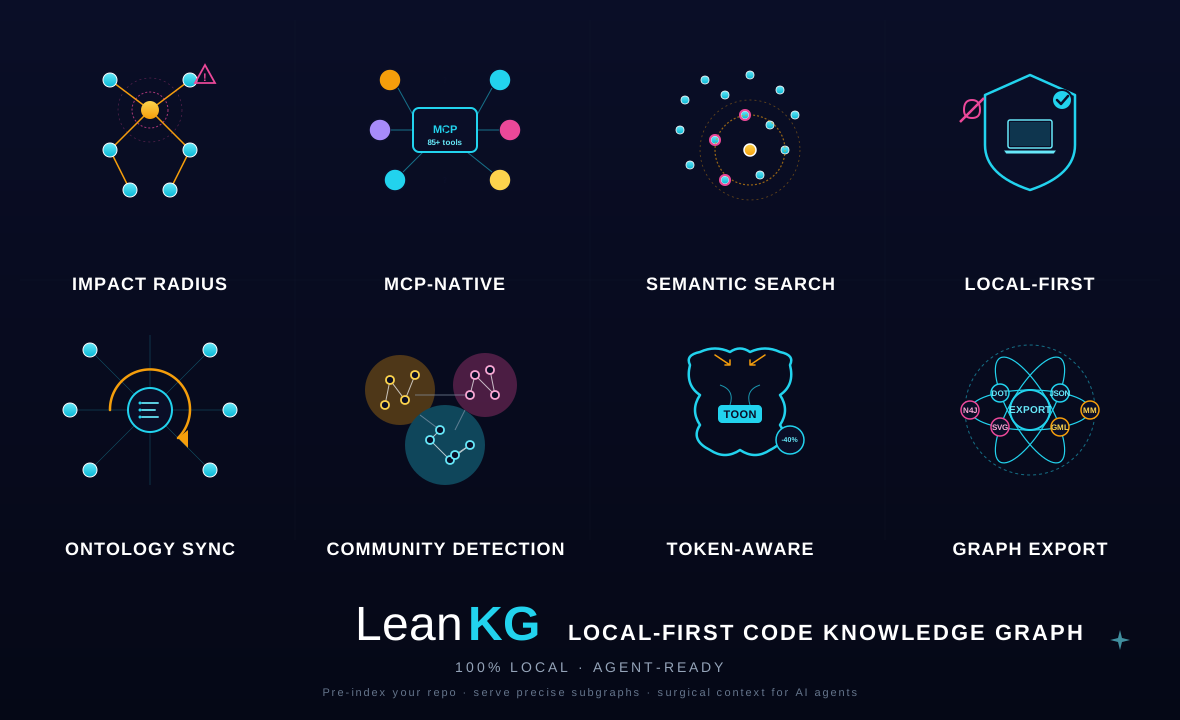
- MCP-native — search, impact, call graphs, ontology, architecture, team knowledge
- SQLite default (zero-config — no Postgres, no Docker required) with an opt-in Postgres/pgvector backend (
LEANKG_DB_ENGINE=postgres+LEANKG_PG_URL) - Ontology — concept catalog + procedural layer (workflows, steps, decision points, failure modes),
query --action ontology,POST /api/v1/ontology/match, and req↔code traceability vialeankg prd/prd-trace - Impact & deps —
contains,calls,importsedges; BFS blast radius (leankg impact) - Web UI v2 — Force / Tree / Circles explorer (
cd ui-v2 && npm run dev; the embedded build is served byleankg serve --ui) - Deploy — single CGO-free binary, no runtime deps: Dockerfile builds a read-only demo image for Render,
/healthanswers container probes, and--ui/--http/--rest/--rpceach bind their own address - Languages — 40 profiles: Go, Rust, TypeScript/TSX, JavaScript/JSX, Python, Markdown, Java, Kotlin, Swift, Objective-C, Dart, C/C++, C#, PHP, Ruby, Scala, Perl, Lua, Haskell, Elixir, Crystal, CUDA, Cypher, Elm, Erlang, F#, GLSL, HLSL, Nim, OCaml, SQL, PowerShell, Q#, Solidity, SystemVerilog, Verilog, Zig
MCP prefer-order
Discover with query — it routes down the ladder by default (L1 exact → L2 fuzzy → L3 semantic), degrades instead of erroring, and every answer carries retrieval{rung,reason} + freshness.
| Question | How |
|---|---|
| Any identifier (default) | query "Alpha" (exact, then fuzzy fallback) |
| Blast radius | leankg impact <file> or query --action impact --to <qn> |
| Who calls X? | query --action callers --to <qn> |
| How A↔B? | query --action path --to <qn> |
| Element details | query --action explain --to <qn> |
| Pattern search | query --action pattern --pattern "func $_(...)" |
| PRD traceability | leankg prd-trace FR-3T-01 |
| File (compressed) | query --action read --path src/main.go |
3 tools: import (index/PRD/memory/session/ontology/read) · query (ladder + graph verbs + actions) · status (inventory/freshness/config).
CLI
leankg index .                          # one-shot index -> .leankg/leankg.db
leankg writer                           # index once, then watch + re-index
leankg query "parseConfig"              # name lookup (exact, then fuzzy) — JSON out
leankg query "parseConfig" --compress   # one line per result
leankg impact src/main.go --depth 3     # blast radius of a file or element
leankg status                           # health, inventory, freshness, embed state
leankg doctor                           # store path, element/file counts, watermark
leankg connect claude-code              # MCP entry: claude-code|cursor|codex|gemini|opencode|omp
leankg install --target cursor          # same wiring, flag form (--register-cwd: claude-code hook)
leankg serve --stdio                    # MCP over stdio (what harnesses spawn)
leankg serve --http 127.0.0.1:9699      # MCP over streamable HTTP (/mcp, /health)
leankg serve --rest 127.0.0.1:8080      # REST API (/health, /api/v1/*)
leankg serve --ui 127.0.0.1:8081        # embedded dashboard (/api/* data API served here)
leankg serve --rpc 127.0.0.1:9090       # ConnectRPC (gRPC + gRPC-Web + JSON)
leankg version
UI hot-reload: cd ui-v2 && npm install && npm run dev → http://127.0.0.1:5173
Full usage: leankg help and leankg <command> --help. The archived Rust-era
CLI reference: docs/archive/cli-reference.md
Go module
The engine is the root module github.com/FreePeak/LeanKG, versioned by the
root vX.Y.Z release tags — so the proxy and
pkg.go.dev resolve real
versions and go install github.com/FreePeak/LeanKG/cmd/leankg@latest builds
the server + CLI straight from source.
| Surface | exactly 3 MCP tools — import / query / status (pinned by internal/mcp/server_test.go). query routes the ladder (L1 exact → L2 keyword/FTS → L3 semantic) and degrades instead of erroring, so every answer carries retrieval{rung,reason} + freshness |
| Storage | SQLite (WAL, FTS5, float32-BLOB vectors, DB-resident watermark) by default; PostgreSQL + pgvector opt-in (LEANKG_DB_ENGINE=postgres + LEANKG_PG_URL) with schema-per-project and per-model HNSW — both behind store.Backend |
| Transports | MCP stdio · MCP streamable HTTP (--http, /mcp + /health) · REST (--rest, /health + /api/v1/*) · ConnectRPC (--rpc) · embedded dashboard (--ui) |
| Indexing | 40 language profiles (internal/langs.Default), AST tiers regex → ast-grep → tree-sitter (behind the tstree tag), 3-signal change detection, writer role with fsnotify reconcile |
| Embeddings | leankg-embed binary + provider port (OpenAI-compatible / llama.cpp sidecar / deterministic). Every vector writer is ModelStamp-guarded, so a model change fails loudly instead of mixing vector spaces |
Layout
cmd/leankg/         serve (stdio | MCP HTTP | REST | RPC | dashboard) · index · writer
                    query · impact · status · doctor · report · connect · install
                    prd · prd-trace · incident · note · obsidian · push · pull · update
cmd/leankg-embed/   run · full · export · import · status
internal/store/     Backend interface + SQLite (WAL/FTS5/watermark) + PGStore (pgvector)
internal/core/      3-tool envelope + L0–L3 ladder + memory/graph routing
internal/index/     extractors, 3-signal detection, call-edge resolution
internal/langs/     the 40 profiles, AST tiers, per-language LSP specs
internal/graph/     impact · path · callers/callees · context · explain · clusters
internal/ontology/  concept catalog + procedural workflows/traceability
internal/mcp/       modelcontextprotocol/go-sdk adapters (stdio + streamable HTTP)
internal/rest/      stdlib net/http REST surface
internal/web/       ui-v2 dashboard via //go:embed (checked-in build) + its /api/*
internal/embed/     provider port, ModelStamp guards, NDJSON export/import
internal/memory/    full-markdown memory + mnemopi bank adapter
internal/watch/     fsnotify reconcile (writer role)
internal/golden/    Rust-vs-Go parity fixtures
Build
go build ./... && go vet ./... && go test ./... -count=1   # CGO-free shape
go build -tags tstree ./...                                # tree-sitter tier (CGO)
The dashboard build under internal/web/embed is checked in and re-synced by
make go-ui-assets; its provenance marker is embed/ui-build.json.
scripts/test-dual-engine.sh is the SQLite + live-PostgreSQL gate
(LEANKG_TEST_PG_URL gates the PG half).
Known limits
- Call edges are package-scoped. No import/type resolution, so a same-name call in the same package resolves and cross-package dispatch is best-effort; the upgrade path is tree-sitter symbol tables.
- Heuristic guards, documented in
internal/index/relations.go: files ≥ 1 MiB are skipped as vendored/minified bundles, call targets shorter than 4 characters are dropped as noise, and outgoing calls are capped per element and per file. - The unit of scope is a repository. A portfolio root (tens of thousands of nested files) is not a project; register its children one at a time.
--uibinds an unauthenticated data API (query/read/import routes). Bind it loopback or front it with a proxy — the public demo container serves it--read-onlyagainst a disposable baked graph.
Docs
The documentation set lives in docs/ — a single unified PRD (docs/prd.md) + task tracker (docs/prd-task-tracker.md). All historical design docs, analyses, reports, and plans are preserved under docs/archive/.
| Doc | |
|---|---|
| PRD | Unified product requirements + HLD (single SoT) |
| Task tracker | Done / in-progress / todo |
| Architecture (archived) | Design & data model (historical) |
| MCP tools (archived) | Tool catalog (historical) |
| CLI (archived) | All commands (historical) |
| Benchmarks (archived) | Methodology (historical) |
| Postgres migration (archived) | Engine notes (historical) |
| AGENTS.md | Agent notes |
Troubleshooting
| Issue | Fix |
|---|---|
| Wrong project served | Start the server with --project DIR (query/impact also honor LEANKG_PROJECT) |
| Embeddings / cold embed | leankg-embed status, then leankg-embed full (provider env: LEANKG_EMBED_*) |
Requirements: macOS or Linux · Go 1.25+ only when building from source. No Docker, no Postgres — sqlite is the default store.
Contributing
- Fork + feature branch (prefer a worktree)
- Update docs when behavior changes
go build ./... && go vet ./... && go test ./...- Open a PR with summary + test plan