Spire.XLS MCP Server
Create, read, edit, and convert Excel files without requiring Microsoft Office.
What is Spire.XLS MCP Server?
The Spire.XLS MCP Server is a robust solution that empowers AI agents to work with Excel files using the Model Context Protocol (MCP). It is totally independent and doesn't require Microsoft Office to be installed on system. This tool enables AI agents to create, read, edit, and convert Excel workbooks seamlessly
Main Features:
- Convert Excel to PDF, Excel to HTML, Excel to CSV, Excel to image, Excel to XML, and more with high fidelity.
- Create, modify, and manage Excel workbooks
- Manage and control worksheets: rename, move, hide, freeze panes, and more.
- Manage worksheets and cell ranges
- Read and write data
- Analyze Excel data
- Add various chart types to create visual Excel dashboards from data
- Create and manipulate pivot tables to summarize, analyze, explore, and present Excel data.
How to use Spire.XLS MCP Server?
Prerequisites
- Python 3.10 or higher
Installation
- Clone the repository:
git clone https://github.com/eiceblue/spire-xls-mcp-server.git
cd spire-xls-mcp-server
- Install using uv:
uv pip install -e .
Running the Server
Start the server (default port 8000):
uv run spire-xls-mcp-server
Custom port (e.g., 8080):
# Bash/Linux/macOS
export FASTMCP_PORT=8080 && uv run spire-xls-mcp-server

# Windows PowerShell
$env:FASTMCP_PORT = "8080"; uv run spire-xls-mcp-server
Integration with AI Tools
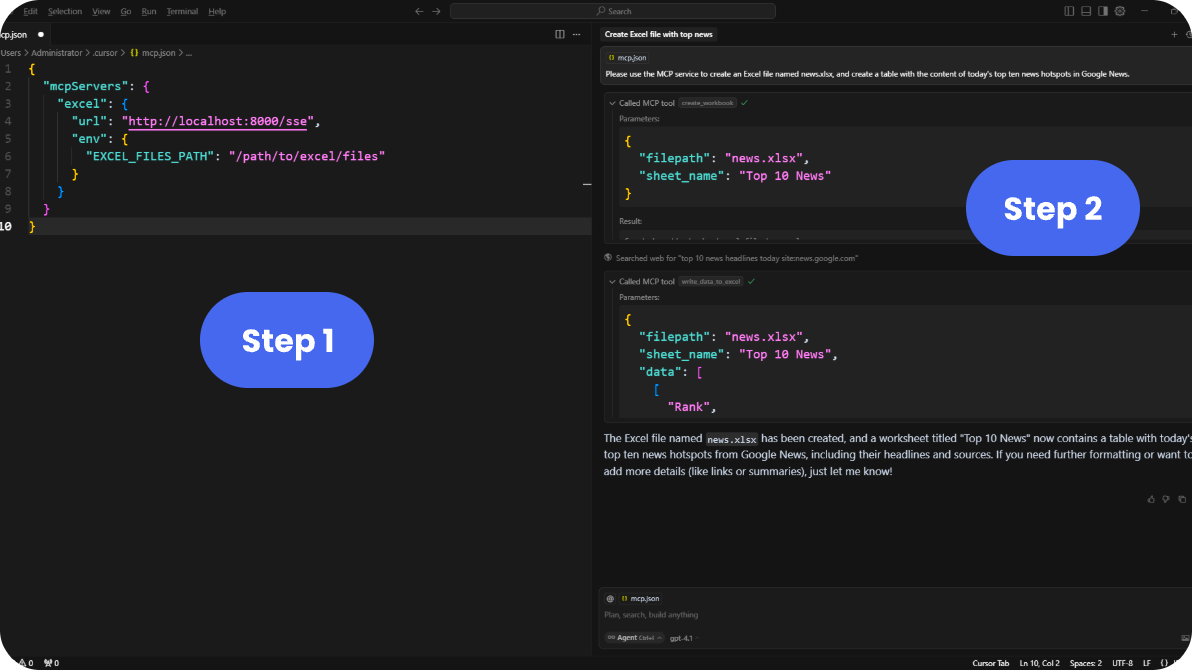
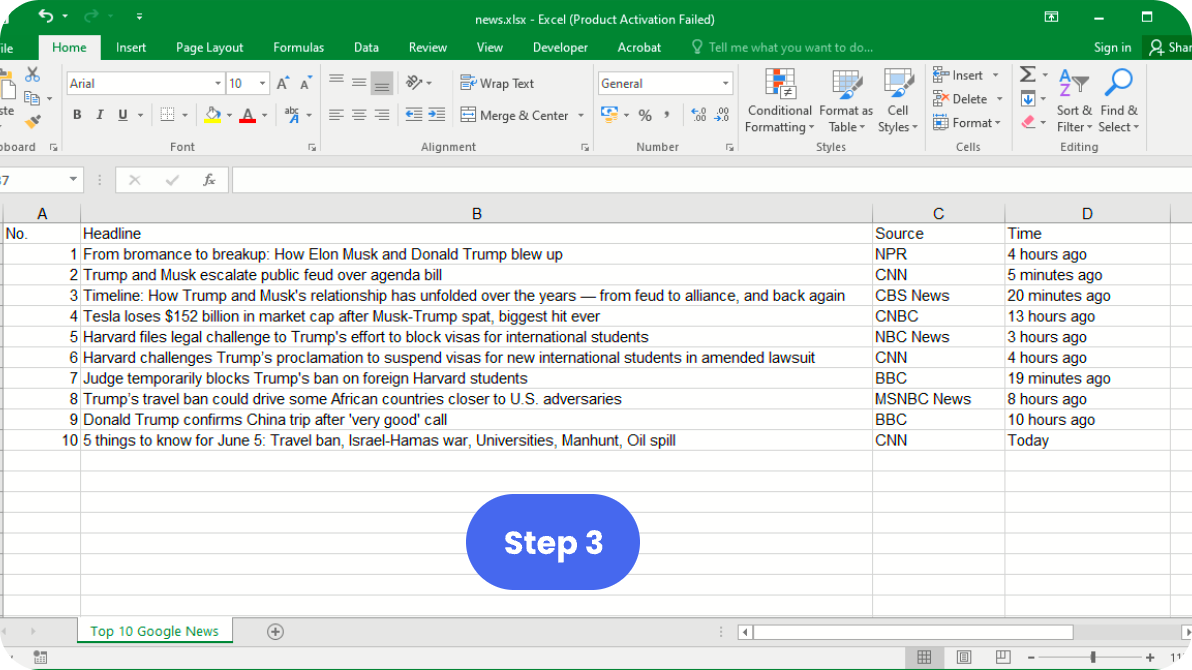
The following visual guide illustrates the three-step process to integrate Spire.XLS MCP Server with supported AI development environments:
Step 1 and Step 2: Start the server and configure AI tool
Step 3: Use Excel features through AI interface
Cursor IDE
- Add this configuration to Cursor:
{
  "mcpServers": {
    "excel": {
      "url": "http://localhost:8000/sse",
      "env": {
        "EXCEL_FILES_PATH": "/path/to/excel/files"
      }
    }
  }
}
- The Excel tools will be available through your AI assistant.
Remote Hosting & Transport Protocols
This server uses Server-Sent Events (SSE) transport protocol. For different use cases:
-
Using with Claude Desktop (requires stdio):
- Use Supergateway to convert SSE to stdio
-
Hosting Your MCP Server:
Environment Variables
| Variable | Description | Default |
|---|---|---|
FASTMCP_PORT | Server port | 8000 |
EXCEL_FILES_PATH | Directory for Excel files | ./excel_files |
Available Tools
The server provides a comprehensive set of Excel manipulation tools. Here are the main categories:
- Basic Operations: Create, read, write, and delete Excel worksheets or workbooks.
- Data Processing: Read and write cell data, apply formulas, sort and filter
- Formatting: Apply styles, merge cells, set fonts and colors
- Advanced Features: Create charts, pivot tables, conditional formatting
- Conversion: Convert Excel to PDF, HTML, CSV, image, XML, and more with high fidelity.
See TOOLS.md for complete documentation of all available tools.
FAQ from Spire.XLS MCP Server?
Q1. Can I use Spire.XLS MCP Server for any directory?
Yes, Spire.XLS MCP Serer works for any directory.
Q2. Is Spire.XLS MCP Server free to use?
Yes, it is licensed under the MIT License, allowing free use and modification.
Q3. What programming languages does Spire.XLS MCP Server support?
It is built with Python.
License
MIT
関連サーバー
Kone.vc
スポンサーMonetize your AI agent with contextual product recommendations
My Prompts MCP
Lightweight MCP server for providing user prompts defined in Markdown with argument support.
Notion
Integrate with Notion workspaces to manage databases, pages, and content.
Yandex Browser Tabs
An MCP server for managing Yandex Browser tabs with extended functionality.
floor plan generator
BuildFloorPlan is an AI floor plan generator for homeowners, interior designers, builders, and small planning teams who need to move from rough input to a reviewable layout faster. It turns short briefs, sketches, images, and PDFs into clearer floor plan outputs in seconds, supports technical 2D layouts, colored presentation-ready plans, and quick 3D previews, and helps users compare layout directions before renovation, client presentation, or internal review. It is designed for fast first drafts, supports editing and refinement workflows, and does not require CAD experience. You can start free with starter credits, and paid plans add more credits, longer history, and commercial usage options.
Jasper AI
An MCP server for interacting with the Jasper AI API to generate various types of content.
Vault MCP
An Obsidian plugin that embeds an MCP server to interact with your notes using AI.
OSP Marketing Tools for Node.js
A suite of tools for technical marketing content creation, optimization, and product positioning based on Open Strategy Partners' methodologies.
Feishu/Lark OpenAPI
Connect AI agents to Feishu/Lark APIs for automating tasks like document processing, conversation management, and calendar scheduling.
Norman Finance
MCP server for managing accounting and taxes with Norman Finance.
Acornonaut
Turn YouTube playlists into AI-generated flashcards with spaced repetition — create, search, and export decks via MCP.