DeskMCP
オープンソースのWindows向けMCPポリシーゲートウェイで、ChatGPTのローカルファイルおよびターミナルセッションへのアクセスを制御し、ワークスペース単位の権限、保護された書き込み、セッション所有のプロセス、監査ログを備えています。
ドキュメント





DeskMCP
DeskMCP is an open-source local-first MCP policy gateway that gives ChatGPT controlled access to local files, terminal sessions, and Windows desktop UI. It runs policy enforcement on your computer, exposes a stable MCP tool surface, and connects through an OpenAI Tunnel while keeping the local MCP endpoint bound to 127.0.0.1.
The default profile is Read-only. Filesystem access is scoped to a workspace you choose locally, sensitive paths are excluded before search, and elevated process capabilities are session-owned rather than arbitrary PID control.
Personal open-source project by edmen12.
Why DeskMCP?
| Local-first | The Gateway and policy enforcement run on your computer. |
| Workspace scoped | Safe profiles keep file tools inside the folder you explicitly select. |
| Secure by default | First run starts in Read-only mode; Full Control and Fully Unlocked are never persisted. |
| Easy to install | The self-contained Setup does not require Node.js, npm, .NET, Git, or a source checkout. |
Product preview
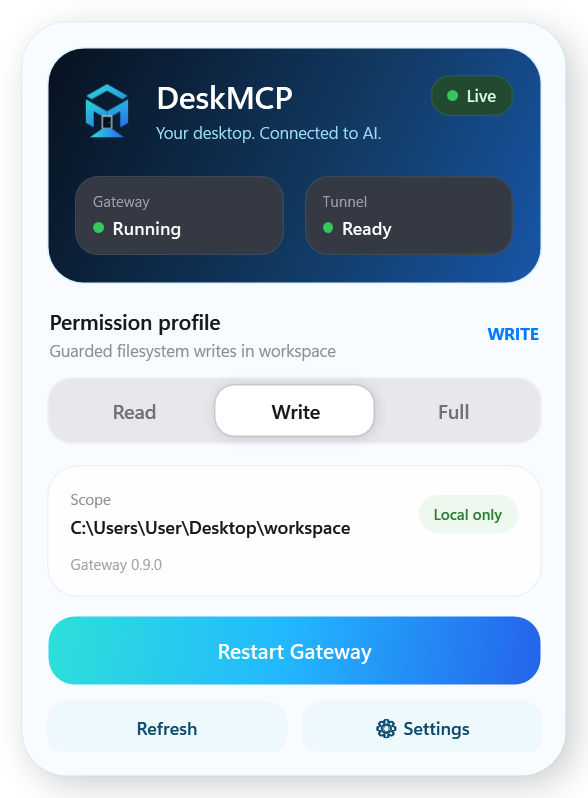
The tray Control Panel shows Gateway/Tunnel health, the active permission profile, the selected workspace, Agent Desktop bindings, Windows startup settings, and Tunnel configuration without exposing secrets.
Windows quick start
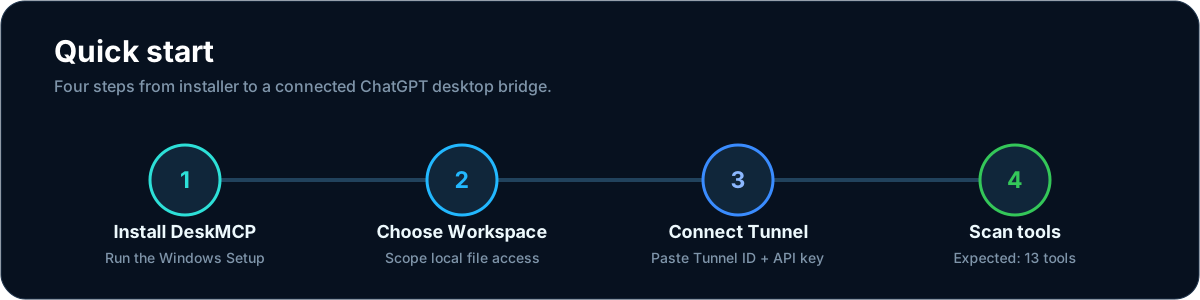
- Download
DeskMCP-Setup-<version>.exefrom the latest GitHub Release and run it. - Choose the workspace DeskMCP may access.
- In OpenAI Platform, create a Tunnel and copy its Tunnel ID and Runtime API Key into First Run.
- In ChatGPT, open the existing DeskMCP plugin if one already exists. Only use Plugins → New plugin when DeskMCP is not present.
- For a new plugin use Name: DeskMCP, Connection: Tunnel, Auth: No auth. If ChatGPT reports Connector name already exists, cancel creation and reuse the existing DeskMCP plugin instead.
- Select the Tunnel, check I understand and want to continue, then Scan tools.
Expected result: 27 DeskMCP tools.
The Runtime API Key is protected with Windows DPAPI and is not written to settings.json. Secret writes are verified by immediate DPAPI readback; settings use atomic replacement with a recoverable backup. You can skip Tunnel setup during First Run and configure it later.
Architecture
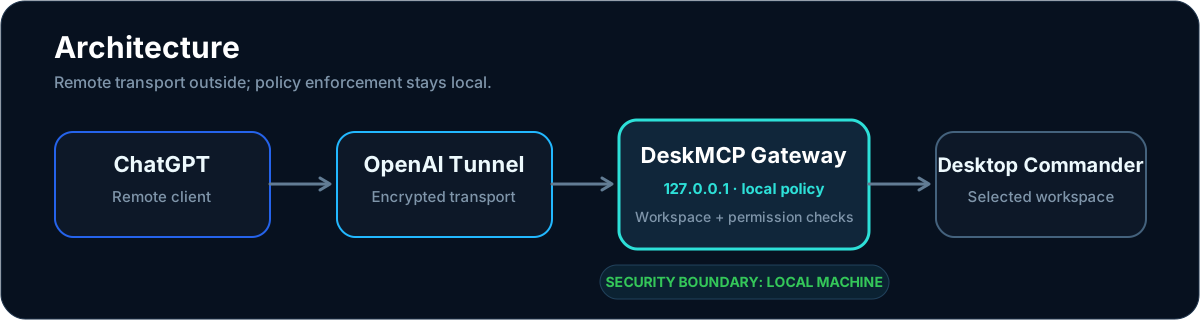
ChatGPT
  ↕ OpenAI Tunnel
DeskMCP Gateway  (127.0.0.1:8765)
  ↕ local policy enforcement
  ├─ DeskMCP backend
  │   ↳ selected workspace
  │   ↳ Gateway-owned process sessions
  ├─ Agent Runtime
  │   ↳ Workspace-bound recoverable Task Rooms
  │   ↳ verified expiring artifacts
  │   ↳ dynamic Streamable HTTP MCP facade
  │   ↳ versioned model-readable Skills
  ├─ Browser Runtime
  │   ↳ DeskMCP-owned Chromium profile / loopback CDP / verified screenshots
  └─ Windows Computer Use backend
      ↳ Microsoft WinApp CLI / UI Automation / screenshot / input
The Tunnel provides the remote transport. The local Gateway checks policy before filesystem, process, computer-use, artifact publication, dynamic MCP, or Skill mutations. Recoverable task state stays local under Workspace-bound Task Rooms: parallel chat windows receive separate opaque room capabilities by default, task listing requires the current room capability, and an interrupted chat can explicitly reattach by exact task id or by a discovered room id plus matching label. Artifacts and installed Skill versions stay local under DeskMCP's data root; Skills expose instructions/resources to the model but never auto-execute bundled scripts. Dynamic MCP servers are user-configured and only their non-secret configuration plus environment-variable names are persisted. Windows Computer Use is packaged as a pinned backend behind DeskMCP's own stable MCP schema, so backend changes do not become remote API changes.
Permission profiles
- Read — default; read, list, metadata, bounded search, Task Room discovery plus task inspection when the current room capability is already available, artifact inspection/read, cached dynamic-MCP discovery, and installed Skill list/get/read plus local package validation.
- Write — adds guarded create/edit/write/move operations plus Task Room creation/reattach and task mutation, artifact publish/delete, and local Workspace Skill install/activate/rollback.
- Full — session-only; keeps the Workspace filesystem boundary and adds terminal/process sessions, Windows Computer Use, isolated Browser Automation, dynamic MCP refresh/live calls, and remote Skill validation/install over verified HTTPS sources.
- Unlock (
fully-unlocked) — session-only; disables DeskMCP Workspace, sensitive-path and fresh-observation file guards and also permits explicitly requested system-wide key injection. Windows ACL/UAC and Secure Desktop remain host boundaries.
Full and Unlock are never persisted. Restarting DeskMCP returns to the last safe persisted profile: Read or Write. Neither profile bypasses Windows ACL/UAC or any remote-client safety policy.
Tool surface
DeskMCP currently exposes a stable 27-tool MCP surface:
desktop_policy_status
desktop_read_file
desktop_list_directory
desktop_get_file_info
desktop_search
desktop_create_directory
desktop_write_file
desktop_edit_file
desktop_move_file
desktop_start_process
desktop_read_process
desktop_interact_process
desktop_terminate_process
desktop_ui_windows
desktop_ui_snapshot
desktop_ui_action
desktop_agent_desktop
desktop_task_manage
desktop_artifact_manage
desktop_mcp_manage
desktop_mcp_tool_search
desktop_mcp_tool_inspect
desktop_mcp_tool_call
desktop_skill_manage
desktop_browser_session
desktop_browser_snapshot
desktop_browser_act
The schemas stay discoverable across profiles so the remote connection remains stable. Discoverable does not mean permitted: every invocation is still checked by the local DeskMCP policy before it can execute. The dynamic MCP facade keeps arbitrary upstream tool schemas behind search → inspect → call rather than expanding DeskMCP's top-level tool list for every connected server.
Windows Computer Use is UI Automation first. desktop_ui_snapshot returns a short-lived opaque computer_observation_id; every desktop_ui_action must consume a fresh observation. Any action invalidates sibling observations for that window, and physical/global input also invalidates observations for other windows because it can change global desktop state. GUI mutations are serialized process-wide. Screenshot capture is optional and bounded before it is returned as MCP image/png; use it when visual context is needed instead of paying the image cost on every step. See docs/COMPUTER_USE.md.
On Windows, window_mode controls only whether the CMD/PowerShell console itself is hidden or visible. It is independent from privilege elevation. window_mode: "hidden" remains the default for background agent work; use window_mode: "visible" only when the local user should see and interact with the console window. Visible sessions take interactive keyboard input from their Windows console instead of desktop_interact_process.
elevation: "admin" uses the Windows runas broker and always relies on the normal local UAC approval flow. It is valid with either window mode: hidden + admin shows the standard UAC prompt and, after approval, runs the administrator process without an extra CMD/PowerShell window; visible + admin shows UAC and then opens the visible administrator console. UAC cancellation or denial is returned as an error; DeskMCP does not bypass UAC.
Agent Desktop pool on Windows
Desktop 1 is reserved for the local user. Create Desktop 2 or later with Windows Virtual Desktops, switch to each desktop you want to offer to agents, then use Settings → Agent Desktop → Bind Current. Multiple bound desktops form a pool: each new Agent Control lease receives the first free live desktop, and concurrent agents cannot take the same slot.
Settings lists each bound desktop separately with its current state. Ready means the slot is available, Controlling means an agent owns the slot, and Unavailable means the original Windows virtual-desktop GUID was removed or became Desktop 1. Idle or unavailable bindings can be removed with Unbind; a controlling desktop must exit Agent Control first. DeskMCP resolves the live Windows desktop number from the stable desktop GUID before allocation, so normal Windows desktop renumbering does not misroute a lease.
Agent Desktop Browser sessions belong to the Agent Control lease rather than one tool call. The browser remains open, including page/login state, until that lease exits, is revoked, or its linked Task Room completes. The blue safety edge/HUD is shown only on the currently viewed controlled Agent Desktop; switching back to Desktop 1 hides the overlay without stopping agents running on other bound desktops.
Security model
- Gateway HTTP binds only to
127.0.0.1:8765. - In Read, Write and Full, allowed filesystem access is restricted to the locally selected Workspace and lexical/canonical path checks block symlink/junction escapes.
- Sensitive paths such as
.env,.npmrc,.pypirc,.netrc,.ssh,.gnupg, and.aws/credentialsare denied by default, and search excludes them before DeskMCP backend/ripgrep reads candidates. - In Read/Write/Full,
desktop_read_fileissues a one-time opaqueobservation_id. Editing, moving, or overwriting an existing file must present the matching fresh capability; capabilities are path/version-bound, single-use, bounded to 1024 entries, and same-path mutations are serialized across Gateway instances so concurrent agents cannot silently overwrite each other from the same observed version. - Unlock intentionally disables those three DeskMCP filesystem protections for the current session. Audit remains enabled and Windows account permissions remain the final local boundary.
- Process tools use opaque Gateway-owned session IDs instead of exposing arbitrary Windows PID control. Capacity counts active sessions plus in-flight start reservations, so no more than 32 owned sessions can be active/starting at once. DeskMCP backend's own
list_sessionsis the active-session source of truth (rather than OS PID liveness guesses); completed-session capabilities remain readable in bounded history, any later reuse of the same OS PID invalidates older capabilities for that PID, and Gateway shutdown cleans up owned live sessions. - Computer Use exposes opaque
window_idcapabilities rather than HWND/PID targets. A freshcomputer_observation_idis required for every action, observations expire after 30 seconds and are one-time, and the first action on a window invalidates sibling observations from the same UI state. Physical/global input also invalidates observations for other windows because it can mutate global desktop state. - Computer Use is available only in session-only Full Control or Fully Unlocked. It does not bypass Windows ACL/UAC, the lock screen, or UAC Secure Desktop. System-wide key injection requires Fully Unlocked; remote callers cannot select WinApp's cross-integrity
post-messagekeyboard transport. Agent Desktop background mode may select a restricted window-targeted transport internally after lease/window validation so it does not steal the user's foreground desktop. - All GUI operations share one process-wide coordinator so multiple MCP clients cannot concurrently mutate the desktop. UI Automation actions are preferred over injected input; screenshots are optional, size-bounded, and temporary PNG files are removed after capture.
- Recoverable tasks are persisted inside Workspace-bound Task Rooms. Each room uses an opaque capability whose secret is stored only as a SHA-256 hash locally; normal task list/get/mutation calls require that capability, so parallel chat windows do not share task state by default. Explicit recovery can mint an additional capability only from an exact task id or an exact discovered context id plus matching label. Room capabilities are also bound to the selected Workspace fingerprint. Mutations inside one room remain serialized, and a task cannot be completed until all declared steps are complete and a final review passes with verified evidence and no remaining
open_risksormissing_checks. - Artifacts can only be published from DeskMCP policy-approved paths. DeskMCP copies the payload into its own state root, records SHA-256/size metadata, re-verifies integrity on reads, expires artifacts after a bounded retention period, and signs download URLs. Plain HTTP artifact URLs are allowed only for loopback hosts; remote artifact URLs require HTTPS and URL credentials are rejected. Artifact mutations are cross-Gateway serialized and the store enforces a bounded total payload budget.
- Dynamic MCP servers use a fixed search → inspect → call facade. Remote plain HTTP and URL-embedded credentials are rejected; persisted registry data contains environment-variable names rather than secret values. OAuth supports both automatic client registration and pre-registered clients: the latter records a public client ID plus a local client-secret environment-variable name, never the secret itself. Refresh and live upstream calls require Full or Unlock. Registry mutations are serialized across Gateway instances, server/tool/schema/result sizes are bounded, and multi-server refresh has a total deadline. This implementation supports Streamable HTTP only; stdio is intentionally not exposed because spawning arbitrary child MCP servers would bypass DeskMCP's owned-process boundary.
- Skills are versioned model-readable instruction/resource packages behind the single
desktop_skill_managefacade. Local installs must come from a policy-approved Workspace path; remote ZIP validation/install requires Full or Unlock, HTTPS without URL credentials, and a caller-supplied SHA-256. Archives reject traversal, symlinks, encrypted entries, Windows-unsafe paths, oversized expansion, and mutable declared-version/digest conflicts. Installed package contents are re-verified against their immutable manifest before read/activate/rollback/reuse. Skillscripts/are resources only and are never auto-executed by this subsystem. - Browser Automation requires Full or Unlock. Settings → Browser Automation auto-detects a local Edge, Chrome or Chromium by default; Choose Browser pins an explicit
.exe, Clear disables Browser Automation, and Auto Detect re-enables discovery.DESKTOP_MCP_BROWSER_EXECUTABLEremains an explicit development/environment override only while auto-detect is enabled and no saved local selection exists. DeskMCP remains the sole browser-process owner through ProcessHost/Windows Job Objects and never attaches to an existing personal browser/CDP session. The default control engine isplaywright-coreover a loopback-only random CDP port; Playwright never launches or closes the DeskMCP-owned browser. AI accessibility snapshots provide observation-scoped element refs, including cross-frame refs such asf1e2, and password input values are redacted before any snapshot data is returned. Browser actions require a fresh one-timebrowser_observation_id, reject stale accessibility state, and authorize at most one state-changing action. Agent Desktop browsers constrain the whole owned process tree to the active lease. Uploads remain under DeskMCP filesystem policy; downloads are observation-authorized, staged under DeskMCP private state, size-checked, published through the verified Artifact store, and then removed from temporary storage. Persistent profiles have cross-Gateway ownership locks plus bounded profile count and explicit list/delete lifecycle; ephemeral profiles are deleted on close. Browser screenshots are pixel/byte-bounded before Artifact publication. Console/network observation is explicit opt-in: no history is buffered untilinclude_console/include_networkis requested for that page, then only bounded in-memory history is retained. Network records expose method/resource/status plus a URL stripped of credentials, query and fragment; request/response bodies and headers are never captured. Console text is bounded and redacts Authorization/Cookie/Set-Cookie style values.DESKTOP_MCP_BROWSER_ENGINE=legacy-cdpis an explicit local migration fallback only; Playwright failures never silently downgrade the engine, and Playwright-only observability/actions fail explicitly under the legacy engine. - Audit records metadata only; it does not record file contents, terminal input/output, Authorization headers, API keys, screenshot pixels, or real process/window IDs. Writes and GUI mutations are serialized within their respective safety domains, and audit logs rotate at 10 MB with four bounded backups.
Security reports should use GitHub Private vulnerability reporting, not a public issue.
User data lives under:
%APPDATA%\DesktopMCP\settings.json
%LOCALAPPDATA%\DesktopMCP\secrets\tunnel-runtime-key.dpapi
%LOCALAPPDATA%\DesktopMCP\logs\audit.jsonl
%LOCALAPPDATA%\DesktopMCP\workspace\
%LOCALAPPDATA%\DesktopMCP\tasks\
%LOCALAPPDATA%\DesktopMCP\artifacts\
%LOCALAPPDATA%\DesktopMCP\mcp-hub\
%LOCALAPPDATA%\DesktopMCP\skills\
%LOCALAPPDATA%\DesktopMCP\browser\
These internal paths intentionally retain DesktopMCP for upgrade compatibility even though the public product name is DeskMCP.
Tray behavior
- Quit Control Panel (Keep Services Running) closes only the UI.
- Quit DeskMCP stops the Gateway and any Tunnel process owned by this Panel, then closes the UI.
- Externally managed Tunnel processes are not killed by DeskMCP.
Uninstall removes program files. Settings, secrets, logs and the default Workspace are kept unless the user explicitly chooses to purge user data.
Developer workflow
End-user requirements and source-development requirements are intentionally separate.
npm.cmd ci --ignore-scripts
npm.cmd test
powershell.exe -NoProfile -ExecutionPolicy Bypass -File .\control-panel\wpf\validate.ps1
For local development, control-panel\wpf\launch.cmd builds the Gateway and .NET 10 Control Panel, then starts the current development build.
Build the complete Windows release with:
scripts\build-installer.cmd
The release pipeline performs Gateway build, clean dist generation, self-contained WPF publish, production-only dependency install, third-party license inventory/notices generation, pinned WinApp CLI provenance/architecture checks, stage smoke, 27-tool validation, Single Instance validation, orphan/lock checks, branded Setup compilation, critical-file SHA-256 integrity generation, injected-failure rollback, corrupt/interrupted-install recovery, install → upgrade → runtime → uninstall smoke, and final release metadata generation.
Generated artifacts live under ignored runtime\release\ and should be attached to GitHub Releases instead of committed.
Release verification
A completed release build writes SHA256SUMS.txt and release-manifest.json beside the final installer.
Get-FileHash .\runtime\release\DeskMCP-Setup-<version>.exe -Algorithm SHA256
Compare the result with SHA256SUMS.txt before running an unsigned build.
Code signing policy
DeskMCP has submitted its application to the SignPath Foundation open-source signing program and is awaiting project approval. See CODE_SIGNING_POLICY.md for the signing roles, provenance rules, approval policy, and publisher-pin model.
Pending project approval: Free code signing provided by SignPath.io, certificate by SignPath Foundation. No release is represented as SignPath-signed until it carries a valid signature from the approved signing workflow.
Privacy and network behavior are documented in PRIVACY.md.
Current limitations
- Current Windows releases provide separate native x64 and ARM64 artifacts. The Windows release pipeline validates release staging, install/upgrade, rollback/recovery, runtime, and uninstall behavior; artifacts remain unsigned until a production signing identity is configured.
- A native macOS ARM64 menu-bar client and downloadable Developer Preview are validated on Apple Silicon CI. The preview is ad-hoc signed and not notarized; a general-user macOS release still requires Developer ID signing, notarization, and production-parity readiness checks. See macOS Developer Preview.
- Settings implement the user-controlled safe-update flow through fixed-repository release checks, immutable metadata, local SHA-256/size verification, optional Authenticode publisher verification, one-click Update Now, and post-install version/profile verification. Unsigned releases can use the verified update path after integrity gates pass; invalid signatures or configured publisher-pin mismatches are blocked.
- The open-source Windows Setup may be distributed unsigned; Windows can still show Unknown Publisher / SmartScreen warnings until a release signing identity is configured.
- Some transitive npm dependencies emit deprecation warnings even though the current production
npm auditreports zero vulnerabilities.
Roadmap
Current roadmap work is tracked publicly with explicit acceptance criteria:
- 🚧 #5 — Fresh Windows user end-to-end validation — still requires a clean-user install/startup/First Run/uninstall pass outside the development account.
- 🚧 #6 — Optional Authenticode signing — SignPath Foundation approval, first signed artifact verification, and production publisher pin remain pending.
- ✅ #7 — Windows ARM64 packaging and validation — target-aware runtime/installer pipeline and native Windows ARM64 full-chain validation pass on both the feature branch and merged main commit; issue closed.
- ✅ #8 — Safe update mechanism — trust validation, verified download, rollback/recovery, profile preservation, failure handling, and manual fallback are implemented; issue closed. Production signing remains tracked by #6.
- ✅ #9 — DeskMCP backend cold-start variance — profiled, attributed to upstream initialization variance, surfaced with startup diagnostics, and closed.
- 🚧 #10 — User-controlled updater UI — the one-click verified update path is implemented; production Authenticode remains an optional publisher-identity enhancement tracked separately from basic updater availability.
Support DeskMCP
DeskMCP is free and open-source. If it saves you time and you would like to support ongoing maintenance, you can sponsor the project through GitHub Sponsors once the edmen12 Sponsors profile is approved.
Sponsorship is entirely optional and never changes access to DeskMCP, feature availability, security treatment, or support priority. The repository funding button is configured in .github/FUNDING.yml.
Support
Start with docs/TROUBLESHOOTING.md. For reproducible bugs, feature requests, and private security reporting, see SUPPORT.md. Never post Tunnel runtime keys, API keys, or private file contents in a public issue.
Project files
SUPPORT.md— support channels and reporting guidanceSECURITY.md— vulnerability reporting and security boundaries- PRIVACY.md — local data and user-controlled network behavior
- CODE_SIGNING_POLICY.md — SignPath roles, build provenance, approval and publisher-pin policy
CONTRIBUTING.md— contribution workflowCHANGELOG.md— project changesRELEASE_CHECKLIST.md— release QATHIRD_PARTY_NOTICES.md— bundled dependency licensingdocs/USER_GUIDE.md— illustrated installation and usage guidedocs/COMPUTER_USE.md— Windows Computer Use flow, permissions, observation safety, and backend packagingdocs/MACOS_DEVELOPER_PREVIEW.md— Apple Silicon Developer Preview download, checksum, and Gatekeeper guidancedocs/TROUBLESHOOTING.md— common setup and recovery pathsdocs/UPDATE_SECURITY.md— update trust model, execution gates, and rollback/recovery contract- docs/SIGNPATH_APPLICATION.md — SignPath Foundation application status and post-approval integration plan
docs/BRAND.md— DeskMCP visual identity and brand rules
License
DeskMCP is licensed under the Apache License 2.0. See LICENSE.
Third-party components retain their own licenses; see THIRD_PARTY_NOTICES.md and the license files bundled with the release.
Built as a personal open-source project by edmen12.