CAD-MCP
自然言語の指示でCADソフトウェアを制御し、作図操作を実行します。
ドキュメント
CAD-MCP Server (CAD Model Context Protocol Server)
Project Introduction
CAD-MCP is an innovative CAD control service that allows controlling CAD software for drawing operations through natural language instructions. This project combines natural language processing and CAD automation technology, enabling users to create and modify CAD drawings through simple text commands without manually operating the CAD interface.
Version 2.0 is fully upgraded based on the latest MCP specification (FastMCP, structured output, tool annotations, progress notifications, Streamable HTTP), and adds 35 tools in total covering querying, editing, layers, drawing management, blocks, and command passthrough — forming a complete "draw → inspect → correct" feedback loop.
Features
CAD Control Functions
- Multiple CAD Software Support: Supports mainstream CAD software including AutoCAD, GstarCAD (GCAD) and ZWCAD
- Basic Drawing Functions:
- Line drawing
- Circle drawing
- Arc drawing
- Ellipse drawing
- Rectangle drawing
- Polyline drawing
- Text addition
- Pattern filling
- Dimension annotation
- Query Functions (the AI can see the actual drawing content):
- List all layers
- List entities in model space (returns editable entity handles)
- Query detailed entity properties by handle (coordinates/radius/text content, etc.)
- Screenshot of the CAD window for preview
- Editing Functions: erase, move, rotate, scale, copy, mirror, offset, array (linear/polar), undo/redo
- Layer Management: Create and switch layers, query layer states
- Drawing Management: New / open / close / save drawings (DWG/DXF)
- Block Operations: Create, insert, and list blocks
- Command Passthrough: Execute any CAD command via
send_command(an escape hatch for everything else)
MCP Protocol Features
- Structured Output: All tools return
structuredContentwith anoutputSchemathat clients can parse directly - Tool Annotations: Query tools are marked
readOnlyHint; destructive operations are markeddestructiveHintfor client confirmation policies - Progress Notifications: Long-running operations (CAD startup, saving) send message notifications to the client
- Dual Transport Modes:
stdio(local, single client) andstreamable-http(remote / multiple clients sharing one CAD instance) - Error Semantics: Input validation errors are returned as tool errors, enabling model self-correction
Natural Language Processing Functions (legacy interface)
- Command Parsing: Parse natural language instructions into CAD operation parameters
- Color Recognition: Extract color information from text and apply it to drawing objects
- Shape Keyword Mapping: Support recognition of various shape description words
- Action Keyword Mapping: Recognize various drawing and editing actions
Demo
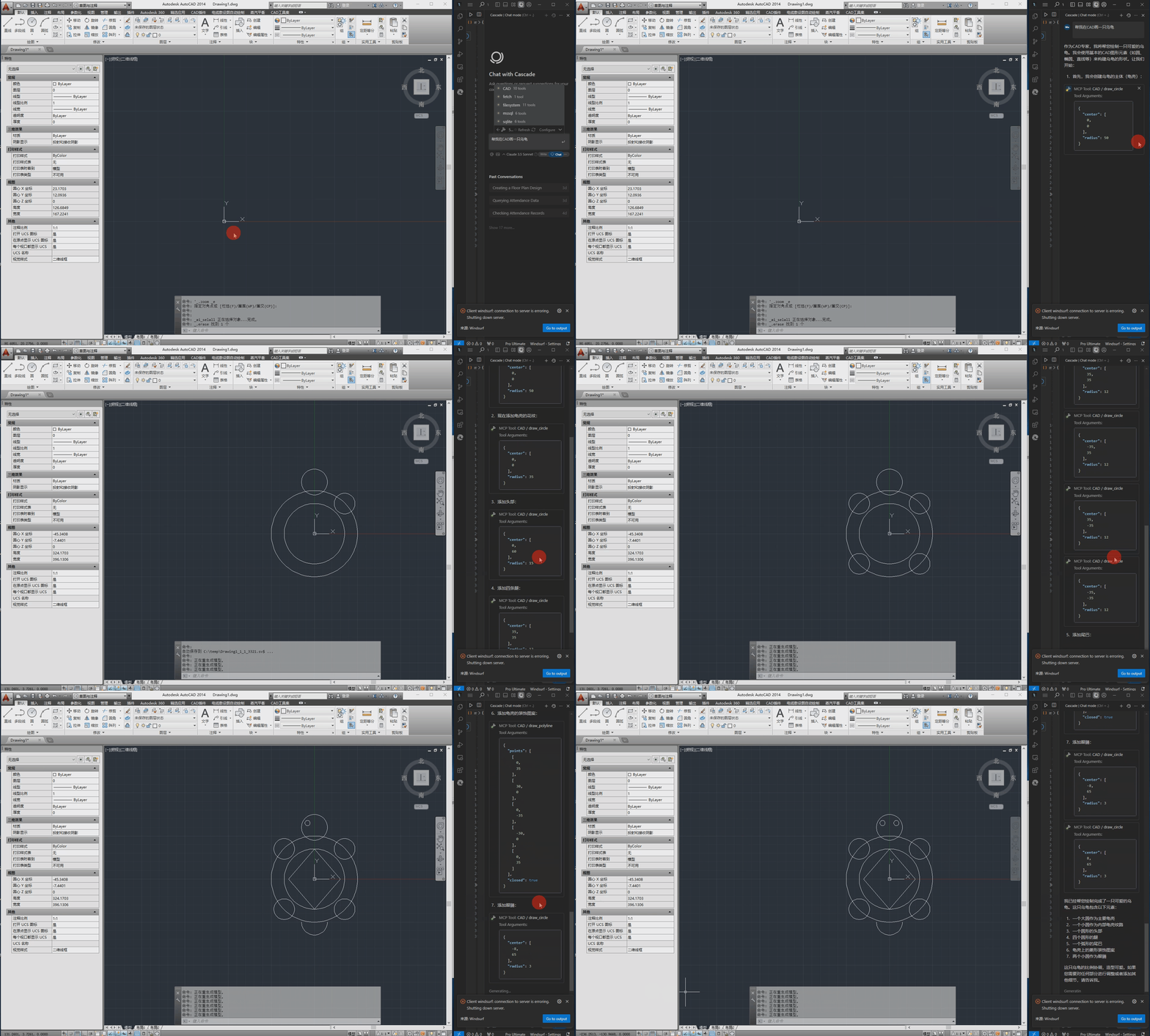
The following is the demo video.
Installation Requirements
Dependencies
pywin32>=306       # Windows COM interface support
mcp>=1.12,<2       # MCP Python SDK (FastMCP, structured output, Streamable HTTP)
pydantic>=2.0.0    # Data validation
Pillow>=10.0.0     # PNG encoding for screenshot previews
System Requirements
- Windows operating system
- Installed CAD software (AutoCAD, GstarCAD, or ZWCAD)
- Python 3.10+
Configuration
The configuration file is located at src/config.json and contains the following main settings:
{
    "server": {
        "name": "CAD MCP 服务器",
        "version": "2.0.0",
        "transport": "stdio",
        "host": "127.0.0.1",
        "port": 8000
    },
    "cad": {
        "type": "AUTOCAD",
        "startup_wait_time": 20,
        "command_delay": 0.5
    },
    "output": {
        "directory": "./output",
        "default_filename": "cad_drawing.dwg"
    }
}
- server: Server name, version, and transport settings
transport: Transport mode,stdio(default, local single client) orstreamable-http(remote / multi-client)host/port: Listen address and port for Streamable HTTP mode (can also be overridden via--host/--portcommand-line arguments)
- cad:
type: CAD software type (AutoCAD, GCAD, GstarCAD, or ZWCAD)startup_wait_time: CAD startup waiting time (seconds)command_delay: Command execution delay (seconds)
- output: Output file settings
Usage
Starting the Service
# Option 1: Run directly (fully compatible with existing Claude/Cursor configs)
python src/server.py

# Option 2: Install as a CLI tool
pip install -e .
cad-mcp

# Option 3: Run with Streamable HTTP transport (remote / multi-client sharing one CAD instance)
python src/server.py --transport streamable-http --port 8000
# Clients connect to http://127.0.0.1:8000/mcp
Connect from an MCP Client
The server uses stdio transport by default, so the same JSON config works for any MCP client (Claude Desktop, Cursor, Windsurf, TRAE, etc.). Add it to your client's MCP server config file (e.g. claude_desktop_config.json, Cursor's mcp.json), replacing the path with your own:
{
    "mcpServers": {
        "CAD": {
            "command": "python",
            "args": [
                # Your actual path, such as:"C:\\cad-mcp\\src\\server.py"
            ]
        }
    }
}
For Streamable HTTP mode, point the client to http://127.0.0.1:8000/mcp instead.
MCP Inspector
# Note: use your path
npx -y @modelcontextprotocol/inspector python C:\\cad-mcp\\src\\server.py
Service API
The server provides the following tools (35 in total):
Basic drawing:
draw_line: Draw a linedraw_circle: Draw a circledraw_arc: Draw an arcdraw_ellipse: Draw an ellipsedraw_polyline: Draw a polylinedraw_rectangle: Draw a rectangledraw_text: Add textdraw_hatch: Draw a hatch patternadd_dimension: Add linear dimension
Query:
list_layers: List all layerslist_entities: List entities in model space (returns editable handles)get_entity_properties: Query detailed entity properties by handlescreenshot: Capture the CAD window to confirm drawing results
Editing:
erase_entity/move_entity/rotate_entity/scale_entity: Erase / move / rotate / scale entitiescopy_entity/mirror_entity/offset_entity: Copy / mirror / offset entitiesarray_linear_entity/array_polar_entity: Linear / polar arraysundo/redo: Undo / redo
Layer & drawing management:
create_layer/set_current_layer: Layer managementnew_drawing/open_drawing/close_drawing/save_drawing: Drawing managementcreate_block/insert_block/list_blocks: Block operationssend_command: Execute any CAD command via the command line
Legacy:
process_command: Process natural language commands
Project Structure
CAD-MCP/
├── imgs/                # Images and video resources
│   └── CAD-mcp.mp4     # Demo video
├── pyproject.toml       # Packaging config (pip install -e .)
├── requirements.txt     # Project dependencies
└── src/                 # Source code
    ├── __init__.py     # Package initialization
    ├── cad_controller.py # CAD controller (COM layer: drawing/query/editing/drawings/blocks)
    ├── config.py        # Config singleton loader
    ├── config.json     # Configuration file
    ├── models.py        # Structured output models (outputSchema)
    ├── nlp_processor.py # Natural language processor
    └── server.py       # Server implementation (FastMCP)
License
MIT License