Design Context Bridge
design-context-bridgeは、スクリーンショットから推測するのではなく、実際にFigmaファイルを読み取れるフロントエンド開発者にAIエージェントを変えるMCPサーバーです。デザイナーがFigmaを渡して「これを作って」と頼むとき、開発者は単に見えるピクセルをコピーするだけではありません。ファイルを開き、コンポーネントを特定し、正確な色やタイプスケールを読み取り、アプリに必要なルートを推測し、ホバー状態や無効状態を把握し、アイコンをエクスポートします。このサーバーはAIに同じアクセス権を与えるため、AIがその作業を忠実に、おおよそではなく正確に行えるようにします。
ドキュメント
Design Context Bridge
npm i -g design-context-bridge · An independent MCP server for Figma


What is this?
design-context-bridge is an MCP server that turns any AI agent into a frontend developer who can actually read a Figma file — not guess from a screenshot.
When you hand a developer a Figma and say "build this", they don't just copy the visible pixels. They open the file, identify the components, read the exact colors and type scale, infer the routes the app will need, figure out the hover and disabled states, and export the icons. This server gives the AI that same access, so it can do that work for you — faithfully, not approximately.
Who is it for?
- Frontend developers who get a Figma and need to build it pixel-faithful, fast.
- Designers and PMs who want an AI to reason about a design — routes, components, tokens — without writing code.
- Anyone building AI tooling that needs structured, reliable design data instead of vision-model guesswork.
Why not just paste a screenshot?
A screenshot is a guess. This is the real data.
| Pasting a screenshot | design-context-bridge |
|---|---|
| AI guesses colors from pixels | Reads the exact hex, per layer |
| Approximate spacing and sizes | Real auto-layout gaps, padding, geometry |
| No idea what's a reusable component | Identifies components and their variants |
| Invents hover/disabled states | Reads the actual prototype interactions |
| You export icons by hand | find_assets + export_image build the folder |
| Can't see tokens | Derives a full design system, even without Figma Variables |
Two ways to connect
Everything works in both modes — choose by workflow, or use both at once.
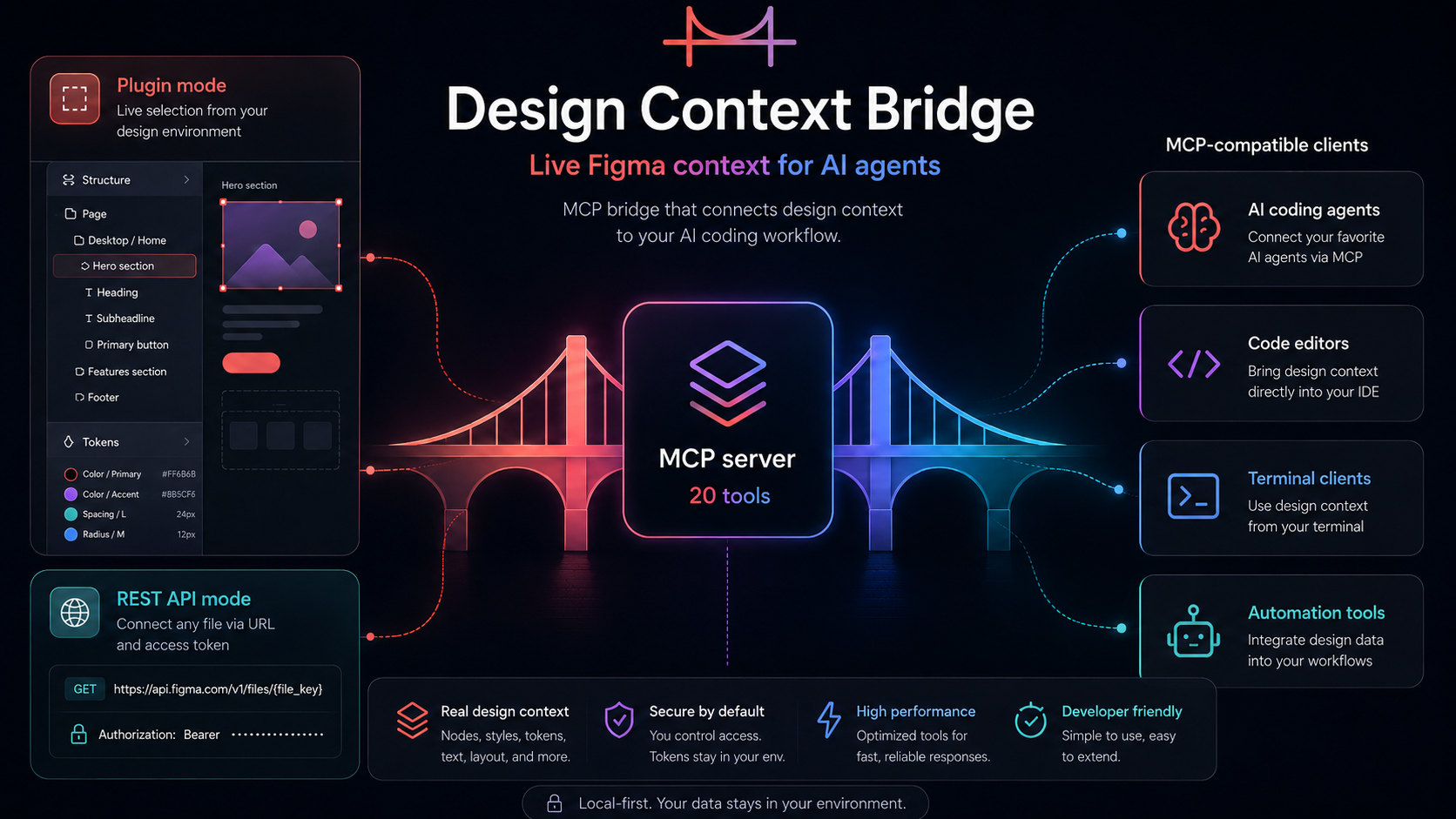
🔌 Plugin mode
A Figma plugin ("Frontend Handoff Snapshot") runs inside Figma desktop. Select any layer and instantly see its colors, typography, and spacing in the plugin panel — no token or server needed for inspection. When you're ready, press Export to send the full selection context to the local bridge for your AI coding tool.
The plugin only talks to
localhostand never modifies your file. It is not Figma's official MCP integration (use_figma) and isn't a replacement for it — pairing it with the MCP server below is optional, for developers who want their AI coding tool to read that same exported context.
The plugin isn't on the Figma Community yet, so you install it manually from the manifest — it takes about a minute and works exactly the same.
🌐 REST API mode
Pass any figma.com URL and the server reads it through the Figma REST API with a personal access token. No plugin, no Figma desktop, no selection. Best for reviewing files you don't have open, CI, or headless use.
The design-system, structure, variant and asset-export tools run in REST mode — pass a URL and they read the whole file.
Quick start
npx design-context-bridge
Add it to your AI client, then ask in plain language:
"Extract the design system from this Figma: <url>"
"What routes would this app have?"
"What variants does this Button component have?"
"Export every icon in this file as SVG into ./assets"
"Build this landing page faithfully — components, tokens, hover states and all."
The AI calls the right tools, gets real data, and builds from it.
What it can do
| Capability | Tools | How you'd ask |
|---|---|---|
| Read the live selection | get_current_selection, get_selected_colors, get_selected_texts, get_selected_spacing, get_selected_interactions | "What colors are in my selection?" |
| Navigate any file | get_all_pages, get_current_page, get_frame_by_name, get_node_info, get_nodes_info, scan_nodes_by_types | "Find the Checkout frame and show its tree" |
| Derive a design system | extract_design_system, get_variables, get_component_definitions | "Give me the tokens: colors, type scale, spacing" |
| Plan the build | analyze_structure, get_component_variants | "What routes and components does this need?" |
| Export assets | find_assets, export_image | "Export all icons as SVG" |
| Start from a URL | get_file_from_url, get_node_from_url | "Read this Figma link" |
→ Full reference with every argument in docs/tools.md
How it works
Figma desktop              design-context-bridge            AI agent
──────────────    HTTP     ─────────────────   stdio   ──────────
  Plugin        ────────►  :3055 bridge     ◄────────  Claude Code
  (push/poll)              + MCP server                Cursor
                                                       OpenCode
              figma.com    ─────────────────           Windsurf
  Any file URL ────────►  REST API client              VS Code…
- The plugin pushes selection context and answers on-demand node requests in real time.
- The MCP server exposes 20 tools over stdio.
- The REST client reads any file from
api.figma.comwhenFIGMA_ACCESS_TOKENis set — and powers the analysis and asset tools.
Documentation
| Guide | What it covers |
|---|---|
| Plugin setup | Install the Figma plugin, verify the bridge, configure the port |
| REST API setup | Generate a Figma token, add it to your client config |
| Client configuration | Claude Code · Claude Desktop · Cursor · OpenCode · Windsurf · VS Code |
| Tools reference | All 20 tools — arguments, return values, and usage patterns |
Token handling
Your FIGMA_ACCESS_TOKEN is read only from the environment and sent only to api.figma.com in the X-Figma-Token header. It is never logged, cached, or written to disk by this server, and never included in tool responses. Treat it like a password: use a scoped Personal Access Token, never commit it, and revoke it if exposed. PATs are intended for local/single-user use — for a public, multi-user product, use Figma OAuth instead.
Security & privacy
- The local bridge listens on
127.0.0.1:3055only — never expose it to untrusted networks. - This tool runs entirely on your machine; its maintainers receive no data.
- Design data is relayed to the AI client you connect, which may forward it to its model provider.
- Only use it with Figma files you have permission to access.
See SECURITY.md and PRIVACY.md for details, and how to report a vulnerability.
Disclaimer
This project is independent and is not affiliated with, endorsed by, or sponsored by Figma. "Figma" is a trademark of Figma, Inc., used here only descriptively to indicate compatibility. See DISCLAIMER.md.
License
MIT © Cristina Fores Campos