Cookbook Directory
レシピの検索、作成、変更
ドキュメント
What Claude can do with your recipes
Once connected, Claude becomes a cooking assistant that actually knows your library.
Search your recipes
Ask Claude to find recipes by ingredient, technique, cuisine, or dietary need. It searches across your full private library in natural language.
Read recipe details
Claude can read any recipe in full — ingredients, method, notes, and pairings — so it can answer contextual questions while you cook.
Create new recipes
Describe what you want and Claude will create a structured recipe in your library, ready to cook or refine.
Revise and adapt
Ask Claude to make a new revision of an existing recipe — converting units, adjusting servings, or adapting for dietary needs — while keeping the original intact.
Set up in three steps
Works directly on claude.ai — just an API token and the server URL. No extra software required.
1
Generate an API token
Go to Settings → API Tokens and create a new token. Copy it — you'll only see it once.
2
Add Cookbook Directory to Claude
Connect via claude.ai Settings → Integrations, or use the Claude Desktop config snippet below.
3
Start cooking with Claude
Open a new Claude conversation. Ask it to "find me a pasta recipe" or "create a recipe for butternut squash soup" and watch it pull from your library.
Setting up on claude.ai
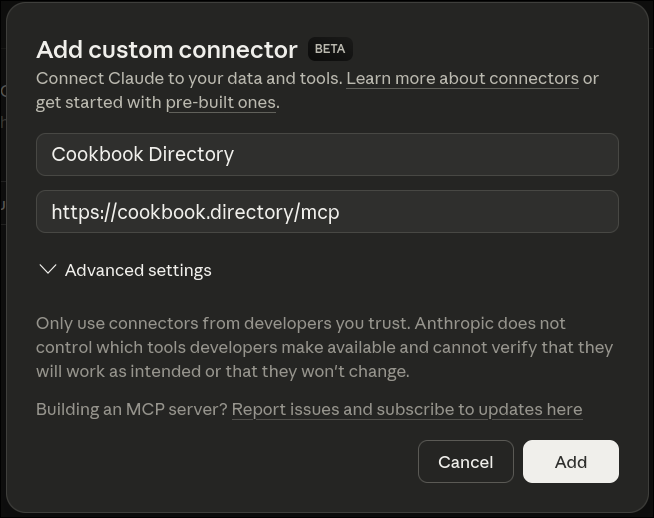
Add Cookbook Directory as an integration directly from your Claude settings — no software to install.
- 1Go to claude.ai → Settings → Integrations
- 2Click Add integration and enter the server URL:
https://cookbook.directory/mcp - 3Enter your API token from Settings → API Tokens when prompted
Claude Desktop config
If you prefer Claude Desktop, add this to your claude_desktop_config.json. Replace YOUR_API_TOKEN with your token from Settings.
{
  "mcpServers": {
    "cookbook": {
      "command": "npx",
      "args": [
        "mcp-remote",
        "https://cookbook.directory/mcp",
        "--header",
        "Authorization:Bearer YOUR_API_TOKEN"
      ]
    }
  }
}
The config file is usually at ~/Library/Application Support/Claude/claude_desktop_config.json on macOS, or %APPDATA%\Claude\claude_desktop_config.json on Windows.
Your recipes, inside every Claude conversation
Stop copying and pasting recipes into chat windows. Connect once and Claude can search, read, and build on your entire library.