Chargebee
公式MCPサーバーは、AIエージェントをChargebeeプラットフォームに接続します。
Chargebee MCPで何ができますか?
- Chargebeeのドキュメントを検索 — API、機能、または請求の概念について質問し、公式ドキュメントから
chargebee_documentation_searchを介して回答を得ます。 - 統合コードの概要を生成 —
chargebee_code_plannerを使用して、Chargebee統合用の構造化されたコード計画とサンプルスニペットをリクエストします。 - リリースノートとFAQを確認 — 最新の製品アップデート、よくある質問、その他のナレッジベースコンテンツを取得します。
ドキュメント
Chargebee Model Context Protocol (MCP) サーバー


⚠️ 非推奨のお知らせ
このパッケージは非推奨となり、今後アップデートやサポートは提供されません。 強化された機能と改善された精度を提供する新しい KnowledgeBase MCP サーバーへの移行をお願いいたします。 詳細とアップグレードはこちら: Chargebee MCP Server ドキュメント
Model Context Protocol (MCP) は、大規模言語モデル (LLM) と外部システム間のコンテキストを管理するために設計された標準化プロトコルです。
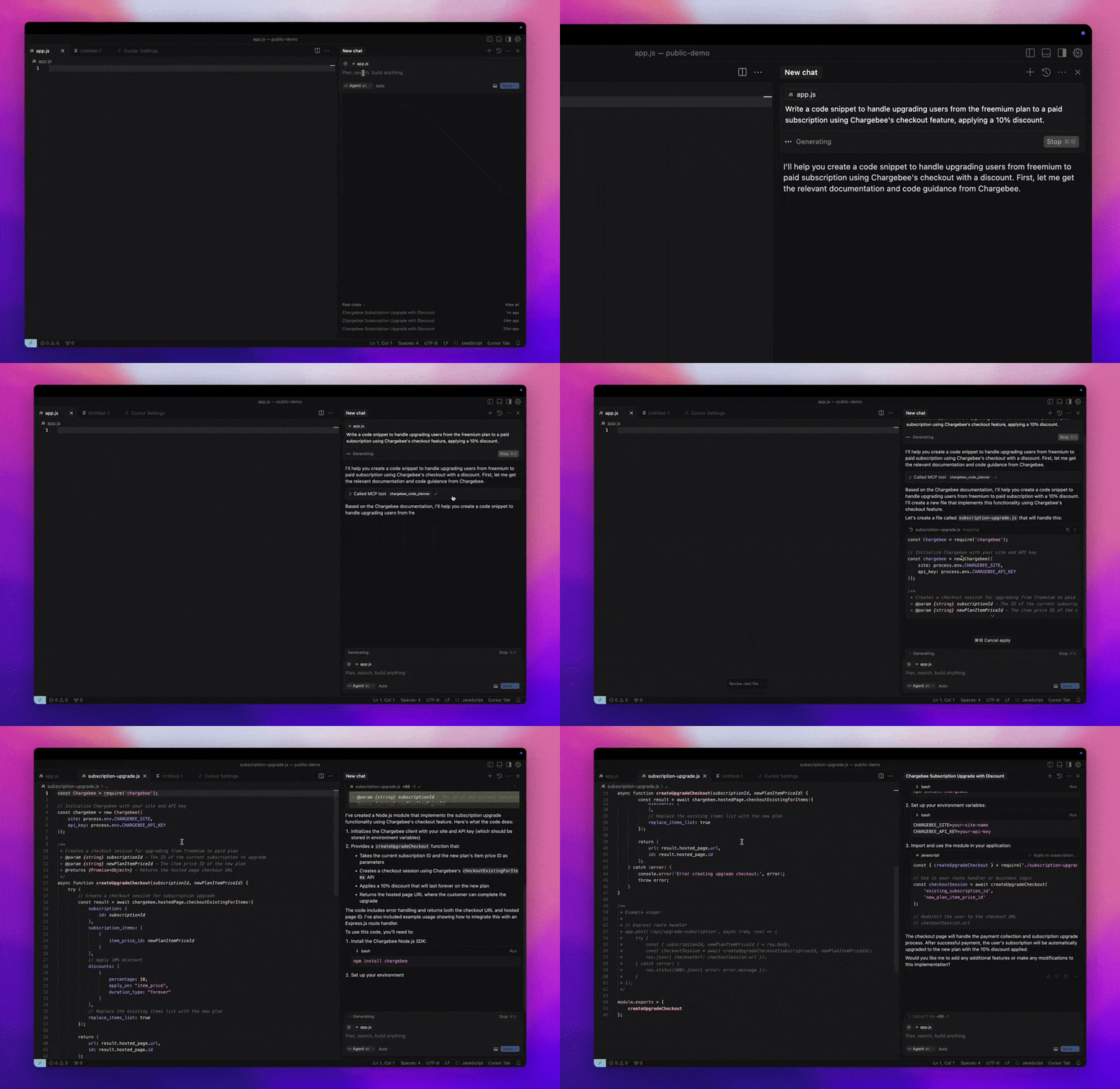
Chargebee MCP Server は、開発者の効率を向上させるための堅牢なツールセットを提供します。Cursor、Windsurf、Cline などの AI 搭載コードエディターや、Claude Desktop などの汎用ツールと統合します。あらゆる MCP クライアントと互換性があります。
この MCP サーバーを使用すると、次のことが可能になります:
-
Chargebee 製品や API サービスに関する質問に即座に回答を得る。
-
統合ニーズに合わせたコンテキスト対応のコードスニペットを受け取る。
-
以下を含む Chargebee のナレッジベースにアクセスする:
- ドキュメント
- FAQ
- リリースノート
- その他多数
前提条件
- Node.js LTS - Chargebee MCP サーバーが正しく機能するには、Node.js LTS バージョンが必要です。
セットアップ
Node.js npx を使用して Chargebee MCP サーバーを実行するには、次のコマンドを実行します:
npx -y @chargebee/mcp@latest
利用可能なツール
| ツール | 説明 |
|---|---|
chargebee_documentation_search | Chargebee のドキュメントを検索し、詳細情報や使用ガイドを取得します。 |
chargebee_code_planner | Chargebee の API や機能を統合するための構造化されたコードアウトラインとサンプルコードを生成します。 |
インストール
Cursor
このサーバーを Cursor IDE に追加するには:
Cursor Settings>MCPに移動します。+ Add new Global MCP Serverをクリックします。- グローバルな
.cursor/mcp.jsonファイルに次の設定を追加します:
{
  "mcpServers": {
    "chargebee": {
      "command": "npx",
      "args": [
          "-y",
          "@chargebee/mcp"
      ]
    }
  }
}
詳細については、Cursor ドキュメント を参照してください。注: プロジェクト固有の Cursor 設定 (Cursor 0.46 以降でサポート) に追加することもできます。
Windsurf
Cascade で MCP をセットアップするには:
- Windsurf を開き、
Settings>Advanced Settingsに移動するか、コマンドパレット >Open Windsurf Settings Pageを使用します。 - Cascade セクションまでスクロールして、新しいサーバーを追加したり、既存のサーバーを表示したり、
mcp_config.jsonにある生の JSON 設定ファイルにアクセスしたりします。 - “カスタムサーバーを追加 +” をクリックして、Chargebee MCP サーバーを
mcp_config.jsonに直接追加します:
{
  "mcpServers": {
    "chargebee": {
      "command": "npx",
      "args": [
          "-y",
          "@chargebee/mcp"
      ]
    }
  }
}
詳細については、Windsurf ドキュメント を参照してください。
VS Code
次のいずれかのボタンを使用して、VS Code に Chargebee MCP サーバーをインストールします:

または、VS Code CLI を使用して Chargebee MCP サーバーをインストールすることもできます:
# For VS Code
code --add-mcp '{"name":"chargebee","command":"npx","args":["-y","@chargebee/mcp"]}'
# For VS Code Insiders
code-insiders --add-mcp '{"name":"chargebee","command":"npx","args":["-y","@chargebee/mcp"]}'
インストール後、VS Code の GitHub Copilot エージェントで Chargebee MCP サーバーが使用可能になります。
Claude
claude_desktop_config.json ファイルに次の設定を追加します。詳細については、Claude Desktop ドキュメント を参照してください:
{
  "mcpServers": {
    "chargebee": {
      "command": "npx",
      "args": [
          "-y",
          "@chargebee/mcp"
      ]
    }
  }
}
Cline
Cline MCP サーバー設定から、次の JSON を cline_mcp_settings.json ファイルに手動で追加します:
{
  "mcpServers": {
    "chargebee": {
      "command": "npx",
      "args": [
          "-y",
          "@chargebee/mcp"
      ]
    }
  }
}
Roo Code
Roo Code 設定で Edit MCP Settings を選択するか、VS Code コマンドパレットで Roo Code: Open MCP Config コマンドを使用して、MCP 設定にアクセスします:
{
  "mcpServers": {
    "chargebee": {
      "command": "npx",
      "args": [
          "-y",
          "@chargebee/mcp"
      ]
    }
  }
}
貢献
このプロジェクトに貢献するには、貢献ガイド を参照してください。