MCP Google Map Server
Google Maps APIを統合し、
ドキュメント




Give your AI agent the ability to understand the physical world —
geocode, route, search, and reason about locations.
English | 繁體中文
- 18 tools — 14 atomic + 4 composite (explore-area, plan-route, compare-places, local-rank-tracker)
- 3 modes — stdio, StreamableHTTP, standalone exec CLI
- Agent Skill — built-in skill definition teaches AI how to chain geo tools (
skills/google-maps/)
vs Google Grounding Lite
| This project | Grounding Lite | |
|---|---|---|
| Tools | 18 | 3 |
| Geocoding | Yes | No |
| Step-by-step directions | Yes | No |
| Elevation | Yes | No |
| Distance matrix | Yes | No |
| Place details | Yes | No |
| Timezone | Yes | No |
| Weather | Yes | Yes |
| Air quality | Yes | No |
| Map images | Yes | No |
| Composite tools (explore, plan, compare) | Yes | No |
| Open source | MIT | No |
| Self-hosted | Yes | Google-managed only |
| Agent Skill | Yes | No |
Quick Start
# stdio (Claude Desktop, Cursor, etc.)
npx @cablate/mcp-google-map --stdio

# exec CLI — no server needed
npx @cablate/mcp-google-map exec geocode '{"address":"Tokyo Tower"}'

# HTTP server
npx @cablate/mcp-google-map --port 3000 --apikey "YOUR_API_KEY"
Special Thanks
Special thanks to @junyinnnn for helping add support for streamablehttp.
Available Tools
| Tool | Description |
|---|---|
maps_search_nearby | Find places near a location by type (restaurant, cafe, hotel, etc.). Supports filtering by radius, rating, and open status. |
maps_search_places | Free-text place search (e.g., "sushi restaurants in Tokyo"). Supports location bias, rating, open-now filters. |
maps_place_details | Get full details for a place by its place_id — reviews, phone, website, hours. Optional maxPhotos param returns photo URLs. |
maps_geocode | Convert an address or landmark name into GPS coordinates. |
maps_reverse_geocode | Convert GPS coordinates into a street address. |
maps_distance_matrix | Calculate travel distances and times between multiple origins and destinations. Driving mode supports avoid_tolls and avoid_highways. |
maps_directions | Get step-by-step navigation between two points with route details. Driving mode supports avoid_tolls and avoid_highways. |
maps_elevation | Get elevation (meters above sea level) for geographic coordinates. |
maps_timezone | Get timezone ID, name, UTC/DST offsets, and local time for coordinates. |
maps_weather | Get current weather conditions or forecast — temperature, humidity, wind, UV, precipitation. |
maps_air_quality | Get air quality index, pollutant concentrations, and health recommendations by demographic group. |
maps_static_map | Generate a map image with markers, paths, or routes — returned inline for the user to see directly. |
maps_batch_geocode | Geocode up to 50 addresses in one call — returns coordinates for each. |
maps_search_along_route | Search for places along a route between two points — ranked by minimal detour time. |
| Composite Tools | |
maps_explore_area | Explore what's around a location — searches multiple place types and gets details in one call. |
maps_plan_route | Plan an optimized multi-stop route — uses Routes API waypoint optimization (up to 25 stops) for efficient ordering. Driving mode supports avoid_tolls and avoid_highways. |
maps_compare_places | Compare places side-by-side — searches, gets details, and optionally calculates distances. |
maps_local_rank_tracker | Track a business's local search ranking across a geographic grid — like LocalFalcon. Supports up to 3 keywords for batch scanning. Returns rank at each point, top-3 competitors, and metrics (ARP, ATRP, SoLV). |
All tools are annotated with readOnlyHint: true and destructiveHint: false — MCP clients can auto-approve these without user confirmation.
Prerequisite: Enable Places API (New) and Routes API in Google Cloud Console before using place-related and routing tools.
Installation
Method 1: stdio (Recommended for most clients)
Works with Claude Desktop, Cursor, VS Code, and any MCP client that supports stdio:
{
  "mcpServers": {
    "google-maps": {
      "command": "npx",
      "args": ["-y", "@cablate/mcp-google-map", "--stdio"],
      "env": {
        "GOOGLE_MAPS_API_KEY": "YOUR_API_KEY"
      }
    }
  }
}
Reduce context usage — If you only need a subset of tools, set GOOGLE_MAPS_ENABLED_TOOLS to limit which tools are registered:
{
  "env": {
    "GOOGLE_MAPS_API_KEY": "YOUR_API_KEY",
    "GOOGLE_MAPS_ENABLED_TOOLS": "maps_geocode,maps_directions,maps_search_places"
  }
}
Omit or set to * for all 18 tools (default).
Method 2: HTTP Server
For multi-session deployments, per-request API key isolation, or remote access:
npx @cablate/mcp-google-map --port 3000 --apikey "YOUR_API_KEY"

# Bind to all interfaces for remote access (e.g. Docker, LAN)
npx @cablate/mcp-google-map --host 0.0.0.0 --port 3000 --apikey "YOUR_API_KEY"
Then configure your MCP client:
{
  "mcpServers": {
    "google-maps": {
      "type": "http",
      "url": "http://localhost:3000/mcp"
    }
  }
}
Server Information
- Transport: stdio (
--stdio) or Streamable HTTP (default) - Tools: 18 Google Maps tools (14 atomic + 4 composite) — filterable via
GOOGLE_MAPS_ENABLED_TOOLS
CLI Exec Mode (Agent Skill)
Use tools directly without running the MCP server:
npx @cablate/mcp-google-map exec geocode '{"address":"Tokyo Tower"}'
npx @cablate/mcp-google-map exec search-places '{"query":"ramen in Tokyo"}'
All 18 tools available: geocode, reverse-geocode, search-nearby, search-places, place-details, directions, distance-matrix, elevation, timezone, weather, air-quality, static-map, batch-geocode-tool, search-along-route, explore-area, plan-route, compare-places, local-rank-tracker. See skills/google-maps/ for the agent skill definition and full parameter docs.
Batch Geocode
Geocode hundreds of addresses from a file:
npx @cablate/mcp-google-map batch-geocode -i addresses.txt -o results.json
cat addresses.txt | npx @cablate/mcp-google-map batch-geocode -i -
Input: one address per line. Output: JSON with { total, succeeded, failed, results[] }. Default concurrency: 20 parallel requests.
API Key Configuration
API keys can be provided in three ways (priority order):
-
HTTP Headers (Highest priority)
{ "mcp-google-map": { "transport": "streamableHttp", "url": "http://localhost:3000/mcp", "headers": { "X-Google-Maps-API-Key": "YOUR_API_KEY" } } } -
Command Line
mcp-google-map --apikey YOUR_API_KEY -
Environment Variable (.env file or command line)
GOOGLE_MAPS_API_KEY=your_api_key_here
MCP_SERVER_PORT=3000
MCP_SERVER_HOST=0.0.0.0
Development
Local Development
# Clone the repository
git clone https://github.com/cablate/mcp-google-map.git
cd mcp-google-map

# Install dependencies
npm install

# Set up environment variables
cp .env.example .env
# Edit .env with your API key

# Build the project
npm run build

# Start the server
npm start

# Or run in development mode
npm run dev
Testing
# Run smoke tests (no API key required for basic tests)
npm test

# Run full E2E tests (requires GOOGLE_MAPS_API_KEY)
npm run test:e2e
Project Structure
src/
├── cli.ts                        # CLI entry point
├── config.ts                     # Tool registration and server config
├── index.ts                      # Package exports
├── core/
│   └── BaseMcpServer.ts          # MCP server with streamable HTTP transport
├── services/
│   ├── NewPlacesService.ts       # Google Places API (New) client
│   ├── PlacesSearcher.ts         # Service facade layer
│   ├── RoutesService.ts          # Google Routes API client (directions, distance matrix, waypoint optimization)
│   └── toolclass.ts              # Google Maps API client (geocoding, timezone, elevation, static map)
├── tools/
│   └── maps/
│       ├── searchNearby.ts       # maps_search_nearby tool
│       ├── searchPlaces.ts       # maps_search_places tool
│       ├── placeDetails.ts       # maps_place_details tool
│       ├── geocode.ts            # maps_geocode tool
│       ├── reverseGeocode.ts     # maps_reverse_geocode tool
│       ├── distanceMatrix.ts     # maps_distance_matrix tool
│       ├── directions.ts         # maps_directions tool
│       ├── elevation.ts          # maps_elevation tool
│       ├── timezone.ts           # maps_timezone tool
│       ├── weather.ts            # maps_weather tool
│       ├── airQuality.ts         # maps_air_quality tool
│       ├── staticMap.ts          # maps_static_map tool
│       ├── batchGeocode.ts       # maps_batch_geocode tool
│       ├── searchAlongRoute.ts   # maps_search_along_route tool
│       ├── exploreArea.ts        # maps_explore_area (composite)
│       ├── planRoute.ts          # maps_plan_route (composite)
│       ├── comparePlaces.ts      # maps_compare_places (composite)
│       └── localRankTracker.ts   # maps_local_rank_tracker (composite)
└── utils/
    ├── apiKeyManager.ts          # API key management
    └── requestContext.ts         # Per-request context (API key isolation)
tests/
└── smoke.test.ts                 # Smoke + E2E test suite
skills/
├── google-maps/                  # Agent Skill — how to USE the tools
│   ├── SKILL.md                  # Tool map, recipes, invocation
│   └── references/
│       ├── tools-api.md          # Tool parameters + scenario recipes
│       ├── travel-planning.md    # Travel planning methodology
│       └── local-seo.md          # Local SEO / Google Business Profile ranking analysis
└── project-docs/                 # Project Skill — how to DEVELOP/MAINTAIN
    ├── SKILL.md                  # Architecture overview + onboarding
    └── references/
        ├── architecture.md       # System design, code map, 9-file checklist
        ├── google-maps-api-guide.md  # API endpoints, pricing, gotchas
        ├── geo-domain-knowledge.md   # GIS fundamentals, Japan context
        └── decisions.md          # 10 ADRs (design decisions + rationale)
Tech Stack
- TypeScript - Type-safe development
- Node.js - Runtime environment
- @googlemaps/places - Google Places API (New) for place search and details
- Google Routes API - Directions, distance matrix, and waypoint optimization via REST
- @googlemaps/google-maps-services-js - Geocoding, timezone, elevation
- @modelcontextprotocol/sdk - MCP protocol implementation (v1.27+)
- Express.js - HTTP server framework
- Zod - Schema validation
Security
- API keys are handled server-side
- Per-session API key isolation for multi-tenant deployments
- DNS rebinding protection available for production
- Input validation using Zod schemas
For enterprise security reviews, see Security Assessment Clarifications — a 23-item checklist covering licensing, data protection, credential management, tool contamination, and AI agent execution environment verification.
To report a vulnerability, see SECURITY.md.
Roadmap
Recent Additions
| Tool / Feature | What it unlocks | Status |
|---|---|---|
maps_static_map | Map images with pins/routes — multimodal AI can "see" the map | Done |
maps_air_quality | AQI, pollutants — health-aware travel, outdoor planning | Done |
maps_batch_geocode | Geocode up to 50 addresses in one call — data enrichment | Done |
maps_search_along_route | Find places along a route ranked by detour time — trip planning | Done |
maps_explore_area | One-call neighborhood overview (composite) | Done |
maps_plan_route | Optimized multi-stop itinerary (composite) | Done |
maps_compare_places | Side-by-side place comparison (composite) | Done |
maps_local_rank_tracker | Geographic grid rank tracking — local SEO analysis (composite) | Done |
GOOGLE_MAPS_ENABLED_TOOLS | Filter tools to reduce context usage | Done |
Planned
| Feature | What it unlocks | Status |
|---|---|---|
maps_place_photo | Place photos for multimodal AI — "see" the restaurant ambiance | Planned |
| Language parameter | Multi-language responses (ISO 639-1) across all tools | Planned |
| MCP Prompt Templates | /travel-planner, /neighborhood-scout slash commands in Claude Desktop | Planned |
| Geo-Reasoning Benchmark | 10-scenario test suite measuring LLM geospatial reasoning accuracy | Research |
Use Cases We're Building Toward
These are the real-world scenarios driving our tool decisions:
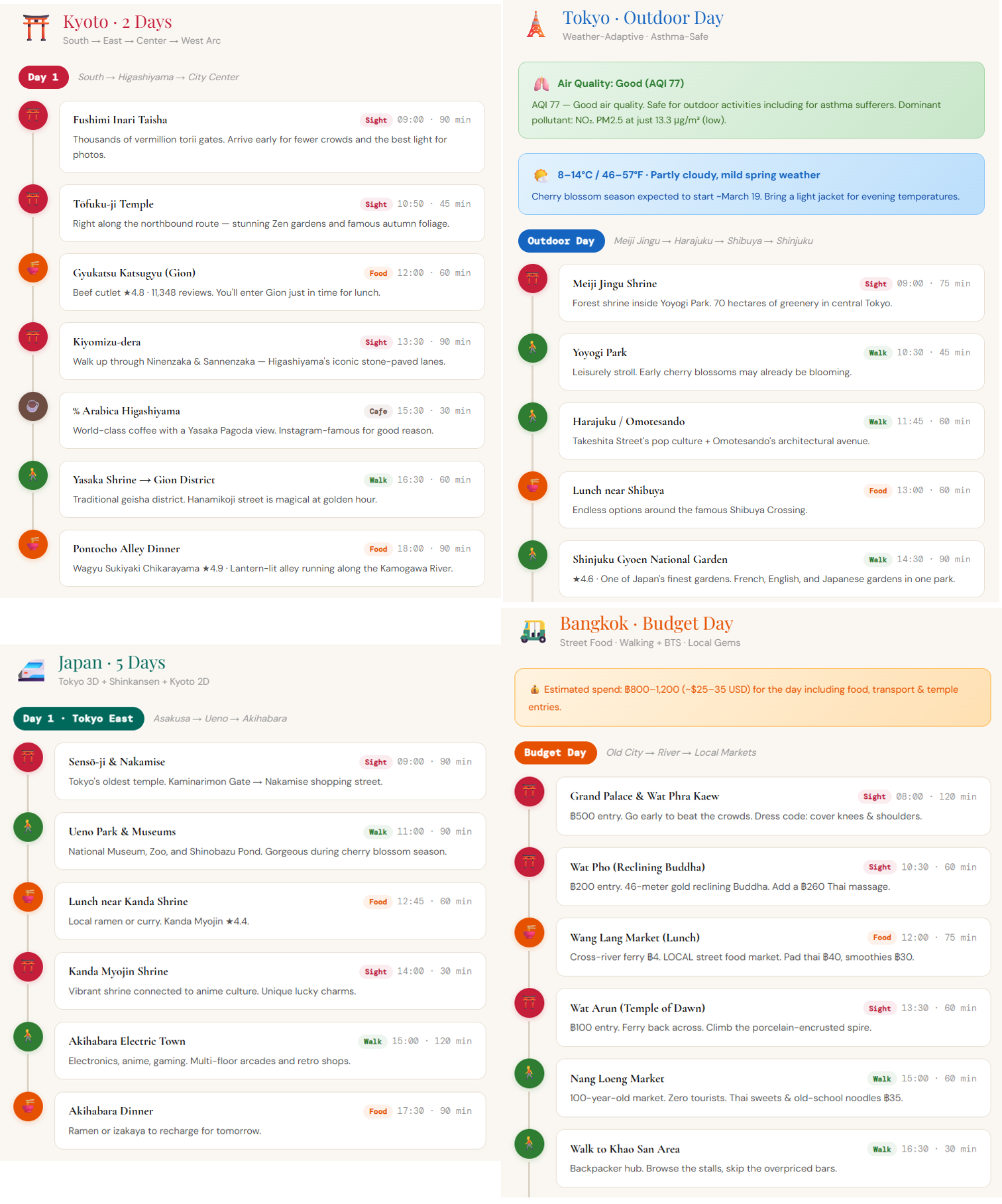
- Travel planning — "Plan a day trip in Tokyo" (geocode → search → directions → weather)
- Real estate analysis — "Analyze this neighborhood: schools, commute, flood risk" (search-nearby × N + elevation + distance-matrix)
- Logistics optimization — "Route these 12 deliveries efficiently from the warehouse" (plan-route)
- Field sales — "Visit 6 clients in Chicago, minimize drive time, find lunch spots" (plan-route + search-nearby)
- Disaster response — "Nearest open hospitals? Am I in a flood zone?" (search-nearby + elevation)
- Content creation — "Top 5 neighborhoods in Austin with restaurant density and airport distance" (explore-area + distance-matrix)
- Accessibility — "Wheelchair-accessible restaurants, avoid steep routes" (search-nearby + place-details + elevation)
- Local SEO — "Audit my restaurant's ranking vs competitors within 1km" (search-places + compare-places + explore-area)
Changelog
See CHANGELOG.md for version history.
License
MIT
Contributing
Community participation and contributions are welcome! Please read CONTRIBUTING.md for development setup, coding guidelines, and the pull request process.
- Submit Issues: Report bugs or provide suggestions
- Create Pull Requests: Submit code improvements
- Documentation: Help improve documentation
Contact
- Email: reahtuoo310109@gmail.com
- GitHub: CabLate