BlazeMeter MCP Server
AI駆動のBlazeMeterパフォーマンステストのためのMCPサーバー
ドキュメント

BlazeMeter MCP Server
The BlazeMeter MCP Server connects AI tools directly to BlazeMeter's cloud-based performance testing platform. This gives AI agents, assistants, and chatbots the ability to manage complete load testing workflows from creation to execution and reporting. All through natural language interactions.
[!NOTE]
For detailed documentation including use cases, available tools, integration points, and troubleshooting, see the BlazeMeter MCP Server documentation.
Prerequisites
- BlazeMeter API credentials (API Key ID and Secret)
- Comply Blazemeter AI Consent
- Compatible MCP host (VS Code, Claude Desktop, Cursor, Windsurf, etc.)
- Docker (only for Docker-based deployment)
- uv and Python 3.11+ (only for installation from source code distribution)
Setup
Get BlazeMeter API Credentials
Follow the BlazeMeter API Keys guide to obtain your API keys as JSON.
[!IMPORTANT]
When downloading your API keys from BlazeMeter, save theapi-keys.jsonfile in the same folder where you'll place the MCP binary.
Quick Setup with CLI Tool ⚡
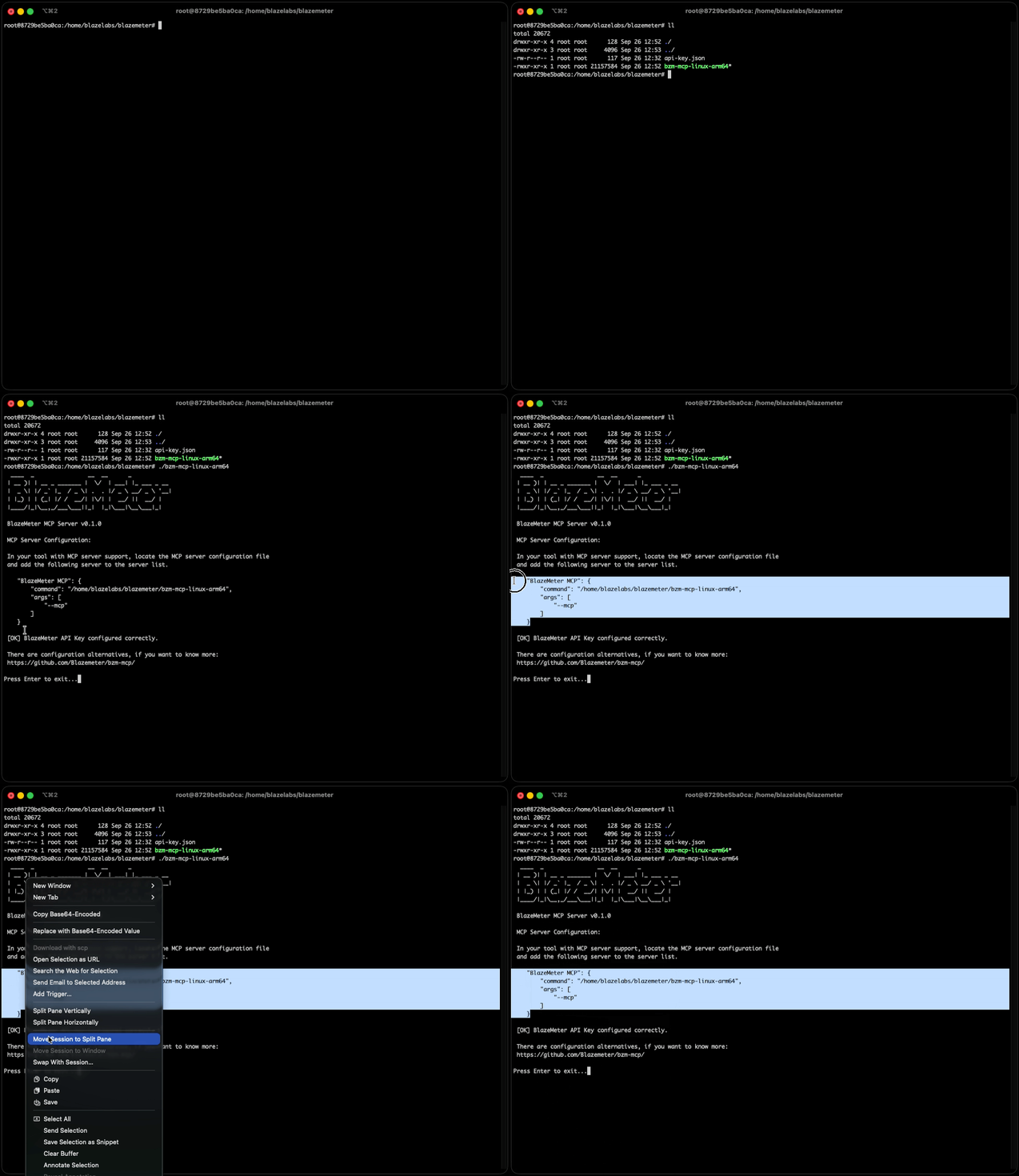
The easiest way to configure your MCP client is using our interactive CLI tool:
- Download the appropriate binary for your operating system from the Releases page
[!NOTE]
Choose the binary that matches your OS (Windows, macOS, Linux)
- Place the binary in the same folder as your
api-keys.jsonfile- Execute or Double-click the binary to launch the interactive configuration tool
- The tool automatically generates the JSON configuration file for you
[!IMPORTANT]
For macOS: You may encounter a security alert saying "Apple could not verify 'bzm-mcp-darwin' is free of malware." To resolve this:
- Go to System Settings → Privacy & Security → Security
- Look for the blocked application and click "Allow Anyway"
- Try running the binary again
Manual Client Configuration (Binary Installation)
- Download the binary for your operating system from the Releases page
- Run the binary once — it will print a JSON config and clickable links to add this MCP in Cursor or VS Code.
- Or configure your MCP client manually with the following settings:
{
  "mcpServers": {
    "BlazeMeter MCP": {
      "command": "/path/to/bzm-mcp-binary",
      "args": ["--mcp"],
      "env": {
        "BLAZEMETER_API_KEY": "/path/to/your/api-key.json"
      }
    }
  }
}
Manual Client Configuration (From Remote Source Code)
- Prerequisites: uv and Python 3.11+
- One-click install or configure your MCP client manually:


After installing, set BLAZEMETER_API_KEY to your api-key.json path in your client's MCP settings.
Or configure manually with the following settings:
{
  "mcpServers": {
    "BlazeMeter MCP": {
      "command": "uvx",
      "args": [
        "--from", "git+https://github.com/Blazemeter/bzm-mcp.git@v1.3.1",
        "-q", "bzm-mcp", "--mcp"
      ],
      "env": {
        "BLAZEMETER_API_KEY": "/path/to/your/api-key.json"
      }
    }
  }
}
[!NOTE]
uvx installs and runs the package and its dependencies in a temporary environment.
You can change to any version that has been released or any branch you want. Package support for uvx command is supported from version 1.0.1 onwards.
For more details on the uv/uvx arguments used, please refer to the official uv documentation.
Docker MCP Client Configuration
- Prerequisites: Docker


After installing, set API_KEY_ID, API_KEY_SECRET, and optionally mount/working dir in your client's MCP settings.
{
  "mcpServers": {
    "Docker BlazeMeter MCP": {
      "command": "docker",
      "args": [
        "run",
        "--pull=always",
        "--rm",
        "-i",
        "--mount",
        "type=bind,source=/path/to/your/test/files,target=/home/bzm-mcp/working_directory/",
        "-e",
        "API_KEY_ID=your_api_key_id",
        "-e",
        "API_KEY_SECRET=your_api_key_secret",
        "-e",
        "SOURCE_WORKING_DIRECTORY=/path/to/your/test/files",
        "ghcr.io/blazemeter/bzm-mcp:latest"
      ]
    }
  }
}
[!IMPORTANT]
For Windows OS, paths must use backslashes (\) and be properly escaped as double backslashes (\\) in the JSON configuration.
E.g.:C:\\User\\Desktop\\mcp_test_folder
[!NOTE]
In order to obtain theAPI_KEY_IDandAPI_KEY_SECRETrefere to BlazeMeter API keys
Custom CA Certificates (Corporate Environments) for Docker
When you need this:
- Your organization uses self-signed certificates
- You're behind a corporate proxy with SSL inspection
- You have a custom Certificate Authority (CA)
- You encounter SSL certificate verification errors when running tests
Required Configuration:
When using custom CA certificate bundles, you must configure both:
- Certificate Volume Mount: Mount your custom CA certificate bundle into the container
- SSL_CERT_FILE Environment Variable: Explicitly set the
SSL_CERT_FILEenvironment variable to point to the certificate location inside the container
Example Configuration
{
  "mcpServers": {
    "Docker BlazeMeter MCP": {
      "command": "docker",
      "args": [
        "run",
        "--pull=always",
        "--rm",
        "-i",
        "--mount",
        "type=bind,source=/path/to/your/test/files,target=/home/bzm-mcp/working_directory/",
        "-v",
        "/path/to/your/ca-bundle.crt:/etc/ssl/certs/custom-ca-bundle.crt",
        "-e",
        "SSL_CERT_FILE=/etc/ssl/certs/custom-ca-bundle.crt",
        "-e",
        "API_KEY_ID=your_api_key_id",
        "-e",
        "API_KEY_SECRET=your_api_key_secret",
        "-e",
        "SOURCE_WORKING_DIRECTORY=/path/to/your/test/files",
        "ghcr.io/blazemeter/bzm-mcp:latest"
      ]
    }
  }
}
Replace:
/path/to/your/ca-bundle.crtwith your host system's CA certificate file path- The container path
/etc/ssl/certs/custom-ca-bundle.crtcan be any path you prefer (just ensure it matchesSSL_CERT_FILE)
The
SSL_CERT_FILEenvironment variable must be set to point to your custom CA certificate bundle. Thehttpxlibrary automatically respects theSSL_CERT_FILEenvironment variable for SSL certificate verification.
OpenTelemetry
BlazeMeter MCP reports traces and metrics for MCP tool calls using OpenTelemetry. This gives you visibility into which tools are used, how long they take, and when errors occur.
Telemetry is enabled by default. You do not need to configure anything unless you want to change where data is sent or turn it off.
Default behavior
By default, telemetry is exported over gRPC to:
https://grpc.public.prd.shared.perforce.com
The service is identified as bzm-mcp with the current release version. If telemetry fails to start or export, the MCP server continues to work as usual.
Turn off telemetry
Add OTEL_SDK_DISABLED=true to your MCP client environment:
"env": {
  "OTEL_SDK_DISABLED": "true"
}
For Docker, pass it with -e:
"-e",
"OTEL_SDK_DISABLED=true"
You can also pass --no-telemetry on the command line (binary or uvx install):
"args": ["--mcp", "--no-telemetry"]
Send data to your own collector
Use these environment variables to point at a different OpenTelemetry collector (for example, a local one during development):
| Variable | Description | Default |
|---|---|---|
OTEL_EXPORTER_OTLP_ENDPOINT | OTLP collector URL | https://grpc.public.prd.shared.perforce.com |
OTEL_EXPORTER_OTLP_PROTOCOL | grpc, http/protobuf, or http/json | grpc |
OTEL_EXPORTER_OTLP_HEADERS | Comma-separated key=value headers for the collector | (none) |
gRPC example (typical local collector on port 4317):
"env": {
  "OTEL_EXPORTER_OTLP_ENDPOINT": "http://localhost:4317",
  "OTEL_EXPORTER_OTLP_PROTOCOL": "grpc"
}
HTTP example (typical local collector on port 4318):
"env": {
  "OTEL_EXPORTER_OTLP_ENDPOINT": "http://localhost:4318",
  "OTEL_EXPORTER_OTLP_PROTOCOL": "http/protobuf"
}
When running the binary directly, you can override the endpoint and headers with CLI flags instead of environment variables:
"args": [
  "--mcp",
  "--otel-endpoint", "http://localhost:4317",
  "--otel-headers", "Authorization=Bearer token"
]
What gets reported
Each MCP tool call creates:
- Traces — one span per call with the tool name, action, MCP client name and version, session ID, and error type when applicable.
- Metrics —
mcp.tool.calls(count) andmcp.tool.duration(seconds), broken down by tool and action.
Security tokens and other credentials are not included in telemetry data.
If your MCP client sends traceparent or tracestate in the request metadata, BlazeMeter MCP links its spans to that parent trace.
License
This project is licensed under the Apache License, Version 2.0. Please refer to LICENSE for the full terms.
Support
- MCP Server Documentation: BlazeMeter MCP Server Guide
- API Documentation: BlazeMeter API Documentation
- Issues: GitHub Issues
- Support: Contact BlazeMeter support for enterprise assistance