Armor Crypto MCP
公式複数のブロックチェーン、ステーキング、DeFi、スワップ、ブリッジ、ウォレット管理、DCA、指値注文、コイン検索、トラッキングなどと連携するMCP。
Armor Crypto MCPで何ができますか?
- Solanaウォレットの作成と管理 — ウォレット管理ツールを使用して、新しいウォレットを生成し、グループに整理し、未使用のウォレットをアーカイブします。
- トークンスワップの実行 — スワップツールを使用してSolana上で通常のスワップを実行します。
- 自動取引戦略の設定 — DCA注文、指値注文、スケジュール取引の設定、表示、キャンセルを行います。
- トークンのステーキングとアンステーキング — ステーキングツールを使用して資産をステーキングするか、ステーキングポジションを引き出します。
- トレンドトークンの発見 — トークンを検索し、Solana上のトレンドトークンデータを取得します。
- 統計分析の実行 — 統計計算ツールを適用して、正確なオンチェーンデータ分析を行います。
ドキュメント
Armor Crypto MCP
アルファテスト版 バージョン0.1.24
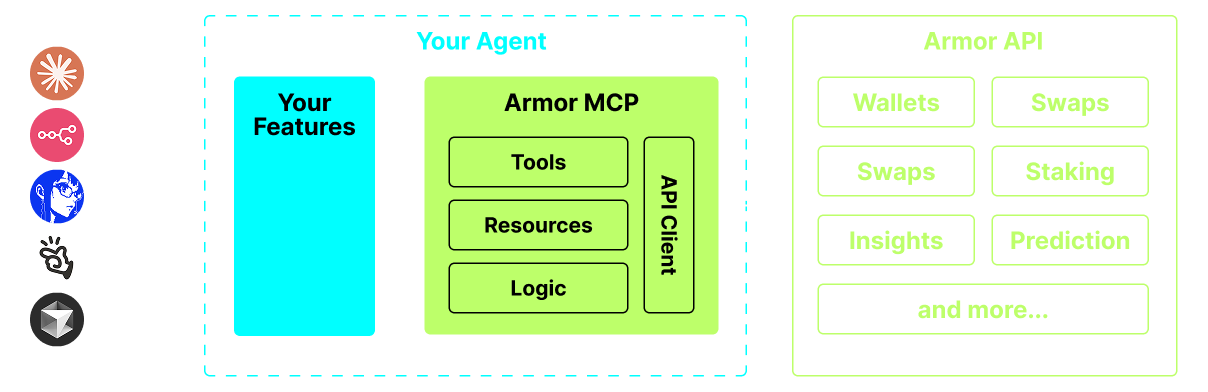
AIエージェントを暗号資産エコシステムに統合するための単一の情報源です。ウォレットの作成と管理、スワップ、送金、DCA(ドルコスト平均法)、ストップロス、テイクプロフィットなどのイベントベースの取引など、多岐にわたります。Armor MCPはアルファ版でSolanaをサポートしており、ベータ版ではEthereum、Base、Avalanche、Bitcoin、Sui、Berachain、megaETH、Optimism、Ton、BNB、Arbitrumなど、十数以上のブロックチェーンをサポートする予定です。ArmorのMCPを使用することで、統一されたロジックと完全なツールセットにより、暗号資産のすべてをAIエージェントに取り込むことができます。
機能
🧠 AIネイティブ
📙 ウォレット管理
🔃 スワップ
🌈 特殊取引(DCA、ストップロスなど)
⛓️ マルチチェーン
↔️ クロスチェーン取引
🥩 ステーキング
🤖 エージェントフレームワークへの迅速な統合
👫 ソーシャルセンチメント
🔮 予測
要件
1. Pythonがインストールされていることを確認してください
2. uv をインストールする
Linux / Windows
pip install uv
Mac
brew install uv
3. Claude DesktopまたはAIエージェントがMCPを実行します
詳細は使用方法と設定を参照してください。
アルファテスト
現在プレアルファ段階であり、Claude Desktop、Cline、Cursor、n8nなどのさまざまなエージェントやエージェントフレームワークの機能をテストしています。
現在の機能とツール
- ウォレット管理
- グループ化と整理
- アーカイブ
- スワップと取引
- 通常のスワップ
- DCA(プレイス/リスト/キャンセル)
- スケジュール注文
- 指値注文(プレイス/リスト/キャンセル)
- ステーキングとアンステーキング
- トークン検索とトレンドトークン
- 正確な分析のための統計計算機
- Solanaブロックチェーンをサポート
近日公開
- より多くのブロックチェーンサポート
- ミンティング
- ツールとしてのArmorエージェント(またはA2A)
MCPセットアップ
現在、APIキーを取得するにはArmor NFTが必要です。 こちらから入手してください。
使用方法と設定
エージェントでArmor MCPを使用するには、以下の設定が必要です。<PUT-YOUR-KEY-HERE> をAPIキーに置き換えてください。
{
  "mcpServers": {
    "armor-crypto-mcp": {
      "command": "uvx",
      "args": ["armor-crypto-mcp@latest", "--version"],
      "env": {
        "ARMOR_API_KEY": "<PUT-YOUR-KEY-HERE>"
      }
    }
  }
}
Claude Desktopでの使用
- 開発者モードを有効にする必要があります
- ウィンドウ左上のClaude Desktopのファイルメニューを開きます。
- ファイル > 設定 に移動します。
- 開発者の下で、設定の編集をクリックします。
- 設定ファイルに、上記の
armor-wallet-mcpセクションを挿入します。 - プレースホルダーをAPIキーに置き換えてください。
- ファイルを保存し、Claude Desktopで新しいチャットを開始します。
Clineでの使用
- VSCodeの左パネルにあるClineタブの
MCP Serversボタンをクリックします。 - 左パネルの一番下までスクロールし、
Configure MCP Serversをクリックします。 - 設定ファイルに、上記の
armor-wallet-mcpセクションを挿入します。 - プレースホルダーをAPIキーに置き換えてください。
- ファイルを保存し、
MCP Serversタブの下にあるDoneをクリックして、Clineとのチャットを開始します。
n8nでの使用
- n8nアプリを開きます。
- 画面左下のユーザー名の横にある
...をクリックし、Settingsをクリックします。 - 左パネルで、
Community nodesをクリックし、次にInstall a Community Nodeボタンをクリックします。 npm Package Nameの検索フィールドに mcp と入力します。MCP Nodesをインストールします。- 任意のMCPノードを追加します(例:
List Tools)。 - MCPクライアントの
Parametersタブで、Select Credentialをクリックし、Create new credentialをクリックします。 Commandの下にuvxを入力します。Argumentsの下にarmor-crypto-mcpを入力します。Environmentsの下にARMOR_API_KEY=eyJhbGciOiJIUzI1NiIsIn...を入力し、=の後に完全なAPIキー値を貼り付けます。Parametersタブに戻り、そのノードのMCPOperationを選択できます。
Armor MCPの使用
Armor MCPをセットアップしたら、開始するために使用できるプロンプトをいくつか紹介します