Google Hotels API (Apify)
Hotel prices for any city and dates: price per night, stay total, rating, reviews, star class and amenities, plus room rates from every booking site (Booking.com, Expedia, Agoda, official site) with cancellation and breakfast terms. Nine currencies. Remote MCP endpoint through the Apify MCP server: https://mcp.apify.com/?tools=monkey.d.scraping/google-hotels-room-offers (Apify token required).
ホスト型 MCP サーバー
npx add-mcp 'https://mcp.apify.com/?tools=monkey.d.scraping/google-hotels-room-offers'Claude Code、Codex、Cursor などにインストールできます
ドキュメント
Google Hotels API — Hotel Prices, Room Rates & OTA Offers (monkey.d.scraping/google-hotels-room-offers) Actor
Google Hotels API and scraper: hotel prices by city with rating, reviews, star class and amenities, plus room rates from every booking site (Booking.com, Expedia, Agoda, official site) with cancellation and breakfast terms. Any currency, no API key.
- URL: https://apify.com/monkey.d.scraping/google-hotels-room-offers.md
- Developed by: Monkey D. Scraping (community)
- Categories: Travel, MCP servers
- Features: Limited permissions
- Stats: 2 total users, 1 monthly users, 100.0% runs succeeded, 0 bookmarks
- User rating: No ratings yet
Pricing
from $0.05 / 1,000 observed room offers
This Actor is paid per event. You are not charged for the Apify platform usage, but only a fixed price for specific events.
Learn more: https://docs.apify.com/actors/running/actors-in-store.md#pay-per-event
What's an Apify Actor?
An Actor is a serverless cloud program that runs on the Apify platform. It has two run modes. In Batch mode, an Actor accepts a well-defined JSON input, performs an action which can take anything from a few seconds to a few hours, and optionally produces a well-defined JSON output, datasets with results, or files in key-value store. In Standby mode, an Actor provides a web server which can be used as a website, API, or an MCP server.
Apify vocabulary and the platform model are defined once, in the agent quickstart at https://apify.com/agents.md.
How to integrate an Actor?
If asked about integration, you help developers integrate Actors into their projects. You adapt to their stack and deliver integrations that are safe, well-documented, and production-ready.
Do not guess an integration path. Every one of them is in the agent quickstart at https://apify.com/agents.md: the Apify MCP server, Agent Skills with the Apify CLI, the JavaScript and Python clients, the REST API, and the account-free path for an agent with no human to sign in. It also carries the rule on stating cost before the first paid run.
For examples already wired to this Actor's own input schema, see the API section below.
Each client library has reference documentation the quickstart does not restate: JavaScript/TypeScript (npm install apify-client) and Python (pip install apify-client).
README
Google Hotels API — Hotel Prices, Room Rates & OTA Offers
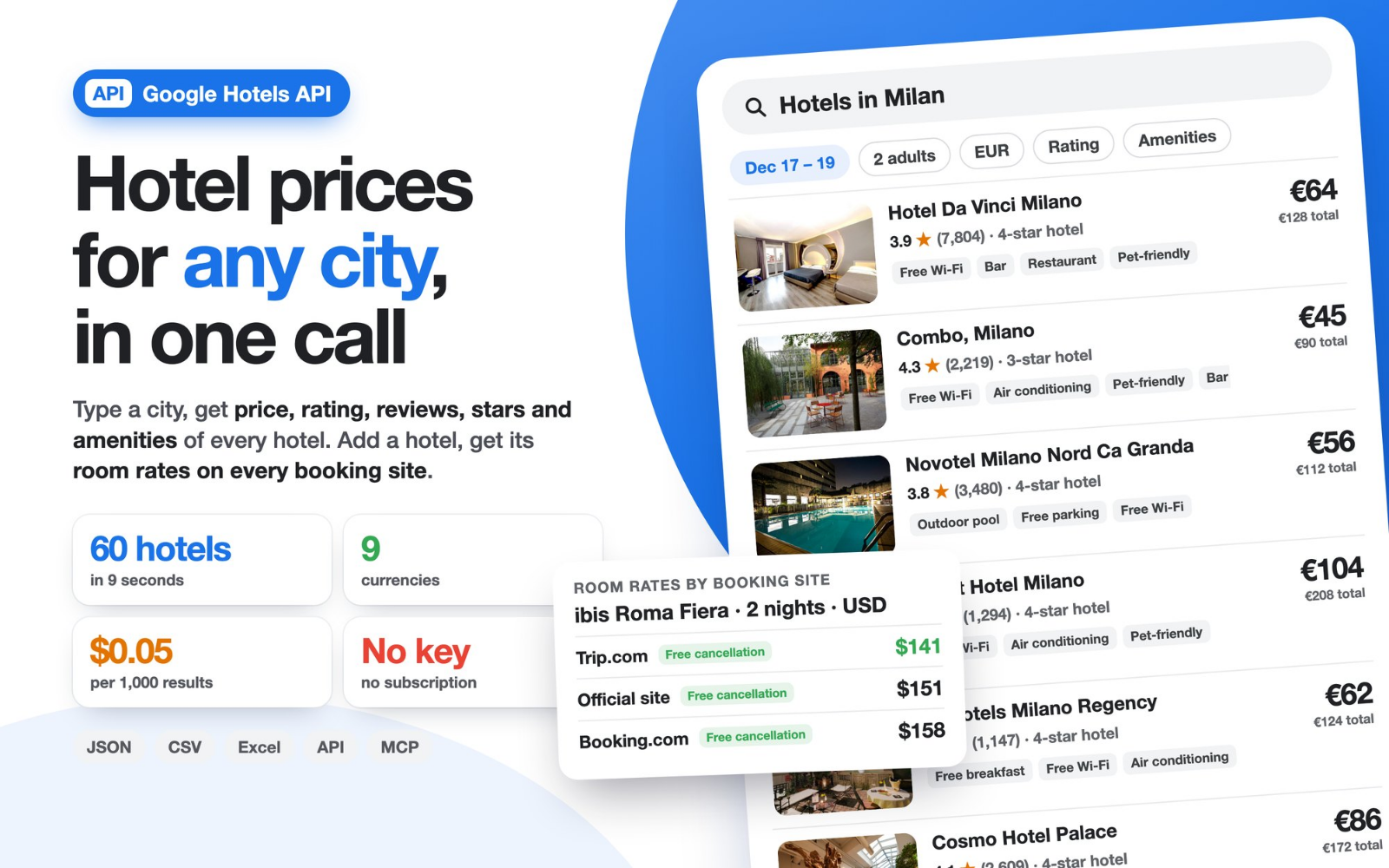
The Google Hotels API that is ready in seconds: no API key, no monthly plan, just results. Search any city and get hotel prices, ratings, reviews, star class and amenities; add a hotel and get room rates from every booking site (Booking.com, Expedia, Agoda, Trip.com, the hotel's official site and more) with cancellation and breakfast terms. Results come as JSON, CSV or Excel, through the Apify API or as an MCP tool for AI agents.
- ⚡ Fast: 60 hotels from three cities in about 9 seconds.
- 💸 Low cost: $0.05 per 1,000 results, pay only for what you get.
- 🌍 Global: any city, area or landmark, nine currencies.
- 🧩 Ready to use: clean fields for spreadsheets, dashboards, apps and AI agents.
Price: $0.003 per run + $0.05 per 1,000 results. A result is one hotel or one room offer, so a search for 20 hotels costs less than half a cent.
What can this Google Hotels scraper do?
| You want | Use | You get |
|---|---|---|
| Hotel prices in a city for your dates | destinations | Up to 20 hotels per search: nightly price, stay total, rating, review count, star class, amenities, Google Hotels link |
| Room rates of one hotel on every booking site | hotels | One row per room offer: booking site, room name, nightly price, stay total, free cancellation, cancellation deadline, breakfast |
| City search plus room rates in one run | destinations + includeRoomOffers | Hotels and their room offers together |
| Hotel price tracking between two dates | previousSnapshotStoreId | A list of price changes, also as CSV for Excel |
Prices are available in EUR, USD, GBP, CHF, JPY, CAD, AUD, CNY and INR.
Quick start
- Type one or more destinations, such as Milan, Paris 5-star hotels or hostels near Shibuya Tokyo.
- Pick check-in and check-out. If you leave both blank, the run uses a 2-night stay starting 30 days from today.
- Press Start and open the Hotels by destination table.
{
  "destinations": ["Milan", "Rome"],
  "checkIn": "2027-03-12",
  "checkOut": "2027-03-14",
  "adults": 2,
  "currency": "USD"
}
For room rates by booking site, name the hotels:
{
  "hotels": ["Hotel Berna Milano", "Hilton Berlin"],
  "checkIn": "2027-03-12",
  "checkOut": "2027-03-14",
  "currency": "EUR",
  "onlyFreeCancellation": true
}
Each destination search brings the top 20 hotels in Google Hotels order. Map a whole city by combining searches: areas (Milan Navigli), categories (Milan 4-star hotels, hostels in Milan) or landmarks (hotels near Duomo Milan). One run handles up to 20 searches and 10 named hotels.
Google Hotels API from your code
Call the Actor like any REST API and read the results as JSON.
curl -X POST "https://api.apify.com/v2/acts/monkey.d.scraping~google-hotels-room-offers/run-sync-get-dataset-items?token=YOUR_APIFY_TOKEN" \
  -H "Content-Type: application/json" \
  -d '{"destinations":["Lisbon"],"currency":"USD"}'
## pip install "apify-client>=3"
from apify_client import ApifyClient

client = ApifyClient("YOUR_APIFY_TOKEN")
run = client.actor("monkey.d.scraping/google-hotels-room-offers").call(
    run_input={"destinations": ["Lisbon"], "currency": "USD", "includeRoomOffers": True}
)
for item in client.dataset(run.default_dataset_id).iterate_items():
    print(item["recordType"], item["hotelName"], item.get("nightlyFromDisplayed") or item.get("stayTotalDisplayed"))
SerpApi or DataForSEO Google Hotels API alternative
Looking for a SerpApi or DataForSEO Google Hotels API alternative? Here you get the same kind of hotel data with simpler billing: no subscription and no key to request, you pay only for the hotels and room offers you receive. Room offers also carry the cancellation deadline and breakfast terms of each booking site, ready for rate comparison.
Google Hotels MCP server for AI agents
Give your AI agent live hotel prices: add the Actor to Claude, ChatGPT, Cursor or any MCP client through the Apify MCP server and ask in plain language:
- "Find hotels in Barcelona for 12–14 March under 150 euros with a rating above 4.3."
- "Compare the room rates of Hotel Berna Milano on Booking.com, Expedia and the official site, free cancellation only."
Output
One hotel from a destination search (recordType: "hotel"):
{
  "recordType": "hotel",
  "destination": "Milan",
  "rank": 2,
  "hotelName": "Hotel Da Vinci Milano",
  "hotelId": "ChgInu3Dz7bByqnYARoLL2cvMXRnNmpmNXQQAQ",
  "hotelUrl": "https://www.google.com/travel/hotels/entity/ChgInu3Dz7bByqnYARoLL2cvMXRnNmpmNXQQAQ",
  "checkIn": "2026-12-17",
  "checkOut": "2026-12-19",
  "nights": 2,
  "adults": 2,
  "currency": "EUR",
  "nightlyFromDisplayed": 64,
  "stayTotalFromDisplayed": 128,
  "rating": 3.9,
  "reviewCount": 7804,
  "ratingDistribution": {"5": 46, "4": 28, "3": 13, "2": 5, "1": 8},
  "hotelClass": 4,
  "amenities": ["Breakfast ($)", "Free Wi-Fi", "Parking ($)", "Air conditioning", "Pet-friendly", "Bar", "Restaurant", "Room service"]
}
One room offer (recordType: "offer"):
{
  "recordType": "offer",
  "hotelName": "ibis Roma Fiera",
  "provider": "Booking.com",
  "roomName": "Twin Room",
  "checkIn": "2026-12-17",
  "checkOut": "2026-12-19",
  "adults": 2,
  "currency": "USD",
  "nightlyDisplayed": 79,
  "stayTotalDisplayed": 158,
  "freeCancellation": true,
  "cancellationDeadlineDisplayed": "Dec 15",
  "breakfastIncluded": null
}
| Field | Meaning |
|---|---|
nightlyFromDisplayed, stayTotalFromDisplayed | Lowest nightly price and stay total with taxes and fees, as shown by Google Hotels for the stay |
rating, reviewCount, ratingDistribution | Guest rating out of 5, number of reviews, share of each star value in percent |
hotelClass, amenities | Star class and listed amenities |
hotelUrl, hotelId | Google Hotels link and ID; paste the link into hotels to get room offers |
provider, roomName | Booking site and room name of the offer |
nightlyDisplayed, stayTotalDisplayed | Nightly price and stay total of the offer |
freeCancellation, breakfastIncluded | true or false when the offer states it, otherwise null |
evidence, sourceUrl, observedAt | Offer text as displayed, source link and time of the reading (UTC) |
The run also saves a SUMMARY record with counts and status for every destination and hotel.
Hotel price tracking and rate shopping
Watch hotel prices move with two runs of the same stay:
- After a run, open Ready-to-use input for next comparison in the output.
- Copy it into the JSON tab of the next run and press Start.
- Open Observed changes or download Changes for Excel (CSV): one row per room offer whose price changed, with before and after.
Schedule it in Apify for a fresh reading every day and send the results to Google Sheets, Slack, Make or n8n. Revenue managers use it for rate shopping against their competitive set and for rate parity checks between booking sites and the official site.
Who uses Google Hotels data
- Hotels and revenue managers: daily rates of competitors for the same dates, parity between OTAs and the direct price.
- Travel agencies and tour operators: price lists by city and date for quotes.
- Travel apps and comparison sites: a hotel price feed without building a scraper.
- Analysts and investors: price levels by city, star class and season.
- AI agents: trip planning with live prices through MCP.
Pricing
$0.003 per run + $0.05 per 1,000 results. You pay only for hotels and room offers saved to your dataset; filtered-out offers and the summary are free. The Apify free plan covers thousands of results to try it.
| Run | Results | Cost |
|---|---|---|
| 1 city, 20 hotels | 20 | $0.004 |
| 20 searches, 400 hotels | 400 | $0.023 |
| 1 city with room offers for 20 hotels | about 500 | $0.028 |
Want a fixed budget? Set Maximum cost per run in the run options and the Actor delivers exactly as many results as it allows.
FAQ
Is there an official Google Hotels API? Google's hotel APIs are for accommodation partners publishing their own prices. To read the public prices of any hotel, this Actor gives you a Google Hotels API with JSON output in one call.
Do I need a Google account or an API key? No. An Apify account is all you need, and the free plan is enough to start.
Can I choose dates, guests and currency? Yes: check-in up to 330 days ahead, stays of 1 to 28 nights, 1 to 6 adults in one room, nine currencies.
Can I search by area, landmark or hotel type? Yes. Write the search as you would on Google Hotels: "hotels near Colosseum Rome", "Tokyo ryokan", "Lisbon hostels".
How do I get the booking site prices of each hotel? Turn on Also get room offers for every hotel found, or put hotel names or Google Hotels links in hotels.
Can I export to Excel or Google Sheets? Yes: CSV, Excel, JSON and XML from the dataset, or through the Google Sheets integration.
More tools for travel and pricing
- Airbnb Listing & Price Scraper: calendar and prices of short-term rentals.
- Google Shopping Price Tracker & Seller Monitor: product prices and sellers.
- Google Search Results Scraper: fast SERP API.
- Google News Scraper: headlines by keyword and country.
This is an independent tool and is not affiliated with Google.
谷歌酒店 Google Hotels 价格采集 & API
无需 API Key,输入城市即可获取 Google Hotels 酒店价格:每晚价格、总价、评分、评论数、星级和设施;输入酒店名称即可获取 各预订平台的房型报价(Booking.com、Expedia、Agoda、Trip.com、酒店官网等),含免费取消与早餐条款。
- 价格: 每次运行 $0.003 + 每 1,000 条结果 $0.05。
- 输入:
destinations填城市或搜索词(如 Tokyo、Paris 5-star hotels),hotels填酒店名称或 Google Hotels 链接,可选入住/退房日期、成人数和货币(支持 CNY、USD、EUR、JPY 等)。 - 输出: JSON、CSV、Excel,可通过 Apify API 或 MCP 供 AI 智能体调用。
- 价格监控: 同一行程运行两次,即可导出价格变动表(CSV)。
繁體中文:輸入城市即可取得 Google Hotels 飯店價格、評分與設施;輸入飯店名稱可取得各訂房網站的房型報價,支援九種貨幣,結果可匯出為 Excel 或 CSV。
Actor input Schema
destinations (type: array):
One search per line, such as Milan, Paris 5-star hotels or hostels near Shibuya Tokyo. Each search returns up to 20 hotels with price, rating, reviews, star class and amenities.
hotels (type: array):
Optional. One hotel name with city or a full https://www.google.com/travel/hotels/entity/... link per line, up to 10. Returns every room offer shown for the stay: booking site, room, nightly price, stay total, cancellation and breakfast.
checkIn (type: string):
YYYY-MM-DD. Leave both dates blank for check-in 30 days from the run date.
checkOut (type: string):
YYYY-MM-DD. With both dates blank, the stay lasts two nights.
adults (type: integer):
Adults sharing one room.
currency (type: string):
Currency of all returned prices.
maxHotelsPerDestination (type: integer):
How many hotels to return for each destination search, in Google Hotels order.
includeRoomOffers (type: boolean):
For each hotel found by a destination search, also return its room offers by booking site (Booking.com, Expedia, Agoda, official site and others).
onlyFreeCancellation (type: boolean):
Keep only room offers that state free cancellation.
onlyBreakfastIncluded (type: boolean):
Keep only room offers that state breakfast is included.
maxOffersPerHotel (type: integer):
Return up to this many room offers per hotel, cheapest stay total first.
previousSnapshotStoreId (type: string):
Select the storage of an earlier run to get a list of room-offer price changes. Use the same dates, adults, filters and offer limit.
previousSnapshot (type: object):
Alternative to selecting the previous storage: paste the exported SNAPSHOT JSON.
Actor input object example
{
  "destinations": [
    "Milan"
  ],
  "adults": 2,
  "currency": "EUR",
  "maxHotelsPerDestination": 20,
  "includeRoomOffers": false,
  "onlyFreeCancellation": false,
  "onlyBreakfastIncluded": false,
  "maxOffersPerHotel": 100
}
Actor output Schema
offers (type: string):
One row per hotel (recordType hotel) or per room offer (recordType offer).
summary (type: string):
Counts and status for every destination and hotel.
changes (type: string):
Room-offer price changes against the earlier run you selected.
snapshot (type: string):
Export this JSON to compare a later run for the same dates and settings.
changesCsv (type: string):
One row per price change, with before and after prices.
nextComparisonInput (type: string):
Copy this JSON into the next run input JSON tab to track price changes.
API
You can run this Actor programmatically using our API. Below are code examples in JavaScript, Python, and CLI, as well as the OpenAPI specification and MCP server setup.
JavaScript example
import { ApifyClient } from 'apify-client';

// Initialize the ApifyClient with your Apify API token
// Replace the '<YOUR_API_TOKEN>' with your token
const client = new ApifyClient({
    token: '<YOUR_API_TOKEN>',
});

// Prepare Actor input
const input = {
    "destinations": [
        "Milan"
    ],
    "adults": 2,
    "currency": "EUR",
    "maxHotelsPerDestination": 20,
    "includeRoomOffers": false,
    "onlyFreeCancellation": false,
    "onlyBreakfastIncluded": false,
    "maxOffersPerHotel": 100
};

// Run the Actor and wait for it to finish
const run = await client.actor("monkey.d.scraping/google-hotels-room-offers").call(input);

// Fetch and print Actor results from the run's dataset (if any)
console.log('Results from dataset');
console.log(`💾 Check your data here: https://console.apify.com/storage/datasets/${run.defaultDatasetId}`);
const { items } = await client.dataset(run.defaultDatasetId).listItems();
items.forEach((item) => {
    console.dir(item);
});

// 📚 Want to learn more 📖? Go to → https://docs.apify.com/api/client/js/docs
Python example
from apify_client import ApifyClient

# Initialize the ApifyClient with your Apify API token
# Replace '<YOUR_API_TOKEN>' with your token.
client = ApifyClient("<YOUR_API_TOKEN>")

# Prepare the Actor input
run_input = {
    "destinations": ["Milan"],
    "adults": 2,
    "currency": "EUR",
    "maxHotelsPerDestination": 20,
    "includeRoomOffers": False,
    "onlyFreeCancellation": False,
    "onlyBreakfastIncluded": False,
    "maxOffersPerHotel": 100,
}

# Run the Actor and wait for it to finish
run = client.actor("monkey.d.scraping/google-hotels-room-offers").call(run_input=run_input)

# Fetch and print Actor results from the run's dataset (if there are any)
print(f"💾 Check your data here: https://console.apify.com/storage/datasets/{run.default_dataset_id}")
for item in client.dataset(run.default_dataset_id).iterate_items():
    print(item)

# 📚 Want to learn more 📖? Go to → https://docs.apify.com/api/client/python/docs/quick-start
CLI example
echo '{
  "destinations": [
    "Milan"
  ],
  "adults": 2,
  "currency": "EUR",
  "maxHotelsPerDestination": 20,
  "includeRoomOffers": false,
  "onlyFreeCancellation": false,
  "onlyBreakfastIncluded": false,
  "maxOffersPerHotel": 100
}' |
apify call monkey.d.scraping/google-hotels-room-offers --silent --output-dataset
MCP server setup
{
    "mcpServers": {
        "apify": {
            "type": "http",
            "url": "https://mcp.apify.com/?tools=fetch-actor-details,monkey.d.scraping/google-hotels-room-offers"
        }
    }
}
The hosted server signs you in with OAuth on first connect, so no API token belongs in this config. Clients without OAuth support can send an Authorization: Bearer <APIFY_API_TOKEN> header instead, using a token from API & Integrations in Apify Console (https://console.apify.com/settings/integrations).
OpenAPI specification
Download the OpenAPI definition: https://api.apify.com/v2/actors/nnnwbNnuUv9qUEA8S/builds/YIUQD3JsfVLYE8AED/openapi.json