Odoo
Odooを大規模言語モデル(LLM)と統合し、ビジネスプロセスの自動化を強化します。
ドキュメント
mcp-server-odoo
An extensible Model Context Protocol server that provides integration between Odoo and LLMs.
Beware: the project is in very early development. Expect rough edges. We welcome any feedback!
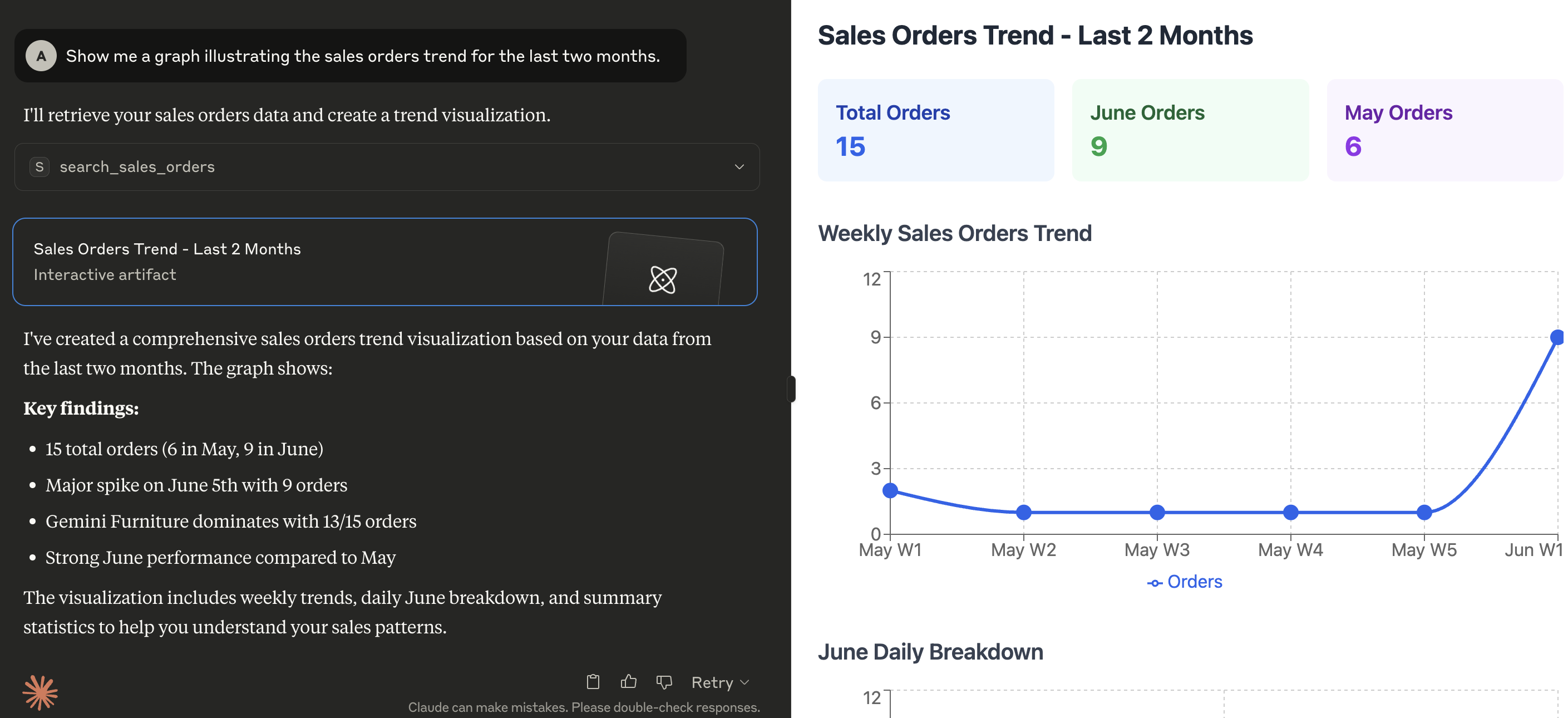
MCP server in action
Here's a demonstration of what kind of capabilities the MCP enables in Claude for Desktop:
Prerequisites
Configuration
The server looks for the following variables in the execution environment:
| Variable | Required | Description | Example |
|---|---|---|---|
ODOO_BASE_URL | Yes | The URL of the Odoo instance | http://localhost:8069 |
ODOO_DATABASE | Yes | The database name to connect to | mydatabase |
ODOO_USERNAME | Yes | Username for authentication | admin |
ODOO_PASSWORD | Yes | Password or API Key for authentication | admin |
ODOO_VERSION | Yes | Major version of your Odoo server | 18 |
LOG_LEVEL | No | Desided logging level (see Python logging levels), default is INFO | INFO |
TRANSPORT_PROTOCOL | Yes | The MCP transport protocol to use. Valid values are stdio for local-only communication or sse / streamable-http for remote communication | stdio |
HOST | No | The IP address(es) on which the server is to listen for connections from clients | 127.0.0.1 |
TOOLS_TO_REGISTER | Yes | Comma-separated list of tools to expose to the MCP client. Tools can be chosen from those included within this project (see directory src/mcp_server_odoo/tools), or custom ones provided by external files (see EXT_DIRECTORIES) | search_partners,search_quotations,search_sales_orders,search_customer_invoices |
EXT_DIRECTORIES | No | Comma-separated list of paths to search for additional tools that can be loaded at runtime | /your/custom/path |
Installation
Install the tool with uv tool:
uv tool install --from git+https://github.com/alberto-re/mcp-server-odoo mcp-server-odoo
Run the server
Execute it directly with uvx:
uvx mcp-server-odoo
Run within Docker
A Dockerfile is included if you wish to run the MCP server inside a Docker container.
To build the container execute this command from the root directory of the repository:
docker build -t mcp-server-odoo .
Now you can execute the container from the built image with:
docker run --rm --env-file /path/to/env/file -p 8000:8000 mcp-server-odoo
When running inside a container remember to use an HTTP based transport protocol (i.e. set TRANSPORT_PROTOCOL to sse or streamable-http)
and to make the server listen to all interfaces (i.e. set HOST to 0.0.0.0).
Integrations
Connecting to Claude Desktop
- Edit the Claude for Desktop configuration file.
- In MacOS the configuration is located at
~/Library/Application Support/Claude/claude_desktop_config.json. - In Windows the configuration is located at
%APPDATA%\Claude\claude_desktop_config.json
- Add the server configuration under the mcpServers section.
{
  "mcpServers": {
    "mcp-server-odoo": {
      "command": "uvx",
      "args": [
        "mcp-server-odoo"
      ],
      "env": {
        "ODOO_BASE_URL": "http://localhost:8069",
        "ODOO_DATABASE": "mydatabase",
        "ODOO_USERNAME": "admin",
        "ODOO_PASSWORD": "admin",
        "ODOO_VERSION": "18",
        "TRANSPORT_PROTOCOL": "stdio",
        "TOOLS_TO_REGISTER": "search_partners,search_quotations,search_sales_orders,search_customer_invoices"
      }
    }
  }
}
- Restart Claude for Desktop.
Connecting to mcphost
-
Edit the mcphost configuration file. See the documentation for where it looks for configuration files.
-
Add the server configuration under the mcpServers section.
{
  "mcpServers": {
    "mcp-server-odoo": {
      "command": "uvx",
      "args": [
        "mcp-server-odoo"
      ],
      "env": {
        "ODOO_BASE_URL": "http://localhost:8069",
        "ODOO_DATABASE": "mydatabase",
        "ODOO_USERNAME": "admin",
        "ODOO_PASSWORD": "admin",
        "ODOO_VERSION": "18",
        "TRANSPORT_PROTOCOL": "stdio",
        "TOOLS_TO_REGISTER": "search_partners,search_quotations,search_sales_orders,search_customer_invoices"
      }
    }
  }
}
- Execute the
mcphostcommand.