Minibridge
バックエンドからフロントエンドへのブリッジで、MCPサーバーをインターネットに安全に公開し、エージェント認証、コンテンツ分析、変換、テレメトリーをサポートします。
ドキュメント
Minibridge



Minibridge serves as a backend-to-frontend bridge, streamlining and securing communication between Agents and MCP servers. It safely exposes MCP servers to the internet and can optionally integrate with generic policing services — known as Policers — for agent authentication, content analysis, and transformation. Policers can be implemented remotely via HTTP or locally using OPA Rego policies.
Minibridge can help ensure the integrity of MCP servers through SBOM (Software Bill of Materials) generation and real-time validation.
Additionally, Minibridge supports OTEL and can report/rettach spans from classical OTEL headers, as well as directly from the MCP call, as inserted by certain tool like Open Inference.
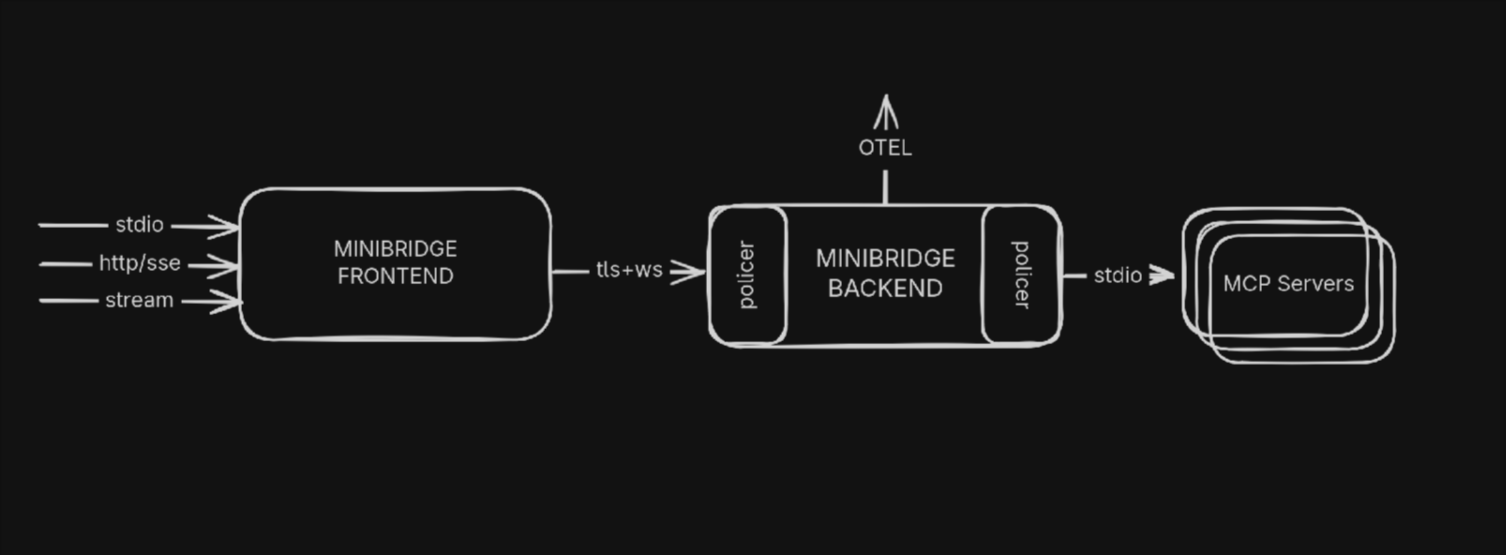
- Minibridge Frontend: The Client connects to the Frontend part of Minibridge.
- Minibridge Backend: The Frontend connects to the Backend which wraps the MCP server.
- Minibridge Policer: The Policer runs in the Backend and can optionally take decision on the input and output based on some policies (locally with Rego or remotely using HTTPs)
[!TIP] Conveniently, Minibridge can be started in an "all-in-one" (AIO) mode to act as a single process.
Why using Minibridge ?
Minibridge covers the following:
- Secure Transport: Use TLS with optionally, client certificate validation
- Integrity: Ensure the MCP server can not mutate tools, templates, etc. during the execution
- User Authentication: Transport the user information to the Policer
- Monitoring: Expose prometheus metrics
- Telemetry: Report traces and spans using Opentelemetry
Installation
Minibridge can be installed from various places:
Homebrew
On macOS, you can use Homebrew
brew tap acuvity/tap
brew install minibridge
AUR
On Arch based Linux distributions, you can run:
yay -S minibridge
Alternatively, to get the latest version from the main branch:
yay -S minibridge-git
Go
If you have the Go toolchain install:
go install go.acuvity.ai/minibridge@latest
Alternatively, to get the latest version from the main branch:
go install go.acuvity.ai/minibridge@main
Manually
You can easily grab a binary version for your platform from the release page.
Features comparisons
| 🚀 Feature | 🔹 MCP | 🔸 Minibridge | 📦 ARC (Acuvity Containers) |
|---|---|---|---|
| 🌐 Remote Access | ⚠️ | ✅ | ✅ |
| 🔒 TLS Support | ❌ | ✅ | ✅ |
| 📃 Tool integrity check | ❌ | ✅ | ✅ |
| 📊 Visualization and Tracing | ❌ | ✅ | ✅ |
| 🛡️ Isolation | ❌ | ⚠️ | ✅ |
| 🔐 Security Policy Management | ❌ | 👤 | ⚠️ |
| 🕵️ Secrets Redaction | ❌ | 👤 | ⚠️ |
| 🔑 Authorization Controls | ❌ | 👤 | 👤 |
| 🧑💻 PII Detection and Redaction | ❌ | 👤 | 👤 |
| 📌 Version Pinning | ❌ | ❌ | ✅ |
✅ Included | ⚠️ Partial/Basic Support | 👤 Custom User Implementation | ❌ Not Supported
Example: Configuring Minibridge in your MCP Client
Suppose your client configuration originally specifies an MCP server like this:
{
  "mcpServers": {
    "fetch": {
      "command": "uvx",
      "args": ["mcp-server-fetch"]
    }
  }
}
To route requests through Minibridge (enabling SBOM checks, policy enforcement, etc.), update the entry:
{
  "mcpServers": {
    "fetch": {
      "command": "minibridge",
      "args": ["aio", "--", "uvx", "mcp-server-fetch"]
    }
  }
}
minibridge aio: Invokes Minibridge in “all-in-one” mode, wrapping the downstream tool.uvx mcp-server-fetch: The original MCP server command, now executed inside Minibridge.
[!TIP] The location of the configuration files depends on your Client. For example, if you use Claude Desktop, configuration files are located:
- macOS:
~/Library/Application Support/Claude/claude_desktop_config.json- Windows:
%APPDATA%\Claude\claude_desktop_config.jsonSee the official MCP QuickStart for Claude Desktop Users documentation.
[!IMPORTANT] Your client must be able to resolve the path of the binary. If you see an error like
MCP fetch: spawn minibridge ENOENT, set thecommandparameter above to the full path of minibridge (which minibridgewill give you the full path).
Documentation
Check out the complete documentation from the wiki pages.
Contribute
We are excited to welcome contributions from everyone! 🎉 Whether you're fixing bugs, enhancing features, improving documentation, or proposing entirely new ideas, your involvement helps strengthen the project and benefits the entire community.
You do not need to sign a Contributor License Agreement (CLA) — just open a pull request and let's collaborate!