SQLAlchemy ODBC
SQLAlchemyを介してODBC準拠のデータベースに接続し、さまざまなDBMSバックエンドをサポートするMCPサーバー。
ドキュメント
MCP Server ODBC via SQLAlchemy
A lightweight MCP (Model Context Protocol) server for ODBC built with FastAPI, pyodbc, and SQLAlchemy. This server is compatible with Virtuoso DBMS and other DBMS backends that implement a SQLAlchemy provider.
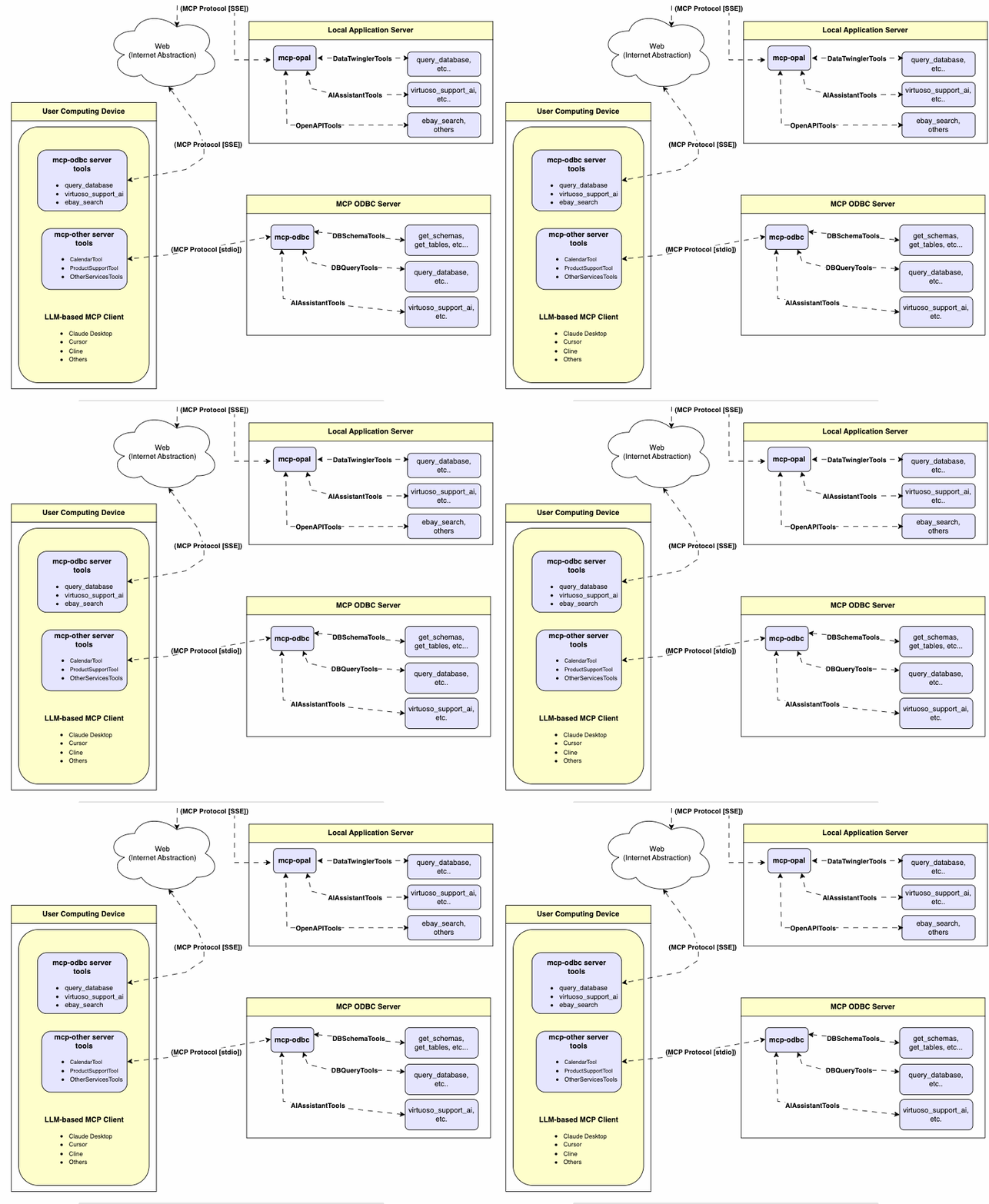
Features
- Get Schemas: Fetch and list all schema names from the connected database.
- Get Tables: Retrieve table information for specific schemas or all schemas.
- Describe Table: Generate a detailed description of table structures, including:
- Column names and data types
- Nullable attributes
- Primary and foreign keys
- Search Tables: Filter and retrieve tables based on name substrings.
- Execute Stored Procedures: In the case of Virtuoso, execute stored procedures and retrieve results.
- Execute Queries:
- JSONL result format: Optimized for structured responses.
- Markdown table format: Ideal for reporting and visualization.
Prerequisites
-
Install uv:
pip install uvOr use Homebrew:
brew install uv -
unixODBC Runtime Environment Checks:
-
Check installation configuration (i.e., location of key INI files) by running:
odbcinst -j -
List available data source names by running:
odbcinst -q -s -
ODBC DSN Setup: Configure your ODBC Data Source Name (
~/.odbc.ini) for the target database. Example for Virtuoso DBMS:[VOS] Description = OpenLink Virtuoso Driver = /path/to/virtodbcu_r.so Database = Demo Address = localhost:1111 WideAsUTF16 = Yes -
SQLAlchemy URL Binding: Use the format:
virtuoso+pyodbc://user:password@VOS
Installation
Clone this repository:
git clone https://github.com/OpenLinkSoftware/mcp-sqlalchemy-server.git
cd mcp-sqlalchemy-server
Environment Variables
Update your .envby overriding the defaults to match your preferences
ODBC_DSN=VOS
ODBC_USER=dba
ODBC_PASSWORD=dba
API_KEY=xxx
Configuration
For Claude Desktop users:
Add the following to claude_desktop_config.json:
{
  "mcpServers": {
    "my_database": {
      "command": "uv",
      "args": ["--directory", "/path/to/mcp-sqlalchemy-server", "run", "mcp-sqlalchemy-server"],
      "env": {
        "ODBC_DSN": "dsn_name",
        "ODBC_USER": "username",
        "ODBC_PASSWORD": "password",
        "API_KEY": "sk-xxx"
      }
    }
  }
}
Usage
Database Management System (DBMS) Connection URLs
Here are the pyodbc URL examples for connecting to DBMS systems that have been tested using this mcp-server.
| Database | URL Format |
|---|---|
| Virtuoso DBMS | virtuoso+pyodbc://user:password@ODBC_DSN |
| PostgreSQL | postgresql://user:password@localhost/dbname |
| MySQL | mysql+pymysql://user:password@localhost/dbname |
| SQLite | sqlite:///path/to/database.db |
| Once connected, you can interact with your WhatsApp contacts through Claude, leveraging Claude's AI capabilities in your WhatsApp conversations. |
Tools Provided
Overview
| name | description |
|---|---|
| podbc_get_schemas | List database schemas accessible to connected database management system (DBMS). |
| podbc_get_tables | List tables associated with a selected database schema. |
| podbc_describe_table | Provide the description of a table associated with a designated database schema. This includes information about column names, data types, nulls handling, autoincrement, primary key, and foreign keys |
| podbc_filter_table_names | List tables, based on a substring pattern from the q input field, associated with a selected database schema. |
| podbc_query_database | Execute a SQL query and return results in JSONL format. |
| podbc_execute_query | Execute a SQL query and return results in JSONL format. |
| podbc_execute_query_md | Execute a SQL query and return results in Markdown table format. |
| podbc_spasql_query | Execute a SPASQL query and return results. |
| podbc_sparql_query | Execute a SPARQL query and return results. |
| podbc_virtuoso_support_ai | Interact with the Virtuoso Support Assistant/Agent -- a Virtuoso-specific feature for interacting with LLMs |
Detailed Description
-
podbc_get_schemas
- Retrieve and return a list of all schema names from the connected database.
- Input parameters:
user(string, optional): Database username. Defaults to "demo".password(string, optional): Database password. Defaults to "demo".dsn(string, optional): ODBC data source name. Defaults to "Local Virtuoso".
- Returns a JSON string array of schema names.
-
podbc_get_tables
- Retrieve and return a list containing information about tables in a specified schema. If no schema is provided, uses the connection's default schema.
- Input parameters:
schema(string, optional): Database schema to filter tables. Defaults to connection default.user(string, optional): Database username. Defaults to "demo".password(string, optional): Database password. Defaults to "demo".dsn(string, optional): ODBC data source name. Defaults to "Local Virtuoso".
- Returns a JSON string containing table information (e.g., TABLE_CAT, TABLE_SCHEM, TABLE_NAME, TABLE_TYPE).
-
podbc_filter_table_names
- Filters and returns information about tables whose names contain a specific substring.
- Input parameters:
q(string, required): The substring to search for within table names.schema(string, optional): Database schema to filter tables. Defaults to connection default.user(string, optional): Database username. Defaults to "demo".password(string, optional): Database password. Defaults to "demo".dsn(string, optional): ODBC data source name. Defaults to "Local Virtuoso".
- Returns a JSON string containing information for matching tables.
-
podbc_describe_table
- Retrieve and return detailed information about the columns of a specific table.
- Input parameters:
schema(string, required): The database schema name containing the table.table(string, required): The name of the table to describe.user(string, optional): Database username. Defaults to "demo".password(string, optional): Database password. Defaults to "demo".dsn(string, optional): ODBC data source name. Defaults to "Local Virtuoso".
- Returns a JSON string describing the table's columns (e.g., COLUMN_NAME, TYPE_NAME, COLUMN_SIZE, IS_NULLABLE).
-
podbc_query_database
- Execute a standard SQL query and return the results in JSON format.
- Input parameters:
query(string, required): The SQL query string to execute.user(string, optional): Database username. Defaults to "demo".password(string, optional): Database password. Defaults to "demo".dsn(string, optional): ODBC data source name. Defaults to "Local Virtuoso".
- Returns query results as a JSON string.
-
podbc_query_database_md
- Execute a standard SQL query and return the results formatted as a Markdown table.
- Input parameters:
query(string, required): The SQL query string to execute.user(string, optional): Database username. Defaults to "demo".password(string, optional): Database password. Defaults to "demo".dsn(string, optional): ODBC data source name. Defaults to "Local Virtuoso".
- Returns query results as a Markdown table string.
-
podbc_query_database_jsonl
- Execute a standard SQL query and return the results in JSON Lines (JSONL) format (one JSON object per line).
- Input parameters:
query(string, required): The SQL query string to execute.user(string, optional): Database username. Defaults to "demo".password(string, optional): Database password. Defaults to "demo".dsn(string, optional): ODBC data source name. Defaults to "Local Virtuoso".
- Returns query results as a JSONL string.
-
podbc_spasql_query
- Execute a SPASQL (SQL/SPARQL hybrid) query return results. This is a Virtuoso-specific feature.
- Input parameters:
query(string, required): The SPASQL query string.max_rows(number, optional): Maximum number of rows to return. Defaults to 20.timeout(number, optional): Query timeout in milliseconds. Defaults to 30000.user(string, optional): Database username. Defaults to "demo".password(string, optional): Database password. Defaults to "demo".dsn(string, optional): ODBC data source name. Defaults to "Local Virtuoso".
- Returns the result from the underlying stored procedure call (e.g.,
Demo.demo.execute_spasql_query).
-
podbc_sparql_query
- Execute a SPARQL query and return results. This is a Virtuoso-specific feature.
- Input parameters:
query(string, required): The SPARQL query string.format(string, optional): Desired result format. Defaults to 'json'.timeout(number, optional): Query timeout in milliseconds. Defaults to 30000.user(string, optional): Database username. Defaults to "demo".password(string, optional): Database password. Defaults to "demo".dsn(string, optional): ODBC data source name. Defaults to "Local Virtuoso".
- Returns the result from the underlying function call (e.g.,
"UB".dba."sparqlQuery").
-
podbc_virtuoso_support_ai
- Utilizes a Virtuoso-specific AI Assistant function, passing a prompt and optional API key. This is a Virtuoso-specific feature.
- Input parameters:
prompt(string, required): The prompt text for the AI function.api_key(string, optional): API key for the AI service. Defaults to "none".user(string, optional): Database username. Defaults to "demo".password(string, optional): Database password. Defaults to "demo".dsn(string, optional): ODBC data source name. Defaults to "Local Virtuoso".
- Returns the result from the AI Support Assistant function call (e.g.,
DEMO.DBA.OAI_VIRTUOSO_SUPPORT_AI).
Troubleshooting
For easier troubleshooting:
-
Install the MCP Inspector:
npm install -g @modelcontextprotocol/inspector -
Start the inspector:
npx @modelcontextprotocol/inspector uv --directory /path/to/mcp-sqlalchemy-server run mcp-sqlalchemy-server
Access the provided URL to troubleshoot server interactions.