Digma
resmiSebuah MCP observabilitas kode yang memungkinkan analisis kode dinamis berdasarkan data OTEL/APM untuk membantu dalam peninjauan kode, identifikasi dan perbaikan masalah, serta menyoroti kode berisiko, dll.
Apa yang bisa Anda lakukan dengan Digma MCP?
- Tinjau cabang PR untuk masalah runtime — minta asisten memeriksa perubahan kode di cabang Anda terhadap masalah yang ditemukan dalam observabilitas pra-produksi.
- Munculkan masalah performa teratas — minta ketidakefisienan paling parah yang terdeteksi oleh analisis kode dinamis di seluruh aplikasi Anda.
- Kaji dampak perubahan suatu fungsi — identifikasi layanan dan kode lain yang terpengaruh berdasarkan data penggunaan runtime dari pelacakan terdistribusi.
- Periksa masalah baru di lingkungan tertentu — tanyakan apakah kode terbaru memperkenalkan masalah di lingkungan seperti Staging.
- Temukan kueri database berdampak tinggi — tanyakan kueri database mana yang memiliki efek terbesar pada performa aplikasi.
Dokumentasi
Server MCP Observabilitas Kode Digma
Implementasi server Model Context Protocol (MCP) yang memungkinkan agen mengakses wawasan observabilitas menggunakan Digma untuk observabilitas kode dan analisis kode dinamis
Fitur Utama 🚀
- 🗣️ Tinjauan kode berbantuan observabilitas: Periksa cabang PR untuk setiap masalah yang ditemukan oleh observabilitas pra-produksi.
- 🔎 Temukan inefisiensi kode dengan analisis kode dinamis: Identifikasi masalah dalam kode/kueri yang memperlambat aplikasi
- 🔭 Manfaatkan data penggunaan runtime kode dari pelacakan terdistribusi: Periksa perubahan yang merusak atau buat pengujian yang relevan
Contoh prompt 💬
help me review the code changes in this branch by looking at related runtime issuesI want to improve the performance of this app. What are the three most severe issues I can fix?I'm making changes to this function, based on runtime data. What other services and code would be affected?Are there any new issues in this code based on the Staging environment?Which database queries have the most impact on the application performance?
Lihat aksinya 📺
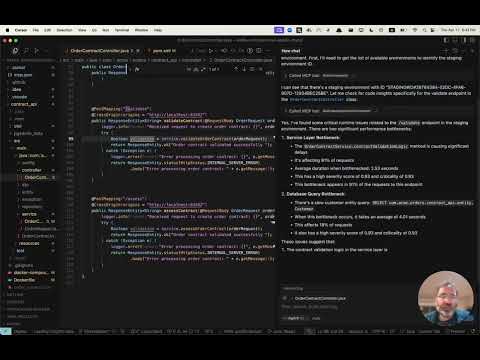
Dapatkan akses awal 👀
Digma memproses data observabilitas Anda untuk mengidentifikasi masalah, melacak kinerja kode, dan data runtime - untuk analisis kode dinamis. Kunjungi halaman MCP kami untuk mendaftar akses awal ke server MCP kami.
Instalasi ⚙️
Konfigurasikan Klien MCP Anda (Claude, Cursor, dll.) untuk menyertakan Digma MCP.
Deployment Digma mencakup server SSE MCP. Anda dapat mengonfigurasinya menggunakan URL-nya di klien Anda, atau menggunakan alat MCP seperti SuperGateway untuk menjalankannya sebagai alat perintah.
Jalur URL MCP terdiri dari Kunci API Digma sebagai berikut:
https://<DIGMA_API_URL>/mcp/<DIGMA_API_TOKEN>>/sse
Contoh XML MCP
Jika klien Anda mendukung server SSE, Anda dapat menggunakan sintaks berikut:
{
  "mcpServers": {
    "digma": {
    "url": "https://<DIGMA_API_URL>/mcp/DIGMA_API_TOKEN>/sse",

      }
    // ... other servers might be here ...
  }
}
Untuk menggunakan server MCP sebagai alat perintah, gunakan alat SuperGateway untuk menjembatani ke URL seperti yang terlihat di bawah ini:
{
  "digma": {
    "command": "npx",
    "args": [
      "-y",
      "supergateway",
      "--sse",
      "https://<DIGMA_API_URL>/mcp/DIGMA_API_TOKEN>/sse"
    ]
  }
}
Menggunakan aturan 👨💼
Agen bersifat otonom dan memilih kapan menggunakan data yang disediakan oleh Digma sesuai kebutuhan, namun, beberapa klien mengizinkan pengaturan aturan dan kebijakan untuk menetapkan proses yang lebih terstruktur.
Berikut adalah contoh file aturan yang dapat Anda tambahkan ke direktori .cursor/rules cursor Anda
# Digma Memory File - Code Review Instructions

## Runtime Analysis Settings
- Environment: TEST

## Code Review Protocol
1. For any code or branch review request:
   - Get the list of changed files and methods in the current branch using `git diff`
   - Check for ALL runtime issues in TEST environment (not just for the method in context)
   - Check if any runtime issue may be related to the changed code
   - Check the runtime usage of the changed methods (based on the `git diff`)
   - Check if any of the changed methods (based on the `git diff`) have a high risk based on their performance impact
   - Synthesize the data with standard code review analysis


## Note
This file is used by the AI assistant to maintain consistent review protocols across sessions.
Lisensi 📜
Lisensi MIT. Lihat file LICENSE.