ArtifactSmith
Open-source MCP server (MIT) that turns agent output into web pages, PDFs, Word docs and spreadsheets you can share and revoke. Works with any OpenAI-compatible model endpoint. Self-hosted with Docker.
दस्तावेज़
ArtifactSmith
ArtifactSmith is an open source artifact server for AI agents.
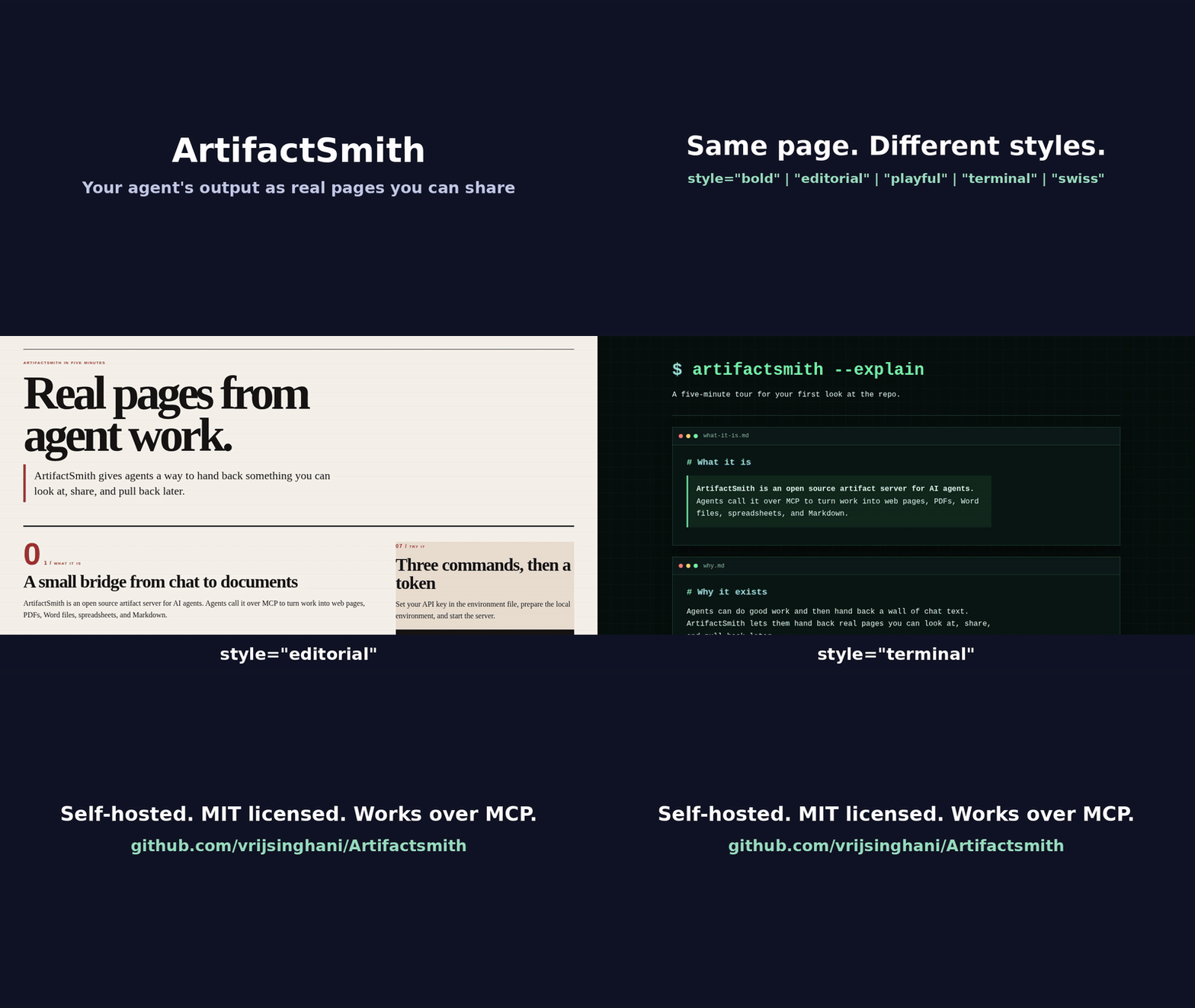
Agents call it to turn their work into documents: web pages, PDFs, Word files, spreadsheets and Markdown. Each artifact is versioned and stays private until someone shares it, and a shared link can be revoked at any time.
It's for people who run their own agents and want artifacts like the ones in Muse on their own servers.
Try it before you install: https://artifactsmith.neuralami.ai/try. I run a copy you can point your MCP client at (email for a token, capped at 20 builds, runs on my server).
Examples, no sign-up: comparison page · status page with a chart · PDF checklist
What it does
ArtifactSmith gives agents tools to create, edit, export (PDF, Word, Excel, Markdown), share, and revoke documents. It works with any OpenAI-compatible model endpoint. The idea comes from Meta's Muse artifacts.
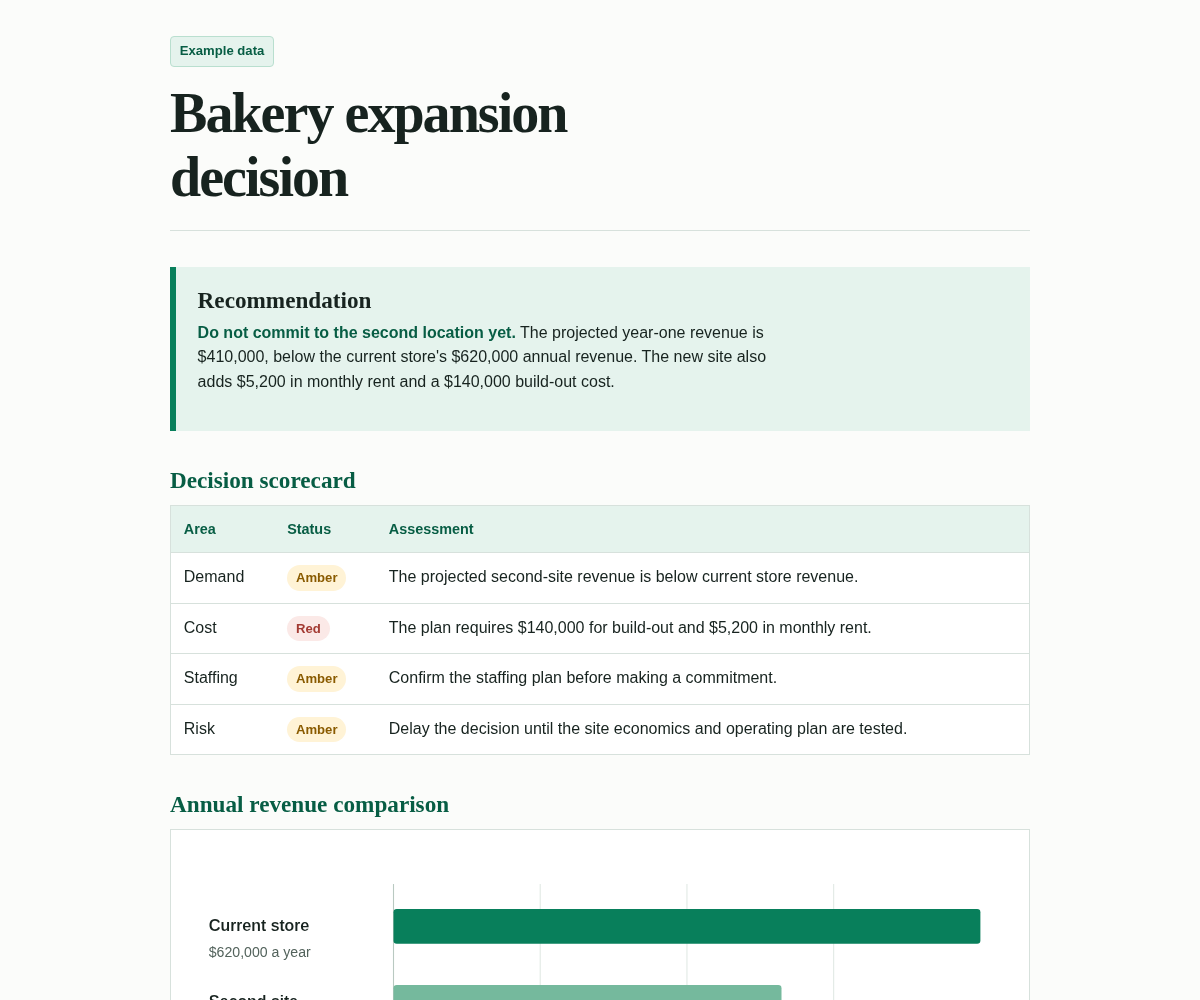
Requirements: Docker Engine with the Compose plugin. A model key (OpenAI-compatible API or local endpoint) is needed to build pages; publishing ready-made Markdown or HTML works without one.
Quickstart
cp .env.example .env
# Set OPENAI_API_KEY (or AM_LLM_KEY). Change AM_LLM_BASE / AM_DEFAULT_MODEL
# only if you are not using the default OpenAI host and model.
# Object-store keys: leave them empty and run ./scripts/ensure-local-env.sh,
# or paste your own AM_STORE_KEY and AM_STORE_SECRET.
./scripts/ensure-local-env.sh
docker compose up -d --build

# Create a token (prints the raw value once; only its hash is stored).
# --workspace is a label that scopes every artifact the token can see
# (e.g. alpha, team-a). Tokens cannot cross workspaces.
docker compose exec server artifactsmith token add --name agent --workspace alpha
publish stores a page you already wrote and does not call the model, so the next step works when the key is empty. Paste the token printed above, then run this. It prints a share URL.
export AM_TOKEN='paste-the-token'
docker compose exec -T -e AM_TOKEN server python - <<'PY'
import asyncio
import json
import os
from datetime import timedelta

from mcp import ClientSession
from mcp.client.streamable_http import streamablehttp_client

URL = "http://127.0.0.1:8780/mcp"
PAGE = """# Pilot store brief

The pilot store code is HARBOR-17. It is the identifier used on inventory, support, and rollout reports.
"""


def parse(result):
    if result.structuredContent is not None:
        return result.structuredContent
    return json.loads(result.content[0].text)


async def main():
    headers = {"Authorization": "Bearer " + os.environ["AM_TOKEN"]}
    async with streamablehttp_client(URL, headers=headers) as (read, write, _session):
        async with ClientSession(read, write) as session:
            await session.initialize()
            created = parse(
                await session.call_tool(
                    "publish",
                    {"display_name": "Pilot store brief", "markdown": PAGE},
                    read_timeout_seconds=timedelta(seconds=120),
                )
            )
            done = parse(
                await session.call_tool(
                    "status",
                    {"job_id": created["job_id"], "wait": 90},
                    read_timeout_seconds=timedelta(seconds=120),
                )
            )
            if done.get("status") != "done":
                raise SystemExit(json.dumps(done))
            shared = parse(
                await session.call_tool(
                    "share",
                    {"artifact_id": created["artifact_id"]},
                    read_timeout_seconds=timedelta(seconds=120),
                )
            )
            print(shared["url"])


asyncio.run(main())
PY
The server reads AM_LLM_BASE, AM_LLM_KEY or OPENAI_API_KEY, and AM_DEFAULT_MODEL from .env. The default base is https://api.openai.com. A trailing /v1 on the base is fine; the client appends /v1/chat/completions itself. create needs a key or a local OpenAI-compatible endpoint. With an empty key, a failed create reports that OPENAI_API_KEY / AM_LLM_KEY is empty. Run docker compose up -d again so the change takes effect.
Host ports bind to 127.0.0.1:
http://127.0.0.1:8780/mcpis the MCP API (bearer token required)http://127.0.0.1:8780/app/is My pages (paste the same token; the browser gets a session cookie)http://127.0.0.1:8781/is the cookieless preview and share origin (/p/…,/s/…)
Use the published image
ghcr.io/vrijsinghani/artifactsmith:0.1.0 is published for linux/amd64 on each release. Building from source (the Compose steps above) stays the default.
Connect a client
Claude.ai: Customize → Connectors → + Add → Add custom connector. Paste https://artifactsmith.neuralami.ai/mcp, select Connect, and sign in with your email. The connector then works in the Claude desktop and phone apps too. Free plans allow one custom connector. On Team and Enterprise plans an owner adds it first.
github.com/vrijsinghani/Artifactsmith is the copy you run yourself. Claude Desktop, Claude Code, and Cursor use a token there. The MCP endpoint on this machine is http://127.0.0.1:8780/mcp. Send the token from artifactsmith token add as Authorization: Bearer YOUR_TOKEN. The header value starts with Bearer .
ChatGPT Free, Go, and Plus cannot add a custom MCP server. Pro can add one with read and fetch access only, so it cannot build pages. A ChatGPT Business, Enterprise, or Edu admin can add it on the web; it signs in with OAuth.
Claude Desktop stores the config in claude_desktop_config.json (Settings → Developer → Edit Config). The snippet runs npx and mcp-remote, which needs Node.js. Restart Claude Desktop after saving.
{
  "mcpServers": {
    "artifactsmith": {
      "command": "npx",
      "args": ["-y", "mcp-remote", "http://127.0.0.1:8780/mcp", "--header", "Authorization:${AUTH_HEADER}"],
      "env": { "AUTH_HEADER": "Bearer YOUR_TOKEN" }
    }
  }
}
Claude Code stores .mcp.json, or run:
claude mcp add --transport http artifactsmith http://127.0.0.1:8780/mcp --header "Authorization: Bearer YOUR_TOKEN"
{
  "mcpServers": {
    "artifactsmith": {
      "type": "http",
      "url": "http://127.0.0.1:8780/mcp",
      "headers": { "Authorization": "Bearer YOUR_TOKEN" }
    }
  }
}
Cursor stores ~/.cursor/mcp.json, or .cursor/mcp.json in the project.
{
  "mcpServers": {
    "artifactsmith": {
      "url": "http://127.0.0.1:8780/mcp",
      "headers": { "Authorization": "Bearer YOUR_TOKEN" }
    }
  }
}
Example prompt: Create a one-page brief named Pilot store brief. Pass this as source_content: The pilot store code is HARBOR-17. It is the identifier used on inventory, support, and rollout reports.
artifactsmith stdio can list tools on stdin and stdout and does not listen. It cannot use the object store or the model, so it cannot build or publish a page.
Serving on your network or behind a proxy
Compose publishes API (8780) and preview/share (8781) on AM_BIND_ADDRESS (default 127.0.0.1). Cards and links use AM_API_URL, AM_PREVIEW_URL, and AM_SHARE_URL (empty AM_SHARE_URL falls back to AM_PREVIEW_URL). Exposing the ports without TLS puts bearer tokens and artifact content on the wire in cleartext.
LAN access
Bind on all interfaces (or a specific NIC IP) and point the public URL variables at the address clients will open:
# .env  (192.0.2.10 is documentation-range; substitute your LAN IP)
AM_BIND_ADDRESS=0.0.0.0
AM_API_URL=http://192.0.2.10:8780
AM_PREVIEW_URL=http://192.0.2.10:8781
AM_SHARE_URL=http://192.0.2.10:8781
AM_ALLOWED_HOSTS=192.0.2.10:8780,127.0.0.1:8780,localhost:8780
Then docker compose up -d --build. Clients open http://192.0.2.10:8780/mcp and preview/share links use 192.0.2.10, not 127.0.0.1. Browser-based MCP clients also need AM_ALLOWED_ORIGINS set to the page origin.
Share and preview URLs are built from AM_SHARE_URL / AM_PREVIEW_URL when the server returns them. Links you copied before switching to LAN serving still use the old base host; call share again (or copy the URL from inspect / status) after changing those settings.
Reverse proxy with TLS
Keep the host bind on loopback and terminate TLS on nginx or Caddy. Set the public URLs and allow-lists to the external hostname:
# .env
AM_BIND_ADDRESS=127.0.0.1
AM_API_URL=https://artifacts.example.com
AM_PREVIEW_URL=https://preview.artifacts.example.com
AM_SHARE_URL=https://preview.artifacts.example.com
AM_ALLOWED_HOSTS=artifacts.example.com
AM_ALLOWED_ORIGINS=https://artifacts.example.com
Minimal Caddy example (API on 443, preview on a second hostname):
artifacts.example.com {
  reverse_proxy 127.0.0.1:8780
}
preview.artifacts.example.com {
  reverse_proxy 127.0.0.1:8781
}
Minimal nginx snippet for the API host:
server {
  listen 443 ssl;
  server_name artifacts.example.com;
  # ssl_certificate / ssl_certificate_key omitted
  location / {
    proxy_pass http://127.0.0.1:8780;
    proxy_set_header Host $host;
    proxy_set_header Authorization $http_authorization;
    # status wait can be up to 90s; nginx defaults cut at 60s.
    proxy_read_timeout 120s;
    proxy_send_timeout 120s;
  }
}
When AM_ALLOWED_HOSTS lists only the public hostname, a local curl http://127.0.0.1:8780/mcp gets HTTP 421 (DNS-rebinding protection). Point clients at the proxied hostname instead. Browser-based MCP clients send an Origin header; set AM_ALLOWED_ORIGINS to that origin or the request is rejected.
MCP client on another machine
Point the client at {AM_API_URL}/mcp and send the token as Authorization: Bearer <token> (the value printed once by artifactsmith token add). The header value starts with Bearer . artifactsmith stdio can list tools on stdin and stdout and does not listen. It cannot use the object store or the model, so it cannot build or publish a page. Example:
URL:    http://192.0.2.10:8780/mcp
Header: Authorization: Bearer asmb_…
How it works
Agents talk to ArtifactSmith over MCP. They pass the user's request as verbatim_request and any research as source_content or source_files. create starts a private build and does not publish a share link. Want a styled page? Pass Markdown to publish and it is styled automatically (omit format when you pass markdown and no html; house style by default, applied when the page is opened). You can still pass format=markdown. Or call create with source_content. Raw HTML in publish is only for a page you designed yourself, and it is shown exactly as given.
The server calls an OpenAI-compatible endpoint (up to two attempts when checks fail). The model writes content. A fixed renderer turns that into HTML, Markdown, PDF, DOCX, or XLSX. publish skips the model and runs the same checks and renderer. Call status (or wait up to 90 seconds) to get a private preview.
share creates a public link for one exact version. unshare makes that link return 404. Tokens belong to one workspace and carry a permission set.
Documents may cite public http(s) sources as clickable links. The server strips scripts, rejects private-link hosts and likely secrets, and keeps images, CSS, fonts, and iframes self-contained so a download opens offline and does not phone home. Size limits apply. The process does not send usage data anywhere.
Output formats
| Format | create(..., format=) | Primary file | Renderer |
|---|---|---|---|
| HTML | html (default) | index.html | sanitize, then store |
| Markdown | markdown | document.md | UTF-8 text |
pdf | document.pdf | WeasyPrint (HTML/CSS to PDF) | |
| DOCX | docx | document.docx | python-docx |
| XLSX | xlsx | document.xlsx | openpyxl |
HTML uses a visual style (house by default) and stores a complete page. The other formats ask the model for Markdown, then a renderer converts it. publish accepts the finished HTML or Markdown and uses that same renderer. PDF, DOCX, and XLSX also store content.md so later edits have a text base.
PDF goes through WeasyPrint, which needs Pango and Cairo. The Docker image does not include Chromium. Details are in docs/formats.md.
Styles
create and edit take an optional style for HTML: house, bold, editorial, playful, terminal, or swiss. The default is AM_DEFAULT_STYLE (usually house). On markdown, PDF, DOCX, and XLSX the model prompt does not use that visual style. A published markdown page is still shown in the recorded style when it is opened. Omit style on edit to keep the last style.
create also takes mode: full (default, AM_BUILD_MODE) has the model write HTML. fast has the model write Markdown and the server render that style. fast is a first HTML build only. Edits and other formats stay on the full path. AM_FAST_STYLES (empty by default) lists styles whose omitted mode is fast; an explicit mode still wins. A complete HTML document in the source, or a request to publish that HTML as-is, stays on full when mode is omitted. Mentioning HTML beside "unchanged" does not.
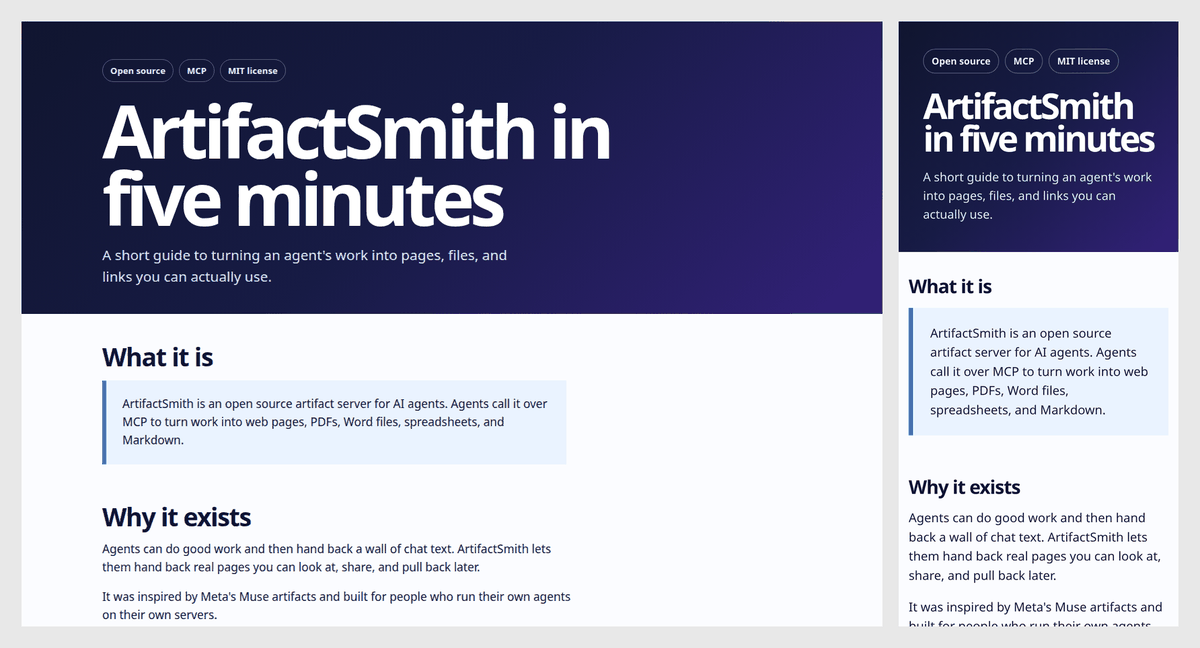
house: today's quiet page — white, one accent, boldness in one place.bold: dark navy-to-violet hero, huge white headline, saturated cards and chips.
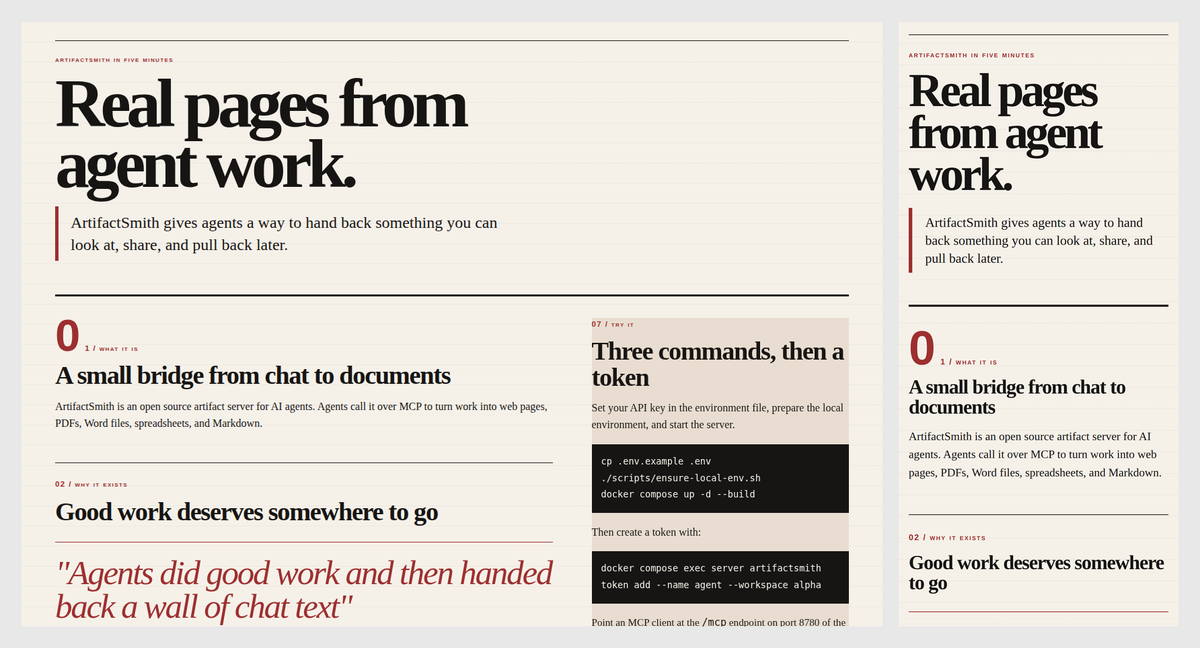
editorial: magazine feature — off-white paper, large serif headline, thin rules, one deep red accent.
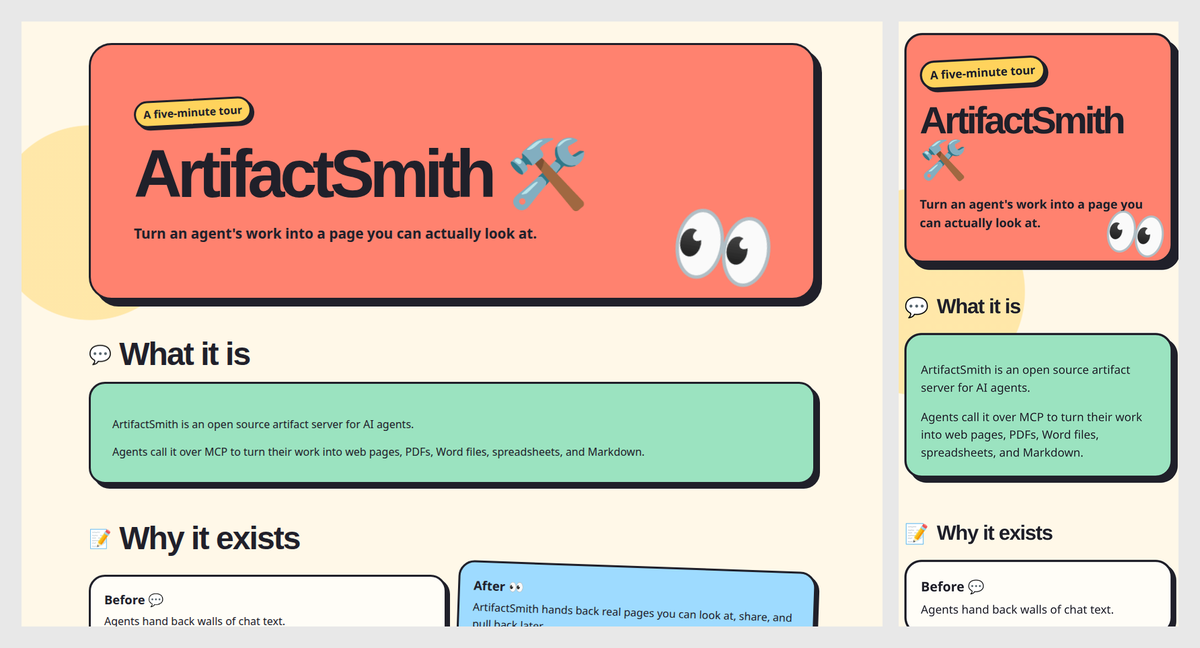
playful: cream page, candy-colored rounded cards, thick outlines and offset shadows.
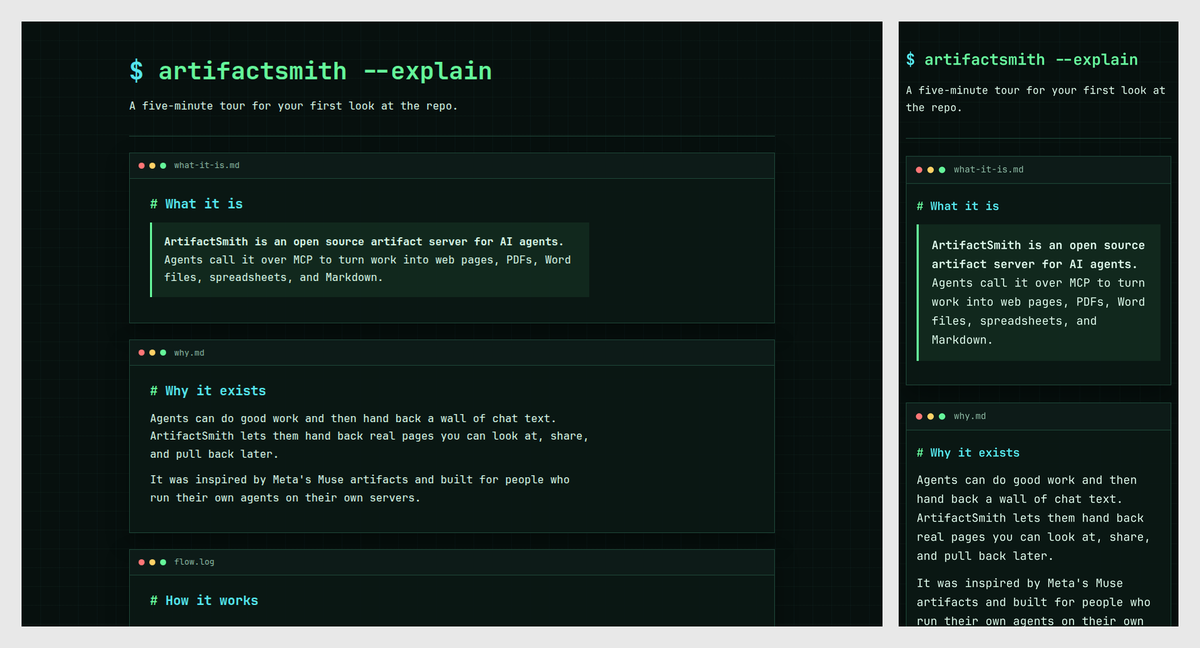
terminal: dark mode, monospace, neon green and cyan, sections as fake terminal windows.
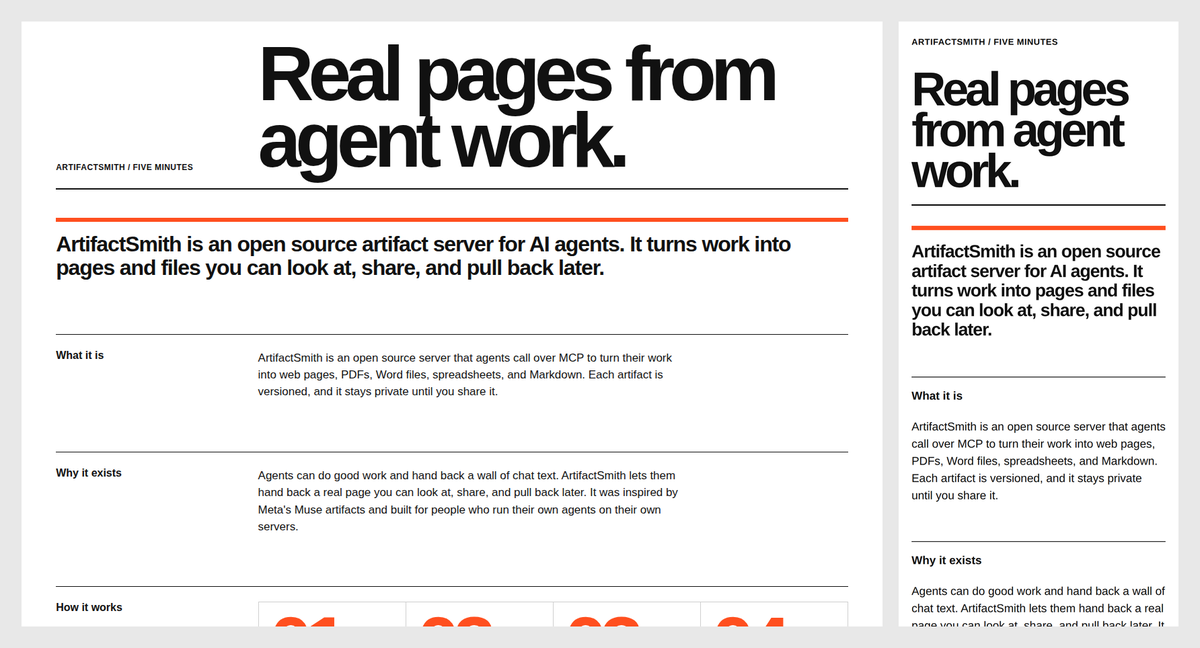
swiss: white grid, huge black grotesque type, signal-orange only on numbers and rules.
MCP tools
| Tool | Permission | What it does |
|---|---|---|
create | create | Queue a private build. Optional format, style, and mode. Does not create a share link. |
publish | publish | Store Markdown to get a styled page, or store HTML you designed yourself. No model call. |
edit | edit | New version from the latest done version. Refuses a stale base_version. |
status | read | Poll, or wait (0 to 90 seconds), until done, failed, or needs_input. |
list_artifacts | read | Catalog for the token's workspace. |
inspect | read | Manifest, history, share state. Optional include_content returns the stored text of that version, capped at the publish character limit. |
export | export | Download link for the rendered file, valid 15 minutes. |
share | share | Public link for one exact version. |
unshare | share | Revoke the public link immediately. |
revoke_previews | export | Expire private /p/ preview links for an artifact (optional version). |
delete | delete | Two-step purge. First call returns a confirm token. |
create arguments
Required:
verbatim_request: the user's exact words. That is the whole scope.
Provide at least one of display_name or slug (the other is filled in):
display_name: human title shown on cards and in the catalog. Not required whenslugis set; if omitted, it defaults to the slug. Limit: 200 characters. Example:"Pilot store brief".slug: URL key, unique in the workspace. Not required whendisplay_nameis set; if omitted, it is derived from the title (lowercase, accents folded, other characters become hyphens). Limit: 2–63 characters ofa-z,0-9, and-, and it must start with a letter or digit. Example:"pilot-store-brief". A duplicate slug in the same workspace is rejected; useedit.
Optional:
kind: defaults toweb_static(the only kind in this release).format:html(default),markdown,pdf,docx, orxlsx.style:house(default),bold,editorial,playful,terminal, orswiss. HTML builds use it. A markdown page is shown in that style when opened. PDF, DOCX, and XLSX do not.mode:full(default) orfast.fastis a first HTML build: Markdown in, styled HTML out.source_content/source_files: researched facts, 200 KB total. The builder treats this as data.model,workspace,idempotency_key,capabilities.
Working example (title only; slug becomes pilot-store-brief). The source text must
support every fact the request asks for (including “why it matters”):
{
  "display_name": "Pilot store brief",
  "verbatim_request": "One page that states the pilot store code and why it matters.",
  "source_content": "The pilot store code is HARBOR-17. It matters because it is the single identifier used across inventory, support, and rollout reports for the pilot.",
  "format": "html"
}
If a needed fact is missing from the request and the source, the job ends as needs_input and stores no file. When server checks fail, the model is called a second time, so a failed build takes about twice as long to report as a clean one. An edit asks for a patch of the changed parts first. A patch that does not apply, or that fails those same checks, is rebuilt as a full file in the same job.
publish arguments
Want a styled page from text you already wrote? Pass Markdown and it is styled automatically. Omit format when you pass markdown and no html. You can still pass format=markdown. style defaults to house and is applied when the page is opened. The stored file stays Markdown. On a new artifact, if you also pass html, html is the page unless you set format. Raw HTML is shown exactly as given, with no ArtifactSmith styling. If that HTML has little or no CSS, the result includes warning. Pass format for pdf, docx, or xlsx. publish does not call the model. The page still goes through the same size caps, secret scan, private-link checks, sanitizer, renderer, and final sweep as model output.
New artifact: pass display_name or slug, plus the page.
html: complete HTML document. Required whenformatishtml.markdown: finished Markdown. Required whenformatismarkdown,pdf,docx, orxlsx. Whenformatis omitted and this is the only body, the format is markdown.- You may also pass the other field. It is checked for secrets and private links and is not rendered.
New version: pass artifact_id and base_version (the latest done version) plus the new page. Omit format on an html or markdown artifact and markdown with no html is markdown; html with no markdown is html; both fields keep the artifact's format. A pdf, docx, or xlsx artifact keeps that format when format is omitted and the new page is markdown. Pass format to choose another supported format. Pass display_name to rename the card when this version finishes. Omit display_name and a changed page title (the HTML <title>, or the first Markdown heading) becomes the card title. The artifact id and slug stay the same. The latest share page uses that name for <title> and og:title. Older versions keep their own format. A shared markdown page opens as styled HTML; ?raw=1 or document.md on that URL downloads the stored Markdown.
summary and assumptions are optional card fields (8000 characters each) and are scanned like model output. A longer summary or assumption is rejected when the call arrives, with metadata exceeds N characters, and nothing is stored. note is optional. Inspect shows it beside Published a finished page. A note that is too long, or that fails the secret, private-link, or allow-list check, is rejected before a version row exists. On markdown, style changes the opened page (house by default). On HTML, style is recorded and the submitted page is not restyled. PDF, DOCX, and XLSX do not use the HTML style sheet.
Returns artifact_id, version, and job_id. Call status until done or failed. A rejected page is failed, and error names the check that failed. When the job is done, status and inspect include safety_changes, the list of safety edits that changed the submitted page. HTML publish does not turn a bare URL into a link. publish does not create a share link. It counts toward the per-token build quota and needs the publish permission.
export
Permission: export.
Arguments:
artifact_id(required): which artifact to download.version(optional): a done version. Omit it to use the latest done version.
Returns download_url (valid 15 minutes), file, version, sha256, self_contained, and expires_in ("15m").
{ "artifact_id": "art_example", "version": 1 }
share
Permission: share.
Arguments:
artifact_id(required): which artifact to publish.version(optional): the exact done version. Omit it to use the latest done version.ttl_days(optional): lifetime in days. Defaults toAM_SHARE_TTL_DAYS. WhenAM_SHARE_TTL_DAYSis0,ttl_daysis ignored and the link lasts until revoked. Otherwise the lifetime is capped byAM_SHARE_TTL_MAX_DAYS.
Returns state ("shared"), url, version, expires_at, lifetime, and reused. Anyone with the URL can open that version.
{ "artifact_id": "art_example" }
unshare
Permission: share.
Arguments:
artifact_id(required): which artifact to revoke.version(optional): revoke one version. Omit it, or pass0, to revoke every version.
Returns artifact_id, revoked_links (how many links were revoked), and state. state is "shared" when a public link is still live, with url and follows ("latest" or "pinned"). It is "not_shared" only when no public link remains. Revoking one pin leaves the follow-latest link up. A revoked URL returns 404 immediately.
{ "artifact_id": "art_example" }
delete
Permission: delete.
Arguments:
artifact_id(required): which artifact to purge.confirm_token(omit on the first call): token from the first response. It expires in 10 minutes.
The first call does not delete anything. It returns step ("confirm"), confirm_token, title, versions, expires_in ("10m"), and a warning. The second call purges every stored version, share link, and database row. It returns deleted (true), artifact_id, and purged_object_versions.
{ "artifact_id": "art_example" }
{ "artifact_id": "art_example", "confirm_token": "paste-the-token" }
Configuration
Every setting also has a NAME_FILE variant that reads the value from a file.
| Variable | Default | Purpose |
|---|---|---|
OPENAI_API_KEY / AM_LLM_KEY | empty | LLM credential for the configured endpoint. |
AM_LLM_API | chat | chat (Chat Completions) or responses. |
AM_LLM_BASE | https://api.openai.com | OpenAI-compatible host root. With or without a trailing /v1. |
AM_LLM_TEMPERATURE | unset | Chat Completions temperature. Unset sends 0; none omits the field. |
AM_DEFAULT_MODEL | gpt-4o-mini | Model name sent to the LLM. |
AM_DEFAULT_STYLE | house | HTML visual style when create omits style. |
AM_BUILD_MODE | full | full or fast when create omits mode. fast is first-build HTML only. |
AM_FAST_STYLES | empty | Comma-separated styles (house, bold, …) that default to fast when create omits mode. Empty keeps AM_BUILD_MODE for every style. An explicit mode still wins. A finished HTML source, or a request to publish that HTML as-is, stays full when mode is omitted. Mentioning HTML beside "unchanged" does not. Other formats and edits stay full. An unknown name fails at startup. |
AM_SHARE_TTL_DAYS | 30 | 0 means until revoked. |
AM_SHARE_TTL_MAX_DAYS | 365 | Cap on positive TTLs. |
AM_STORE_ENDPOINT | (required) | S3-compatible object store. |
AM_STORE_BUCKET | artifacts | Bucket name. |
AM_STORE_KEY / AM_STORE_SECRET | (required) | Object-store credentials. |
AM_BLOCK_PRIVATE_LINKS | true | Reject localhost, RFC1918, and link-local hosts in output. |
AM_ALLOWED_LINK_DOMAINS | empty | If set, every remaining host must match. |
AM_MAX_OUTPUT_BYTES | 50 MiB | Rendered output cap. |
AM_RENDER_TIMEOUT | 120 | Seconds for one renderer call. |
AM_BUILD_TIMEOUT | 900 | Seconds for the whole job. |
AM_EDIT_PATCH_TIMEOUT_S | 45 | Seconds for the edit patch call. A timeout falls back to a full rewrite. |
AM_MAX_BUILDS | 2 | Concurrent workers. A hosted trial uses at most one of these slots. |
AM_BUILDS_PER_HOUR | 20 | Per-token quota for internal tokens. Trial tokens use AM_TRIAL_BUILDS_PER_HOUR. |
AM_TRIAL_ENABLED | false | Open the hosted try-it page (/try, old /trial) and allow its builds. false closes both immediately. |
AM_TRIAL_EMAIL_VERIFY | true | Email a one-time link before showing the token. false shows it on submit and records the address as unverified. |
AM_TRIAL_BUILD_LIMIT | 20 | Lifetime builds for one trial token. |
AM_TRIAL_FREE_NEEDS_INPUT | 5 | needs_input jobs per hosted token that do not use a build. Further ones do. |
AM_TRIAL_BUILDS_PER_HOUR | 10 | Hourly limit for a trial token. Does not change AM_BUILDS_PER_HOUR. |
AM_TRIAL_DAILY_USD | 10 | Global trial spend cap per UTC day. Internal tokens are not capped. |
AM_TRIAL_PRICE_IN / AM_TRIAL_PRICE_OUT | 0.10 / 0.50 | USD per 1M input / output tokens, used to price the hold. |
AM_TRIAL_MODEL | anthropic/claude-haiku-5-5 | Model for every trial build. The caller's model name is ignored. |
AM_TRIAL_MAX_OUTPUT_TOKENS | 16000 | Output cap sent on trial model calls. |
AM_TRIAL_SIGNUPS_PER_IP / AM_TRIAL_SIGNUP_WINDOW_S | 3 / 86400 | Sign-up attempts per IPv4 address or IPv6 /48 per window. |
AM_TRIAL_SIGNUPS_PER_DAY | 300 | Minted sign-ups per UTC day. After that, /try says no more hosted tokens today, back at 00:00 UTC. |
AM_TRIAL_LINK_TTL_S | 1800 | Magic-link lifetime, in seconds. |
AM_TRIAL_RETENTION_DAYS | 30 | Delete a trial workspace this many days after its last build. |
AM_TRIAL_ABUSE_EMAIL | empty | Mailto on the trial page footer. Empty omits the link. |
AM_SMTP_HOST / AM_SMTP_PORT / AM_SMTP_FROM | empty / 587 / empty | Magic-link mail. Empty host or from fails closed. |
AM_SMTP_USER / AM_SMTP_PASSWORD | empty | SMTP login. Password accepts AM_SMTP_PASSWORD_FILE. |
AM_SMTP_TLS | true | Start TLS when sending the magic link. |
AM_HOST | 127.0.0.1 | Listen address for artifactsmith serve. Compose/image set 0.0.0.0 in-container. |
AM_BIND_ADDRESS | 127.0.0.1 | Host publish bind for ports 8780 and 8781 in compose.yaml. |
AM_API_PORT / AM_PREVIEW_PORT | 8780 / 8781 | Listen ports. |
AM_API_URL / AM_PREVIEW_URL / AM_SHARE_URL | http://127.0.0.1:8780 / :8781 | URLs written into cards and links. Empty AM_SHARE_URL uses AM_PREVIEW_URL. An https:// API URL marks the My pages cookie Secure. |
AM_COOKIE_SECURE | follows AM_API_URL | true or false forces the My pages cookie Secure flag. Leave it unset on local HTTP. |
AM_TRUSTED_PROXIES | empty | Comma-separated IPs or CIDRs that may set X-Real-IP or X-Forwarded-For for My pages login limits and trial sign-up limits. Empty ignores those headers. |
AM_LOGIN_LIMIT / AM_LOGIN_PREFIX_LIMIT / AM_LOGIN_WINDOW_S | 8 / 8 / 900 | Failed sign-ins per IPv4 address or IPv6 /64, and per hashed token prefix, inside the window (seconds). |
AM_ALLOWED_HOSTS | 127.0.0.1:<api_port>,localhost:<api_port> | Comma-separated Host values for MCP DNS-rebinding protection (on by default). |
AM_ALLOWED_ORIGINS | empty | Comma-separated Origin values for MCP DNS-rebinding protection. |
AM_DATA_DIR / AM_SECRETS_DIR | /data / /secrets | SQLite and the HMAC signing key. |
Copy .env.example for a local file. ./scripts/ensure-local-env.sh fills empty AM_STORE_KEY and AM_STORE_SECRET. The storage image is rustfs/rustfs:1.0.1 (pinned by digest in compose.yaml).
Running a hosted try-it page
Set AM_TRIAL_ENABLED=true and point AM_API_URL at the public origin. With AM_TRIAL_EMAIL_VERIFY left at true, /try emails a one-time link (AM_SMTP_HOST and AM_SMTP_FROM are required; if either is empty, sign-up fails closed). GET /trial redirects to /try. POST /trial and /trial/verify stay so an open form or a link already sent still works. The Message-ID domain is the domain of AM_SMTP_FROM. Opening the link does not spend it. The "Show my token" button shows the workspace token once. Set AM_TRIAL_EMAIL_VERIFY=false to show that same page on submit and send no mail; the sign-up row stores verified=0. Either way the page includes config for Claude Desktop (mcp-remote), Claude Code (HTTP), Cursor, and a generic MCP client. The Desktop snippet puts the bearer value in AUTH_HEADER so a space is not an argument. Cursor uses a URL and headers, with no command arguments. Each snippet says YOUR_TOKEN. The page also names Claude Desktop's Customize → Connectors → Add custom connector route, with that same public MCP URL and an Authorization request header. The header value starts with Bearer. It names claude_desktop_config.json, .mcp.json, and ~/.cursor/mcp.json, the claude mcp add command for that public MCP URL, and one example prompt that passes notes as source_content. The page states the build cap from AM_TRIAL_BUILD_LIMIT. When AM_API_URL is a public https origin, that same page carries an Open Graph and Twitter card for {AM_API_URL}/try. The image is {AM_API_URL}/static/og-trial.png and needs no token. A loopback or private AM_API_URL omits the tags. The page stays noindex. One normalized address gets one token. Gmail addresses ignore dots and +tags. Disposable domains are rejected. Sign-up attempts from one IPv6 network share a /48. My pages login stays a /64. At most AM_TRIAL_SIGNUPS_PER_DAY tokens are minted per UTC day (default 300). After that, /try says no more hosted tokens today, back at 00:00 UTC.
Hosted builds always use AM_TRIAL_MODEL and cannot call publish. A hosted token's tool list omits publish. Responses include builds_remaining. Up to AM_TRIAL_FREE_NEEDS_INPUT (default 5) needs_input jobs per token do not use a build; after that they do. A failed job still does. The daily spend cap still counts that job's model tokens, and the hourly limit still counts the attempt. Deleting an artifact does not return those builds. When the daily spend cap is reached, the error is the hosted copy hit today's limit, back at 00:00 UTC. A used-up token points at the GitHub repo. Share links for a hosted token last at most 30 days. The served page adds noindex even when the page already has a robots meta that does not say noindex, and a footer that links the repo and stays visible if the page hides footers. Idle hosted workspaces are deleted after AM_TRIAL_RETENTION_DAYS (default 30). That sweep runs at startup and then hourly.
Security
Tokens are issued per workspace and stored as SHA-256 hashes. Knowing an artifact id does not grant access.
Permissions are create, read, edit, publish, export, share, and delete.
Builds stay private until you call share. That creates a public /s/… URL that follows the latest done version. Pass version or pin to freeze one version on its own URL. unshare makes it return 404. unshare with a version revokes only that pin.
Preview and share pages run on their own port, send no cookies, and set CSP script-src 'none' with sandbox allow-popups allow-popups-to-escape-sandbox allow-top-navigation-by-user-activation.
My pages (/app/ on the API origin) is a read-only catalog for the token's workspace. Sign-in pastes a token into a form. The response sets an HttpOnly, SameSite=Strict session cookie on path /app and does not put the token in the URL. The cookie is Secure when AM_API_URL is https (or when AM_COOKIE_SECURE=true). Each request loads the token again, so a revoke drops the session immediately. Another workspace's artifact id is a 404. The list shows 50 pages at a time. Times use America/New_York unless the viewer sets another IANA zone; the page names that zone. Behind a reverse proxy, set AM_TRUSTED_PROXIES to that proxy so a failed sign-in is counted for the client (X-Real-IP, or the rightmost X-Forwarded-For hop) and for a hash of the token prefix. IPv6 clients share a /64. Each IPv4 address is its own bucket, including an IPv4-mapped IPv6 address. Other peers cannot supply those headers. The preview origin does not serve /app/.
Scripts are stripped. Public http(s) links to global hosts are kept (with rel="noopener noreferrer nofollow" and target="_blank" in HTML). In-page # anchors stay on the page. Host checks use urllib plus a WHATWG-style approximation; they guarantee accepted links do not reach private hosts, not that every accepted link is browser-valid. Protocol-relative //host citations are upgraded to https:// only when the host is public; private or dangerous // destinations are neutralized, not upgraded. Private, loopback, and link-local hosts fail the build, as do javascript:, vbscript:, data:, and file:. A remote image URL becomes a clickable link to that URL (alt text as the label) in every format — nothing loads the image on open. CSS url(), fonts, and iframes stay local. Secrets fail the build. Size and time caps apply.
The process does not send usage data anywhere.
docs/threat-model.md and SECURITY.md have the rest.
Tokens
A workspace is a namespace for artifacts (for example alpha or team-a). Each token belongs to exactly one workspace and can only create or read artifacts in that workspace. Knowing an artifact id from another workspace does not grant access.
artifactsmith token add --name NAME --workspace WS [--perms create,read,edit,publish,export,share,delete]
artifactsmith token list
artifactsmith token revoke --id ID | --name NAME
artifactsmith token perms --id ID | --name NAME
artifactsmith token perms --name NAME --add publish
artifactsmith token perms --name NAME --remove publish
token perms changes one permission on an existing token. The token value stays the same. Each add or remove appends one line to the audit log. Listing permissions does not. If the name matches more than one token, pass --id.
Uninstall / reset
# Stop containers, delete compose volumes, and remove images created for this project
# (server, storage-init, and the rustfs/rustfs pull). Requires store keys in .env like other compose commands.
docker compose down --volumes --rmi all
Copy .env.example again and re-run the quickstart to start clean.
Development
python3 -m venv .venv && source .venv/bin/activate
make install
make ci          # lint, types, unit tests, denylist
Running the tests
make test runs the unit suite with the same pytest command CI uses. It does not start Docker.
End-to-end tests use compose.test.yaml, which adds a fake chat model from tests/support/.
./scripts/ensure-local-env.sh
docker compose -f compose.yaml -f compose.test.yaml up -d --build
python -m tests.e2e.test_end_to_end
python -m tests.e2e.test_formats
python -m tests.e2e.test_bind_address   # AM_BIND_ADDRESS=0.0.0.0 via non-loopback IP
make smoke runs the same stack and scripts. Compose commands need a .env with AM_STORE_KEY and AM_STORE_SECRET set (including docker compose down), because those variables are required by compose.yaml.
docs/architecture.md, docs/operations.md, CONTRIBUTING.md.
How this was built
Artifactsmith was vibe-coded. A person set the direction and made the calls, and AI agents wrote and checked the code:
- Grok Bot ran the project. It planned the work, reviewed every pull request file by file, and decided what had to be fixed before anything merged.
- Cursor cloud agents wrote the code, tests and docs, and fixed what the reviews found.
- Hermes agents gave independent checks. One reviewed the code as a senior engineer and signed off on each round. Another installed it from scratch, following only this README, the way a new user would.
Before release it went through:
- Several rounds of line-by-line code review, each one repeated until no blocking issues were left.
- An independent security audit with Semgrep, Bandit, gitleaks, pip-audit and Trivy, plus a written threat model.
- Hands-on attack testing of the HTML cleaner, link handling and export formats.
- Real builds with a live model in all five formats, checking that links stay clickable and nothing loads from outside when a document is opened.
- Clean installs on a separate machine, including serving it to other machines on a local network.
- Automated checks on every change: lint, strict type checking, unit tests on Python 3.11 and 3.12, a Docker build, dependency scanning, and secret scanning.
The audit report is in docs/security-audit-2026-10-09.md. If you find something we missed, see SECURITY.md.
License
MIT. House-style writing and visual rules are adapted from Humanizer (MIT) and Anthropic frontend-design (Apache-2.0). Attribution is in NOTICE; third-party license texts are under licenses/. The Docker image ships those files at /app.