pilot-mcp

Fast browser automation MCP server — in-process Playwright, 58 tools, cookie import from Chrome/Arc/Brave, 41% faster than @playwright/mcp.

pilot — The Fastest MCP Browser Automation Server

npm license stars

MCP browser automation for AI agents. 20x faster than the alternatives.

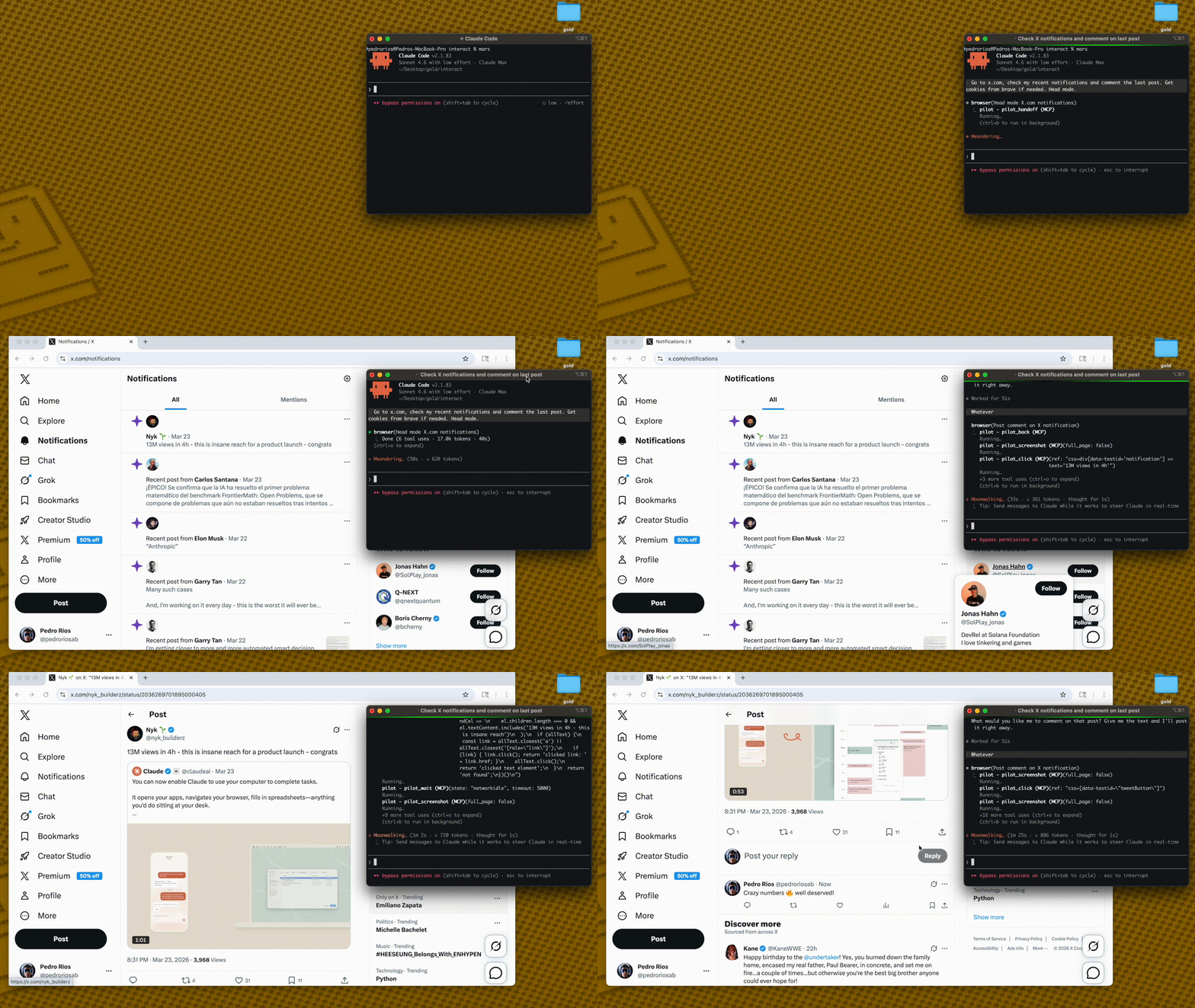
pilot demo

pilot is an MCP server that gives Claude Code, Cursor, and other AI agents a fast, persistent browser for web automation. Built on Playwright, it runs Chromium in-process over stdio — no HTTP server, no cold starts, no per-action overhead. If you need a Playwright MCP alternative with lower latency, more tools, and cookie import, this is it.

LLM Client → stdio (MCP) → pilot → Playwright → Chromium
                              in-process      persistent
First call: ~3s (launch)
Every call after: ~5-50ms

Why pilot? MCP Browser Automation Compared

pilot@playwright/mcpBrowserMCP
Latency/action~5-50ms~100-200ms~150-300ms
ArchitectureIn-process stdioSeparate processChrome extension
Persistent browserYesPer-sessionYes
Tools51 (configurable profiles)25+~20
Token controlmax_elements, structure_only, interactive_onlyNoNo
Iframe supportFull (list, switch, snapshot inside)NOT_PLANNEDNo
Cookie importChrome, Arc, Brave, Edge, CometNoNo
Snapshot diffingTrack page changes between actionsNoNo
Handoff/ResumeOpen headed Chrome, interact manually, resumeNoNo

Speed matters when your agent makes hundreds of browser calls in a session. At 100 actions, that's 5 seconds with pilot vs 20 seconds with alternatives.

Benchmark — pilot vs @playwright/mcp

Measured end-to-end with Claude Code (claude -p) as the runtime, 3 runs per task, averaged. Tasks require 2–3 page navigations and interactions (click link → read result) — the realistic workload for an AI agent.

Methodology: claude -p --output-format stream-json --verbose captures every intermediate message. Tool result sizes are measured from the raw tool_result content blocks. Context tokens = sum of input_tokens + cache_creation_input_tokens + cache_read_input_tokens across all turns. Wall time = full task completion including all LLM calls. Full benchmark source in benchmark/llm-compare.ts, raw results in benchmark/results.jsonl.

Multi-step tasks (navigate → interact → read)

Taskpilot wall time@playwright/mcp wall timepilot advantage
HN: click top story → read article27s❌ failed (bot detection)
GitHub: trending → click repo → star count29s100s71% faster
GitHub: vscode/releases → latest version23s19s
npm: search "zod" → click → downloads21s28s26% faster
Wikipedia: main page → click featured → first sentence27s69s60% faster

Averages across 5 tasks:

Metricpilot@playwright/mcpDelta
Wall time (avg)25s43spilot 41% faster
Tool result size (chars)5,2309,165pilot 43% smaller
Cost per task (USD)$0.107$0.124pilot 13% cheaper
Success rate5/54/5pilot more reliable

Why pilot is faster on multi-step tasks

@playwright/mcp bundles a full page snapshot (~58K chars) into every navigate response. On a 2-page flow, that's ~116K chars of snapshot content entering context — even before the model generates a single token. The LLM then has to attend over that entire context on every subsequent turn, making each API call progressively slower.

pilot's navigate returns a lightweight confirmation. The model requests a snapshot explicitly (pilot_snapshot, ~9K chars) and only when it needs one. On the same 2-page flow: ~18K chars of snapshot content. 6× less data in context, which directly translates to faster LLM inference and lower cost.

@playwright/mcp:  navigate(58K) → navigate(58K) → answer     = 116K snapshot chars
pilot:           navigate(1K)  → snapshot(9K) → navigate(1K) → snapshot(9K) → answer = 20K snapshot chars

The tradeoff: pilot requires more tool calls per task (avg 4–5 vs 1–2). For simple single-page reads, this roughly cancels out. For multi-step flows — search, click, navigate, extract — pilot wins by a widening margin.

Reproduce

npm run build
npx tsx benchmark/llm-compare.ts            # multi-step LLM benchmark (claude -p)
npx tsx benchmark/playwright-compare.ts     # raw MCP tool response sizes + timing

Quick Start — Add Browser Automation to Claude Code or Cursor

npx pilot-mcp
npx playwright install chromium

Add to your Claude Code config (.mcp.json):

{
  "mcpServers": {
    "pilot": {
      "command": "npx",
      "args": ["-y", "pilot-mcp"]
    }
  }
}

For Cursor, add the same config to your Cursor MCP settings.

That's it. Your AI agent now has a browser.

How It Works

Snapshot once, interact by ref. No CSS selectors needed.

pilot_snapshot → @e1 [button] "Submit", @e2 [textbox] "Email", ...
pilot_fill    → { ref: "@e2", value: "[email protected]" }
pilot_click   → { ref: "@e1" }

The ref system gives LLMs a simple, reliable way to interact with pages. Stale refs are auto-detected with clear error messages.

Token Control

Large pages can blow up your context window. Pilot gives you fine-grained control:

pilot_snapshot({ max_elements: 20 })
→ Returns 20 elements + "614 more elements not shown"

pilot_snapshot({ structure_only: true })
→ Pure tree structure, no text content

pilot_snapshot({ interactive_only: true, max_elements: 15 })
→ Only buttons/links/inputs, capped at 15

Combine max_elements, structure_only, interactive_only, compact, and depth to get exactly the level of detail you need. Start small, expand as needed.

Tool Profiles

48+ tools can overwhelm LLMs (research shows degradation at 30+ tools). Use PILOT_PROFILE to load only what you need:

ProfileToolsUse case
core9Simple automation — navigate, snapshot, click, fill, type, press_key, wait, screenshot
standard25Common workflows — core + tabs, scroll, hover, drag, iframe, page reading
full51Everything
{
  "mcpServers": {
    "pilot": {
      "command": "npx",
      "args": ["-y", "pilot-mcp"],
      "env": { "PILOT_PROFILE": "full" }
    }
  }
}

The default profile is standard (25 tools). Set PILOT_PROFILE=full for all 51 tools.

Security & Configuration

VariableDefaultDescription
PILOT_PROFILEstandardTool set: core (9), standard (25), or full (51)
PILOT_OUTPUT_DIRSystem tempRestricts where screenshots/PDFs can be written

Security hardening:

  • Output path validation prevents writing outside PILOT_OUTPUT_DIR
  • Path traversal protection on all file-write operations
  • Expression size limit (50KB) on pilot_evaluate input
  • File upload resolves symlinks to prevent directory escape

Tools (51)

Navigation

ToolDescription
pilot_navigateNavigate to a URL
pilot_backGo back in browser history
pilot_forwardGo forward in browser history
pilot_reloadReload the current page

Snapshots

ToolDescription
pilot_snapshotAccessibility tree with @eN refs. Supports max_elements, structure_only, interactive_only, compact, depth.
pilot_snapshot_diffUnified diff showing what changed since last snapshot
pilot_annotated_screenshotScreenshot with red overlay boxes at each @ref position

Interaction

ToolDescription
pilot_clickClick by @ref or CSS selector (auto-routes <option> to selectOption)
pilot_hoverHover over an element
pilot_fillClear and fill an input/textarea
pilot_select_optionSelect a dropdown option by value, label, or text
pilot_typeType text character by character
pilot_press_keyPress keyboard keys (Enter, Tab, Escape, etc.)
pilot_dragDrag from one element to another
pilot_scrollScroll element into view or scroll page
pilot_waitWait for element visibility, network idle, or page load
pilot_file_uploadUpload files to a file input

Iframes

ToolDescription
pilot_framesList all frames (iframes) on the page
pilot_frame_selectSwitch context into an iframe by index or name
pilot_frame_resetSwitch back to the main frame

After switching frames, pilot_snapshot, pilot_click, pilot_fill, and all interaction tools operate inside that iframe. Use pilot_frames to discover available iframes, then pilot_frame_select to enter one.

Page Inspection

ToolDescription
pilot_page_textClean text extraction (strips script/style/svg)
pilot_page_htmlGet innerHTML of element or full page
pilot_page_linksAll links as text + href pairs
pilot_page_formsAll form fields as structured JSON
pilot_page_attrsAll attributes of an element
pilot_page_cssComputed CSS property value
pilot_element_stateCheck visible/hidden/enabled/disabled/checked/focused
pilot_page_diffText diff between two URLs (staging vs production, etc.)

Debugging

ToolDescription
pilot_consoleConsole messages from circular buffer
pilot_networkNetwork requests from circular buffer
pilot_dialogCaptured alert/confirm/prompt messages
pilot_evaluateRun JavaScript on the page (supports await)
pilot_cookiesGet all cookies as JSON
pilot_storageGet localStorage/sessionStorage (sensitive values auto-redacted)
pilot_perfPage load performance timings (DNS, TTFB, DOM parse, load)

Visual

ToolDescription
pilot_screenshotScreenshot of page or specific element
pilot_pdfSave page as PDF
pilot_responsiveScreenshots at mobile (375), tablet (768), and desktop (1280)

Tabs

ToolDescription
pilot_tabsList open tabs
pilot_tab_newOpen a new tab
pilot_tab_closeClose a tab
pilot_tab_selectSwitch to a tab

Settings & Session

ToolDescription
pilot_resizeSet viewport size
pilot_set_cookieSet a cookie
pilot_import_cookiesImport cookies from Chrome, Arc, Brave, Edge, Comet
pilot_set_headerSet custom request headers (sensitive values auto-redacted)
pilot_set_useragentSet user agent string
pilot_handle_dialogConfigure dialog auto-accept/dismiss
pilot_handoffOpen headed Chrome with full state for manual interaction
pilot_resumeResume automation after manual handoff
pilot_closeClose browser and clean up

Key Features

Cookie Import

Import cookies from your real browser into the headless session. Decrypts from the browser's SQLite cookie database using platform-specific safe storage keys (macOS Keychain).

pilot_import_cookies({ browser: "chrome", domains: [".github.com"] })

Supports Chrome, Arc, Brave, Edge, and Comet. Use list_browsers, list_profiles, and list_domains to discover what's available.

Handoff / Resume

When headless mode hits a CAPTCHA, bot detection, or complex auth flow:

  1. Call pilot_handoff — opens a visible Chrome window with all your cookies, tabs, and localStorage
  2. Solve the challenge manually
  3. Call pilot_resume — automation continues with the updated state

Snapshot Diffing

Call pilot_snapshot_diff after an action to see exactly what changed on the page. Returns a unified diff. Useful for verifying actions worked, monitoring dynamic content, or debugging.

AI-Friendly Errors

Playwright errors are translated into actionable guidance:

  • Timeout → "Element not found. Run pilot_snapshot for fresh refs."
  • Multiple matches → "Selector matched multiple elements. Use @refs from pilot_snapshot."
  • Stale ref → "Ref is stale. Run pilot_snapshot for fresh refs."

Circular Buffers

Console, network, and dialog events are captured in O(1) ring buffers (50K capacity). Query with pilot_console, pilot_network, pilot_dialog. Never grows unbounded.

Architecture — In-Process Playwright MCP Server

pilot runs Playwright in the same process as the MCP server. No HTTP layer, no subprocess — direct function calls to the Playwright API over a persistent Chromium instance.

┌─────────────────────────────────────────────────┐
│  Your AI Agent (Claude Code, Cursor, etc.)      │
│                                                 │
│  ┌──────────────┐    stdio     ┌─────────────┐ │
│  │  MCP Client  │◄───────────►│    pilot     │ │
│  └──────────────┘              │              │ │
│                                │  Playwright  │ │
│                                │  (in-proc)   │ │
│                                │      │       │ │
│                                │      ▼       │ │
│                                │  Chromium    │ │
│                                │  (persistent)│ │
│                                └─────────────┘ │
└─────────────────────────────────────────────────┘

This is why it's fast. No network hops, no serialization overhead, no process spawning per action.

Requirements

  • Node.js >= 18
  • Chromium (installed via npx playwright install chromium)

Development

21 unit tests via vitest:

npm test

Credits

The core browser automation architecture — ref-based element selection, snapshot diffing, cursor-interactive scanning, annotated screenshots, circular buffers, and AI-friendly error translation — is ported from gstack by Garry Tan.

Built on Playwright by Microsoft and the Model Context Protocol SDK by Anthropic.

Frequently Asked Questions

How do I add browser automation to Claude Code?

Install pilot with npx pilot-mcp, then add it to your .mcp.json config file. Once configured, Claude Code can navigate pages, click elements, fill forms, take screenshots, and extract data through 51 browser automation tools. See the Quick Start section above.

What is the fastest MCP browser server?

pilot is the fastest MCP browser automation server available. It runs Playwright in-process over stdio with a persistent Chromium instance, achieving ~5-50ms per action compared to ~100-300ms for alternatives like @playwright/mcp and BrowserMCP. The speed difference compounds over sessions with hundreds of browser actions.

How does pilot compare to @playwright/mcp?

pilot offers lower latency (~5-50ms vs ~100-200ms per action), more tools (51 vs 25+), token control for large pages, full iframe support, cookie import from five browsers, snapshot diffing, and a handoff/resume flow for manual intervention. Both are built on Playwright, but pilot runs in-process instead of as a separate process.

How do I import cookies into an MCP browser session?

Use pilot_import_cookies with the browser name and domains you want to import. pilot decrypts cookies directly from the SQLite databases of Chrome, Arc, Brave, Edge, and Comet using platform-specific safe storage keys. Use list_browsers, list_profiles, and list_domains to discover what cookies are available on your system.

Does pilot work with Cursor?

Yes. Add the same MCP server configuration to your Cursor MCP settings. pilot works with any MCP-compatible client, including Claude Code, Cursor, Windsurf, and other AI coding agents that support the Model Context Protocol.

How do I handle CAPTCHAs and bot detection?

Call pilot_handoff to open a visible Chrome window with your full session state (cookies, tabs, localStorage). Solve the challenge manually, then call pilot_resume to continue automation with the updated state. This handoff/resume pattern works for CAPTCHAs, complex auth flows, and any situation where human interaction is needed.

License

MIT


If pilot is useful to you, star the repo — it helps others find it.


संबंधित सर्वर