StatementPro.ai
अपने AI assistant में बैंक स्टेटमेंट को CSV या JSON में बदलें। लागत देखें, फिर मंज़ूरी दें।
होस्ट किया गया MCP सर्वर
npx add-mcp 'https://statementpro.ai/v1/mcp'Claude Code, Codex, Cursor और अन्य में इंस्टॉल होता है
दस्तावेज़
See it in action
Quote, Approve, Get Your Transactions
The whole conversion happens inside the chat. Pick your assistant to see how it goes.
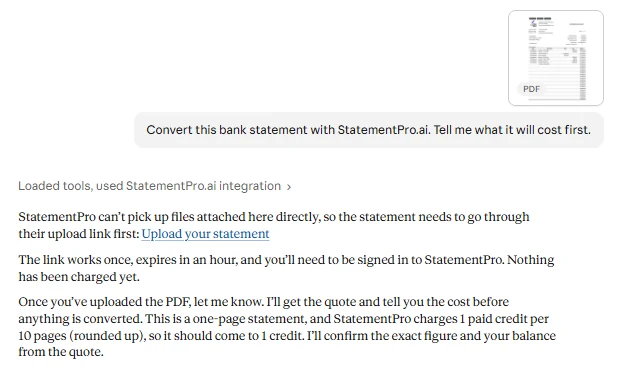
Real screenshots from Claude, converting a sample statement.
How it goes in Claude
- Ask Claude to convert a statement. Claude can’t pass files along, so it hands you a one-time upload link.
- Check the quote. Pages, credits and your balance. Getting a quote is free.
- Say yes. The transactions come back as CSV or JSON, ready to check and import.
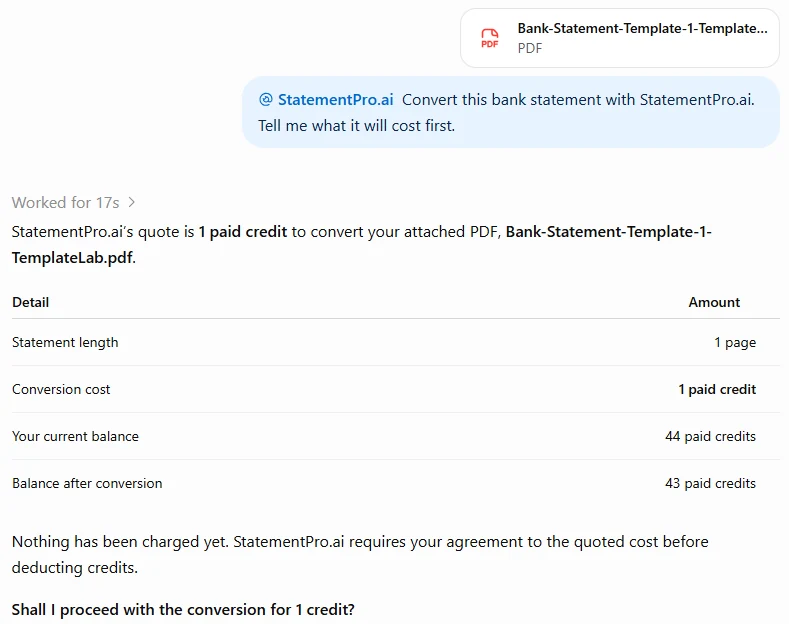
Real screenshots from ChatGPT, converting a sample statement.
How it goes in ChatGPT
- Attach the statement and ask ChatGPT to convert it with StatementPro.ai.
- Check the quote. Pages, credits and your balance. Nothing is charged yet.
- Approve. Get the transactions as CSV or JSON, then ask ChatGPT to sort, filter or total them.
Screenshots use a sample statement; your assistant’s wording will vary. Very long statements may be cut short in the chat; use the web app or the API for those.
How it works
Three Steps, All Inside the Chat
-
1. Connect once
Add StatementPro.ai to your assistant, sign in and approve the connection. -
2. Get a free quote
Share the statement. Your assistant shows the pages, the credit cost and your balance. -
3. Approve, get CSV
Say yes and get the transactions as CSV or JSON, usually in minutes.
Get started
How to Get Started with MCP
Pick your assistant. Setup takes a few minutes, and each guide walks you through every click.
- Any credit pack, from $5. Your 5 free credits work in the web app, not through an assistant.
- A plan with custom connectors. They aren’t on every Claude or ChatGPT plan, so check yours.
- For local tools: Node.js 22 or later and an API key from Settings.
No API key
Claude
Add StatementPro.ai as a custom connector.
- Open Customize › Connectors and add a custom connector.
- Paste this URL:
https://statementpro.ai/v1/mcp
- Sign in to StatementPro.ai and click Allow.
No API key
ChatGPT
Add StatementPro.ai as a custom connector.
- In ChatGPT’s settings, create a custom connector with OAuth.
- Paste this URL:
https://statementpro.ai/v1/mcp
- Sign in to StatementPro.ai and click Allow.
API key
Claude Code, Claude Desktop, Cursor or VS Code
Run our npm package, @statementpro/mcp, on your computer.
- Create an API key in Settings › API access.
- Add the server to your tool’s MCP config.
- Restart the tool and ask for a conversion.
For bookkeepers
Built for the Jobs You Already Do
Month-end across clients
Hand over each client’s statements and get a quote for each one first. Only what you approve is converted.
Catch-up and year-end
Convert a year of statements, then ask your assistant to check opening against closing balances, find missing months and flag repeats.
Works beside QuickBooks or Xero
StatementPro.ai turns the statement into clean transactions. Your accounting software’s own connector stays in charge of the books.
Example prompts
Copy a Prompt and Try It
- “Convert this statement with StatementPro.ai, show me the credit cost first, and once I say yes, give me the transactions as a CSV.”Copy
- “How many StatementPro.ai credits do I have left?”Copy
- “Convert this statement, then list every transaction over $1,000 and total the deposits for the month.”Copy
- “Is the conversion I started this morning finished? If it is, give me the CSV.”Copy
- “Show my StatementPro.ai conversions from this week and tell me which ones failed.”Copy
- “Convert this statement and lay the transactions out with Date, Description and Amount columns, debits as negative numbers.”Copy
Some prompts ask your assistant to work with the results after StatementPro.ai returns them. Always check totals and the closing balance against the statement before you import.
Cost
What It Costs
1 credit per 10 pages, rounded up
A 4-page statement costs 1 credit; a 23-page statement costs 3.
- $5 10 credits
- $10 25 credits
- $19 50 credits
- $29 100 credits
Same rate as the web app. You see the cost before anything is charged, and if a conversion fails, its credits go back to your balance. Credits are valid for 12 months, with no subscription. Any pack unlocks the AI-assistant connection, the API and every web-app download format, including Excel, QuickBooks and Xero.
Security and consent
You Stay in Control
- You approve every connection The approval screen names the assistant and lists what it can do.
- Nothing is charged without a quote Quotes are free. Connected assistants can’t convert a statement without one.
- Disconnect at any time Settings, then Connected apps, then Disconnect.
- Your sign-in stays with us Claude and ChatGPT never see it. An API key stays in your own config.
- Upload links are single-use Each works once, for one hour, and only while you’re signed in.
For developers
Tools and Configuration
The six tools your assistant can use
| Tool | What it does | Spends credits? |
|---|---|---|
get_account | Shows your account email and your remaining paid and free credits. | No |
convert_document | Takes your statement (PDF, PNG or JPEG, up to 25 MB) and returns a quote: pages, credits and your balance. | No |
confirm_conversion | Converts a quoted statement once you’ve agreed to the cost. | Yes, 1 purchased credit per 10 pages |
get_job | Shows whether a conversion is queued, processing, completed or failed. | No |
list_conversions | Lists your assistant and API conversions, newest first. | No |
get_result | Gets a finished conversion as CSV or JSON. | No |
Your assistant sees conversions made through the API or an assistant. Statements you uploaded on the StatementPro.ai website stay in your web History.
Config for Claude Code, Cursor, Claude Desktop and VS Code
Create a key first: in StatementPro.ai, go to Settings, find API access and click Create API key. The key is shown once, so copy it somewhere safe.
Claude Code:
claude mcp add statementpro --scope user -e STATEMENTPRO_API_KEY=sp_live_... -- npx -y @statementpro/mcp
Cursor (~/.cursor/mcp.json) and Claude Desktop (Settings, Developer, Edit Config):
{
  "mcpServers": {
    "statementpro": {
      "command": "npx",
      "args": ["-y", "@statementpro/mcp"],
      "env": { "STATEMENTPRO_API_KEY": "sp_live_..." }
    }
  }
}
VS Code (.vscode/mcp.json) asks for your key the first time and stores it securely, so it never sits in the file. The full configuration, Windows notes and troubleshooting are in the npm package README and our guide, Connect Claude Code, Claude Desktop, Cursor or VS Code.
Keep your key private. Your assistant never sees it, and if it ever leaks, revoke it in Settings and create a new one.
AI Assistants — Frequently Asked Questions
Which AI assistants work with StatementPro.ai? +
Claude and ChatGPT connect to our hosted server by URL. Claude Code, Cursor, VS Code, Claude Desktop and other MCP clients that run local servers use our npm package, @statementpro/mcp, with an API key.
Do I need to pay to connect an assistant? +
Yes. Connecting needs a StatementPro.ai account that has bought a credit pack of any size. Packs start at $5 for 10 credits. You can sign up and try the web app with 5 free credits first.
Can I use my free credits through Claude or ChatGPT? +
No. Conversions through an assistant use purchased credits only. The 5 free credits that come with a new account are for the web app.
Will my assistant charge credits without asking? +
Getting a quote never charges anything. Converting is a separate step that spends credits, and StatementPro.ai tells your assistant to show you the cost and wait for your OK. Connected assistants can’t convert without a quote.
How long does a conversion take? +
Usually a few minutes. If a statement is still processing, your assistant can check on it and fetch the result when it’s ready.
What can I get back? +
CSV or JSON, with the date, description, debits and credits (or a signed amount in JSON) and the running balance for each transaction. Very long statements may be cut short in the chat; use the web app or the API for those. Excel, QuickBooks and Xero files are downloads in the StatementPro.ai web app.
Can my assistant see statements I uploaded on the website? +
No. Your assistant sees conversions made through an assistant or the API. Statements you uploaded on statementpro.ai stay in your web History.
How do I disconnect an assistant? +
In StatementPro.ai, go to Settings, then Connected apps, and click Disconnect. That removes its access to your account. To stop a local client, revoke or regenerate your API key in Settings.
Full steps: Disconnect an AI assistant
Do you use my statements to train AI models? +
We don’t use the content of your statements to build general-purpose AI models, whether you convert on our website or through an assistant. Our Privacy Policy explains the limited, de-identified way corrections improve our extraction. What you share in a chat is handled by your AI provider under its own terms.
Claude is a trademark of Anthropic. ChatGPT is a trademark of OpenAI. StatementPro.ai is not affiliated with or endorsed by Anthropic or OpenAI.