MindmupGoogleDriveMcp
यह सर्वर आपको MCP इंटरफ़ेस के माध्यम से सीधे आपके Google Drive में संग्रहीत MindMup फ़ाइलों को खोजने, पुनर्प्राप्त करने और पार्स करने में सक्षम बनाता है।
दस्तावेज़
MindMup2 Google Drive MCP Server
A Model Context Protocol (MCP) server that lets AI clients (Claude Code, Cursor) search, read, and drill into MindMup 2 .mup mind maps stored in Google Drive — without dumping a 3MB JSON tree into the model. Large maps are auto-summarised into a tree outline; the AI then drills into specific sections by node_path.
Compatibility: Claude Code, Cursor (HTTP transport). Not supported: Claude Desktop (stdio-only).
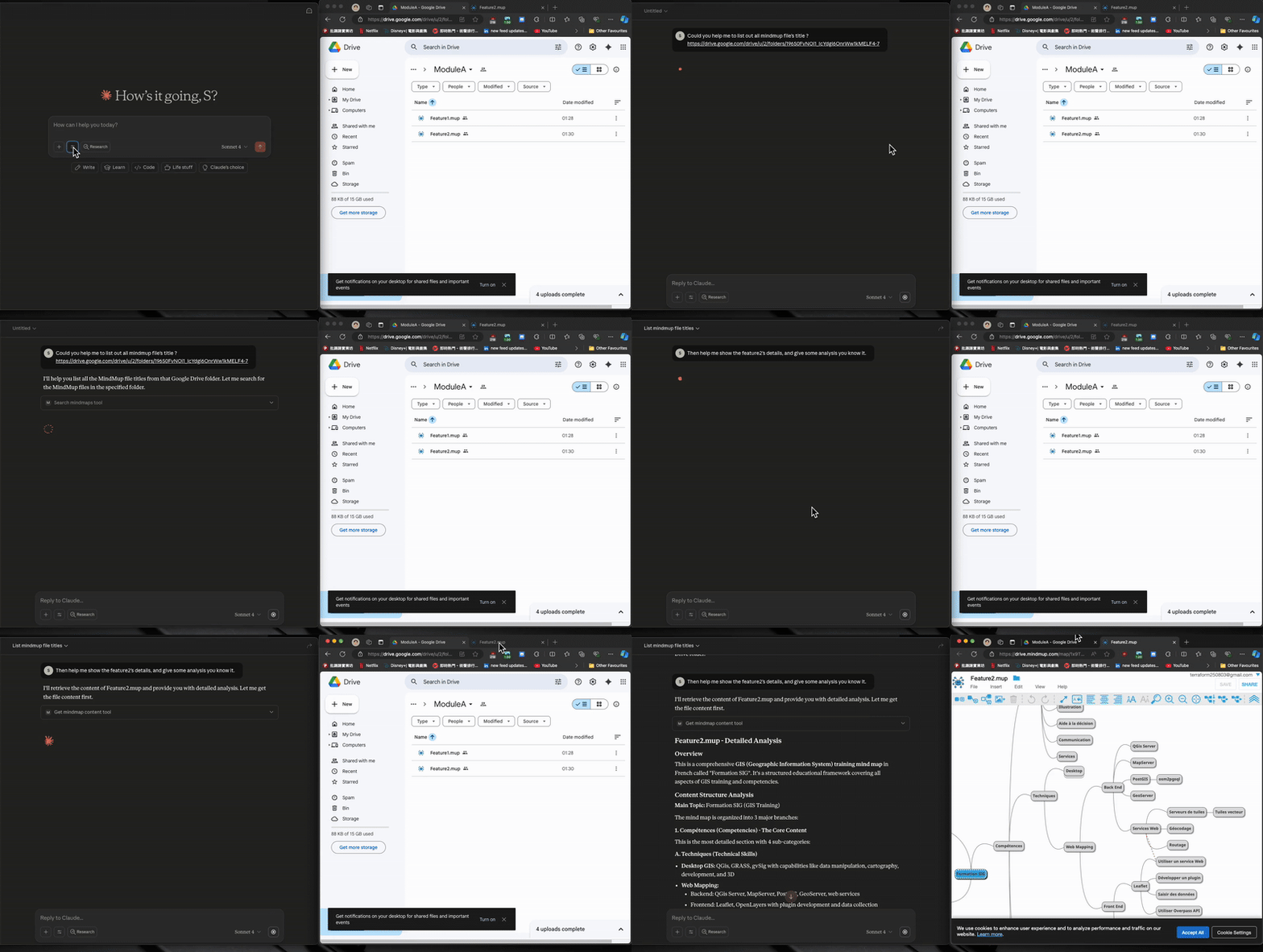
💫 Result
✨ Features
- Search MindMup files across your entire Google Drive (read-only)
- Tree navigation + section drill-down for large mind maps — small files return full content, large files return an outline you can drill into
- Per-client cache isolation via
X-Client-Idheader, so different users/tools don't share cached content - Hot-reload dev mode via
fastmcp run --reload+ bind-mounted source - FastMCP server with built-in
/healthand/pingendpoints - Docker Compose for both dev and prod
🗺️ End-to-End Flow
1. Set up Google Cloud service account     →  download JSON key
2. Share your Drive folder with the SA     →  Viewer access
3. Base64-encode the JSON key              →  for X-Google-Credential header
4. Run the server  (Docker or Python)      →  http://127.0.0.1:9805
5. Configure your MCP client (Claude/Cursor) with the base64 credential
6. Verify  →  curl http://127.0.0.1:9805/health
🔧 Available MCP Tools
| Tool | Description |
|---|---|
list_files | List MindMup files from Google Drive (folders and non-.mup filtered by default). Returns id, name, folder_url, size, modified_time. |
read_mindmap | Read a MindMup file by file_id or file_name (one required; name uses first partial match). Small files (<100KB AI-dict) return content_type: "full". Large files return content_type: "outline_only" with tree_outline, section_stats, and suggested_start_paths. |
search_mindmap | Search nodes by keyword. Params: file_id, keyword, optional node_path (subtree scope), max_results=30, normalize_whitespace=True. Returns nodes with node_path, title_preview, breadcrumb, children_count. |
get_mindmap_section | Drill into a section by node_path (dotted integers, root is 1, e.g. "1.2.3"). Optional max_depth, offset=0, limit=0. Returns content_type: "full" | "outline_only" | "paginated" | "truncated" — auto-switches when the section is still too large. |
Suggested workflow for AI agents: list_files → read_mindmap → if outline_only, either search_mindmap (by keyword) or get_mindmap_section (by node_path from suggested_start_paths).
🚀 Getting Started
Prerequisites
- Python 3.12+
- Docker & docker-compose (required for
make run-dev-docker/make run-prod) ; Ref. makefile - Google Cloud Platform account
- An MCP client that supports HTTP transport (Claude Code or Cursor)
Google Drive API Setup
| Step | Description | Image |
|---|---|---|
| 1 | Go to Google Cloud Console and create a new project (free tier is fine — no billing required for Drive API). | |
| 2 | Enable the Google Drive API. | |
| 3 | Create Service Account credentials: - "IAM & Admin" → "Service Accounts" → "Create Service Account" - No project-level role needed (Drive sharing handles auth) - Open the SA → "Keys" tab → "Add Key" → JSON → download the key file. | 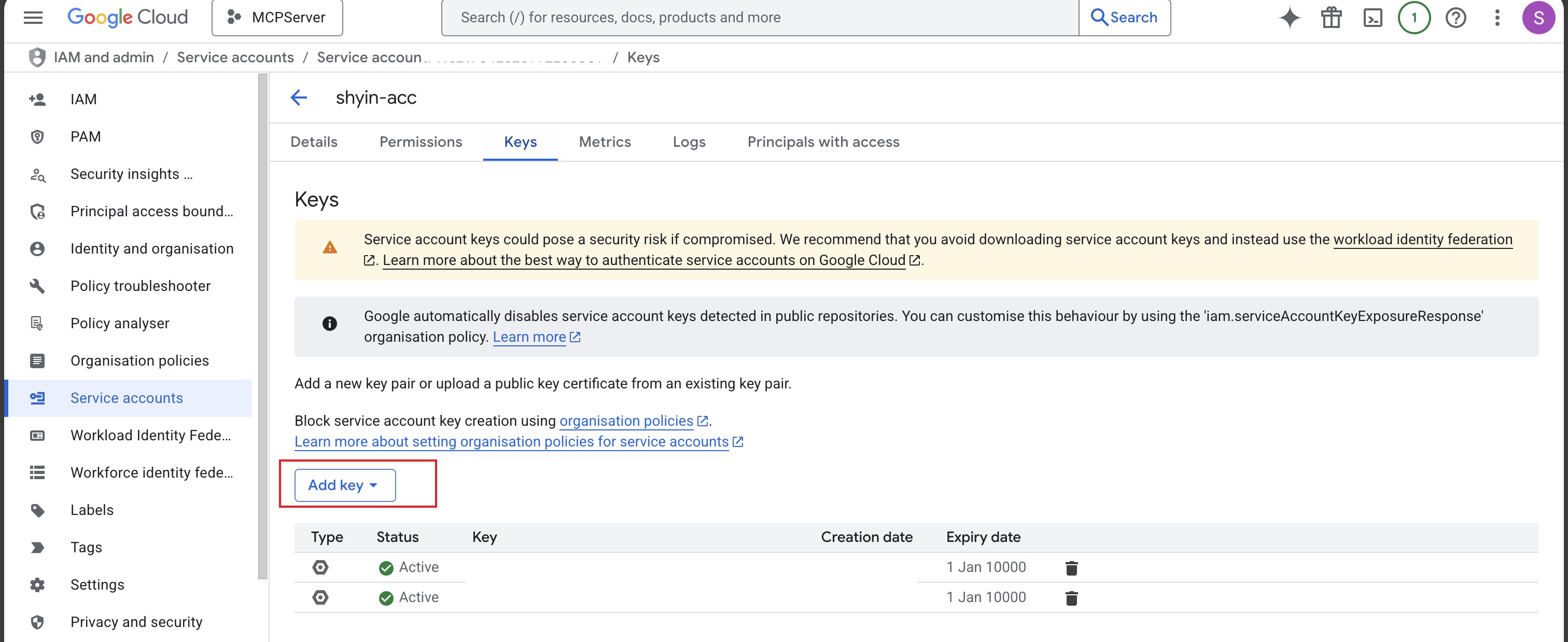 |
| 4 | Base64-encode the entire JSON key file (see Header Reference). ⚠️ Add the JSON file to .gitignore — never commit it. | |
| 5 | Share your Google Drive folder with the SA: - Copy the client_email value from the JSON- Right-click the folder → Share → paste the email - Grant Viewer access, uncheck "Notify people" - Sharing propagates to subfolders. | 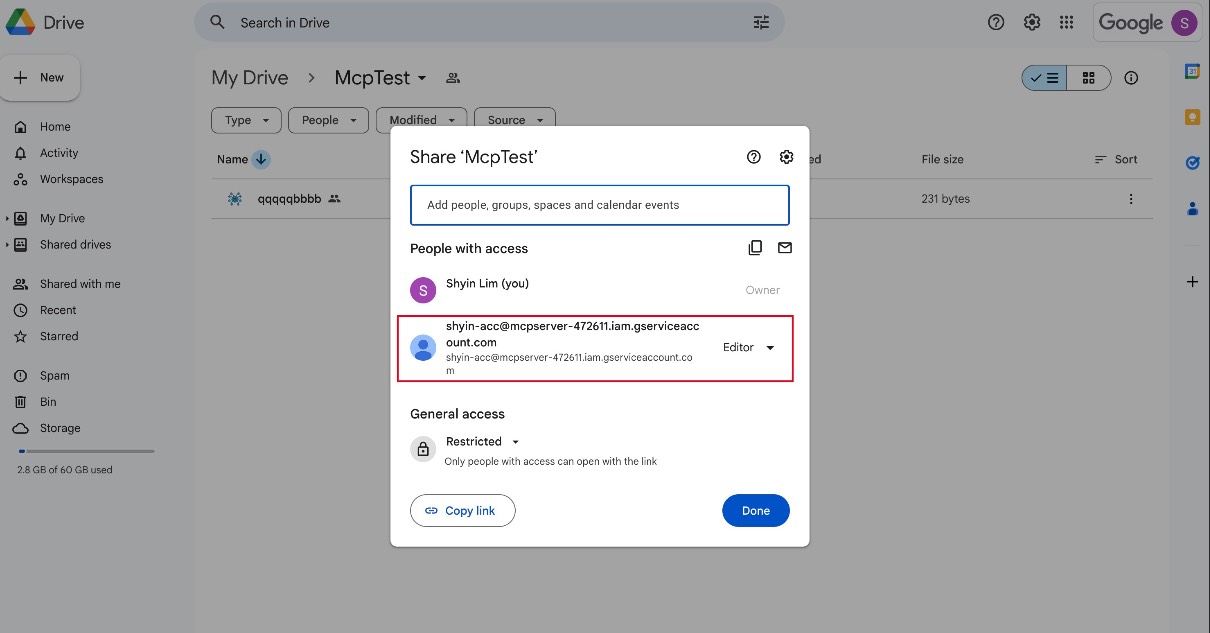 |
Note on scopes: The server requests
auth/drive+auth/drive.file. Despite the broad scope, withViewerfolder-level sharing the SA can only read what you've shared. Workspace-managed accounts may block external sharing — if so, ask your admin to allow service-account sharing for your domain.
Run the Server
Docker (recommended):
make run-dev-docker   # dev: hot-reload, source bind-mounted
make run-prod         # prod: no reload
Direct Python (no Docker):
pip install -r requirements.txt
python3 run.py
# Optionally: MCP_TRANSPORT=streamable-http python3 run.py
Verify the Server
curl http://127.0.0.1:9805/health
# => {"result":"success","time":"...","message":"MCP server is running. ..."}
If you don't get success, check docker logs <container> (Docker mode) or stdout (Python mode).
Run Tests
pip install -r requirements.txt
pytest
MCP Client Configuration
Add to your MCP client config (~/.claude/mcp.json for Claude Code, or your Cursor MCP settings):
{
    "mcpServers": {
        "mindmup-gdrive": {
            "type": "http",
            "url": "http://127.0.0.1:9805/mcp",
            "headers": {
                "X-Google-Credential": "ewogICJ0eXBlIjogInNlcnZpY2VfYWNjb3VuXXXXXXXXXXX",
                "X-Client-Id": "shyin-claude-code"
            }
        }
    }
}
Header Reference
| Header | Required | Description |
|---|---|---|
X-Google-Credential | ✅ | Your service account JSON, base64-encoded. Use base64encode.org and paste the output here. ⚠️ Base64 is encoding, not encryption — the MCP client config sits in plaintext on disk, so don't sync it to public repos / unencrypted cloud backups. |
X-Client-Id | Optional | A unique identifier per user + tool, e.g. shyin-claude-code. Used as part of the cache key (X-Client-Id, credential_hash, file_id) to isolate cached content across clients. If omitted, falls back to default (cache may be shared with other unset clients) and a warning is logged. Recommended format: <your-name>-<tool-name>. Use a high-entropy value to avoid collisions with other users. |
🩺 Troubleshooting
| Symptom | Likely cause / fix |
|---|---|
health returns nothing / connection refused | Server not running. Check docker ps or stdout. Port 9805 already in use? Edit mcp_deployment/docker-compose-dev.yml to remap. |
Google Drive authentication failed | Invalid base64. Sanity check: echo "$CRED" | base64 -d | jq .client_email — should print the SA email. |
list_files returns empty | (a) Folder shared with the wrong email — must match client_email in the JSON. (b) Files aren't .mup — call with mindmup_only=False to confirm visibility. (c) Workspace org policy blocks external sharing. |
| Docker build fails | Make sure Docker daemon is running. Re-run make run-dev-docker. |
| Changes not picking up in dev | Hot-reload only watches Python source. Restart the container after dependency or env changes. |
🏗️ Project Structure
Click to expand
├── mcp_deployment/
│   ├── docker-compose-dev.yml
│   ├── docker-compose-prod.yml
│   └── Dockerfile
├── src/
│   ├── core/
│   │   ├── gdrive_client.py    # Google Drive API client
│   │   ├── gdrive_feature.py   # Google Drive feature implementation
│   │   ├── mcp_server.py       # Main MCP server with read tools
│   │   └── mindmup_parser.py   # MindMup parsing + tree navigation
│   ├── model/
│   │   ├── common_model.py     # Common data models
│   │   ├── gdrive_model.py     # Google Drive data models
│   │   └── mindmup_model.py    # Mind map data models (with to_ai_dict)
│   └── utility/
│       ├── enum.py             # Enumerations and constants
│       └── logger.py           # Logging utilities
├── tests/                      # Unit tests
├── plans/                      # Implementation plans
├── run.py                      # Main entry point
├── requirements.txt            # Python dependencies
└── makefile                    # Build and deployment commands