OrionBelt Analytics
रिलेशनल डेटाबेस स्कीमा (PostgreSQL, Snowflake, और Dremio) का विश्लेषण करता है और सीधे SQL मैपिंग के साथ RDF/Turtle प्रारूप में स्वचालित रूप से व्यापक ऑन्टोलॉजी उत्पन्न करता है।
दस्तावेज़

OrionBelt® Analytics
The Ontology-based MCP server for your Text-2-SQL convenience.










OrionBelt Analytics is an MCP server that analyzes relational database schemas and generates RDF/OWL ontologies with embedded SQL mappings. It provides relationship-aware Text-to-SQL with automatic fan-trap prevention, GraphRAG for intelligent schema discovery, and interactive charting -- all accessible through any MCP-compatible AI client.
The OrionBelt Ecosystem
| Project | Purpose |
|---|---|
| OrionBelt Analytics (this) | Schema analysis, ontology generation, GraphRAG, Text-to-SQL |
| OrionBelt Semantic Layer | Declarative YAML models compiled into dialect-specific, fan-trap-free SQL |
| OrionBelt Ontology Builder | Visual OWL ontology editor with reasoning and graph visualization (live demo) |
| OrionBelt Chat | AI chat UI for Analytics + Semantic Layer (Chainlit, multiple LLM providers) |
Run Analytics and Semantic Layer side-by-side in Claude Desktop for schema-aware ontology generation and guaranteed-correct SQL compilation.
Architecture
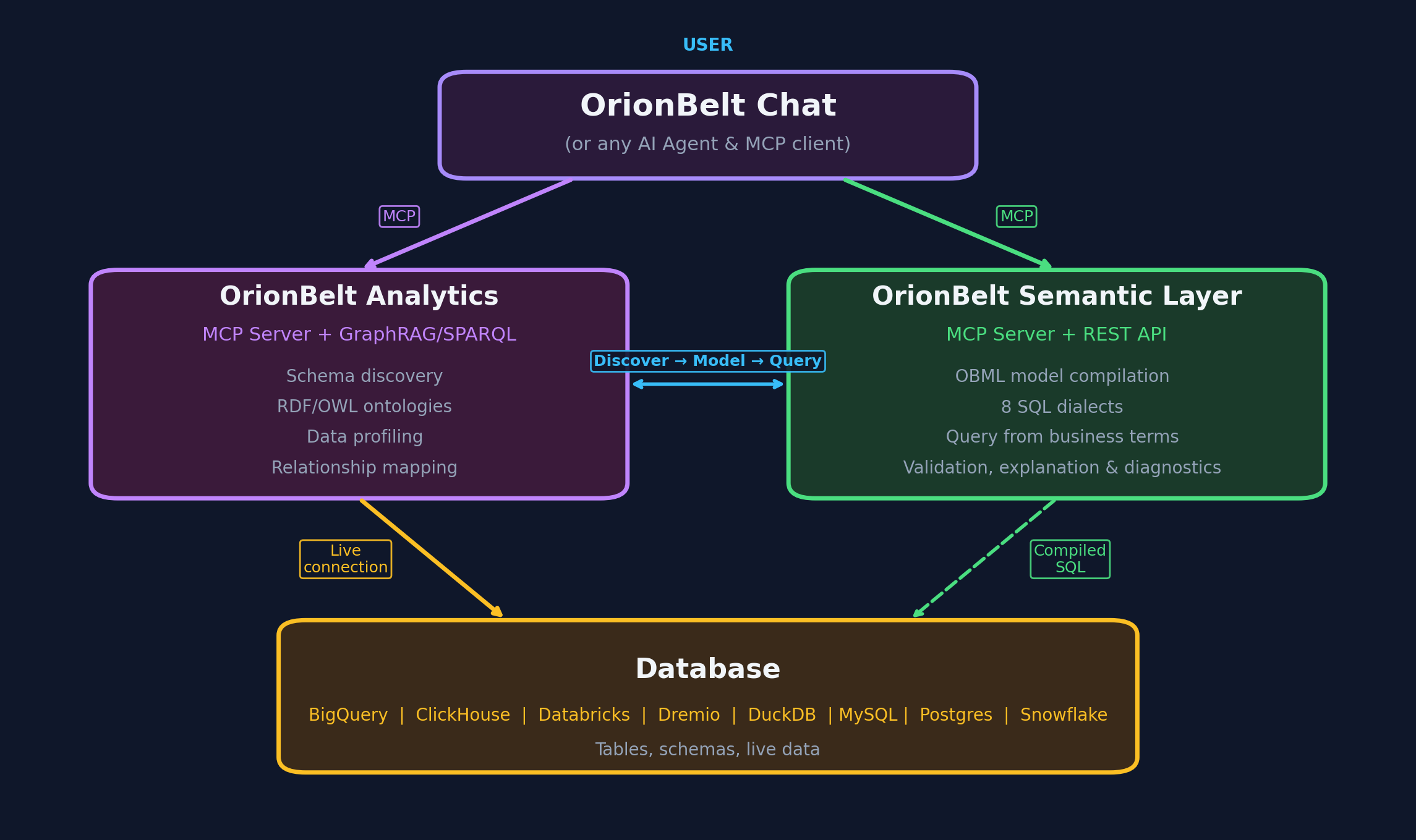
- 8 database connectors -- PostgreSQL, MySQL, Snowflake, ClickHouse, Dremio, BigQuery, DuckDB/MotherDuck, Databricks SQL
- RDF/OWL ontology generation with
oba:namespace SQL annotations and W3C R2RML mappings - GraphRAG -- graph traversal (up to 12 hops) + ChromaDB vector embeddings for semantic schema discovery
- SPARQL 1.1 query interface via persistent Oxigraph RDF store
- OBQC validation -- deterministic SQL checks against the ontology (table/column existence, join validity, type mismatches, fan-traps)
- Interactive charting -- Plotly charts with MCP-UI rendering in Claude Desktop
- Multi-schema support -- analyze multiple schemas simultaneously; ontology and GraphRAG state are isolated per schema
- Workspace persistence -- reconnect to the same database and restore your previous session
- MCP sampling -- when the connected client supports sampling (e.g. OrionBelt Chat),
suggest_semantic_namesasks the host LLM to pre-fill rename suggestions for cryptic identifiers viasampling/createMessage, collapsing the previous review-then-apply flow into a single tool call. Clients without sampling support (e.g. Claude Desktop) silently fall back to the manual review path
OBQC -- Ontology-Based Query Check
A key differentiator of OrionBelt is OBQC (Ontology-Based Query Check), a deterministic, rule-based SQL validator that catches errors before queries reach the database. Unlike LLM-only approaches that rely on the model "getting it right," OBQC cross-references every generated SQL statement against the loaded RDF/OWL ontology to enforce structural correctness.
What OBQC validates:
| Check | What it catches |
|---|---|
| Table existence | References to tables that don't exist in the schema |
| Column existence | References to columns not present in their table, ambiguous unqualified columns |
| Join validity | Missing join conditions (Cartesian products), join columns that don't match declared foreign keys |
| Type compatibility | WHERE/ON comparisons between incompatible types (e.g. string vs. integer) |
| Aggregation correctness | SELECT columns missing from GROUP BY when aggregates are used |
| Fan-trap detection | Aggregations across multiple one-to-many joins that silently multiply results |
How it works:
generate_ontologyorload_my_ontologycreates/loads an ontology withoba:namespace annotations that map OWL classes and properties to actual database tables, columns, types, and foreign keys.- When
execute_sql_queryis called, OBQC parses the SQL with sqlglot and validates every table, column, join, and aggregation against the ontology's schema model. - Issues are returned with severity levels (error, warning, info) alongside the query results, so the LLM can self-correct before the user sees wrong data.
OBQC is fully deterministic -- no LLM calls, no probabilistic reasoning. It acts as a safety net that complements the LLM's SQL generation with hard structural guarantees. Errors block query execution; warnings are attached to the response for the LLM to act on. See OBQC documentation for the full rule reference, severity behavior, and annotation requirements.
Quick Start
1. Install
git clone https://github.com/ralforion/orionbelt-analytics
cd orionbelt-analytics
uv sync
Requires Python 3.13+ and uv.
2. Configure
cp .env.template .env
Edit .env with your database credentials. At minimum, set the variables for one database (e.g. POSTGRES_HOST, POSTGRES_PORT, POSTGRES_DATABASE, POSTGRES_USERNAME, POSTGRES_PASSWORD).
See docs/configuration.md for all environment variables, transport options, and troubleshooting.
3. Run
uv run server.py
The server starts on http://localhost:9000 (HTTP transport, configurable via MCP_SERVER_PORT).
Connect Your AI Client
Claude Desktop
Start the server, then add to your claude_desktop_config.json:
{
  "mcpServers": {
    "OrionBelt-Analytics": {
      "command": "npx",
      "args": [
        "mcp-remote",
        "http://localhost:9000/mcp",
        "--transport",
        "http-only"
      ]
    }
  }
}
Claude Code
claude mcp add orionbelt-analytics http://localhost:9000/mcp
LibreChat
Set MCP_TRANSPORT=sse in .env, restart the server, then add to librechat.yaml:
mcpServers:
  OrionBelt-Analytics:
    url: "http://host.docker.internal:9000/sse"
    timeout: 60000
    startup: true
Other Frameworks
OrionBelt works with LangChain, OpenAI Agents SDK, CrewAI, Google ADK, Vercel AI SDK, n8n, and ChatGPT Custom GPTs. See docs/integrations.md for setup examples.
Tools
OrionBelt exposes 26 MCP tools. Here is a summary by category:
Connection & Schema
| Tool | Description |
|---|---|
connect_database | Connect to any supported database using .env credentials |
list_databases | List the databases configured on the server, by name and description |
list_schemas | List available schemas in the connected database |
reset_cache | Clear cached schema and ontology data for the current session |
discover_schema | Analyze schema structure with automatic GraphRAG + ontology generation |
get_table_details | Get detailed column, key, and constraint info for a specific table |
cleanup_workspace | Delete all workspace files for the current connection and start fresh |
Ontology & Semantic
| Tool | Description |
|---|---|
generate_ontology | Generate RDF/OWL ontology from schema with SQL mapping annotations |
suggest_semantic_names | Detect abbreviations and cryptic names for business-friendly renaming |
apply_semantic_names | Apply LLM-suggested semantic names and descriptions to ontology |
load_my_ontology | Load a custom .ttl ontology file from an import folder |
download_artifact | Download ontology or R2RML mapping as a Turtle file |
Query & Visualization
| Tool | Description |
|---|---|
sample_table_data | Preview table data with row limit and injection protection |
execute_sql_query | Execute SQL with OBQC validation, security checks, and fan-trap detection |
generate_chart | Generate Plotly charts (bar, line, scatter, heatmap) with MCP-UI rendering |
GraphRAG
| Tool | Description |
|---|---|
graphrag_search | Semantic search + schema overview (auto-initialized by discover_schema) |
graphrag_query_context | Get optimized context for SQL generation (85-95% token reduction) |
graphrag_find_join_path | Discover join paths between tables via graph traversal |
reachable_from | Dimension-capable tables for an anchor grain (many-to-one closure) |
measurable_from | Measure-capable tables for an anchor grain (one-to-many closure) |
plan_composite_query | Advise a fan-trap-safe Composite Fact Layer (UNION ALL) decomposition |
SPARQL & RDF
| Tool | Description |
|---|---|
store_ontology_in_rdf | Persist ontology in Oxigraph for SPARQL access |
query_sparql | Execute SPARQL queries (SELECT, ASK, CONSTRUCT — auto-detected) |
add_rdf_knowledge | Add custom metadata triples to the RDF store |
Semantic Models
| Tool | Description |
|---|---|
save_semantic_model | Save a semantic model (e.g., OBML YAML) to the workspace |
get_semantic_model | Retrieve a stored semantic model by name |
list_semantic_models | List all stored semantic models for the current connection |
For full parameter details, return values, and examples, see docs/tools-reference.md.
Typical Workflows
Full analysis session:
connect_database("postgresql") -> discover_schema("public") -> generate_ontology() -> execute_sql_query(...)
Quick data exploration:
connect_database("duckdb") -> list_schemas() -> sample_table_data("events")
Query with visualization:
execute_sql_query(query) -> generate_chart(data, "bar", ...)
execute_sql_query runs OBQC validation, security checks, and fan-trap detection before executing — no separate validation step is needed.
Resume a previous session (auto-restores workspace):
connect_database("postgresql") -> execute_sql_query(...)
Development
uv sync installs everything; uv run pytest, black/isort/ruff and strict
mypy are the gates. The Development guide has the full
setup, project layout, and contribution checklist.
One thing worth knowing before you open a workflow file: every GitHub Action is
pinned to a 40-character commit SHA carrying a # vX.Y.Z comment, which is why
they are full of hex. A git tag is a movable label, so actions/checkout@v7 runs
whatever commit that label points at when the job starts; a SHA cannot move. The
comments name exact patch releases rather than # v7, because a major tag moves
with every upstream release. ./scripts/check-action-pins.sh resolves each tag
upstream and fails when the commit it names is not the one pinned -- which is the
only thing that distinguishes a real bump from a hash quietly swapped for one
taken from a fork. It runs as the pins job on every pull request and as the
first step of both publishing workflows; --offline skips the upstream lookups
and checks only the SHA and comment format.
Documentation
| Document | Contents |
|---|---|
| Tools Reference | Full parameter docs, return values, and usage examples |
| Configuration | Environment variables, transport setup, troubleshooting |
| GraphRAG | Graph-based schema intelligence and OBML workflow |
| OBQC Overview | Short explanation of how OBQC works inside OrionBelt Analytics |
| OBQC | Validation rules, severity levels, blocking behavior, annotation requirements |
| Fan-Trap Prevention | The fan-trap problem, detection, and safe SQL patterns |
| Integrations | LangChain, OpenAI, CrewAI, Google ADK, Vercel, n8n, ChatGPT |
| Development | Project structure, testing, contributing |
License
Copyright 2025-2026 RALFORION d.o.o.
Licensed under the Business Source License 1.1. The Licensed Work will convert to Apache License 2.0 on 2030-03-16.
By contributing to this project, you agree to the Contributor License Agreement.
For commercial licensing inquiries, contact: licensing@ralforion.com
Third-party software
OrionBelt Analytics builds on open source. THIRD_PARTY_NOTICES.md lists every bundled dependency with its licence, and calls out the few that carry obligations beyond attribution (psycopg2's LGPL, wordfreq's CC-BY-SA data, the MPL-2.0 components).
The Docker image redistributes those packages, so it ships their verbatim licence texts at /app/licenses/THIRD_PARTY_LICENSES.txt, alongside the Debian copyright files under /usr/share/doc/. The PyPI wheel bundles nothing third-party — it declares its dependencies and the installer fetches them from PyPI.

Copyright © 2026 RALFORION d.o.o.
OrionBelt® is a registered trademark of RALFORION d.o.o.