MCP Reticle
Reticle आपके LLM और MCP सर्वरों के बीच JSON-RPC ट्रैफ़िक को रीयल-टाइम में इंटरसेप्ट, विज़ुअलाइज़ और प्रोफाइल करता है, जिसमें शून्य विलंबता ओवरहेड होता है। अंधेरे में डिबग करना बंद करें। सब कुछ देखना शुरू करें।
दस्तावेज़

RETICLE
The Wireshark for the Model Context Protocol (MCP)





See what your agent sees.
Reticle intercepts, visualizes, and profiles MCP JSON-RPC traffic in real time — designed for microsecond-level overhead.
Quick start · Install · Docs · Security · Contributing
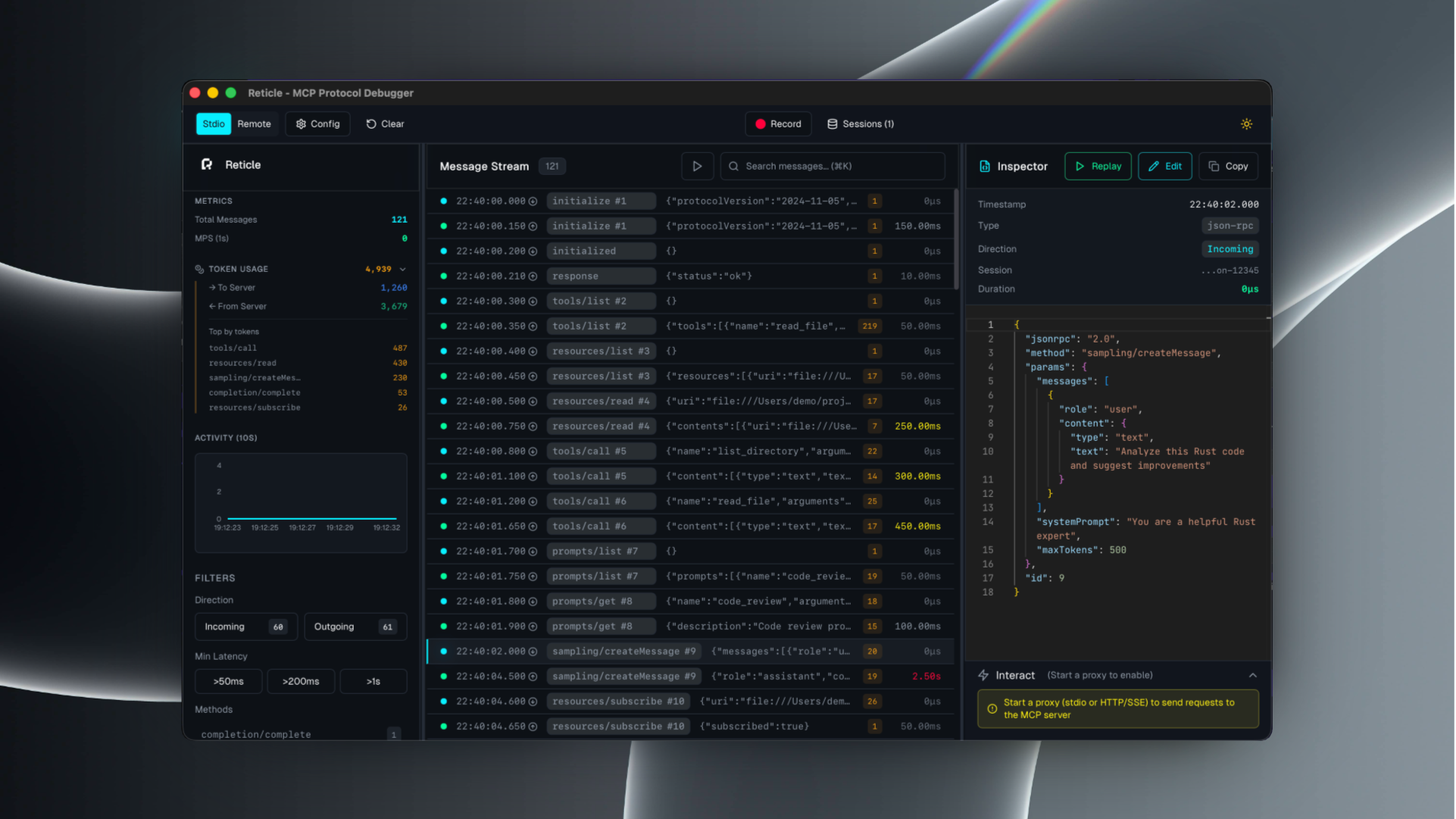
What is Reticle?
Reticle is a proxy + UI for debugging MCP integrations:
- inspect raw JSON-RPC messages (requests / notifications / responses)
- correlate request ↔ response instantly
- profile latency and token estimates
- capture server stderr and crashes
- record sessions and export logs
Supported transports: stdio, Streamable HTTP, WebSocket, HTTP/SSE.
Quick start
1) Install
# npm
npm install -g mcp-reticle

# pip
pip install mcp-reticle

# Homebrew
brew install labterminal/mcp-reticle/mcp-reticle
2) Wrap your MCP server (stdio)
Replace your MCP server command with mcp-reticle run --name <name> -- <command...>.
Example (Claude Desktop-style config):
{
  "mcpServers": {
    "filesystem": {
      "command": "mcp-reticle",
      "args": ["run", "--name", "filesystem", "--", "npx", "-y", "@modelcontextprotocol/server-filesystem", "/Users/me/work"]
    }
  }
}
3) Launch the UI
mcp-reticle ui
Optional: log-only mode (no UI)
mcp-reticle run --log -- npx -y @modelcontextprotocol/server-memory
Optional: proxy an HTTP-based MCP server
mcp-reticle proxy --name api --upstream http://localhost:8080 --listen 3001
Installation
If you prefer building from source:
git clone https://github.com/labterminal/mcp-reticle.git
cd mcp-reticle
just build
Documentation
All guides and deep dives are in the GitHub Wiki:
- Getting started
- CLI reference
- Client configuration
- Troubleshooting
- Architecture
- Security & privacy
- Development
- Exports
CLI overview
| Command | Purpose |
|---|---|
mcp-reticle run | Wrap stdio MCP servers and inspect traffic |
mcp-reticle proxy | Reverse proxy HTTP/SSE/WebSocket transports |
mcp-reticle ui | Launch the desktop UI |
mcp-reticle daemon | Headless telemetry hub |
Full details: CLI reference
Security & privacy
Reticle can capture tool inputs/outputs and server stderr. Treat recordings and exports as sensitive artifacts.
Recommended reading: Security & privacy
Contributing
- Repo guidelines:
CONTRIBUTING.md - Dev setup and commands: Development guide
License
MIT — see LICENSE.