Kubelatch MCP
Communicate with Kubernetes clusters in a secure way, with limited permissions and expiring credentials
दस्तावेज़
Two bad options.
You're developer on shop and you ask your agent “find out why the web pod is failing”. Give it your kubeconfig, and it can do everything you can while the audit shows only you. Or ask an administrator for a bot and wait, which nobody does for a ten-minute task.
Like “Sign in with Google”, for your clusters.
You don't hand over your password: you give a limited permission you can take back.
-
Add kubelatch once
claude mcp add --transport http kubelatch https://kubelatch.example.com/mcp -
Your browser opens
The first time the agent uses it, on kubelatch, where you're already signed in. -
You choose, and authorize
“Let Claude Code act as you?”: your permissions, read-only, for 8 hours. -
It reads, it doesn't break
Pods, logs, events. In a read-only session the cluster turns down any change it tries; if it needs more, it asks withrequest_access. -
Changes wait for you
Give it yourdeveloperrole with “Writes need my approval”, and every change it wants waits for you, with the diff. -
It ends by itself
After 8 hours. Before that, Cut.
Nothing else to install on your laptop. No kubectl, no kubeconfig: the agent talks to kubelatch over MCP, and you authorize it in your browser once per session. It works with the tools kubelatch gives it; for an exec, a port-forward or a logs -f, a person still uses kubectl, with their own credential.
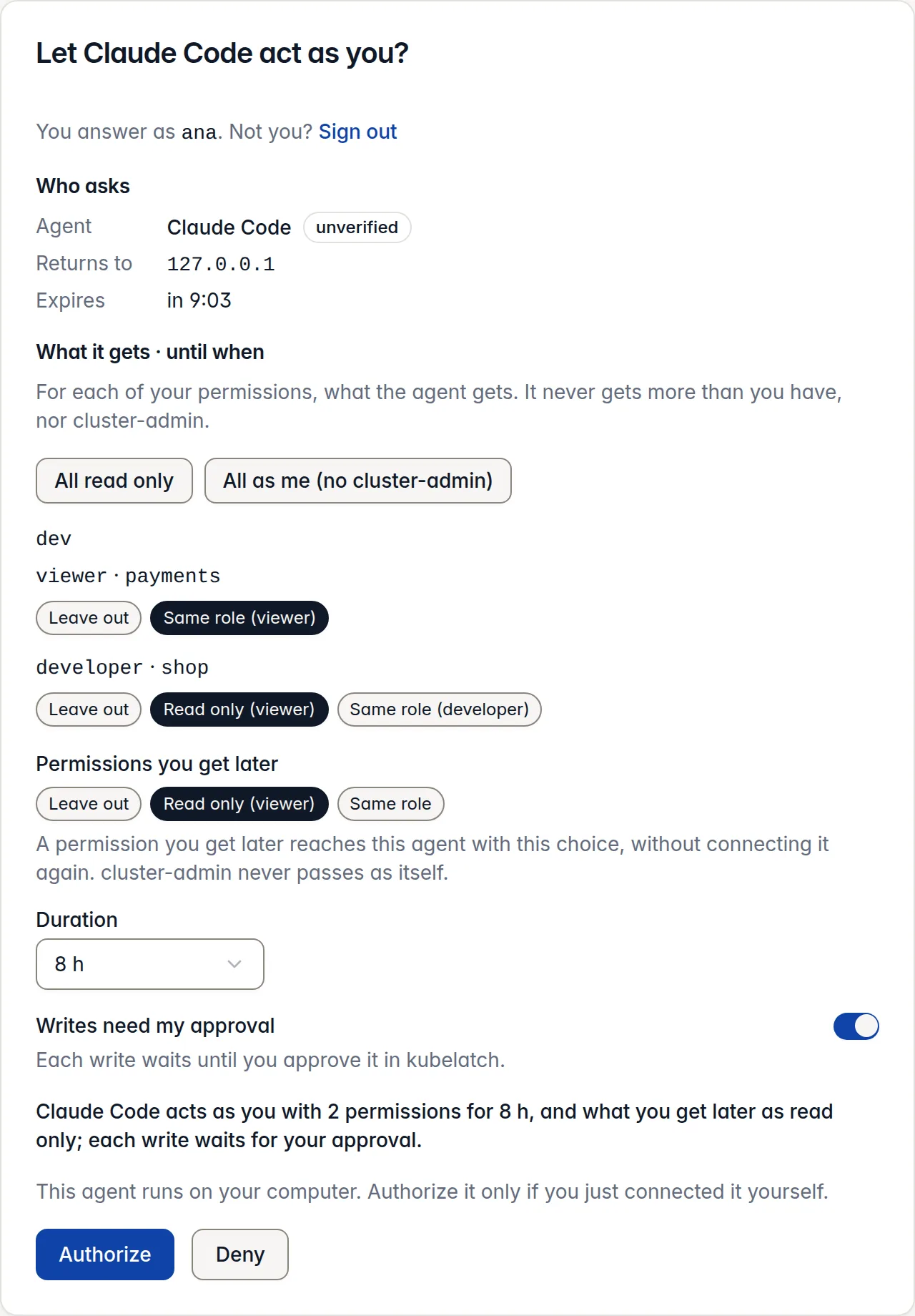
The authorization card: “Let Claude Code act as you?”, with a choice for each of ana’s two permissions (leave out, read only or same role), a duration of 8 hours and “Writes need my approval” on.
What it sees, and what waits for you.
What the agent sees
kubelatch MCP tools
› whoami
identity: user:sergio
session:
  id: 0199c1d0…
  mode: delegated
  expires_at: 2026-10-06T20:04:31Z
on_behalf_of: user:sergio
credential_expires_at: 2026-10-06T13:04:31Z
writes_need_approval: true
permissions:
  - cluster: prod-eu
    role: developer
    scope: shop
    expires_at: 2026-10-06T20:04:31Z
  - cluster: prod-eu
    role: secrets-reader
    scope: shop
    expires_at: 2026-10-06T20:04:31Z
scope "*" is the whole cluster; any other scope is one namespace.
› get_resource secret/db-credentials -n shop
apiVersion: v1
data:
  password: <redacted, 24 bytes>
  username: <redacted, 8 bytes>
kind: Secret
…
› delete_resource pod/web-7f9c-x2kq -n shop
agent.approval_pending: this write waits for a person's approval at
https://kubelatch.example.com/agents/requests/0199c1d2…; once approved,
call the tool again with the same arguments and approval_id 0199c1d2….
It expires at 2026-10-06T12:19:31Z
› approved by sergio, the same call with its approval_id
delete_resource: 200 OK (audit id 0199c1d3…)
- It works as you, with only what you gave it: read-only unless you chose more.
- Secret values stay hidden until it asks for them, and each read is recorded.
- A change waits for a person, who sees the diff before it runs, once.
Connect it in one line
claude mcp add --transport http kubelatch https://kubelatch.example.com/mcp
The first time it uses kubelatch, your browser asks what it may do: your permissions, read-only by default, for 8 hours. Cursor and any MCP client connect the same way, and Claude Code has a plugin that also stops it reaching for kubectl.
Three ways to give an agent access.
| Question | Your kubeconfig to the agent | Bot | Delegated |
|---|---|---|---|
| Who sets it up | You, at once | An administrator | You, at once |
| What the agent can do | Everything you can | What the administrator decides | What you can, cut down; read-only by default |
| What the audit shows | You | The bot | You, through the agent |
| How long it lasts | As long as your credential | Up to 90 days | Hours |
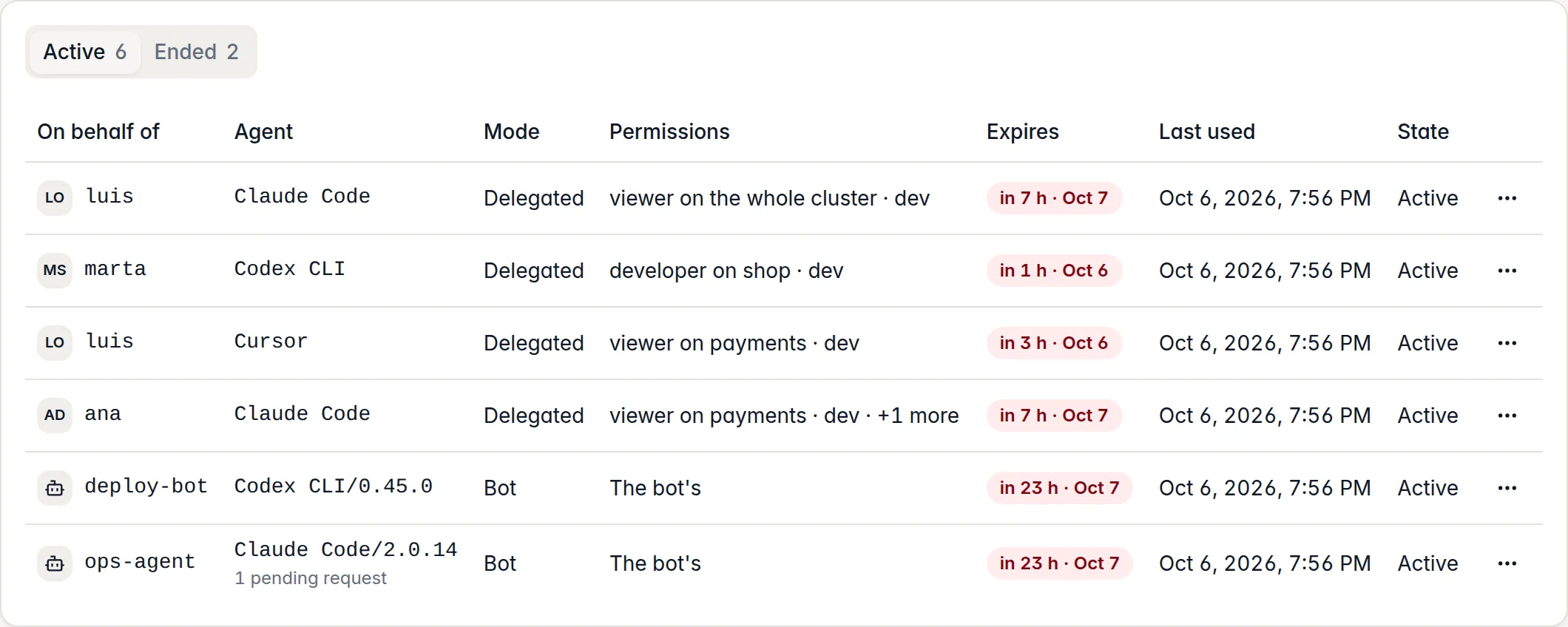
The sessions table of the Agents page: six active sessions of Claude Code, Cursor and Codex CLI, on behalf of luis, marta and ana or as bots, each with its permissions, its expiry and its last use; one pending request.
Two identities that never mix.
You're developer on shop. Your Claude Code, delegated, works as you, read-only. Meanwhile the on-call agent that reviews alerts at night uses the bot ops-agent, viewer on every namespace because an administrator granted it.
| Question | Bot | Delegated |
|---|---|---|
| Who the agent is on the cluster | bot:ops-agent | user:sergio |
| Where its permissions come from | Those an administrator granted the bot | Yours, cut down by you |
| Who decides how much it can do | An administrator | You, up to your own limit |
| If a permission of yours is taken away | It doesn't affect it | The agent loses it at once |
Once per session, and only when it writes.
- The browser opens once per session, like
kubelatch login. - Read-only work asks nothing.
- For a task with several changes, one approval of “developer on shop, 30 minutes” instead of one per change.
kubelatch states its limits: what an agent does through another way into the cluster, and what it does with what it reads. What it does not cover