Google Stitch MCP
Google Stitch के लिए सार्वभौमिक MCP सर्वर। AI एजेंटों को अपने UI डिज़ाइन से कनेक्ट करें।
दस्तावेज़
Stitch MCP



Universal MCP Server for Google Stitch
Build amazing UI/UX designs instantly with AI. Works seamlessly with Cursor, Claude, Antigravity, and any MCP-compatible editor.
Created by Aakash Kargathara.
🚀 How It Works
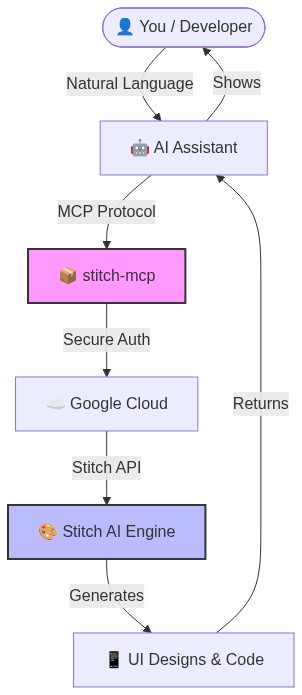
✨ Why this is cool
- Zero Config: Just login once and it works everywhere.
- Universal: Works on Windows, Mac, and Linux.
- Free: Google Stitch API is free to use.
�️ Quick Setup (2 Minutes)
1. Prerequisite: Google Cloud
You need a Google Cloud project with the Stitch API enabled.
# Login to your Google Cloud
gcloud auth login

# Set your project (replace with your actual project ID)
gcloud config set project YOUR_PROJECT_ID
gcloud auth application-default set-quota-project YOUR_PROJECT_ID

# Enable the magic
gcloud beta services mcp enable stitch.googleapis.com
2. Install the Credentials
This gives stitch-mcp permission to talk to Google on your behalf.
gcloud auth application-default login
3. Add to Your AI Editor
Copy and paste this into your MCP config file:
For Claude Desktop:
~/Library/Application Support/Claude/claude_desktop_config.json
For Cursor: Settings > MCP > Add New Server
{
  "mcpServers": {
    "stitch": {
      "command": "npx",
      "args": ["-y", "stitch-mcp"],
      "env": {
         "GOOGLE_CLOUD_PROJECT": "YOUR_PROJECT_ID"
      }
    }
  }
}
🛠️ Available Tools
| Tool Name | What it does |
|---|---|
extract_design_context | 🧠 Scans a screen to extract "Design DNA" (Fonts, Colors, Layouts). Use this to keep style consistent. |
fetch_screen_code | 💾 Downloads the raw HTML/Frontend code of a screen. |
fetch_screen_image | 🖼️ Downloads the high-res screenshot of a screen. |
generate_screen_from_text | ✨ Generates a NEW screen based on your prompt (and context). |
create_project | 📁 Creates a new workspace/project folder. |
list_projects | 📋 Lists all your available Stitch projects. |
list_screens | 📱 Lists all screens within a specific project. |
get_project | 🔍 Retrieves details of a specific project. |
get_screen | ℹ️ Gets metadata for a specific screen. |
💡 Pro Tip: The "Designer Flow"
To generate consistent UI, use this 2-step flow:
- Extract: "Get design context from the Home Screen..."
- Generate: "Using that context, generate a Chat Screen..."
This ensures your new screen matches your existing design system perfectly.
📄 License
Apache 2.0 - Open source and free to use.
Star History
Built with ❤️ by Aakash Kargathara