DESIGN:OS 3D Blender
AI एजेंट्स के लिए मुफ़्त Blender MCP सर्वर, जो 3D पार्ट्स और रेंडर बनाता है
दस्तावेज़
DESIGN:OS 3D Blender Agent (design-os-3d-blender)
Parametric 3D mechanical parts generator, headless Blender Python (bpy) pipeline, and embedded Three.js CAD showcase engine.
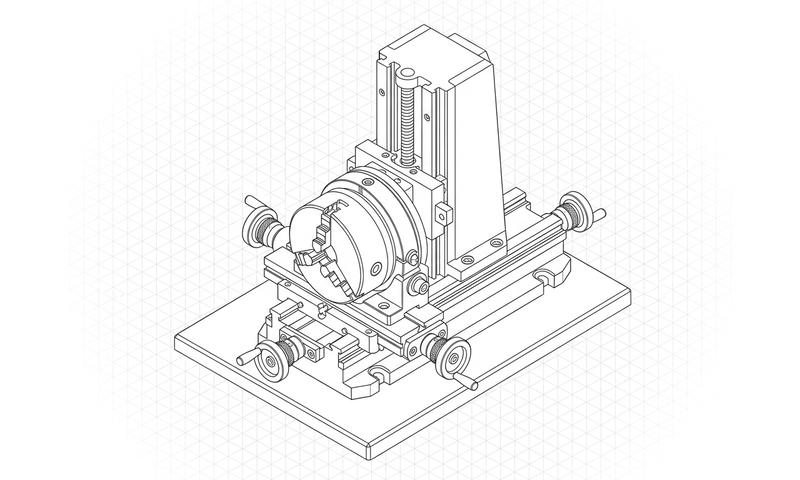
Generate dimensionally accurate gears, enclosures, drone frames, and exploded mechanical assemblies from plain-English specs or JSON parameters, complete with glTF/STL exports and interactive browser inspection.
design-os-3d-blender is a free MCP server (Model Context Protocol, stdio) for Blender. Connect it to Claude Code, Codex, Cursor or any MCP client to model, render and verify parts in Blender 5.2 LTS. Free, nothing sold, source-available under PolyForm Shield 1.0.0.



Quickstart · What it makes · Install · How it works · Commands · Limits
Why this exists
Text-to-3D diffusion models produce melted, non-manifold blobs that cannot be 3D-printed, machined, or cleanly animated in web viewers. design-os-3d-blender drives Blender's Python API (bpy) and Three.js deterministically to produce crisp mechanical geometry and interactive CAD showcases.
| Dimension | Generic AI / Manual Workflow | DESIGN:OS 3D Blender Agent (DESIGN:OS) |
|---|---|---|
| Geometry Quality | Melted AI diffusion meshes with non-manifold holes | Clean parametric bpy booleans, bevels, and precision vertex topology |
| Dimensional Accuracy | Arbitrary unscaled units that fail in slicers | Millimeter-locked parametric dimensions and bounding-box verification |
| Web Inspection | Static screenshots with no way to inspect hidden faces | Embedded Three.js CAD viewer with orbit controls, wireframe, and exploded scrub |
| Reproducibility | Unrepeatable random seeds | Git-tracked Python generator scripts and declarative JSON part specs |
| Privacy & Telemetry | Opaque cloud telemetry or unverified third-party APIs | Zero telemetry — 100% local execution (PRIVACY.md audited) |
Quickstart
1. Install the plugin or CLI
In Claude Code:
/plugin marketplace add jangtrinh/design-os-3d-blender
/plugin install design-os-3d-blender@design-os-3d-blender
Or from your terminal (Codex, Gemini CLI, Antigravity, OpenCode, or standalone CLI):
git clone https://github.com/jangtrinh/design-os-3d-blender.git
cd design-os-3d-blender
python3 scripts/self_check.py
2. Ask in plain English
Open your project in your AI coding agent and describe what you need:
"Generate a parametric 24-tooth helical gear and mounting bracket in headless Blender and export glTF + STL artifacts."
"Build an interactive Three.js CAD viewer page with exploded-view scrubbing, wireframe toggle, and orthographic camera presets."
"Audit the exported mesh topology for non-manifold edges, zero-area faces, and bounding-box dimensional tolerances."
3. Verify your setup
python3 scripts/self_check.py
What it makes
Every deliverable produced by design-os-3d-blender is backed by a deterministic verification gate rather than freehand AI guesswork.
Prompt: "Generate a parametric 24-tooth helical gear and mounting bracket in headless Blender and export glTF + STL artifacts."
| Deliverable / Mode | Best for | Output Format | Verification Gate |
|---|---|---|---|
Parametric bpy Part Scripts | Reproducible headless Blender generation for brackets, gears, and housings | Python (.py) + JSON spec | Zero non-manifold edges |
| Print & Web 3D Assets | Exporting production meshes for 3D printing and real-time web rendering | .glb / .gltf / .stl / .obj | Bounding-box & file integrity check |
| Three.js CAD Showcase | Interactive browser viewer with material switches and exploded assembly scrub | Self-contained HTML + Three.js | 60fps WebGL render check |
Installation
Choose the setup that matches your AI coding agent. Every option installs the same canonical skill (skills/design-os-3d-blender/SKILL.md) and /doctor diagnostic suite.
Claude Code
Run these two commands inside Claude Code:
/plugin marketplace add jangtrinh/design-os-3d-blender
/plugin install design-os-3d-blender@design-os-3d-blender
OpenAI Codex
Install to your personal Codex skills directory:
git clone https://github.com/jangtrinh/design-os-3d-blender.git /tmp/design-os-3d-blender
mkdir -p ~/.codex/skills/design-os-3d-blender ~/.codex/prompts
cp -R /tmp/design-os-3d-blender/skills/design-os-3d-blender/* ~/.codex/skills/design-os-3d-blender/
cp /tmp/design-os-3d-blender/prompts/doctor.md ~/.codex/prompts/design-os-3d-blender-doctor.md
rm -rf /tmp/design-os-3d-blender
Gemini CLI & Google Antigravity
git clone https://github.com/jangtrinh/design-os-3d-blender.git /tmp/design-os-3d-blender
mkdir -p ~/.gemini/skills/design-os-3d-blender
cp -R /tmp/design-os-3d-blender/skills/design-os-3d-blender/* ~/.gemini/skills/design-os-3d-blender/
rm -rf /tmp/design-os-3d-blender
OpenCode, Cursor, Windsurf & Other Agent Harnesses
git clone https://github.com/jangtrinh/design-os-3d-blender.git /tmp/design-os-3d-blender
mkdir -p ~/.agents/skills/design-os-3d-blender
cp -R /tmp/design-os-3d-blender/skills/design-os-3d-blender/* ~/.agents/skills/design-os-3d-blender/
rm -rf /tmp/design-os-3d-blender
Verify or uninstall
Verify installation:
python3 scripts/self_check.py
Or run /doctor inside Claude Code / Codex to inspect installed skill paths, plugin manifests, and gate health.
Uninstall:
rm -rf ~/.claude/skills/design-os-3d-blender ~/.codex/skills/design-os-3d-blender ~/.gemini/skills/design-os-3d-blender ~/.agents/skills/design-os-3d-blender
Usage & Prompt Cookbook
Once installed, skills/design-os-3d-blender/SKILL.md activates automatically when your prompt matches its domain triggers. Browse docs/cookbook.md for copy-paste prompt recipes.
Generate & Scaffold
"Generate a parametric 24-tooth helical gear and mounting bracket in headless Blender and export glTF + STL artifacts."
Audit & Verify
"Build an interactive Three.js CAD viewer page with exploded-view scrubbing, wireframe toggle, and orthographic camera presets."
Export & Automate
"Audit the exported mesh topology for non-manifold edges, zero-area faces, and bounding-box dimensional tolerances."
Commands & Diagnostics
| Command | Environment | What it does |
|---|---|---|
/doctor | Claude Code / Codex | Read-only diagnostic check of installed skill paths, plugin manifests, and runtime prerequisites |
python3 scripts/self_check.py | Terminal / CI | Deterministic offline verification of manifests, skill contracts, and governance files |
python3 scripts/self_check.py | Terminal / CI | Verify 3D Blender skill contracts, CAD showcase assets, and repository delivery manifests |
How it works
- Intent Routing — Your AI agent matches your request against
skills/design-os-3d-blender/SKILL.mdfrontmatter triggers. - Progressive Context Loading — Only the entry-point
SKILL.mdrouter loads initially; detailed recipes and scripts load on demand. - Deterministic Execution — Domain scripts and contracts execute locally with reproducible inputs and outputs.
- Gate Verification —
scripts/self_check.pyand domain verifiers (python3 scripts/self_check.py) validate the artifact before completion. - Zero-Telemetry Delivery — Verified files are written directly to your workspace with zero external network calls.
User Prompt / CLI Invocation
            │
            ▼
┌───────────────────────────────────────────────┐
│ skills/design-os-3d-blender/SKILL.md
│ Progressive disclosure router & hard rules    │
└───────────┬───────────────────────────────────┘
            │ loads on demand
            ▼
┌───────────────────────────────────────────────┐
│ python3 scripts/self_check.py
│ Deterministic build & contract enforcement    │
└───────────┬───────────────────────────────────┘
            │ verifies
            ▼
┌───────────────────────────────────────────────┐
│ python3 scripts/self_check.py + /doctor       │
│ Zero-telemetry local verification gate        │
└───────────────────────────────────────────────┘
What loads when
design-os-3d-blender uses progressive context disclosure so your agent's context window stays fast and focused:
| File | Loaded when |
|---|---|
skills/design-os-3d-blender/SKILL.md | Always (~100–150 lines) — routing rules, triggers, and execution workflow |
docs/cookbook.md | When selecting multi-step prompt recipes or domain patterns |
commands/doctor.md / prompts/doctor.md | Only when running /doctor diagnostics |
llms.txt | When indexed by AI answer engines, RAG pipelines, or repo crawlers |
File structure
design-os-3d-blender/
├── .claude-plugin/
│   ├── plugin.json                 # Claude Code plugin manifest
│   └── marketplace.json            # Claude Code marketplace catalog
├── .codex-plugin/
│   └── plugin.json                 # OpenAI Codex plugin & interface manifest
├── .agents/
│   └── plugins/marketplace.json    # Cross-agent local plugin registry
├── .factory-plugin/
│   ├── plugin.json                 # Factory / Droid plugin manifest
│   └── marketplace.json            # Factory marketplace metadata
├── skills/
│   └── design-os-3d-blender/
│       └── SKILL.md                # Canonical agent skill entrypoint
├── commands/
│   └── doctor.md                   # /doctor diagnostic slash command
├── prompts/
│   └── doctor.md                   # Codex diagnostic prompt mirror
├── scripts/
│   └── self_check.py               # Deterministic repository & skill self-check
├── docs/
│   ├── cookbook.md                 # Copy-paste prompt recipes by job
│   └── llms.txt                    # GEO / LLM discovery index
├── PRIVACY.md                      # Zero-telemetry & local-first privacy commitment
├── SECURITY.md                     # Vulnerability disclosure & security policy
├── CONTRIBUTING.md                 # Contribution workflow & verification rules
├── CODE_OF_CONDUCT.md              # Contributor Covenant code of conduct
├── CHANGELOG.md                    # Release history
├── llms.txt                        # Root LLM indexing manifest
├── LICENSE                         # PolyForm Shield 1.0.0
└── README.md
Quality bar & Limitations
It's working if...
python3 scripts/self_check.pyprintsok: design-os-3d-blender self-check passed (design-os-3d-blender)and exits0.python3 scripts/self_check.pypasses with zero contract or test regressions.- Your AI coding agent loads
skills/design-os-3d-blender/SKILL.mdautomatically when given any prompt fromdocs/cookbook.md. - Network traffic during execution remains zero (guaranteed by
PRIVACY.md).
When not to use
- Sheet-metal or paperboard folding dielines where 2D crease patterns govern topology (use
design-os-origami). - Organic character sculpting or AAA rigged game characters requiring manual ZBrush artistry.
- 2D vector UI motion walkthroughs (use
design-os-svg-animation).
DESIGN:OS Ecosystem
design-os-3d-blender is one of the 13 source-available engines in the DESIGN:OS ecosystem:
Contributing, Governance & License
- Contributing: See
CONTRIBUTING.mdfor pull request guidelines and verification gates (python3 scripts/self_check.py). - Code of Conduct: Governed by
CODE_OF_CONDUCT.md. - Security & Privacy: Zero telemetry — see
SECURITY.mdandPRIVACY.md. - Changelog & LLM Index: Track releases in
CHANGELOG.mdand machine-readable index inllms.txt. - License: PolyForm Shield 1.0.0 © Jang Trinh. Free to use and modify, including for paid client work; you may not resell it or build a competing product from it.
If design-os-3d-blender saves you time, a star on GitHub helps other engineers and AI agents find it.
