Imagen3-MCP
Google के Imagen 3.0 मॉडल का उपयोग करके Gemini API के माध्यम से चित्र बनाएँ।
GitHub
71
इस MCP को आज़माएँप्रायोजितदस्तावेज़
Imagen3-MCP
基于 Google 的 Imagen 3.0 的图像生成工具,通过 MCP(Model Control Protocol)提供服务。
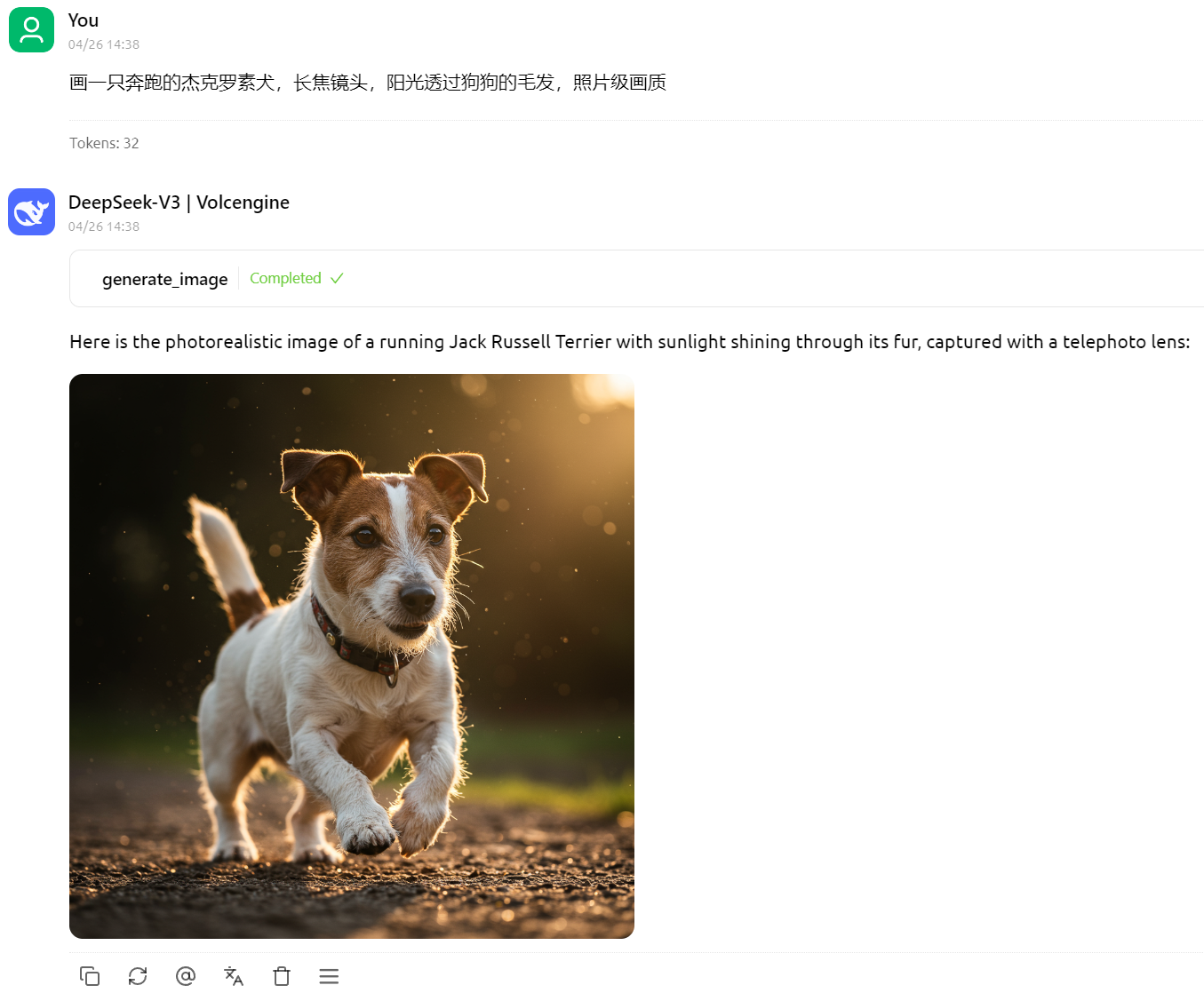
效果
画一只奔跑的杰克罗素犬,长焦镜头,阳光透过狗狗的毛发,照片级画质
画一个科技感十足的苹果

安装要求
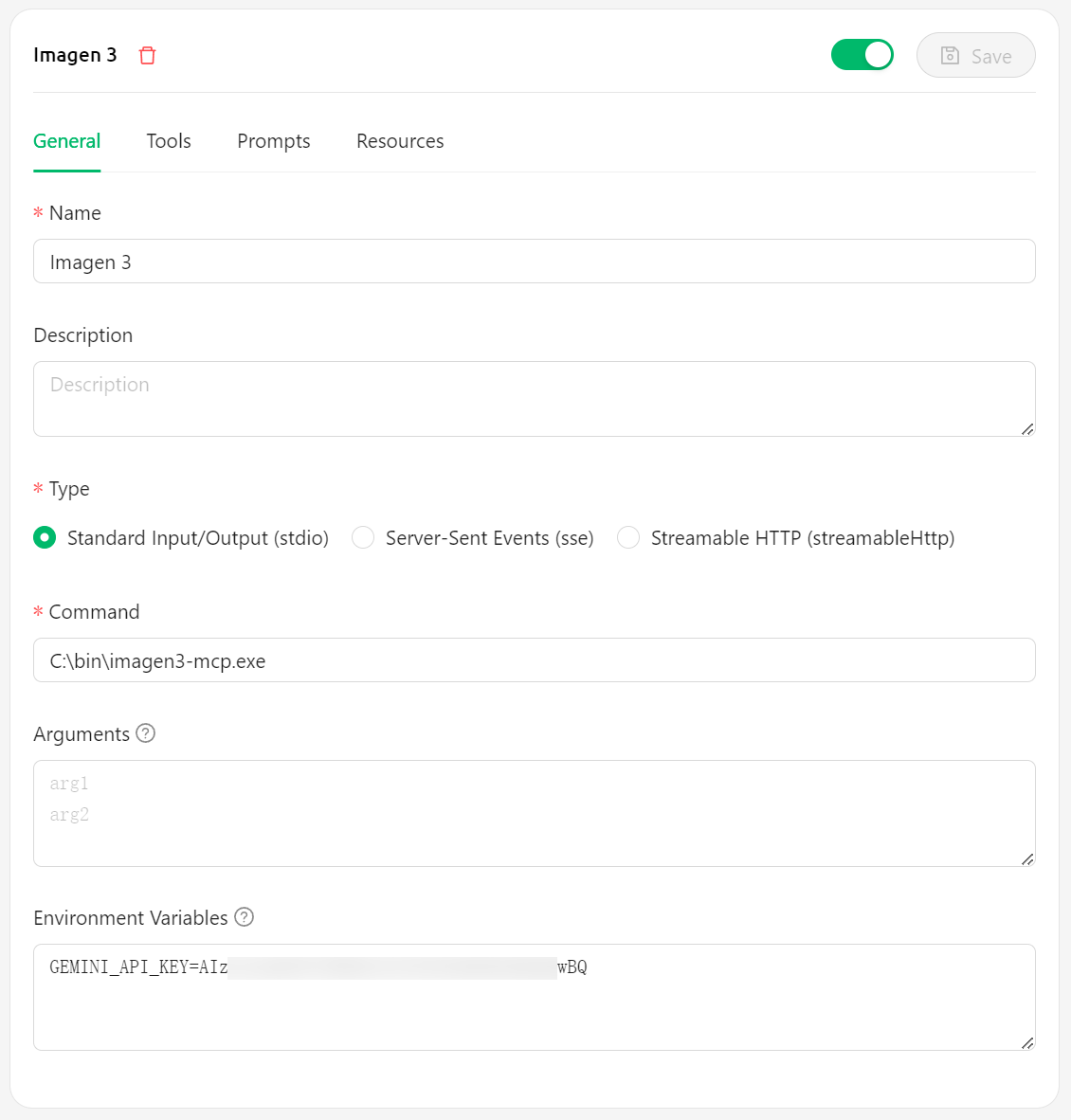
安装步骤——Cherry Studio
- 从 GitHub Releases 下载最新版本的可执行文件
- 将下载的可执行文件放置在系统中的任意位置,例如
C:\bin\imagen3-mcp.exe - 在 Cherry Studio 中配置:
- Command 字段填写可执行文件路径,例如
C:\bin\imagen3-mcp.exe - 环境变量
GEMINI_API_KEY中填写你的 Gemini API 密钥 - [可选] 环境变量
BASE_URL中填写代理地址,例如https://lingxi-proxy.hamflx.dev/api/provider/google(这个地址可以解决 GFW 的问题,但是解决不了 Google 对 IP 的限制问题,因此还是得挂梯子)。 - [可选] 环境变量
SERVER_LISTEN_ADDR:设置服务器监听的 IP 地址(默认为127.0.0.1)。 - [可选] 环境变量
SERVER_PORT:设置服务器监听的端口和图片 URL 使用的端口(默认为9981)。 - [可选] 环境变量
IMAGE_RESOURCE_SERVER_ADDR:设置图片 URL 中使用的服务器地址(默认为127.0.0.1)。这在服务器运行在容器或远程机器上时很有用。
- Command 字段填写可执行文件路径,例如
安装步骤——Cursor
{
  "mcpServers": {
    "imagen3": {
      "command": "C:\\bin\\imagen3-mcp.exe",
      "env": {
        "GEMINI_API_KEY": "<GEMINI_API_KEY>"
        // Optional environment variables:
        // "BASE_URL": "<PROXY_URL>",
        // "SERVER_LISTEN_ADDR": "0.0.0.0", // Example: Listen on all interfaces
        // "SERVER_PORT": "9981",
        // "IMAGE_RESOURCE_SERVER_ADDR": "your.domain.com" // Example: Use a domain name for image URLs
      }
    }
  }
}
许可证
MIT
Imagen3-MCP (English)
An image generation tool based on Google's Imagen 3.0, providing services through MCP (Model Control Protocol).
Examples
A running Jack Russell Terrier, telephoto lens, sunlight filtering through the dog's fur, photorealistic quality
A high-tech apple
Requirements
- Valid Google Gemini API key
Installation Steps—Cherry Studio
- Download the latest executable from GitHub Releases
- Place the downloaded executable anywhere in your system, e.g.,
C:\bin\imagen3-mcp.exe - Configure in Cherry Studio:
- Fill in the Command field with the executable path, e.g.,
C:\bin\imagen3-mcp.exe - Enter your Gemini API key in the
GEMINI_API_KEYenvironment variable - [Optional] Enter a proxy URL in the
BASE_URLenvironment variable, e.g.,https://your-proxy.com. - [Optional] Set the
SERVER_LISTEN_ADDRenvironment variable: The IP address the server listens on (defaults to127.0.0.1). - [Optional] Set the
SERVER_PORTenvironment variable: The port the server listens on and uses for image URLs (defaults to9981). - [Optional] Set the
IMAGE_RESOURCE_SERVER_ADDRenvironment variable: The server address used in the image URLs (defaults to127.0.0.1). Useful if the server runs in a container or remote machine.
- Fill in the Command field with the executable path, e.g.,
Installation Steps—Cursor
{
  "mcpServers": {
    "imagen3": {
      "command": "C:\\bin\\imagen3-mcp.exe",
      "env": {
        "GEMINI_API_KEY": "<GEMINI_API_KEY>"
        // Optional environment variables:
        // "BASE_URL": "<PROXY_URL>",
        // "SERVER_LISTEN_ADDR": "0.0.0.0", // Example: Listen on all interfaces
        // "SERVER_PORT": "9981",
        // "IMAGE_RESOURCE_SERVER_ADDR": "your.domain.com" // Example: Use a domain name for image URLs
      }
    }
  }
}
License
MIT