Heimdall MCP
पारदर्शी MCP प्रॉक्सी जिसमें OpenTelemetry ट्रेसिंग है। किसी भी MCP सर्वर को लपेटें, किसी भी OTel बैकएंड · SQLite · Postgres · MySQL पर ट्रेस को स्थायी रखें। कोई कोड बदलाव की आवश्यकता नहीं है।
दस्तावेज़
@cardor/heimdall-mcp
Transparent proxy for any MCP server. Intercepts all JSON-RPC messages, measures latency, stores traces in a configurable database, and enforces per-server allow/deny policies — without touching the original server.
Visit the website to view a full explanation, examples, and other tools!






Table of Contents
- @cardor/heimdall-mcp
How it works
flowchart LR
    A["MCP Client\n(Claude Desktop / OpenCode / Cursor)"]

    subgraph proxy["heimdall-mcp"]
        B["TelemetryInterceptor"]
        P["PolicyInterceptor"]
        C["ForwardInterceptor"]
        D[("SQLite\nPostgres\nMySQL")]
        B --> P
        P --> C
        B -->|"saves span"| D
    end

    S["Real MCP server\n(subprocess / HTTP / SSE)"]

    A -->|"stdio"| B
    C -->|"stdio · http · sse"| S
    S -->|"response"| C
    C -->|"response"| A
The proxy always exposes stdio to the MCP client and speaks the correct transport to the real server. Every request/response pair is converted into a span with timing, attributes, and the input/output body.
Installation
npm install -g @cardor/heimdall-mcp
# or as a project dependency
npm install @cardor/heimdall-mcp
Policy config
Drop a heimdall.config.ts in your project root and define exactly which tools, prompts, and resources each MCP server is allowed to expose to the agent — at the proxy layer, without touching the server code.
Config files
| Scope | Path | Purpose |
|---|---|---|
| Local | {project-root}/heimdall.config.{ts,js,mjs,cjs,json} | Per-repo rules |
| Global | ~/.config/heimdall/heimdall.config.{ts,js,mjs,cjs,json} | User/org-wide rules |
Both are optional. If neither exists, the proxy stays fully transparent (backward compatible).
Config format
// heimdall.config.ts
import type { HeimdallConfig } from '@cardor/heimdall-mcp';

export default {
  // default: applies to any server without an explicit entry
  default: {
    tools: { allow: ['*'], deny: [] },
  },

  // servers: keyed by --server-name (or serverInfo.name from initialize response)
  servers: {
    filesystem: {
      tools: {
        allow: ['read_file', 'list_directory', 'search_files'],
        deny:  ['write_file', 'create_file', 'delete_file', 'move_file'],
      },
      resources: {
        allow: ['*'],
        deny:  ['file:///etc/*', 'file:///root/*'],
      },
    },
    database: {
      tools: {
        allow: ['query', 'describe_table', 'list_tables'],
        deny:  ['execute', 'drop_table', 'truncate'],
      },
    },
  },
} satisfies HeimdallConfig;
TypeScript configs are loaded via jiti without pre-compilation. Also works as .js, .mjs, .cjs, or .json.
Merge strategy
When both local and global configs exist, they merge with security-first semantics:
| Rule | Behavior |
|---|---|
| Deny → union | Denied by either = denied. Global deny cannot be overridden locally. |
| Allow → intersection | Must pass both. * or [] means "defer to the other side." |
| Deny beats allow | Within any single config, deny always wins. |
The global config enforces a floor the team can't accidentally loosen. Local configs can only add more restrictions, never fewer.
Argument policies
toolPolicies adds a second enforcement layer on top of name-level tools rules. Instead of just deciding which tools are callable, you can constrain what arguments are allowed on each call.
// heimdall.config.ts
export default {
  servers: {
    filesystem: {
      tools: { allow: ['read_file', 'list_directory'] },
      toolPolicies: {
        // '*' applies to every tool (merged first; tool-specific entries override)
        '*': {
          args: {
            path: { isPath: true, deny_pattern: ['\\.env$', '\\.pem$'] },
          },
        },
        read_file: {
          args: {
            // scope path to the current working directory
            path: { isPath: true, allow_pattern: './' },
            // allow only safe encodings
            encoding: { allow_pattern: ['utf-8', 'utf8', 'ascii'] },
          },
        },
      },
    },
  },
} satisfies HeimdallConfig;
ArgConstraint fields
| Field | Type | Default | Description |
|---|---|---|---|
isPath | boolean | false | Enables path-aware matching (containment check) instead of regex |
allow_pattern | string | string[] | — | Arg must match at least one pattern to pass |
deny_pattern | string | string[] | — | Arg is blocked if it matches any pattern; deny wins over allow |
array_mode | 'all' | 'any' | 'all' | For array-typed args: require all items to pass (all) or at least one (any) |
case_sensitive | boolean | true | Regex flag; not applied to path-root matching |
warn_only | boolean | false | Record the violation in the OTel span without blocking the call |
Path scoping with isPath: true
When isPath: true, patterns that look like directory roots are treated as containment checks rather than regex expressions:
| Pattern | Meaning |
|---|---|
"./" or "." | Arg must resolve within process.cwd() |
"/some/dir" | Arg must resolve within /some/dir |
"~" / "${HOME}/projects" | Resolved to homedir |
"${CWD}/data" | Resolved to cwd + /data |
The resolver uses path.resolve + fs.realpathSync to prevent ../ traversal and symlink escapes. Patterns that don't look like directory roots (e.g. "^/etc/.*") fall back to regex matching.
warn_only mode
Useful for gradual rollout: set warn_only: true to observe violations without blocking. The call is forwarded and the following attributes appear in the OTel span:
policy.arg_warning = true
policy.arg_warning_field = "path"
policy.arg_warning_message = "Tool arg 'path' is denied by policy"
Switch to warn_only: false (the default) when you're ready to enforce.
Dot-notation for nested args
Use dot notation to constrain fields inside nested parameter objects:
toolPolicies: {
  my_tool: {
    args: {
      'options.target': { isPath: true, allow_pattern: './' },
    },
  },
}
Resource locks
Prevent concurrent tools/call invocations from racing on the same resource (e.g. two agents writing the same file at once). Configure a locks block per server, keyed by tool name.
Use cases
Concrete scenarios where resource locks solve a real coordination problem:
- Two AI coding agents editing the same file concurrently. Two agent sessions (e.g. two Claude Code instances, or an MCP filesystem server invoked by multiple agents) running in parallel against the same repo can both decide to write the same file at the same time. Without a lock, the second write silently clobbers the first agent's changes. Locking on the file-path argument (
resource: 'path'orresource: 'file_path') serializes those calls — the second call is rejected (or, withonConflict: 'warn', forwarded with a warning) until the first completes or the lock's TTL expires. - Serializing a database migration tool across parallel sessions. A
run_migrationtool exposed through an MCP database server is dangerous to run concurrently — two overlapping migrations against the same database can corrupt state. Locking on a literal resource key (resource: 'db-migration', not tied to any particular argument) ensures only one migration call is in flight at a time, regardless of which session or agent triggered it. - Avoiding duplicate/racing calls to a rate-limited external API. A tool that calls a third-party API with a strict rate limit (e.g. payment or search APIs) can be locked on a stable key (the tool name, or an argument like
query) so near-simultaneous duplicate calls from separate agent turns don't multiply API usage or trip the provider's rate limiter. - Coordinating across multiple proxy instances, not just one process. With a shared Postgres/MySQL lock store (see below) instead of the default local SQLite file, resource locks coordinate across machines — useful for fleets of agents or proxy instances sharing the same backing infrastructure.
// heimdall.config.ts
export default {
  servers: {
    filesystem: {
      tools: { allow: ['read_file', 'write_file'] },
      locks: {
        write_file: { resource: 'path', ttl: 30_000 },
        run_migration: { resource: 'db-migration', onConflict: 'warn' },
      },
    },
  },
} satisfies HeimdallConfig;
LockRule fields
| Field | Type | Default | Description |
|---|---|---|---|
resource | string | — | Name of a tool-call argument whose value is used as the lock key (e.g. resource: 'path' locks on arguments.path), or a literal resource key (e.g. resource: 'db-migration') if no argument by that name exists. Falls back to the tool name itself when omitted. Path-like values are canonicalized automatically (see below). |
ttl | number | 30000 | Lock time-to-live in milliseconds. Acts as a backstop so a crashed/hung holder can't keep a resource locked forever. |
onConflict | 'reject' | 'warn' | 'reject' | reject blocks the call and returns a RESOURCE_LOCKED JSON-RPC error (default). warn forwards the call anyway and attaches lock.* warning metadata to the OTel span instead of blocking. |
Semantics: write mode, TTL, and read mode
- Write mode is exclusive. Every lock acquired by
LockInterceptoris a'write'lock: at most one holder can hold a given resource key at a time, regardless of whether the underlying call is conceptually a read or a write. There's no separate shared/concurrent mode — two calls that both just need to read the same resource still serialize against each other if they share a lock rule. 'read'mode exists as a type, not as a feature. TheLockStoreinterface definesLockMode = 'read' | 'write'at the storage layer, butLockInterceptorcurrently hardcodes'write'on everyacquire()call, andLockRuleSchemahas nomodefield to select it fromheimdall.config.ts. Don't rely on'read'mode for anything — it's not configurable or reachable from user config yet.- What TTL expiry means in practice.
ttlis not a per-call timeout — it's a backstop for stuck holders. If the process holding a lock crashes, hangs, or is killed before it releases the lock, the lock would otherwise block that resource forever. Oncettlmilliseconds pass since acquisition, the lock is treated as expired and a new caller can acquire the same resource, even though the original holder never explicitly released it. Release is idempotent, so if the original (crashed) holder later callsrelease()after its lock has already expired and been reacquired by someone else, that stale release is a silent no-op — it does not release the new holder's lock.
Status: write-mode (exclusive) locking is enforced on tools/call — LockInterceptor acquires a lock before forwarding, releases it on completion or error, and is backed by a LockStore. Resource keys that look like filesystem paths (absolute, ~, ./, ../, or a drive letter) are canonicalized — expanded, resolved to an absolute path, and symlinks followed — so the same real file is locked consistently no matter how it's referenced (relative path, ~, symlink, or a different project directory). Not yet implemented: read-mode locking (every lock is currently acquired in exclusive 'write' mode; there is no mode field in LockRuleSchema yet — see Limitations).
By default the lock store is a local SQLite file at ~/.config/heimdall/locks.db — zero configuration required. Postgres and MySQL backends are also available for multi-machine lock coordination (e.g. multiple proxy instances sharing the same resource locks), via --lock-store:
heimdall-mcp --store sqlite://./traces.db --lock-store postgres://user:pass@host/db -- node server.js
heimdall-mcp --store sqlite://./traces.db --lock-store mysql://user:pass@host/db -- node server.js
Host policies
servers and default configure MCP servers routed through the proxy's tools/call pipeline. hosts is a separate, sibling top-level field for configuring lock policy on host-native tools — tools built into the coding agent itself (e.g. Claude Code's Write/Edit, or OpenCode's/Codex's equivalents) that are not MCP servers and are not intercepted by the JSON-RPC proxy. It is keyed by host name, and each host's locks block uses the exact same LockRule shape (resource/ttl/onConflict) documented above.
// heimdall.config.ts
export default {
  hosts: {
    'claude-code': {
      locks: {
        Write: { resource: 'file_path', ttl: 30_000 },
        Edit: { resource: 'file_path', ttl: 30_000 },
        MultiEdit: { resource: 'file_path', ttl: 30_000 },
        NotebookEdit: { resource: 'file_path', ttl: 30_000 },
      },
    },
  },
} satisfies HeimdallConfig;
HostPolicy fields
| Field | Type | Default | Description |
|---|---|---|---|
locks | Record<string, LockRule> | — | Same shape as a server's locks block, keyed by native tool name (e.g. Write, Edit). See LockRule fields above. |
@cardor/heimdall-mcp exports CLAUDE_CODE_DEFAULT_HOST_POLICY, a ready-made HostPolicy covering Claude Code's file-mutating native tools — Write, Edit, MultiEdit, and NotebookEdit — each locking on a file_path argument with a 30s TTL.
Not yet implemented: Bash is deliberately excluded from CLAUDE_CODE_DEFAULT_HOST_POLICY and has no recommended lock rule. Bash's arbitrary shell commands have no single stable "resource" argument to lock on — a command could touch zero, one, or many files — so locking it would be either meaningless (no resource key to extract) or dangerously coarse (serializing all Bash calls globally, unrelated work included).
Status: config loading, merging, and enforcement via a real Claude Code PreToolUse hook script. The hosts field, HostPolicySchema, and CLAUDE_CODE_DEFAULT_HOST_POLICY are defined, validated, and merged (global config's hosts and local config's hosts are combined per host key, with local's locks for a given host winning entirely over global's when both set it — no field-level union, matching default/servers locks semantics). If neither config sets hosts['claude-code'], CLAUDE_CODE_DEFAULT_HOST_POLICY is applied automatically as a baseline; any user-supplied hosts['claude-code'] value (in either config) replaces the default entirely.
Claude Code PreToolUse hook
bin/hooks/claude-pretooluse.js is a real, working PreToolUse hook script for Claude Code. On every invocation it reads tool_name/tool_input from stdin, reloads heimdall.config.* fresh from disk (local + global, merged — never cached), matches the tool against hosts['claude-code'].locks, resolves the lock resource from the matched rule's resource argument (canonicalizing filesystem paths the same way LockRule resource resolution does elsewhere in this doc), and attempts to acquire an exclusive lock against the same default SQLite lock store used by the proxy (~/.config/heimdall/locks.db). If the lock is free, the call is allowed. If it's held by another holder, the call is denied with a human-readable reason. The hook always exits 0 and fails open (silently allows) on any unexpected error — a bug in the hook must never brick a Claude Code session.
For the full PreToolUse hook contract investigation and unresolved edge cases behind this implementation, see SPIKE_CLAUDE_HOOKS.md.
Recommended: run heimdall-mcp init --hooks claude-code to register this hook automatically:
heimdall-mcp init --hooks claude-code
This reads ~/.claude/settings.json (creating it if it doesn't exist), resolves the absolute path to the installed package's bin/hooks/claude-pretooluse.js, and appends a PreToolUse entry for it — without touching any other hooks.* entries or unrelated top-level settings keys. It's idempotent: running it again when the hook is already registered prints a confirmation and makes no changes, instead of adding a duplicate entry. Written via an atomic temp-file-then-rename, and it never blind-overwrites the file.
The manual, hand-edited version is still supported and useful for troubleshooting or understanding exactly what gets written — it's the same shape init --hooks claude-code produces. Add it to PreToolUse in .claude/settings.json (or .claude/settings.local.json):
{
  "hooks": {
    "PreToolUse": [
      {
        "matcher": "Write|Edit|MultiEdit|NotebookEdit",
        "hooks": [
          { "type": "command", "command": "node /absolute/path/to/node_modules/@cardor/heimdall-mcp/bin/hooks/claude-pretooluse.js" }
        ]
      }
    ]
  }
}
Not yet implemented:
- A
PostToolUsecompanion hook to release the lock once the tool call completes. Locks acquired by this hook are released only via TTL expiration (default 30s, or the rule's configuredttl), not immediately after the tool finishes — a known limitation, not a bug.
OpenCode tool.execute.before plugin
src/plugins/opencode-heimdall.ts (compiled to dist/plugins/opencode-heimdall.js, re-exported by bin/plugins/opencode-heimdall.js) is an OpenCode plugin implementing the tool.execute.before hook, following the same config-loading, host-matching, and lock-acquisition logic as the Claude Code hook above — but matched against hosts['opencode'] instead of hosts['claude-code']. There is no built-in default policy for OpenCode yet (no OPENCODE_DEFAULT_HOST_POLICY equivalent to CLAUDE_CODE_DEFAULT_HOST_POLICY), so this plugin allows every tool call until you explicitly configure hosts.opencode.locks yourself, e.g.:
// heimdall.config.ts
export default {
  hosts: {
    opencode: {
      locks: {
        write: { resource: 'filePath', ttl: 30_000 },
      },
    },
  },
} satisfies HeimdallConfig;
For the full tool.execute.before contract investigation, deny-mechanism verification method, and unresolved open questions behind this implementation, see SPIKE_OPENCODE_HOOKS.md.
Unlike Claude Code's hook (a separate process spawned per tool call, communicating over stdin/stdout), OpenCode plugins are resolved and run in-process — OpenCode itself import()s the plugin module and calls its exported factory function once at startup; there is no subprocess, no stdin/stdout, and the resulting hooks stay registered for the whole session.
Recommended: run heimdall-mcp init --hooks opencode to register this plugin automatically:
heimdall-mcp init --hooks opencode
This reads ~/.config/opencode/opencode.jsonc (creating it if it doesn't exist), resolves the absolute path to the installed package's bin/plugins/opencode-heimdall.js, and appends it to the top-level plugin array — without touching any other keys. It's idempotent: running it again when the plugin is already registered prints a confirmation and makes no changes, instead of adding a duplicate entry. Written via an atomic temp-file-then-rename, and it never blind-overwrites the file.
opencode.jsonc is genuine JSONC — real configs can and do contain // comments and trailing commas. This installer uses jsonc-parser (the same library VS Code uses internally to edit settings.json) to compute a surgical text edit that appends the new array entry, rather than a plain JSON.parse/JSON.stringify round-trip — so existing comments, trailing commas, and formatting elsewhere in the file are preserved. (Comments attached directly to the appended array entry's own line may shift by one entry as a side effect of the array-insertion edit; comments elsewhere in the file are untouched.)
The manual, hand-edited version is still supported and useful for troubleshooting or understanding exactly what gets written — it's the same shape init --hooks opencode produces. Add the compiled package's plugin path to your opencode.jsonc's plugin array:
// opencode.jsonc
{
  "plugin": ["/absolute/path/to/node_modules/@cardor/heimdall-mcp/bin/plugins/opencode-heimdall.js"]
}
Confidence caveat on the registration mechanism itself. The plugin array's support for bare absolute file-path entries (no package.json, no npm packaging) was verified with HIGH confidence against OpenCode's real fetched source (sst/opencode, packages/opencode/src/plugin/shared.ts's isPathPluginSpec()/resolvePathPluginTarget()) cross-checked against the actually-installed OpenCode binary's embedded strings — see SPIKE_OPENCODE_HOOKS.md for the verification method. That said, like the plugin's deny mechanism documented below, this has not been validated end-to-end against a live OpenCode process actually loading and using the plugin — treat the registration step, same as the plugin itself, as experimental until independently verified against a real OpenCode session.
Confidence caveat — read before relying on this for security. OpenCode's own published documentation for tool.execute.before was not locally available during development (see SPIKE_OPENCODE_HOOKS.md), and its output type is only { args: any } — there is no confirmed deny/block/status field on this hook (contrast OpenCode's own permission.ask hook, which does have a typed status: "ask" | "deny" | "allow" field). This plugin denies a conflicting lock by throwing an Error from the hook callback, on the assumption that a rejected promise aborts the tool call — the conventional pattern for void-returning before-hooks, and nothing found contradicts it, but this has not been confirmed against a live OpenCode session. If that assumption is wrong, this plugin will silently fail to block anything while still appearing to deny (it throws; whether OpenCode's runtime actually blocks the tool call on that throw is unverified). Treat this integration as experimental until independently verified.
Not yet implemented:
- A
tool.execute.aftercompanion to release the lock once the tool call completes — same TTL-only-release limitation as the Claude Code hook above. - Live confirmation of the deny mechanism described above, and of the
init --hooks opencoderegistration mechanism actually being loaded by a live OpenCode process.
Limitations
A single, canonical list of everything not yet implemented, or not yet independently verified, across resource locks and host policies. Each item also has an inline note near the relevant section above with more local context.
- No read-mode locking. Every lock is acquired in exclusive
'write'mode;LockRuleSchemahas nomodefield yet, even though theLockStoretype defines'read' | 'write'. See Semantics above. - No lock support for
Bash.Bashis deliberately excluded fromCLAUDE_CODE_DEFAULT_HOST_POLICYbecause arbitrary shell commands have no single stable "resource" argument to lock on — locking it would be either meaningless or dangerously coarse. - No automatic release on tool completion (Claude Code). The
PreToolUsehook has noPostToolUsecompanion to release the lock immediately once the tool call finishes. Locks it acquires are released only via TTL expiration (default 30s, or the rule's configuredttl) — not a bug, but a known limitation. - No automatic release on tool completion (OpenCode). Same limitation as Claude Code above — the
tool.execute.beforeplugin has notool.execute.aftercompanion; release is TTL-only. - OpenCode deny mechanism unverified end-to-end. The plugin denies a conflicting lock by throwing an
Errorfrom thetool.execute.beforecallback, on the assumption that a thrown error aborts the tool call. This has not been confirmed against a live OpenCode session. SeeSPIKE_OPENCODE_HOOKS.md. - OpenCode
init --hooks opencoderegistration unverified end-to-end. The registration mechanism (appending a bare file path toopencode.jsonc'spluginarray) was verified with high confidence against OpenCode's source and installed binary, but has not been validated against a live OpenCode process actually loading and using the plugin. SeeSPIKE_OPENCODE_HOOKS.md.
For the full hook-contract investigation behind the Claude Code caveats above, see SPIKE_CLAUDE_HOOKS.md. For the OpenCode plugin registration/deny-mechanism investigation, see SPIKE_OPENCODE_HOOKS.md.
What happens when a call is blocked
The blocked call never reaches the real server:
[TelemetryInterceptor] → [PolicyInterceptor] → [ForwardInterceptor]
                                ↑
                         blocks here, returns JSON-RPC error
The client receives:
{
  "jsonrpc": "2.0",
  "id": 42,
  "error": {
    "code": -32001,
    "message": "Tool 'write_file' is not permitted by policy"
  }
}
The OTel span is still recorded — with policy.blocked = true and mcp.error.code = -32001 — so you get a full audit trail of what was attempted and blocked.
tools/list, prompts/list, and resources/list responses are also filtered: denied entries are removed before the client sees them. The agent never learns a denied tool exists.
Lock conflicts
A tools/call blocked by an active resource lock returns a distinct JSON-RPC error with structured holder info in error.data:
{
  "jsonrpc": "2.0",
  "id": 42,
  "error": {
    "code": -32600,
    "message": "Resource '/repo/file.txt' is locked (requested by tool 'write_file')",
    "data": {
      "resource_key": "/repo/file.txt",
      "held_by": "a1b2c3d4...",
      "expires_at": 1735689600000
    }
  }
}
-32600 (exported as RESOURCE_LOCKED) is used deliberately here even though it collides with JSON-RPC 2.0's reserved "Invalid Request" range — see the code comment in LockInterceptor.ts for the rationale.
Set onConflict: 'warn' on a lock rule to forward the call instead of blocking — the OTel span gets lock.conflict_warning = true, lock.resource_key, lock.held_by, and lock.expires_at attributes instead of an error response.
Server name
Policy entries are keyed by server name. Use --server-name to set it explicitly in your MCP config:
{
  "mcpServers": {
    "filesystem": {
      "command": "heimdall-mcp",
      "args": [
        "start",
        "--store", "sqlite://~/.heimdall/traces.db",
        "--server-name", "filesystem",
        "--",
        "npx", "@modelcontextprotocol/server-filesystem", "/home/user/projects"
      ]
    }
  }
}
--server-name overrides the name from the server's initialize response — for both policy lookup and the mcp.server.name OTel attribute.
Policy config in library mode
import { ProxyBuilder } from '@cardor/heimdall-mcp';
import type { HeimdallConfig } from '@cardor/heimdall-mcp';

const policy: HeimdallConfig = {
  servers: {
    filesystem: {
      tools: { deny: ['write_file', 'delete_file'] },
    },
  },
};

const proxy = await ProxyBuilder.create()
  .inbound({ transport: 'stdio' })
  .outbound({ transport: 'stdio', command: 'npx', args: ['@modelcontextprotocol/server-filesystem', '/tmp'] })
  .store('sqlite://./traces.db')
  .config(policy)           // attach policy
  .serverName('filesystem') // match config key
  .build();

await proxy.start();
Usage modes
Mode 1 — CLI wrapping a subprocess (stdio)
The MCP client thinks it is talking to heimdall-mcp. The proxy spawns the real server as a child process and forwards all messages.
mcp.json / Claude Desktop configuration:
{
  "mcpServers": {
    "my-server": {
      "command": "heimdall-mcp",
      "args": [
        "--store", "sqlite://~/.mcp-traces/traces.db",
        "--", "node", "my-server.js"
      ]
    }
  }
}
The -- separator divides heimdall-mcp flags from the real server command. Everything after it is executed as a subprocess.
With a globally installed server:
{
  "mcpServers": {
    "filesystem": {
      "command": "heimdall-mcp",
      "args": [
        "--store", "sqlite://~/.mcp-traces/traces.db",
        "--", "npx", "@modelcontextprotocol/server-filesystem", "/tmp"
      ]
    }
  }
}
With Postgres instead of SQLite:
{
  "mcpServers": {
    "my-server": {
      "command": "heimdall-mcp",
      "args": [
        "--store", "postgres://user:pass@localhost:5432/traces",
        "--", "node", "my-server.js"
      ]
    }
  }
}
Mode 2 — CLI wrapping a remote HTTP server
When the MCP server is already running and exposes an HTTP endpoint.
{
  "mcpServers": {
    "remote-server": {
      "command": "heimdall-mcp",
      "args": [
        "--store",  "sqlite://~/.mcp-traces/traces.db",
        "--out",    "http",
        "--target", "http://localhost:3001"
      ]
    }
  }
}
The proxy exposes stdio to the client and forwards each message as an HTTP POST to the target URL.
Mode 3 — CLI wrapping a remote SSE server
For servers that use Server-Sent Events.
{
  "mcpServers": {
    "sse-server": {
      "command": "heimdall-mcp",
      "args": [
        "--store",  "postgres://user:pass@host/db",
        "--out",    "sse",
        "--target", "http://remote.example.com"
      ]
    }
  }
}
The proxy connects to {target}/sse to receive responses and sends requests as POST to {target}.
Mode 4 — Library for developers
When you have access to the source code and want to integrate the proxy programmatically.
Minimal setup:
import { ProxyBuilder } from '@cardor/heimdall-mcp'

const proxy = await ProxyBuilder.create()
  .inbound({ transport: 'stdio' })
  .outbound({ transport: 'stdio', command: 'node', args: ['my-server.js'] })
  .store('sqlite://./traces.db')
  .build()

await proxy.start()

// clean shutdown
process.on('SIGINT', () => proxy.stop())
stdio → remote HTTP:
const proxy = await ProxyBuilder.create()
  .inbound({ transport: 'stdio' })
  .outbound({ transport: 'http', url: 'http://localhost:3001' })
  .store('postgres://user:pass@localhost/traces')
  .build()

await proxy.start()
HTTP inbound (proxy listens on a port):
const proxy = await ProxyBuilder.create()
  .inbound({ transport: 'http', port: 8080 })
  .outbound({ transport: 'stdio', command: 'node', args: ['server.js'] })
  .store('mysql://user:pass@localhost/traces')
  .build()

await proxy.start()
With OTLP export and debug logging:
const proxy = await ProxyBuilder.create()
  .inbound({ transport: 'stdio' })
  .outbound({ transport: 'stdio', command: 'node', args: ['my-server.js'] })
  .store('sqlite://./traces.db')
  .otlp('http://localhost:4318/v1/traces')   // export to Jaeger / Tempo / Grafana
  .setDebug(true)                             // verbose span logs to stderr
  .build()

await proxy.start()
With a custom interceptor:
import type { Interceptor, InterceptorContext, JsonRpcMessage } from '@cardor/heimdall-mcp'

class LogAllInterceptor implements Interceptor {
  name = 'LogAllInterceptor'

  async intercept(
    request: JsonRpcMessage,
    context: InterceptorContext,
    next: () => Promise<JsonRpcMessage>
  ): Promise<JsonRpcMessage> {
    console.log('→', request.method, request.id)
    const response = await next()
    console.log('←', response.id, response.error ? 'ERROR' : 'OK')
    return response
  }
}

const proxy = await ProxyBuilder.create()
  .inbound({ transport: 'stdio' })
  .outbound({ transport: 'stdio', command: 'node', args: ['server.js'] })
  .store('sqlite://./traces.db')
  .build()

proxy.addInterceptor(new LogAllInterceptor())
await proxy.start()
Stores
SQLite
No external server required — ideal for local development.
Valid connection strings:
sqlite://./traces.db
sqlite://~/.mcp-traces/traces.db
sqlite:///absolute/path/traces.db
Driver: @libsql/client — pure WASM, no native compilation required.
Schema:
heimdall_spans
  span_id               TEXT     PRIMARY KEY
  trace_id              TEXT     NOT NULL
  name                  TEXT     NOT NULL      → "mcp.tool.call", "mcp.initialize", etc.
  kind                  INTEGER               → OTel SpanKind: 0=INTERNAL, 1=SERVER, 2=CLIENT, 3=PRODUCER, 4=CONSUMER
  status                INTEGER  NOT NULL     → 0=UNSET, 1=OK, 2=ERROR
  status_message        TEXT
  start_time_unix_nano  INTEGER  NOT NULL     → Unix nanoseconds (OTel native)
  end_time_unix_nano    INTEGER  NOT NULL
  attributes            TEXT/JSON             → mcp.jsonrpc.method, mcp.jsonrpc.id, mcp.trace.request_id, mcp.tool.name, mcp.transport, mcp.status, mcp.error.type, mcp.server.name, mcp.latency.*, duration.ms, etc.
  events                TEXT/JSON             → OTel events array (e.g. error events)
  links                 TEXT/JSON             → OTel links array
  resource_attributes   TEXT/JSON             → service.name, service.version, service.namespace (OTel semantic conventions)
  created_at            TIMESTAMP DEFAULT CURRENT_TIMESTAMP

heimdall_metrics
  id           INTEGER  PRIMARY KEY AUTOINCREMENT
  tool_name    TEXT     NOT NULL
  call_count   INTEGER  DEFAULT 0
  error_count  INTEGER  DEFAULT 0
  avg_duration INTEGER
  updated_at   TEXT     NOT NULL
Note: SQLite uses
INTEGERfor nanosecond timestamps because SQLite has no nativeBIGINTtype — the integer affinity handles large values correctly.
PostgreSQL
postgres://user:pass@localhost:5432/my_db
postgresql://user:pass@localhost:5432/my_db
Driver: postgres — pure JS, no node-gyp.
Schema differences from SQLite:
start_time_unix_nano/end_time_unix_nano→BIGINT(native 64-bit, exact for nanoseconds)attributes/events/links/resource_attributes→JSONB(indexable, queryable)avg_duration→REALupdated_at→TIMESTAMPcreated_at→TIMESTAMPTZ DEFAULT CURRENT_TIMESTAMP
MySQL
mysql://user:pass@localhost:3306/my_db
Driver: mysql2.
Schema differences from SQLite:
span_id/trace_id/name→VARCHAR(64/512)(explicit lengths)start_time_unix_nano/end_time_unix_nano→BIGINT(native 64-bit, exact for nanoseconds)attributes/events/links/resource_attributes→JSONavg_duration→FLOATidin metrics →BIGINT UNSIGNED AUTO_INCREMENTupdated_at→TIMESTAMP(3)(millisecond precision)
What gets recorded
Every JSON-RPC message produces a span in the heimdall_spans table. All attributes follow the mcp.* namespace for interoperability with other MCP-aware tools.
| MCP method | Span name | Key attributes |
|---|---|---|
initialize | mcp.initialize | mcp.jsonrpc.method, mcp.jsonrpc.id, mcp.trace.request_id, mcp.transport, mcp.status, duration.ms |
tools/list | mcp.tools.list | + mcp.server.name, mcp.server.version, mcp.response_mode, mcp.response.body_hash |
tools/call | mcp.tool.call | + mcp.tool.name, mcp.request.body_hash, mcp.response.body_hash, mcp.latency.proxy_to_server_ms, mcp.latency.proxy_overhead_ms |
resources/read | mcp.resource.read | + mcp.server.name, mcp.server.version |
resources/list | mcp.resources.list | + mcp.server.name, mcp.server.version |
prompts/get | mcp.prompt.get | + mcp.server.name, mcp.server.version |
prompts/list | mcp.prompts.list | + mcp.server.name, mcp.server.version |
shutdown | mcp.shutdown | mcp.jsonrpc.method, mcp.jsonrpc.id, mcp.trace.request_id, mcp.transport, mcp.status, duration.ms |
| any other | mcp.{method} | mcp.jsonrpc.method, mcp.jsonrpc.id, mcp.trace.request_id, mcp.transport, mcp.status, duration.ms |
Common attributes on every span:
| Attribute | Description |
|---|---|
mcp.rpc.system | Always "mcp" |
mcp.jsonrpc.method | The JSON-RPC method name |
mcp.jsonrpc.id | JSON-RPC id from the frame, coerced to string. Empty for notifications |
mcp.trace.request_id | Proxy-generated per-request correlation ID (stable across numeric/string/null JSON-RPC IDs) |
mcp.transport | stdio, http, or sse |
mcp.status | ok · error · timeout · cancelled |
mcp.server.name | Name of the real MCP server (captured from initialize response) |
mcp.server.version | Version of the real MCP server (captured from initialize response) |
duration.ms | Total round-trip latency in milliseconds |
Latency breakdown (on tools/call):
| Attribute | Description |
|---|---|
mcp.latency.proxy_to_server_ms | Time the real server took to respond |
mcp.latency.proxy_overhead_ms | Overhead introduced by the proxy itself |
Body capture modes:
Body capture is controlled by --body-mode (CLI) or .setBodyMode() (library). Default is redacted.
| Mode | mcp.tool.request / mcp.tool.response | mcp.request.body_hash | mcp.response.body_hash |
|---|---|---|---|
redacted (default) | — (omitted) | sha256:<hex> (always) | [redacted] |
hash | — (omitted) | sha256:<hex> (always) | sha256:<hex> |
full | raw JSON | sha256:<hex> (always) | sha256:<hex> |
mcp.request.body_hash is always a real hash regardless of mode — use it to correlate repeated identical calls without exposing the payload. mcp.response.body_hash follows the redaction setting.
Use
fullonly for local development — raw bodies in shared OTLP backends can leak secrets.
Agent correlation (optional):
If the MCP client sends a _meta object inside params, heimdall-mcp will automatically extract and record these attributes:
_meta field | Span attribute |
|---|---|
conversationId | gen_ai.conversation.id |
turnId | gen_ai.turn.id |
agentRunId | gen_ai.agent.run.id |
As a fallback, the env vars MCP_CONVERSATION_ID, MCP_TURN_ID, and MCP_AGENT_RUN_ID are used if set.
On error, every span also gets mcp.error.type (protocol · tool · proxy · transport), mcp.error.message, and mcp.error.code attributes plus an error OTel event attached to the span.
When a call is blocked by policy, the span additionally includes policy.blocked = true — so you can query for attempted-but-blocked calls separately from real errors.
Every span's resource_attributes column contains OTel resource metadata:
service.name—@cardor/heimdall-mcpservice.version— package versionservice.namespace—mcp-proxy
The schema follows the OpenTelemetry data model natively:
- Timestamps stored as Unix nanoseconds (
BIGINTin Postgres/MySQL,INTEGERin SQLite) kindis an integer SpanKind (0=INTERNAL, 1=SERVER, 2=CLIENT, 3=PRODUCER, 4=CONSUMER)statusis an integer SpanStatusCode (0=UNSET, 1=OK, 2=ERROR)- JSON columns map directly to OTLP attribute bags
This means rows can be consumed directly by any OTel-compatible tool without transformation.
Jaeger UI (OTLP)
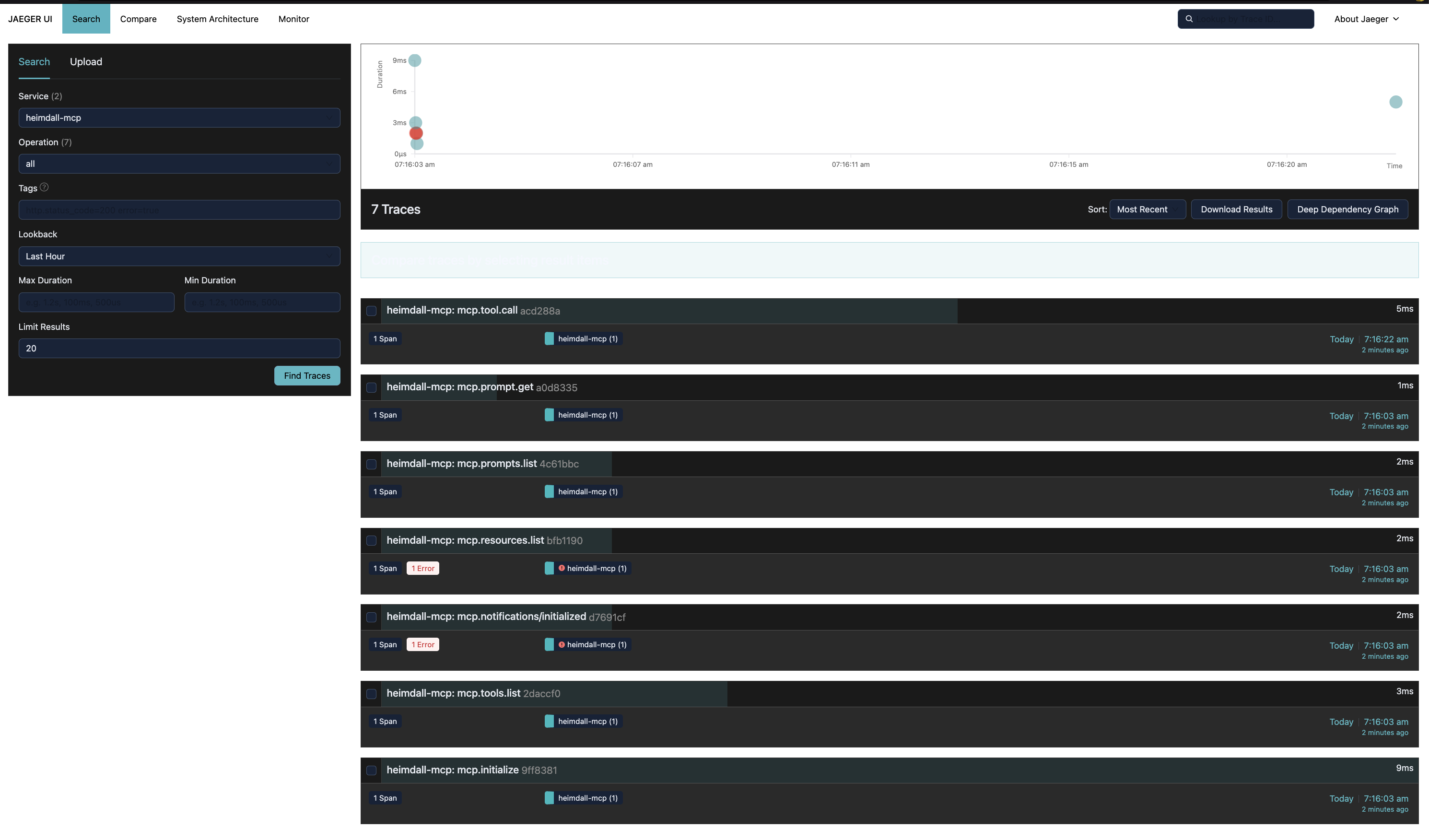
heimdall-mcp can export every span to a Jaeger instance in real time via OTLP HTTP, so you can visualize traces without querying the database directly.
1. Start Jaeger
docker run -d \
  --name jaeger \
  -p 16686:16686 \
  -p 4318:4318 \
  jaegertracing/all-in-one:latest
2. Add --otlp to your config
{
  "mcpServers": {
    "my-server": {
      "command": "heimdall-mcp",
      "args": [
        "--store",  "sqlite://~/.mcp-traces/traces.db",
        "--otlp",   "http://localhost:4318/v1/traces",
        "--", "node", "my-server.js"
      ]
    }
  }
}
For the HTTP/SSE variant (e.g. the setup used during development of this project):
{
  "mcpServers": {
    "my-server": {
      "command": "sh", "-c",
      "args": [
        "heimdall-mcp --store postgresql://user:pass@localhost:5432/db --out http --target http://localhost:3000/mcp --otlp http://localhost:4318/v1/traces"
      ]
    }
  }
}
3. Open Jaeger UI
http://localhost:16686
Select service heimdall-mcp and click Find Traces. Each MCP method (mcp.tool.call, mcp.initialize, mcp.tools.list, …) appears as a separate trace with full attributes and input/output event bodies.
Dark mode — append ?uiConfig={"theme":"dark"} to the URL, or mount a config file:
echo '{"uiConfig":{"theme":"dark"}}' > jaeger-ui.json

docker rm -f jaeger && docker run -d \
  --name jaeger \
  -p 16686:16686 \
  -p 4318:4318 \
  -v $(pwd)/jaeger-ui.json:/etc/jaeger/ui-config.json \
  -e JAEGER_UI_CONFIG_FILE=/etc/jaeger/ui-config.json \
  jaegertracing/all-in-one:latest
The
--otlpflag is additive — spans are saved to the database and exported to Jaeger at the same time.
Custom interceptors
The Interceptor interface is public. You can add your own logic into the pipeline before the telemetry interceptor:
interface Interceptor {
  name: string
  intercept(
    request: JsonRpcMessage,
    context: InterceptorContext,
    next: () => Promise<JsonRpcMessage>
  ): Promise<JsonRpcMessage>
}

interface InterceptorContext {
  startedAt: Date
  traceId: string
  spanId: string
  bodyMode: 'redacted' | 'hash' | 'full'
  transport: 'stdio' | 'http' | 'sse'
  serverInfo: { name?: string; version?: string }  // populated after initialize
  conversationId?: string                           // from _meta or env var
  turnId?: string
  agentRunId?: string
  metadata: Record<string, unknown>                 // shared bag between interceptors
}
Calling next() passes control to the next interceptor in the chain. ForwardInterceptor is always last — it makes the actual call to the real server and records latency.proxy_to_server_ms in context.metadata for the telemetry interceptor to read.
You can use context.metadata to pass data between your interceptor and others in the same pipeline run.
CLI reference
start
The default command. Starts the proxy.
heimdall-mcp start [options] [-- command [args...]]
heimdall-mcp [options] [-- command [args...]]   # "start" is optional

Options:
  --store <url>           Store connection string (required)
                            sqlite://./traces.db
                            postgres://user:pass@host/db
                            mysql://user:pass@host/db

  --lock-store <url>      Lock store connection string (optional)
                            sqlite:// | postgres:// | mysql://
                            defaults to ~/.config/heimdall/locks.db

  --out <transport>       Transport to the real server (default: stdio)
                            stdio | http | sse

  --target <url>          Server URL when --out is http or sse

  --in <transport>        Inbound transport (default: stdio)
                            stdio | http | sse

  --in-port <port>        Port for --in http or --in sse

  --otlp <url>            Export spans to an OTLP HTTP endpoint (e.g. Jaeger, Tempo)
                            Additive — spans are also saved to the store
                            Example: http://localhost:4318/v1/traces

  --body-mode <mode>      Body capture mode for tool args and responses (default: redacted)
                            redacted  → stores [redacted] + size (safe for production)
                            hash      → stores sha256:<hex> + size (safe for production)
                            full      → stores raw JSON (local/dev only — may leak secrets)

  --server-name <name>    Override server name for policy lookup and mcp.server.name OTel attribute.
                            If not provided, falls back to serverInfo.name from the initialize response.

  --out-port <port>       Port for outbound http or sse transport

  --debug                 Write verbose logs to stderr (prints span names + trace IDs to stderr)

  -V, --version           Print version
  -h, --help              Print this help

  --                      Separates proxy flags from the subprocess command
                          (required when --out is stdio)

Examples:
  # stdio proxy → subprocess
  heimdall-mcp --store sqlite://./t.db -- node server.js

  # stdio proxy with policy enforcement
  heimdall-mcp --store sqlite://./t.db --server-name filesystem -- npx @modelcontextprotocol/server-filesystem /tmp

  # stdio proxy → remote HTTP server
  heimdall-mcp --store sqlite://./t.db --out http --target http://localhost:3001

  # stdio proxy → remote SSE server with Postgres
  heimdall-mcp --store postgres://user:pass@host/db --out sse --target http://remote.com

  # with OTLP export to Jaeger
  heimdall-mcp --store sqlite://./t.db --otlp http://localhost:4318/v1/traces -- node server.js
start auto-discovers heimdall.config.{ts,js,json} in the current working directory and ~/.config/heimdall/heimdall.config.* at startup. Config load errors print a warning but never crash the proxy.
init
Scaffolds a heimdall.config.ts with commented examples. With --hooks <host>, registers a native-tool hook for a coding agent instead (see Claude Code PreToolUse hook and OpenCode tool.execute.before plugin).
heimdall-mcp init [options]

Options:
  --global          Write to ~/.config/heimdall/ instead of the current directory
  --format <fmt>    File format: ts | js | json (default: ts)
  --force           Overwrite an existing config file
  --hooks <host>    Register a native-tool PreToolUse hook for a coding agent instead of
                     writing a config file (supported: claude-code, opencode)
# Create local config in current directory
heimdall-mcp init

# Create global config (applies to all projects)
heimdall-mcp init --global

# Create as JSON
heimdall-mcp init --format json

# Register the Claude Code PreToolUse lock-enforcement hook in ~/.claude/settings.json
heimdall-mcp init --hooks claude-code

# Register the OpenCode plugin in ~/.config/opencode/opencode.jsonc
heimdall-mcp init --hooks opencode
health
Validates the merged policy config and reports per-server policies. Does not connect to any MCP server.
heimdall-mcp health [options]

Options:
  --config <path>   Path to a specific config file (skips auto-discovery)
Example output:
Config files loaded:
  global: ~/.config/heimdall/heimdall.config.ts
  local:  ./heimdall.config.ts

Default policy:
    tools: allow=[*] deny=[none]

Server policies:
  filesystem:
      tools: allow=[read_file, list_directory, search_files] deny=[write_file, create_file, delete_file, move_file]
  database:
      tools: allow=[query, describe_table, list_tables] deny=[execute, drop_table, truncate]

No conflicts detected.
If the same entity appears in both allow and deny, health exits with code 1 and lists all conflicts.
Tracing reference
The complete attribute vocabulary — required attributes, optional attributes, body capture fields, error classification, and annotated span examples for initialize, tools/list, tools/call, and a proxy failure case — is documented in TRACING.md.
Roadmap
| Phase | Feature | Status |
|---|---|---|
| 1 | Auto-discovered heimdall.config.{ts,js,json} — local + global, allow/deny lists per server | ✅ Done (v1.2) |
| 2 | PolicyInterceptor — blocked calls return JSON-RPC error -32001, recorded in OTel with policy.blocked = true | ✅ Done (v1.2) |
| 3 | heimdall-mcp init + heimdall-mcp health CLI commands | ✅ Done (v1.2) |
| 4 | Stable tracing vocabulary — mcp.jsonrpc.id, mcp.trace.request_id, mcp.error.type, per-direction body hashes, TRACING.md spec | ✅ Done (v1.3) |
| 5 | Filter by action type (read / write / execute) inferred from tool name or MCP metadata | 📋 Planned |
| 6 | Runtime enforcement modes: warn (log + forward), audit (span with policy.violation = true) | 📋 Planned |
| 7 | Resource locks — locks config schema, LockStore, TTL-based expiration, lock-specific JSON-RPC error code, canonical path resolution, Postgres/MySQL-backed stores, hook integrations | 🚧 In progress (write-mode locking with canonical path resolution, RESOURCE_LOCKED error code, onConflict reject/warn modes, and Postgres/MySQL-backed stores implemented; hook integrations and read-mode locking pending) |