Gamedev All-in-One MCP
एक ओपन-सोर्स MCP सर्वर जो Roblox Studio, Unity, Unreal Engine और Blender को गेम डेवलपमेंट वर्कफ़्लो के लिए एक एकल AI नियंत्रण तल में एकीकृत करता है।
दस्तावेज़
🎮 Gamedev All-in-One MCP
One Server. Four Engines. 67 Tools. Zero Friction.
The first open-source MCP server that unifies Roblox Studio, Unity, Unreal Engine, and Blender into a single AI-powered control plane.







Quick Start · Features · Architecture · Tool Inventory · Dashboard · Contributing
"Hey Claude, create a red spinning cube in Unity, then replicate it in Roblox and Blender."
✨ Features
🔧 67 MCP ToolsAcross 12 modules — scene management, scripting, instance CRUD, physics simulation per engine. 🌉 4 Engine ConnectorsAuto-reconnecting bridges for Roblox (HTTP), Unity (TCP), Unreal (TCP), and Blender (TCP). 🤖 Built-in AI ConsoleChat with Claude, GPT-4o, or Gemini directly from the dashboard — tools auto-execute. |
🖥️ Web DashboardReal-time SSE monitoring at ⚡ Physics EnginePer-engine gravity, rigid bodies, constraints, raycasting, force/impulse simulation. 🔌 Universal CompatibilityWorks with Claude Desktop, Cursor, Claude Code, OpenCode, VS Code Copilot, and any MCP client. |
🎯 Supported Engines

20 tools HTTP Long-Poll Bridge Port 3002Luau Plugin Included |

15 tools TCP Socket Bridge Port 7890C# EditorWindow |

15 tools TCP Socket Bridge Port 55557C++ Plugin |

13 tools TCP Socket Bridge Port 9876Python Addon |
🚀 Quick Start
# Clone the repo
git clone https://github.com/nicepkg/gamedev-all-in-one.git
cd gamedev-all-in-one

# Install & build
npm install
npm run build

# Start the server
npm run dev
Then open http://127.0.0.1:3100 for the web dashboard.
MCP Client Configuration
Add to your MCP client config (Claude Desktop, Cursor, etc.):
{
  "mcpServers": {
    "gamedev-all-in-one": {
      "command": "node",
      "args": ["/absolute/path/to/gamedev-all-in-one/dist/index.js"]
    }
  }
}
🏗 Architecture
graph TB
    subgraph Client["🤖 MCP Clients"]
        CD[Claude Desktop]
        CR[Cursor]
        CC[Claude Code]
        OC[OpenCode]
        VS[VS Code Copilot]
    end

    subgraph Server["⚡ MCP Server — Node.js"]
        FND["🔧 Foundation (4 tools)"]
        RBX["🟦 Roblox (20 tools)"]
        UNI["⬛ Unity (15 tools)"]
        UNR["⬜ Unreal (15 tools)"]
        BLN["🟧 Blender (13 tools)"]
        WEB["🖥️ Dashboard :3100"]
    end

    subgraph Engines["🎮 Game Engines"]
        RS["Roblox Studio<br/>Luau Plugin"]
        UE["Unity Editor<br/>C# EditorWindow"]
        UEE["Unreal Editor<br/>C++ Plugin"]
        BE["Blender<br/>Python Addon"]
    end

    Client -->|stdio| Server
    RBX -->|"HTTP :3002"| RS
    UNI -->|"TCP :7890"| UE
    UNR -->|"TCP :55557"| UEE
    BLN -->|"TCP :9876"| BE

    style Client fill:#1e1b4b,stroke:#6366f1,color:#e0e7ff
    style Server fill:#0c4a6e,stroke:#0ea5e9,color:#e0f2fe
    style Engines fill:#431407,stroke:#f97316,color:#fff7ed
📦 Tool Inventory (67 tools)
🔧 Foundation — 4 tools
| Tool | Description |
|---|---|
project_init | Initialize project manifest |
inspect_project | Read manifest state |
doctor | Validate environment and connectors |
list_capabilities | List all tools and connector status |
🟦 Roblox — 20 tools
| Category | Tools |
|---|---|
| Core (2) | roblox_run_code · roblox_create_workspace_part |
| Script (4) | roblox_get_script_source · roblox_set_script_source · roblox_edit_script_lines · roblox_grep_scripts |
| Instance (5) | roblox_create_instance · roblox_delete_instance · roblox_set_property · roblox_clone_instance · roblox_reparent_instance |
| Query (4) | roblox_get_instance_properties · roblox_get_instance_children · roblox_search_instances · roblox_get_file_tree |
| Physics (5) | roblox_set_gravity · roblox_set_physics · roblox_add_constraint · roblox_raycast · roblox_simulate_physics |
⬛ Unity — 15 tools
| Category | Tools |
|---|---|
| Core (10) | unity_get_hierarchy · unity_get_gameobject · unity_create_gameobject · unity_delete_gameobject · unity_set_component_property · unity_add_component · unity_set_transform · unity_get_script_source · unity_play_mode · unity_execute_menu_item |
| Physics (5) | unity_set_gravity · unity_add_rigidbody · unity_add_joint · unity_raycast · unity_apply_force |
⬜ Unreal Engine — 15 tools
| Category | Tools |
|---|---|
| Core (10) | unreal_get_world_outliner · unreal_get_actor · unreal_spawn_actor · unreal_destroy_actor · unreal_set_actor_transform · unreal_set_actor_property · unreal_get_blueprint · unreal_run_python · unreal_play_mode · unreal_get_viewport_screenshot |
| Physics (5) | unreal_set_gravity · unreal_set_simulate_physics · unreal_add_physics_constraint · unreal_raycast · unreal_apply_force |
🟧 Blender — 13 tools
| Category | Tools |
|---|---|
| Core (8) | blender_get_scene · blender_get_object · blender_create_object · blender_delete_object · blender_set_transform · blender_set_material · blender_run_python · blender_export |
| Physics (5) | blender_set_gravity · blender_setup_rigid_body · blender_add_constraint · blender_bake_physics · blender_apply_force |
🖥️ Web Dashboard
The built-in dashboard at http://127.0.0.1:3100 features a dark glassmorphism UI:
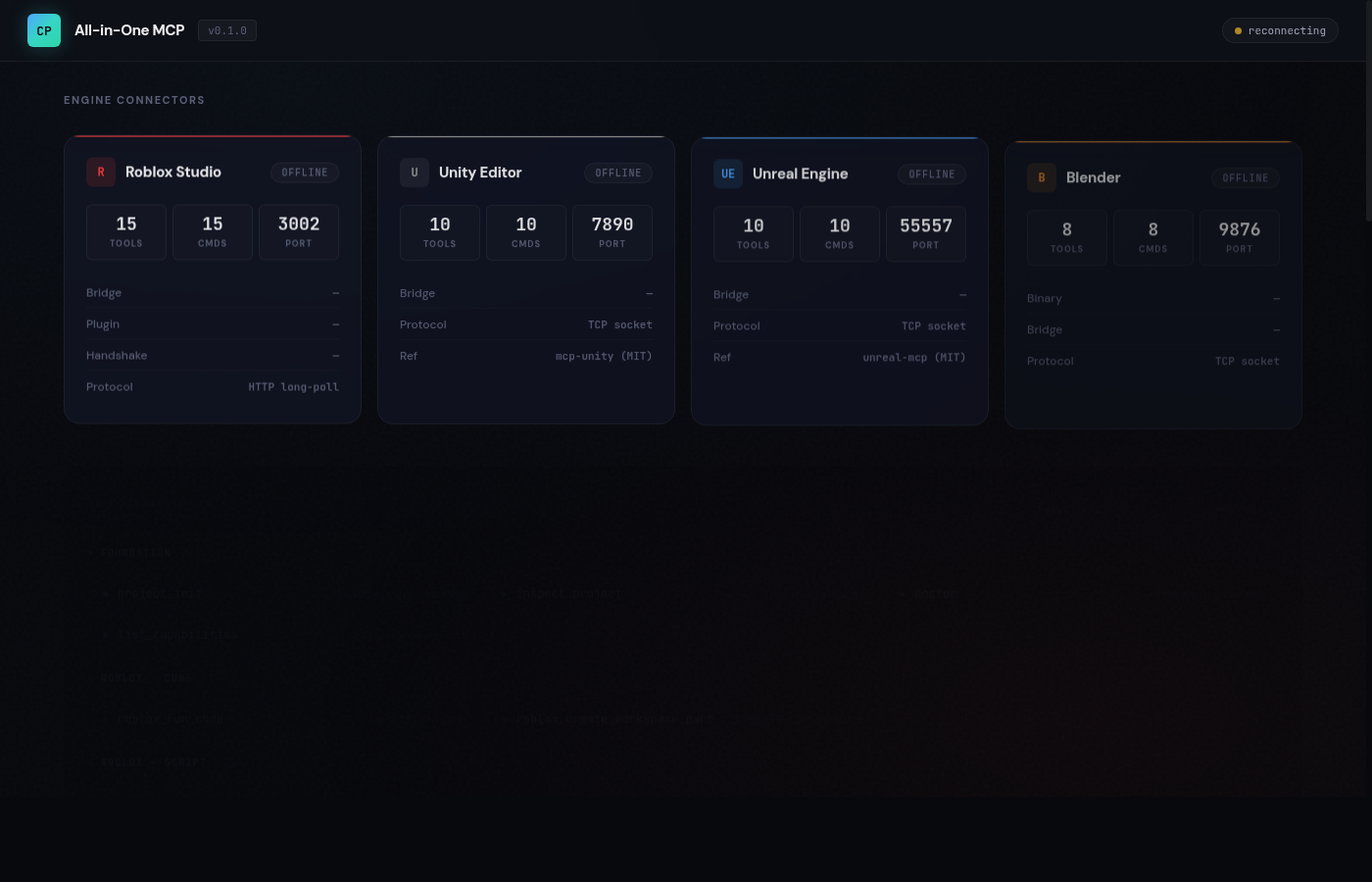
| Panel | Description |
|---|---|
| Engine Status | Real-time connection status for all 4 engines with animated glow effects |
| AI Console | Chat with Claude / GPT-4o / Gemini — auto-executes engine tools |
| Tool Registry | All 67 tools with color-coded engine dots and live search |
| Event Log | SSE-powered real-time stream of connections, tool calls, and errors |
AI Console Providers
| Provider | Models |
|---|---|
| Anthropic | Claude Opus 4.6, Claude Sonnet 4.6, Claude Haiku 4.5 |
| OpenAI | GPT-5.4, GPT-5.4 Mini, GPT-5.4 Nano, o3, o4-mini |
| Gemini 2.5 Pro, Gemini 2.5 Flash, Gemini 2.5 Flash-Lite |
API keys are stored in localStorage only — never sent to or stored on the server.
🔌 Roblox Studio Plugin
A production-ready single-file plugin is included.
Installation
- Copy
runtime/roblox-studio-plugin/GamedevAllInOne.server.luato your Plugins folder:- Windows:
%LOCALAPPDATA%\Roblox\Plugins\ - Mac:
~/Documents/Roblox/Plugins/
- Windows:
- Restart Roblox Studio
- Enable: Game Settings > Security > Allow HTTP Requests = ON
- Start the server with
npm run dev - Plugin auto-connects on load
Plugin Features
- 20 command handlers (script CRUD, instance CRUD, physics, raycast)
- Auto-handshake with bridge on startup
- HTTP long-poll command loop with
pcall-wrapped requests - Toolbar button to start/stop runtime
🌉 Bridge Architecture
| Engine | Protocol | Port | Reconnect | Plugin |
|---|---|---|---|---|
| Roblox | HTTP long-poll | 3002 | N/A | Luau plugin (included) |
| Unity | TCP socket | 7890 | Auto | C# EditorWindow |
| Unreal | TCP socket | 55557 | Auto | C++ Plugin |
| Blender | TCP socket | 9876 | Auto | Python Addon |
All bridges bind to
127.0.0.1only. TCP bridges auto-reconnect with configurable intervals.
⚙️ Configuration
Environment Variables
| Variable | Default | Description |
|---|---|---|
WEB_DASHBOARD_PORT | 3100 | Dashboard HTTP port |
WEB_DASHBOARD_ENABLED | true | Set false to disable dashboard |
ROBLOX_LUAU_BRIDGE_PORT | 3002 | Roblox Luau bridge port |
UNITY_BRIDGE_PORT | 7890 | Unity TCP bridge port |
UNREAL_BRIDGE_PORT | 55557 | Unreal TCP bridge port |
BLENDER_BRIDGE_PORT | 9876 | Blender TCP bridge port |
🔒 Security
- Loopback only — all bridges bind to
127.0.0.1 - Host validation — requests with invalid Host headers are rejected
- Origin-restricted CORS — only localhost origins permitted
- Body size limits — 1 MiB max on Luau bridge, 64 KiB on dashboard API
- Input validation — Zod schemas on all bridge endpoints
- No server-side secrets — API keys live in browser localStorage only
- Graceful degradation — port conflicts disable individual services without crashing
🛠 Development
npm run dev          # Start with tsx (hot reload)
npm run build        # TypeScript compile + copy dashboard
npm start            # Production mode
npm test             # Run tests
Project Structure
src/
├── index.ts                        # Entry point + graceful shutdown
├── version.ts                      # NAME, VERSION constants
├── server/
│   └── create-server.ts            # McpServer + 12 tool module registration
├── connectors/
│   ├── shared/tcp-bridge.ts        # Shared TCP bridge (Unity/Unreal/Blender)
│   ├── roblox/index.ts             # Roblox detection + command dispatch
│   ├── luau/bridge.ts              # HTTP long-poll bridge (hardened)
│   ├── unity/index.ts              # Unity detection + TCP bridge
│   ├── unreal/index.ts             # Unreal detection + TCP bridge
│   └── blender/index.ts            # Blender detection + TCP bridge
├── tools/
│   ├── foundation.ts               # 4 foundation tools
│   ├── roblox*.ts                  # 20 Roblox tools (5 files)
│   ├── unity*.ts                   # 15 Unity tools (2 files)
│   ├── unreal*.ts                  # 15 Unreal tools (2 files)
│   └── blender*.ts                 # 13 Blender tools (2 files)
└── web/
    ├── server.ts                   # Dashboard HTTP + SSE + Chat API
    ├── llm-proxy.ts                # Multi-provider LLM with tool execution
    └── dashboard.html              # Single-file frontend (dark theme)

runtime/
└── roblox-studio-plugin/
    └── GamedevAllInOne.server.lua  # Production-ready Studio plugin
🤝 Contributing
Contributions are welcome! Here's how to get started:
- Fork the repository
- Create a feature branch:
git checkout -b feat/amazing-feature - Commit your changes:
git commit -m 'feat: add amazing feature' - Push to the branch:
git push origin feat/amazing-feature - Open a Pull Request
Areas We'd Love Help With
- 🎮 Engine plugins — C# EditorWindow for Unity, C++ plugin for Unreal, Python addon for Blender
- 🧪 Tests — unit tests, integration tests, E2E bridge tests
- 📚 Docs — tutorials, video walkthroughs, example prompts
- 🌐 i18n — translations for the dashboard UI
- 🔧 New tools — animation, audio, terrain, lighting tools per engine
📚 Upstream References
Projects that inspired this work
| Engine | Project | License |
|---|---|---|
| Roblox | boshyxd/robloxstudio-mcp | MIT |
| Roblox | yannyhl/linkedsword-mcp | MIT |
| Roblox | Roblox/studio-rust-mcp-server | Official |
| Unity | CoderGamester/mcp-unity | MIT |
| Unity | CoplayDev/unity-mcp | MIT |
| Unreal | chongdashu/unreal-mcp | MIT |
| Unreal | kevinpbuckley/VibeUE | MIT |
| Blender | ahujasid/blender-mcp | MIT |
| Blender | poly-mcp/Blender-MCP-Server | MIT |
| Physics | KAIST-M4/MCP-SIM | — |
📄 License
AGPL-3.0-only — see LICENSE for details.
- Improvements to the server must remain open source
- Networked or hosted variants must not become closed forks
- MIT and Apache-2.0 upstream code adapted with attribution preserved
If this project helps your game development workflow, give it a ⭐
Made with ❤️ by the open-source community